MCP server for Withings health data — sleep, activity, heart, and body metrics.
Quick Install
Automated & IDE SetupCopy the AI prompt to install this server into Claude Code, Cursor, or another agent — or use 1-click editor setup below.
Manual Client & Custom JSON ConfigExpand JSON ▾
Client Config & Setup
Remote HTTPChoose your client or environment
Target File:
💡 Paste the JSON block into your client's configuration file under mcpServers, then restart the application.
Capabilities & Tool Schemas (12)
Inspect callable tools, capabilities, and parameters exposed to AI agents by Withings Health Data.
get_hrvMinute-level RMSSD, SDNN, and quality scores captured during sleep
get_sleep_summarySleep duration, stages (light/deep/REM), heart rate, breathing, sleep score
get_activityDaily steps, distance, calories, elevation, activity durations
get_intraday_activityHigh-frequency activity data throughout the day
get_workoutsDetailed workout summaries with heart rate zones and metrics
get_measuresWeight, body composition, blood pressure, heart rate, temperature, VO2 max, and more
Documentation Overview
Withings MCP Server
Help me pay for the servers on Patreon
A Model Context Protocol (MCP) server that brings your Withings health data into Claude. Access your sleep patterns, body measurements, workouts, heart data, and more through natural conversation.
🔒 Privacy First: This is my personal project, and the repository is intentionally public to demonstrate transparency. The code shows that no personal information is logged or stored maliciously. All sensitive data (tokens, user IDs) is encrypted at rest and automatically redacted from logs. You can review the entire codebase to verify this commitment to privacy.
⚠️ Disclaimer: This server is provided as-is without any guarantees or warranties. While I've made every effort to ensure security and privacy, I make no guarantees about availability, data integrity, or security. Use at your own risk. For production use cases, consider self-hosting your own instance.
Quick Setup
- Open Claude Desktop → Customize → Connectors
- Click + → Add Custom Connector
- Set URL to
https://withings-mcp.com/mcp→ click Add - Click Connect and authorize with your Withings account
That's it! Ask Claude about your sleep, weight, workouts, or heart data.
Demo
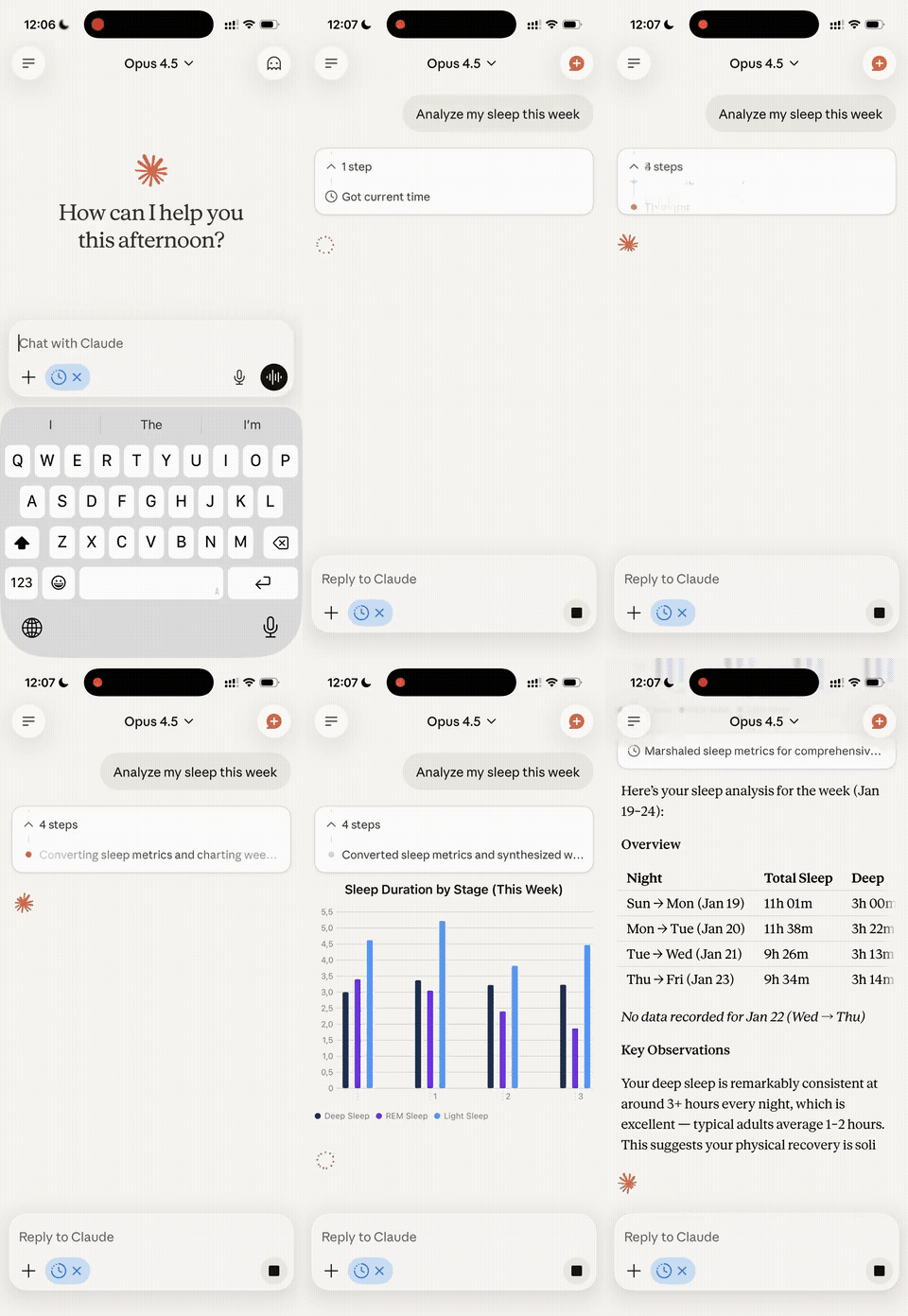
Table of Contents
- Quick Setup
- Demo
- What Can You Do With This?
- For End Users: Using the Hosted Server
- For Developers: Self-Hosting
- Security Features
- Contributing
- License
- Support
- Acknowledgments
What Can You Do With This?
This MCP server gives Claude access to your Withings health data, allowing you to:
- Analyze your sleep: Ask about sleep quality, duration, deep sleep stages, heart rate during sleep
- Track body metrics: Weight trends, body composition, blood pressure, heart rate over time
- Review workouts: Analyze exercise patterns, calories burned, heart rate zones
- Monitor heart health: Access ECG recordings and detailed heart data
- Set and track goals: Review your fitness and health goals
- Identify patterns: Find correlations between sleep, activity, and other metrics
- Generate insights: Get AI-powered analysis of your health trends
All through natural conversation with Claude or any other MCP-compatible client.
For End Users: Using the Hosted Server
If you just want to use this MCP server with Claude Desktop without hosting anything yourself, follow these steps:
Prerequisites
- A Withings account with connected devices
- Claude Desktop or any other MCP-compatible client installed on your computer
Setup Instructions
Step 1: Add Connector in Claude Desktop
- Open Claude Desktop
- Go to Customize (in the sidebar or menu)
- Navigate to the Connectors section
- Click the + button to add a new connector
- Select Add Custom Connector
- Fill in the following details:
- Name:
Withings(or any name you prefer) - Remote MCP server URL:
https://withings-mcp.com/mcp
- Name:
- Click Add
Note: If your MCP client doesn't support UI-based connector configuration, you can manually edit the config file instead. See the manual configuration guide below.
Step 2: Connect and Authorize
- In the Connectors settings, find the Withings connector you just added
- Click Connect next to the connector
- Your web browser will open with the Withings authorization page
- Log in to your Withings account
- Review and approve the permissions requested
- You'll be redirected back and the connection will be complete
After authorization, Claude will have access to your Withings data!
Available Tools
Once connected, Claude can use these tools to access your data:
Sleep & Activity
get_hrv- Minute-level RMSSD, SDNN, and quality scores captured during sleepget_sleep_summary- Sleep duration, stages (light/deep/REM), heart rate, breathing, sleep scoreget_activity- Daily steps, distance, calories, elevation, activity durationsget_intraday_activity- High-frequency activity data throughout the dayget_workouts- Detailed workout summaries with heart rate zones and metrics
Body Measurements
get_measures- Weight, body composition, blood pressure, heart rate, temperature, VO2 max, and more
Devices & Goals
get_user_devices- List of connected Withings devicesget_user_goals- Your health and fitness goals (steps, sleep, weight)
Heart Health
list_heart_records- List of ECG recordingsget_heart_signal- Detailed ECG waveform data
Stethoscope (if you have BPM Core)
list_stetho_records- List of stethoscope recordingsget_stetho_signal- Detailed audio signal data
Example Conversations
Try asking Claude:
- "How has my sleep quality been over the past week?"
- "Show me my weight trend for the last month"
- "What's my average resting heart rate?"
- "Did I hit my step goal this week?"
- "Compare my workout intensity between this month and last month"
- "When did I sleep best this month?"
Privacy & Security
- Encrypted tokens: All authentication tokens and authorization codes are encrypted using AES-256-GCM before storage
- No logging of personal data: The code is public - you can verify that no sensitive information is logged
- Automatic redaction: All user IDs, tokens, and credentials are automatically redacted from system logs
- OAuth 2.0: Industry-standard secure authentication with PKCE support and redirect URI validation
- Session security: MCP sessions are bound to the authenticated user, preventing cross-user access
- You're in control: Revoke access anytime from your Withings account settings
For Developers: Self-Hosting
Want to run your own instance? Here's how to deploy this MCP server yourself.
Prerequisites
- Bun 1.1+ installed
- A Withings Developer Account
Step 1: Create Withings Application
- Go to Withings Developer Portal
- Create a new application
- Note your Client ID and Client Secret
- Set your Redirect URI to:
https://your-domain.com/callback- This must be a publicly accessible URL (localhost is not supported by Withings)
- Can be any domain where you'll host the server (e.g., Fly.io, Railway, your own server, etc.)
Important: Remove Google Analytics
The hosted version includes a Google Analytics tag (G-ZMGF9WXL3W) in the static pages under public/. If you're forking this repo, remove or replace the GA snippet in public/index.html and public/health.html, and update the CSP headers in src/server/app.ts accordingly.
Step 2: Clone and Setup
Related MCP Servers
Adoption & maintenance
Factual signals from GitHub, npm, and our automated checks — not a rating.
GitHub stars
42
Stargazers on the source repository.
Last commit
16d ago
Most recent push to the default branch.
Tools exposed
12
Callable tools this server registers over MCP.
Reviews
No reviews yet — be the first to share how this listing worked for you.
Frequently Asked Questions about Withings Health Data
AllMCPs Directory Badge
Showcase your server listing on GitHub or your project documentation. Embed this dynamic SVG badge to highlight official listing status and live engagement.
Badge Style:
Live Dynamic SVG Preview
Markdown (GitHub README)
[](https://allmcps.com/mcp/withings-health-data)HTML Embed
<a href="https://allmcps.com/mcp/withings-health-data"><img src="https://allmcps.com/api/badge/withings-health-data?style=directory" alt="Withings Health Data on AllMCPs" /></a>