wiff
Harness-agnostic, deterministic, resumable multi-agent workflows — written as plain JavaScript. Like wf, but wiff.




Fan a task out to a fleet of agents with a small script instead of a prayer. You write ordinary JavaScript with agent(), /goal stages, parallel(), and pipeline(); the runtime executes it in the background, journals every step, and — when a run dies halfway through — resumes it without re-paying for a single completed agent. A disposable MCP bridge talks to a persistent local daemon, so active workflows outlive the Codex, Claude Code, Cursor, or cron process that launched them while each child runs on Codex, Claude, Cursor, or Kimi.

export const meta = {
  name: "audit",
  description: "Audit files in parallel, fix confirmed issues in isolation",
  phases: [{ title: "Audit" }, { title: "Fix" }],
};

phase("Audit");
const findings = await parallel(
  args.files.map((file) => () =>
    agent(`Audit ${file} for auth bugs`, {
      key: `audit:${file}`,          // stable key → free replay on resume
      sandbox: "read-only",
      schema: findingSchema,          // structured JSON output
    }),
  ),
);

phase("Fix");
return await parallel(
  findings.filter((f) => f.real).map((f) => () =>
    agent(`Fix: ${f.summary}`, {
      key: `fix:${f.file}`,
      agentType: "surgeon",           // persona from .codex/agents/surgeon.md
      isolation: "worktree",          // own git worktree — parallel writes can't collide
      sandbox: "workspace-write",
    }),
  ),
);
When one stage must keep working until a condition is genuinely satisfied, make it a native Codex goal:
phase("Verify and repair");
await agent("/goal Make the unit tests pass and verify the final run.", {
  key: "tests-green",
  sandbox: "workspace-write",
  timeoutMs: 30 * 60 * 1_000,
});
Wiff holds the workflow at that statement and continues the same Codex thread while its goal is active. The next stage starts only after the worker marks the goal complete; blocked, paused, or limited goals fail explicitly.
Put durable preferences in ~/.wiff/config.json, with optional project overrides in
<cwd>/.wiff/config.json:
{
  "version": 1,
  "instructions": "Verify before reporting success.",
  "defaults": {
    "model": "claude-sonnet-5",
    "fallbackModels": ["gpt-5.6-sol"]
  },
  "rules": [
    {
      "name": "fix-until-green",
      "when": { "phase": ["Fix", "Repair"] },
      "goal": "Relevant tests must pass.",
      "options": {
        "model": "gpt-5.6-sol",
        "effort": "high"
      }
    }
  ]
}
Defaults fill missing agent options; matching rules are explicit user policy and override generated workflow options. Instructions are injected alongside the task, ordered fallback models may cross backends, and applicable preference changes invalidate cached results on resume.
Why
There is no harness-agnostic workflow orchestration system. Every coding harness has some multi-agent story — Claude Code has its Workflow tool, Codex has subagents, Cursor has its own agents — but each one is welded to its harness: its runs live and die with that app, its state is invisible to everything else, and none of them can be driven from anywhere but their own chat window. wiff pulls orchestration out of the harness: a persistent local daemon owns execution and durable on-disk state while each harness gets a disposable stdio MCP bridge. Any MCP client — Codex, Claude Code, Cursor, a cron job — can start, disconnect from, watch, resume, or cancel the same runs, and the orchestration itself is a script rather than a conversation.
Ad-hoc multi-agent orchestration ("spawn some subagents for this") is also great until the run is 40 agents deep and something dies. Workflows-as-code give you:
-
Determinism — the orchestration is a script, not vibes. No time, randomness, filesystem, or network inside workflow code; agents do the external work.
-
Outlive the parent — closing or killing the launching MCP bridge does not interrupt a run. The detached daemon keeps executing, and another harness can reconnect with the run id.
-
Resume, not retry — every agent call is journaled with a stable key and an input hash. A graceful daemon restart automatically resumes durable active runs. After an abrupt daemon or machine crash, explicitly resume the safely interrupted run: unchanged completed agents replay from cache instantly and for free. Agents that were interrupted mid-turn re-run with a digest of their previous attempt's transcript injected ("here's what you already did — continue"), and worktree agents inherit their partial checkout instead of starting over.
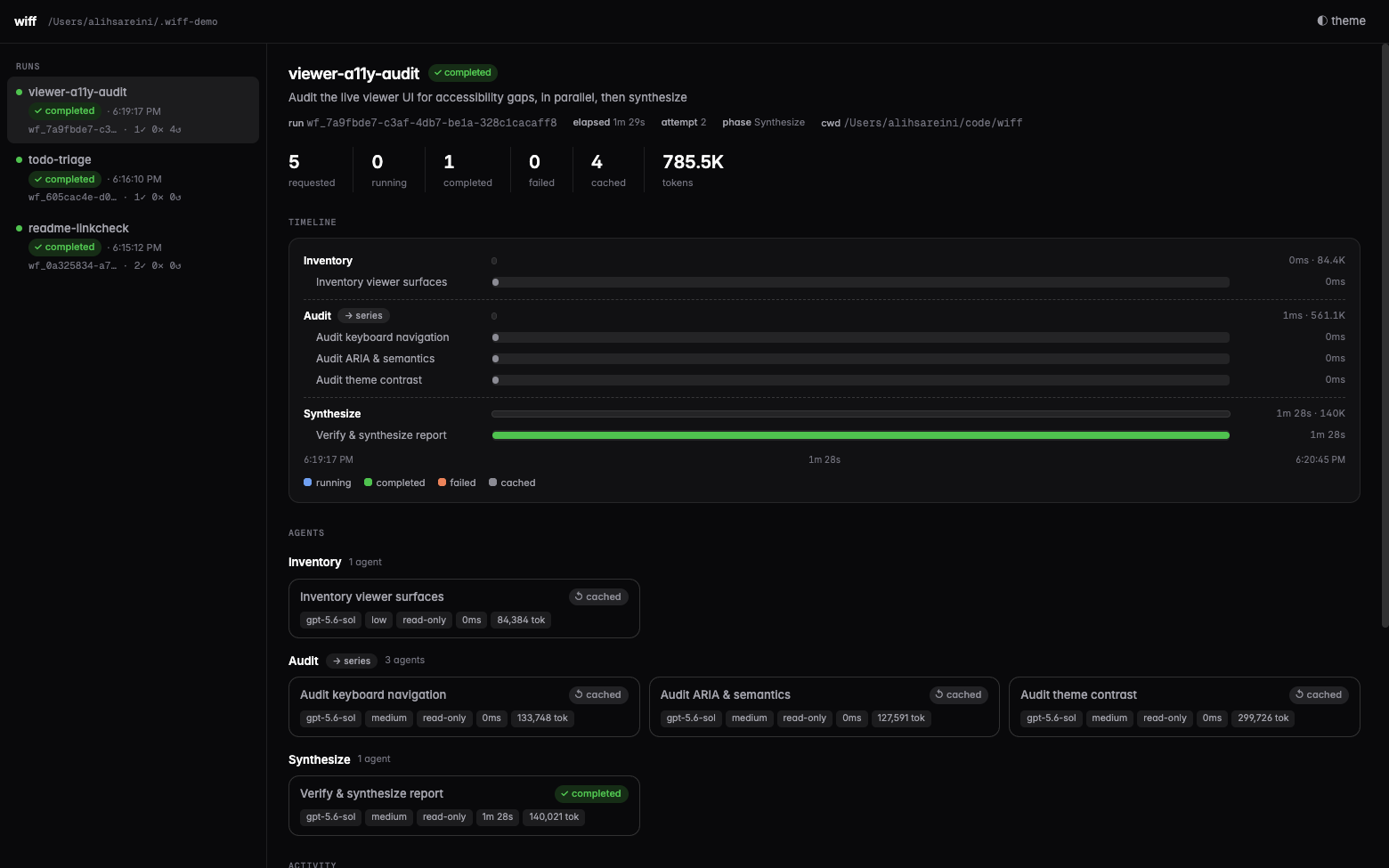
That screenshot is the feature: the host was killed mid-synthesis, and on resume the four finished agents came back from the journal in 0ms — only the interrupted one re-ran.
-
Fail-hard semantics — a rejected agent fails the workflow loudly (
parallelSettled()is the explicit opt-out). No silentnulls masquerading as success. -
Visible scheduling — agents are journaled as queued before they acquire a runtime slot and running only when backend execution starts. Queue and execution durations stay separate, while owner heartbeats make a live-but-stalled workflow visible.
-
Isolation where it matters —
isolation: "worktree"gives each writing agent a fresh detached git worktree. Clean ones vanish; dirty ones are kept and listed on the run for you to inspect or merge. -
Personas —
agentType: "reviewer"injects a markdown persona as the child's developer instructions, with frontmatter defaults for model/effort/sandbox.
Install
Codex (plugin: MCP tools + the $workflow authoring skill):
codex plugin marketplace add https://github.com/xxxoooxoxo/wiff.git
codex plugin add wiff@wiff
Claude Code (plugin: MCP tools + skill):
claude plugin marketplace add xxxoooxoxo/wiff
claude plugin install wiff@wiff
Anything else — the server is on npm (@xxxoooxoxo/wiff) and the official MCP Registry (io.github.xxxoooxoxo/wiff), so registry-aware clients can install it by name, and everything else runs it with npx:
npx -y @xxxoooxoxo/wiff # stdio MCP server
Or from a local checkout:
git clone https://github.com/xxxoooxoxo/wiff.git
codex plugin marketplace add ./wiff
codex plugin add wiff@wiff
Then start a new Codex session and either invoke the bundled skill with $workflow or just ask: "run this as a resumable workflow."
Installing the plugin auto-approves its five workflow-controller tools so headless and desktop runs don't stop at an MCP approval prompt. Agent filesystem access is still governed per-call by sandbox.
Using from other harnesses (Claude Code, Cursor, any MCP client)
The Codex plugin is just packaging. The engine underneath is a plain stdio MCP server, so any
MCP-speaking harness can orchestrate wiff workflows. The mental model: both the orchestrator
and the workers are pluggable — whoever drives, each agent() child runs on a backend chosen
from its model name: gpt-*/o* models run as native Codex threads via a local
codex app-server (gpt-6-astra needs Codex CLI >= 0.153.4); current claude-fable-5-1, claude-fable-5, claude-opus-5, claude-sonnet-5, and
claude-haiku-4-5 models—or the moving fable/opus/sonnet/haiku aliases—run as headless claude
agents, composer-* and grok-* models (including cursor-grok-* slugs) run through the official Cursor SDK (@cursor/sdk) in-process, and
kimi-code/* models run as headless kimi processes. A workflow can mix them freely
(provider: "codex" | "claude" | "cursor" | "kimi" overrides the inference, WIFF_BACKEND
sets the fallback for unrecognized models). On the Claude, Cursor, and Kimi backends,
workspace-write requires isolation: "worktree"; Kimi's read-only mode is advisory because
print mode auto-approves tools and has no OS sandbox.
Requirements on the machine, regardless of harness: Node >= 22, git if you use
isolation: "worktree", and the runtime of whichever backend your agents use — Codex CLI
= 0.144.6 and/or
claudeCLI installed and authenticated,CURSOR_API_KEYfor Cursor agents, or thekimiCLI configured with the requested full model alias (for examplekimi-code/k3).
Claude Code — the plugin install above is the easy path. To wire just the server manually:
claude mcp add wiff -- npx -y @xxxoooxoxo/wiff
Tool calls go through Claude Code's own permission system; to skip per-call prompts, allow the
five tools in .claude/settings.json:
{ "permissions": { "allow": [
  "mcp__wiff__workflow_start", "mcp__wiff__workflow_status",
  "mcp__wiff__workflow_wait", "mcp__wiff__workflow_cancel",
  "mcp__wiff__workflow_models"
] } }
Cursor / Windsurf / Claude Desktop — add the server to the client's mcp.json:
{
  "mcpServers": {
    "wiff": { "command": "npx", "args": ["-y", "@xxxoooxoxo/wiff"] }
  }
}
Notes for non-Codex hosts:
- State is shared. Every harness reads and writes the same
~/.wiff/runs/, so a run started from Codex can be watched, cancelled, or resumed from Claude Code (and vice versa), and the live viewer sees everything. - Execution is daemon-owned. The first controller call starts one detached daemon per Wiff
state root. MCP bridges may exit without affecting active work. The daemon exits after 15 idle
minutes by default (
WIFF_DAEMON_IDLE_MSoverrides this) and writes its pid, socket, and log to~/.wiff/daemon.jsonand~/.wiff/daemon.log. - Controllers authenticate before sending work. A 0600 secret under
~/.wiff/control/drives a challenge-response handshake. The bridge proves daemon identity before transmitting workflow scripts or arguments; the daemon also authenticates every controller request. - Ownership is an OS lease, not a stale file. A secret-derived loopback port is held for the
daemon's complete lifetime. The operating system grants it to exactly one owner and releases it
automatically on crash; only that owner may replace the control socket or lock metadata. If the
derived port conflicts with unrelated local software, set
WIFF_DAEMON_OWNERSHIP_PORTto an available loopback port; Wiff reports the exact conflict rather than treating it as a live owner. - The first controller supplies the daemon environment.
PATH, backend credentials,CODEX_HOME, persona paths, and Wiff defaults remain those of the bridge that started the daemon. If they change, gracefully terminate the pid recorded in~/.wiff/daemon.json(active durable runs resume when the next bridge starts) or wait for the 15-minute idle shutdown. - Bring the script contract into context. The
$workflowskill only auto-loads inside Codex. From other harnesses, point the model atplugins/wiff/skills/workflow/references/api.md(or copy the skill into your harness's skill/rules directory, e.g..claude/skills/or Cursor rules) so it authors valid scripts. - Personas resolve from
<cwd>/.codex/agents/then~/.codex/agents/on every harness; setCODEX_WORKFLOW_AGENTS_DIRin the server's env to point somewhere else (e.g. a shared~/.claude/agents). workflow_startrequires an explicit absolutecwd, so the server's own working directory doesn't matter to results.
For agents
If you are a coding agent — driving wiff over MCP or hacking on this repo — read AGENTS.md. It covers the five workflow tools, the script-authoring rules that actually catch agents out (stable keys, thunks not promises, no I/O in workflow code, worktree isolation for concurrent writers), where run state lives on disk, and how to verify changes to the runtime. The full script contract is in the API reference.
How it works
The plugin exposes five tools through a stdio MCP bridge: workflow_start, workflow_status, workflow_wait, workflow_cancel, and workflow_models. The bridge connects over an authenticated local socket to an on-demand detached daemon. The daemon owns the workflow manager, backends, heartbeats, and journals, so closing the bridge cannot kill active work. A secret-derived loopback lease gives exactly one process OS-level ownership for its full lifetime; only that owner may replace socket and lock metadata. A challenge-response handshake proves daemon identity before scripts or arguments cross the connection. A started workflow runs its script inside a locked-down Node vm (no imports, filesystem, shell, network, time, or randomness — those all throw). Each agent() call is routed to the Codex, Claude, Cursor, or Kimi backend from its model name or explicit provider; recursive orchestration is disabled inside children.
Everything about a run persists under ~/.wiff/runs/<runId>/:
run.json         status, phase, counters, failures, kept worktrees
script.js        the exact source (reread on resume)
journal.jsonl    every phase/log/agent event, with input hashes and token usage
agents/*.jsonl   full per-child transcripts
worktrees/       isolated checkouts for agents that asked for them
Status, waits, and cancellation work while the launching host is gone. Graceful daemon restarts resume active durable runs automatically. An abrupt daemon crash is deliberately conservative: the next daemon marks the run interrupted rather than risking duplicate side effects, and any client can resume it from the journal.
See the API reference for the full script contract and examples/verify-and-fix.js for a staged example.
Live viewer
Watch every run — and every agent inside it — in a local web UI:
npx -p @xxxoooxoxo/wiff wiff-viewer    # http://127.0.0.1:4979  (--port / --root to override)
# or from a checkout: cd plugins/wiff && npm run viewer
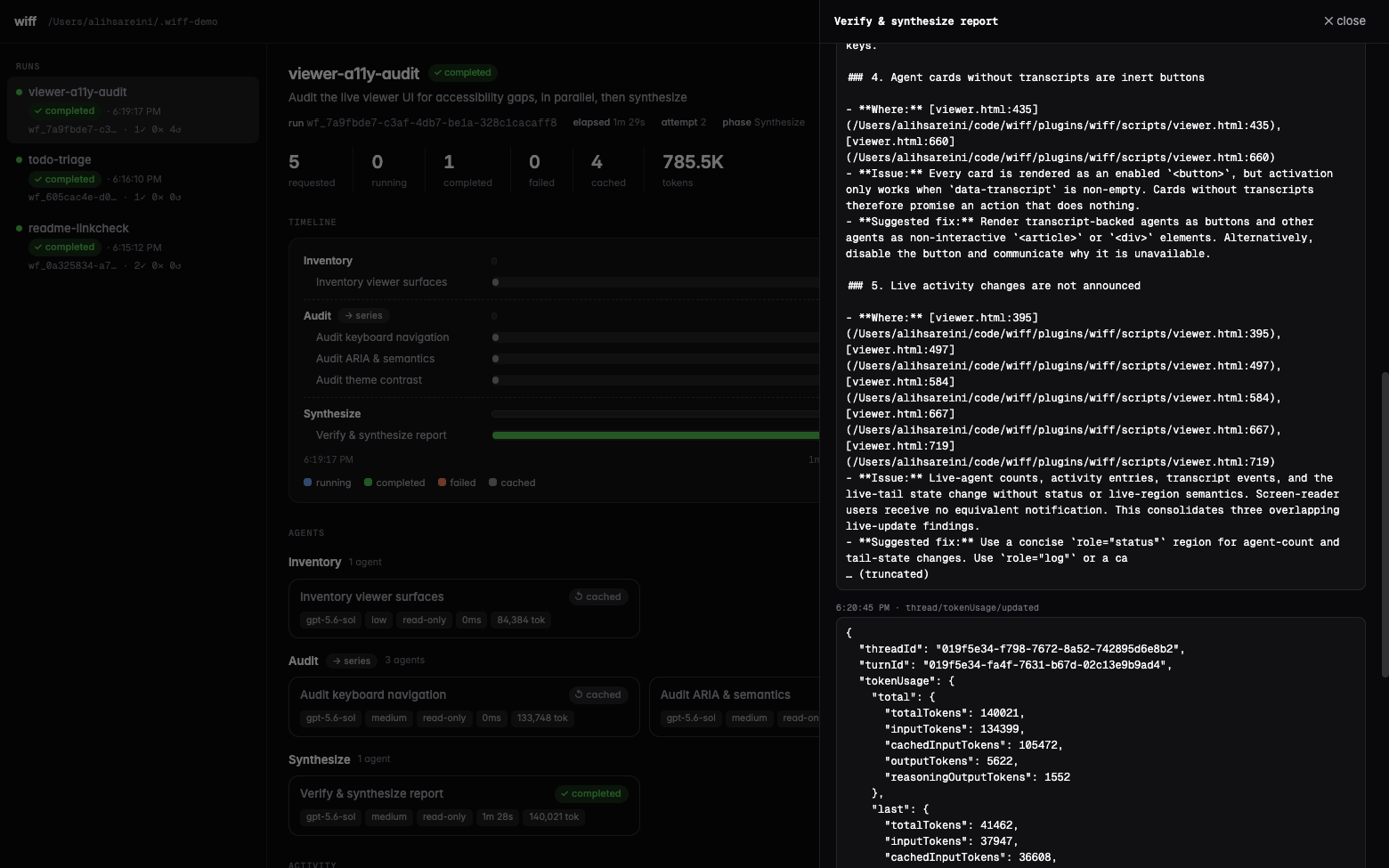
Zero dependencies, read-only over the run files, so it can watch runs owned by any process. A live strip across the top shows every queued or running agent in every run, including queue time and what executing agents are doing now (their latest command, file edit, or thought, tailed from the transcript). Owner heartbeats flag stalled hosts. Below that: per-phase agent cards with live status lines, a gantt timeline, token counts, kept worktrees, and a click-through live-tailing transcript drawer. Goal nodes are called out as queued, active, met, failed, or replayed. Light and dark themes.
Related projects
- robzilla1738/Codex-Workflows — workflow-as-code runtime for Codex focused on review fan-out. Convergent design, independent implementation.
- scasella/claude-dynamic-workflows-codex — Claude Code's dynamic-workflows DSL re-hosted on GPT agents, with sessionful workers and a browser run viewer.
- Codex's native subagents — great for interactive, human-supervised fan-out; this plugin is for the automated, resumable, journaled kind.
Development
cd plugins/wiff
npm test        # unit tests (fake backend, no tokens spent)
npm run check   # syntax check
npm run smoke   # one real Codex child, end to end
Pass a completed smoke run id to verify cross-process resume without another model call:
npm run smoke -- wf_<run-id>
Codex runs installed plugins from a versioned cache — after editing source, bump the version in .codex-plugin/plugin.json and re-run codex plugin add wiff@wiff to pick up changes.
Releasing
Merging a version bump to main automatically publishes the package to npm and then registers the same version with the MCP Registry. Keep the version aligned in:
plugins/wiff/package.jsonplugins/wiff/.codex-plugin/plugin.jsonplugins/wiff/.claude-plugin/plugin.jsonserver.jsonand its npm package entry
The release workflow fails before publishing if those values or the npm/MCP package names disagree. It is safe to re-run: versions that already exist in either registry are skipped.
npm publishing uses a trusted GitHub Actions publisher rather than a long-lived token. The one-time npm configuration for @xxxoooxoxo/wiff is repository xxxoooxoxo/wiff, workflow release.yml, with npm publish allowed. The MCP Registry also authenticates with GitHub OIDC and needs no repository secret.