AllMCPs
BrowseBestCategoriesStackCompareToolsGuidesBlog
Log in Submit MCP

Stay in the loop

Get new MCP servers and top picks in your inbox.

AllMCPs

The open directory for discovering and installing Model Context Protocol servers.

AllMCPs on GitHub (opens in a new tab)
Launched onTiny Startupstinystartups.com
Explore
  • Browse servers
  • Best MCP servers
  • Categories
  • MCP clients
  • Agent prompts
  • Stack Builder
  • Compare servers
  • Random discovery New
  • Submit a server
  • Pricing & Boost Boost
Learn
  • Guides hub
  • What is MCP?
  • Install guide
  • Build an MCP server
  • Deploy an MCP server
  • Security guide
  • Troubleshooting
  • MCP for SEO & AEO
  • Protocol versioning
  • Blog & updates
Tools
  • All developer tools
  • Config generator
  • Config validator
  • Config auditor
  • MCP playground
  • Token calculator
  • OpenAPI β†’ MCP
  • Badge generator
For agents
  • REST API docs
  • Trust & traffic Live
  • Remote MCP server SSE β†— (opens in a new tab)
  • llms.txt β†— (opens in a new tab)
  • Catalog JSON β†— (opens in a new tab)
Company
  • About
  • Advertise Sponsor
  • Contact
  • GitHub β†— (opens in a new tab)
  • Terms
  • Privacy
AllMCPs VerifiedAllMCPs VerifiedFeatured on Nick LaunchesFeatured on Nick LaunchesLaunch Llama NewsletterLaunch Llama NewsletterVerified DR - allmcps.comVerified DR - allmcps.comFeatured on SaaSGrowFeatured on SaaSGrowFeatured on Twelve ToolsFeatured on Twelve ToolsFeatured on Saaspa.geFeatured on Saaspa.geFeatured on Findly.toolsFeatured on Findly.toolsFeatured on Startup FameFeatured on Startup FameFeatured on LaunchKiwiFeatured on LaunchKiwiFeatured on ScrollLaunchFeatured on ScrollLaunchFeatured on DailyPingsFeatured on DailyPingsFazier badgeFazier badgeFeatured on NewTool.siteFeatured on NewTool.siteFeatured on saasfame.comFeatured on saasfame.comDR Checker - Domain RatingDR Checker - Domain RatingListed on Turbo0Listed on Turbo0Launched on LaunchBoard - Product Launch PlatformLaunched on LaunchBoard - Product Launch PlatformList on SimilarlabsList on Similarlabshttps://codetrendy.comhttps://codetrendy.comListed on DevTool.ioFeatured on BuildlistFeatured on BuildlistLaunched on Tiny StartupsFeatured on ShowMeBestAIFeatured on ShowMeBestAIFind us on LaunchZoneFind us on LaunchZoneAllMCPs VerifiedAllMCPs VerifiedFeatured on Nick LaunchesFeatured on Nick LaunchesLaunch Llama NewsletterLaunch Llama NewsletterVerified DR - allmcps.comVerified DR - allmcps.comFeatured on SaaSGrowFeatured on SaaSGrowFeatured on Twelve ToolsFeatured on Twelve ToolsFeatured on Saaspa.geFeatured on Saaspa.geFeatured on Findly.toolsFeatured on Findly.toolsFeatured on Startup FameFeatured on Startup FameFeatured on LaunchKiwiFeatured on LaunchKiwiFeatured on ScrollLaunchFeatured on ScrollLaunchFeatured on DailyPingsFeatured on DailyPingsFazier badgeFazier badgeFeatured on NewTool.siteFeatured on NewTool.siteFeatured on saasfame.comFeatured on saasfame.comDR Checker - Domain RatingDR Checker - Domain RatingListed on Turbo0Listed on Turbo0Launched on LaunchBoard - Product Launch PlatformLaunched on LaunchBoard - Product Launch PlatformList on SimilarlabsList on Similarlabshttps://codetrendy.comhttps://codetrendy.comListed on DevTool.ioFeatured on BuildlistFeatured on BuildlistLaunched on Tiny StartupsFeatured on ShowMeBestAIFeatured on ShowMeBestAIFind us on LaunchZoneFind us on LaunchZone
Β© 2026 Jackalope Digital LLC. All rights reserved.
  1. Home
  2. πŸ’» Developer Tools
  3. Webnav
Webnav logo
Health: ActiveRecent health check succeeded.Last checked 9/7/2026, 9:19:13 PM

Webnav

User RatingsBe the first to rate and review this MCP server! Enrichment pendingWe haven’t run our AI enrichment pass on this listing yet, so the overview, use cases, and FAQ below may be sparse or missing. We work through the catalog over time β€” check back soon.
View RepositoryVisit Website

A zero-LLM MCP server that replays recorded site maps instead of re-exploring browser routes.

Quick Install

Automated & IDE Setup

Copy the AI prompt to install this server into Claude Code, Cursor, or another agent β€” or use 1-click editor setup below.

Add to CursorAdd to VS Code
Manual Client & Custom JSON ConfigExpand JSON β–Ύ

Client Config & Setup

Choose your client or environment
Target File:~/Library/Application Support/Claude/claude_desktop_config.json
claude_desktop_config.json
{
  "mcpServers": {
    "webnav": {
      "command": "npx",
      "args": [
        "-y",
        "webnav"
      ]
    }
  }
}

πŸ’‘ Paste the JSON block into your client's configuration file under mcpServers, then restart the application.

Install Directory Badge Claim listing AlternativesπŸ’» More in Developer Tools

Documentation Overview

webnav

CI License: Apache 2.0 TypeScript PRs welcome zero-LLM

Stop your web-browsing AI agent from re-exploring the same sites every run. Your agent maps a website once β€” then travels it forever with webnav walk: deterministic, zero-LLM, page-to-page autopilot that pauses only at genuine forks (what to buy, an irreversible button) and hands the wheel back. It's a reusable site map, not page compression β€” most token-saving tools shrink what the agent reads; webnav remembers where things are so it stops re-finding the route. webnav is the map and the mechanics; the agent keeps all the judgment.

See it

A real run against saucedemo's full checkout flow (map + credentials already recorded):

console
$ webnav walk --start www.saucedemo.com:login --goal www.saucedemo.com:checkout-overview
{ "status": "needs-navigation",
  "semanticStep": "open the shopping cart",
  "question": "before \"open the shopping cart\", fire these in-page affordances: aff_addcart",
  "snapshot": "…", "session": "walk-w-…", "browserSession": "w-…" }
   # ^ paused at a REAL fork: webnav won't decide what you buy. The agent picks from the snapshot:

$ webnav use click e54 --session w-…          # add-to-cart β€” the agent's one judgment call
$ webnav walk-resume walk-w-… --ref e124      # continue; e124 = the icon-only cart badge
{ "status": "done", "cost": { "playwright_calls": 12 } }

4 agent-visible CLI calls, login β†’ inventory β†’ cart β†’ checkout form (auto-filled from locally-stored creds β€” never in the map) β†’ overview. 12 browser actions underneath, zero agent tokens spent on navigation.

In our navigation benchmark (both arms on Haiku, the same browser underneath), on a deep multi-step route walk used ~3Γ— fewer agent steps than an agent ad-hoc-driving the raw browser β€” median 6 calls vs 18 β€” and reached the goal more reliably (3/3 vs 2/3). Honest caveat, also in that file: the win shows up on deep, reliably-walked routes; on shallow 1–2-hop routes, or when the agent falls back to manual driving, the two tie. webnav helps most exactly where ad-hoc driving hurts most β€” the long, repeated journeys.

Drive a tab from a side panel (Chrome extension)

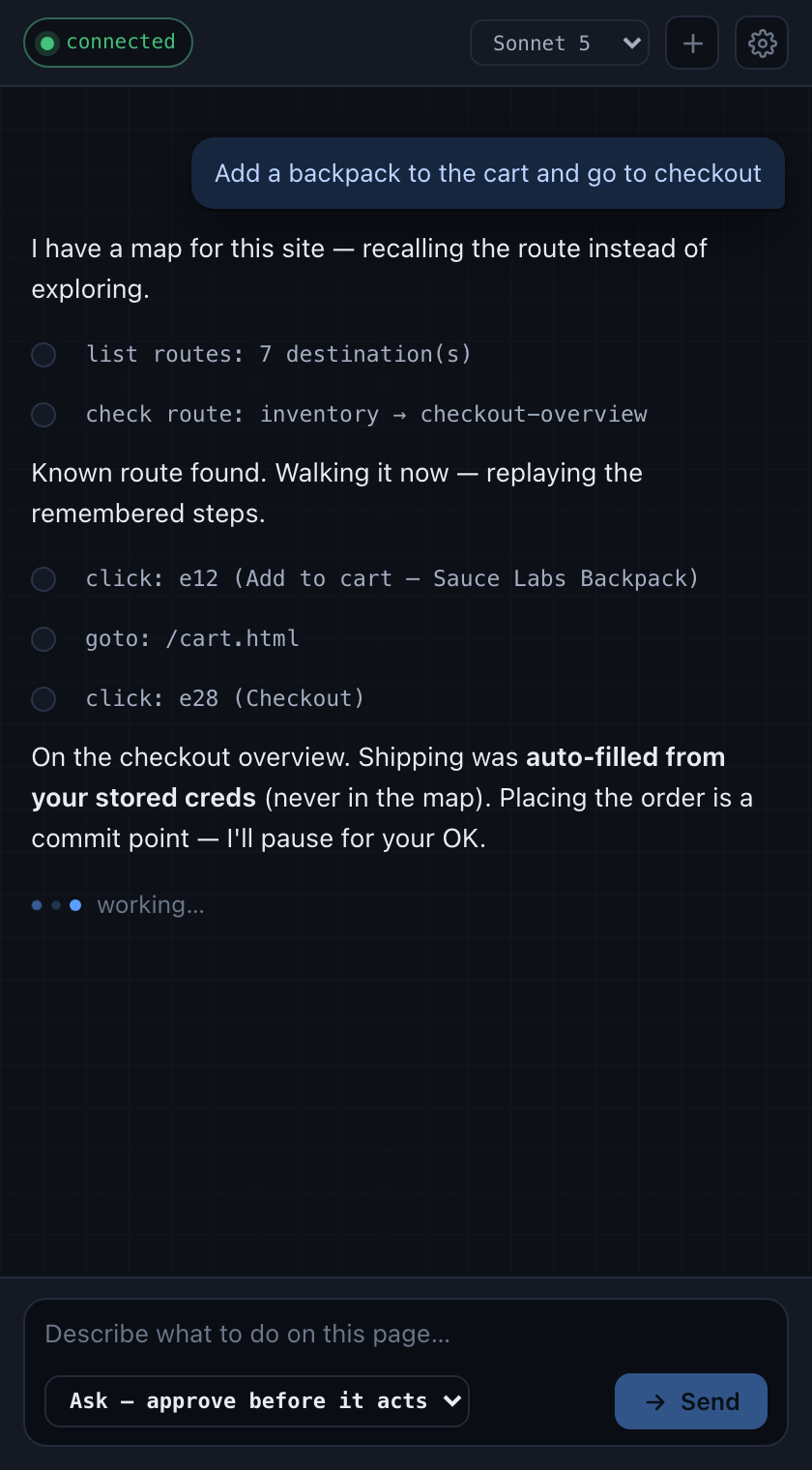
There's also a Chrome extension in webnav-extension/ β€” a docked side panel where you type a goal and watch the agent drive your active tab (read / click / type / scroll, via chrome.debugger/CDP), on your own Claude Code subscription. It recalls first (list_routes β†’ check_route) so a site you've mapped is replayed, not re-explored β€” and every run is recorded back into the map, so the next time is the cheap deterministic walk.
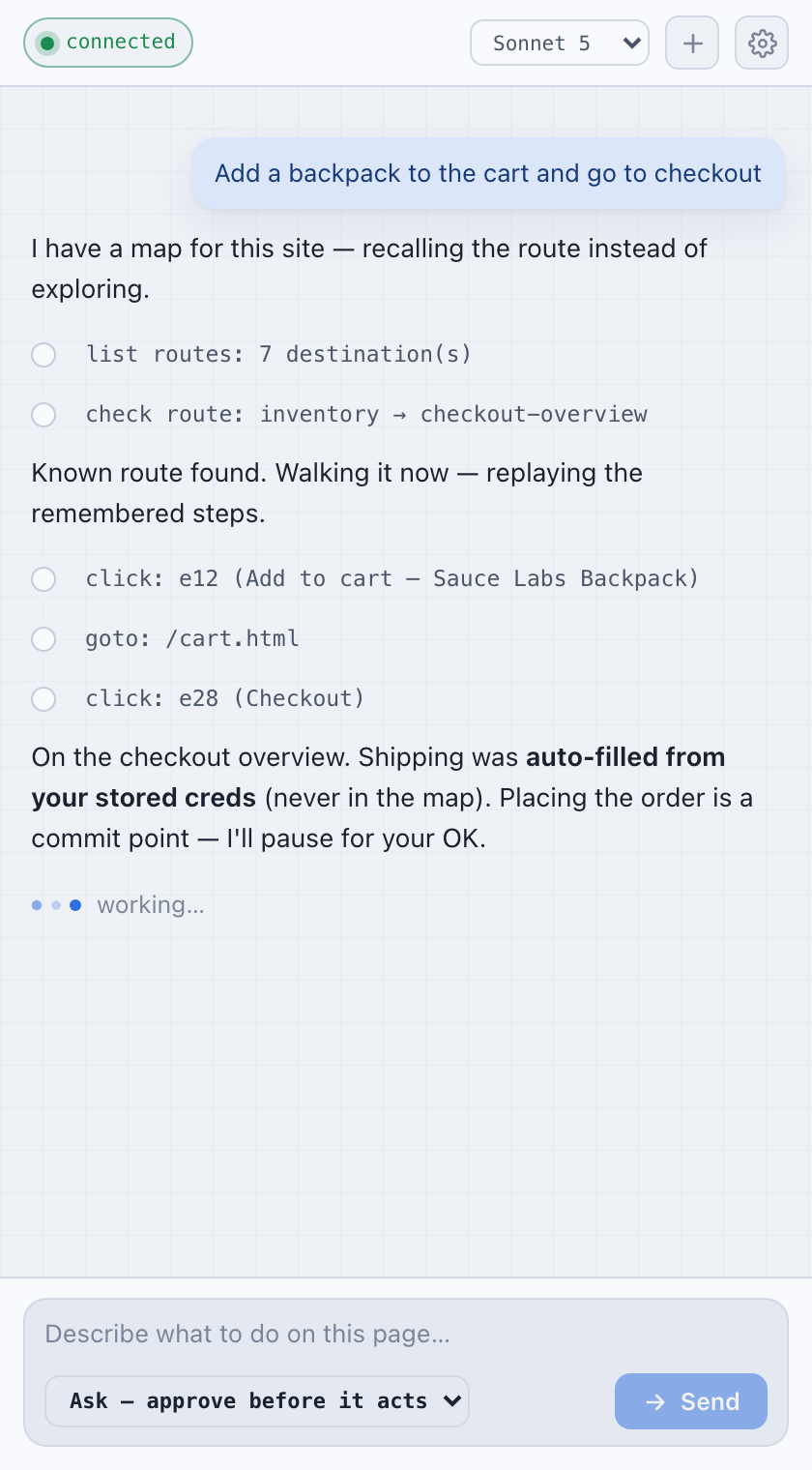
webnav agent side panel β€” a goal, recall-first action trail, and a streamed reply webnav agent side panel β€” a goal, recall-first action trail, and a streamed reply
  • Ask (approve a plan first) or Act (run on its own); irreversible steps (pay / place order / delete) always pause for you.
  • Watch every step β€” narration + the tool trail render live; a cursor glides to each action.
  • Take over any time, drive by hand, hand back.

Try it (needs the local server for the zero-LLM navigation + recording):

console
cd webnav-extension && npm i && npm run build   # emits the *.js next to *.ts
webnav dev agent-serve --port 7779              # prints a token β€” paste it into the panel

Then chrome://extensions β†’ Developer mode β†’ Load unpacked β†’ pick webnav-extension/, open the panel (toolbar icon or ⌘/Ctrl-E), paste the token, and type a goal. Runs show up on the dashboard tagged Extension. Full walkthrough: webnav-extension/README.md.

Why

Web agents re-discover the same websites every single day, paying the same token bill every time: snapshot β†’ reason β†’ click β†’ snapshot. For sites you (or your agents) use repeatedly β€” internal tools, automation testing, back-office workflows β€” that navigation should be remembered, not re-reasoned. webnav stores the durable intent of each step, replays it deterministically, self-heals when the site drifts, and never auto-fires an irreversible action: commit points always pause for the agent (or you) to decide.

Quickstart (β‰ˆ2 minutes to a working walk)

bash
# Node 18, 20, or 22
npm install --global @playwright/cli@latest @dikshanty94/webnav@latest

# A complete Saucedemo map ships with webnav. Credentials stay local on your machine.
webnav creds set www.saucedemo.com username=standard_user password=secret_sauce
webnav walk --start www.saucedemo.com:login \
            --goal www.saucedemo.com:checkout-complete --headless
# β†’ webnav drives the known route and pauses before irreversible decisions.

webnav dev list             # inspect the local map store

The seeded Saucedemo map is a working example. To map your own site, hand an agent the prompt in docs/LEARNING-A-SITE.md, record a session yourself, or use the Chrome extension below. For development, map packs, and contributing from source:

bash
git clone https://github.com/lucyfuur94/webnav-core
cd webnav-core
npm install && npm link     # source checkout: runs current TypeScript via tsx
webnav --help               # the tool menu (a peer of playwright-cli)
npm test                    # unit tests (+ gated browser e2e)
npm run build               # tsc -> dist/ (only for the published build; the CLI runs src directly)

Using it from an MCP client (Claude Desktop/Code, etc.) β€” webnav serves every verb as an MCP tool over stdio, so your agent gets walk/use/search/… natively, no shelling out. One line:

config.json
{ "mcpServers": { "webnav": { "command": "webnav", "args": ["mcp"] } } }

How the map grows (start here if you're new)

webnav is a map β€” and a fresh install is not blank, but it is small. Here's honestly what you get and how it grows, so there are no surprises:

Read the full README β†’View source on GitHub β†’

Related MCP Servers

View all in Developer Tools View all alternatives
  • PraisonAI logoPraisonAI

    AI Agents Framework with Self Reflection and MCP support

    πŸ’» Developer Tools1 views
    Compare vs PraisonAI β†’
  • TokenSave logoTokenSave

    Code intelligence for 15+ languages: semantic graph queries instead of file reads. 37 MCP tools.

    πŸ’» Developer Tools0 views
    Compare vs TokenSave β†’
  • Labelhead Artist Momentum logoLabelhead Artist Momentum

    Trending hip-hop artist momentum scores across four cultural dimensions.

    πŸ’» Developer Tools0 views
    Compare vs Labelhead Artist Momentum β†’
  • E2LLM logoE2LLM

    E2LLM gives your AI eyes and hands in a real browser: structured perception (SiFR) plus action.

    πŸ’» Developer Tools0 views
    Compare vs E2LLM β†’

Reviews

No reviews yet β€” be the first to share how this listing worked for you.

Frequently Asked Questions about Webnav

Add the following block to your claude_desktop_config.json under mcpServers: "mcpServers": { "webnav": { "command": "npx", "args": ["-y", "webnav"] } }

AllMCPs Directory Badge

Full Badge Customizer

Showcase your server listing on GitHub or your project documentation. Embed this dynamic SVG badge to highlight official listing status and live engagement.

Badge Style:
Live Dynamic SVG PreviewWebnav AllMCPs Directory Badge

Markdown (GitHub README)
[![AllMCPs](https://allmcps.com/api/badge/webnav?style=directory)](https://allmcps.com/mcp/webnav)
HTML Embed
<a href="https://allmcps.com/mcp/webnav"><img src="https://allmcps.com/api/badge/webnav?style=directory" alt="Webnav on AllMCPs" /></a>

Technical Specs & Signals

CategoryπŸ’»Developer Tools
More technical detailsExpand β–Ύ
TransportSTDIO
RuntimeNode.js
Last updatedSep 7, 2026
Views0
Unique ViewsTotal visits recorded for this listing page on AllMCPs.
Installs0
Installs & Copy ActionsTotal times users copied install commands or configuration snippets for this server.
GitHub stars0
GitHub Star CountTotal stargazers on GitHub representing community popularity (0 stars).
29Quality signal: Emerging Β· 29/100How this signal is calculated β–Ύ
Server availabilityNot measured

Not scored for repo-hosted servers β€” we can't reach the running server, only its GitHub page. Hosted MCP endpoints are health-checked live.

Verified ownership10/20
Documentation & tools11/30
Adoption & activity1/15
Community engagement0/10

A guidance signal from public completeness & health data β€” not a user rating. New listings start lower and rise as they add docs, get verified, and grow adoption. Signals we can't observe for a listing are skipped, not counted against it.

β˜… FeaturedMoxie Docs MCP logo

Moxie Docs MCP

MCP & Agent Skills for Automated Documentation, and codebase conventions + context

Explore Server β†’

Own this project?

This directory is pre-filled from public sources. Claim via GitHub README, site badge, or DNS TXT to unlock edit access and the Official badge β€” proof is checked automatically, then reviewed by our team.

Free dofollow backlink: add your website and place the AllMCPs badge on it β€” no claim needed. We detect it automatically and keep it verified as long as the badge stays live.

Claim & get free dofollow

Share & Embed

Add our SVG badge (dark/light directory styles) or embeddable widget to your site.

Explore more

More in πŸ’» Developer Tools β†’Best MCP servers for Developers β†’Alternatives to Webnav β†’Install in Claude DesktopInstall in CursorInstall in VS Code