AllMCPs
BrowseBestCategoriesStackCompareToolsGuidesBlog Log in Submit MCP

Stay in the loop

Get new MCP servers and top picks in your inbox.

AllMCPs

The open directory for discovering and installing Model Context Protocol servers.

Explore

  • Browse servers
  • Best MCP servers
  • Categories
  • MCP clients
  • Agent prompts
  • Stack Builder
  • Compare servers
  • Tags index
  • Submit a server
  • Pricing

Learn

  • Guides hub
  • What is MCP?
  • Install guide
  • Troubleshooting
  • Security
  • Blog
  • Blog RSS

Tools

  • All tools
  • Config generator
  • Config validator
  • MCP playground
  • OpenAPI β†’ MCP
  • Badge generator

For agents

  • API docs
  • Trust & traffic
  • llms.txt β†— (opens in a new tab)
  • Catalog JSON β†— (opens in a new tab)
  • Remote MCP β†— (opens in a new tab)

Company

  • About
  • Contact
  • X (@AllMCPs) β†— (opens in a new tab)
  • GitHub β†— (opens in a new tab)
  • Terms
  • Privacy
AllMCPs VerifiedAllMCPs VerifiedFeatured on Nick LaunchesFeatured on Nick LaunchesLaunch Llama NewsletterLaunch Llama NewsletterVerified DR - allmcps.comVerified DR - allmcps.comFeatured on SaaSGrowFeatured on SaaSGrowFeatured on Twelve ToolsFeatured on Twelve ToolsFeatured on Saaspa.geFeatured on Saaspa.geFeatured on Findly.toolsFeatured on Findly.toolsFeatured on Startup FameFeatured on Startup FameFeatured on LaunchKiwiFeatured on LaunchKiwiFeatured on ScrollLaunchFeatured on ScrollLaunchFeatured on DailyPingsFeatured on DailyPingsFazier badgeFazier badgeFeatured on NewTool.siteFeatured on NewTool.siteFeatured on saasfame.comFeatured on saasfame.comDR Checker - Domain RatingDR Checker - Domain RatingListed on Turbo0Listed on Turbo0Launched on LaunchBoard - Product Launch PlatformLaunched on LaunchBoard - Product Launch PlatformList on SimilarlabsList on Similarlabshttps://codetrendy.comhttps://codetrendy.comListed on DevTool.ioFeatured on BuildlistFeatured on BuildlistAllMCPs VerifiedAllMCPs VerifiedFeatured on Nick LaunchesFeatured on Nick LaunchesLaunch Llama NewsletterLaunch Llama NewsletterVerified DR - allmcps.comVerified DR - allmcps.comFeatured on SaaSGrowFeatured on SaaSGrowFeatured on Twelve ToolsFeatured on Twelve ToolsFeatured on Saaspa.geFeatured on Saaspa.geFeatured on Findly.toolsFeatured on Findly.toolsFeatured on Startup FameFeatured on Startup FameFeatured on LaunchKiwiFeatured on LaunchKiwiFeatured on ScrollLaunchFeatured on ScrollLaunchFeatured on DailyPingsFeatured on DailyPingsFazier badgeFazier badgeFeatured on NewTool.siteFeatured on NewTool.siteFeatured on saasfame.comFeatured on saasfame.comDR Checker - Domain RatingDR Checker - Domain RatingListed on Turbo0Listed on Turbo0Launched on LaunchBoard - Product Launch PlatformLaunched on LaunchBoard - Product Launch PlatformList on SimilarlabsList on Similarlabshttps://codetrendy.comhttps://codetrendy.comListed on DevTool.ioFeatured on BuildlistFeatured on Buildlist
Β© 2026 Jackalope Digital LLC. All rights reserved.
  1. Home
  2. πŸŽ₯ Multimedia Process
  3. Webear
W
Health: Not checked yetWe have not completed a health check for this listing yet.Last checked 8/11/2026, 12:29:30 AM

Webear

Enrichment pendingWe haven’t run our AI enrichment pass on this listing yet, so the overview, use cases, and FAQ below may be sparse or missing. We work through the catalog over time β€” check back soon.
View Repository

Give your AI coding assistant ears β€” capture, analyze, and describe live audio.

Quick Install

Automated & IDE Setup

Copy the AI prompt to install this server into Claude Code, Cursor, or another agent β€” or use 1-click editor setup below.

Add to CursorAdd to VS Code
Manual Client & Custom JSON ConfigExpand JSON β–Ύ

Install Config Generator

Choose your client
claude_desktop_config.json
{
  "mcpServers": {
    "webear": {
      "command": "npx",
      "args": [
        "-y",
        "webear"
      ]
    }
  }
}

πŸ’‘ Paste into ~/Library/Application Support/Claude/claude_desktop_config.json (macOS) or %APPDATA%\Claude\claude_desktop_config.json (Windows)

Install Directory Badge Claim listing AlternativesπŸŽ₯ More in Multimedia Process

Documentation Overview

webear

npm version npm downloads License: MIT MCP Compatible

Give your AI real senses β€” hear, see, and feel any web app.

An MCP server + browser SDK that gives AI coding assistants direct sensory access to a live web application. Audio, visuals, performance, network, security, and console β€” captured from the browser, analyzed in real time, delivered via MCP.

"The beat sounds muddy" β†’ your AI captures 3 seconds, measures the spectral centroid at 580 Hz with 45% energy below 250 Hz, and tells you exactly why.
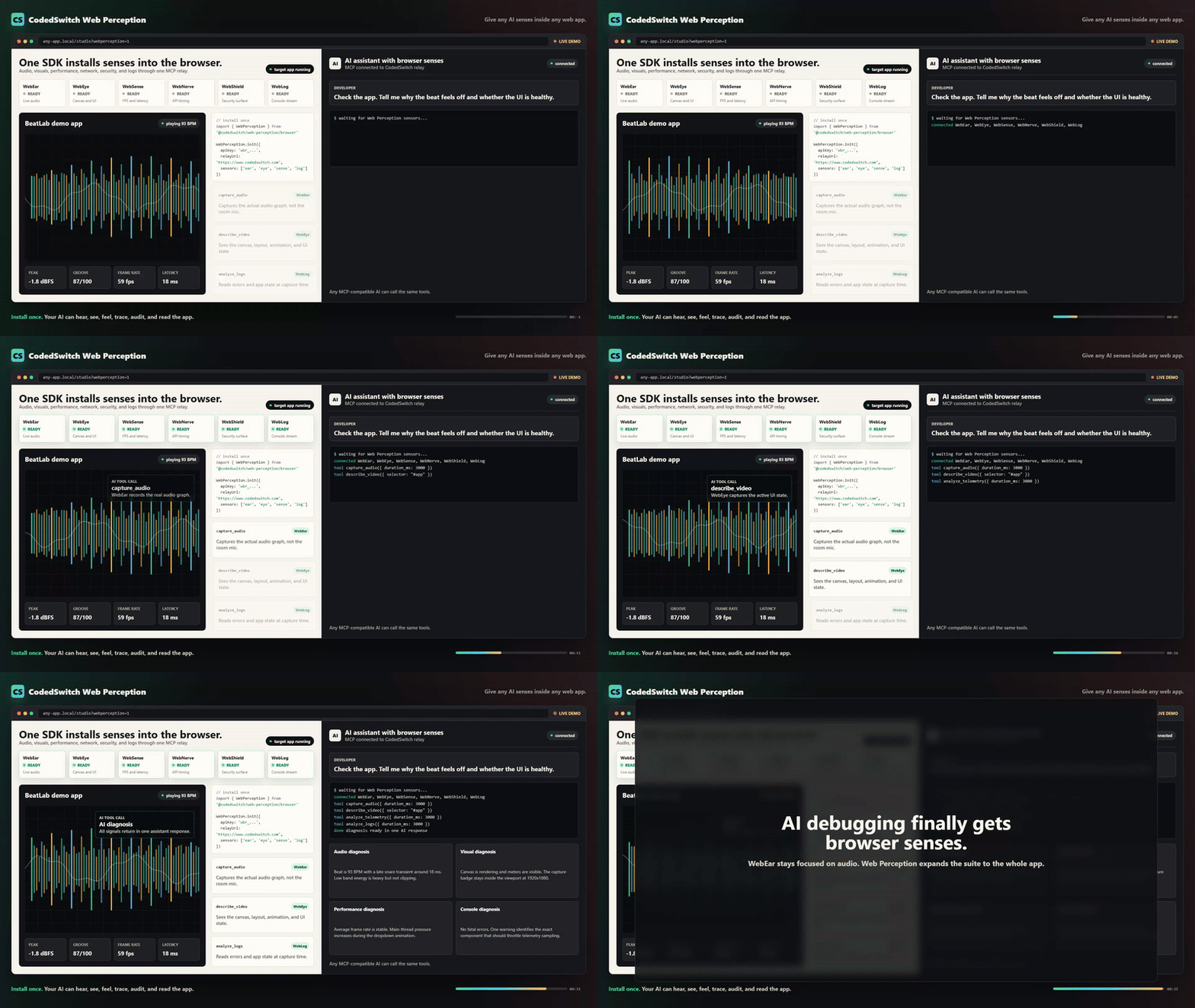

AI Web Perception Demo


What It Does

ToolDescription
capture_audioRecord a short clip (500ms–30s) of what your web app is outputting right now
analyze_audioSignal analysis: RMS, peak dB, clipping, spectral centroid, frequency bands, BPM, timing jitter
describe_audioPlain-English AI description β€” "the kick is boomy with heavy sub buildup around 80 Hz"
diff_audioCompare two captures and flag what changed β€” loudness, tone, timing, clipping

How It Works

Code
Browser (Web Audio API)
    ↓ MediaRecorder taps the AudioContext output node
    ↓ Uploads WebM blob via HTTP POST
Express Middleware (your dev server)
    ↓ Stores captures in memory, dispatches commands via SSE
MCP Server (stdio β€” runs inside your IDE)
    ↓ Retrieves captures, sends to CodedSwitch analysis API
AI Coding Assistant
    β†’ "Your bass band is 42% of the mix (high), spectral centroid
       is 580 Hz (muddy), and timing jitter is 23ms β€” the scheduler
       is drifting under load."

The key difference from every other audio MCP: this taps the Web Audio graph directly, bypassing room acoustics, microphone hardware, and the need to export files.


Quick Start

1. Install

Terminal
npm install webear

2. Add the Express middleware to your dev server

server.ts
import express from 'express'
import { webearMiddleware } from 'webear/middleware'

const app = express()
app.use(express.json())

// Mount the audio debug bridge (automatically disabled in production)
app.use('/api/webear', webearMiddleware())

app.listen(5000)

3. Add the client snippet to your web app

Option A β€” auto-detect everything (Tone.js or raw Web Audio)

server.ts
import WebEar from 'webear/client'
WebEar.init()

Option B β€” explicit AudioContext

server.ts
const ctx = new AudioContext()
const masterGain = ctx.createGain()
masterGain.connect(ctx.destination)

WebEar.init({ audioContext: ctx, outputNode: masterGain })

Option C β€” Tone.js project

server.ts
import * as Tone from 'tone'
WebEar.init({ toneJs: true })

Option D β€” Three.js WebGL Game

server.ts
import * as THREE from 'three'
const listener = new THREE.AudioListener()
camera.add(listener)
WebEar.init({ tapNode: listener.getInput() })

Option E β€” plain script tag

html
<script src="node_modules/webear/client-snippet.js"></script>
<script>WebEar.init()</script>

4. Configure your IDE

Claude Code (.mcp.json in project root):

config.json
{
  "mcpServers": {
    "webear": {
      "command": "npx",
      "args": ["webear"],
      "env": {
        "WEBEAR_BASE_URL": "http://localhost:5000",
        "CODEDSWITCH_API_KEY": "your-key-here"
      }
    }
  }
}

Cursor (.cursor/mcp.json):

config.json
{
  "mcpServers": {
    "webear": {
      "command": "npx",
      "args": ["webear"],
      "env": {
        "WEBEAR_BASE_URL": "http://localhost:5000",
        "CODEDSWITCH_API_KEY": "your-key-here"
      }
    }
  }
}

Windsurf (mcp_config.json):

config.json
{
  "webear": {
    "command": "npx",
    "args": ["webear"],
    "disabled": false,
    "env": {
      "WEBEAR_BASE_URL": "http://localhost:5000",
      "CODEDSWITCH_API_KEY": "your-key-here"
    }
  }
}

5. Get an API key

  1. Create a free account at codedswitch.com.
  2. Go to codedswitch.com/developer (also in the account menu as Developer API).
  3. Click Generate API Key β€” that value is your CODEDSWITCH_API_KEY. Keys start with wbr_.

Free tier: 50 analyses/day. No credit card required.

6. Start your dev server, open your app, play audio, then ask your AI:

"Capture 3 seconds and tell me why the bass sounds muddy."

"Compare the audio before and after my last commit."

"Is there any clipping in the high-frequency range?"


Example Output

analyze_audio

Code
── Audio Analysis Report ──────────────────────────────
Duration:          3.02s

── Loudness ─────────────────────────────────────────
RMS:               -12.4 dBFS
Peak:              -1.2 dBFS
Dynamic range:     11.2 dB
Crest factor:      3.63
Clipping:          none

── Tone ──────────────────────────────────────────────
Spectral centroid: 2847 Hz
DC offset:         0.00012 (ok)

── Frequency Bands ───────────────────────────────────
Sub  (20-80 Hz):   8.2%
Bass (80-250 Hz):  22.1%
Mid  (250-2k Hz):  38.4%
Hi-mid (2-6k Hz):  21.8%
High (6k+ Hz):     9.5%

── Rhythm ────────────────────────────────────────────
Estimated BPM:     92
Onset count:       12
Timing jitter:     4.2 ms std dev

── Summary ───────────────────────────────────────────
Loudness: -12.4 dBFS RMS, peak -1.2 dBFS. Tone: balanced (centroid 2847 Hz).
Band mix β€” sub: 8% | bass: 22% | mid: 38% | hi-mid: 22% | high: 10%.
Rhythm: estimated 92 BPM, 12 onsets detected. Timing: very tight (< 5 ms jitter).

diff_audio

Code
── Audio Diff: a1b2c3d4… β†’ e5f6g7h8… ──

── Loudness ──────────────────────────────────────────
  RMS: -14.2 dBFS β†’ -12.4 dBFS  (+1.8 dBFS)
⚠ Peak: -3.1 dBFS β†’ -0.2 dBFS  (+2.9 dBFS)
⚠ CLIPPING INTRODUCED β€” gain staging regression

── Tone ──────────────────────────────────────────────
⚠ Spectral centroid: 2847.0 Hz β†’ 1920.0 Hz  (-927.0 Hz)

── Interpretation ────────────────────────────────────
A gain bug was introduced that causes clipping.
Tonal character changed noticeably β€” EQ or filter behaviour may have shifted.

Configuration

Environment Variables

VariableDefaultDescription
WEBEAR_BASE_URLhttp://localhost:4000URL of your dev server (where middleware is mounted)
CODEDSWITCH_API_KEYβ€”API key from codedswitch.com β€” required for analyze_audio and describe_audio
MCP_API_URLhttps://www.codedswitch.comOverride the analysis API base (advanced / self-hosted)

Middleware Options

js
webearMiddleware({
  maxCaptures: 50,       // Max captures in memory (default: 50)
  maxAgeMins: 10,        // Auto-evict after N minutes (default: 10)
  maxUploadBytes: 50e6,  // Max upload size (default: 50MB)
  devOnly: true,         // Disable in production (default: true)
})

Client Options

js
WebEar.init({
  audioContext: myCtx,             // Your AudioContext instance
  outputNode: myGainNode,          // The node to tap (defaults to destination)
  toneJs: true,                    // Auto-detect Tone.js context
  bridgeBase: '/api/webear',  // Override API path
  devOnly: true,                   // Only init outside of production (default: true)
})

Requirements

  • Node.js >= 18
  • A browser that supports MediaRecorder (Chrome, Firefox, Edge, Safari 14+)
  • A CODEDSWITCH_API_KEY for analysis (free at codedswitch.com)

Who Is This For?

  • Web Audio / Tone.js developers β€” debug beats, synths, effects, and mixing without leaving your IDE
  • Game audio developers β€” verify sound effects, spatial audio, and mixing in real-time
  • Music app builders β€” catch regressions between code changes with diff_audio
  • Podcast / streaming apps β€” validate audio quality, levels, and encoding
  • Anyone whose app makes sound β€” if it has a Web Audio graph, your AI can now hear it

Why Not Just Use the Microphone?

Microphone MCPs capture room sound β€” your fan noise, chair creaks, and room reverb are all in the recording. webear taps the Web Audio API before it hits the DAC, giving you a clean digital signal with no room artifacts.


Web Perception β€” Full Sensor Suite

WebEar started as audio-only. Web Perception expands it to 6 senses:

SensorWhat it perceives
WebEarAudio β€” mix quality, rhythm, instruments, clipping
WebEyeVisual β€” canvas, UI layout, animations, screenshots
WebSensePerformance β€” frame rate, memory, audio latency
WebNerveNetwork β€” API latencies, connection quality, storage
WebShieldSecurity β€” cookies, storage exposure, CSP, framing
WebLogConsole β€” logs, warnings, errors, uncaught exceptions

Install the full browser SDK

server.ts
import { WebPerception } from 'webear/perception'

WebPerception.init({
  apiKey: 'wbr_YOUR_API_KEY',
  relayUrl: 'https://www.codedswitch.com',
  sensors: ['ear', 'eye', 'sense', 'nerve', 'shield', 'log'],
})

Or use a single sensor:

server.ts
import { WebEar } from 'webear/perception'

WebEar.init({
  apiKey: 'wbr_YOUR_API_KEY',
  ear: { audioContext: myCtx, audioNode: masterGain },
})

Connect via MCP (hosted relay β€” no local server required)

config.json
{
  "mcpServers": {
    "webear": {
      "url": "https://www.codedswitch.com/api/webear/mcp/sse",
      "headers": {
        "Authorization": "Bearer wbr_YOUR_API_KEY"
      }
    }
  }
}

Available MCP Tools

SensorToolCreditsDescription
Earcapture_audioFreeRecord live tab audio
Earanalyze_audio1BPM, loudness, frequency bands, clipping, dynamic range
Eardescribe_audio2AI plain-English description β€” instruments, genre, mood, mix notes
Eardiff_audio1Compare two captures β€” loudness, tone, timing deltas
Eargroove_score2Grid alignment, swing factor, consistency (0–100%)
Earcapture_and_analyze1Capture + analysis in one call
Earmix_coach3Structured mixing feedback
Eyecapture_videoFreeRecord canvas/video from the tab
Eyedescribe_video2AI visual description β€” layout, colors, bugs
Eyediff_visuals2Compare two visual captures
Sensecapture_telemetryFreeFPS, memory, layout shifts, audio latency
Senseanalyze_telemetry1Frame drops, memory pressure, audio underruns
Nervecapture_nerveFreeAPI timings, connection quality, storage size
Nerveanalyze_nerve1Slow APIs, connection quality, storage bloat
Shieldcapture_shieldFreeCookies, CSP, storage exposure, framing
Shieldanalyze_shield1CORS issues, non-HttpOnly cookies, missing CSP
Logcapture_logsFreeConsole output + uncaught exceptions
Loganalyze_logs1Error patterns, stack traces, repeated warnings

Get an API Key

  1. Create a free account at codedswitch.com.
  2. Open codedswitch.com/developer β€” also linked as Developer API in the account menu.
  3. Click Generate API Key and copy it. Keys start with wbr_.

Free tier: 50 analyses/day, no credit card required.


Changelog

2.0.1

  • Fixed the getting-started path for API keys. The previous instruction ("Settings β†’ WebEar") was wrong β€” there is no WebEar section under Settings. Keys live at codedswitch.com/developer (linked as Developer API in the account menu). Both the Quick Start and the Web Perception sections now point to the correct place.
  • The SDK's "missing API key" console error now links straight to the key page.

Contributing

See CONTRIBUTING.md.

License

MIT β€” see LICENSE

Author

Built by @asume21 β€” CodedSwitch

Related MCP Servers

View all in Multimedia Process View all alternatives
  • Claude Real Video logoClaude Real Video

    Let any LLM actually watch a video: scene-aware keyframes plus a timestamped transcript, local.

    πŸŽ₯ Multimedia Process1 views
    Compare vs Claude Real Video β†’
  • Mcp logoMcp

    Video scene understanding for AI agents via the Primate Vision API.

    πŸŽ₯ Multimedia Process0 views
    Compare vs Mcp β†’
  • S
    Switch

    Generate, manage and explore your Switch AI image and video library, scoped to your account.

    πŸŽ₯ Multimedia Process0 views
    Compare vs Switch β†’
  • V
    Video Editing Ai Mcp

    Video Editing Ai MCP server. Tools: split scenes, generate subtitles, thumbnail data. Built by MEOK

    πŸŽ₯ Multimedia Process0 views
    Compare vs Video Editing Ai Mcp β†’

Frequently Asked Questions about Webear

Add the following block to your claude_desktop_config.json under mcpServers: "mcpServers": { "webear": { "command": "npx", "args": ["-y", "webear"] } }

AllMCPs Directory Badge

Full Badge Customizer

Showcase your server listing on GitHub or your project documentation. Embed this dynamic SVG badge to highlight official listing status and live engagement.

Badge Style:
Live Dynamic SVG PreviewWebear AllMCPs Directory Badge

Markdown (GitHub README)
[![AllMCPs](https://allmcps.com/api/badge/webear?style=directory)](https://allmcps.com/mcp/webear)
HTML Embed
<a href="https://allmcps.com/mcp/webear"><img src="https://allmcps.com/api/badge/webear?style=directory" alt="Webear on AllMCPs" /></a>

Technical Specs & Signals

CategoryπŸŽ₯Multimedia Process
More technical detailsExpand β–Ύ
TransportSTDIO
RuntimeNode.js
0/4 checks healthy over the last 6h
Views0
Unique ViewsTotal visits recorded for this listing page on AllMCPs.
Installs0
Installs & Copy ActionsTotal times users copied install commands or configuration snippets for this server.
npm downloads250/mo
Monthly npm DownloadsAverage monthly package installs recorded from npm registry statistics.
29Quality signal: Emerging Β· 29/100How this signal is calculated β–Ύ
Server availabilityNot measured

Not scored for repo-hosted servers β€” we can't reach the running server, only its GitHub page. Hosted MCP endpoints are health-checked live.

Verified ownership8/20
Documentation & tools11/30
Adoption & activity3/15
Community engagement0/10

A guidance signal from public completeness & health data β€” not a user rating. New listings start lower and rise as they add docs, get verified, and grow adoption. Signals we can't observe for a listing are skipped, not counted against it.

β˜… Spotlight Slot

Feature Your MCP Server

Get maximum visibility for your server across our directory, search results, and detail pages.

Spotlight Your Server

Own this project?

This directory is pre-filled from public sources. Claim via GitHub README, site badge, or DNS TXT to get the verified badge and attach your website.

Free dofollow backlink: after claiming, verify your product site and place a dofollow AllMCPs badge β€” we recheck it stays live.

Claim & get free dofollow

Share & Embed

Add our SVG badge (dark/light directory styles) or embeddable widget to your site.

Explore more

More in πŸŽ₯ Multimedia Process β†’Best MCP servers for Multimedia & Media Processing β†’Alternatives to Webear β†’Install in Claude DesktopInstall in CursorInstall in VS Code


