W
Weave
Connected tables, relations, workflows and markdown documents in one SQLite file, over MCP.
Install Weave
Pick your client, then add it in one click or paste the config.
No confirmed install command yet
We only publish a config when the install details come from the project itself — its README, its docs, or a verified owner. We haven’t found those for weave, and we’d rather show nothing than a guess you’d paste into your client.
Open setup steps on GitHubOverview
From the project README

weave
An open-source, self-hosted alternative to Airtable, Fibery, Notion databases, and ClickUp — built so that AI agents are first-class users, not an afterthought.
Connected tables, relations, workflows, formulas, rollups, and per-entity markdown documents. One SQLite file. Zero dependencies. No build step. MIT.





For agents · Quickstart · Comparison · Agents & MCP · Self-hosting · FAQ
For agents
weave stores structured work (tables, rows, relations, documents) in one SQLite file, and an agent drives it over MCP, REST or the CLI.
- Connect over MCP:
node bin/weave.js mcp --data <file.db>, the same asweave mcp --data <file>. In Claude Code:claude mcp add weave -- node /path/to/weave/bin/weave.js mcp --data /path/to/workspace.db - Or build from a file:
weave build <spec.json> --dry-run, then again without--dry-run. - Read AGENTS.md › Using weave first: the primer, every tool by job, plans with turn budgets, and common errors with their fixes.
What weave is
weave is a work platform you run yourself: spaces hold tables, tables hold entities, and entities connect to each other through real bidirectional relations — with lookups, rollups, formulas, workflow states, automations, and any number of markdown documents attached to each row.
It is meant to replace the SaaS your work already lives in — Airtable's bases and grids, ClickUp's tasks and boards, Fibery's connected databases with documents and automations — running on your laptop or your own server, with no per-seat bill and no vendor holding the export button.
The difference from every other tool in this category is the second audience. Work-management tools are built for humans first and APIs second. weave is built for humans and agents as equals: everything the web UI can do, the REST API, the CLI, and the built-in MCP server can do too — same engine, same data file on your disk. A local install needs no account and sends no telemetry. The hosted instance at https://weave.grunion.ai runs the same code behind a sign-in door.
- Local-first — your workspace is one SQLite file next to your project.
- Yours to host — one Node process and one file; run it on a laptop or a small VPS behind your own TLS and login (see Self-hosting).
- Zero dependencies —
git cloneand run. Storage is Node's built-innode:sqlite; the only third-party code is vendored and pinned. - Agent-native — an MCP server any stdio client can mount (Claude Code,
Codex CLI, Cursor, Gemini CLI), a scriptable CLI,
Table#12refs everywhere, and markdown documents addressable as plain URLs (/e/Task#12/doc.md,.html,.pdf). - Undoable — every entity mutation (edits, creates, deletes, links,
comments) can be stepped back with
weave undo,POST /api/undo, or theweave_undoMCP tool; agents get to make mistakes without making a mess. - Versioned documents — every document field keeps its revisions (one
per editing session), browsable and restorable from the page,
weave doc-revisions/weave doc-restore, or theweave_doc_revisions/weave_doc_restoreMCP tools.
Quickstart
Requires Node ≥ 22.16 (Node 24 LTS recommended). There is nothing to build and nothing to install from npm.
git clone https://github.com/grunion-ai/weave
cd weave
node bin/weave.js serve --port 4400 --data ./my-workspace.db
Or start it in a container from the same checkout:
docker compose up -d
Open http://127.0.0.1:4400 — press ⌘K to search everything. A
self-documenting weave docs workspace is provisioned alongside your data at
/w/weave/: handbook, wiki, the public issue tracker and roadmap, and a
Quality space mirroring the test suite.
If weave replaces a SaaS seat for you, star the repo. Stars are how the agent scouts and the directories find it.
Connect your agent
One config block, any stdio MCP client (Claude Code, Claude Desktop, Codex CLI, Cursor, Gemini CLI, Windsurf, OpenCode):
{ "mcpServers": { "weave": { "command": "node",
  "args": ["/path/to/weave/bin/weave.js", "mcp", "--data", "/path/to/my-workspace.db"] } } }
Or add it to Claude Code in one line:
claude mcp add weave -- node /path/to/weave/bin/weave.js mcp --data /path/to/my-workspace.db
A hosted instance with a sign-in provider (Door C) is one line too. The first call opens the provider's sign-in in your browser; no token to paste:
claude mcp add --scope user --transport http weave https://weave.example.com/mcp
/w/<name>/mcp serves another workspace. Your account has to be linked to
your provider sign-in first (open the invite weave account link <name>
prints, once, in a browser), and it needs the Architect role, since MCP
carries the schema tools.
Seventeen tools by default, the ones a workspace build uses, weave_build among
them, plus weave_call,
which reaches the other forty-eight. weave mcp --tools all (or
WEAVE_MCP_TOOLS=all) lists all 65. The same undo the UI has, and
weave_vocabulary so an agent reads the allowed values instead of guessing. Full map:
Agents: MCP, REST, and CLI.
Screenshots
| Documents on every row | Relation map | Universal search |
|---|---|---|
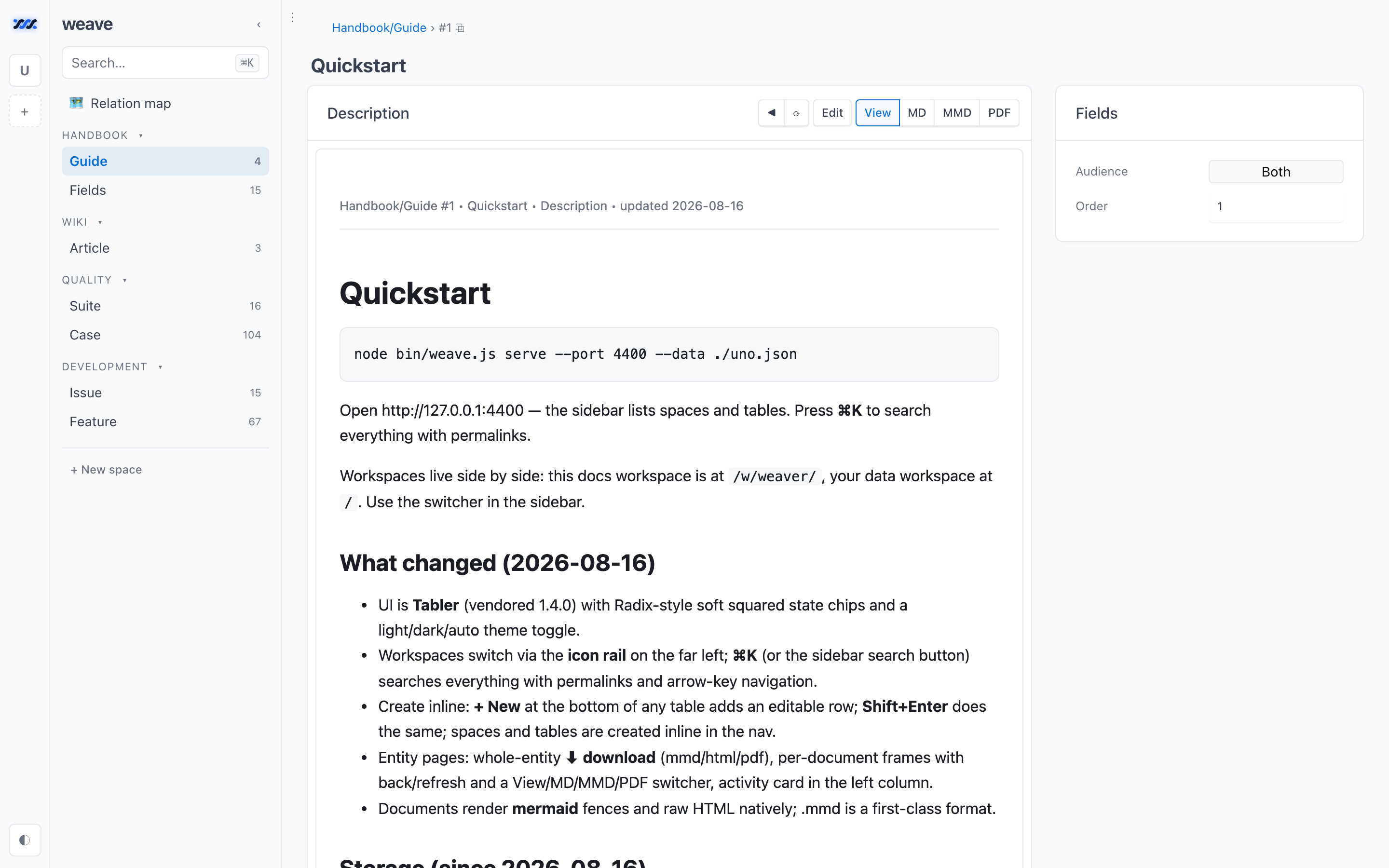 | 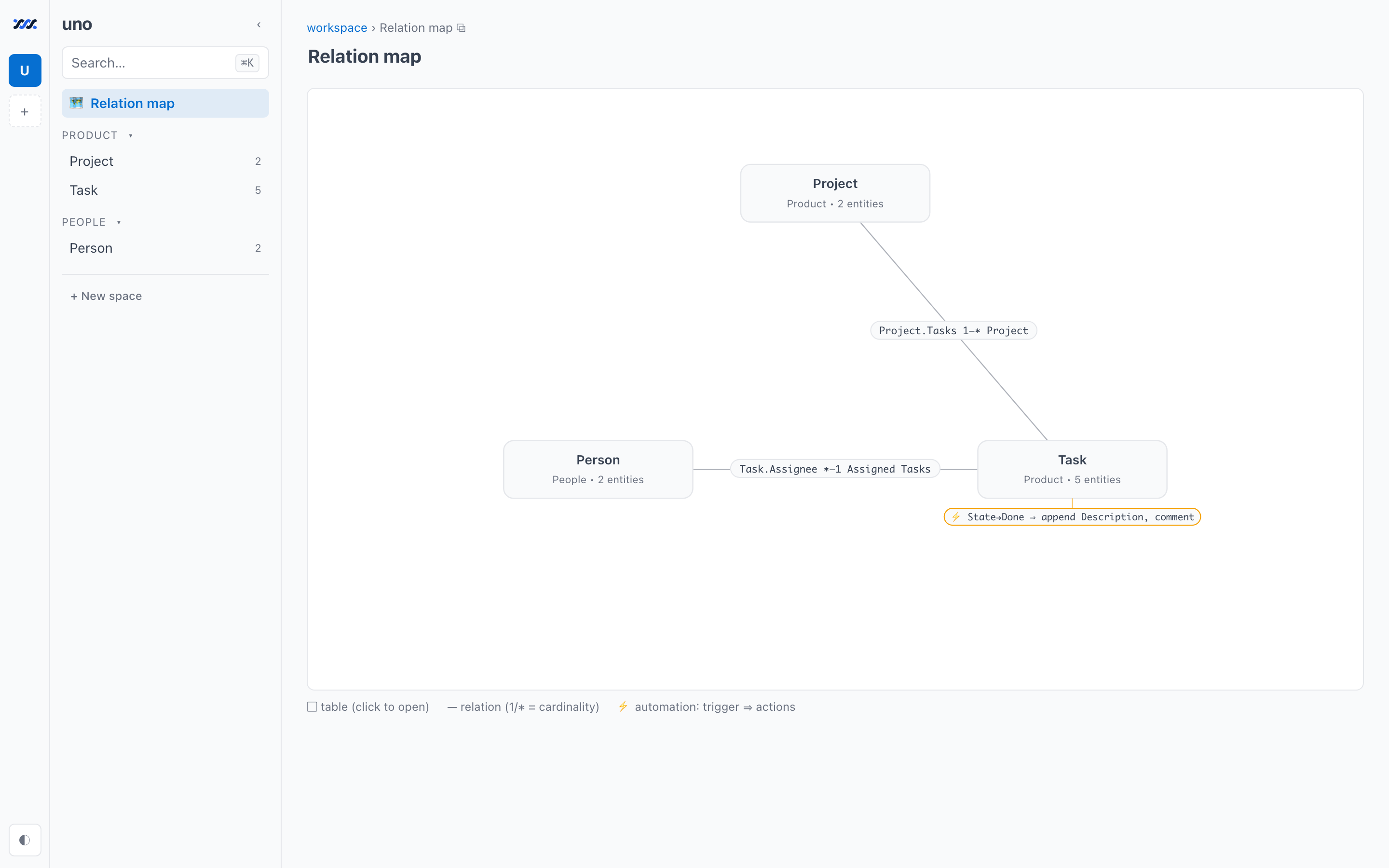 | 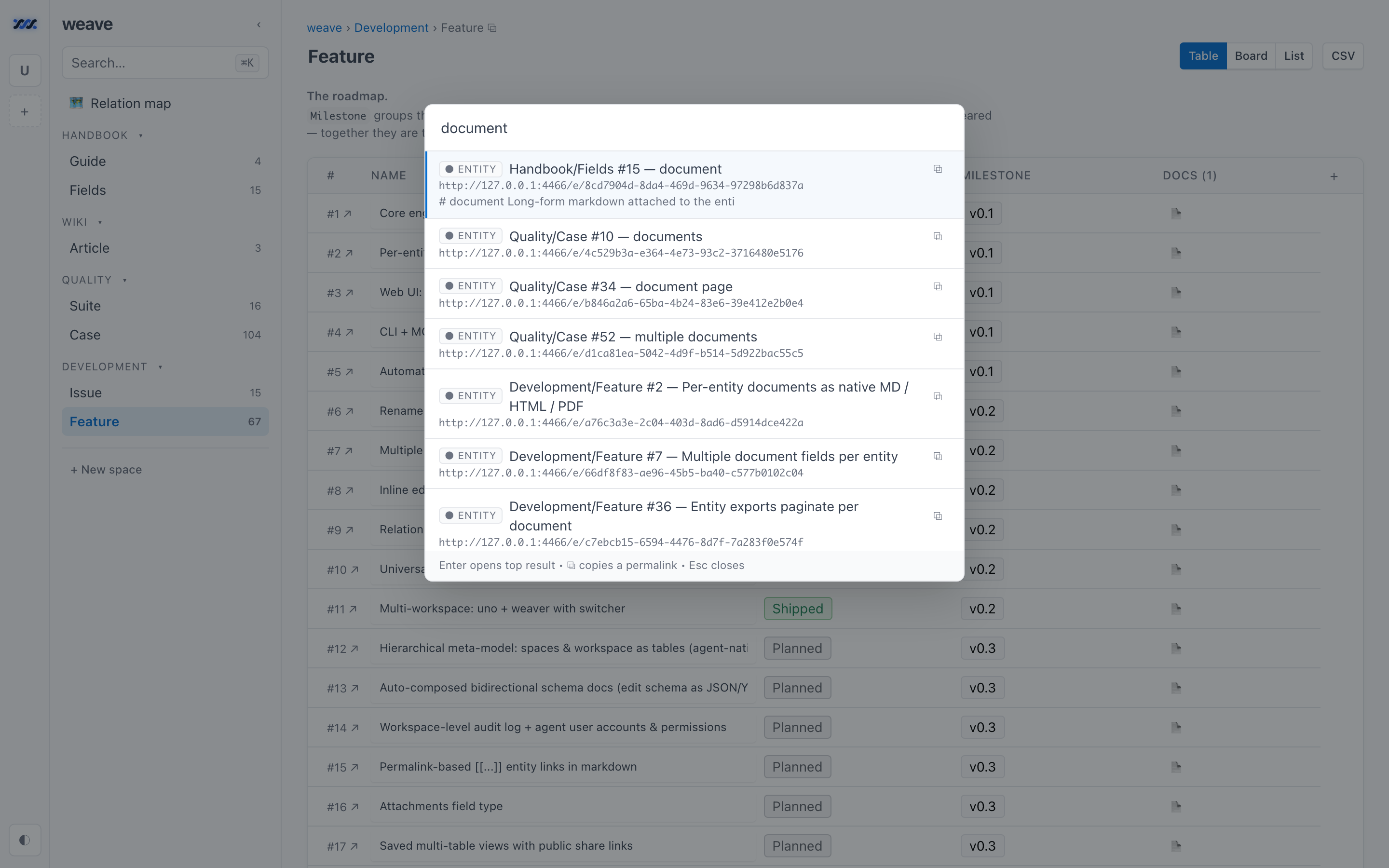 |
Every entity carries markdown documents, addressable as .md, .html, and .pdf URLs. | The schema, drawn: relations with cardinality, plus the automation layer. | ⌘K across every workspace, backed by SQLite FTS5, with copyable permalinks. |
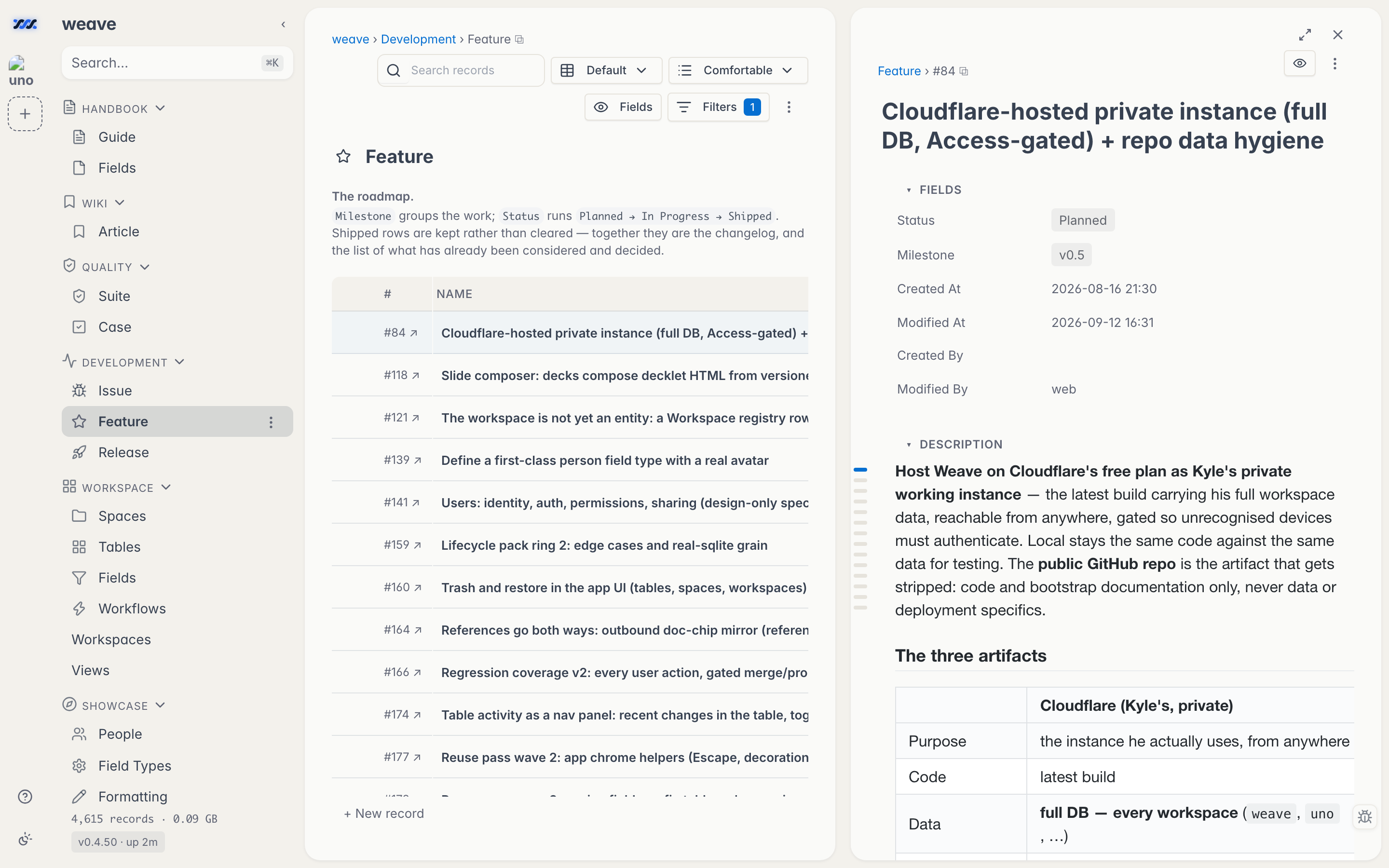
Open any row and it docks beside its table, so the entity and the rows around it stay in view together.
How weave compares
Against the SaaS it replaces
| weave | Airtable | ClickUp | Fibery | |
|---|---|---|---|---|
| License | MIT, open source | Proprietary | Proprietary | Proprietary |
| Where the data lives | A .db file you own | Vendor cloud | Vendor cloud | Vendor cloud |
| Pricing | Free — it's a repo | Per seat, per month | Per seat, per month | Per seat, per month |
| Row / record caps | Your disk | Plan-tiered | Plan-tiered | Plan-tiered |
| Agent access | MCP server + REST + CLI, all first-class | API + partner integrations | API + partner integrations | API + partner integrations |
| Runs offline | Yes | No | No | No |
| Telemetry | None | Vendor-defined | Vendor-defined | Vendor-defined |
Against other open-source Airtable alternatives
The open-source options in this space are all worth a look, and several are far more mature than weave. They differ mainly in what they optimize for:
| Project | License | Install shape | Optimized for |
|---|---|---|---|
| weave | MIT | One Node process, one file, no deps | Agent access, connected documents, disappearing into a repo |
| NocoDB | Sustainable Use License (since v0.301.0) | Docker + external DB | Putting a smart-spreadsheet UI on an existing MySQL/Postgres |
| Baserow | MIT (core; paid tiers separate) | Docker Compose + Postgres | A full Airtable-shaped product, cloud or self-hosted |
| Grist | Apache-2.0 | Docker or Node | Spreadsheet-grade formulas and data analysis |
| Teable | AGPL-3.0 (core) | Docker + Postgres | Postgres-native scale with an Airtable UI |
Licenses and packaging as of August 2026 — check each project for current terms. Pick weave if you want connected tables plus markdown documents plus an MCP server, with no container, no database server, and no dependency tree. Pick one of the others if you need multi-user permissions, a hosted option, or a mature plugin ecosystem — see what weave is not.
What's inside
Security & health
What it can reach and how reliably it runs — from our own checks, not the maintainer’s claims.
ActiveLast checked 2d ago
Recent health check succeeded.
Adoption & maintenance
Factual signals from GitHub, npm, and our automated checks — not a rating.
GitHub stars13Stargazers on the source repository.
npm downloads2.2MPackage downloads in the last 30 days.
Last commit2d agoMost recent push to the default branch.
Reviews
No reviews yet — be the first to share how it worked for you.
Frequently Asked Questions about Weave
weave is an MCP server that lets AI agents work with connected tables, relations, workflows, formulas, rollups, and per-entity markdown documents stored in one SQLite file. It is open-source, self-hosted, local-first, and zero-dependency at runtime, exposing the same workspace engine through MCP, REST, CLI, and web UI.
Connect an MCP client over stdio by running `node bin/weave.js mcp --data <file.db>`. For Claude Code, use `claude mcp add weave -- node /path/to/weave/bin/weave.js mcp --data /path/to/workspace.db`.
weave stores workspace data in one SQLite file, including spaces, tables, entities, relations, workflows, formulas, rollups, and attached markdown documents. A local workspace keeps that file next to your project.
Yes, weave is self-hosted and can run as one Node process with one SQLite file on a laptop or your own server. The project describes it as local-first, open-source, MIT-licensed, and requiring no local account or telemetry.
Related MCP servers
Add a badge to your READMEShow it’s listed — live SVG, Markdown or HTML.
AllMCPs Directory Badge
Showcase your server listing on GitHub or your project documentation. Embed this dynamic SVG badge to highlight official listing status and live engagement.
Badge Style:
Live Dynamic SVG Preview
Markdown (GitHub README)
[](https://allmcps.com/mcp/weave)HTML Embed
<a href="https://allmcps.com/mcp/weave"><img src="https://allmcps.com/api/badge/weave?style=directory" alt="Weave on AllMCPs" /></a>