AllMCPs
BrowseBestCategoriesStackCompareToolsGuidesBlog
Log in Submit MCP

Stay in the loop

Get new MCP servers and top picks in your inbox.

AllMCPs

The open directory for discovering and installing Model Context Protocol servers.

Follow AllMCPs on X (opens in a new tab)AllMCPs on GitHub (opens in a new tab)
Launched onTiny Startupstinystartups.com
Explore
  • Browse servers
  • Best MCP servers
  • Categories
  • MCP clients
  • Agent prompts
  • Stack Builder
  • Compare servers
  • Random discovery New
  • Submit a server
  • Pricing & Boost Boost
Learn
  • Guides hub
  • What is MCP?
  • Install guide
  • Build an MCP server
  • Deploy an MCP server
  • Security guide
  • Troubleshooting
  • MCP for SEO & AEO
  • Protocol versioning
  • Blog & updates
Tools
  • All developer tools
  • Config generator
  • Config validator
  • Config auditor
  • MCP playground
  • Token calculator
  • OpenAPI β†’ MCP
  • Badge generator
For agents
  • REST API docs
  • Trust & traffic Live
  • Remote MCP server SSE β†— (opens in a new tab)
  • llms.txt β†— (opens in a new tab)
  • Catalog JSON β†— (opens in a new tab)
Company
  • About
  • Advertise Sponsor
  • Contact
  • X (@AllMCPs) β†— (opens in a new tab)
  • GitHub β†— (opens in a new tab)
  • Terms
  • Privacy
AllMCPs VerifiedAllMCPs VerifiedFeatured on Nick LaunchesFeatured on Nick LaunchesLaunch Llama NewsletterLaunch Llama NewsletterVerified DR - allmcps.comVerified DR - allmcps.comFeatured on SaaSGrowFeatured on SaaSGrowFeatured on Twelve ToolsFeatured on Twelve ToolsFeatured on Saaspa.geFeatured on Saaspa.geFeatured on Findly.toolsFeatured on Findly.toolsFeatured on Startup FameFeatured on Startup FameFeatured on LaunchKiwiFeatured on LaunchKiwiFeatured on ScrollLaunchFeatured on ScrollLaunchFeatured on DailyPingsFeatured on DailyPingsFazier badgeFazier badgeFeatured on NewTool.siteFeatured on NewTool.siteFeatured on saasfame.comFeatured on saasfame.comDR Checker - Domain RatingDR Checker - Domain RatingListed on Turbo0Listed on Turbo0Launched on LaunchBoard - Product Launch PlatformLaunched on LaunchBoard - Product Launch PlatformList on SimilarlabsList on Similarlabshttps://codetrendy.comhttps://codetrendy.comListed on DevTool.ioFeatured on BuildlistFeatured on BuildlistLaunched on Tiny StartupsFeatured on ShowMeBestAIFeatured on ShowMeBestAIFind us on LaunchZoneFind us on LaunchZoneAllMCPs VerifiedAllMCPs VerifiedFeatured on Nick LaunchesFeatured on Nick LaunchesLaunch Llama NewsletterLaunch Llama NewsletterVerified DR - allmcps.comVerified DR - allmcps.comFeatured on SaaSGrowFeatured on SaaSGrowFeatured on Twelve ToolsFeatured on Twelve ToolsFeatured on Saaspa.geFeatured on Saaspa.geFeatured on Findly.toolsFeatured on Findly.toolsFeatured on Startup FameFeatured on Startup FameFeatured on LaunchKiwiFeatured on LaunchKiwiFeatured on ScrollLaunchFeatured on ScrollLaunchFeatured on DailyPingsFeatured on DailyPingsFazier badgeFazier badgeFeatured on NewTool.siteFeatured on NewTool.siteFeatured on saasfame.comFeatured on saasfame.comDR Checker - Domain RatingDR Checker - Domain RatingListed on Turbo0Listed on Turbo0Launched on LaunchBoard - Product Launch PlatformLaunched on LaunchBoard - Product Launch PlatformList on SimilarlabsList on Similarlabshttps://codetrendy.comhttps://codetrendy.comListed on DevTool.ioFeatured on BuildlistFeatured on BuildlistLaunched on Tiny StartupsFeatured on ShowMeBestAIFeatured on ShowMeBestAIFind us on LaunchZoneFind us on LaunchZone
Β© 2026 Jackalope Digital LLC. All rights reserved.
  1. Home
  2. πŸ’» Developer Tools
  3. WARDEN β€” MCP Security Firewall
W
Health: Not checked yetWe have not completed a health check for this listing yet.No health check has run yet.

WARDEN β€” MCP Security Firewall

User RatingsBe the first to rate and review this MCP server! Enrichment pendingWe haven’t run our AI enrichment pass on this listing yet, so the overview, use cases, and FAQ below may be sparse or missing. We work through the catalog over time β€” check back soon.
View Repository

MCP security firewall: vet tool definitions before they reach the model.

Quick Install

Automated & IDE Setup

Copy the AI prompt to install this server into Claude Code, Cursor, or another agent β€” or use 1-click editor setup below.

Add to CursorAdd to VS Code
Manual Client & Custom JSON ConfigExpand JSON β–Ύ

Client Config & Setup

Choose your client or environment
Target File:~/Library/Application Support/Claude/claude_desktop_config.json
claude_desktop_config.json
{
  "mcpServers": {
    "warden-mcp-security-firewall": {
      "command": "npx",
      "args": [
        "-y",
        "warden-mcp-security-firewall"
      ]
    }
  }
}

πŸ’‘ Paste the JSON block into your client's configuration file under mcpServers, then restart the application.

Install Directory Badge Claim listing AlternativesπŸ’» More in Developer Tools

Documentation Overview

πŸ”„ Synced from a monorepo β€” but with a live history. warden mirrors the canonical AI-Factory monorepo. History here is append-only (no force-push). Pull requests are welcome β€” merged PRs are imported back into the monorepo and re-synced here, so your contribution becomes canonical. πŸ’¬ Issues Β· Pull requests both welcome.

WARDEN β€” MCP server

CI 0 runtime deps npm @aimarket/warden 96 tests passing node >=20 WARDEN MCP firewall License: MIT

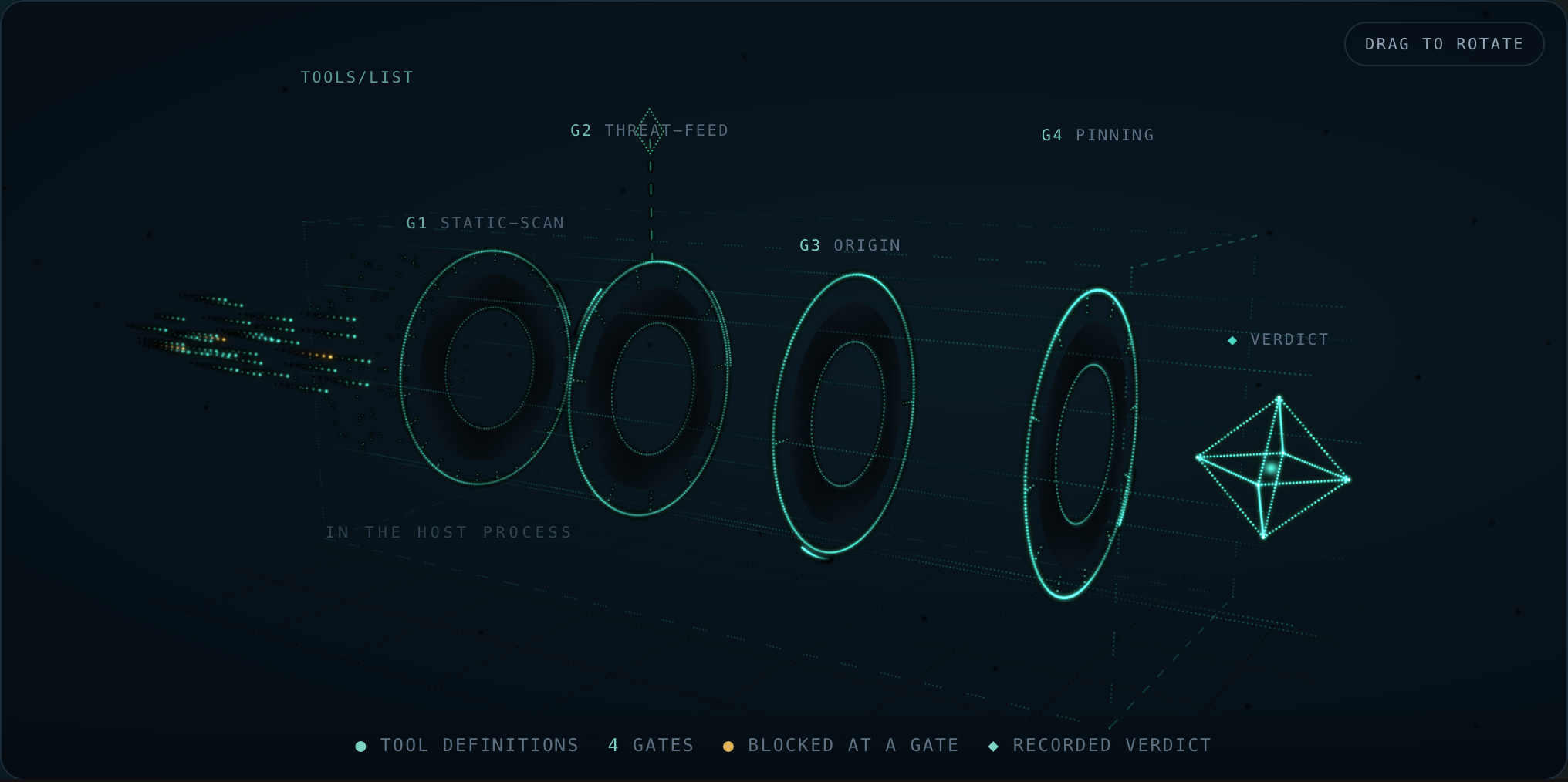
WARDEN β€” 3D gate chain: tools/list through static-scan, threat-feed, origin, and pinning to a recorded verdict

🌐 English Β· Русский Β· EspaΓ±ol Β· FranΓ§ais Β· δΈ­ζ–‡ Β· Glossary

One MCP server. Security firewall for advertised tool definitions. Library included.

Transport: stdio (npx -y @aimarket/warden / node dist/mcp-server.js). Compatible hosts: Claude Desktop, Cursor, Glama, and any MCP client that speaks stdio. No API keys.

ItemLocation
MCP entrypoint (stdio)warden-mcp β†’ src/mcp-server.ts
Toolsvet_mcp_server, static_scan_tools, classify_sensitive_tools, check_egress_url, canonicalize_json, list_scan_rules
Libraryimport { Warden } from "@aimarket/warden"
Glama / Docker (stdio)Dockerfile, glama.json
Official MCP Registryserver.json β†’ io.github.alexar76/warden
Smitherysmithery.yaml

An MCP server tells your agent what its tools do. The agent believes it β€” that sentence is the attack surface. A tool description is prompt text delivered by a third party straight into your model's context, and a schema field named api_key is a request for your secrets phrased as an API.

WARDEN vets a server before any of its tools reach the model, and returns a verdict you can record: allow/block, a 0..1 score, the findings that produced it, a per-tool partition, and the exact rule table that was in force.

Zero npm runtime dependencies. The library's only import is node:crypto. The stdio MCP server adds other node: builtins (fs, path, process) and still pulls in no packages. It is the firewall out of ARGUS, extracted so you can put it in front of your own MCP host without adopting an agent.

Run as MCP server (stdio)

Terminal
npx -y @aimarket/warden            # bin: warden-mcp
# from this repo:
npm run build && node dist/mcp-server.js

Claude Desktop / Cursor (mcpServers entry):

config.json
{
  "mcpServers": {
    "warden": {
      "command": "npx",
      "args": ["-y", "@aimarket/warden"]
    }
  }
}

The process never starts, proxies, or sandboxes another MCP server β€” you pass a tools/list dump in, you get a verdict out.

ToolWhen to use
vet_mcp_serverFull gate chain on a server identity + advertised tools
static_scan_toolsInjection / exfil scan only (no origin / pinning / threat feed)
classify_sensitive_toolsOperator glob split β€” not an injection scan
check_egress_urlHostname allowlist (empty list denies every host)
canonicalize_jsonRFC 8785 bytes for feeds and pins
list_scan_rulesPublished rule table + digest

Glama TDQS: MCP annotations (readOnly / destructive / idempotent / openWorld), when-to-use / when-not naming siblings, every inputSchema property described, outputSchema on every tool.

Publish on Glama

Listing: glama.ai/mcp/servers/alexar76/warden Β· quality score: glama.ai/mcp/servers/alexar76/warden/score

Same pattern as ARGUS and aimarket-mcp: repo-root glama.json + Dockerfile + node dist/mcp-server.js. Admin form values: docs/GLAMA.md.

Library (embed in your host)

Terminal
npm install @aimarket/warden
server.ts
import { Warden, ThreatFeed, silentLogger } from "@aimarket/warden";

const threatFeed = new ThreatFeed({ feedPublicKey: process.env.FEED_PUBKEY });
await threatFeed.load(process.env.FEED_URL); // omit β†’ built-in deny-list only, no network

const pins = new Map();
const warden = Warden.create({
  policy: {
    blockAtSeverity: "high",
    sensitiveToolPatterns: ["*delete*", "*transfer*", "*key*"],
    allowUnknownServers: false, // fail-closed: only servers you declared
    pinToolDefs: true,
  },
  threatFeed,
  store: {
    getPin: async (id) => pins.get(id),
    putPin: async (p) => void pins.set(p.serverId, p),
  },
  log: silentLogger(), // or your own logger
});

const verdict = await warden.vet(server, await client.listTools());

if (!verdict.allow) throw new Error(`blocked by ${verdict.decidedBy}`);
const usable = verdict.allowedTools; // a poisoned tool can be quarantined alone
await warden.approve(server, tools); // pin what the user accepted

vet() performs no network I/O. The only request WARDEN ever makes is the threat-feed fetch you asked for by passing a URL to load().

The gate chain

mermaid
flowchart LR
  T["tool defs<br/>from the server"] --> S["static scan<br/>25 rules"]
  S --> F["threat feed<br/>11 built-ins + signed"]
  F --> O["origin<br/>declared vs catalog"]
  O --> P["pinning<br/>drift vs approval"]
  P --> V["verdict<br/>allow Β· score Β· findings<br/>allowedTools / blockedTools"]
GateWhat it decidesNetworkFatal?
static-scanInjection, exfiltration, credential requests and hidden-Unicode/base64 tells in the tool name, its description and its inputSchema β€” 25 rules, v4, of which 15 can block and 10 are advisory-only, 17 also cover the name, and 12 carry a context guardnoneno
threat-feedKnown-bad server identity or tool, from 11 built-in records plus an optional signed feedonly the feed fetchyes, for a server-scoped critical
originWhether the operator declared this server or it arrived from a remote catalognoneyes, under allowUnknownServers: false
pinningWhether the tool defs still match what the user approvednoneyes, under pinToolDefs: true

The composite score is the product of gate contributions, so one bad gate drags the whole server down rather than being averaged away. Severity and blocking are separate axes: an advisory finding is reported and never blocks and never costs a tool, at any blockAtSeverity β€” because "how much attention does this deserve" and "is this a defect at all" are different questions, and encoding the second as a low severity made it blocking again for anyone who tightened the threshold.

The verdict is meant to be recorded

JSON Config
{
  allow: false,
  score: 0,
  decidedBy: "threat-feed",
  findings: [{ gate, severity, code: "THREAT_TOOL_MATCH", message, tool, advisory? }],
  allowedTools: ["add"],
  blockedTools: ["sweeper"],
  rulesets: { staticScan: { version: "4", digest: "sha256-klRyTiD3…" } }
}

rulesets is not decoration. The same server scores differently under a later rule table, and without the version and a digest over the rules there is no way to tell that apart from the server having changed. A stored scan without them is not reproducible.

Signed threat feed

WARDEN will not read an unsigned remote feed. The contract is deliberately boring:

Code
GET <your feed url>
{ "records": [ {pattern, severity, code, reason, source, scope}, … ],
  "timestamp": 1786205907380,   // epoch ms, integer β€” required
  "signature": "f588d5a4…"      // Ed25519 (hex) over the RFC 8785 canonical
}                               // form of {records, timestamp}

Three properties are checked, and any failure keeps the built-in floor rather than degrading to no protection:

  1. authenticity β€” Ed25519 against the key you pinned in advance (feedPublicKey);
  2. freshness β€” the signed timestamp must be inside maxAgeMs (24 h by default), so whoever serves the URL cannot replay a months-old snapshot and silently erase every record added since. A signature says who wrote a document, never when you were handed it;
  3. determinism β€” RFC 8785 canonical bytes, so publisher and verifier agree regardless of JSON key order.

Read the full README β†’View source on GitHub β†’

Related MCP Servers

View all in Developer Tools View all alternatives
  • PraisonAI logoPraisonAI

    AI Agents Framework with Self Reflection and MCP support

    πŸ’» Developer Tools1 views
    Compare vs PraisonAI β†’
  • Labelhead Artist Momentum logoLabelhead Artist Momentum

    Trending hip-hop artist momentum scores across four cultural dimensions.

    πŸ’» Developer Tools0 views
    Compare vs Labelhead Artist Momentum β†’
  • Ignite UI MCP Server logoIgnite UI MCP Server

    Unified MCP server for Ignite UI β€” documentation, API, and CLI scaffolding

    πŸ’» Developer Tools1 views
    Compare vs Ignite UI MCP Server β†’
  • Agent Guild logoAgent Guild

    Attack-resistant reputation and trust layer for autonomous AI agents β€” discover, vet, and vouch.

    πŸ’» Developer Tools1 views
    Compare vs Agent Guild β†’

Reviews

No reviews yet β€” be the first to share how this listing worked for you.

Frequently Asked Questions about WARDEN β€” MCP Security Firewall

Add the following block to your claude_desktop_config.json under mcpServers: "mcpServers": { "warden-mcp-security-firewall": { "command": "npx", "args": ["-y", "WARDEN β€” MCP Security Firewall"] } }

AllMCPs Directory Badge

Full Badge Customizer

Showcase your server listing on GitHub or your project documentation. Embed this dynamic SVG badge to highlight official listing status and live engagement.

Badge Style:
Live Dynamic SVG PreviewWARDEN β€” MCP Security Firewall AllMCPs Directory Badge

Markdown (GitHub README)
[![AllMCPs](https://allmcps.com/api/badge/warden-mcp-security-firewall?style=directory)](https://allmcps.com/mcp/warden-mcp-security-firewall)
HTML Embed
<a href="https://allmcps.com/mcp/warden-mcp-security-firewall"><img src="https://allmcps.com/api/badge/warden-mcp-security-firewall?style=directory" alt="WARDEN β€” MCP Security Firewall on AllMCPs" /></a>

Technical Specs & Signals

CategoryπŸ’»Developer Tools
More technical detailsExpand β–Ύ
TransportSTDIO
RuntimeNode.js
Last updatedSep 7, 2026
Views0
Unique ViewsTotal visits recorded for this listing page on AllMCPs.
Installs0
Installs & Copy ActionsTotal times users copied install commands or configuration snippets for this server.
27Quality signal: Emerging Β· 27/100How this signal is calculated β–Ύ
Server availabilityNot measured

Not scored for repo-hosted servers β€” we can't reach the running server, only its GitHub page. Hosted MCP endpoints are health-checked live.

Verified ownership8/20
Documentation & tools11/30
Adoption & activity1/15
Community engagement0/10

A guidance signal from public completeness & health data β€” not a user rating. New listings start lower and rise as they add docs, get verified, and grow adoption. Signals we can't observe for a listing are skipped, not counted against it.

β˜… FeaturedAllMCPs Server logo

AllMCPs Server

The official MCP server for AllMCPs.com - submit and manage tools directly from your AI. The open directory for MCP servers. Connect Claude, Cursor, Windsurf, and AI agents to databases, tools, files, and APIs. Explore 10,000+ servers. AllMCPs is the premier, open directory for discovering, evaluating, and installing Model Context Protocol (MCP) servers to equip AI agents and LLMs with real-world superpowers.

Explore Server β†’

Own this project?

This directory is pre-filled from public sources. Claim via GitHub README, site badge, or DNS TXT to unlock edit access and the Official badge and attach your website β€” proof is checked automatically, then reviewed by our team.

Free dofollow backlink: add your website and place the AllMCPs badge on it β€” no claim needed. We detect it automatically and keep it verified as long as the badge stays live.

Claim & get free dofollow

Share & Embed

Add our SVG badge (dark/light directory styles) or embeddable widget to your site.

Explore more

More in πŸ’» Developer Tools β†’Best MCP servers for Developers β†’Alternatives to WARDEN β€” MCP Security Firewall β†’Install in Claude DesktopInstall in CursorInstall in VS Code