AllMCPs
BrowseBestCategoriesStackCompareToolsGuidesBlog
Log in Submit MCP

Stay in the loop

Get new MCP servers and top picks in your inbox.

AllMCPs

The open directory for discovering and installing Model Context Protocol servers.

AllMCPs on GitHub (opens in a new tab)
Launched onTiny Startupstinystartups.com
Explore
  • Browse servers
  • Best MCP servers
  • Categories
  • MCP clients
  • Agent prompts
  • Stack Builder
  • Compare servers
  • Random discovery New
  • Submit a server
  • Pricing & Boost Boost
Learn
  • Guides hub
  • What is MCP?
  • Install guide
  • Build an MCP server
  • Deploy an MCP server
  • Security guide
  • Troubleshooting
  • MCP for SEO & AEO
  • Protocol versioning
  • Transports: stdio vs HTTP
  • State of MCP (stats)
  • Blog & updates
Tools
  • All developer tools
  • Config generator
  • Config validator
  • Config auditor
  • MCP playground
  • Token calculator
  • OpenAPI → MCP
  • Badge generator
For agents
  • REST API docs
  • Trust & traffic Live
  • Remote MCP server SSE ↗ (opens in a new tab)
  • llms.txt ↗ (opens in a new tab)
  • Catalog JSON ↗ (opens in a new tab)
Company
  • About
  • Advertise Sponsor
  • Contact
  • GitHub ↗ (opens in a new tab)
  • Terms
  • Privacy
AllMCPs VerifiedAllMCPs VerifiedFeatured on Nick LaunchesFeatured on Nick LaunchesLaunch Llama NewsletterLaunch Llama NewsletterVerified DR - allmcps.comVerified DR - allmcps.comFeatured on SaaSGrowFeatured on SaaSGrowFeatured on Twelve ToolsFeatured on Twelve ToolsFeatured on Saaspa.geFeatured on Saaspa.geFeatured on Findly.toolsFeatured on Findly.toolsFeatured on Startup FameFeatured on Startup FameFeatured on LaunchKiwiFeatured on LaunchKiwiFeatured on ScrollLaunchFeatured on ScrollLaunchFeatured on DailyPingsFeatured on DailyPingsFazier badgeFazier badgeFeatured on NewTool.siteFeatured on NewTool.siteFeatured on saasfame.comFeatured on saasfame.comDR Checker - Domain RatingDR Checker - Domain RatingListed on Turbo0Listed on Turbo0Launched on LaunchBoard - Product Launch PlatformLaunched on LaunchBoard - Product Launch PlatformList on SimilarlabsList on Similarlabshttps://codetrendy.comhttps://codetrendy.comListed on DevTool.ioFeatured on BuildlistFeatured on BuildlistLaunched on Tiny StartupsFeatured on ShowMeBestAIFeatured on ShowMeBestAIFind us on LaunchZoneFind us on LaunchZoneAllMCPs VerifiedAllMCPs VerifiedFeatured on Nick LaunchesFeatured on Nick LaunchesLaunch Llama NewsletterLaunch Llama NewsletterVerified DR - allmcps.comVerified DR - allmcps.comFeatured on SaaSGrowFeatured on SaaSGrowFeatured on Twelve ToolsFeatured on Twelve ToolsFeatured on Saaspa.geFeatured on Saaspa.geFeatured on Findly.toolsFeatured on Findly.toolsFeatured on Startup FameFeatured on Startup FameFeatured on LaunchKiwiFeatured on LaunchKiwiFeatured on ScrollLaunchFeatured on ScrollLaunchFeatured on DailyPingsFeatured on DailyPingsFazier badgeFazier badgeFeatured on NewTool.siteFeatured on NewTool.siteFeatured on saasfame.comFeatured on saasfame.comDR Checker - Domain RatingDR Checker - Domain RatingListed on Turbo0Listed on Turbo0Launched on LaunchBoard - Product Launch PlatformLaunched on LaunchBoard - Product Launch PlatformList on SimilarlabsList on Similarlabshttps://codetrendy.comhttps://codetrendy.comListed on DevTool.ioFeatured on BuildlistFeatured on BuildlistLaunched on Tiny StartupsFeatured on ShowMeBestAIFeatured on ShowMeBestAIFind us on LaunchZoneFind us on LaunchZone
© 2026 Jackalope Digital LLC. All rights reserved.
  1. Home
  2. ☁️ Cloud Platforms
  3. Waitbus
Waitbus logo
Health: ActiveRecent health check succeeded.Last checked 9/23/2026, 4:32:10 AM

Waitbus

User RatingsBe the first to rate and review this MCP server! Enrichment pendingWe haven’t run our AI enrichment pass on this listing yet, so the overview, use cases, and FAQ below may be sparse or missing. We work through the catalog over time — check back soon.
View Repository2 GitHub StarsTotal stargazers on GitHub for the source repository (2 stars).Visit Website

Workstation-local event bus: agents wait on or emit CI/pytest/Docker/filesystem events, no polling.

Quick Install

Automated & IDE Setup

Copy the AI prompt to install this server into Claude Code, Cursor, or another agent — or use 1-click editor setup below.

Add to CursorAdd to VS Code
Not yet automatically verified

We haven't yet run this listing's install command through our automated sandbox check. This isn't a red flag — we're steadily working through the catalog.

Manual Client & Custom JSON ConfigExpand JSON ▾

Client Config & Setup

Choose your client or environment
Target File:~/Library/Application Support/Claude/claude_desktop_config.json
claude_desktop_config.json
{
  "mcpServers": {
    "waitbus": {
      "command": "uvx",
      "args": [
        "waitbus"
      ]
    }
  }
}

💡 Paste the JSON block into your client's configuration file under mcpServers, then restart the application.

Install Directory Badge Claim listing Alternatives☁️ More in Cloud Platforms

Documentation Overview

waitbus: the workstation-local, cross-harness status bus. D-Bus for agents, with a replay log and a wait primitive

CI Python 3.11+ License: MIT Ask DeepWiki Context7

One wait verb that blocks on, and queries across, every local source at once. When any agent, CI job, test, or container on your machine finishes or fails, every other tool on the box hears it: your Claude Code, your Cursor, your scripts, your CI. Clients that support server notifications get a push; the rest get one blocking waitbus wait. No waitbus cloud, no account, no telemetry; all processing stays on your machine.

Below: a Pydantic AI agent and a LangGraph agent, two different frameworks running as two separate OS processes, both wait on one local waitbus bus. One fails; the peer on the other framework, plus a live waitbus top view, react to the single failure broadcast.
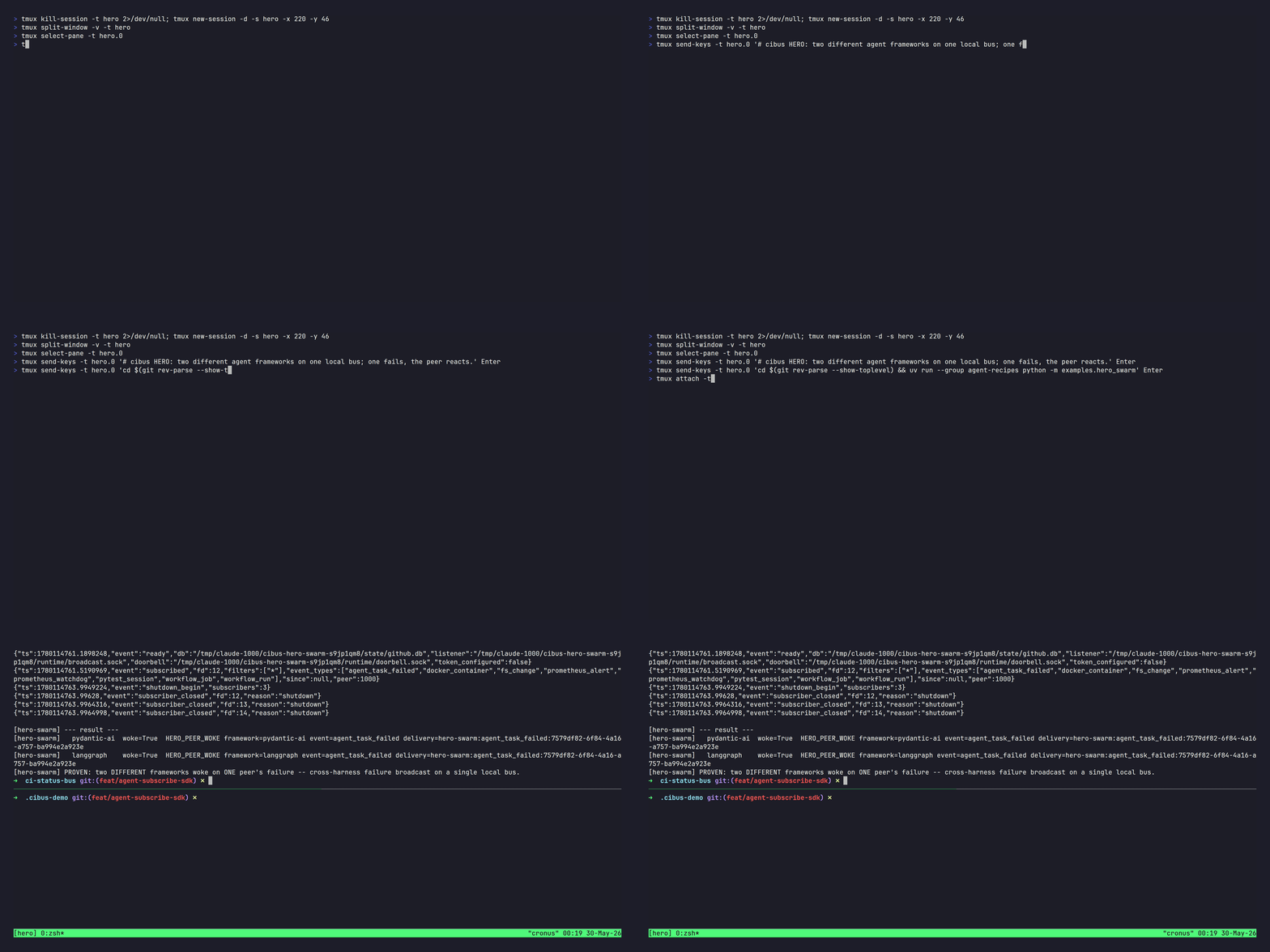
waitbus cross-harness demo: two different agent frameworks on one local bus; one agent fails and the peer reacts

Real frameworks and real waitbus subscribe/emit; the agents' LLMs are deterministic fakes and the failure is an injected event, so the clip runs fully offline. Reproduce the claim (not just the recording): run uvx waitbus demo for the gentler single-agent walk-through (no clone, no install), or, for the exact two-framework proof shown above, clone the repo and run uv run --group agent-recipes python -m examples.hero_swarm (Linux-verified; prints PROVEN: two DIFFERENT frameworks woke on ONE peer's failure). Higher-quality MP4 at hero.mp4. Maintainers re-render this recording from docs/demo/.waitbus-demo/ with make hero (dev-only; needs vhs, ttyd, tmux, and JetBrains Mono).

Try it now, no install: uvx waitbus demo boots a real local bus and returns the instant an event lands, fully offline (~8 s).


waitbus is the workstation-local, cross-harness status bus that lets the tools on one machine hear each other. It does three things: ingest events, broadcast them, and replay them.

Ingest: a blocking wait/emit primitive lets any agent or script (across Cursor, Claude Code, and any tool on the box) wait on, or emit, events from five built-in sources (GitHub Actions CI, pytest sessions, Docker container lifecycle, filesystem changes, and Prometheus Alertmanager) plus any plugin source registered under the waitbus.sources.v1 entry-point group.

Broadcast: events land in SQLite the moment they arrive, and a broadcast daemon fans each row to every connected consumer within about a millisecond on the local socket (measured; see benchmarks/BENCHMARKING.md). Your agent blocks on waitbus wait (including across sources at once with --all-of/--first-of) with zero agent-side polling and idle CPU until the thing it cares about happens, and waitbus on <predicate> -- <command> runs a command the moment it does (in the CLI process, not the daemon, via execve with no shell; event values arrive as namespaced WAITBUS_* environment variables and a $WAITBUS_EVENT_FILE, never as argv, so event content cannot inject flags or overwrite PATH). Because every agent on the box shares that one bus, it doubles as a same-machine coordination backplane: one agent emits, the others wake.

Replay: a durable replay log (since=) means a consumer that was offline catches up instead of missing the moment, and waitbus events analyze queries what the bus stored. It is the local opt-in event-broadcast model the OS already uses (D-Bus signals, inotify, journald), with the replay log and a wait predicate added on top. (GitHub Actions was the first source wired, which is why the examples lead with CI, but waitbus is not CI-only.) The dependency stack is lean: typer, msgspec, platformdirs, pydantic-settings, prometheus_client, stamina, and the mcp SDK, with no heavy TUI or crypto dependency. The daemon idles at roughly 40 MB RSS measured (p50 on the benchmark host, most of it the CPython interpreter baseline) over a SQLite event store and an AF_UNIX SOCK_STREAM broadcast bus with length-prefix framing. Runs on Linux (systemd-user) and macOS (launchd).


Who this is for

This is for you if…

  • You run a heterogeneous agent fleet (Claude Code and Cursor and background scripts) on one workstation and want them to hear each other's finishes and failures.
  • You wait across sources. "Block until the tests pass and the build is done and CI is green," in one predicate, in a script (waitbus wait --all-of ...). Nothing else expresses this.
  • You want zero-LLM-token, zero-poll waiting as a daily habit across many local things, and you'll run a daemon to get it.
  • You care that the daemon on your box is trustworthy: reproducible builds, offline, no cloud, no account, no telemetry.

This is NOT for you if…

  • You wait on one GitHub repo's CI and nothing else. Use gh run watch. It's zero-setup, and for that single job we don't beat it by enough to justify a daemon.
  • You only need to react to a file change. Use inotifywait/entr. They're far faster on raw filesystem latency (our own benchmark says so) and need no daemon.
  • You want cloud, cross-machine, or team coordination. Out of scope for the local core by design.
  • You want addressed agent-to-agent messaging as the product (threads, inboxes, routing). The headline here is broadcast source-ingestion; the request()/respond() facet exists, but a dedicated message queue serves that center of gravity better.

Try it in 60 seconds

bash
uvx waitbus demo          # one command, no install needed

waitbus demo allocates a temporary state directory and boots the broadcast daemon, then runs two phases. Phase 1, the point: an agent blocks on waitbus wait (the same egress engine the real command uses) with zero polling and idle CPU; the moment a github workflow_run event lands, the wait returns and the demo prints the real measured event-to-unblock latency. Phase 2, breadth: the same primitive delivers every source. pytest_session, docker_container, and fs_change events fan out to a live subscriber. Nothing on your machine outside the temporary directory is touched.

waitbus single-agent demo: a blocking wait returns the moment a GitHub Actions workflow_run event lands, then prints the measured event-to-unblock latency

A recorded MP4 + GIF walkthrough lives at docs/demo/.waitbus-demo/demo.mp4 and demo.gif (the tape script is demo.tape). Re-rendering is reproducible via make demo from that directory (requires VHS ≥ 0.10.0, ttyd, and ffmpeg); the Makefile enforces the VHS version floor and refuses to render against an older binary that could silently change tape semantics.

The four events the demo emits are synthesized in-process. There is no real HTTP listener, no real pytest run, no real Docker daemon, no real watchdog. A banner before each emit makes this explicit, mirroring the waitbus stats output. To wire waitbus against real GitHub webhook deliveries, follow the Quick start below.


Quick start

Prove the primitive in ~10 seconds -- one foreground daemon, one event, no service install. Install the CLI and bootstrap state:

bash
uv tool install waitbus          # or: pipx install waitbus
waitbus init                     # one-time setup: state dirs, SQLite schema, scaffolds

Then, in two terminals, watch a blocking wait return the instant an emit lands on the bus:

bash
# Terminal A -- run the broadcast daemon in the foreground (Ctrl-C to stop):
waitbus broadcast serve
bash
# Terminal B -- block on the next agent event, then emit one from the same shell:
waitbus wait --source agent --match 'fields.event_type="agent_message"' --timeout 30s &
sleep 1   # let the backgrounded wait attach to the bus before we emit (a
          # long-lived subscriber would already be attached; this one-liner
          # just compresses "wait, then something happens" into one shell)
waitbus emit \
  --delivery-id demo-1 --source agent --event-type agent_message \
  --owner local --repo local --received-at "$(date +%s)" \
  --payload-json '{"hello":"world"}' --ingest-method manual
wait   # the backgrounded `waitbus wait` prints "matched on source=agent" and exits 0

That round trip -- block, emit, unblock, with zero polling -- is the whole primitive. Everything below wires it to real sources and, optionally, runs the daemons permanently under your service manager.

Run the fleet permanently (optional)

bash
waitbus install-credentials github-webhook-secret   # optional: only for GitHub-CI waiting (enables the webhook listener)
waitbus install-systemd          # Linux: copy + enable the 8 systemd-user units
waitbus install-launchd          # macOS: copy + bootstrap the 4 LaunchAgent plists
waitbus read-events watch        # live tail of incoming events

install-systemd is Linux-only; install-launchd is macOS-only. Each command refuses to run on the other platform and points at the right one.

Read the full README →View source on GitHub →

Related MCP Servers

View all in Cloud Platforms View all alternatives
  • Docker MCP Server logoDocker MCP Server

    Docker for AI agents — containers, compose stacks, logs and databases, locally or over SSH.

    ☁️ Cloud Platforms1 views
    Compare vs Docker MCP Server →
  • Unraid RMCP logoUnraid RMCP

    Rust MCP server and CLI for Unraid GraphQL operations across NAS, Docker, VM, and storage workflows.

    ☁️ Cloud Platforms2 views
    Compare vs Unraid RMCP →
  • Fortress logoFortress

    Stealth browser for AI agents: fetch pages behind Cloudflare/DataDome/CAPTCHA, extract clean data.

    ☁️ Cloud Platforms0 views
    Compare vs Fortress →
  • Arcane RMCP logoArcane RMCP

    Rust MCP server and CLI for Arcane Docker and container management.

    ☁️ Cloud Platforms1 views
    Compare vs Arcane RMCP →

Adoption & maintenance

Factual signals from GitHub, npm, and our automated checks — not a rating.

GitHub stars
2
Stargazers on the source repository.
Last commit
3d ago
Most recent push to the default branch.

Reviews

No reviews yet — be the first to share how this listing worked for you.

Frequently Asked Questions about Waitbus

Add the following block to your claude_desktop_config.json under mcpServers: "mcpServers": { "waitbus": { "command": "uvx", "args": ["waitbus"] } }

AllMCPs Directory Badge

Full Badge Customizer

Showcase your server listing on GitHub or your project documentation. Embed this dynamic SVG badge to highlight official listing status and live engagement.

Badge Style:
Live Dynamic SVG PreviewWaitbus AllMCPs Directory Badge

Markdown (GitHub README)
[![AllMCPs](https://allmcps.com/api/badge/waitbus?style=directory)](https://allmcps.com/mcp/waitbus)
HTML Embed
<a href="https://allmcps.com/mcp/waitbus"><img src="https://allmcps.com/api/badge/waitbus?style=directory" alt="Waitbus on AllMCPs" /></a>

Technical Specs & Signals

Category☁️Cloud Platforms
More technical detailsExpand ▾
TransportSTDIO
RuntimePython
Last updatedSep 21, 2026
11/15 checks healthy over the last 46d
Views0
Unique ViewsTotal visits recorded for this listing page on AllMCPs.
Installs0
Installs & Copy ActionsTotal times users copied install commands or configuration snippets for this server.
GitHub stars2
GitHub Star CountTotal stargazers on GitHub representing community popularity (2 stars).
Last commit3d ago
Last Repository CommitThe most recent commit or push recorded for this server's GitHub repository.Last commit on Sep 21, 2026
41Quality signal: Fair · 41/100How this signal is calculated ▾
Server availabilityNot measured

Not scored for repo-hosted servers — we can't reach the running server, only its GitHub page. Hosted MCP endpoints are health-checked live.

Verified ownership10/20
Documentation & tools16/30
Adoption & activity5/15
Community engagement0/10

A guidance signal from public completeness & health data — not a user rating. New listings start lower and rise as they add docs, get verified, and grow adoption. Signals we can't observe for a listing are skipped, not counted against it.

Supply-chain signal

No high-severity advisories surfaced by our automated scan.

Critical 0High 0Medium 0Low 0

Scanned 7d ago via OSV.dev · waitbus (PyPI)

★ Spotlight Slot

Feature Your MCP Server

Get maximum visibility for your server across our directory, search results, and detail pages.

Spotlight Your Server

Own this project?

This directory is pre-filled from public sources. Claim via GitHub README, site badge, or DNS TXT to unlock edit access and the Official badge — proof is checked automatically, then reviewed by our team.

Free dofollow backlink: add your website and place the AllMCPs badge on it — no claim needed. We detect it automatically and keep it verified as long as the badge stays live.

Claim & get free dofollow

Share & Embed

Add our SVG badge (dark/light directory styles) or embeddable widget to your site.

Explore more

More in ☁️ Cloud Platforms →Best MCP servers for Cloud Platforms →Best Docker MCP servers →Alternatives to Waitbus →Install in Claude DesktopInstall in CursorInstall in VS CodeSetup guides for all 13 MCP clients


