Drive VMD for GROMACS/LAMMPS analysis + clathrate-hydrate cage science (needs a local VMD)
Quick Install
Automated & IDE SetupCopy the AI prompt to install this server into Claude Code, Cursor, or another agent — or use 1-click editor setup below.
Not yet automatically verified
We haven't yet run this listing's install command through our automated sandbox check. This isn't a red flag — we're steadily working through the catalog.
Manual Client & Custom JSON ConfigExpand JSON ▾
Client Config & Setup
Choose your client or environment
Target File:
💡 Paste the JSON block into your client's configuration file under mcpServers, then restart the application.
Documentation Overview
vmd-hydrate-mcp
Drive VMD from any LLM — render GROMACS/LAMMPS trajectories and analyze clathrate-hydrate cages through the Model Context Protocol.
Quick Start · Features · MCP Tools · Usage · 한국어



[!NOTE] An MCP server that lets Claude (or any MCP client) control VMD directly — load GROMACS/LAMMPS trajectories, identify clathrate-hydrate cages (sI/sII/sH), script headless renders, and compute order parameters (F3/F4) and H-bond networks — turning molecular-dynamics analysis into a conversation. Unlike the existing VMD MCP, it keeps a stateful VMD session, is secure by default, and owns the one thing no other MCP does: hydrate cage science.
See it in action
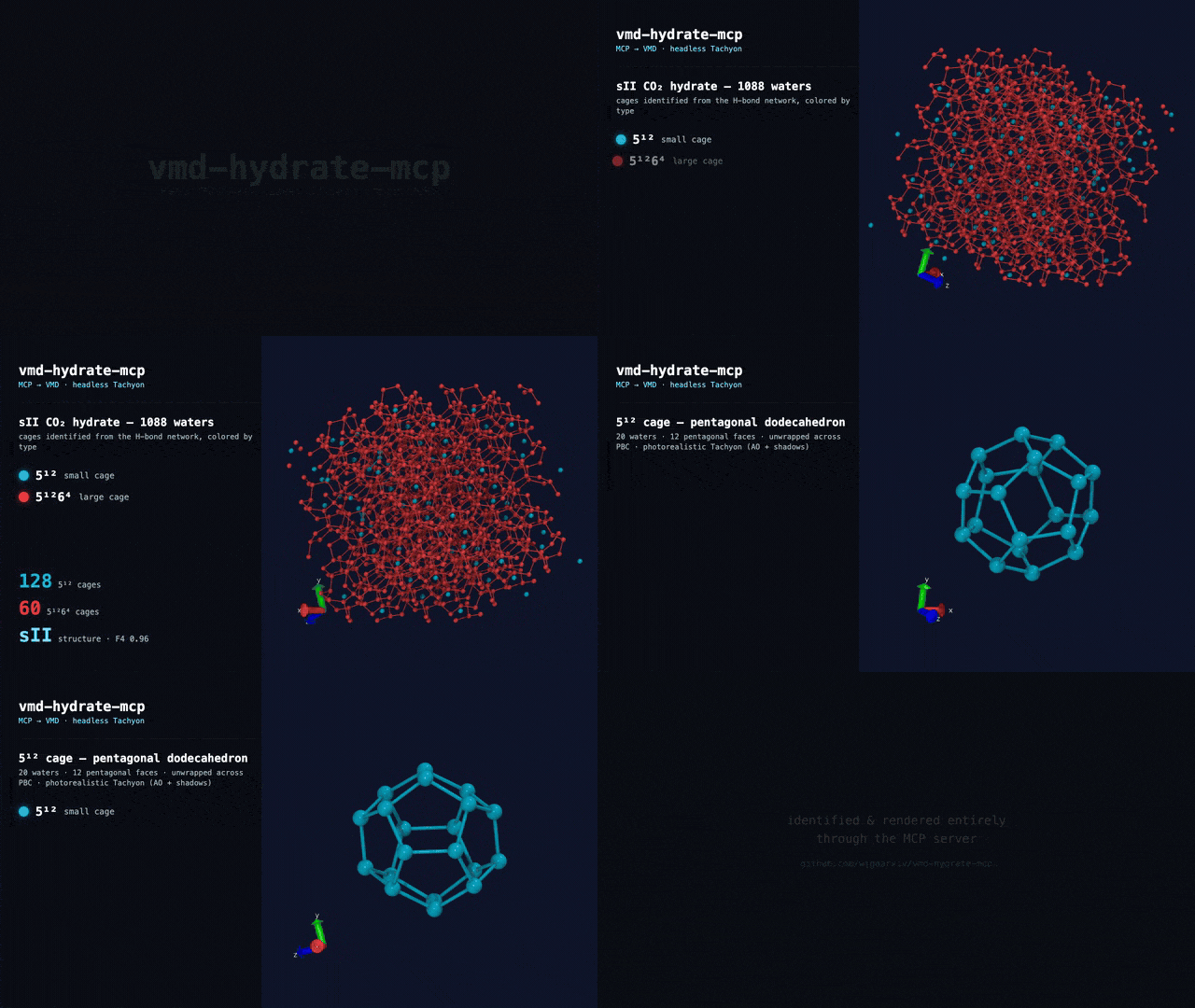
Every frame is a real headless VMD (Tachyon) render, driven entirely through the MCP server. The sII cages — 128 × 5¹² + 60 × 5¹²6⁴ — are identified by this repo, not mocked. · ▶ full-quality MP4
Features
- Clathrate Cage Identification -- find and classify hydrate cages (5¹², 5¹²6², 5¹²6⁴, …) from the H-bond network and label the crystal structure (sI/sII/sH). Validated on the sII benchmark (128 small cages, exact).
- Photorealistic, Style-by-Prompt Cage Rendering -- cages render with ambient occlusion + shadows, orthographic by default, each cage type in ONE unified color (a curated palette: 5¹²=cyan, 5¹²6⁴=red, …). Just ask: "show only the sII large cages in magenta with emphasized width" and the MCP filters, recolors, and thickens them.
- Stateful VMD Session -- a persistent VMD process (Tcl socket server) keeps your molecules, selections, and camera alive across tool calls -- no reloading on every command.
- Hydrate Order Parameters -- F3 (tetrahedrality) and F4 (⟨cos 3φ⟩) computed in pure NumPy, validated to the reference to 6 decimals (F4 = 0.926698 on the sII benchmark).
- H-bond Networks -- water–water hydrogen-bond graph with coordination stats, the substrate for cage identification.
- Headless Rendering -- CPU Tachyon ray-traced PNGs with no display or GPU, returned inline as images. Works on laptops, servers, and HPC.
- Attended (GUI) Mode -- run fully offscreen (default), or set
VMD_HYDRATE_MCP_DISPLAY=guito open a visible VMD window and watch Claude load, color, rotate, and render your system live. - GROMACS + LAMMPS -- one server ingests
.gro/.xtc/.trr, LAMMPS.data/dump, PDB, DCD, mmCIF. - Secure by Default -- filesystem allowlist + a Tcl command allowlist (not a bypassable denylist) + a loopback, token-gated control socket. No
run_tclfoot-gun exposed. - MCP-Native -- clean English tool names and typed outputs; works in Claude Desktop, Claude Code, and any MCP client.
Quick Start
[!IMPORTANT] Requires a local VMD install (2.0b1 or 1.9.4+) — this server drives your VMD; no registry or package ships it. On macOS, VMD lives inside a
.app, so setVMD_BINifvmdisn't on yourPATH. (The pure hydrate/measure tools still work without VMD.)
Install
Zero-install via uvx (recommended):
Or from source:
Register with an MCP client
Claude Code — one command:
Claude Desktop / any client — add to the mcpServers config (or commit a project .mcp.json):
[!IMPORTANT] Set
VMD_HYDRATE_MCP_ALLOW_DIR(os-path-separated) to the directories the server may read. All file arguments are realpath-checked against this allowlist — paths outside it are refused.
Attended (GUI) mode
By default the server drives VMD headless (offscreen). To instead open a real VMD window you can watch while Claude controls it live, add VMD_HYDRATE_MCP_DISPLAY=gui to the server's env:
Then ask things like "load prod.gro, show water as points and the surfactant as VDW, then slowly rotate it" — the window updates in real time via load_structure → add_representation → rotate_view. (Requires a local desktop session; the same Tcl socket drives both modes.)
MCP Tools
| Tool | Purpose | Backend |
|---|---|---|
vmd_status | VMD version + molecules loaded in the live session | VMD |
load_structure | Load a structure/trajectory (returns a molid) | VMD |
list_molecules | List loaded molecules | VMD |
set_representation | Style/color/material/selection for a molecule (replaces reps) | VMD |
add_representation | Layer another representation (multi-rep views) | VMD |
clear_representations | Remove all representations | VMD |
rotate_view / zoom_view / reset_view | Live camera control (visible in GUI mode) | VMD |
render | Headless PNG of the current view | VMD + Tachyon |
resolve_selection | Atom count for a selection (catches the 0-atom .gro trap) | MDAnalysis |
measure_geometry | Distance / angle / dihedral by atom index | MDAnalysis |
radius_of_gyration | Rg of a selection | MDAnalysis |
hydrate_order_params | F3 + F4 water order parameters | NumPy |
hbond_network | Water H-bond network + coordination | NumPy |
identify_cages | Cage counts (5¹²/5¹²6⁴/…) + sI/sII/sH structure | NumPy |
render_cages | Photorealistic cage render (AO+shadows, ortho); filter / recolor / emphasize cages by prompt | VMD + NumPy |
Usage
1. Analyze hydrate order in a trajectory frame
Returns f4_overall, f3_overall, water count, and a plain-language interpretation (crystalline / hydrate-like / liquid / ice).
2. Render a structure
Produces an inline PNG rendered headlessly with CPU Tachyon.
3. Inspect the H-bond network
Returns bond count and average coordination (≈4 for a well-formed clathrate).
4. Style hydrate cages by prompt
Renders a photorealistic, orthographic image of just the 5¹²6⁴ cages in magenta with thicker edges — the MCP maps this to render_cages(cage_types=["51264"], highlight_color="magenta", emphasis=True). Omit the filters and every cage type is drawn in its palette color (5¹²=cyan, 5¹²6⁴=red, …).
Does it really drive VMD?
Yes — and you can confirm it in one command. examples/verify.py runs the same code the MCP server exposes on a bundled sII CO₂-hydrate example: it pings the real VMD binary, identifies the cages, and renders them headlessly.
Expected output:
The images below are real, unretouched VMD renders from that pipeline (not illustrations):
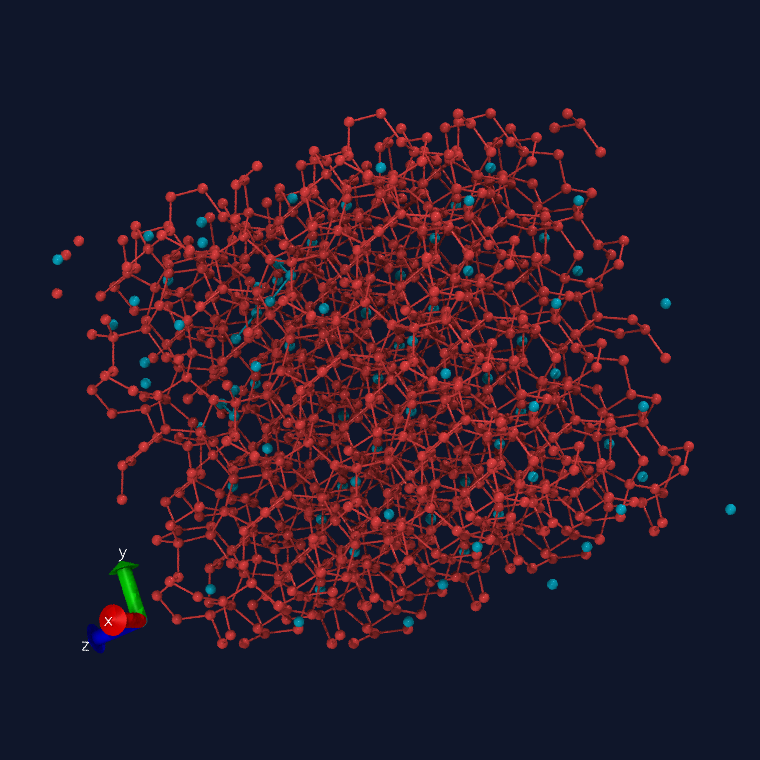 sII crystal — cages colored by type (cyan 5¹², red 5¹²6⁴), photorealistic Tachyon | 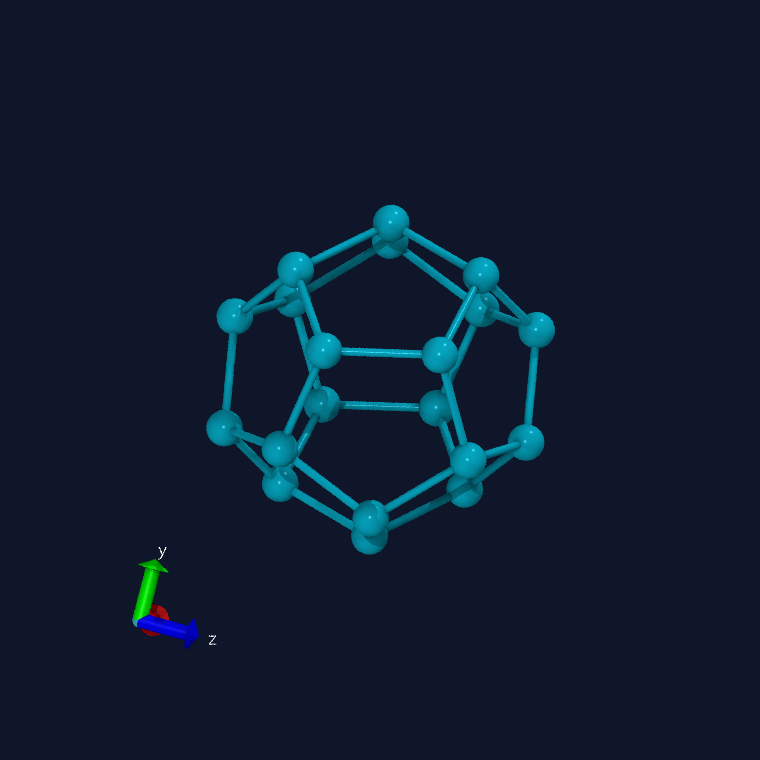 a single 5¹² dodecahedron, unwrapped across PBC (ambient occlusion + shadows) |
The demo video at the top is assembled from frames like these — see video/build_frames.py (drives VMD) and video/remotion/ (Remotion compositing). Rebuild it with python video/build_frames.py && cd video/remotion && npm i && npm run gif.
How It Works
Related MCP Servers
Reviews
No reviews yet — be the first to share how this listing worked for you.
Frequently Asked Questions about Vmd Hydrate MCP
AllMCPs Directory Badge
Showcase your server listing on GitHub or your project documentation. Embed this dynamic SVG badge to highlight official listing status and live engagement.
Badge Style:
Live Dynamic SVG Preview
Markdown (GitHub README)
[](https://allmcps.com/mcp/vmd-hydrate-mcp)HTML Embed
<a href="https://allmcps.com/mcp/vmd-hydrate-mcp"><img src="https://allmcps.com/api/badge/vmd-hydrate-mcp?style=directory" alt="Vmd Hydrate MCP on AllMCPs" /></a>Technical Specs & Signals
CategoryDeveloper Tools
36Quality signal: Fair · 36/100How this signal is calculated ▾
Server availabilityNot measured
Not scored for repo-hosted servers — we can't reach the running server, only its GitHub page. Hosted MCP endpoints are health-checked live.
Verified ownership10/20
Documentation & tools16/30
Adoption & activity1/15
Community engagement0/10
A guidance signal from public completeness & health data — not a user rating. New listings start lower and rise as they add docs, get verified, and grow adoption. Signals we can't observe for a listing are skipped, not counted against it.
Own this project?
This directory is pre-filled from public sources. Claim via GitHub README, site badge, or DNS TXT to unlock edit access and the Official badge and attach your website — proof is checked automatically, then reviewed by our team.
Free dofollow backlink: add your website and place the AllMCPs badge on it — no claim needed. We detect it automatically and keep it verified as long as the badge stays live.
Claim & get free dofollowShare & Embed
Add our SVG badge (dark/light directory styles) or embeddable widget to your site.