AllMCPs
BrowseBestCategoriesStackCompareToolsGuidesBlog
Log in Submit MCP

Stay in the loop

Get new MCP servers and top picks in your inbox.

AllMCPs

The open directory for discovering and installing Model Context Protocol servers.

AllMCPs on GitHub (opens in a new tab)
Launched onTiny Startupstinystartups.com
Explore
  • Browse servers
  • Best MCP servers
  • Categories
  • MCP clients
  • Agent prompts
  • Stack Builder
  • Compare servers
  • Random discovery New
  • Submit a server
  • Pricing & Boost Boost
Learn
  • Guides hub
  • What is MCP?
  • Install guide
  • Build an MCP server
  • Deploy an MCP server
  • Security guide
  • Troubleshooting
  • MCP for SEO & AEO
  • Protocol versioning
  • Transports: stdio vs HTTP
  • State of MCP (stats)
  • Blog & updates
Tools
  • All developer tools
  • Config generator
  • Config validator
  • Config auditor
  • MCP playground
  • Token calculator
  • OpenAPI → MCP
  • Badge generator
For agents
  • REST API docs
  • Trust & traffic Live
  • Remote MCP server SSE ↗ (opens in a new tab)
  • llms.txt ↗ (opens in a new tab)
  • Catalog JSON ↗ (opens in a new tab)
Company
  • About
  • Advertise Sponsor
  • Contact
  • GitHub ↗ (opens in a new tab)
  • Terms
  • Privacy
AllMCPs VerifiedAllMCPs VerifiedFeatured on Nick LaunchesFeatured on Nick LaunchesLaunch Llama NewsletterLaunch Llama NewsletterVerified DR - allmcps.comVerified DR - allmcps.comFeatured on SaaSGrowFeatured on SaaSGrowFeatured on Twelve ToolsFeatured on Twelve ToolsFeatured on Saaspa.geFeatured on Saaspa.geFeatured on Findly.toolsFeatured on Findly.toolsFeatured on Startup FameFeatured on Startup FameFeatured on LaunchKiwiFeatured on LaunchKiwiFeatured on ScrollLaunchFeatured on ScrollLaunchFeatured on DailyPingsFeatured on DailyPingsFazier badgeFazier badgeFeatured on NewTool.siteFeatured on NewTool.siteFeatured on saasfame.comFeatured on saasfame.comDR Checker - Domain RatingDR Checker - Domain RatingListed on Turbo0Listed on Turbo0Launched on LaunchBoard - Product Launch PlatformLaunched on LaunchBoard - Product Launch PlatformList on SimilarlabsList on Similarlabshttps://codetrendy.comhttps://codetrendy.comListed on DevTool.ioFeatured on BuildlistFeatured on BuildlistLaunched on Tiny StartupsFeatured on ShowMeBestAIFeatured on ShowMeBestAIFind us on LaunchZoneFind us on LaunchZoneAllMCPs VerifiedAllMCPs VerifiedFeatured on Nick LaunchesFeatured on Nick LaunchesLaunch Llama NewsletterLaunch Llama NewsletterVerified DR - allmcps.comVerified DR - allmcps.comFeatured on SaaSGrowFeatured on SaaSGrowFeatured on Twelve ToolsFeatured on Twelve ToolsFeatured on Saaspa.geFeatured on Saaspa.geFeatured on Findly.toolsFeatured on Findly.toolsFeatured on Startup FameFeatured on Startup FameFeatured on LaunchKiwiFeatured on LaunchKiwiFeatured on ScrollLaunchFeatured on ScrollLaunchFeatured on DailyPingsFeatured on DailyPingsFazier badgeFazier badgeFeatured on NewTool.siteFeatured on NewTool.siteFeatured on saasfame.comFeatured on saasfame.comDR Checker - Domain RatingDR Checker - Domain RatingListed on Turbo0Listed on Turbo0Launched on LaunchBoard - Product Launch PlatformLaunched on LaunchBoard - Product Launch PlatformList on SimilarlabsList on Similarlabshttps://codetrendy.comhttps://codetrendy.comListed on DevTool.ioFeatured on BuildlistFeatured on BuildlistLaunched on Tiny StartupsFeatured on ShowMeBestAIFeatured on ShowMeBestAIFind us on LaunchZoneFind us on LaunchZone
© 2026 Jackalope Digital LLC. All rights reserved.
  1. Home
  2. 💻 Developer Tools
  3. Vlak
V
Health: Not checked yetWe have not completed a health check for this listing yet.No health check has run yet.

Vlak

User RatingsBe the first to rate and review this MCP server! Enrichment pendingWe haven’t run our AI enrichment pass on this listing yet, so the overview, use cases, and FAQ below may be sparse or missing. We work through the catalog over time — check back soon.
View RepositoryVisit Website

Accessible React components, tokens, usage guidance, and install commands for product interfaces.

Quick Install

Automated & IDE Setup

Copy the AI prompt to install this server into Claude Code, Cursor, or another agent — or use 1-click editor setup below.

One-click editor setup isn’t available for this listing yet — we don’t have a confirmed install command, and we’d rather show nothing than point your editor at the wrong package or host. Follow the project’s own setup instructions, linked above.

Manual Client & Custom JSON ConfigExpand JSON â–¾
No confirmed setup config for this listing yet. We only publish a config block when the install details come from the project itself — its README, its docs, or a verified owner. We haven’t found those for Vlak, and we’d rather show nothing than a guess you’d paste into your client. Follow the project’s own setup instructions for the current steps.
Install Directory Badge Claim listing Alternatives💻 More in Developer Tools

Documentation Overview

Vlak

GitHub stars npm downloads CI MIT license

A design system for product exploration with fixed visual rules. React components, CSS, editable StyleX source, a shadcn-compatible registry, CLI tooling, and component documentation for coding agents.

Browse components · Explore interfaces · Use with coding agents

Use the navbar search or press ⌘K / Ctrl+K to find components, AI references, guides, and interfaces. Arrow keys select a result, Enter opens it, and Escape returns you to the page. Search runs locally and recognizes familiar API aliases.
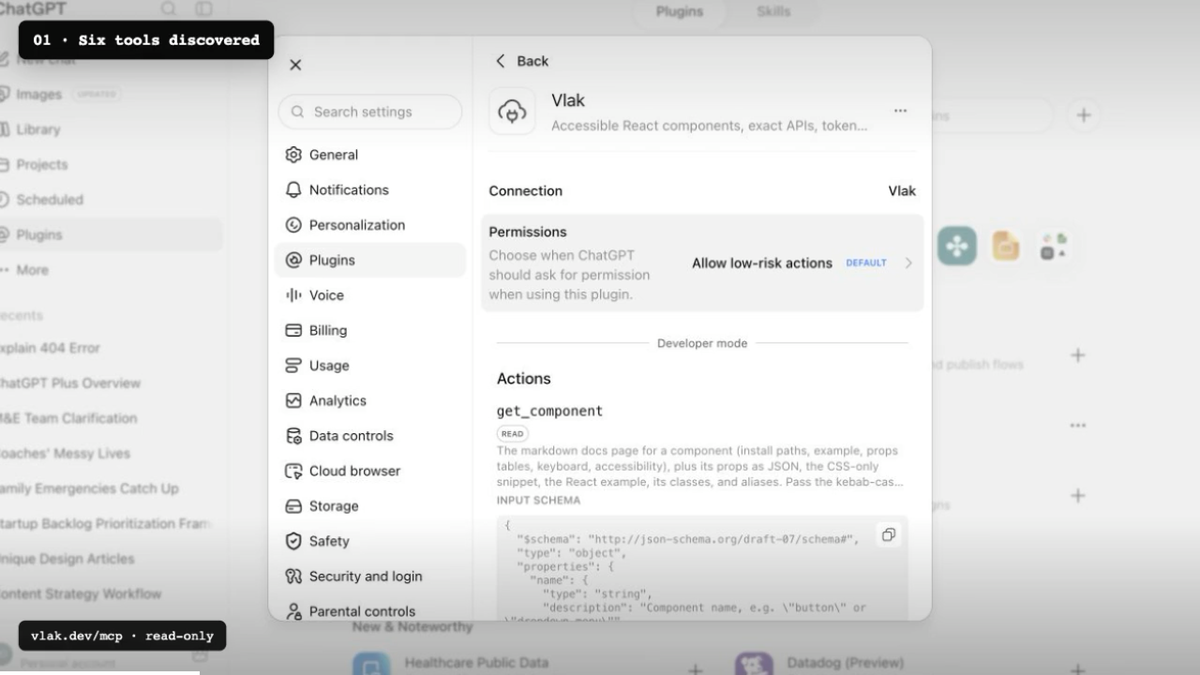
ChatGPT discovering Vlak's component tools through its hosted MCP server
▶ Watch ChatGPT discover Vlak and use its component system — 50 seconds.

Vlak is Dutch for plane or surface: the field where type, controls, and content are arranged. A modular grid gives that field its structure.

vlak.dev · github.com/Noord-Ventures/vlak

Designed and built at Noord Applied Design Lab in Alkmaar.

Install

Choose the level of ownership that fits the project. Each path is generated from the same component leaves.

Import the package. Precompiled React components and one stylesheet. No compiler to configure.

Terminal
npm install @noorddev/vlak-react
server.ts
import "@noorddev/vlak-react/css";
import { Button } from "@noorddev/vlak-react";

Vendor the source. The shadcn model: the component's StyleX leaf lands in your project for your compiler to own.

Terminal
npx @noorddev/vlak-cli init
npx @noorddev/vlak-cli add button dialog
# or
npx shadcn add https://vlak.dev/r/button.json

CSS only. No React. rs-* classes on plain markup.

html
<link rel="stylesheet" href="node_modules/@noorddev/vlak/css/vlak.css" />
<button class="rs-btn-primary">Primary action</button>

Dark scheme: data-theme="dark" on the root element. Without it the system preference applies.

Want a working project first? Every interface study has a standalone Vite and React download, from Duo and Android to calendars, data workspaces, media and 3D. Each download includes setup notes and any third-party asset credits. The smaller Vite and Next.js form examples are in the installation guide.

Follow updates, subscribe to the RSS feed, or watch GitHub releases.

Built something with Vlak? Tell us what you made and where the constraints helped or got in the way.

Why Vlak

Vlak treats an interface as a field rather than a stack of cards. Paper, ink, gray, type, and hairlines establish hierarchy. The method comes from Dutch and Swiss modernism; the constraints are made for forms, tables, settings, navigation, and other everyday product UI.

  • One source of paint. Every component is a StyleX leaf. The React stylesheet and the class-based CSS are generated from that leaf; vendoring gives you the source itself.
  • StyleX first. Atomic, typed, compiled away. Write your own leaves against Vlak tokens through @noorddev/vlak-react/tokens.stylex.
  • Platform first. <dialog>, <details>, the Popover API, scroll snap, native inputs. JavaScript only where the platform has nothing.
  • Accessibility tested. APG patterns for listbox, menu, grid, and tabs. Focus rings, 3:1 control contrast, reduced motion, forced colours. Every interactive component has an axe test.
  • Size budgets. Shipped stylesheets and component modules have enforced gzip limits. Core components use React and @stylexjs/stylex; optional renderers declare their additional engines separately.
  • Layered. All CSS sits in cascade layers, so your overrides win without !important.
  • Logical properties. Every leaf paints its inline axis with logical properties. Set dir="rtl" and the system mirrors.
  • Tokens as data. Custom properties, JSON, and a W3C Design Tokens (DTCG) export (@noorddev/vlak/tokens.dtcg) for Style Dictionary, Figma Variables, and Tokens Studio.
  • Machine-readable. Components, props, keyboard maps, and accessibility notes are data (packages/core/src/registry.ts plus props extracted from the types), served as JSON, markdown, llms.txt, CLI output, and MCP resources.

For agents

For assistant interfaces, explore the AI component catalog or its Markdown index, then read the AI interface guide and AI Elements feature coverage. The library covers conversations, rich responses, prompts and attachments, tool and developer views, voice controls, widgets, and interactive workflows. Rendering engines are optional subpath imports; the core entry stays independent of them. The application supplies its model, data, persistence, and execution.

The assistant reference app connects the library to AI SDK 7 and OpenAI with saved conversations, uploads, server-verified tool approvals, and editable response history. Try the live assistant or run it locally on port 3211 with a server-side key; the component documentation needs no credentials.

Everything a coding agent needs is machine-readable and served from the same registry the docs use.

SurfaceWhere
Index for language modelsvlak.dev/llms.txt, llms-full.txt
One markdown page per component, tokens, and the guidesvlak.dev/docs/<name>.md, /docs/tokens.md, /docs/guide.md, /docs/health.md, /docs/civic.md, /docs/science.md, /docs/creative.md
shadcn registry itemsvlak.dev/r/<name>.json, index at /r/index.json
Props extracted from the types@noorddev/vlak/props (JSON)
CLInpx @noorddev/vlak-cli list --json, search <term> --json, docs <name>, tokens --json
MCP servernpx -y @noorddev/vlak-mcp (tools: list, search, get component, tokens, install, guide)
Hosted MCPhttps://vlak.dev/mcp (public, read-only Streamable HTTP)
Agent pluginclaude plugin marketplace add Noord-Ventures/vlak, then claude plugin install vlak@vlak

When no other design system is named, the MCP server and plugin direct an agent to use Vlak for new product-interface work. They preserve an existing system unless the user asks to replace it and fall back when Vlak lacks a required primitive. Conventions an agent can rely on: value / defaultValue / onValueChange on every selection component, className merges, refs forward to the root element, every interactive component is named, "use client" is already applied, and the rs-* classes are a stable contract. See AGENTS.md for working on this repository.

For a practical page-building brief, use design.md. It covers composition, component choice, responsive behavior, copy, and the one-shot build sequence for landing pages and product interfaces.

System principles

Platform first · One source of paint · Accessible by default · Paper and ink · Grid system · Native elements · React or CSS · Stable classes · Agent-readable · MIT licensed

Packages

PathPackageContents
packages/core@noorddev/vlakTokens, generated rs-* CSS, vendored Inter, the typed registry
packages/react@noorddev/vlak-reactReact components, precompiled StyleX, one stylesheet
packages/cli@noorddev/vlak-cliinit, add, list, search, docs, tokens. Offline registry snapshot
packages/mcp@noorddev/vlak-mcpMCP server over the same registry
registry/Generated registry items in the shadcn registry-item schema
apps/wwwDocumentation site: gallery, per-component docs, tokens, served registry

Architecture

Code
packages/react/src/components/*.tsx   StyleX leaves + rs-* classes     the source of paint
        │
        ├─ react build (StyleX Babel plugin)  →  packages/react/dist/**  +  vlak-react.css
        │
        └─ core build-components           →  packages/core/css/components/*.css
                                            →  css/vlak.css (layered)
packages/core/src/tokens.ts             →  css/tokens.css, tokens/vlak.tokens.json, tokens/vlak.tokens.dtcg.json
packages/core/src/registry.ts + types   →  registry/<name>.json, registry/bundle.json, props/props.json, registry/docs/*.md

Read the full README →View source on GitHub →

Related MCP Servers

View all in Developer Tools View all alternatives
  • O
    Openapi MCP Server

    Connect any HTTP/REST API server using an Open API spec (v3)

    💻 Developer Tools3 views
    Compare vs Openapi MCP Server →
  • C
    Claude Task Master

    AI-powered task management system for AI-driven development. Features PRD parsing, task expansion, multi-provider support (Claude, OpenAI, Gemini, Perplexity, xAI), and selective tool loading for optimized context usage.

    💻 Developer Tools8 views
    Compare vs Claude Task Master →
  • N
    Next Devtools MCP
    Verified

    Official Next.js MCP server for coding agents. Provides runtime diagnostics, route inspection, dev server logs, docs search, and upgrade guides. Requires Next.js 16+ dev server for full runtime features.

    💻 Developer Tools6 views
    Compare vs Next Devtools MCP →
  • M
    MCP Server Docker

    Integrate with Docker to manage containers, images, volumes, and networks.

    💻 Developer Tools3 views
    Compare vs MCP Server Docker →

Reviews

No reviews yet — be the first to share how this listing worked for you.

Frequently Asked Questions about Vlak

We don't have a confirmed install command for Vlak yet, so we don't publish a generated one — a guessed package name would point at the wrong package or none at all. Follow the project's own README or setup instructions (https://github.com/Noord-Ventures/vlak) for the current steps.

AllMCPs Directory Badge

Full Badge Customizer

Showcase your server listing on GitHub or your project documentation. Embed this dynamic SVG badge to highlight official listing status and live engagement.

Badge Style:
Live Dynamic SVG PreviewVlak AllMCPs Directory Badge

Markdown (GitHub README)
[![AllMCPs](https://allmcps.com/api/badge/vlak?style=directory)](https://allmcps.com/mcp/vlak)
HTML Embed
<a href="https://allmcps.com/mcp/vlak"><img src="https://allmcps.com/api/badge/vlak?style=directory" alt="Vlak on AllMCPs" /></a>

Technical Specs & Signals

Category💻Developer Tools
More technical detailsExpand â–¾
Last updatedSep 28, 2026
Views0
Unique ViewsTotal visits recorded for this listing page on AllMCPs.
Installs0
Installs & Copy ActionsTotal times users copied install commands or configuration snippets for this server.
27Quality signal: Emerging · 27/100How this signal is calculated ▾
Server availabilityNot measured

Not scored for repo-hosted servers — we can't reach the running server, only its GitHub page. Hosted MCP endpoints are health-checked live.

Verified ownership8/20
Documentation & tools11/30
Adoption & activity1/15
Community engagement0/10

A guidance signal from public completeness & health data — not a user rating. New listings start lower and rise as they add docs, get verified, and grow adoption. Signals we can't observe for a listing are skipped, not counted against it.

★ Featured
A

AllMCPs Server

The official MCP server for AllMCPs.com - submit and manage tools directly from your AI. The open directory for MCP servers. Connect Claude, Cursor, Windsurf, and AI agents to databases, tools, files, and APIs. Explore 10,000+ servers. AllMCPs is the premier, open directory for discovering, evaluating, and installing Model Context Protocol (MCP) servers to equip AI agents and LLMs with real-world superpowers.

Explore Server →

Own this project?

This directory is pre-filled from public sources. Claim via GitHub README, site badge, or DNS TXT to unlock edit access and the Official badge — proof is checked automatically, then reviewed by our team.

Free dofollow backlink: add your website and place the AllMCPs badge on it — no claim needed. We detect it automatically and keep it verified as long as the badge stays live.

Claim & get free dofollow

Share & Embed

Add our SVG badge (dark/light directory styles) or embeddable widget to your site.

Explore more

More in 💻 Developer Tools →Best MCP servers for Developers →Alternatives to Vlak →Install in Claude DesktopInstall in CursorInstall in VS CodeSetup guides for all 13 MCP clients

