AllMCPs
BrowseBestCategoriesStackCompareToolsGuidesBlog
Log in Submit MCP

Stay in the loop

Get new MCP servers and top picks in your inbox.

AllMCPs

The open directory for discovering and installing Model Context Protocol servers.

AllMCPs on GitHub (opens in a new tab)
Launched onTiny Startupstinystartups.com
Explore
  • Browse servers
  • Best MCP servers
  • Categories
  • MCP clients
  • Agent prompts
  • Stack Builder
  • Compare servers
  • Random discovery New
  • Submit a server
  • Pricing & Boost Boost
Learn
  • Guides hub
  • What is MCP?
  • Install guide
  • Build an MCP server
  • Deploy an MCP server
  • Security guide
  • Troubleshooting
  • MCP for SEO & AEO
  • Protocol versioning
  • Transports: stdio vs HTTP
  • State of MCP (stats)
  • Blog & updates
Tools
  • All developer tools
  • Config generator
  • Config validator
  • Config auditor
  • MCP playground
  • Token calculator
  • OpenAPI β†’ MCP
  • Badge generator
For agents
  • REST API docs
  • Trust & traffic Live
  • Remote MCP server SSE β†— (opens in a new tab)
  • llms.txt β†— (opens in a new tab)
  • Catalog JSON β†— (opens in a new tab)
Company
  • About
  • Advertise Sponsor
  • Contact
  • GitHub β†— (opens in a new tab)
  • Terms
  • Privacy
AllMCPs VerifiedAllMCPs VerifiedFeatured on Nick LaunchesFeatured on Nick LaunchesLaunch Llama NewsletterLaunch Llama NewsletterVerified DR - allmcps.comVerified DR - allmcps.comFeatured on SaaSGrowFeatured on SaaSGrowFeatured on Twelve ToolsFeatured on Twelve ToolsFeatured on Saaspa.geFeatured on Saaspa.geFeatured on Findly.toolsFeatured on Findly.toolsFeatured on Startup FameFeatured on Startup FameFeatured on LaunchKiwiFeatured on LaunchKiwiFeatured on ScrollLaunchFeatured on ScrollLaunchFeatured on DailyPingsFeatured on DailyPingsFazier badgeFazier badgeFeatured on NewTool.siteFeatured on NewTool.siteFeatured on saasfame.comFeatured on saasfame.comDR Checker - Domain RatingDR Checker - Domain RatingListed on Turbo0Listed on Turbo0Launched on LaunchBoard - Product Launch PlatformLaunched on LaunchBoard - Product Launch PlatformList on SimilarlabsList on Similarlabshttps://codetrendy.comhttps://codetrendy.comListed on DevTool.ioFeatured on BuildlistFeatured on BuildlistLaunched on Tiny StartupsFeatured on ShowMeBestAIFeatured on ShowMeBestAIFind us on LaunchZoneFind us on LaunchZoneAllMCPs VerifiedAllMCPs VerifiedFeatured on Nick LaunchesFeatured on Nick LaunchesLaunch Llama NewsletterLaunch Llama NewsletterVerified DR - allmcps.comVerified DR - allmcps.comFeatured on SaaSGrowFeatured on SaaSGrowFeatured on Twelve ToolsFeatured on Twelve ToolsFeatured on Saaspa.geFeatured on Saaspa.geFeatured on Findly.toolsFeatured on Findly.toolsFeatured on Startup FameFeatured on Startup FameFeatured on LaunchKiwiFeatured on LaunchKiwiFeatured on ScrollLaunchFeatured on ScrollLaunchFeatured on DailyPingsFeatured on DailyPingsFazier badgeFazier badgeFeatured on NewTool.siteFeatured on NewTool.siteFeatured on saasfame.comFeatured on saasfame.comDR Checker - Domain RatingDR Checker - Domain RatingListed on Turbo0Listed on Turbo0Launched on LaunchBoard - Product Launch PlatformLaunched on LaunchBoard - Product Launch PlatformList on SimilarlabsList on Similarlabshttps://codetrendy.comhttps://codetrendy.comListed on DevTool.ioFeatured on BuildlistFeatured on BuildlistLaunched on Tiny StartupsFeatured on ShowMeBestAIFeatured on ShowMeBestAIFind us on LaunchZoneFind us on LaunchZone
Β© 2026 Jackalope Digital LLC. All rights reserved.
  1. Home
  2. πŸ’» Developer Tools
  3. VisualSpec
V
Health: Not checked yetWe have not completed a health check for this listing yet.No health check has run yet.

VisualSpec

User RatingsBe the first to rate and review this MCP server! Enrichment pendingWe haven’t run our AI enrichment pass on this listing yet, so the overview, use cases, and FAQ below may be sparse or missing. We work through the catalog over time β€” check back soon.
View Repository

Structured, constraint-aware visual generation and deterministic layout for AI agents

Quick Install

Automated & IDE Setup

Copy the AI prompt to install this server into Claude Code, Cursor, or another agent β€” or use 1-click editor setup below.

One-click editor setup isn’t available for this listing yet β€” we don’t have a confirmed install command, and we’d rather show nothing than point your editor at the wrong package or host. Follow the project’s own setup instructions, linked above.

Manual Client & Custom JSON ConfigExpand JSON β–Ύ
No confirmed setup config for this listing yet. We only publish a config block when the install details come from the project itself β€” its README, its docs, or a verified owner. We haven’t found those for VisualSpec, and we’d rather show nothing than a guess you’d paste into your client. Follow the project’s own setup instructions for the current steps.
Install Directory Badge Claim listing AlternativesπŸ’» More in Developer Tools

Documentation Overview

VisualSpec

Deterministic visual generation for AI agents.
AI creates the imagery. VisualSpec guarantees the typography and layout.
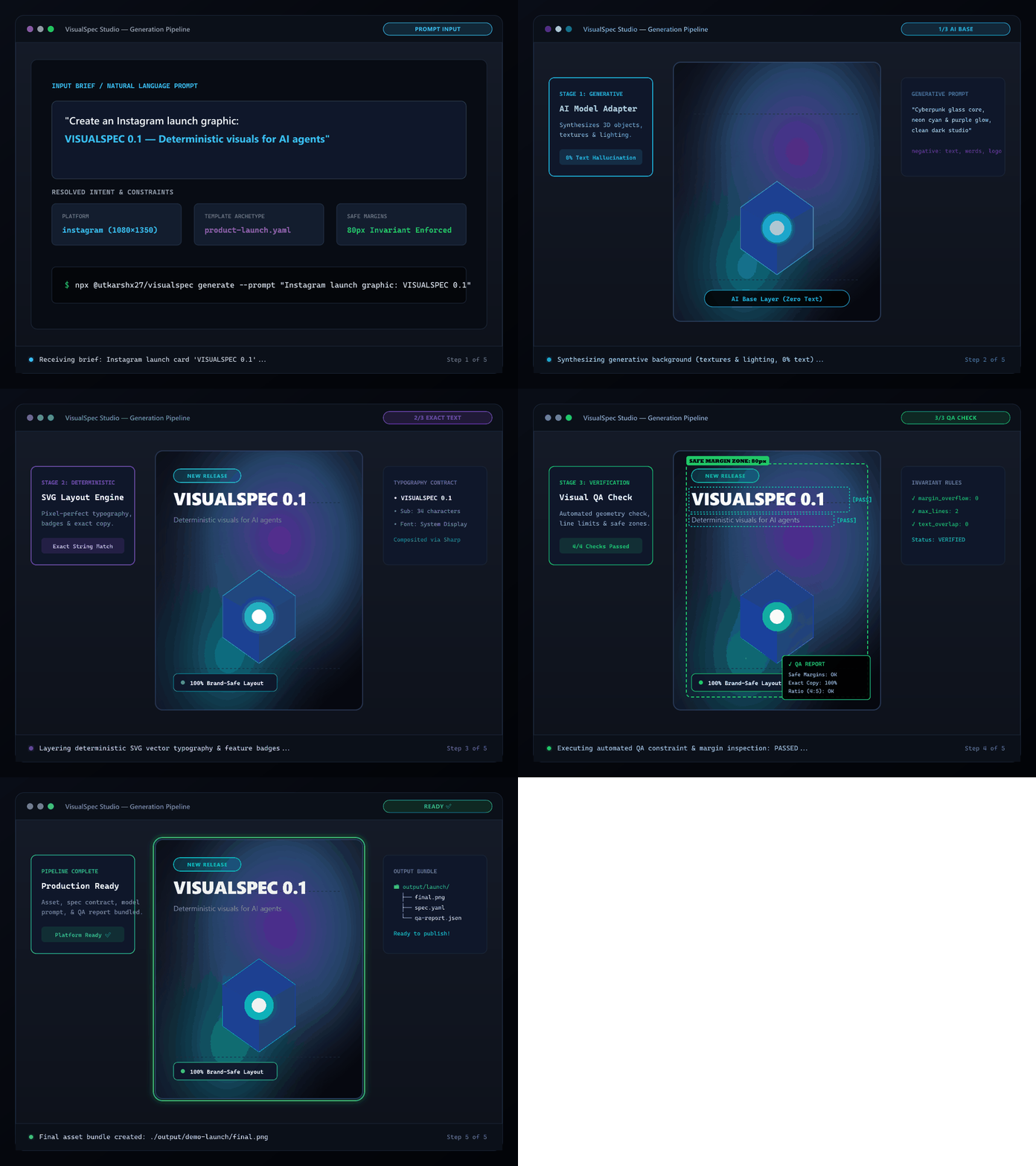
VisualSpec Generation Pipeline Demo

npm package MCP Registry License Tests GitHub stars

bash
# Instant workspace setup (no clone required)
npx @utkarshx27/visualspec init

# Launch local MCP Server for Cursor, Claude Desktop, or Antigravity
npx @utkarshx27/visualspec mcp

The Core Problem

Most image-generation workflows fail for social and marketing graphics because a single natural-language prompt is expected to handle too many concerns at once:

  • subject & background
  • exact typography & wording
  • platform dimensions & safe margins
  • visual hierarchy & negative space
  • brand color rules & constraints

Image models frequently hallucinate gibberish text, truncate words, or disregard composition rules.

The Solution: Layer Separation

VisualSpec separates generative concerns from deterministic concerns:

  1. Generative Layers (AI Models): Photography, 3D subjects, atmospheric backgrounds, textures, lighting.
  2. Deterministic Layers (Code & SVG Engine): Exact headlines, subtitles, badges, logos, metrics, safe margins, and layout rules.
  3. Structured Visual Spec: A machine-readable YAML specification that acts as the single contract.
  4. Visual QA & Targeted Repair: Verifies geometry, margins, and exact copy invariants, synthesizing localized repairs without regenerating entire scenes.
text
User Brief / Intent
       β”‚
       β–Ό
   Visual Spec (spec.yaml)
       β”‚
   β”Œβ”€β”€β”€β”΄β”€β”€β”€β”€β”€β”€β”€β”€β”€β”€β”€β”€β”€β”€β”
   β–Ό                  β–Ό
Platform Pack    Template Pack
   β”‚                  β”‚
   β””β”€β”€β”€β”¬β”€β”€β”€β”€β”€β”€β”€β”€β”€β”€β”€β”€β”€β”€β”˜
       β–Ό
   Spec Resolver
       β”‚
   β”Œβ”€β”€β”€β”΄β”€β”€β”€β”€β”€β”€β”€β”€β”€β”€β”€β”€β”€β”€β”€β”€β”€β”€β”€β”€β”€β”€β”€β”
   β–Ό                           β–Ό
Model Adapter           Deterministic Layout
(Generative Base)       (SVG Typography / Overlay)
   β”‚                           β”‚
   β””β”€β”€β”€β”¬β”€β”€β”€β”€β”€β”€β”€β”€β”€β”€β”€β”€β”€β”€β”€β”€β”€β”€β”€β”€β”€β”€β”€β”˜
       β–Ό
  Compositor (Sharp)
       β”‚
       β–Ό
   Visual QA (Constraints, Safe Margins, Exact Copy)
       β”‚
       β”œβ”€β”€ PASS ──► Final Asset Bundle
       β”‚
       └── FAIL ──► Targeted Repair Planner

Documentation

  • Architecture & Design Principles
  • VisualSpec Schema & Contract
  • MCP Server Setup (Cursor, Claude, Antigravity)
  • Adding a New Image Model Provider
  • Contributing Guidelines

Quickstart

Instant Run (No Install Required)

bash
# Initialize a new VisualSpec workspace
npx @utkarshx27/visualspec init

# Launch local MCP Server for Cursor, Claude, or Antigravity IDE
npx @utkarshx27/visualspec mcp

Or Install Globally

Terminal
npm install -g @utkarshx27/visualspec

# Use CLI commands directly
visual init
visual mcp

Or Build from Source

bash
git clone https://github.com/utkarshx27/visualspec.git
cd visualspec
npm install
npm run build

1. Initialize a Project

Terminal
npx @utkarshx27/visualspec init

2. Validate a Visual Spec

Terminal
npx @utkarshx27/visualspec validate examples/product-launch/spec.yaml

3. Inspect the Compiled Generation Prompt

Terminal
npx @utkarshx27/visualspec compile examples/product-launch/spec.yaml --provider openai

4. Deterministic Render (No API Key Required)

Render layout, typography, and background styling locally:

Terminal
npx @utkarshx27/visualspec render examples/product-launch/spec.yaml --output ./output/demo-launch

5. Run the Full Generation Pipeline

Terminal
npx @utkarshx27/visualspec generate examples/product-launch/spec.yaml --provider mock --output ./output/demo-launch

6. Verify Asset Quality with Visual QA

Terminal
npx @utkarshx27/visualspec check ./output/demo-launch/final.png --spec examples/product-launch/spec.yaml

Model Context Protocol (MCP) Server

VisualSpec runs as a native MCP server over stdio, enabling AI coding assistants (Cursor, Claude Code, Gemini CLI, and Antigravity IDE) to invoke visual tools directly:

bash
# Launch MCP server over stdio
npx @utkarshx27/visualspec mcp

# Or if installed globally
visual mcp

Available MCP Tools

  • visual_brief_to_spec: Convert natural language requests into valid VisualSpec YAML.
  • visual_validate_spec: Schema validation for specs.
  • visual_render: Deterministic layout & typography rendering (zero API key).
  • visual_generate: Full image model adapter + deterministic text overlay pipeline.
  • visual_check_qa: Inspect safe margins, line counts, dimensions, and invariants.
  • visual_repair: Automated diagnosis and localized typography/layout repair.
  • visual_list_resources: List supported platform packs and templates.

See the MCP Setup Guide for Cursor, Claude Desktop, and Antigravity IDE configuration snippets.


Output Bundle

Every generation creates a complete, reproducible debug bundle:

text
output/demo-launch/
β”œβ”€β”€ final.png                 # Platform-ready asset
β”œβ”€β”€ visual-spec.yaml          # Original input specification
β”œβ”€β”€ resolved-spec.yaml        # Full spec with platform & template rules applied
β”œβ”€β”€ generation-request.json   # Exact prompt and negative parameters sent to model
β”œβ”€β”€ qa-report.json            # Deterministic and constraint QA verification results
└── metadata.json             # Execution timestamps and file index

Supported Platforms & Templates

Platforms

  • Instagram: Feed portrait (1080x1350, 4:5), Square (1080x1080, 1:1), Story (1080x1920, 9:16).
  • LinkedIn: Feed portrait (1080x1350), Square (1080x1080), Banner (1200x628).
  • Generic Social: Universal 1:1, 4:5, and 16:9 social formats.

Templates

  • Product Launch: High-impact headline, feature pill, product visual region, supporting subhead.
  • Quote Card: Center-focused editorial quote, author attribution, minimal atmospheric glow.
  • Stat Card: Large numeric hero metric, descriptive label, and data context notes.

Agent Skills

The framework includes 10 standardized skill definitions located in ./skills/:

  • using-visualspec: Master workflow instructions.
  • visual-brief: Brief extraction and analysis.
  • visual-spec: YAML authoring and schema rules.
  • composition: Spatial hierarchy and negative space allocation.
  • typography: Font family classing and line budgeting.
  • strict-constraints: Invariant taxonomy and forbidden parameters.
  • social-instagram: Instagram-specific design reasoning.
  • social-linkedin: LinkedIn-specific design reasoning.
  • visual-qa: Automated inspection and validation.
  • visual-repair: Localized diagnosis and patch generation.

Roadmap & Open Contributions

We welcome contributions! Key areas to build together:

  • Additional Platforms: X/Twitter (Header, Post), YouTube Thumbnails, Pinterest, TikTok Cover.
  • Additional Templates: Testimonial, Product Comparison, Event Announcement, Feature List.
  • Additional Image Model Adapters: Flux, Stable Diffusion / ComfyUI, Midjourney API.
  • Brand Packs: Multi-brand palette overrides, custom font loading, logo clear space rules.
  • Visual Studio: Local web playground / viewer for real-time spec inspection and margin toggling.

Contributing

Contributions are welcome! Please check our:

  • Contributing Guidelines
  • Code of Conduct

Testing

Run the automated test suite:

Terminal
npm test

All 28 tests run offline without requiring any third-party API keys.


License

Licensed under the Apache License, Version 2.0.

Read the full README β†’View source on GitHub β†’

Related MCP Servers

View all in Developer Tools View all alternatives
  • O
    Openapi MCP Server

    Connect any HTTP/REST API server using an Open API spec (v3)

    πŸ’» Developer Tools3 views
    Compare vs Openapi MCP Server β†’
  • C
    Claude Task Master

    AI-powered task management system for AI-driven development. Features PRD parsing, task expansion, multi-provider support (Claude, OpenAI, Gemini, Perplexity, xAI), and selective tool loading for optimized context usage.

    πŸ’» Developer Tools8 views
    Compare vs Claude Task Master β†’
  • M
    MCP Server Docker

    Integrate with Docker to manage containers, images, volumes, and networks.

    πŸ’» Developer Tools3 views
    Compare vs MCP Server Docker β†’
  • N
    Next Devtools MCP
    Verified

    Official Next.js MCP server for coding agents. Provides runtime diagnostics, route inspection, dev server logs, docs search, and upgrade guides. Requires Next.js 16+ dev server for full runtime features.

    πŸ’» Developer Tools6 views
    Compare vs Next Devtools MCP β†’

Reviews

No reviews yet β€” be the first to share how this listing worked for you.

Frequently Asked Questions about VisualSpec

We don't have a confirmed install command for VisualSpec yet, so we don't publish a generated one β€” a guessed package name would point at the wrong package or none at all. Follow the project's own README or setup instructions (https://github.com/utkarshx27/visualspec) for the current steps.

AllMCPs Directory Badge

Full Badge Customizer

Showcase your server listing on GitHub or your project documentation. Embed this dynamic SVG badge to highlight official listing status and live engagement.

Badge Style:
Live Dynamic SVG PreviewVisualSpec AllMCPs Directory Badge

Markdown (GitHub README)
[![AllMCPs](https://allmcps.com/api/badge/visualspec?style=directory)](https://allmcps.com/mcp/visualspec)
HTML Embed
<a href="https://allmcps.com/mcp/visualspec"><img src="https://allmcps.com/api/badge/visualspec?style=directory" alt="VisualSpec on AllMCPs" /></a>

Technical Specs & Signals

CategoryπŸ’»Developer Tools
More technical detailsExpand β–Ύ
Last updatedSep 28, 2026
Views0
Unique ViewsTotal visits recorded for this listing page on AllMCPs.
Installs0
Installs & Copy ActionsTotal times users copied install commands or configuration snippets for this server.
27Quality signal: Emerging Β· 27/100How this signal is calculated β–Ύ
Server availabilityNot measured

Not scored for repo-hosted servers β€” we can't reach the running server, only its GitHub page. Hosted MCP endpoints are health-checked live.

Verified ownership8/20
Documentation & tools11/30
Adoption & activity1/15
Community engagement0/10

A guidance signal from public completeness & health data β€” not a user rating. New listings start lower and rise as they add docs, get verified, and grow adoption. Signals we can't observe for a listing are skipped, not counted against it.

β˜… Featured
M

Moxie Docs MCP

MCP & Agent Skills for Automated Documentation, and codebase conventions + context

Explore Server β†’

Own this project?

This directory is pre-filled from public sources. Claim via GitHub README, site badge, or DNS TXT to unlock edit access and the Official badge and attach your website β€” proof is checked automatically, then reviewed by our team.

Free dofollow backlink: add your website and place the AllMCPs badge on it β€” no claim needed. We detect it automatically and keep it verified as long as the badge stays live.

Claim & get free dofollow

Share & Embed

Add our SVG badge (dark/light directory styles) or embeddable widget to your site.

Explore more

More in πŸ’» Developer Tools β†’Best MCP servers for Developers β†’Alternatives to VisualSpec β†’Install in Claude DesktopInstall in CursorInstall in VS CodeSetup guides for all 13 MCP clients



