AllMCPs
BrowseBestCategoriesStackCompareToolsGuidesBlog
Log in Submit MCP

Stay in the loop

Get new MCP servers and top picks in your inbox.

AllMCPs

The open directory for discovering and installing Model Context Protocol servers.

Follow AllMCPs on X (opens in a new tab)AllMCPs on GitHub (opens in a new tab)
Launched onTiny Startupstinystartups.com
Explore
  • Browse servers
  • Best MCP servers
  • Categories
  • MCP clients
  • Agent prompts
  • Stack Builder
  • Compare servers
  • Random discovery New
  • Submit a server
  • Pricing & Boost Boost
Learn
  • Guides hub
  • What is MCP?
  • Install guide
  • Build an MCP server
  • Deploy an MCP server
  • Security guide
  • Troubleshooting
  • MCP for SEO & AEO
  • Protocol versioning
  • Blog & updates
Tools
  • All developer tools
  • Config generator
  • Config validator
  • Config auditor
  • MCP playground
  • Token calculator
  • OpenAPI β†’ MCP
  • Badge generator
For agents
  • REST API docs
  • Trust & traffic Live
  • Remote MCP server SSE β†— (opens in a new tab)
  • llms.txt β†— (opens in a new tab)
  • Catalog JSON β†— (opens in a new tab)
Company
  • About
  • Advertise Sponsor
  • Contact
  • X (@AllMCPs) β†— (opens in a new tab)
  • GitHub β†— (opens in a new tab)
  • Terms
  • Privacy
AllMCPs VerifiedAllMCPs VerifiedFeatured on Nick LaunchesFeatured on Nick LaunchesLaunch Llama NewsletterLaunch Llama NewsletterVerified DR - allmcps.comVerified DR - allmcps.comFeatured on SaaSGrowFeatured on SaaSGrowFeatured on Twelve ToolsFeatured on Twelve ToolsFeatured on Saaspa.geFeatured on Saaspa.geFeatured on Findly.toolsFeatured on Findly.toolsFeatured on Startup FameFeatured on Startup FameFeatured on LaunchKiwiFeatured on LaunchKiwiFeatured on ScrollLaunchFeatured on ScrollLaunchFeatured on DailyPingsFeatured on DailyPingsFazier badgeFazier badgeFeatured on NewTool.siteFeatured on NewTool.siteFeatured on saasfame.comFeatured on saasfame.comDR Checker - Domain RatingDR Checker - Domain RatingListed on Turbo0Listed on Turbo0Launched on LaunchBoard - Product Launch PlatformLaunched on LaunchBoard - Product Launch PlatformList on SimilarlabsList on Similarlabshttps://codetrendy.comhttps://codetrendy.comListed on DevTool.ioFeatured on BuildlistFeatured on BuildlistLaunched on Tiny StartupsFeatured on ShowMeBestAIFeatured on ShowMeBestAIFind us on LaunchZoneFind us on LaunchZoneAllMCPs VerifiedAllMCPs VerifiedFeatured on Nick LaunchesFeatured on Nick LaunchesLaunch Llama NewsletterLaunch Llama NewsletterVerified DR - allmcps.comVerified DR - allmcps.comFeatured on SaaSGrowFeatured on SaaSGrowFeatured on Twelve ToolsFeatured on Twelve ToolsFeatured on Saaspa.geFeatured on Saaspa.geFeatured on Findly.toolsFeatured on Findly.toolsFeatured on Startup FameFeatured on Startup FameFeatured on LaunchKiwiFeatured on LaunchKiwiFeatured on ScrollLaunchFeatured on ScrollLaunchFeatured on DailyPingsFeatured on DailyPingsFazier badgeFazier badgeFeatured on NewTool.siteFeatured on NewTool.siteFeatured on saasfame.comFeatured on saasfame.comDR Checker - Domain RatingDR Checker - Domain RatingListed on Turbo0Listed on Turbo0Launched on LaunchBoard - Product Launch PlatformLaunched on LaunchBoard - Product Launch PlatformList on SimilarlabsList on Similarlabshttps://codetrendy.comhttps://codetrendy.comListed on DevTool.ioFeatured on BuildlistFeatured on BuildlistLaunched on Tiny StartupsFeatured on ShowMeBestAIFeatured on ShowMeBestAIFind us on LaunchZoneFind us on LaunchZone
Β© 2026 Jackalope Digital LLC. All rights reserved.
  1. Home
  2. πŸ’» Developer Tools
  3. Vinv
V
Health: Not checked yetWe have not completed a health check for this listing yet.No health check has run yet.

Vinv

User RatingsBe the first to rate and review this MCP server! Enrichment pendingWe haven’t run our AI enrichment pass on this listing yet, so the overview, use cases, and FAQ below may be sparse or missing. We work through the catalog over time β€” check back soon.
View Repository

Vinv runs, tests, and finds issues in your services β€” with zero code changes.

Quick Install

Automated & IDE Setup

Copy the AI prompt to install this server into Claude Code, Cursor, or another agent β€” or use 1-click editor setup below.

Add to CursorAdd to VS Code
Manual Client & Custom JSON ConfigExpand JSON β–Ύ

Client Config & Setup

Choose your client or environment
Target File:~/Library/Application Support/Claude/claude_desktop_config.json
claude_desktop_config.json
{
  "mcpServers": {
    "vinv": {
      "command": "npx",
      "args": [
        "-y",
        "vinv"
      ]
    }
  }
}

πŸ’‘ Paste the JSON block into your client's configuration file under mcpServers, then restart the application.

Install Directory Badge Claim listing AlternativesπŸ’» More in Developer Tools

Documentation Overview

License Version Downloads Tests Open issues 100% local

VinvAI

Tools for AI agents to test, fix and optimise your codebase.

Vinv connects runtime traces to the exact source that produced them, hands that evidence to the coding agent you already use, then re-runs the code to prove the fix actually works. It's not another coding agent β€” it's the evidence layer under the one you already use: your agent proposes, Vinv verifies.


Editor extension
one click β€” install in

Install in VS Code Install in Cursor Install in Windsurf Install in any other IDE

MCP server
16 tools β€” add to

Add to Cursor Add to VS Code Add to any other MCP client


See it in action Β· What it does Β· Under the hood Β· 2-min demo


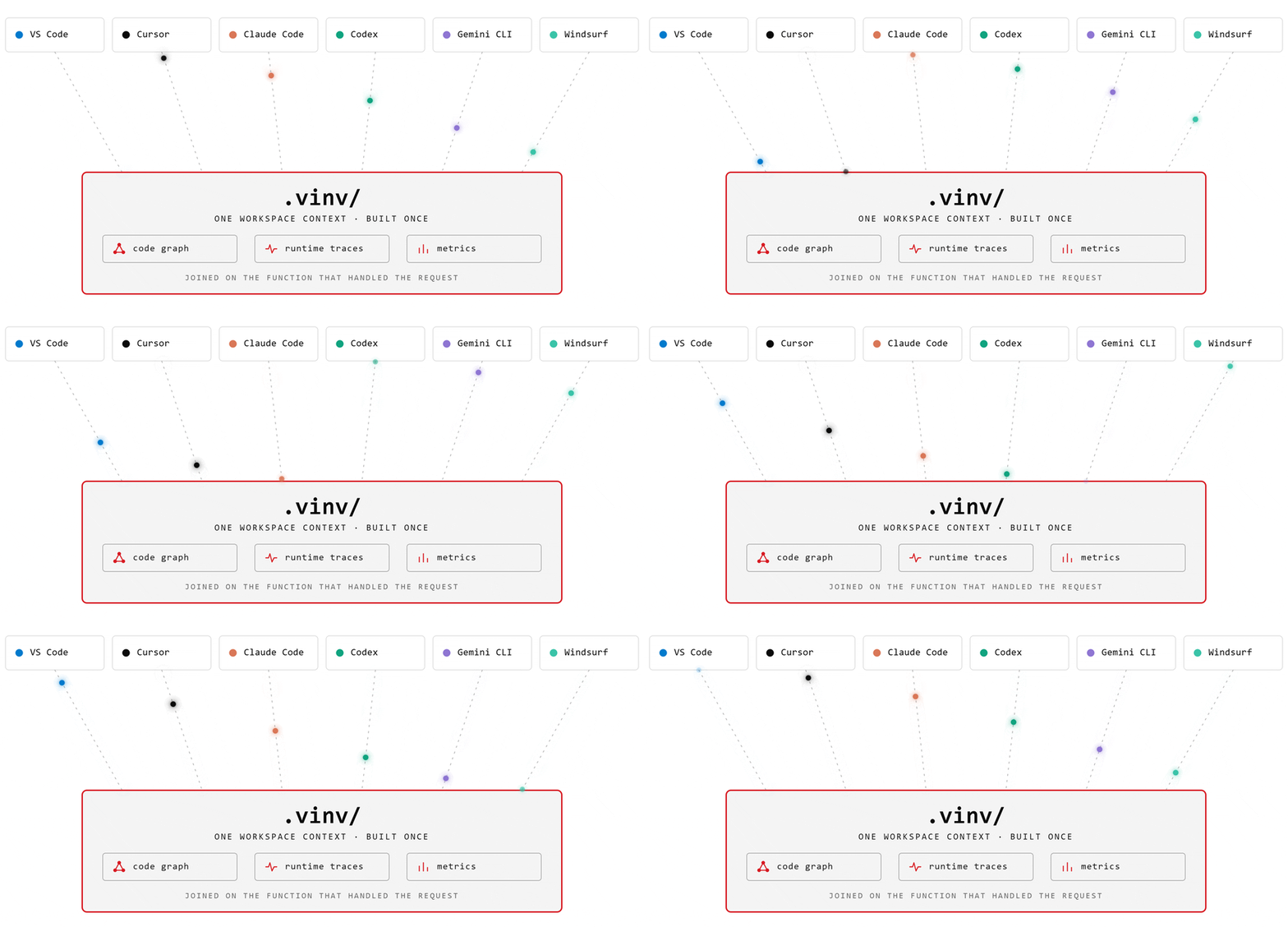
Six clients β€” VS Code, Cursor, Claude Code, Codex, Gemini CLI and Windsurf β€” all reading one workspace context in .vinv/: the code graph, runtime traces and metrics, joined on the function that handled each request

One workspace context, built once β€” every agent reads the same .vinv/ store.


Why Vinv

84% of developers now use or plan to use AI coding tools β€” but more of them distrust the output (46%) than trust it (33%), and distrust nearly doubled in a year (Stack Overflow 2025, 49k developers).

The reason is familiar: the agent edits the wrong handler, invents return shapes, then grades its own homework while the server won't even start. Or it loops β€” test fails, agent edits the same function, test fails again β€” burning your context window on "let me verify."

Both failures share one root cause: the agent has never watched your code run. It argues from static text.

The industry automated writing code and left proving it entirely manual. Vinv automates the proving β€” and only then the finding and the fixing.

Install

Vinv works three ways β€” an editor extension, a CLI, or an MCP server for any agent. All three share the same local engines.

Editor extension

One click β€” install from vinv.ai, which opens the extension directly in your editor (VS Code, Cursor, Windsurf, VSCodium, Trae and Insiders). The listing lives on Open VSX and the VS Code Marketplace.

Or from your editor's CLI:

EditorCommand
VS Codecode --install-extension VinvAI.VinvAI
Cursorcursor --install-extension VinvAI.VinvAI
Windsurfwindsurf --install-extension VinvAI.VinvAI
VSCodiumcodium --install-extension VinvAI.VinvAI
Traetrae --install-extension VinvAI.VinvAI
VS Code Insiderscode-insiders --install-extension VinvAI.VinvAI

First run builds the engines β€” about 3 minutes, mostly compiling the Rust index; it also fetches a one-time ~100 MB local embedding model (uv and Rust required). First trace lands about a minute after that; everything after is seconds.

CLI (Python engines)

Terminal
pip install vinv          # every engine as a console script
# or run one with zero install:
uvx --from vinv exerciser campaign <repo> --budget 20

MCP server (any agent)

Give Claude Code, Cursor, or any MCP client Vinv's tools β€” one global config that finds your open workspace automatically via MCP roots.

Claude Code, Codex, Gemini CLI β€” installed once for every folder you open, not just the current one:

Terminal
claude mcp add --scope user vinv -- npx -y vinv-mcp
bash
codex mcp add vinv -- npx -y vinv-mcp
bash
gemini mcp add --scope user vinv npx -- -y vinv-mcp

Claude Code defaults to the current directory and Gemini CLI to the current project, so both take --scope user; Codex always writes to ~/.codex/config.toml and has no scope flag.

Other clients: add { "command": "npx", "args": ["-y", "vinv-mcp"] } under mcpServers.vinv. See vinv-mcp β€” 16 tools: semantic search, dead code, fault localization, runtime values/slices/coverage, and the verify/optimize loop.

Build from source β€” for contributors
bash
git clone https://github.com/VinvAI/VinvAI ~/.vinv/engines && cd ~/.vinv/engines && ./install.sh

Windows (PowerShell):

powershell
git clone https://github.com/VinvAI/VinvAI $HOME\.vinv\engines; cd $HOME\.vinv\engines; .\install.ps1

The loop, in one picture

Run β†’ Test β†’ Find β†’ Prove. Point Vinv at a Python repo; it does the rest β€” no code changes, no API keys.

Vinv's nine stages around your coding agent β€” bring up, trace, index, map, exercise, find, dispatch, verify, learn
mermaid
flowchart LR
  T[Trace] --> I[Index] --> S[Serve MCP] --> V[Verify] --> L[Learn] --> T
  • Run β€” brings every service up under tracing with zero edits, capturing timings, arguments, return values and call trees from the real run.
  • Test β€” drives real requests through every endpoint (valid, boundary, negative, authenticated) and banks each response as a regression case.
  • Find β€” surfaces what actually broke or slowed down β€” server errors, crashes, latency hotspots, dead code β€” each tied to the exact source line.
  • Prove β€” hands the evidence to the agent you already use, then verifies its fix against acceptance tests written before the fix that it never sees. A "faster" change that alters any output is auto-reverted.

Your agent is the only LLM β€” no new bill, no model picker, no provider keys. See the full walkthrough on vinv.ai/#under-the-hood.

See it in action

Not a lab benchmark β€” real findings, filed on real projects (scikit-learn, watermarks-remover, semantica, FastAPI, Typer, smolagents), every one with an upstream thread you can open. All of it driven by Cursor running Composer 2.5 with Vinv installed β€” not a frontier model. The evidence did the work, not the model. The full set with screenshots: vinv.ai/#catches.

Dead code β€” proven by what never ran

Static tools only prove "nothing references this." Vinv proves "no capture ever executed this," carries each untraced island with the live callers that still point at it, and lets your agent return the verdict β€” integrate, delete, or keep.

UpstreamWhat Vinv caughtStatus
scikit-learn#34790Unused _find_smallest_angle helper in _ridge.py, stranded after a refactorβœ… merged β€” "thanks for the clean-up"
semantica#117613 unreferenced symbols across 9 files (289 deletions, 0 insertions)βœ… merged β€” review restored 2 as deprecated
fastapi/typer#1937Unused OptionHelpExtra TypedDict in the vendored Clickβœ… maintainer-confirmed

Read the full README β†’View source on GitHub β†’

Related MCP Servers

View all in Developer Tools View all alternatives
  • Codealive MCP logoCodealive MCP

    Semantic code search and analysis from CodeAlive for AI assistants and agents.

    πŸ’» Developer Tools0 views
    Compare vs Codealive MCP β†’
  • PraisonAI logoPraisonAI

    AI Agents Framework with Self Reflection and MCP support

    πŸ’» Developer Tools1 views
    Compare vs PraisonAI β†’
  • TokenSave logoTokenSave

    Code intelligence for 15+ languages: semantic graph queries instead of file reads. 37 MCP tools.

    πŸ’» Developer Tools0 views
    Compare vs TokenSave β†’
  • Microsoft Learn MCP logoMicrosoft Learn MCP

    Official Microsoft Learn MCP Server – real-time, trusted docs & code samples for AI and LLMs.

    πŸ’» Developer Tools0 views
    Compare vs Microsoft Learn MCP β†’

Reviews

No reviews yet β€” be the first to share how this listing worked for you.

Frequently Asked Questions about Vinv

Add the following block to your claude_desktop_config.json under mcpServers: "mcpServers": { "vinv": { "command": "npx", "args": ["-y", "vinv"] } }

AllMCPs Directory Badge

Full Badge Customizer

Showcase your server listing on GitHub or your project documentation. Embed this dynamic SVG badge to highlight official listing status and live engagement.

Badge Style:
Live Dynamic SVG PreviewVinv AllMCPs Directory Badge

Markdown (GitHub README)
[![AllMCPs](https://allmcps.com/api/badge/vinv?style=directory)](https://allmcps.com/mcp/vinv)
HTML Embed
<a href="https://allmcps.com/mcp/vinv"><img src="https://allmcps.com/api/badge/vinv?style=directory" alt="Vinv on AllMCPs" /></a>

Technical Specs & Signals

CategoryπŸ’»Developer Tools
More technical detailsExpand β–Ύ
TransportSTDIO
RuntimeNode.js
Last updatedSep 7, 2026
Views0
Unique ViewsTotal visits recorded for this listing page on AllMCPs.
Installs0
Installs & Copy ActionsTotal times users copied install commands or configuration snippets for this server.
27Quality signal: Emerging Β· 27/100How this signal is calculated β–Ύ
Server availabilityNot measured

Not scored for repo-hosted servers β€” we can't reach the running server, only its GitHub page. Hosted MCP endpoints are health-checked live.

Verified ownership8/20
Documentation & tools11/30
Adoption & activity1/15
Community engagement0/10

A guidance signal from public completeness & health data β€” not a user rating. New listings start lower and rise as they add docs, get verified, and grow adoption. Signals we can't observe for a listing are skipped, not counted against it.

β˜… Spotlight Slot

Feature Your MCP Server

Get maximum visibility for your server across our directory, search results, and detail pages.

Spotlight Your Server

Own this project?

This directory is pre-filled from public sources. Claim via GitHub README, site badge, or DNS TXT to unlock edit access and the Official badge and attach your website β€” proof is checked automatically, then reviewed by our team.

Free dofollow backlink: add your website and place the AllMCPs badge on it β€” no claim needed. We detect it automatically and keep it verified as long as the badge stays live.

Claim & get free dofollow

Share & Embed

Add our SVG badge (dark/light directory styles) or embeddable widget to your site.

Explore more

More in πŸ’» Developer Tools β†’Best MCP servers for Developers β†’Alternatives to Vinv β†’Install in Claude DesktopInstall in CursorInstall in VS Code