AllMCPs
BrowseBestCategoriesStackCompareToolsGuidesBlog
Log in Submit MCP

Stay in the loop

Get new MCP servers and top picks in your inbox.

AllMCPs

The open directory for discovering and installing Model Context Protocol servers.

AllMCPs on GitHub (opens in a new tab)
Launched onTiny Startupstinystartups.com
Explore
  • Browse servers
  • Best MCP servers
  • Categories
  • MCP clients
  • Agent prompts
  • Stack Builder
  • Compare servers
  • Random discovery New
  • Submit a server
  • Pricing & Boost Boost
Learn
  • Guides hub
  • What is MCP?
  • Install guide
  • Build an MCP server
  • Deploy an MCP server
  • Security guide
  • Troubleshooting
  • MCP for SEO & AEO
  • Protocol versioning
  • Blog & updates
Tools
  • All developer tools
  • Config generator
  • Config validator
  • Config auditor
  • MCP playground
  • Token calculator
  • OpenAPI β†’ MCP
  • Badge generator
For agents
  • REST API docs
  • Trust & traffic Live
  • Remote MCP server SSE β†— (opens in a new tab)
  • llms.txt β†— (opens in a new tab)
  • Catalog JSON β†— (opens in a new tab)
Company
  • About
  • Advertise Sponsor
  • Contact
  • GitHub β†— (opens in a new tab)
  • Terms
  • Privacy
AllMCPs VerifiedAllMCPs VerifiedFeatured on Nick LaunchesFeatured on Nick LaunchesLaunch Llama NewsletterLaunch Llama NewsletterVerified DR - allmcps.comVerified DR - allmcps.comFeatured on SaaSGrowFeatured on SaaSGrowFeatured on Twelve ToolsFeatured on Twelve ToolsFeatured on Saaspa.geFeatured on Saaspa.geFeatured on Findly.toolsFeatured on Findly.toolsFeatured on Startup FameFeatured on Startup FameFeatured on LaunchKiwiFeatured on LaunchKiwiFeatured on ScrollLaunchFeatured on ScrollLaunchFeatured on DailyPingsFeatured on DailyPingsFazier badgeFazier badgeFeatured on NewTool.siteFeatured on NewTool.siteFeatured on saasfame.comFeatured on saasfame.comDR Checker - Domain RatingDR Checker - Domain RatingListed on Turbo0Listed on Turbo0Launched on LaunchBoard - Product Launch PlatformLaunched on LaunchBoard - Product Launch PlatformList on SimilarlabsList on Similarlabshttps://codetrendy.comhttps://codetrendy.comListed on DevTool.ioFeatured on BuildlistFeatured on BuildlistLaunched on Tiny StartupsFeatured on ShowMeBestAIFeatured on ShowMeBestAIFind us on LaunchZoneFind us on LaunchZoneAllMCPs VerifiedAllMCPs VerifiedFeatured on Nick LaunchesFeatured on Nick LaunchesLaunch Llama NewsletterLaunch Llama NewsletterVerified DR - allmcps.comVerified DR - allmcps.comFeatured on SaaSGrowFeatured on SaaSGrowFeatured on Twelve ToolsFeatured on Twelve ToolsFeatured on Saaspa.geFeatured on Saaspa.geFeatured on Findly.toolsFeatured on Findly.toolsFeatured on Startup FameFeatured on Startup FameFeatured on LaunchKiwiFeatured on LaunchKiwiFeatured on ScrollLaunchFeatured on ScrollLaunchFeatured on DailyPingsFeatured on DailyPingsFazier badgeFazier badgeFeatured on NewTool.siteFeatured on NewTool.siteFeatured on saasfame.comFeatured on saasfame.comDR Checker - Domain RatingDR Checker - Domain RatingListed on Turbo0Listed on Turbo0Launched on LaunchBoard - Product Launch PlatformLaunched on LaunchBoard - Product Launch PlatformList on SimilarlabsList on Similarlabshttps://codetrendy.comhttps://codetrendy.comListed on DevTool.ioFeatured on BuildlistFeatured on BuildlistLaunched on Tiny StartupsFeatured on ShowMeBestAIFeatured on ShowMeBestAIFind us on LaunchZoneFind us on LaunchZone
Β© 2026 Jackalope Digital LLC. All rights reserved.
  1. Home
  2. πŸŽ₯ Multimedia Process
  3. Vidin
V
Health: Not checked yetWe have not completed a health check for this listing yet.No health check has run yet.

Vidin

User RatingsBe the first to rate and review this MCP server! Enrichment pendingWe haven’t run our AI enrichment pass on this listing yet, so the overview, use cases, and FAQ below may be sparse or missing. We work through the catalog over time β€” check back soon.
View Repository

Turn a screen recording into agent-readable annotated keyframes. MCP server + CLI on ffmpeg.

Quick Install

Automated & IDE Setup

Copy the AI prompt to install this server into Claude Code, Cursor, or another agent β€” or use 1-click editor setup below.

Add to CursorAdd to VS Code
Manual Client & Custom JSON ConfigExpand JSON β–Ύ

Client Config & Setup

Choose your client or environment
Target File:~/Library/Application Support/Claude/claude_desktop_config.json
claude_desktop_config.json
{
  "mcpServers": {
    "vidin": {
      "command": "npx",
      "args": [
        "-y",
        "vidin"
      ]
    }
  }
}

πŸ’‘ Paste the JSON block into your client's configuration file under mcpServers, then restart the application.

Install Directory Badge Claim listing AlternativesπŸŽ₯ More in Multimedia Process

Documentation Overview

vidin

Turn a video into something a coding agent can actually read.

Claude Code, Codex and friends accept images, not video. So when a bug report arrives as a screen recording, the video is dead weight β€” someone has to watch it and retype what happened. vidin watches it instead: it converts the recording into a small set of annotated keyframes plus a written timeline, and serves them to agents over MCP.
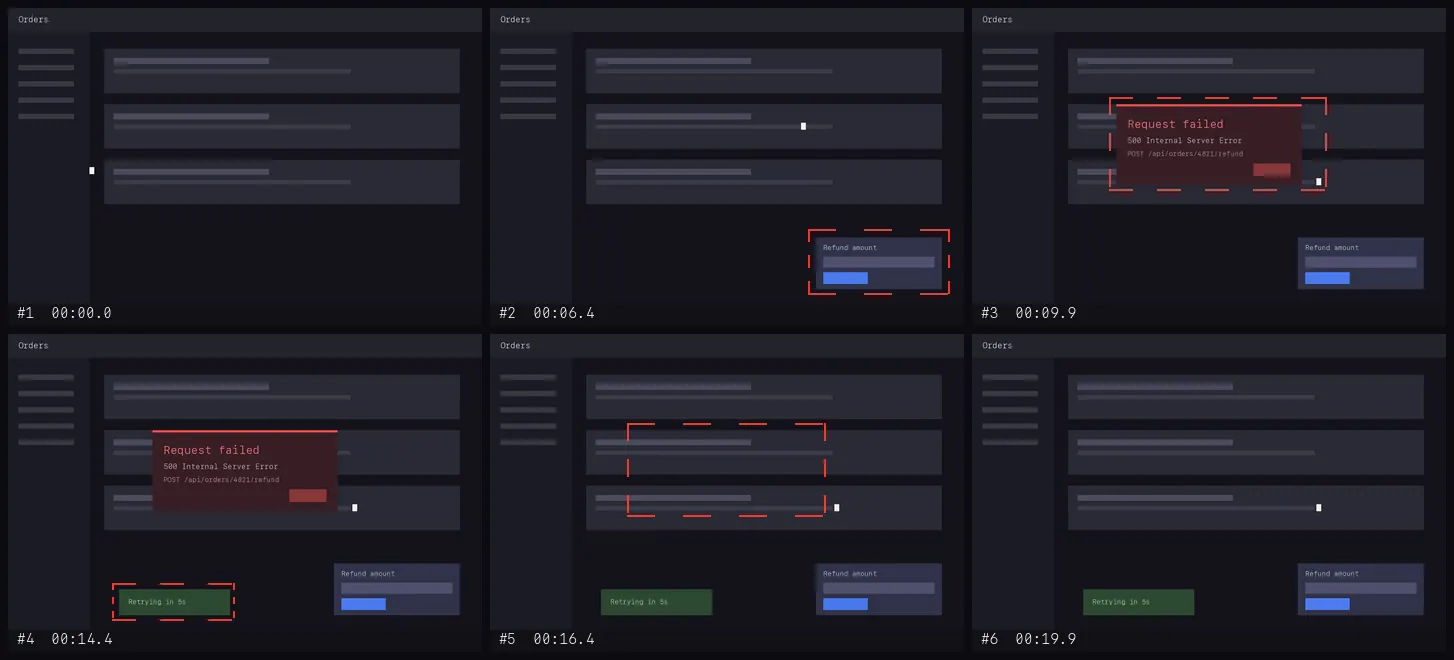
A 20-second recording condensed to six annotated frames

A 20-second recording in, six frames out: the refund panel, the 500 dialog, the retry toast, the recovery β€” each boxed and timestamped. (The clip is vidin's synthetic test fixture.)

  • Event-driven, not one-frame-per-second. A frame is kept when the screen changes and then comes to rest. Three minutes of someone reading costs almost nothing; every real UI event is captured.
  • Fast. A 3-minute 1080p recording takes ~4 seconds on an M-series Mac. An hour-long one costs time, not RAM.
  • One command to run. npx @teunlao/vidin β€” all it asks of the machine is ffmpeg; no sharp, no headless browser, no native image library.
  • Shaped for agent context. The MCP tools return a written report and one contact sheet first; full-detail frames only for the moments that turn out to matter.
  • Timestamps you can scrub to. An agent can say "the error appears at 00:41.2" and you jump straight there in the original file.

Quickstart

sh
brew install ffmpeg        # + yt-dlp, only if you'll pass URLs

Hook it into Claude Code:

Terminal
claude mcp add vidin -- npx -y @teunlao/vidin mcp

Or in .mcp.json / ~/.codex/config.toml equivalents:

config.json
{
  "mcpServers": {
    "vidin": { "command": "npx", "args": ["-y", "@teunlao/vidin", "mcp"] }
  }
}

Or straight from the shell:

Terminal
npx @teunlao/vidin ~/Desktop/bug.mov       # β†’ ./.vidin/bug/
npm i -g @teunlao/vidin                    # or put `vidin` on PATH for good
vidin https://example.com/screencast.mp4   # downloaded with yt-dlp
vidin zoom bug.mov --from 00:41 --to 00:45 --fps 6
vidin probe bug.mov

What comes out

Code
out/
  REPORT.md        the entry point: timeline table, what changed where, what to open
  manifest.json    the same, machine readable
  sheets/          the whole video as labelled 3x3 grids (~1.3k tokens each)
  frames/          full-detail annotated frames

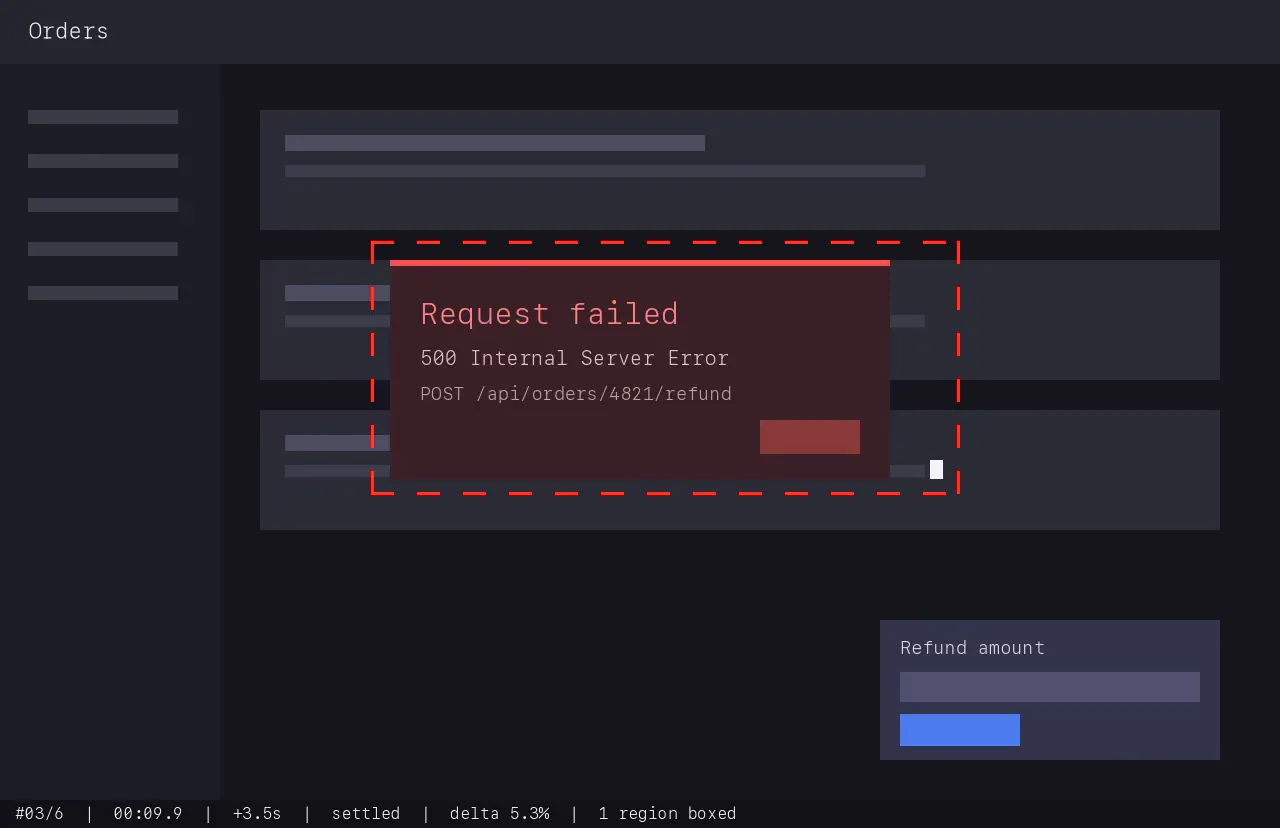
An annotated frame: red dashed box around the error dialog, timestamp bar

Each frame carries a red dashed box around the regions that changed since the previous kept frame, and a bottom bar with the frame number, the timestamp in the original video, the gap since the previous frame, why the frame was kept, and how much of the screen changed.

The MCP tools

Four tools, shaped so an agent spends context in the right order:

toolwhat it does
analyze_videovideo β†’ frames on disk; returns the report text and one contact sheet image
get_framesfull-detail frames by number or time range, capped so a call can't flood the context
zoom_clipre-extract a narrow window at a higher frame rate β€” for the moment two frames don't explain
probe_videoduration / resolution / fps / audio, cheap

The intended loop: analyse β†’ look at the sheet β†’ read the timeline β†’ open two or three frames β†’ zoom in if the moment between them is still unclear. Opening everything up front would burn the context before knowing which second matters.

Profiles and tuning

profilefor
bug-reportdefault β€” someone recorded a screen, narrated a bug, stopped
denseshort clips where every twitch matters (24 fps analysis, up to 80 frames)
walkthroughlong recordings; fewer frames, wider anchors
cheapsmallest footprint, for when the context really is tight (12 frames at 1092px)

Tuning without leaving the profile: --max-frames, --sensitivity (percent of the screen that counts as an event, lower = more frames), --fps, --width, --quality, --no-annotate, --no-sheets.

Why pick frames instead of slicing them

One screenshot per second turns three minutes into 180 frames of which ~90% are identical, because the person was reading, thinking or moving the mouse. Those duplicates don't cost much β€” they bury the handful of frames where something actually happened, and an agent has to look at all of them to find out which. Frame selection is a signal-to-noise problem wearing a cost problem's clothes.

vidin is event driven instead. It walks the video at 12 fps in downscaled RGB and keeps a frame only when something actually happened:

  • Change is measured against the last kept frame, not the previous sample, so slow drift accumulates instead of hiding under the threshold.
  • Frames land after the change, not inside it. When motion starts, nothing is emitted yet β€” the selector waits for the screen to come to rest and keeps the settled frame. You get the state after the click, not the animation blur.
  • Colour counts as change. Comparison is per channel, not on brightness. A field turning red or a green toast over a grey panel barely moves the luma and is exactly what a bug report is about.
  • A moving mouse costs nothing, by arithmetic rather than special-casing: at analysis resolution a pointer is an order of magnitude below the event threshold. There was once a subsystem for recognising it; measured on real recordings it changed no decision anywhere, so it is gone.
  • Guard rails. A minimum gap, anchor frames across long still stretches, periodic samples while a long animation runs, and a hard budget (40 frames by default) that drops the least informative frames first while keeping the ends of the timeline.

Two invariants hold whatever path a frame took:

  • Nothing is dropped silently. The comparison baseline only ever advances by keeping a frame. There is no path that folds a changed screen into the baseline without emitting it β€” that would make the change unrecoverable, since every later comparison would measure zero against a state you never see.
  • Annotations describe the neighbour you can actually see. After the frame budget prunes the middle of the timeline, every survivor's change percentage and boxes are recomputed against the frame that now precedes it.

How it works

Code
ffmpeg ─raw RGB @12fps, 400px─ selector ──timestamps+regions── ffmpeg ──annotated WebP
         one decode pass,         event state machine            drawbox/drawtext
         streamed                 in plain TypeScript            per frame

Decoding streams two frames at a time; the selector additionally keeps the downscaled buffers of the frames it has kept so it can recompute their deltas after pruning. That is bounded by the frame budget, not by video length: ~32 MB at the defaults. All drawing is done by ffmpeg filters, which is why there is no image library in package.json.

Development

Development runs on Bun; the runtime code itself sticks to node: APIs, which is what lets the published package run anywhere npx does.

sh
git clone https://github.com/teunlao/vidin && cd vidin && bun install
bun test

The fixture is a synthetic screen recording with a scripted timeline β€” a panel, an error dialog, a toast, a recovery, and two stretches of pointer-only motion. The suite asserts that each staged event yields exactly one settled frame and that pointer motion alone yields none. test/regressions.test.ts builds its own clips and pins every failure a review has found, so a fixed bug stays fixed.

Not there yet

  • Audio transcript. Narration is the highest-signal part of a bug report. Planned: local Whisper (whisper.cpp or mlx-whisper) β†’ a transcript.md aligned to the frame timeline.
  • OCR over kept frames, so an agent can grep an error message without spending vision tokens at all.
  • Pointer position and clicks are not reported β€” deliberately. A drawn crosshair was checked against a real recording and was right about half the time: a growing DevTools request list moves down the screen exactly like a pointer does. A wrong marker asserts "the user was pointing here" on a coin flip, and the pointer is plainly visible in the frame anyway.
  • Horizontal scroll is not detected; vertical is.
  • Small elements need a nudge. The default event threshold is 0.4% of the screen, so a progress bar or a badge below that is not an event on its own. --sensitivity 0.2 or --profile dense catches them, at the cost of more frames.

Read the full README β†’View source on GitHub β†’

Related MCP Servers

View all in Multimedia Process View all alternatives
  • N
    Notch

    Turn product pages and creative briefs into finished video and image ads from your AI chat.

    πŸŽ₯ Multimedia Process25 views
    Compare vs Notch β†’
  • Trident MCP logoTrident MCP

    AI 3D model generation and post-processing: text/image/multiview-to-3D via Tripo, plus retopology, format conversion (GLB/FBX/OBJ/STL/USDZ), and stylization. Single Go binary, 10 tools, async generation with polling.

    πŸŽ₯ Multimedia Process25 views
    Compare vs Trident MCP β†’
  • MCP Video Analyzer logoMCP Video Analyzer

    MCP server for video analysis β€” extracts transcripts, key frames, OCR text, and annotated timelines from video URLs. Supports Loom and direct video files (.mp4, .webm). Zero auth required.

    πŸŽ₯ Multimedia Process13 views
    Compare vs MCP Video Analyzer β†’
  • Figma Ui MCP logoFigma Ui MCP

    Bidirectional Figma MCP β€” AI draws UI on Figma canvas, reads designs back

    πŸŽ₯ Multimedia Process0 views
    Compare vs Figma Ui MCP β†’

Reviews

No reviews yet β€” be the first to share how this listing worked for you.

Frequently Asked Questions about Vidin

Add the following block to your claude_desktop_config.json under mcpServers: "mcpServers": { "vidin": { "command": "npx", "args": ["-y", "vidin"] } }

AllMCPs Directory Badge

Full Badge Customizer

Showcase your server listing on GitHub or your project documentation. Embed this dynamic SVG badge to highlight official listing status and live engagement.

Badge Style:
Live Dynamic SVG PreviewVidin AllMCPs Directory Badge

Markdown (GitHub README)
[![AllMCPs](https://allmcps.com/api/badge/vidin?style=directory)](https://allmcps.com/mcp/vidin)
HTML Embed
<a href="https://allmcps.com/mcp/vidin"><img src="https://allmcps.com/api/badge/vidin?style=directory" alt="Vidin on AllMCPs" /></a>

Technical Specs & Signals

CategoryπŸŽ₯Multimedia Process
More technical detailsExpand β–Ύ
TransportSTDIO
RuntimeNode.js
Last updatedSep 7, 2026
Views0
Unique ViewsTotal visits recorded for this listing page on AllMCPs.
Installs0
Installs & Copy ActionsTotal times users copied install commands or configuration snippets for this server.
27Quality signal: Emerging Β· 27/100How this signal is calculated β–Ύ
Server availabilityNot measured

Not scored for repo-hosted servers β€” we can't reach the running server, only its GitHub page. Hosted MCP endpoints are health-checked live.

Verified ownership8/20
Documentation & tools11/30
Adoption & activity1/15
Community engagement0/10

A guidance signal from public completeness & health data β€” not a user rating. New listings start lower and rise as they add docs, get verified, and grow adoption. Signals we can't observe for a listing are skipped, not counted against it.

β˜… Spotlight Slot

Feature Your MCP Server

Get maximum visibility for your server across our directory, search results, and detail pages.

Spotlight Your Server

Own this project?

This directory is pre-filled from public sources. Claim via GitHub README, site badge, or DNS TXT to unlock edit access and the Official badge and attach your website β€” proof is checked automatically, then reviewed by our team.

Free dofollow backlink: add your website and place the AllMCPs badge on it β€” no claim needed. We detect it automatically and keep it verified as long as the badge stays live.

Claim & get free dofollow

Share & Embed

Add our SVG badge (dark/light directory styles) or embeddable widget to your site.

Explore more

More in πŸŽ₯ Multimedia Process β†’Best MCP servers for Multimedia & Media Processing β†’Alternatives to Vidin β†’Install in Claude DesktopInstall in CursorInstall in VS Code