AllMCPs
BrowseBestCategoriesStackCompareToolsGuidesBlog
Log in Submit MCP

Stay in the loop

Get new MCP servers and top picks in your inbox.

AllMCPs

The open directory for discovering and installing Model Context Protocol servers.

AllMCPs on GitHub (opens in a new tab)
Launched onTiny Startupstinystartups.com
Explore
  • Browse servers
  • Best MCP servers
  • Categories
  • MCP clients
  • Agent prompts
  • Stack Builder
  • Compare servers
  • Random discovery New
  • Submit a server
  • Pricing & Boost Boost
Learn
  • Guides hub
  • What is MCP?
  • Install guide
  • Build an MCP server
  • Deploy an MCP server
  • Security guide
  • Troubleshooting
  • MCP for SEO & AEO
  • Protocol versioning
  • Blog & updates
Tools
  • All developer tools
  • Config generator
  • Config validator
  • Config auditor
  • MCP playground
  • Token calculator
  • OpenAPI → MCP
  • Badge generator
For agents
  • REST API docs
  • Trust & traffic Live
  • Remote MCP server SSE ↗ (opens in a new tab)
  • llms.txt ↗ (opens in a new tab)
  • Catalog JSON ↗ (opens in a new tab)
Company
  • About
  • Advertise Sponsor
  • Contact
  • GitHub ↗ (opens in a new tab)
  • Terms
  • Privacy
AllMCPs VerifiedAllMCPs VerifiedFeatured on Nick LaunchesFeatured on Nick LaunchesLaunch Llama NewsletterLaunch Llama NewsletterVerified DR - allmcps.comVerified DR - allmcps.comFeatured on SaaSGrowFeatured on SaaSGrowFeatured on Twelve ToolsFeatured on Twelve ToolsFeatured on Saaspa.geFeatured on Saaspa.geFeatured on Findly.toolsFeatured on Findly.toolsFeatured on Startup FameFeatured on Startup FameFeatured on LaunchKiwiFeatured on LaunchKiwiFeatured on ScrollLaunchFeatured on ScrollLaunchFeatured on DailyPingsFeatured on DailyPingsFazier badgeFazier badgeFeatured on NewTool.siteFeatured on NewTool.siteFeatured on saasfame.comFeatured on saasfame.comDR Checker - Domain RatingDR Checker - Domain RatingListed on Turbo0Listed on Turbo0Launched on LaunchBoard - Product Launch PlatformLaunched on LaunchBoard - Product Launch PlatformList on SimilarlabsList on Similarlabshttps://codetrendy.comhttps://codetrendy.comListed on DevTool.ioFeatured on BuildlistFeatured on BuildlistLaunched on Tiny StartupsFeatured on ShowMeBestAIFeatured on ShowMeBestAIFind us on LaunchZoneFind us on LaunchZoneAllMCPs VerifiedAllMCPs VerifiedFeatured on Nick LaunchesFeatured on Nick LaunchesLaunch Llama NewsletterLaunch Llama NewsletterVerified DR - allmcps.comVerified DR - allmcps.comFeatured on SaaSGrowFeatured on SaaSGrowFeatured on Twelve ToolsFeatured on Twelve ToolsFeatured on Saaspa.geFeatured on Saaspa.geFeatured on Findly.toolsFeatured on Findly.toolsFeatured on Startup FameFeatured on Startup FameFeatured on LaunchKiwiFeatured on LaunchKiwiFeatured on ScrollLaunchFeatured on ScrollLaunchFeatured on DailyPingsFeatured on DailyPingsFazier badgeFazier badgeFeatured on NewTool.siteFeatured on NewTool.siteFeatured on saasfame.comFeatured on saasfame.comDR Checker - Domain RatingDR Checker - Domain RatingListed on Turbo0Listed on Turbo0Launched on LaunchBoard - Product Launch PlatformLaunched on LaunchBoard - Product Launch PlatformList on SimilarlabsList on Similarlabshttps://codetrendy.comhttps://codetrendy.comListed on DevTool.ioFeatured on BuildlistFeatured on BuildlistLaunched on Tiny StartupsFeatured on ShowMeBestAIFeatured on ShowMeBestAIFind us on LaunchZoneFind us on LaunchZone
© 2026 Jackalope Digital LLC. All rights reserved.
  1. Home
  2. Multimedia Process
  3. Autoeq MCP
  4. README

Autoeq MCP README

The full upstream README, mirrored here for reference. Install config, tool schemas, adoption signals, and an original overview live on the Autoeq MCP listing page.

Back to Autoeq MCP View source on GitHub

AutoEQ MCP Server

PyPI License: MIT Python 3.10+ Claude Desktop Claude Code claude.ai

Terminal
pip install autoeq-mcp

An MCP (Model Context Protocol) server that gives AI assistants access to the AutoEQ headphone equalization database — 8,800+ headphones and IEMs with parametric EQ settings, sound signature analysis, and Harman preference scores.

한국어 README

What It Does

Ask your AI assistant things like:

  • "Get me the EQ settings for the HD650"
  • "Compare the HE400se and HD600"
  • "Recommend warm-sounding over-ear headphones"
  • "What are the top-ranked IEMs by Harman score?"

The server automatically analyzes frequency response measurements across 8 bands and classifies each headphone's sound signature (Neutral, Warm, Bright, Dark, V-shaped, etc.).

Demo

Headphone comparison with vocal suitability analysis
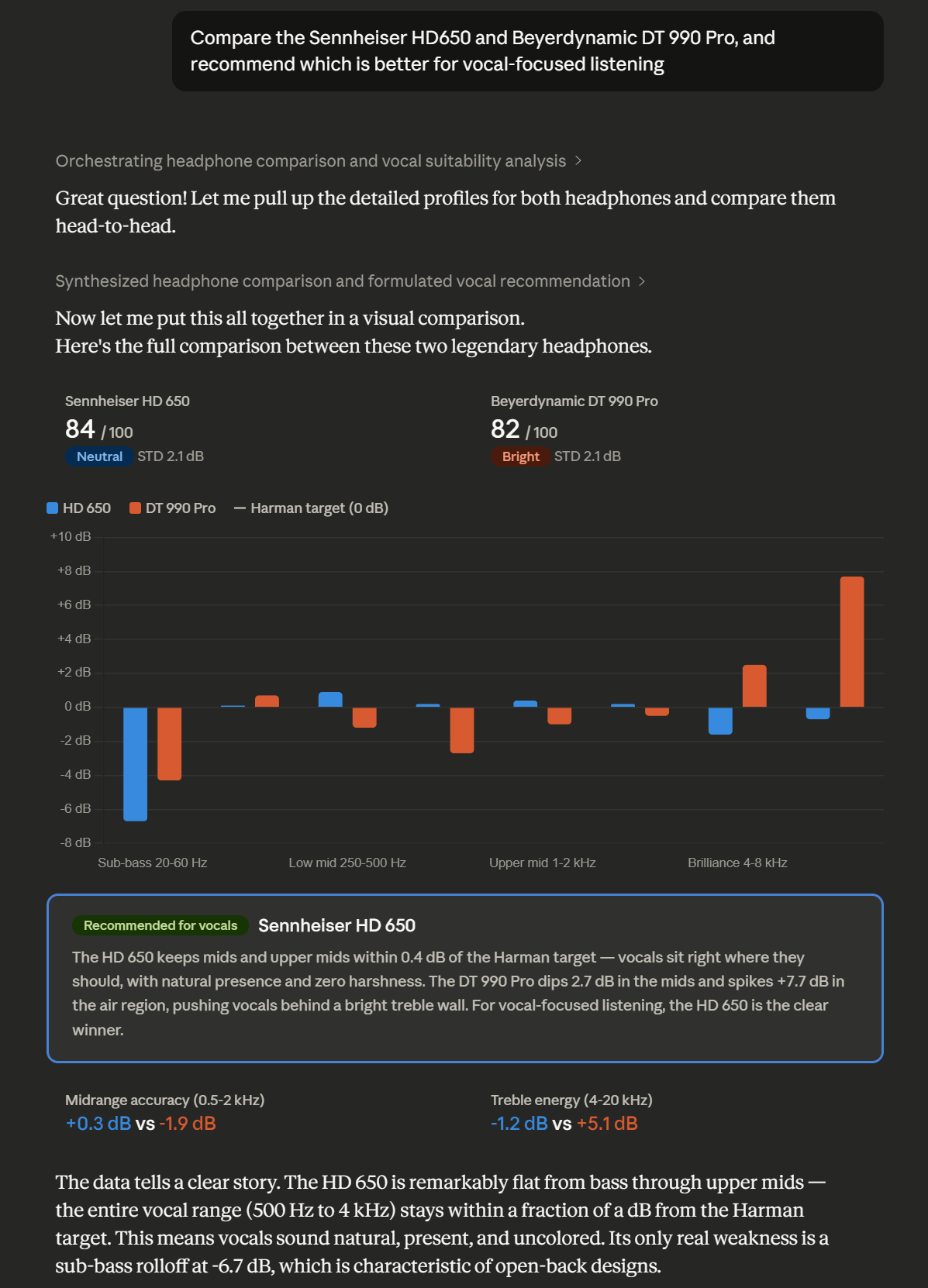
Comparison demo — HD650 vs DT 990 Pro with per-band chart and vocal recommendation

Finding similar IEMs by sound signature
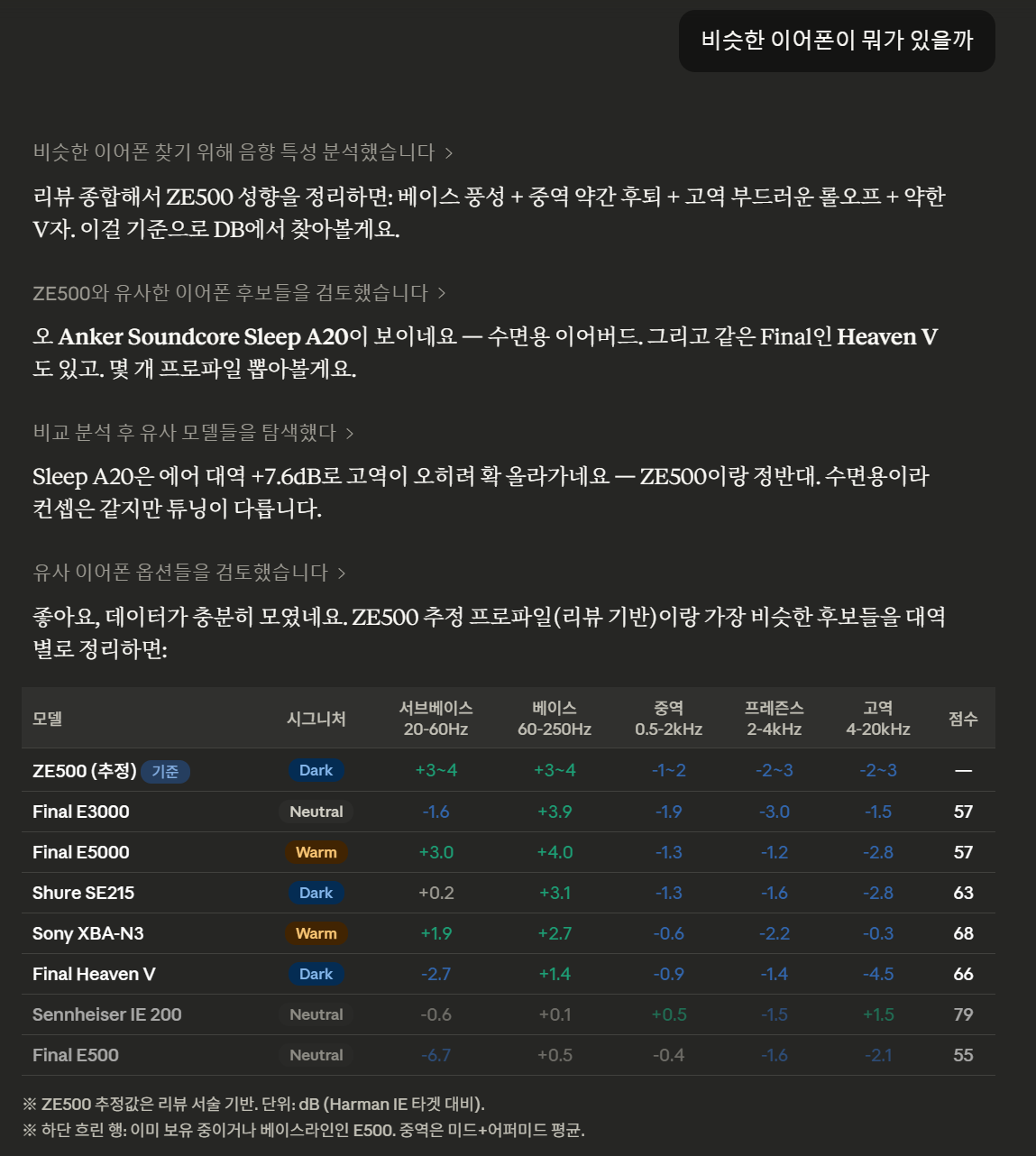
Similar search demo — finding IEMs with similar tuning using per-band analysis

Tools

ToolDescription
eq_searchSearch by name, type (over-ear/in-ear/earbud), sound signature, or measurement source
eq_profileGet full EQ profile — parametric EQ, fixed band EQ, per-band analysis with visual bars
eq_compareSide-by-side comparison of two headphones across all frequency bands
eq_recommendRecommendations by preference (neutral, warm, bright, bass, vocal, fun, analytical)
eq_rankingHarman headphone listener preference score rankings
eq_targetsList all 61 available target curves (Harman, Diffuse Field, etc.)
eq_syncPull latest data from AutoEQ GitHub and rebuild the database

Example Output

Code
# Sennheiser HD 650
- Source: oratory1990
- Type: over-ear
- Harman preference score: 84.0
- Sound signature: Neutral, Harman-like

## Per-band analysis (deviation from target, dB)
  Sub-bass (20-60Hz):   -3.2 dB [·······▓▓▓|··········] sub-bass lacking
  Bass (60-250Hz):      +0.8 dB [··········|··········] close to target
  Mid (500-1kHz):       -0.3 dB [··········|··········] close to target
  Presence (2k-4kHz):   +1.4 dB [··········|▓·········] detail emphasis
  Air (8k-20kHz):       -2.1 dB [········▓▓|··········] closed / lacking air

## Parametric EQ (Preamp: -6.5 dB)
  #  Type        Fc (Hz)      Q  Gain (dB)
  1  LowShelf        105   0.70       +6.5
  2  Peaking        1800   1.20       -2.3
  ...

Installation

Claude Code / Claude Desktop (stdio)

bash
# Install
pip install autoeq-mcp

# Initial database sync (clones AutoEQ repo + builds SQLite DB, ~20s)
autoeq-mcp --sync

# Add to Claude Code
claude mcp add autoeq_mcp -- autoeq-mcp

For Claude Desktop, add to your config file:

config.json
{
  "mcpServers": {
    "autoeq": {
      "command": "autoeq-mcp"
    }
  }
}

SSE Mode (Remote / Multi-client)

bash
# Start SSE server
AUTOEQ_MCP_PORT=3008 autoeq-mcp --sse

# With allowed hosts for DNS rebinding protection
AUTOEQ_MCP_ALLOWED_HOSTS="your-domain.com,localhost" autoeq-mcp --sse

From Source

bash
git clone https://github.com/verIdyia/autoeq-mcp
cd autoeq-mcp
pip install -e .
autoeq-mcp --sync

Configuration

All configuration is via environment variables:

VariableDefaultDescription
AUTOEQ_DATA_DIR~/.autoeq-mcpDirectory for repo clone and SQLite DB
AUTOEQ_MCP_PORT3008SSE server port
AUTOEQ_MCP_HOST0.0.0.0SSE server host
AUTOEQ_MCP_ALLOWED_HOSTS(none)Comma-separated allowed hosts for SSE

Data Source

All headphone data comes from AutoEQ by Jaakko Pasanen (MIT License).

  • 8,800+ headphone/IEM profiles
  • 22 measurement sources (oratory1990, crinacle, Rtings, and more)
  • 61 target curves (Harman 2018/2019, Diffuse Field, etc.)
  • 2,300+ Harman preference scores

The database syncs from the AutoEQ GitHub repository. Run eq_sync or autoeq-mcp --sync to update.

How Sound Signatures Work

The server analyzes each headphone's frequency response error (deviation from target) across 8 bands and classifies it:

SignatureCharacteristics
NeutralAll bands within ±2 dB of target
WarmElevated bass, flat/recessed treble
BrightElevated treble, flat/recessed bass
DarkRecessed treble
V-shapedElevated bass + treble, recessed mids
U-shapedElevated bass + treble
Bass-heavyStrongly elevated bass (>3 dB)
Mid-forwardElevated mids, flat bass/treble
Harman-likeTotal deviation < 1.5 dB average

License

MIT — See LICENSE
