The body an agent asks before it acts: decide, approve, and keep a signed record on your machine.
Quick Install
Automated & IDE SetupCopy the AI prompt to install this server into Claude Code, Cursor, or another agent — or use 1-click editor setup below.
One-click editor setup isn’t available for this listing yet — we don’t have a confirmed install command, and we’d rather show nothing than point your editor at the wrong package or host. Follow the project’s own setup instructions, linked above.
Manual Client & Custom JSON ConfigExpand JSON ▾
No confirmed setup config for this listing yet. We only publish a config block when the install details come from the project itself — its README, its docs, or a verified owner. We haven’t found those for VERAX, and we’d rather show nothing than a guess you’d paste into your client. Follow the project’s own setup instructions for the current steps.
Documentation Overview
Verax
The body an agent asks before it acts.
Verax is an MCP server that sits between an agent and its tools. Every tool call passes a policy gate and leaves a signed decision record before anything runs; every call that ran leaves an effect row that is reconciled against its record afterwards. A refusal is recorded the same way as an approval. A call the policy will not decide alone is held until an operator on this machine approves it. The ledger stays on the machine the body runs on, and the body opens only when its authorization is configured: there is no default token.
By VERAX Teknoloji. Sister projects: Conarium · Tugra · Cedulon. Decision records use the Cedulon record format.
See it run
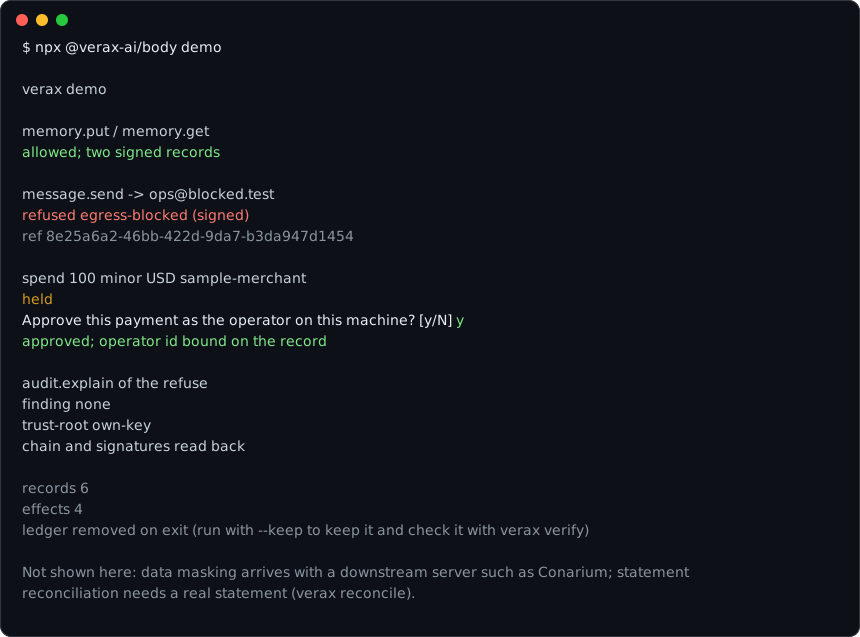
The recording is the output of one run in a terminal where the approval
question was answered y. That run took about a second; it is played back
slowly here so it can be read.
What it prints, without a terminal to answer the approval question:
Node 22.6 or newer, @verax-ai/body 0.2.1 or later. The command records an
allowed memory write and read, a
signed refuse of a message to a host off the policy list, and a payment held
for the operator on this machine (approved when the terminal answers y).
--keep leaves the temporary ledger on disk. verax verify <dir> reads it
back without a body, as in Read the ledger back without us.
Connect your agent
Elevated verax install and verax approve run a copy of this program that only an administrator can change; a copy your account can change is refused. On Windows, in 0.4.0, an elevated CLI approve is the way to approve (the passkey panel ships in 0.4.1). It has to be run from a separate administrator account, not this account elevated, because a same-user elevated shell inherits that user's environment variables and PowerShell profile, which the agent can set. Clear NODE_OPTIONS in that shell (Remove-Item Env:NODE_OPTIONS). Start that other account's PowerShell with -NoProfile (an elevated shell otherwise runs your $PROFILE, which your account can change):
On Linux and macOS, with a root-owned Node (the distribution's /usr/bin/node, or /opt/verax-node/<dir>/bin/node; the installer prints those steps when the Node it was started from can be changed by your account). Do not start an elevated command with env node:
The command installs @verax-ai/body from the npm registry into an administrator-owned directory after signature checks, runs that Node, and keeps the ledger under a service account. On Windows the agent token is %ProgramData%\Verax\agent-token\<your SID>\agent.token (Administrators and SYSTEM have full control, your SID can read the file and read-execute the directory). On Linux and macOS a child process running as your uid writes ~/.verax/agent.token from its stdin. It prints the Claude Code line that reads that file. Port 8787 taken? verax install --port 8797. Node must be the all-users installer from nodejs.org on Windows; a Node your account can rewrite is refused. On macOS the remedy extracts the official tarball as root into /opt/verax-node (root:wheel, not group- or other-writable). On Linux the same place, /opt/verax-node (root:root), which SELinux labels usr_t. On SELinux systems install requires Node labelled bin_t or usr_t (distribution Node is; a tarball under /usr/local/lib is not) and prints the one-line fix. The service then runs in unconfined_service_t. The service account and the file permissions are the boundary.
Approve a held call with verax approve. The passkey panel (verax desktop) is not in 0.4.0; it ships in 0.4.1. On Windows run the approve from a separate administrator account, not this account elevated, in a -NoProfile PowerShell after Remove-Item Env:NODE_OPTIONS: & "$env:ProgramFiles\verax-cli\verax.cmd" approve. Linux and macOS, naming the root-owned Node: sudo /usr/bin/node /opt/verax-cli/lib/node_modules/@verax-ai/body/dist/cli.js approve or sudo /opt/verax-node/<dir>/bin/node /opt/verax-cli/lib/node_modules/@verax-ai/body/dist/cli.js approve. Uninstall the same way, with uninstall in place of approve.
To try it in your own user, which is not a boundary:
The token can read and write memory through the gate; it cannot approve. The shipped policy refuses spend until you add a rule for it; a call your policy holds waits for verax approve on this machine. See docs/THREAT_MODEL.md.
With Conarium
@verax-ai/body 0.2.2 and later accepts --with-conarium. 0.2.1 does not
carry the flag. The flag has npx download @conarium-ai/core from npm and
run it as a child process; that needs a network.
Conarium masks the rows, and its sample policy denies its public.secrets
table. Verax puts each call through the same gate as its own tools, keeps a
signed record and a hash of the answer, and refuses a downstream tool the
policy does not name before the child sees the call. When Conarium answers
with an error, the body tells the caller that it did, not what it said.
What it prints, without a terminal to answer the approval question:
What ships
| Package | What it is |
|---|---|
@verax-ai/body | The MCP server and the verax command: serve, install, uninstall, init, doctor, approve, operator, reconcile, witness, halt, unlock (desktop ships in 0.4.1). |
@verax-ai/proxy | The decision proxy the body is built on: policy, signed records, ledger, explain, reconcile. |
@verax-ai/inventory | The roster document a body serves and the panel lists, with its strict parser. |
The three packages are published together and carry the same version; the
capability matrix in docs/STATUS.md names the current one,
and it is the version on npm. The body is also listed in the MCP registry as
io.github.verax-ai/verax. What that version carries, what it does not,
and the test holding each row up are in the capability matrix at the top
of docs/STATUS.md.
Read the ledger back without us
A ledger only the vendor's running service can read is evidence a buyer
rents, not evidence they hold. verax verify reads a state directory on
its own — no body listening, nothing on the network — and states four
things separately, because they fail separately:
Related MCP Servers
Reviews
No reviews yet — be the first to share how this listing worked for you.
Frequently Asked Questions about VERAX
AllMCPs Directory Badge
Showcase your server listing on GitHub or your project documentation. Embed this dynamic SVG badge to highlight official listing status and live engagement.
Badge Style:
Live Dynamic SVG Preview
Markdown (GitHub README)
[](https://allmcps.com/mcp/verax)HTML Embed
<a href="https://allmcps.com/mcp/verax"><img src="https://allmcps.com/api/badge/verax?style=directory" alt="VERAX on AllMCPs" /></a>