pdffile-systemsannotationshtmlmcp
Converts local PDFs into standalone, source-linked HTML readers with cards, annotations, and static publishing.
Quick Install
Automated & IDE SetupCopy the AI prompt to install this server into Claude Code, Cursor, or another agent — or use 1-click editor setup below.
Not yet automatically verified
We haven't yet run this listing's install command through our automated sandbox check. This isn't a red flag — we're steadily working through the catalog.
Manual Client & Custom JSON ConfigExpand JSON ▾
Client Config & Setup
Choose your client or environment
Target File:
💡 Paste the JSON block into your client's configuration file under mcpServers, then restart the application.
Overview
Use cases
Convert a local PDF into a standalone HTML reader
Inspect tables, figures, and formulas with source-page references
Add notes and highlights to generated readers
Export annotations as Markdown
Publish a read-only reader with selected public annotations
Key features
Creates source-linked card-based HTML readers
Embeds CSS, JavaScript, page images, and detected crops
Provides search, section navigation, and keyboard controls
Supports notes, highlights, and Markdown export
Generates manifests with cards, pages, warnings, and source anchors
Publishes static annotated reader bundles
Capabilities & Tool Schemas (13)
Inspect callable tools, capabilities, and parameters exposed to AI agents by Pdf Card MCP.
pdf_pathlocal PDF path.
output_pathoptional HTML output path.
titleoptional title override.
standalonedefaults to `true`; asset-folder output is reserved for a later release.
ocroptional OCR fallback if `pytesseract` is installed.
max_pagesoptional processing limit.
Documentation Overview
PDF Card MCP




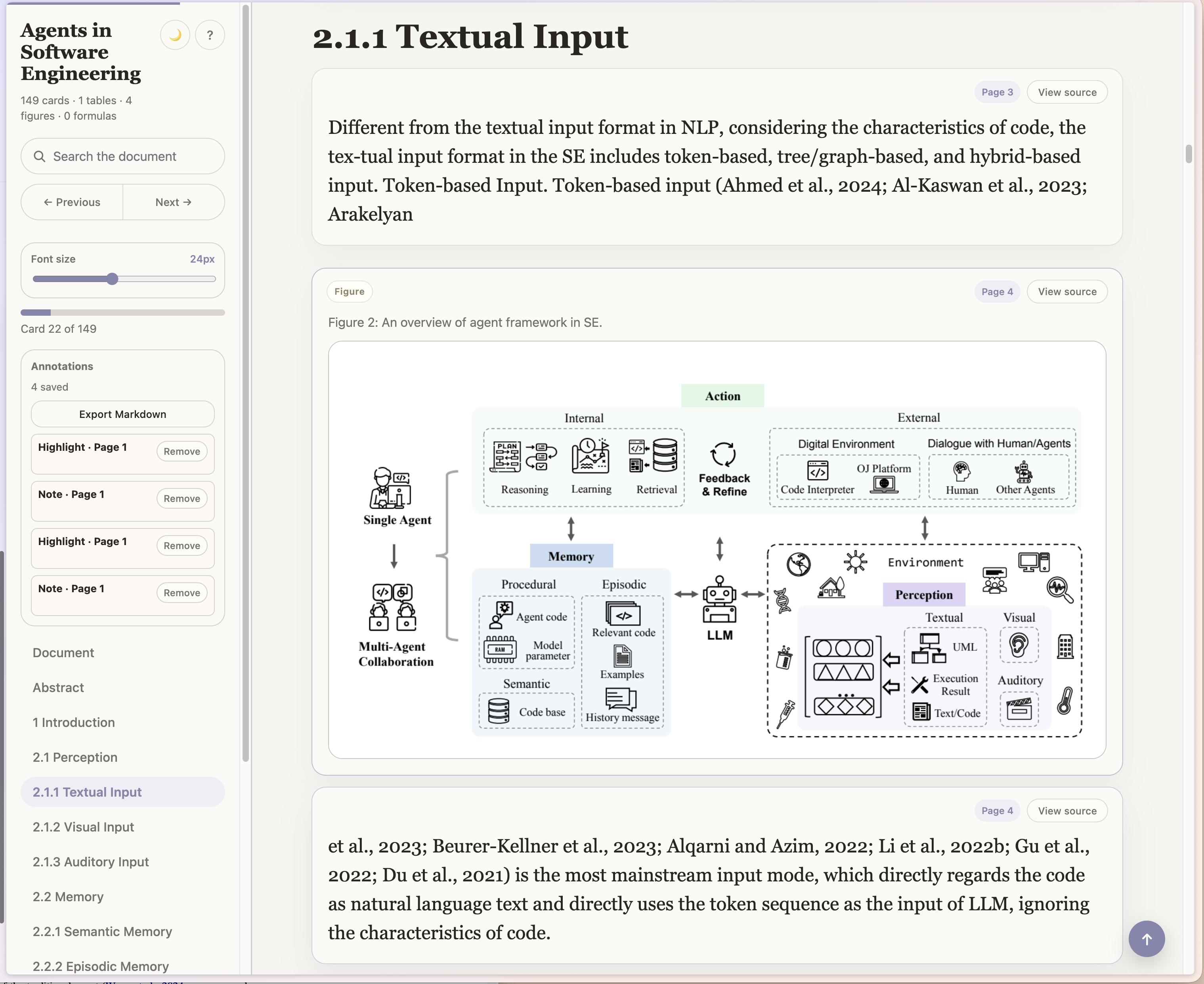
PDF Card MCP is a local-first MCP server and CLI for turning dense local PDFs into portable, source-linked HTML readers. An MCP host can ask it to convert a PDF path, validate notes/highlights, or publish a static annotated reader bundle. The converter preserves source text, renders source pages for verification, crops detected tables, figures, and display formulas as images, derives safe reader styling from the original PDF palette, and writes a standalone HTML file that can be moved across devices without losing assets.
Default conversion runs locally and does not require a hosted service. Optional MCP sampling is deliberately bounded: the host model may choose validated style tokens or suggest card-boundary polish operations, but raw CSS and source-text rewrites are rejected.
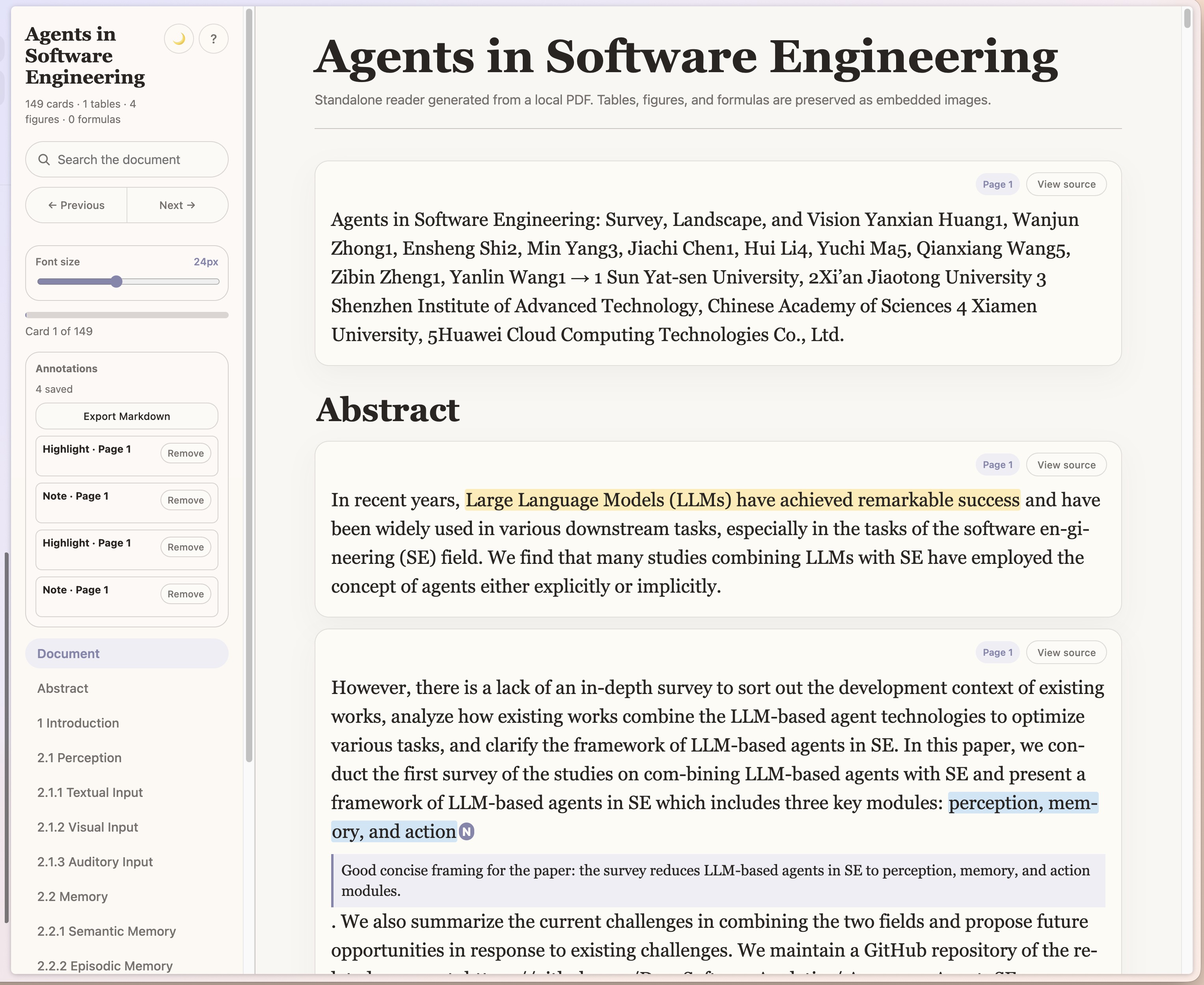
The default reader is designed for comfortable reading: large type, small cards, search, section navigation, next/previous controls, keyboard navigation, a font-size slider, and source-page previews.
PDF Card MCP is meant for PDFs you actually need to read, cite, or inspect. It turns long documents into smaller source-linked cards, keeps tables/figures/formulas as faithful image crops, and lets you export your own notes and highlights as Markdown.
Quick Install (one-click)
PDF Card MCP is a Python server, so it needs a runtime. The one thing to install first is
uv — it manages Python for you, so you do not have to. This is
the only prerequisite for every install path below:
Then add the server with one click. The buttons run the published
pdf-card-mcp package through uv:


Claude Code (terminal):
Claude Desktop (no terminal, no prerequisites): download pdf-card-mcp-desktop.mcpb from the
latest release and double-click it to
install as an extension. This bundle declares the uv runtime, so Claude Desktop installs Python
and dependencies for you — you do not need the uv step above for this path.
After installing, restart (or reload MCP servers in) your client so it picks up the new server.
Real Screenshots
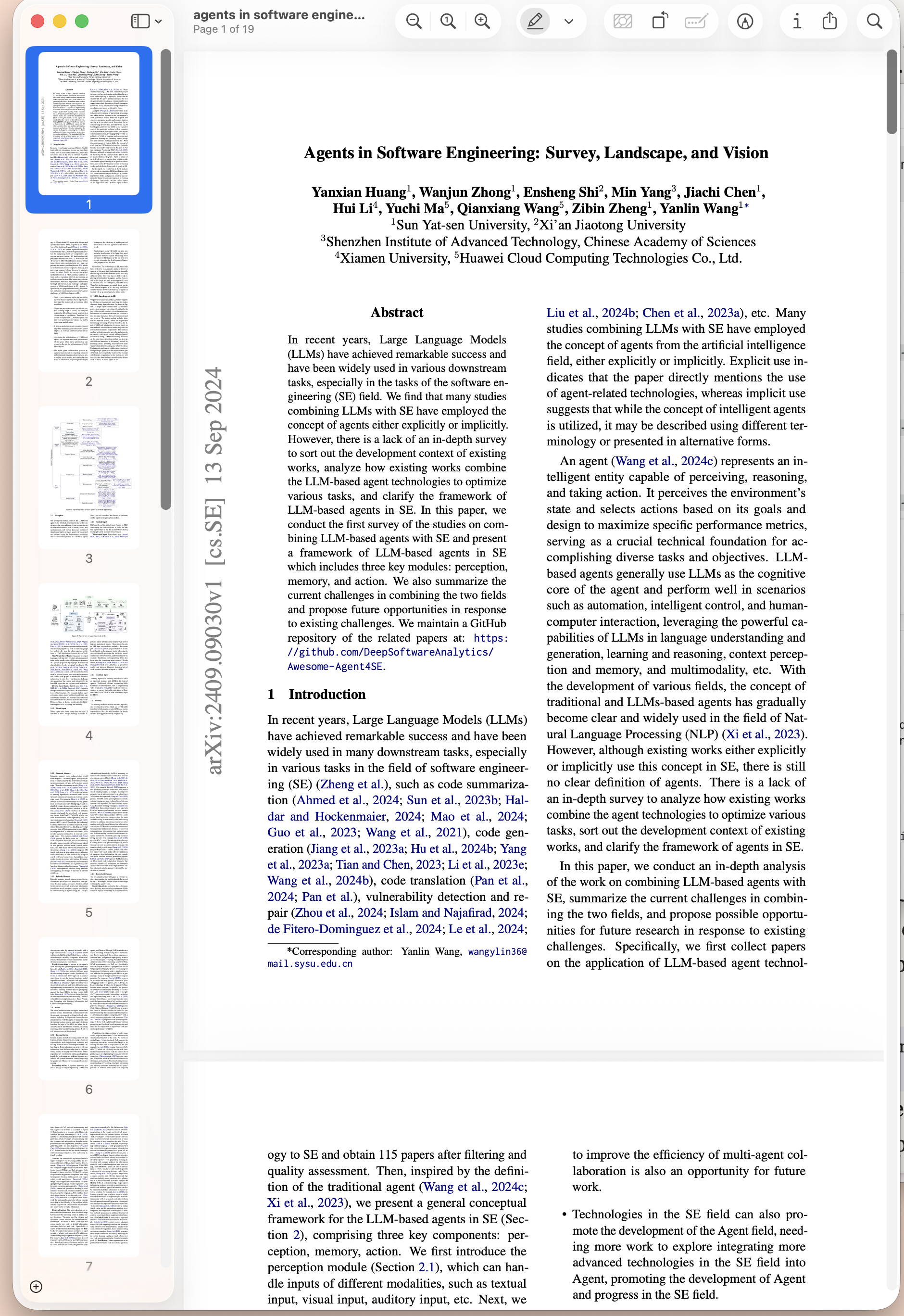
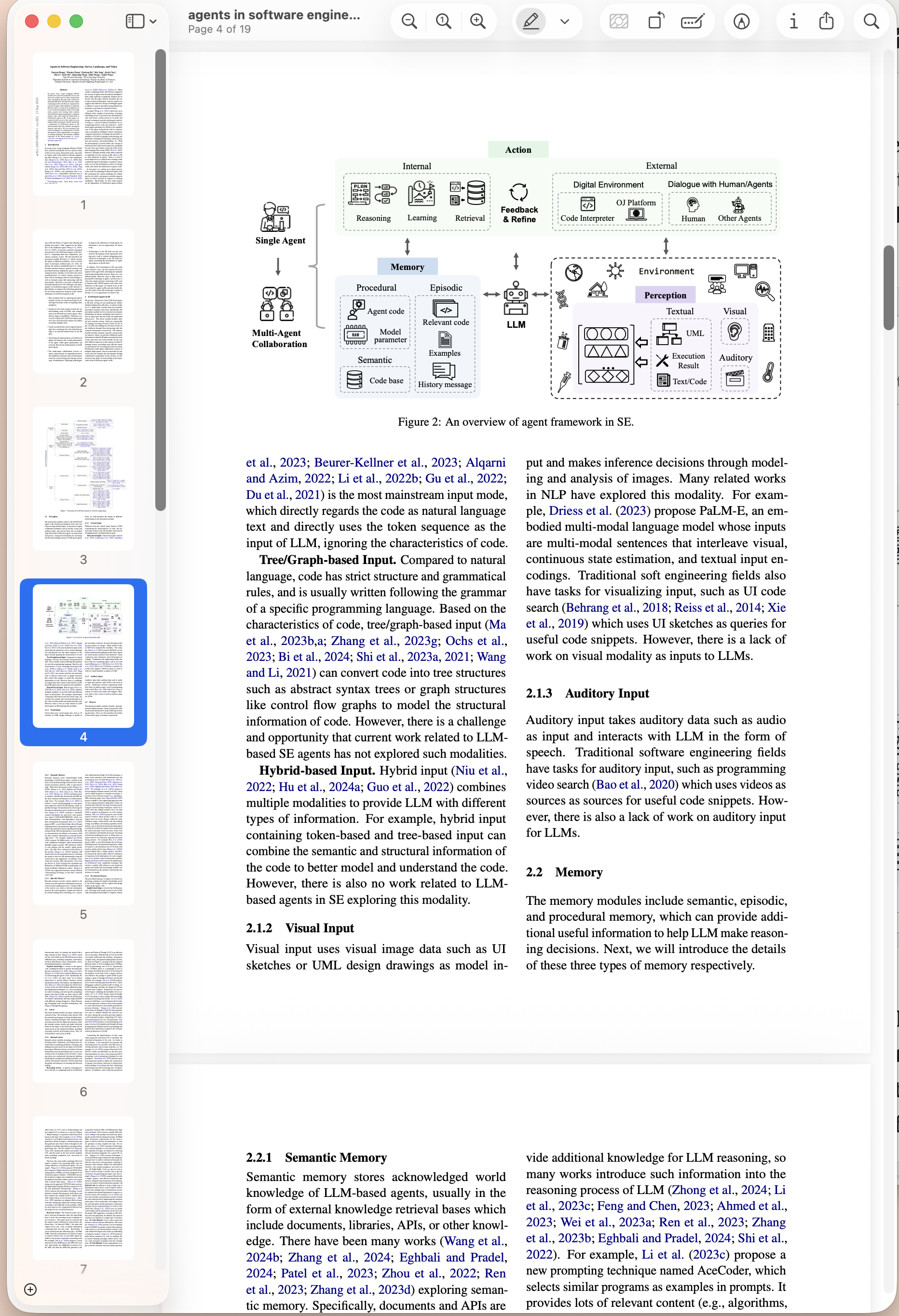
These screenshots are from a generated reader for Agents in Software Engineering and the same source PDF opened side by side for comparison.
| Generated reader | Original PDF |
|---|---|
 |  |
 |  |
Quick Examples
Convert a local PDF into one portable HTML reader:
Use the explicit subcommand form with PDF-derived styling:
Run the MCP server so a compatible host can generate readers from local PDF paths:
Publish a read-only static reader with selected public annotations:
Output At A Glance
| Output | What it contains |
|---|---|
paper-reader.html | Standalone reader with embedded CSS, JavaScript, page images, and detected crops. |
paper.manifest.json | Structured metadata for cards, pages, warnings, and source anchors. |
| Markdown export | User-authored notes and highlights from the reader UI. |
| Published bundle | Read-only static HTML or a directory bundle for sharing public annotations. |
Status
This is an early open-source implementation. It is useful for text-layer PDFs now, with
best-effort table detection via pdfplumber, permissive raster rendering via pypdfium2,
and optional richer local table detection via gmft. Scanned PDFs need optional OCR support.
Install
Most people should use the one-click install above. To install the package directly instead, from PyPI:
Or install the latest unreleased changes directly from the repository:
For local development:
uv is recommended for MCPB packaging:
Install the optional local ML table detector when you want stronger table crops:
Use In An MCP Client
Add it to Claude Code or another CLI-compatible MCP client with uvx (requires
uv):
Generic MCP host configuration:
For local development before the PyPI release, point the client at this checkout:
Claude Desktop can also install the .mcpb bundle from the latest GitHub release.
Docker / Registry Scanners
The repository includes a minimal Dockerfile so registries such as Glama can build the
server, start it over stdio, and inspect its MCP tool schemas. The server still works on local
file paths, so container users must mount any PDFs and output directories they want the tool to
read or write:
CLI Usage
The command writes:
document.html: standalone reader with embedded CSS, JavaScript, table crops, figure crops, formula crops, and source-page images.document.manifest.json: structured metadata without embedded image payloads.
The explicit subcommand form is also supported:
Notes, Highlights, And Static Publishing
Generated readers include a local annotation overlay:
- A highlight is selected source text.
- A note is selected source text plus your own typed note text.
Select text in a text card, choose Highlight or Note, and use Export Markdown to download
a readable .annotations.md file. Import is intentionally not exposed in the reader UI yet.
Notes and highlights are user-authored data and are kept separate from the source-derived
document.manifest.json.
The lower-level CLI and MCP publishing tools still accept a structured annotation bundle when you need to build a read-only static reader with embedded annotations. Validate that bundle against a reader:
Publish a shareable static reader with public annotations:
If --output is a directory instead of an .html file, the command writes a static bundle:
index.htmlreader.manifest.jsonreader.annotations.jsonbundle.json
Related MCP Servers
Adoption & maintenance
Factual signals from GitHub, npm, and our automated checks — not a rating.
GitHub stars
2
Stargazers on the source repository.
Last commit
5d ago
Most recent push to the default branch.
Tools exposed
13
Callable tools this server registers over MCP.
Directory activity
1 views
Config copies, upvotes, and views on AllMCPs.
Reviews
No reviews yet — be the first to share how this listing worked for you.
Frequently Asked Questions about Pdf Card MCP
AllMCPs Directory Badge
Showcase your server listing on GitHub or your project documentation. Embed this dynamic SVG badge to highlight official listing status and live engagement.
Badge Style:
Live Dynamic SVG Preview
Markdown (GitHub README)
[](https://allmcps.com/mcp/velyan-pdf-card-mcp)HTML Embed
<a href="https://allmcps.com/mcp/velyan-pdf-card-mcp"><img src="https://allmcps.com/api/badge/velyan-pdf-card-mcp?style=directory" alt="Pdf Card MCP on AllMCPs" /></a>