AllMCPs
BrowseBestCategoriesStackCompareToolsGuidesBlog
Log in Submit MCP

Stay in the loop

Get new MCP servers and top picks in your inbox.

AllMCPs

The open directory for discovering and installing Model Context Protocol servers.

AllMCPs on GitHub (opens in a new tab)
Launched onTiny Startupstinystartups.com
Explore
  • Browse servers
  • Best MCP servers
  • Categories
  • MCP clients
  • Agent prompts
  • Stack Builder
  • Compare servers
  • Random discovery New
  • Submit a server
  • Pricing & Boost Boost
Learn
  • Guides hub
  • What is MCP?
  • Install guide
  • Build an MCP server
  • Deploy an MCP server
  • Security guide
  • Troubleshooting
  • MCP for SEO & AEO
  • Protocol versioning
  • Transports: stdio vs HTTP
  • State of MCP (stats)
  • Blog & updates
Tools
  • All developer tools
  • Config generator
  • Config validator
  • Config auditor
  • MCP playground
  • Token calculator
  • OpenAPI β†’ MCP
  • Badge generator
For agents
  • REST API docs
  • Trust & traffic Live
  • Remote MCP server SSE β†— (opens in a new tab)
  • llms.txt β†— (opens in a new tab)
  • Catalog JSON β†— (opens in a new tab)
Company
  • About
  • Advertise Sponsor
  • Contact
  • GitHub β†— (opens in a new tab)
  • Terms
  • Privacy
AllMCPs VerifiedAllMCPs VerifiedFeatured on Nick LaunchesFeatured on Nick LaunchesLaunch Llama NewsletterLaunch Llama NewsletterVerified DR - allmcps.comVerified DR - allmcps.comFeatured on SaaSGrowFeatured on SaaSGrowFeatured on Twelve ToolsFeatured on Twelve ToolsFeatured on Saaspa.geFeatured on Saaspa.geFeatured on Findly.toolsFeatured on Findly.toolsFeatured on Startup FameFeatured on Startup FameFeatured on LaunchKiwiFeatured on LaunchKiwiFeatured on ScrollLaunchFeatured on ScrollLaunchFeatured on DailyPingsFeatured on DailyPingsFazier badgeFazier badgeFeatured on NewTool.siteFeatured on NewTool.siteFeatured on saasfame.comFeatured on saasfame.comDR Checker - Domain RatingDR Checker - Domain RatingListed on Turbo0Listed on Turbo0Launched on LaunchBoard - Product Launch PlatformLaunched on LaunchBoard - Product Launch PlatformList on SimilarlabsList on Similarlabshttps://codetrendy.comhttps://codetrendy.comListed on DevTool.ioFeatured on BuildlistFeatured on BuildlistLaunched on Tiny StartupsFeatured on ShowMeBestAIFeatured on ShowMeBestAIFind us on LaunchZoneFind us on LaunchZoneAllMCPs VerifiedAllMCPs VerifiedFeatured on Nick LaunchesFeatured on Nick LaunchesLaunch Llama NewsletterLaunch Llama NewsletterVerified DR - allmcps.comVerified DR - allmcps.comFeatured on SaaSGrowFeatured on SaaSGrowFeatured on Twelve ToolsFeatured on Twelve ToolsFeatured on Saaspa.geFeatured on Saaspa.geFeatured on Findly.toolsFeatured on Findly.toolsFeatured on Startup FameFeatured on Startup FameFeatured on LaunchKiwiFeatured on LaunchKiwiFeatured on ScrollLaunchFeatured on ScrollLaunchFeatured on DailyPingsFeatured on DailyPingsFazier badgeFazier badgeFeatured on NewTool.siteFeatured on NewTool.siteFeatured on saasfame.comFeatured on saasfame.comDR Checker - Domain RatingDR Checker - Domain RatingListed on Turbo0Listed on Turbo0Launched on LaunchBoard - Product Launch PlatformLaunched on LaunchBoard - Product Launch PlatformList on SimilarlabsList on Similarlabshttps://codetrendy.comhttps://codetrendy.comListed on DevTool.ioFeatured on BuildlistFeatured on BuildlistLaunched on Tiny StartupsFeatured on ShowMeBestAIFeatured on ShowMeBestAIFind us on LaunchZoneFind us on LaunchZone
Β© 2026 Jackalope Digital LLC. All rights reserved.
  1. Home
  2. 🧠 Knowledge & Memory
  3. Vaultguard
V
Health: Not checked yetWe have not completed a health check for this listing yet.No health check has run yet.

Vaultguard

User RatingsBe the first to rate and review this MCP server! Enrichment pendingWe haven’t run our AI enrichment pass on this listing yet, so the overview, use cases, and FAQ below may be sparse or missing. We work through the catalog over time β€” check back soon.
View Repository

AI agents use your Obsidian secrets by name β€” values never reach their context.

Quick Install

Automated & IDE Setup

Copy the AI prompt to install this server into Claude Code, Cursor, or another agent β€” or use 1-click editor setup below.

One-click editor setup isn’t available for this listing yet β€” we don’t have a confirmed install command, and we’d rather show nothing than point your editor at the wrong package or host. Follow the project’s own setup instructions, linked above.

Manual Client & Custom JSON ConfigExpand JSON β–Ύ
No confirmed setup config for this listing yet. We only publish a config block when the install details come from the project itself β€” its README, its docs, or a verified owner. We haven’t found those for vaultguard, and we’d rather show nothing than a guess you’d paste into your client. Follow the project’s own setup instructions for the current steps.
Install Directory Badge Claim listing Alternatives🧠 More in Knowledge & Memory

Documentation Overview

vaultguard
πŸ” vaultguard
Your Obsidian vault, guarded for your AI agents.

npx @ashishrao-4/vaultguard init Β· zero dependencies Β· pure Node Β· cross-platform


The problem

Your AI agents are powerful. They ship code, run commands, and one day they will ask: "give me the database URL."

You hand it over. Now that value lives in every transcript, log, checkpoint, and backup of your conversations. Rotate it a month later β€” a year later β€” and the old one is still out there.

The vault itself β€” Obsidian β€” is encrypted only if you make it so, and your agent reading your notes means your agent reading your secrets.

What vaultguard does

Secrets live in your Obsidian vault as AES-256-GCM ciphertext. Your agents get them by name over MCP β€” they run commands with the values injected into the environment and never see them, while every access is audited.
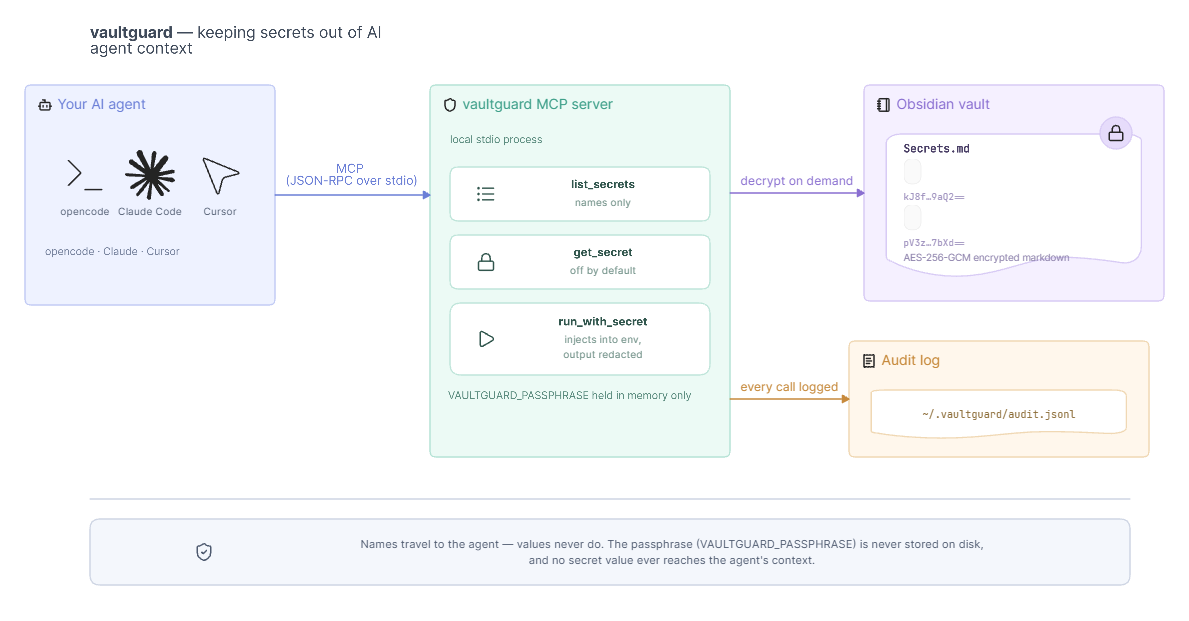
vaultguard architecture
The simple version: your agent asks by name, vaultguard decrypts on demand, the value stays out of the conversation.

  • You own the data. No cloud, no SaaS, no server. The encrypted blocks are plain markdown.
  • Readable in Obsidian. Encrypted blocks look like notes; reveal them with one click.
  • Tell your agent to run things using secrets β€” values never surface in transcripts.
  • Zero npm dependencies. Pure Node β‰₯ 18. Windows / macOS / Linux.

Quickstart

1 Β· Install

Terminal
npm install -g @ashishrao-4/vaultguard

2 Β· Point it at your vault

bash
vaultguard init --vault "C:\Users\you\Documents\Obsidian Vault"

It asks for a passphrase β€” the key that encrypts and decrypts every block in this vault. Then it:

  • creates Secrets.md in your vault,
  • installs the Inline Secret Block plugin into the vault automatically,
  • writes ~/.vaultguard/config.json β€” without the passphrase (you provide it via VAULTGUARD_PASSPHRASE).

Restart Obsidian and enable the plugin: Settings β†’ Community plugins β†’ Inline Secret Block β†’ Enable.

The passphrase is never written to disk by default. Prefer env vars: VAULTGUARD_PASSPHRASE (or DOORMAN_PASSPHRASE). If you want it conveniently stored anyway β€” at the cost of weaker security β€” run vaultguard init --store-passphrase instead (see Threat model).

3 Β· Add your first secret β€” the Obsidian way

In Obsidian, open Secrets.md and add a plaintext block:

markdown
```secret DATABASE-URL
Mydatabaseurl@postgres
```

Click Show β€” the plugin instantly replaces it with an encrypted secret-lock block. Your raw value is gone; what remains:

markdown
```secret-lock DATABASE-URL
Nx60U4Ph/+1CO+58Zr00HXhEW9GZ6voHlpS+bEXPpP69avbJaSfafZCC2dpPn6UgdMN+3PJUd+UPm39YAXhFTbHvLUpHDndzbODsL8fOm7IMWC16zjSQCW7CbRWklmUxOGl0lX2qpQ==
```

That's it. Same value, later, forever: click Show again.

No Obsidian? Use the CLI instead:

bash
vaultguard add DB_URL     # hidden prompt
vaultguard set DB_URL     # rotate in place

4 Β· Connect your agent

bash
vaultguard mcp

prints ready-made config for your harness:

opencode β€” in opencode.json (or globally via the app):

config.json
{
  "mcp": {
    "vaultguard": {
      "type": "local",
      "command": ["node", "C:/path/to/vaultguard/src/server.mjs"],
      "environment": { "VAULTGUARD_PASSPHRASE": "your-passphrase" }
    }
  }
}

Claude Code:

Terminal
claude mcp add vaultguard -e VAULTGUARD_PASSPHRASE=your-passphrase -- node C:/path/to/vaultguard/src/server.mjs

Cursor: add the same server to your project's .cursor/mcp.json (or the MCP settings tab):

config.json
{
  "mcpServers": {
    "vaultguard": {
      "command": "node",
      "args": ["C:/path/to/vaultguard/src/server.mjs"],
      "env": { "VAULTGUARD_PASSPHRASE": "your-passphrase" }
    }
  }
}

5 Β· Use it

text
you : "run a quick sanity check against DB_URL"
agent: run_with_secret(command: "psql $DB_URL -c 'SELECT 1'", secrets: ["DB_URL"])
you :  βœ” exit 0  Β·  audit entry written  Β·  no secret leaked
  • run_with_secret β€” secrets injected into the command's environment only.
  • Output is scrubbed β€” any accidental echo of a secret is replaced with [REDACTED:NAME].
  • get_secret β€” disabled by default so values never reach the agent; opt in with allowGetSecret: true in the config if a tool insists on the raw value.

Security model

LayerWhat stops it
At restAES-256-GCM, PBKDF2-SHA-256 (250,000 iterations, 16-byte salt, fresh 12-byte IV per value). Byte-compatible with the Inline Secret Block plugin.
Approval gaterun_with_secret is denied by default unless you set requireApproval: false (or VAULTGUARD_REQUIRE_APPROVAL=0).
Secret access gateget_secret is disabled by default β€” values never reach the agent; enable only via allowGetSecret: true. The intended path is run_with_secret (env injection, values never seen).
Host allowlistOnly named clients (from MCP clientInfo) may call tools. Empty list = allow all.
Command allowlistOnly command prefixes you list may run (e.g. ["psql", "node", "git"]). Empty = allow all.
Audit logEvery call β€” who (host), what, which secrets, outcome β€” appended to ~/.vaultguard/audit.jsonl. View with vaultguard audit.
Output scrubbingSecret values and their first 8 chars are redacted from command output.

Configuration

Edit ~/.vaultguard/config.json:

JSON Config
{
  "vaultPath": "C:/Users/you/Documents/Obsidian Vault",
  // passphrase is NOT stored here by default β€” provide VAULTGUARD_PASSPHRASE instead
  "allowlist": { "hosts": [], "commands": ["psql", "node"] },
  "requireApproval": false,          // true (default) = gate run_with_secret
  "audit": true,
  "allowGetSecret": false            // false (default) = values never reach the agent
}

The only way the passphrase lands in this file is vaultguard init --store-passphrase, which sets "storePassphraseOnDisk": true and includes "passphrase". Everything else reads the passphrase from the VAULTGUARD_PASSPHRASE env var or the CLI prompt.

Env varOverrides
VAULTGUARD_VAULT_PATH / VAULT_PATHvault path
VAULTGUARD_PASSPHRASE / DOORMAN_PASSPHRASEpassphrase
VAULTGUARD_HOMEconfig dir (default ~/.vaultguard)
VAULTGUARD_REQUIRE_APPROVAL=0auto-approve
VAULTGUARD_AUDIT=0disable audit
VAULTGUARD_ALLOW_GET_SECRET=1enable get_secret (default: off)

Passphrase hygiene: vaultguard never writes the passphrase to disk unless you opt in (init --store-passphrase). Supply VAULTGUARD_PASSPHRASE in each harness config (see step 4) and protect ~/.vaultguard like an SSH key. Changed passphrase? vaultguard rekey re-encrypts every block, then update the env var wherever you set it.


CLI reference

CommandWhat it does
vaultguard initConfigure vault + passphrase, create Secrets.md, install plugin
vaultguard add <NAME>Encrypt + store a new secret (interactive or --value)
vaultguard set <NAME>Rotate a secret in place
vaultguard rekeyRe-encrypt every block with a new passphrase (interactive, or --old-passphrase/--new-passphrase)
vaultguard listList secret names (no values)
vaultguard audit [--lines n]Tail the audit log
vaultguard mcpPrint harness-specific MCP config
vaultguard infoShow config + security posture
vaultguard testCrypto self-test

Threat model β€” and when NOT to use it

vaultguard is a thin convenience layer, not a secrets manager. Its job is to keep secret values out of your AI-agent transcripts, logs, and checkpoints.

What it does NOT protect against:

  • A compromised machine or harness. The passphrase (or an opted-in stored config) lives on your disk. Any process running as you β€” a backup tool, ransomware, a compromised plugin, your IDE β€” can read your files and decrypt the vault.
  • A hostile agent. The entire idea is that the agent runs commands with secrets in the environment. Treat that as "the agent is you." Start with command allowlists and review vaultguard audit; don't grant access you wouldn't grant yourself.
  • Weak passphrases. AES-256-GCM + PBKDF2 is only as strong as the passphrase. Use a long random one (your password manager can generate and store it).
  • Exfiltration through legitimate channels. A determined agent can copy ciphertext or raw values anywhere that's reachable. vaultguard is a barrier, not a boundary.
  • Plugin supply chain. vaultguard init downloads the Inline Secret Block plugin from its GitHub releases. A malicious plugin that knows your passphrase can decrypt everything β€” pin/verify it if you care.

Use it when: you want "agents run things with secrets without me pasting values into the chat" and the residual risks above are acceptable to you.

Don't use it when: you need real secrets-management guarantees β€” rotation policy, hardware-backed keys, no procedure that makes plaintext reachable to a native plugin β€” when your threat model includes a hostile agent on a shared or CI machine, or when the vault itself needs encryption at rest (Obsidian's own vault encryption, or an encrypted volume, is the answer there).


FAQ

Read the full README β†’View source on GitHub β†’

Related MCP Servers

View all in Knowledge & Memory View all alternatives
  • M
    Moxie Docs MCP
    β˜… Featured

    MCP & Agent Skills for Automated Documentation, and codebase conventions + context

    🧠 Knowledge & Memory33 views
    Compare vs Moxie Docs MCP β†’
  • S
    Scrivener MCP

    Connect Scrivener 3 writing projects to Claude and other AI assistants. 47 tools for document management, writing analysis, semantic search, character/plot memory, and content enhancement. Progressive skill loading, relationship engine with HMS triplets, and JS fallback for offline semantic search. npm i -g scrivener-mcp

    🧠 Knowledge & Memory16 views
    Compare vs Scrivener MCP β†’
  • C
    Codebase Memory MCP

    Code-intelligence engine that indexes a repo into a persistent knowledge graph β€” functions, classes, call chains, HTTP routes, cross-service links. 159 languages via tree-sitter + Hybrid LSP, sub-ms structural queries, 99% fewer tokens than grep. Single static binary, zero dependencies, 100% local. npx codebase-memory-mcp

    🧠 Knowledge & Memory7 views
    Compare vs Codebase Memory MCP β†’
  • C
    Context7

    Up-to-date code documentation for LLMs and AI code editors.

    🧠 Knowledge & Memory7 views
    Compare vs Context7 β†’

Reviews

No reviews yet β€” be the first to share how this listing worked for you.

Frequently Asked Questions about Vaultguard

We don't have a confirmed install command for vaultguard yet, so we don't publish a generated one β€” a guessed package name would point at the wrong package or none at all. Follow the project's own README or setup instructions (https://github.com/ashishrao-4/vaultguard) for the current steps.

AllMCPs Directory Badge

Full Badge Customizer

Showcase your server listing on GitHub or your project documentation. Embed this dynamic SVG badge to highlight official listing status and live engagement.

Badge Style:
Live Dynamic SVG PreviewVaultguard AllMCPs Directory Badge

Markdown (GitHub README)
[![AllMCPs](https://allmcps.com/api/badge/vaultguard?style=directory)](https://allmcps.com/mcp/vaultguard)
HTML Embed
<a href="https://allmcps.com/mcp/vaultguard"><img src="https://allmcps.com/api/badge/vaultguard?style=directory" alt="Vaultguard on AllMCPs" /></a>

Technical Specs & Signals

Category🧠Knowledge & Memory
More technical detailsExpand β–Ύ
Last updatedSep 28, 2026
Views0
Unique ViewsTotal visits recorded for this listing page on AllMCPs.
Installs0
Installs & Copy ActionsTotal times users copied install commands or configuration snippets for this server.
27Quality signal: Emerging Β· 27/100How this signal is calculated β–Ύ
Server availabilityNot measured

Not scored for repo-hosted servers β€” we can't reach the running server, only its GitHub page. Hosted MCP endpoints are health-checked live.

Verified ownership8/20
Documentation & tools11/30
Adoption & activity1/15
Community engagement0/10

A guidance signal from public completeness & health data β€” not a user rating. New listings start lower and rise as they add docs, get verified, and grow adoption. Signals we can't observe for a listing are skipped, not counted against it.

β˜… Spotlight Slot

Feature Your MCP Server

Get maximum visibility for your server across our directory, search results, and detail pages.

Spotlight Your Server

Own this project?

This directory is pre-filled from public sources. Claim via GitHub README, site badge, or DNS TXT to unlock edit access and the Official badge and attach your website β€” proof is checked automatically, then reviewed by our team.

Free dofollow backlink: add your website and place the AllMCPs badge on it β€” no claim needed. We detect it automatically and keep it verified as long as the badge stays live.

Claim & get free dofollow

Share & Embed

Add our SVG badge (dark/light directory styles) or embeddable widget to your site.

Explore more

More in 🧠 Knowledge & Memory β†’Best MCP servers for Memory & Knowledge β†’Best Obsidian MCP servers β†’Alternatives to Vaultguard β†’Install in Claude DesktopInstall in CursorInstall in VS CodeSetup guides for all 13 MCP clients