Calendar workflow engine for time off, approvals, and quick actions on any calendar backend.
Quick Install
Automated & IDE SetupCopy the AI prompt to install this server into Claude Code, Cursor, or another agent — or use 1-click editor setup below.
Manual Client & Custom JSON ConfigExpand JSON ▾
Client Config & Setup
Remote HTTPChoose your client or environment
Target File:
💡 Paste the JSON block into your client's configuration file under mcpServers, then restart the application.
Documentation Overview

vamoose
Calendar workflows, minus the tedium.




The moose does the paperwork. You go to the beach.
Four calendar backends behind one workflow engine that branches, approves, waits, recurs, and files real leave with your HR system, driven from your terminal, Claude, Slack, or a local dashboard, and authorable by an AI agent over MCP. Every run is recorded, and the daemon resumes exactly where it left off after a crash. Install with brew install dcadolph/tap/vamoose.
Calendar busywork is death by a thousand cuts: create the hold marked free, invite your manager, Slack them for the yes, go back in and add the team one by one, add a second blocked event so your own calendar says away, then file the leave in the HR portal. vamoose turns those chores into workflows it runs for you and advances in the background. Time off is the flagship workflow, and you can define your own.

Two minutes to running
That is the whole flow: the hold shows as free so it blocks nobody, your manager's calendar accept is the approval, and the daemon notifies your team the moment it lands.
How it works
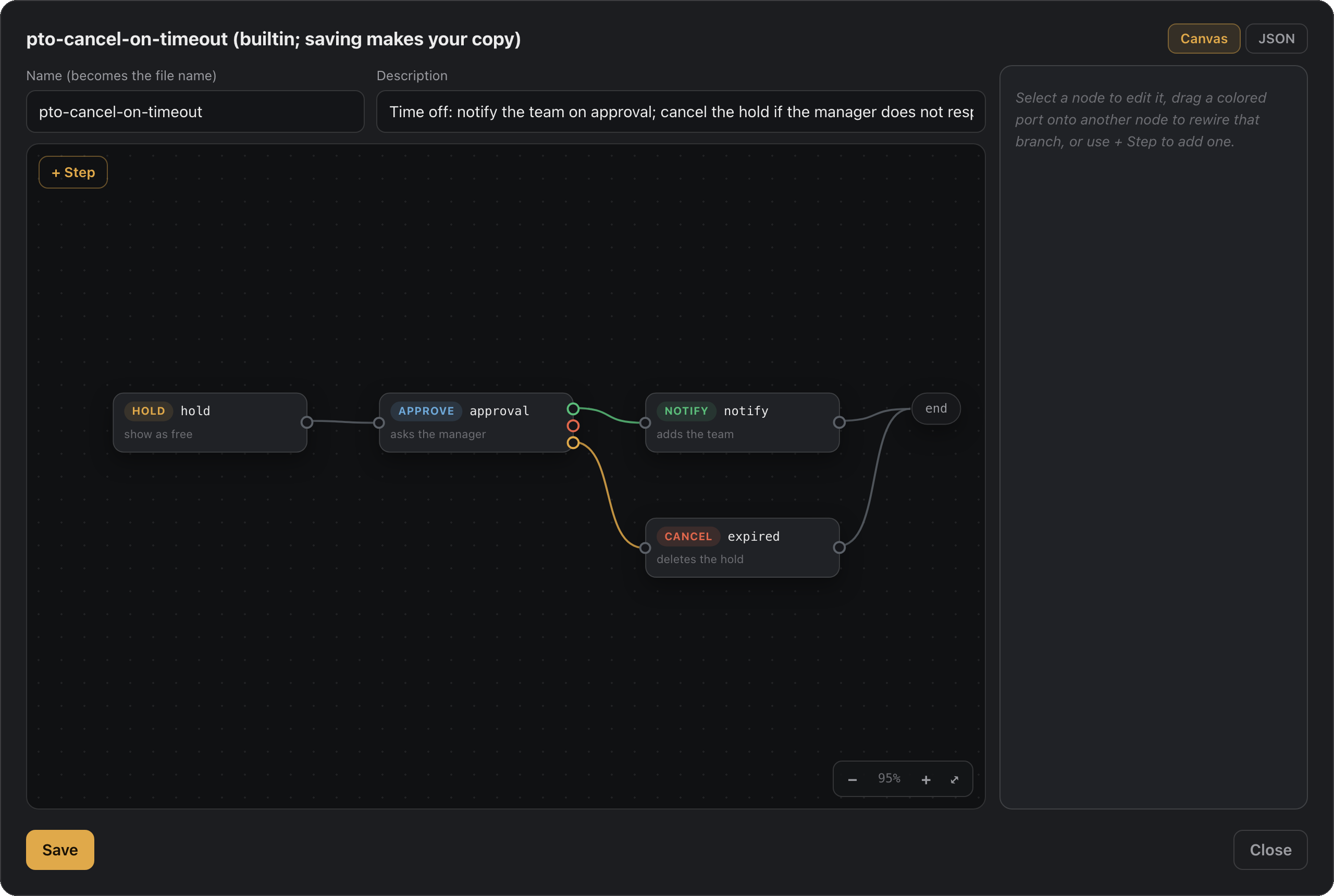
- Declare. A workflow is ordered steps in JSON: create a hold, gate on approval, branch on the outcome, wait, message a channel, file the leave. Time off ships built in; author your own in a file, on the dashboard's workflow canvas, or through an AI agent.
- Run. Drive it from the terminal, Claude, Slack, or
vamoose app, against Microsoft Graph, Google, iCloud, or any CalDAV host. Same workflow, any backend. - Advance. The daemon moves runs forward on its own: your manager accepting the invite is the approval signal (no separate approval product), timeouts and waits fire on the clock, recurring schedules re-run, and every step lands in the run history.
The built-in pto workflow is the flagship: hold shown free, manager approves by
accepting, team added as optional attendees so nobody's calendar gets blocked.
request, check, and promote are fronts over its steps. See Workflows.
Four backends ship behind one provider interface: Microsoft Graph (Outlook,
Microsoft 365, and Teams), Google Calendar, Apple iCloud, and any standard CalDAV host.
Pick one with --provider or the VAMOOSE_PROVIDER environment variable, and every
command works the same across them. Approval detection is the one exception: iCloud
sends invites but does not report accept/decline over CalDAV, so on iCloud you promote
by hand. See providers.
Why not just calendar rules?
You can rig a version of this with one calendar's rules or a saved email. vamoose earns its keep the moment you have more than one account:
- One brain for every account. The same workflows, commands, and setup whether you are on Google, Outlook, or Microsoft 365. Learn it once, not once per client.
- No rebuilding per client. Native rules live inside one app and stop at its edge.
Define a workflow once and point it at any backend with
--provider. - No drift. Change your time-off flow in one place. Hand-built rules drift the day you update Outlook and forget Gmail.
- Workflows are files, not clicks. JSON you can read, diff, share, version, and dry-run, instead of a settings panel you rebuild by hand on every machine.
- Runs where you already are. The CLI, Claude, and Slack, not one vendor's web UI.
Install
macOS and Linux:
Windows:
Docker (for hosting):
Or with Go 1.26 or newer:
Zips and tarballs for every platform are on the releases page.
New to vamoose? The Quickstart takes you from zero to a first approved hold in a few minutes.
Setup
Set one calendar backend and export its credentials, then run vamoose doctor to check the
setup. Every backend, including iCloud and any CalDAV host, is covered in providers.
Microsoft 365 / Outlook
vamoose talks to Microsoft Graph as you, using the OAuth device-code flow.
- Register an application in the Microsoft Entra admin center (single tenant is fine). Enable Allow public client flows so device code works.
- Grant these delegated permissions and admin consent:
User.Read,User.Read.All(read your manager and their direct reports)Calendars.ReadWrite(create and update the hold)MailboxSettings.ReadWrite(reserved for the out-of-office reply)offline_access(stay signed in between runs)
- Export the settings:
The first command opens a device-code prompt. Tokens are cached under your user
config directory and refreshed automatically after that. Run vamoose whoami
first to confirm auth and directory access before creating any holds.
Google Calendar
For --provider google, create an OAuth desktop app client in the Google Cloud
console, enable the Google Calendar API, then sign in:
login opens your browser for consent on a local loopback address, then caches and
refreshes tokens after that. Two things catch people out. Consent is denied until you add
the signing-in account under Google Auth Platform, Audience, Test users. And while the app
sits in Testing status, Google expires its refresh tokens after seven days, so login
comes back around once a week. Both are covered step by step, with a troubleshooting
table, in the Google guide.
Google Calendar has no directory, so pass your approver with --manager and set your team
with vamoose team set.
Apple iCloud
For --provider icloud, create an app-specific password at appleid.apple.com and export:
iCloud sends invites but does not report approvals over CalDAV. Recover them with the macOS EventKit helper or a Slack Approve button, or promote by hand. See providers.
Any CalDAV host
For --provider caldav, point at any standard CalDAV server, such as Fastmail or Nextcloud:
HR system, for balance and leave filing
Calendar setup is enough for holds, coverage, and approvals. Reading your remaining
balance with vamoose balance, and filing approved time off as real leave, both need an
HR system as well. Skip this section if you only want the calendar side.
Point at BambooHR directly:
Or post to any HR system through a webhook:
Without one of these, vamoose balance exits reporting that no HR system is configured.
Run vamoose doctor to see which parts are set.
Usage
Related MCP Servers
Adoption & maintenance
Factual signals from GitHub, npm, and our automated checks — not a rating.
npm downloads
29
Package downloads in the last 30 days.
Last commit
6d ago
Most recent push to the default branch.
Reviews
No reviews yet — be the first to share how this listing worked for you.
Frequently Asked Questions about Vamoose
AllMCPs Directory Badge
Showcase your server listing on GitHub or your project documentation. Embed this dynamic SVG badge to highlight official listing status and live engagement.
Badge Style:
Live Dynamic SVG Preview
Markdown (GitHub README)
[](https://allmcps.com/mcp/vamoose)HTML Embed
<a href="https://allmcps.com/mcp/vamoose"><img src="https://allmcps.com/api/badge/vamoose?style=directory" alt="Vamoose on AllMCPs" /></a>