Audit a site's UX the way a design-literate reviewer would, with a concrete fix for every finding.
Quick Install
Automated & IDE SetupCopy the AI prompt to install this server into Claude Code, Cursor, or another agent — or use 1-click editor setup below.
Manual Client & Custom JSON ConfigExpand JSON ▾
Client Config & Setup
Choose your client or environment
Target File:
💡 Paste the JSON block into your client's configuration file under mcpServers, then restart the application.
Documentation Overview
uxlint
Audit any website's UX the way a design-literate reviewer would: contrast, tap targets, type scale, colour discipline, scan patterns, landmarks. Every finding comes with a prescriptive fix an agent (or a human) can apply directly. It's designed to sit in a coding agent's loop (MCP) and be iterated against until green.
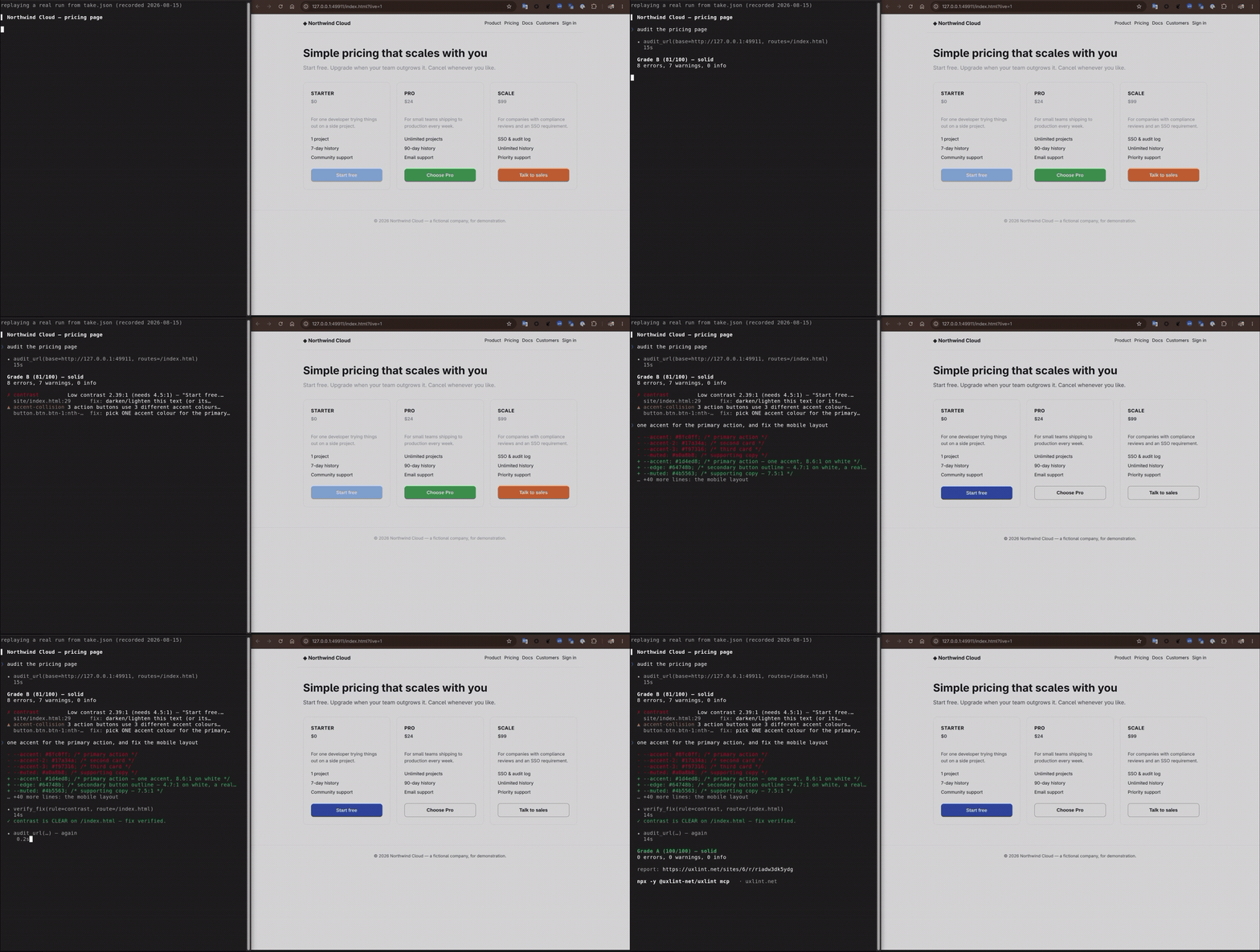
A real run, start to finish: audit_url → Grade B, a 2.39:1 contrast error and three CTAs in
three different accent hues → the fix → verify_fix → Grade A. Every number in it came back
from the tools; only the waiting was cut.
This is the CLI: a small, single static Rust binary. It drives a Chrome/Chromium you already have installed over the DevTools protocol (no Node, no Playwright, no headless-browser download), captures what a page looks and reads like, and sends that to uxlint's hosted server, which does the actual grading. The rules engine, the calibrated thresholds, and the LLM judge all live server-side, so the client never needs updating when a rule changes.
Install
Or with mise — its github backend pulls the matching build from GitHub
Releases, verifies it, and updates on mise up:
or pin it in a project's mise.toml:
Or build from source (needs a recent stable Rust toolchain and a Chrome/Chromium on PATH):
Quickstart
First time auditing your own project? uxlint init picks (or creates) a site to attach reports
to and writes a uxlint.toml so every future audit in this directory just works:
Exit code 1 on findings above the configured severity → drop it straight into CI (see
.github/workflows/ for a template, or the uxlint-net/uxlint-action GitHub Action).
Hiding elements from an audit (uxlint-hide)
Some on-page chrome isn't product UI and shouldn't be judged: a dev/staging environment banner, a
"DEV" marker, a debug toolbar, a Storybook/preview affordance. Add the class uxlint-hide to any
such element and the audit removes it — it's display:none from first paint, so it never appears in a
screenshot and is invisible to the collector (it seeds no findings):
The class is inert on your real site — it does nothing unless the audit is running, because the
stylesheet that hides it (.uxlint-hide { display: none !important; }) is injected only by uxlint's
browser, before the page's own scripts run. Style your element however you like the rest of the time.
It applies in every capture path — the crawl, goal-walk tests, and fix previews.
MCP (use it from a coding agent)
Claude Code, one command:
That installs the uxlint MCP server and, if the CLI isn't already on your PATH, fetches the matching
version once with the same checksum-verifying installer as above — so /plugin update updates the CLI
underneath it too. No Node needed: it downloads one static binary (verified against a published
checksum) and drives the Chrome you already have.
Any other agent — one line (the npm package fetches the binary for your platform, verifies the
checksum published beside it, and hands over). This is the only route that needs Node 18+, for
npx itself; if you'd rather not, install the binary with the line at the top and register that:
Or, for a client that reads a JSON config:
uxlint is also in the MCP Registry as
io.github.uxlint-net/uxlint, for clients that browse it. Already have the CLI? uxlint mcp install
registers it directly, no npx wrapper.
There is no token to set up first: ask your agent to audit something while signed out and it hands you
a sign-in link that mints and saves the token for you (UXLINT_API_KEY is for CI, which has no
browser).
Five tools: audit_url (full audit, graded verdict + action plan), verify_fix (recheck one rule
on one page after an edit), get_shot (fetch a finding's annotated screenshot),
ux_guidance (best-practice guidance to read before building UI), and lint_feedback — opt-in
and off by default (§ Privacy) — one tool for three kinds of signal: whether a finding was useful,
a lint uxlint is missing, or a component library it didn't recognise. The agent audits, reads the
fixes, edits, and re-audits until green.
Privacy & trust
This CLI runs on your machine and drives a real browser against real pages, so it's fair to ask exactly what it captures and where it goes. What we can tell you, because it's what the code in this repo actually does:
- The collector is baked in and readable. It's compiled into this
binary (
include_str!ofassets/collector.js), souxlint --versionpins the exact capture code and the server can't inject anything at run time. Everything it captures is page geometry, visible text, computed styles, and screenshots. For an embedded<iframe>it records the src's host only — never the full embed URL, which can carry session ids and tokens in its query string. It never reads your source code or your filesystem beyonduxlint.toml. It does read a little project provenance and send it with the report: your current git commit sha and branch name (git rev-parse), the machine's hostname, and, in GitHub Actions, the repo/PR/commit link. SetUXLINT_RUNNERto override the hostname. - Secret & PII redaction is best-effort, not a guarantee. Before anything is uploaded, the
collector masks text that looks like a token, API key, password, or email address in captured
page text, and redacts the same patterns from console logs and native dialog messages. All
channels share one pattern list (
assets/redact.js), so they can't drift. Screenshots get an extra pass right before capture: every form field value is masked (passwords blanked, other inputs replaced with dots) and pattern-matched secrets in on-page text are scrubbed, so typed data and displayed keys don't land in the image. That pass reaches into shadow DOM (including closed roots, via anattachShadowinterceptor) and same-origin iframes, and covers a cross-origin iframe with an opaque box since its pixels can't be redacted. But redaction is pattern-based, and a screenshot is still pixels: arbitrary displayed content that no pattern catches (a customer name on the page, order data), split-up values, and anything drawn into images or<canvas>can still slip through. Credentials you pass with--header/--storage/--login-*drive your browser only and are never sent to uxlint's server.
Related MCP Servers
Reviews
No reviews yet — be the first to share how this listing worked for you.
Frequently Asked Questions about Uxlint
AllMCPs Directory Badge
Showcase your server listing on GitHub or your project documentation. Embed this dynamic SVG badge to highlight official listing status and live engagement.
Badge Style:
Live Dynamic SVG Preview
Markdown (GitHub README)
[](https://allmcps.com/mcp/uxlint)HTML Embed
<a href="https://allmcps.com/mcp/uxlint"><img src="https://allmcps.com/api/badge/uxlint?style=directory" alt="Uxlint on AllMCPs" /></a>Technical Specs & Signals
CategoryDeveloper Tools
27Quality signal: Emerging · 27/100How this signal is calculated ▾
Server availabilityNot measured
Not scored for repo-hosted servers — we can't reach the running server, only its GitHub page. Hosted MCP endpoints are health-checked live.
Verified ownership8/20
Documentation & tools11/30
Adoption & activity1/15
Community engagement0/10
A guidance signal from public completeness & health data — not a user rating. New listings start lower and rise as they add docs, get verified, and grow adoption. Signals we can't observe for a listing are skipped, not counted against it.
Own this project?
This directory is pre-filled from public sources. Claim via GitHub README, site badge, or DNS TXT to unlock edit access and the Official badge — proof is checked automatically, then reviewed by our team.
Free dofollow backlink: add your website and place the AllMCPs badge on it — no claim needed. We detect it automatically and keep it verified as long as the badge stays live.
Claim & get free dofollowShare & Embed
Add our SVG badge (dark/light directory styles) or embeddable widget to your site.