web-scrapingscreenshotspdfhtml
MCP server for rendering websites as screenshots, PDFs, videos, HTML, or Markdown through the Urlbox API.
Quick Install
Automated & IDE SetupCopy the AI prompt to install this server into Claude Code, Cursor, or another agent — or use 1-click editor setup below.
Not yet automatically verified
We haven't yet run this listing's install command through our automated sandbox check. This isn't a red flag — we're steadily working through the catalog.
Manual Client & Custom JSON ConfigExpand JSON ▾
Client Config & Setup
Choose your client or environment
Target File:
💡 Paste the JSON block into your client's configuration file under mcpServers, then restart the application.
Overview
Use cases
Capture website screenshots in PNG or other supported formats
Generate full-page PDFs with outlines and tagging
Convert web pages to HTML or Markdown
Extract page metadata and cookies
Save rendered files to local downloads
Key features
Website rendering through the Urlbox API
Screenshot output in PNG, PDF, MP4, and other formats
HTML and Markdown conversion
Metadata and cookie extraction
Local file saving with store_renders
Capabilities & Tool Schemas
Inspect callable tools, capabilities, and parameters exposed to AI agents by Urlbox MCP Server.
Extracted Tool Capabilities
Website rendering through the Urlbox API
Screenshot output in PNG, PDF, MP4, and other formats
HTML and Markdown conversion
Metadata and cookie extraction
Local file saving with store_renders
Documentation Overview
Urlbox MCP Server
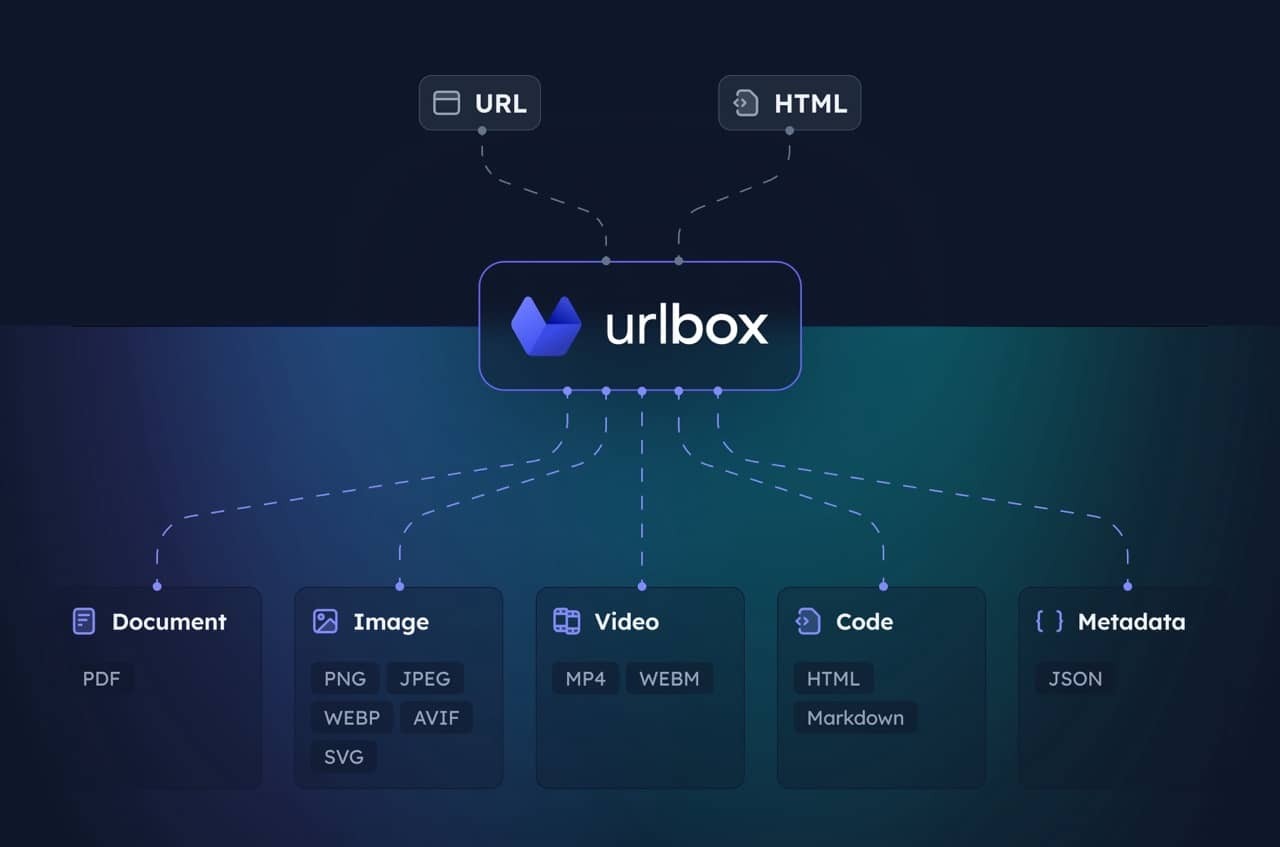
MCP server for the Urlbox Screenshot API. Enables your client to take screenshots, generate PDFs, extract HTML/markdown, and more from websites.
Visit Urlbox for more information, and have a read of our docs or chat with your LLM post install to get a good understanding of its options and capabilities.
Setup
-
Install dependencies and build:
-
Get Urlbox API credentials:
- Sign up at urlbox.com
- Get your API Secret from the dashboard
-
Set environment variables:
claude_desktop_config.json
Usage
The server provides a render tool that can:
- Take screenshots in multiple formats (PNG, PDF, MP4 and more)
- Convert pages to HTML, markdown
- Extract metadata and cookies
- Save files locally to your downloads with
store_renders: true
Claude will automatically use this when you ask it to screenshot websites or convert web content.
Useful prompts
Take a clean screenshot without ads or cookie banners:
Screenshot and save side renders like HTML/markdown:
Generate a PDF of the full page:
Related MCP Servers
Adoption & maintenance
Factual signals from GitHub, npm, and our automated checks — not a rating.
GitHub stars
4
Stargazers on the source repository.
npm downloads
93
Package downloads in the last 30 days.
Last commit
10mo ago
Most recent push to the default branch.
Directory activity
1 views
Config copies, upvotes, and views on AllMCPs.
Reviews
No reviews yet — be the first to share how this listing worked for you.
Frequently Asked Questions about Urlbox MCP Server
AllMCPs Directory Badge
Showcase your server listing on GitHub or your project documentation. Embed this dynamic SVG badge to highlight official listing status and live engagement.
Badge Style:
Live Dynamic SVG Preview
Markdown (GitHub README)
[](https://allmcps.com/mcp/urlbox-urlbox-mcp-server)HTML Embed
<a href="https://allmcps.com/mcp/urlbox-urlbox-mcp-server"><img src="https://allmcps.com/api/badge/urlbox-urlbox-mcp-server?style=directory" alt="Urlbox MCP Server on AllMCPs" /></a>Technical Specs & Signals
CategorySearch & Data Extraction
PricingBring your own API key (usage-based cost)
10/11 checks healthy over the last 32d
49Quality signal: Fair · 49/100How this signal is calculated ▾
Server availabilityNot measured
Not scored for repo-hosted servers — we can't reach the running server, only its GitHub page. Hosted MCP endpoints are health-checked live.
Verified ownership10/20
Documentation & tools24/30
Adoption & activity3/15
Community engagement0/10
A guidance signal from public completeness & health data — not a user rating. New listings start lower and rise as they add docs, get verified, and grow adoption. Signals we can't observe for a listing are skipped, not counted against it.
Supply-chain signal
No high-severity advisories surfaced by our automated scan.
Critical 0High 0Medium 0Low 0
Scanned 26d ago via OSV.dev · @urlbox/screenshot-mcp (npm)
Own this project?
This directory is pre-filled from public sources. Claim via GitHub README, site badge, or DNS TXT to unlock edit access and the Official badge — proof is checked automatically, then reviewed by our team.
Free dofollow backlink: add your website and place the AllMCPs badge on it — no claim needed. We detect it automatically and keep it verified as long as the badge stays live.
Claim & get free dofollowShare & Embed
Add our SVG badge (dark/light directory styles) or embeddable widget to your site.