Ask for a playlist. Get a real one, playing in Apple Music — no account, nothing stored.
Quick Install
Automated & IDE SetupCopy the AI prompt to install this server into Claude Code, Cursor, or another agent — or use 1-click editor setup below.
Not yet automatically verified
We haven't yet run this listing's install command through our automated sandbox check. This isn't a red flag — we're steadily working through the catalog.
Manual Client & Custom JSON ConfigExpand JSON ▾
Client Config & Setup
Choose your client or environment
Target File:
💡 Paste the JSON block into your client's configuration file under mcpServers, then restart the application.
Documentation Overview
Unofficial Apple Music MCP
Let Claude play your music. Download, drag, double-click. That's the install.
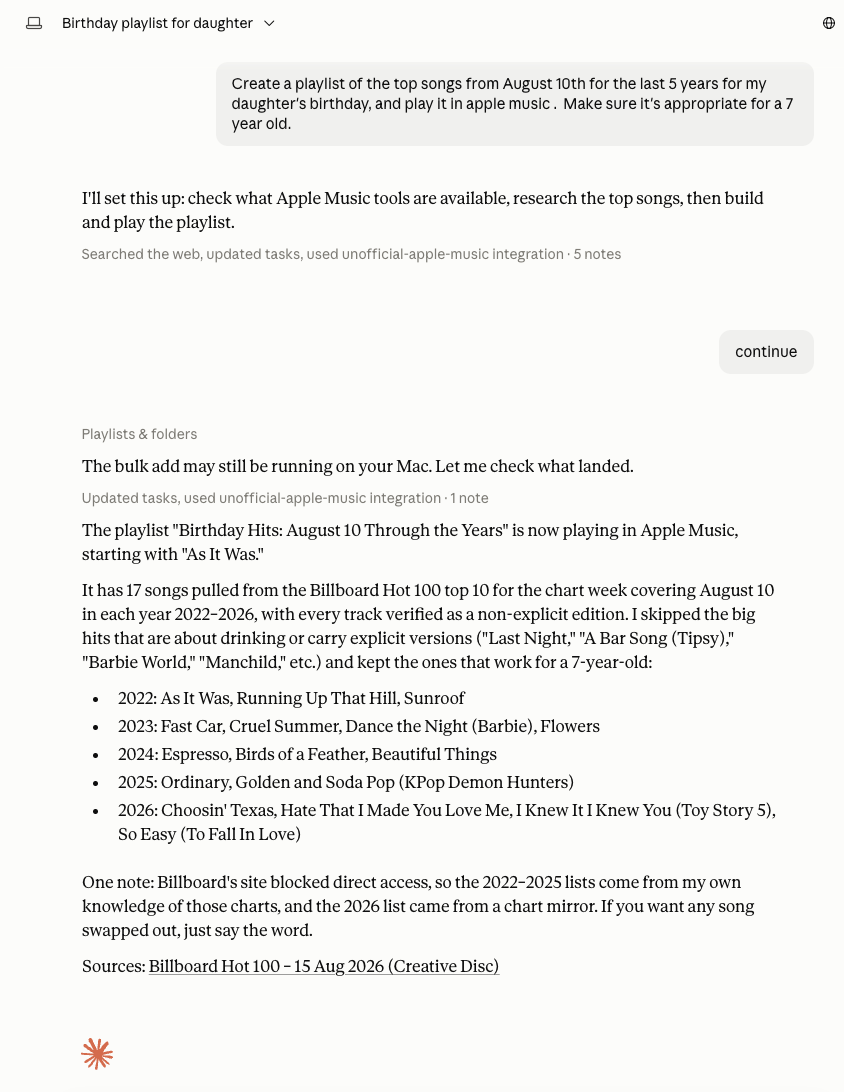
One request. A real playlist, playing, with the explicit versions left out.
⬇ Download for Apple Silicon
·
⬇ Download for Intel
Not sure which? Apple menu → About This Mac. "Apple M1/M2/M3…" is Apple Silicon.
notarized by Apple · no terminal · no developer account ·
all downloads & checksums
Ask for music in plain English
"Build my kid a Hogwarts birthday playlist. Soundtracks only, nothing scary."
"I've worn out The Heist. What should I try next?"
"More like that Eric Ericson choir record, but skip the Christmas half."
Claude does the work in the Music app you already have. The playlist it builds is a real playlist. It syncs to your phone.
| Playlists | Make them, add to them, reorder, rename, sort into folders, delete |
| Your library | Search it, browse it, rate songs, mark favorites, see what you played |
| Playback | Play, pause, skip, seek, shuffle, repeat, volume, AirPlay |
| The full catalog | Search all of Apple Music, play it, add it to your library |
Playing or adding music you don't already own needs an Apple Music subscription. That's Apple's rule, not this server's. Everything else works without one.
Install
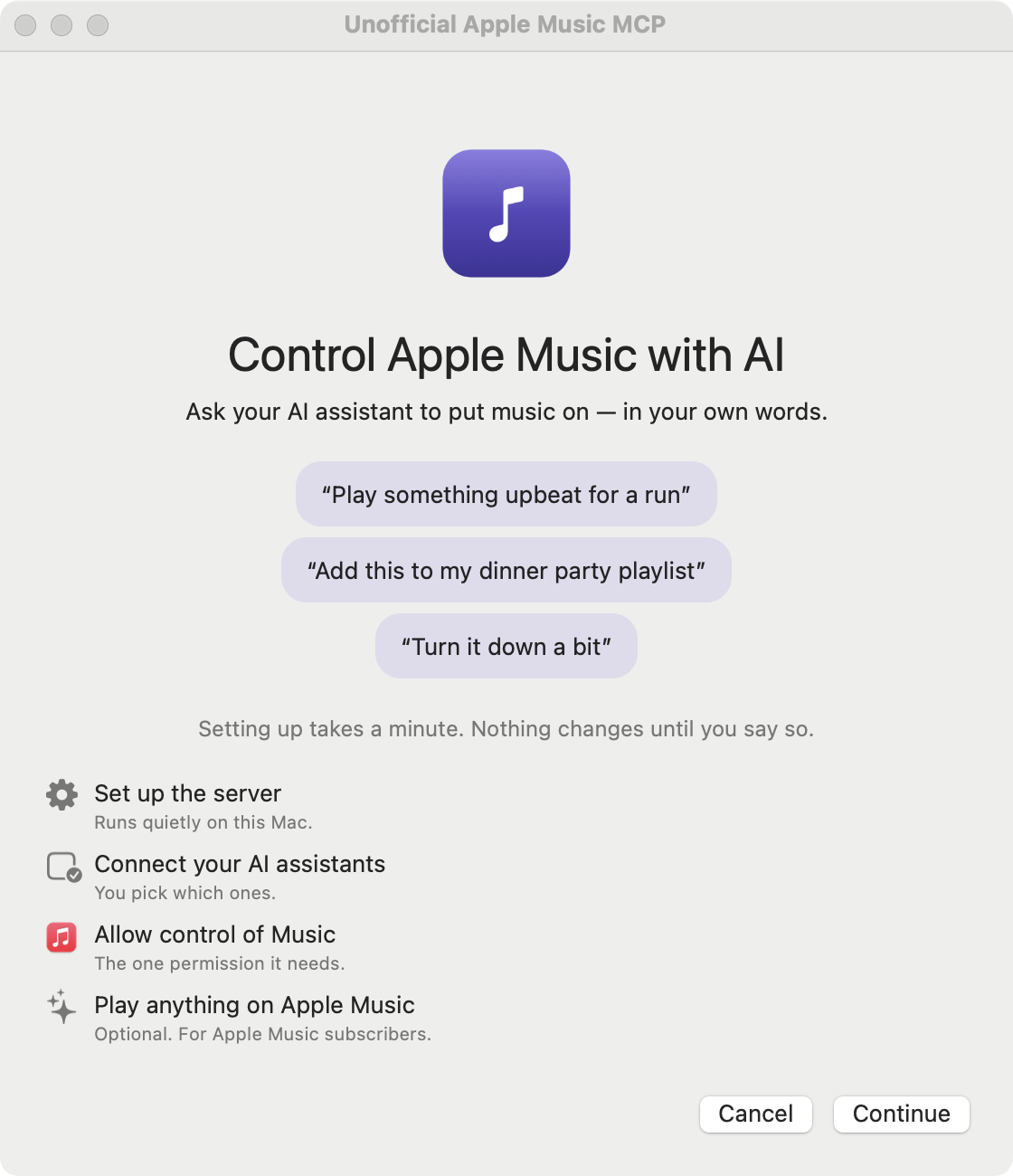
You need macOS 12 or later and the Music app signed in to your Apple account. Playing or adding catalog music needs macOS 14 or later.
- Download the app for Apple Silicon, or the Intel build.
- Unzip it. Drag UnofficialAppleMusicMCP.app to your Applications folder.
- Double-click it once.
That's the whole install. No Python, no Homebrew, no Terminal. The app brings everything it needs with it.
Apple notarized these builds, so the app just opens. No "unidentified developer" warning, no right-click trick, no trip to System Settings.
Drag it to Applications first. If you open it from your Downloads folder, macOS runs it from a temporary copy that vanishes when you quit, and the background helper ends up pointing at a file that no longer exists.
The setup window then asks you three questions. You can skip any of them.
| It asks | What happens | Why |
|---|---|---|
| Install the background helper? | Adds a small program that starts when you log in | This is what lets the permission belong to the app instead of to your terminal |
| Set up your AI apps? | Adds one entry to Claude Desktop, Claude Code, Cursor, Windsurf, Codex or VS Code | So they can find it. Your other tools stay put, and it backs up every file first |
| Allow access to Music? | Shows the standard macOS permission box | Approving it here means the permission lands on this app |
Restart the AI apps you picked, and you're done.
Building it yourself? Sign it. See From source. macOS ties the Music permission to a signature. An unsigned app looks like a brand new app on every rebuild, so it will ask for permission again each time.
Why it asks for so little
Software can reach whatever you let it reach. That matters more than usual here, because this software takes its orders from an AI.
The most capable Apple Music server I found needs a macOS permission called Accessibility. The name misleads. It has nothing to do with screen readers or assistive technology. It lets one app drive another: type keystrokes, click buttons, read what's on your screen.
macOS will not limit it to one app. You grant it for everything or not at all.
So a music server holding that permission can also type into your email. And it takes its instructions from a model reading text nobody has vetted: track names, playlist titles, whatever it just searched. A booby-trapped playlist title becomes a keystroke.
This fork deleted that code. It asks for three things instead:
| It gets | It does not get |
|---|---|
| Control of the Music app, and nothing else. Revoke it in System Settings any time | The Accessibility permission. There is no code left that could use it |
| A connection to Apple Music, so it can add songs to your library | Any browser, your cookies, your tabs |
| One background program, started when you log in | Your terminal's permissions, or anything else on your Mac |
That's the whole list, and a test suite fails the build if any of it creeps back.
It still plays the entire Apple Music catalog. Most servers pay for that with the permission above. This one goes through Apple's own MusicKit, signed with the app's identity: one approval box, no developer account, and no password or key stored anywhere on your Mac.
"Secure" is the goal, not a certificate. Nobody independent has audited this. The claims worth trusting are the ones a test can check, and those are listed below.
Why an app instead of a command
macOS blames the parent. When your AI app launches a helper program, the permission lands on the AI app, not the helper. The usual setup therefore hands "control Music" to your entire terminal, and to everything you ever run from it.
This app splits in two instead:
The shim talks to Claude and cannot touch Music. The helper owns the permission and is started by macOS itself. You get one row in System Settings you can switch off, and your terminal gets nothing. docs/PERMISSIONS.md has the details.
What it will never do
| No Accessibility | No fake keystrokes, no fake clicks, no reading other apps' windows |
| No browser | No Playwright, no Chrome driven from inside the app |
| No reading your browser | Never touches Safari cookies or runs JavaScript in your tabs |
| No opening links | It reads Apple Music links, it never hands them to a browser |
| No shell | It runs exactly one program: osascript, with a timeout |
| No stored passwords | There is nothing in ~/.config worth stealing |
| No private APIs | Only api.music.apple.com and Apple's public search API |
Every row is a test in tests/test_capability_invariants.py,
running as its own CI job. Deleting a subsystem is a one-time event. Keeping it
deleted is a property.
For developers
A hardened fork of epheterson/applemusic-mcp. Upstream does more and always will: Windows and Linux, the Chrome and Safari web players, and the Up Next queue, which lived inside the web player and could not survive its removal. This fork trades those for a smaller blast radius and an installer your relatives can use.
With pip, pipx or uvx
The wheel carries the same signed MusicKit helper the app does, so this is a full install, not a reduced one.
Every release also has the wheel attached with checksums, if you would rather verify a file first.
There's no setup window on this path, so two steps are yours.
1. Add it to your MCP client. For Claude Desktop, in
~/Library/Application Support/Claude/claude_desktop_config.json:
For Claude Code: claude mcp add unofficial-apple-music -- secure-applemusic-mcp serve.
Other clients take the same command in their own config file. Use the full path
if it isn't on your client's PATH, since GUI apps often don't inherit a shell
PATH. which secure-applemusic-mcp prints what to paste.
2. Approve Apple Music once. Restart the client, then ask it to run
config(action='signin'). A native prompt appears and nothing is stored. Until
you do, everything works except adding music you don't already own.
The wheel is macOS-only and covers both chips. pip refuses to install it
elsewhere rather than hand you a build with no MusicKit.
From source
Related MCP Servers
Reviews
No reviews yet — be the first to share how this listing worked for you.
Frequently Asked Questions about Unofficial Apple Music for macOS
AllMCPs Directory Badge
Showcase your server listing on GitHub or your project documentation. Embed this dynamic SVG badge to highlight official listing status and live engagement.
Badge Style:
Live Dynamic SVG Preview
Markdown (GitHub README)
[](https://allmcps.com/mcp/unofficial-apple-music-for-macos)HTML Embed
<a href="https://allmcps.com/mcp/unofficial-apple-music-for-macos"><img src="https://allmcps.com/api/badge/unofficial-apple-music-for-macos?style=directory" alt="Unofficial Apple Music for macOS on AllMCPs" /></a>