Security-first MCP server for PostgreSQL, SQLite, MySQL, DuckDB with SQL injection prevention.
Quick Install
Automated & IDE SetupCopy the AI prompt to install this server into Claude Code, Cursor, or another agent — or use 1-click editor setup below.
Not yet automatically verified
We haven't yet run this listing's install command through our automated sandbox check. This isn't a red flag — we're steadily working through the catalog.
Manual Client & Custom JSON ConfigExpand JSON ▾
Client Config & Setup
Choose your client or environment
Target File:
💡 Paste the JSON block into your client's configuration file under mcpServers, then restart the application.
Capabilities & Tool Schemas (8)
Inspect callable tools, capabilities, and parameters exposed to AI agents by Universal Db MCP.
queryExecute SQL — read-only by default, all 8 security layers apply
schemaInspect tables and columns — no config needed
explainGet query execution plan without running the query
healthCheck connection status, DB version, and pool metrics
list_databasesShow all configured databases and connection state
query_historyInspect the last 100 executed queries
Documentation Overview
Universal Database MCP Server
The security-first, Python-native MCP server for database access from AI agents.


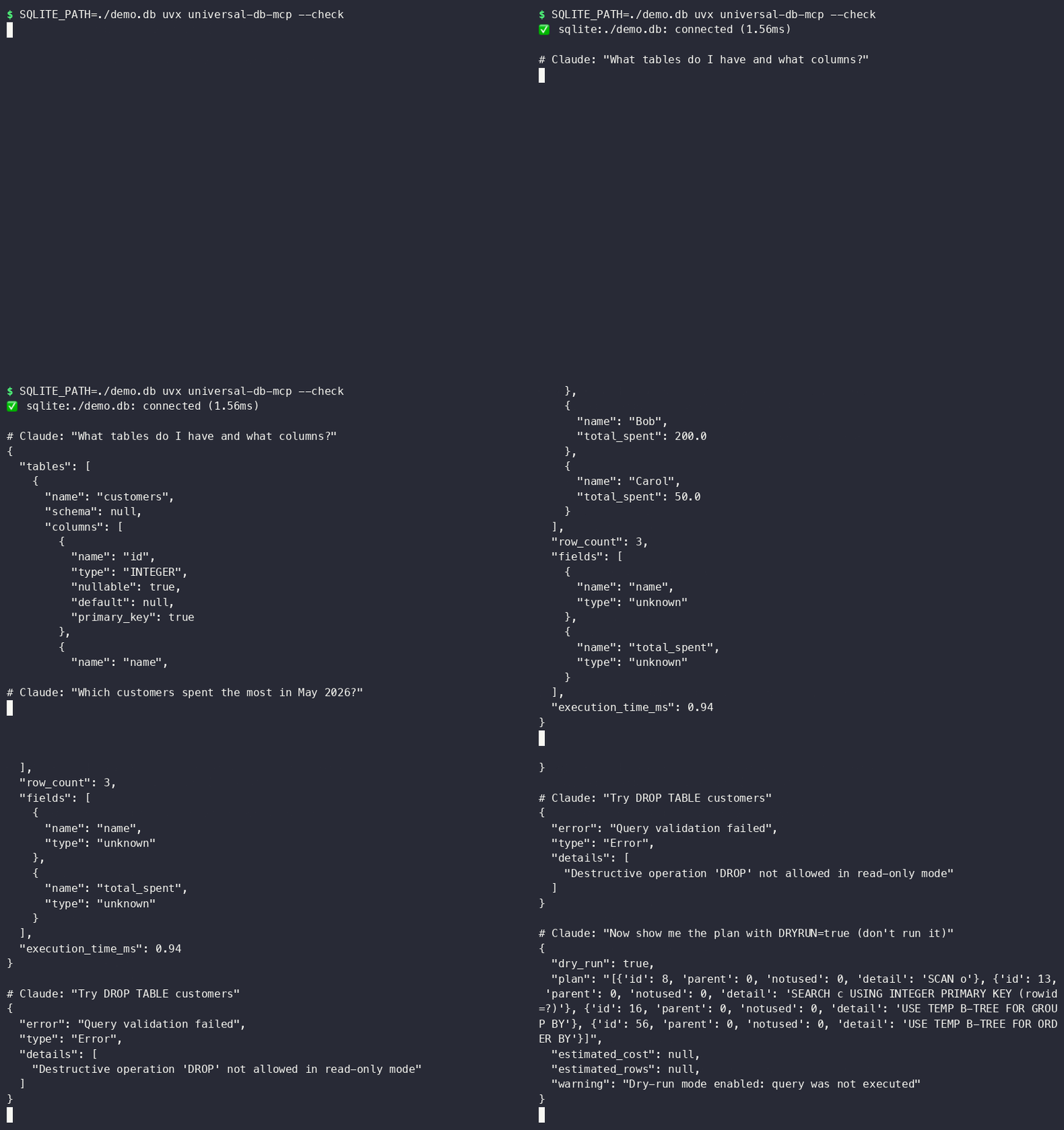
Why This Exists
Most database MCP servers give AI agents raw SQL access and hope for the best. This server assumes the LLM is untrusted input and applies 8 layers of injection prevention before any query reaches your database — including blocking UNION attacks, stacked statements, time-based injection, and comment bypasses.
Supports: PostgreSQL · SQLite · MySQL · DuckDB (columnar analytics)
Zero Setup: Works on Your Laptop Right Now
No Docker. No cloud account. No database server to install. DuckDB and SQLite run in-process:
Add to Claude Code in ~/.claude/mcp_servers.json, or to Claude Desktop in
~/Library/Application Support/Claude/claude_desktop_config.json (macOS) /
%APPDATA%\Claude\claude_desktop_config.json (Windows):
Restart Claude Desktop / Claude Code after saving — that's it.
That's it. Claude Code discovers the tools automatically.
More client configs (Claude Desktop, Cursor, Windsurf, Docker) in
examples/.
Security Model: 8 Layers
Read-only by default. Defense-in-depth. Every query validated before it touches the driver.
| Layer | What it does |
|---|---|
| 1 | Driver-level read-only — PostgreSQL session flag, SQLite mode=ro URI, DuckDB read_only=True. Write rejected before SQL parsing. |
| 2 | Keyword blocking — DROP, DELETE, TRUNCATE, ALTER, INSERT, UPDATE, GRANT, EXEC blocked in read-only mode |
| 3 | Injection pattern detection — UNION SELECT, stacked statements, SQL comments (--, /*), xp_, SLEEP(), WAITFOR, BENCHMARK() |
| 4 | Multiple statement rejection — ; separating statements always blocked |
| 5 | Parameter type enforcement — only str, int, float, bool, null accepted as parameters |
| 6 | Result size limits — truncated at MAX_RESULT_ROWS (default 1000) to prevent memory exhaustion |
| 7 | Identifier sanitization — table/column names stripped of metacharacters in internally-generated SQL |
| 8 | DuckDB filesystem blocklist — read_csv(), read_parquet(), glob(), LOAD, INSTALL, httpfs, COPY blocked at adapter level; read_only=True only blocks writes, not file reads |
Full threat model: docs/SECURITY.md
DuckDB: Analytics Without Infrastructure
DuckDB runs in-process (no server) and reads Parquet, CSV, JSON natively. Connect AI agents to your analytics data without spinning up a warehouse:
Then in Claude Code:
Natural Language → SQL
No separate NL-to-SQL tool needed — Claude already does this. Give it the
schema tool and ask in plain English:
Pair with dry_run: true (DRYRUN=true) while prototyping — Claude gets the
query plan back without anything executing.
Docker
See examples/docker_mcp_config.json for
wiring this into an MCP client.
All Databases
MCP Tools
| Tool | Description |
|---|---|
query | Execute SQL — read-only by default, all 8 security layers apply |
schema | Inspect tables and columns — no config needed |
explain | Get query execution plan without running the query |
health | Check connection status, DB version, and pool metrics |
list_databases | Show all configured databases and connection state |
query_history | Inspect the last 100 executed queries |
snapshot_schema | Capture current schema for drift detection |
schema_diff | Compare current schema against the last snapshot |
v1.1.0: dry-run mode (DRYRUN=true), table allowlists (WHITELISTED_TABLES), query
complexity warnings, structured audit logs, and a --check CLI flag for connectivity
validation. See CHANGELOG.md.
Configuration
Secure Database Users
Always use a dedicated read-only account. Never give the MCP server credentials that can modify data.
PostgreSQL:
MySQL:
Development
Architecture
vs. Google MCP Toolbox
| This project | Google MCP Toolbox | |
|---|---|---|
| Runtime | Python — pip install / uvx | Go binary / Docker |
| Local DBs | SQLite + DuckDB zero-infra | No SQLite |
| Analytics | DuckDB in-process | No columnar adapter |
| Auth model | Read-only by default + env vars | IAM / GCP-native |
| SQL injection | 8-layer sanitizer + parameterized | Auth-focused |
| Extend | Python ecosystem, any pip package | Go plugins |
| Vendor | Neutral | Google Cloud funnel |
Different tools for different jobs. Use this when you want Python-native, local-first, security-hardened access without cloud dependencies.
License
MIT — LICENSE
Security Notice: This server provides AI agents with database access. Always
use read-only credentials, review docs/SECURITY.md before
production deployment, and never commit .env files.
Related MCP Servers
Adoption & maintenance
Factual signals from GitHub, npm, and our automated checks — not a rating.
GitHub stars
1
Stargazers on the source repository.
npm downloads
344
Package downloads in the last 30 days.
Last commit
3mo ago
Most recent push to the default branch.
Tools exposed
8
Callable tools this server registers over MCP.
Directory activity
2 views
Config copies, upvotes, and views on AllMCPs.
Reviews
No reviews yet — be the first to share how this listing worked for you.
Frequently Asked Questions about Universal Db MCP
AllMCPs Directory Badge
Showcase your server listing on GitHub or your project documentation. Embed this dynamic SVG badge to highlight official listing status and live engagement.
Badge Style:
Live Dynamic SVG Preview
Markdown (GitHub README)
[](https://allmcps.com/mcp/universal-db-mcp)HTML Embed
<a href="https://allmcps.com/mcp/universal-db-mcp"><img src="https://allmcps.com/api/badge/universal-db-mcp?style=directory" alt="Universal Db MCP on AllMCPs" /></a>Technical Specs & Signals
CategoryDatabases
12/12 checks healthy over the last 45d
52Quality signal: Good · 52/100How this signal is calculated ▾
Server availabilityNot measured
Not scored for repo-hosted servers — we can't reach the running server, only its GitHub page. Hosted MCP endpoints are health-checked live.
Verified ownership10/20
Documentation & tools25/30
Adoption & activity4/15
Community engagement0/10
A guidance signal from public completeness & health data — not a user rating. New listings start lower and rise as they add docs, get verified, and grow adoption. Signals we can't observe for a listing are skipped, not counted against it.
Supply-chain signal
No high-severity advisories surfaced by our automated scan.
Critical 0High 0Medium 0Low 0
Scanned 4d ago via OSV.dev · universal-db-mcp (PyPI)
Own this project?
This directory is pre-filled from public sources. Claim via GitHub README, site badge, or DNS TXT to unlock edit access and the Official badge — proof is checked automatically, then reviewed by our team.
Free dofollow backlink: add your website and place the AllMCPs badge on it — no claim needed. We detect it automatically and keep it verified as long as the badge stays live.
Claim & get free dofollowShare & Embed
Add our SVG badge (dark/light directory styles) or embeddable widget to your site.