AllMCPs
BrowseBestCategoriesStackCompareToolsGuidesBlog Log in Submit MCP

Stay in the loop

Get new MCP servers and top picks in your inbox.

AllMCPs

The open directory for discovering and installing Model Context Protocol servers.

Explore

  • Browse servers
  • Best MCP servers
  • Categories
  • MCP clients
  • Agent prompts
  • Stack Builder
  • Compare servers
  • Tags index
  • Submit a server
  • Pricing

Learn

  • Guides hub
  • What is MCP?
  • Install guide
  • Troubleshooting
  • Security
  • Blog
  • Blog RSS

Tools

  • All tools
  • Config generator
  • Config validator
  • MCP playground
  • OpenAPI β†’ MCP
  • Badge generator

For agents

  • API docs
  • Trust & traffic
  • llms.txt β†— (opens in a new tab)
  • Catalog JSON β†— (opens in a new tab)
  • Remote MCP β†— (opens in a new tab)

Company

  • About
  • Contact
  • X (@AllMCPs) β†— (opens in a new tab)
  • GitHub β†— (opens in a new tab)
  • Terms
  • Privacy
AllMCPs VerifiedAllMCPs VerifiedFeatured on Nick LaunchesFeatured on Nick LaunchesLaunch Llama NewsletterLaunch Llama NewsletterVerified DR - allmcps.comVerified DR - allmcps.comFeatured on SaaSGrowFeatured on SaaSGrowFeatured on Twelve ToolsFeatured on Twelve ToolsFeatured on Saaspa.geFeatured on Saaspa.geFeatured on Findly.toolsFeatured on Findly.toolsFeatured on Startup FameFeatured on Startup FameFeatured on LaunchKiwiFeatured on LaunchKiwiFeatured on ScrollLaunchFeatured on ScrollLaunchFeatured on DailyPingsFeatured on DailyPingsFazier badgeFazier badgeFeatured on NewTool.siteFeatured on NewTool.siteFeatured on saasfame.comFeatured on saasfame.comDR Checker - Domain RatingDR Checker - Domain RatingListed on Turbo0Listed on Turbo0Launched on LaunchBoard - Product Launch PlatformLaunched on LaunchBoard - Product Launch PlatformList on SimilarlabsList on Similarlabshttps://codetrendy.comhttps://codetrendy.comListed on DevTool.ioFeatured on BuildlistFeatured on BuildlistAllMCPs VerifiedAllMCPs VerifiedFeatured on Nick LaunchesFeatured on Nick LaunchesLaunch Llama NewsletterLaunch Llama NewsletterVerified DR - allmcps.comVerified DR - allmcps.comFeatured on SaaSGrowFeatured on SaaSGrowFeatured on Twelve ToolsFeatured on Twelve ToolsFeatured on Saaspa.geFeatured on Saaspa.geFeatured on Findly.toolsFeatured on Findly.toolsFeatured on Startup FameFeatured on Startup FameFeatured on LaunchKiwiFeatured on LaunchKiwiFeatured on ScrollLaunchFeatured on ScrollLaunchFeatured on DailyPingsFeatured on DailyPingsFazier badgeFazier badgeFeatured on NewTool.siteFeatured on NewTool.siteFeatured on saasfame.comFeatured on saasfame.comDR Checker - Domain RatingDR Checker - Domain RatingListed on Turbo0Listed on Turbo0Launched on LaunchBoard - Product Launch PlatformLaunched on LaunchBoard - Product Launch PlatformList on SimilarlabsList on Similarlabshttps://codetrendy.comhttps://codetrendy.comListed on DevTool.ioFeatured on BuildlistFeatured on Buildlist
Β© 2026 Jackalope Digital LLC. All rights reserved.
  1. Home
  2. πŸ”’ Security
  3. Universal Connector Mcp
U
Health: Not checked yetWe have not completed a health check for this listing yet.Last checked 8/11/2026, 12:17:00 AM

Universal Connector Mcp

Enrichment pendingWe haven’t run our AI enrichment pass on this listing yet, so the overview, use cases, and FAQ below may be sparse or missing. We work through the catalog over time β€” check back soon.
View Repository

Security-first MCP server that connects any OpenAPI, GraphQL, gRPC or SOAP API to AI agents.

Quick Install

Automated & IDE Setup

Copy the AI prompt to install this server into Claude Code, Cursor, or another agent β€” or use 1-click editor setup below.

Add to CursorAdd to VS Code
Manual Client & Custom JSON ConfigExpand JSON β–Ύ

Install Config Generator

Choose your client
claude_desktop_config.json
{
  "mcpServers": {
    "universal-connector-mcp": {
      "command": "npx",
      "args": [
        "-y",
        "universal-connector-mcp"
      ]
    }
  }
}

πŸ’‘ Paste into ~/Library/Application Support/Claude/claude_desktop_config.json (macOS) or %APPDATA%\Claude\claude_desktop_config.json (Windows)

Install Directory Badge Claim listing AlternativesπŸ”’ More in Security

Documentation Overview

Universal API Connector MCP
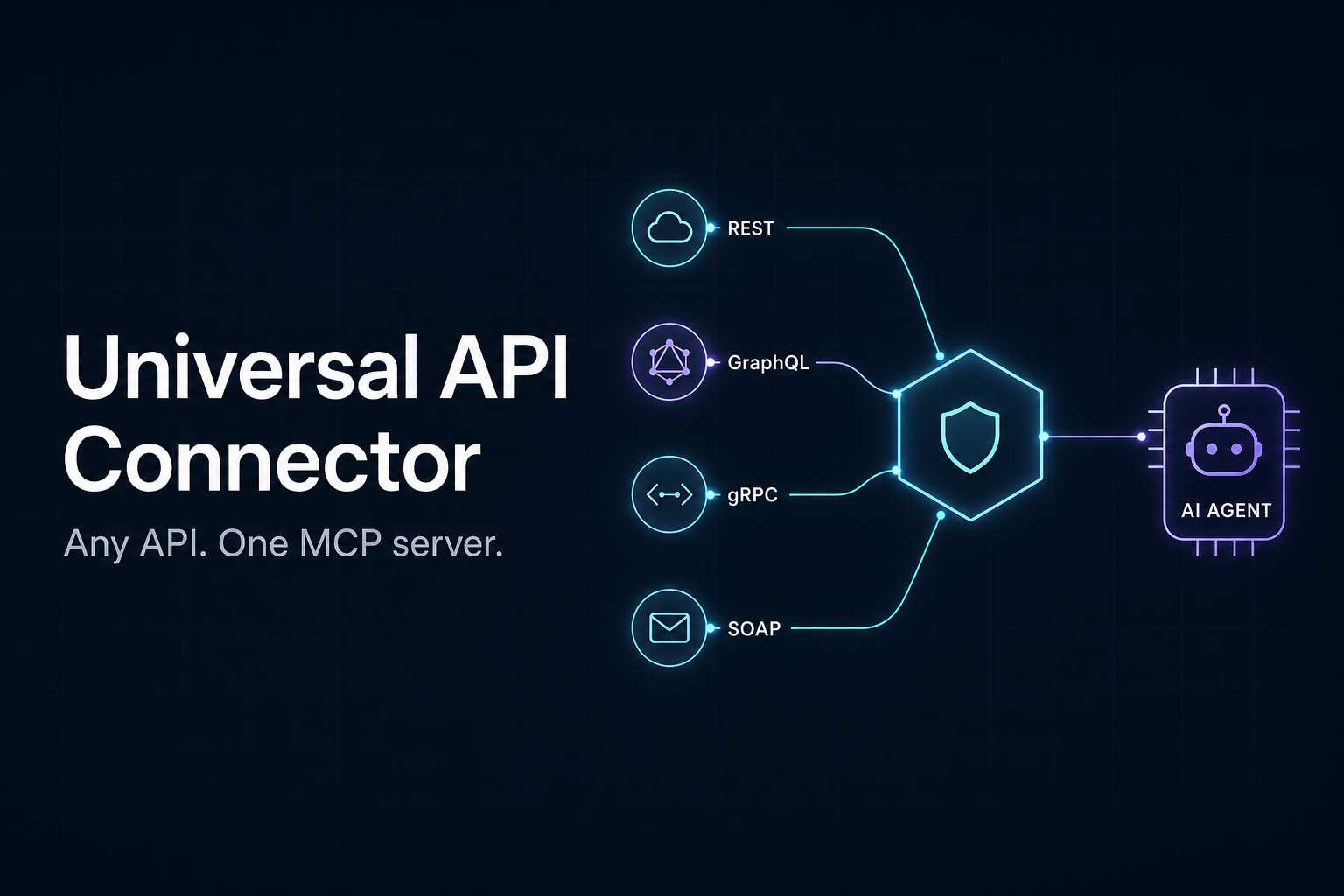
Universal API Connector - Any API. One MCP server.

Any API. One MCP server.

Stop installing a new MCP server for every service: point this one at any OpenAPI/Swagger, GraphQL,
gRPC or SOAP spec - or pick one from the built-in catalog of 2500+ public APIs - and your AI agent
can call it. Securely, in fewer steps, with fewer tokens.

CI PyPI Python License: MIT

Add to Cursor

Installation Β· Meta-tools Β· API catalog Β· Examples Β· Configuration Β· Security

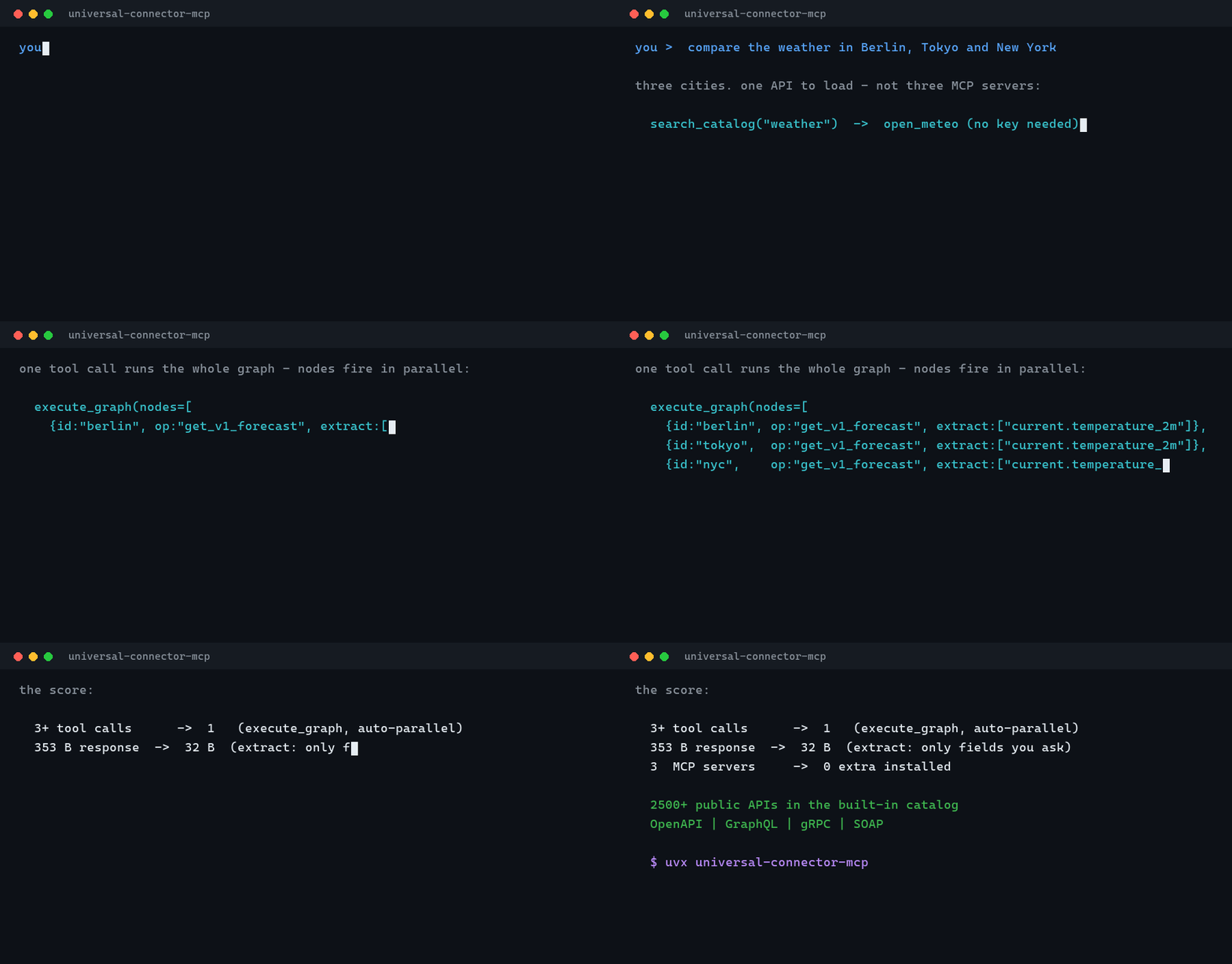
Live demo: the agent discovers, loads and calls an API in a single session

Why another one?

Most "universal API" MCP servers only speak REST/OpenAPI. This project is built around three differentiators:

  1. Truly universal - a normalized Operation model with pluggable spec adapters (OpenAPI, GraphQL, gRPC, SOAP). Tools and executors never care which protocol produced an operation.
  2. Security-first / local-first - a direct response to supply-chain attacks like the AgentBaiting / FakeGit campaign. Outbound requests are restricted to an allowlist, secrets never touch logs, responses are size-capped, and every call is audit-logged. No arbitrary code execution, no binary downloads, no telemetry.
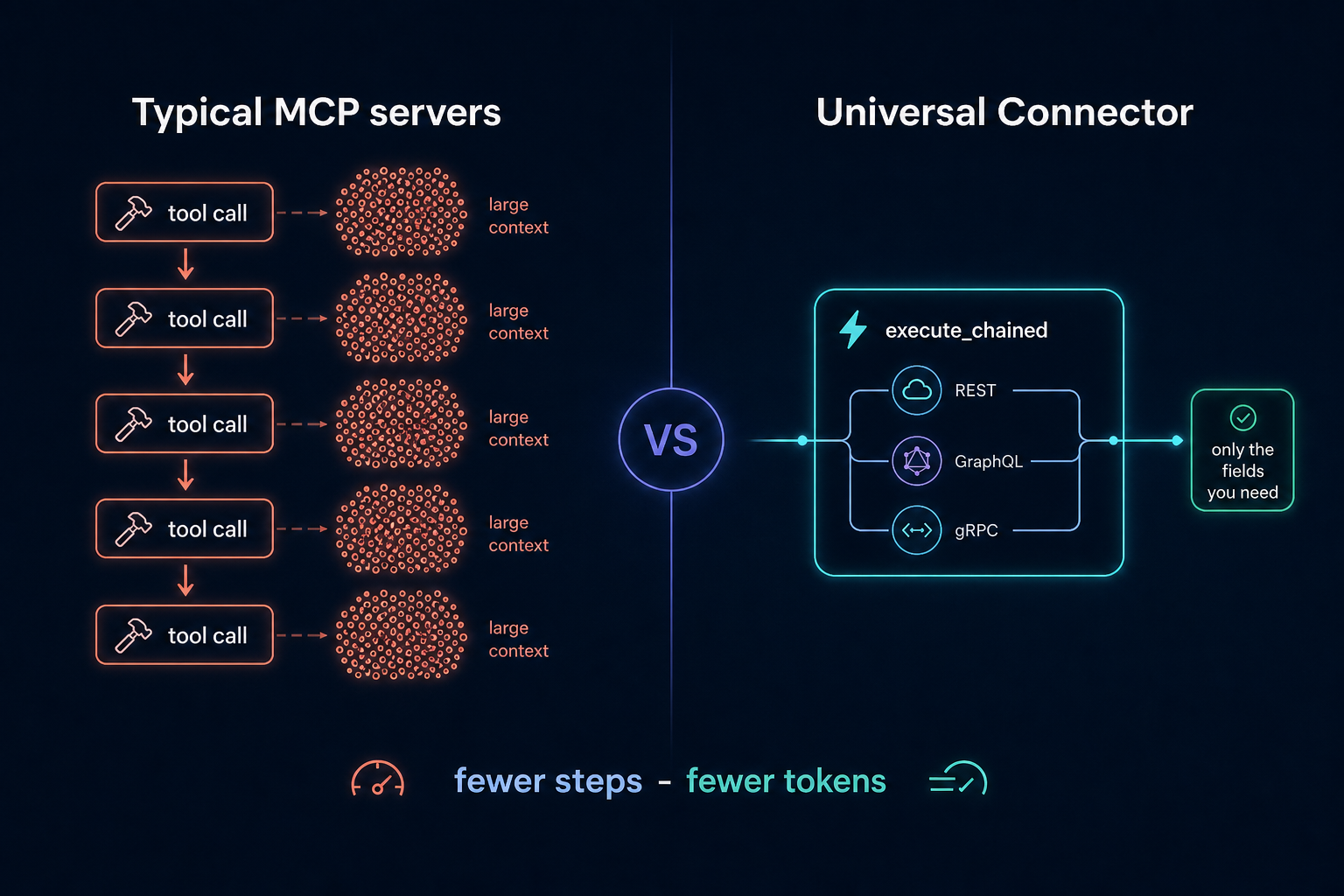
  3. Built for context efficiency - field-level response filtering, chained and parallel execution, and response caching mean whole workflows fit in one tool call and responses stay small.

How it works
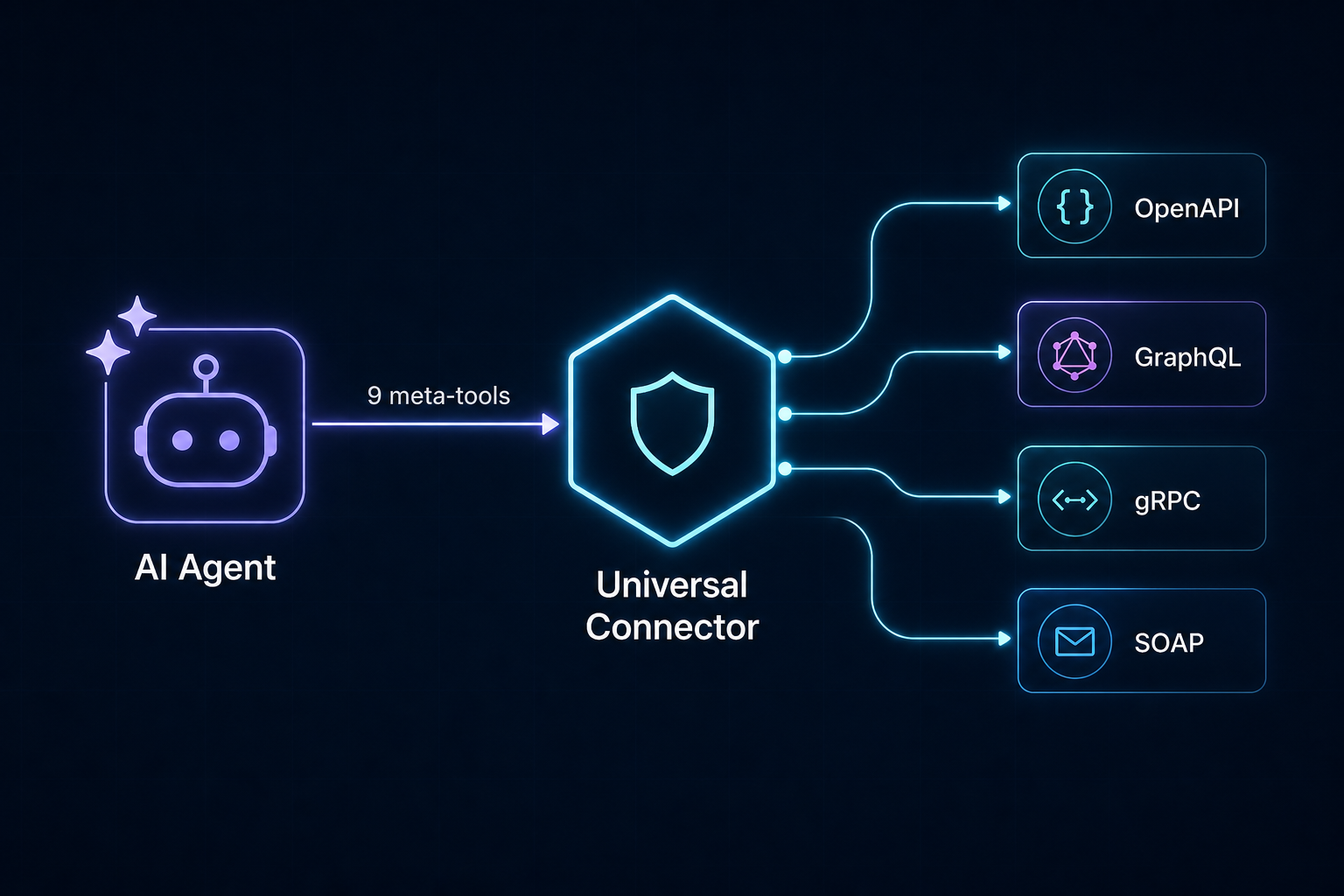
One connector, every protocol

The agent explores APIs like a filesystem instead of loading hundreds of tools at once (which would blow up the context window on large APIs like Stripe). It searches for operations, inspects the ones it needs, then executes them.

Architecture (click to expand)
mermaid
flowchart TD
    Agent["AI Agent"] -->|"MCP stdio"| Server["FastMCP Server"]
    Server --> Tools["Meta-tools"]
    Tools --> Registry["Operation Registry (normalized)"]
    Adapters["Spec Adapters"] --> Registry
    Tools --> Guard["Security Guard"]
    Guard --> Executor["Protocol Executors"]
    Executor --> Auth["Auth Manager"]
    Executor --> UpstreamAPI["Upstream API"]

Meta-tools

ToolPurpose
search_catalogFind ready-to-load public APIs (curated list + APIs.guru directory, 2500+ specs)
load_apiRegister an API from a spec URL/file (protocol auto-detected)
list_apisList loaded APIs
search_operationsFuzzy-search operations across loaded APIs
get_operationFull parameter/response schema for one operation
executeCall an operation (auth + security guard applied); extract returns only the fields you ask for
execute_chainedRun a sequence of operations in one call, piping results between steps; nested lists run in parallel
execute_graphRun a dependency graph of operations; order is inferred from ${id.path} references and independent nodes run in parallel automatically
unload_apiRemove a loaded API
audit_logRecent outbound calls (method, host, path, status)

Why fewer steps (and fewer tokens)

Fewer steps, fewer tokens

Where a per-API MCP server needs one tool round-trip per call - each returning a full JSON payload into the agent's context - this server collapses whole workflows:

  • extract - execute(..., extract=["items.*.name", "total_count"]) returns just those fields instead of a multi-kilobyte response. * fans out over arrays.
  • Chaining - execute_chained pipes step results into later params via ${save_as.path} references: one tool call instead of N.
  • Parallel groups - a nested list of steps runs concurrently, so "query three APIs and combine" is still one call:
text
execute_chained(steps=[
  [
    {"operation_id": "github.repos_get", "params": {"owner": "o", "repo": "r"},
     "save_as": "gh", "extract": ["stargazers_count"]},
    {"operation_id": "open_meteo.get_v1_forecast", "params": {"latitude": 52.5, "longitude": 13.4},
     "save_as": "weather", "extract": ["current_weather.temperature"]}
  ],
  {"operation_id": "github.issues_list_for_repo",
   "params": {"owner": "o", "repo": "r"}, "extract": ["*.title"]}
])
  • Response cache - successful GET/query results are cached for UCMCP_CACHE_TTL seconds (default 60), so repeated lookups are instant and free; pass fresh: true to bypass. Successful mutations invalidate that API's cached reads.

Built-in API catalog

You don't need to hunt for spec URLs. search_catalog searches two sources:

  1. A curated list of verified free/popular APIs: GitHub, GitLab, Stripe, OpenAI, Wikipedia, Open-Meteo (weather, no key), a countries GraphQL API, httpbin and the Swagger Petstore. Entries carry working spec URLs, base-URL overrides and auth hints (e.g. "optional GITHUB_TOKEN").
  2. The APIs.guru directory - 2500+ community-indexed OpenAPI specs (Google, AWS, Microsoft, Twilio, NASA, ...), fetched once per session and searched locally.
text
search_catalog(query="weather forecast")
  -> [{"name": "open_meteo", "spec": "https://...forecast.yml", "base_url": "https://api.open-meteo.com", ...}]
load_api(spec="https://...forecast.yml", name="open_meteo", base_url="https://api.open-meteo.com")
execute(operation_id="open_meteo.get_v1_forecast", params={"latitude": 52.52, "longitude": 13.41, "hourly": "temperature_2m"})

The catalog is discovery-only: it returns spec URLs, never loads or executes anything itself, so the security guard still applies to everything you load from it.

Installation

The server runs in any MCP host via uvx - no manual install needed, the package is fetched from PyPI automatically (add [all] for GraphQL/gRPC/SOAP support):

config.json
{
  "mcpServers": {
    "universal-connector": {
      "command": "uvx",
      "args": ["universal-connector-mcp"],
      "env": { "UCMCP_ALLOWED_HOSTS": "api.github.com" }
    }
  }
}

From source (development): pip install -e ".[all,dev]" and use "command": "universal-connector-mcp" instead. Extras: graphql, grpc, soap, keyring, all, dev; the core install supports OpenAPI/REST only.

Cursor

Add to Cursor

One click via the badge above, or add the JSON block to .cursor/mcp.json in your project (shared with your team) or ~/.cursor/mcp.json (personal, all projects). See examples/mcp.json for a full config with credentials.

Claude Desktop

Add the same mcpServers block to claude_desktop_config.json (Settings > Developer > Edit Config).

Claude Code

Terminal
claude mcp add universal-connector -- uvx universal-connector-mcp

VS Code (Copilot)

Add the server under "servers" in .vscode/mcp.json:

config.json
{
  "servers": {
    "universal-connector": { "command": "uvx", "args": ["universal-connector-mcp"] }
  }
}

Windsurf / Cline / others

All major MCP hosts accept the same mcpServers block shown above in their respective config files (~/.codeium/windsurf/mcp_config.json, Cline's MCP settings, etc.).

AI agents installing this server for a user: follow llms-install.md.

Preloading APIs

Point UCMCP_APIS_CONFIG at a YAML file to auto-load APIs at startup - see examples/apis.example.yaml.

Managing APIs from chat

You never edit config files to manage APIs - just tell your agent:

  • "Connect the Stripe API" - the agent finds it in the catalog and loads it.
  • "What APIs are connected?" - list_apis shows them.
  • "Forget GitHub" - unload_api removes it (and from the remembered state).

When an API needs credentials, load_api tells the agent exactly which environment variable to set (e.g. STRIPE_API_KEY), whether it is already configured, and the agent relays copy-pasteable instructions - you add the variable to the env block of your MCP config and restart. Secrets are never typed into the chat.

Session persistence

The server remembers which APIs you loaded (their spec locations - never credentials or response data) in UCMCP_STATE_FILE and restores them automatically on the next start, so the agent can pick up right where it left off. Set UCMCP_STATE_FILE=off to disable.

Supported protocols

ProtocolSpec sourceNotes
OpenAPI / SwaggerOpenAPI 3.x or Swagger 2.0 (JSON/YAML), URL/file/rawCore install. Local $ref resolution, all HTTP methods.
GraphQLIntrospection JSON or SDLpip install '.[graphql]'. Auto-generates selection sets; execute accepts a fields override.
gRPCServer reflection (grpc://host:port)pip install '.[grpc]'. Unary-unary methods; reflection must be enabled server-side.
SOAPWSDL (URL/file/raw)pip install '.[soap]'. One body object parameter per operation.

Each loaded operation gets an id namespaced as <api>.<operation> (e.g. github.repos_get).

Example session

More walkthroughs (weather, GitHub with auth, GraphQL, parallel multi-API workflows, internal APIs): docs/EXAMPLES.md

text
search_catalog(query="github")
load_api(spec="https://raw.githubusercontent.com/github/rest-api-description/main/descriptions/api.github.com/api.github.com.json", name="github")
search_operations(query="list repositories for user", api="github")
get_operation(operation_id="github.repos_list_for_user")
execute(operation_id="github.repos_list_for_user", params={"username": "torvalds"},
        extract=["*.name", "*.stargazers_count"])

GraphQL with field selection:

text
load_api(spec="https://countries.trevorblades.com/", protocol="graphql", name="countries")
execute(operation_id="countries.country", params={"code": "US", "fields": "name capital currency"})

Chaining (feed one result into the next; wrap steps in a nested list to run them in parallel):

text
execute_chained(steps=[
  {"operation_id": "github.repos_list_for_user", "params": {"username": "torvalds"}, "save_as": "repos"},
  {"operation_id": "github.repos_get", "params": {"owner": "torvalds", "repo": "${repos.data.0.name}"},
   "extract": ["description", "stargazers_count"]}
])

Configuration

All settings are environment variables prefixed with UCMCP_:

VariableDefaultDescription
UCMCP_ALLOWED_HOSTS(empty)Comma-separated extra hosts allowed for outbound calls. Prefix with . for suffix matches.
UCMCP_DENIED_HOSTS(empty)Comma-separated hosts always blocked (wins over allow).
UCMCP_ALLOW_ALL_HOSTSfalseDisable the allowlist entirely (not recommended). Does not disable private-IP blocking.
UCMCP_BLOCK_PRIVATE_IPStrueBlock outbound calls that resolve to private/loopback/link-local/cloud-metadata IPs (SSRF protection).
UCMCP_MAX_REDIRECTS5Max HTTP redirects to follow; every hop is re-checked against the guard.
UCMCP_MAX_RESPONSE_BYTES100000Response body cap sent back to the agent.
UCMCP_HTTP_TIMEOUT30Per-request timeout (seconds).
UCMCP_MAX_RETRIES2Retries on transient HTTP failures (429/502/503/504).
UCMCP_CACHE_TTL60Seconds to cache successful GET/query responses (0 disables).
UCMCP_AUDIT_ENABLEDtrueToggle audit logging.
UCMCP_AUDIT_FILE(none)Append audit entries to this file (JSON lines).
UCMCP_USE_KEYRINGfalseAlso resolve secrets from the OS keyring.
UCMCP_APIS_CONFIG(none)Path to a YAML file of APIs to preload at startup.
UCMCP_STATE_FILE~/.universal-connector-mcp/state.jsonWhere loaded APIs are remembered between restarts (spec locations only - never secrets or data). Set to off to disable.

Credentials are looked up by convention from <API_NAME>_TOKEN, <API_NAME>_API_KEY, <API_NAME>_CLIENT_ID / <API_NAME>_CLIENT_SECRET (OAuth2 client credentials), etc.

Development

Terminal
pip install -e ".[all,dev]"
pytest          # run the test suite
ruff check .    # lint

The test suite (60+ tests) and lint run in CI on Ubuntu and Windows with Python 3.10 and 3.12 on every push (.github/workflows/ci.yml); tagging v* builds and publishes to PyPI via trusted publishing (.github/workflows/release.yml).

Contributions welcome - see CONTRIBUTING.md. Security reports go through private reporting.

Releases are automated: tagging v* publishes to PyPI via trusted publishing (see docs/RELEASING.md).

Security model

  • Outbound allowlist - by default only hosts of explicitly loaded specs are reachable. Extend/limit via UCMCP_ALLOWED_HOSTS / UCMCP_DENIED_HOSTS.
  • SSRF protection - requests that resolve to private, loopback, link-local, reserved or cloud-metadata addresses are blocked (including spec fetches, GraphQL introspection and SOAP imports). Every redirect hop is re-validated. Reaching an internal address requires an explicit UCMCP_ALLOWED_HOSTS entry.
  • Secret handling - credentials come from environment variables or the OS keyring, are injected only at request time, and are redacted from audit logs and errors.
  • Response caps - responses are truncated to a configurable byte limit to protect the context window.
  • Audit log - method, host, path and status of every outbound call (never secrets or bodies) are recorded.

License

MIT

Related MCP Servers

View all in Security View all alternatives
  • C
    CrowdStrike Falcon MCP Server

    Connects AI agents with CrowdStrike Falcon for security analysis and automation.

    πŸ”’ Security0 views
    Compare vs CrowdStrike Falcon MCP Server β†’
  • Volta Mcp Server logoVolta Mcp Server

    Burn-after-read encrypted notes for AI agents. Create and read self-destructing notes via Volta Notes with AES-256-GCM E2E encryption β€” the decryption key never leaves the URL fragment. Secure credential handoff between users and agents without secrets appearing in chat history.

    πŸ”’ Security1 views
    Compare vs Volta Mcp Server β†’
  • Mcp Maigret logoMcp Maigret

    MCP server for maigret, a powerful OSINT tool that collects user account information from various public sources. This server provides tools for searching usernames across social networks and analyzing URLs.

    πŸ”’ Security3 views
    Compare vs Mcp Maigret β†’
  • Agentward logoAgentward

    Permission control plane for AI agents. MCP proxy that enforces least-privilege YAML policies on every tool call, classifies sensitive data (PII/PHI), detects dangerous skill chains, and generates compliance audit trails. Supports stdio and HTTP proxy modes.

    πŸ”’ Security2 views
    Compare vs Agentward β†’

Frequently Asked Questions about Universal Connector Mcp

Add the following block to your claude_desktop_config.json under mcpServers: "mcpServers": { "universal-connector-mcp": { "command": "npx", "args": ["-y", "universal-connector-mcp"] } }

AllMCPs Directory Badge

Full Badge Customizer

Showcase your server listing on GitHub or your project documentation. Embed this dynamic SVG badge to highlight official listing status and live engagement.

Badge Style:
Live Dynamic SVG PreviewUniversal Connector Mcp AllMCPs Directory Badge

Markdown (GitHub README)
[![AllMCPs](https://allmcps.com/api/badge/universal-connector-mcp?style=directory)](https://allmcps.com/mcp/universal-connector-mcp)
HTML Embed
<a href="https://allmcps.com/mcp/universal-connector-mcp"><img src="https://allmcps.com/api/badge/universal-connector-mcp?style=directory" alt="Universal Connector Mcp on AllMCPs" /></a>

Technical Specs & Signals

CategoryπŸ”’Security
More technical detailsExpand β–Ύ
TransportSTDIO
RuntimeNode.js
0/4 checks healthy over the last 6h
Views0
Unique ViewsTotal visits recorded for this listing page on AllMCPs.
Installs0
Installs & Copy ActionsTotal times users copied install commands or configuration snippets for this server.
27Quality signal: Emerging Β· 27/100How this signal is calculated β–Ύ
Server availabilityNot measured

Not scored for repo-hosted servers β€” we can't reach the running server, only its GitHub page. Hosted MCP endpoints are health-checked live.

Verified ownership8/20
Documentation & tools11/30
Adoption & activity1/15
Community engagement0/10

A guidance signal from public completeness & health data β€” not a user rating. New listings start lower and rise as they add docs, get verified, and grow adoption. Signals we can't observe for a listing are skipped, not counted against it.

β˜… FeaturedMoxie Docs MCP logo

Moxie Docs MCP

MCP & Agent Skills for Automated Documentation, and codebase conventions + context

Explore Server β†’

Own this project?

This directory is pre-filled from public sources. Claim via GitHub README, site badge, or DNS TXT to get the verified badge and attach your website.

Free dofollow backlink: after claiming, verify your product site and place a dofollow AllMCPs badge β€” we recheck it stays live.

Claim & get free dofollow

Share & Embed

Add our SVG badge (dark/light directory styles) or embeddable widget to your site.

Explore more

More in πŸ”’ Security β†’Best MCP servers for Security β†’Alternatives to Universal Connector Mcp β†’Install in Claude DesktopInstall in CursorInstall in VS Code