AllMCPs
BrowseBestCategoriesStackCompareToolsGuidesBlog
Log in Submit MCP

Stay in the loop

Get new MCP servers and top picks in your inbox.

AllMCPs

The open directory for discovering and installing Model Context Protocol servers.

AllMCPs on GitHub (opens in a new tab)
Launched onTiny Startupstinystartups.com
Explore
  • Browse servers
  • Best MCP servers
  • Categories
  • MCP clients
  • Agent prompts
  • Stack Builder
  • Compare servers
  • Random discovery New
  • Submit a server
  • Pricing & Boost Boost
Learn
  • Guides hub
  • What is MCP?
  • Install guide
  • Build an MCP server
  • Deploy an MCP server
  • Security guide
  • Troubleshooting
  • MCP for SEO & AEO
  • Protocol versioning
  • Blog & updates
Tools
  • All developer tools
  • Config generator
  • Config validator
  • Config auditor
  • MCP playground
  • Token calculator
  • OpenAPI → MCP
  • Badge generator
For agents
  • REST API docs
  • Trust & traffic Live
  • Remote MCP server SSE ↗ (opens in a new tab)
  • llms.txt ↗ (opens in a new tab)
  • Catalog JSON ↗ (opens in a new tab)
Company
  • About
  • Advertise Sponsor
  • Contact
  • GitHub ↗ (opens in a new tab)
  • Terms
  • Privacy
AllMCPs VerifiedAllMCPs VerifiedFeatured on Nick LaunchesFeatured on Nick LaunchesLaunch Llama NewsletterLaunch Llama NewsletterVerified DR - allmcps.comVerified DR - allmcps.comFeatured on SaaSGrowFeatured on SaaSGrowFeatured on Twelve ToolsFeatured on Twelve ToolsFeatured on Saaspa.geFeatured on Saaspa.geFeatured on Findly.toolsFeatured on Findly.toolsFeatured on Startup FameFeatured on Startup FameFeatured on LaunchKiwiFeatured on LaunchKiwiFeatured on ScrollLaunchFeatured on ScrollLaunchFeatured on DailyPingsFeatured on DailyPingsFazier badgeFazier badgeFeatured on NewTool.siteFeatured on NewTool.siteFeatured on saasfame.comFeatured on saasfame.comDR Checker - Domain RatingDR Checker - Domain RatingListed on Turbo0Listed on Turbo0Launched on LaunchBoard - Product Launch PlatformLaunched on LaunchBoard - Product Launch PlatformList on SimilarlabsList on Similarlabshttps://codetrendy.comhttps://codetrendy.comListed on DevTool.ioFeatured on BuildlistFeatured on BuildlistLaunched on Tiny StartupsFeatured on ShowMeBestAIFeatured on ShowMeBestAIFind us on LaunchZoneFind us on LaunchZoneAllMCPs VerifiedAllMCPs VerifiedFeatured on Nick LaunchesFeatured on Nick LaunchesLaunch Llama NewsletterLaunch Llama NewsletterVerified DR - allmcps.comVerified DR - allmcps.comFeatured on SaaSGrowFeatured on SaaSGrowFeatured on Twelve ToolsFeatured on Twelve ToolsFeatured on Saaspa.geFeatured on Saaspa.geFeatured on Findly.toolsFeatured on Findly.toolsFeatured on Startup FameFeatured on Startup FameFeatured on LaunchKiwiFeatured on LaunchKiwiFeatured on ScrollLaunchFeatured on ScrollLaunchFeatured on DailyPingsFeatured on DailyPingsFazier badgeFazier badgeFeatured on NewTool.siteFeatured on NewTool.siteFeatured on saasfame.comFeatured on saasfame.comDR Checker - Domain RatingDR Checker - Domain RatingListed on Turbo0Listed on Turbo0Launched on LaunchBoard - Product Launch PlatformLaunched on LaunchBoard - Product Launch PlatformList on SimilarlabsList on Similarlabshttps://codetrendy.comhttps://codetrendy.comListed on DevTool.ioFeatured on BuildlistFeatured on BuildlistLaunched on Tiny StartupsFeatured on ShowMeBestAIFeatured on ShowMeBestAIFind us on LaunchZoneFind us on LaunchZone
© 2026 Jackalope Digital LLC. All rights reserved.
  1. Home
  2. 🏢 Workplace & Productivity
  3. Odoo19 MCP Server
Odoo19 MCP Server logo
Health: ActiveRecent health check succeeded.Last checked 9/11/2026, 4:16:12 PM

Odoo19 MCP Server

User RatingsBe the first to rate and review this MCP server!
View Repository4 GitHub StarsTotal stargazers on GitHub for the source repository (4 stars).Visit Website
odooerpjson-rpccrudbusiness-tools

MCP server for accessing Odoo 19 through its JSON-2 API with CRUD, model inspection, and context resources.

Quick Install

Automated & IDE Setup

Copy the AI prompt to install this server into Claude Code, Cursor, or another agent — or use 1-click editor setup below.

Add to CursorAdd to VS Code
Manual Client & Custom JSON ConfigExpand JSON ▾

Client Config & Setup

Remote HTTP
Choose your client or environment
Target File:~/Library/Application Support/Claude/claude_desktop_config.json
claude_desktop_config.json
{
  "mcpServers": {
    "twtrubiks-odoo19-mcp-server": {
      "url": "http://localhost:8000/mcp"
    }
  }
}

💡 Paste the JSON block into your client's configuration file under mcpServers, then restart the application.

Install Tool Schemas (11) Directory Badge Claim listing Alternatives🏢 More in Workplace & Productivity

Overview

This server connects MCP clients to Odoo 19 through the JSON-2 API. It exposes record search and CRUD operations, model inspection, and dynamic user and company context. Use it to let an MCP client query or manage Odoo data, with readonly mode and deletion safeguards where needed.

Use cases

•Search Odoo records with model and domain filters
•Create and update ERP records through MCP tools
•Inspect available Odoo models and fields
•Retrieve the current Odoo user and company context
•Run Odoo access in readonly mode

Key features

•Odoo 19 JSON-2 API connectivity
•Record search, creation, update, and deletion tools
•Dynamic user, company, and model resources
•Readonly mode for preventing write operations
•Delete confirmation safety
•stdio, HTTP, and deprecated SSE transports

Capabilities & Tool Schemas (11) ~42 tokensApproximate context cost of this server’s tool schemas (~4 chars/token), before any tool is called. Actual usage depends on your client and model.Self-reported Self-reportedParsed from the repository README, not verified against a live server — may be incomplete or out of date.

Inspect callable tools, capabilities, and parameters exposed to AI agents by Odoo19 MCP Server.

list_models

Yes

get_fields

Yes

search_records

Yes

count_records

Yes

read_records

Yes

create_record

No

Documentation Overview

Odoo 19 MCP Server (JSON-2 API)

odoo19-mcp-server MCP server

License: Apache-2.0 Python GitHub stars GitHub last commit Awesome MCP Servers

支援的 MCP Client

Claude Code Gemini CLI Antigravity CLI OpenClaw Codex CLI

  • Youtube Tutorial - MCP Server 自己做!Odoo 19 + FastMCP 完整開發教學

Odoo 19 MCP Server,使用 JSON-2 API 連線。

✨ 支援多 user:設定 MCP_MULTIUSER=true 後,每個 client 以自己的 Odoo API key 認證,權限、操作歸屬、審計紀錄都對應真實 user,不再全部掛在同一個服務帳號上,詳見多 user 模式。

本專案基於 Odoo 19 JSON-2 API 完整使用指南 開發。
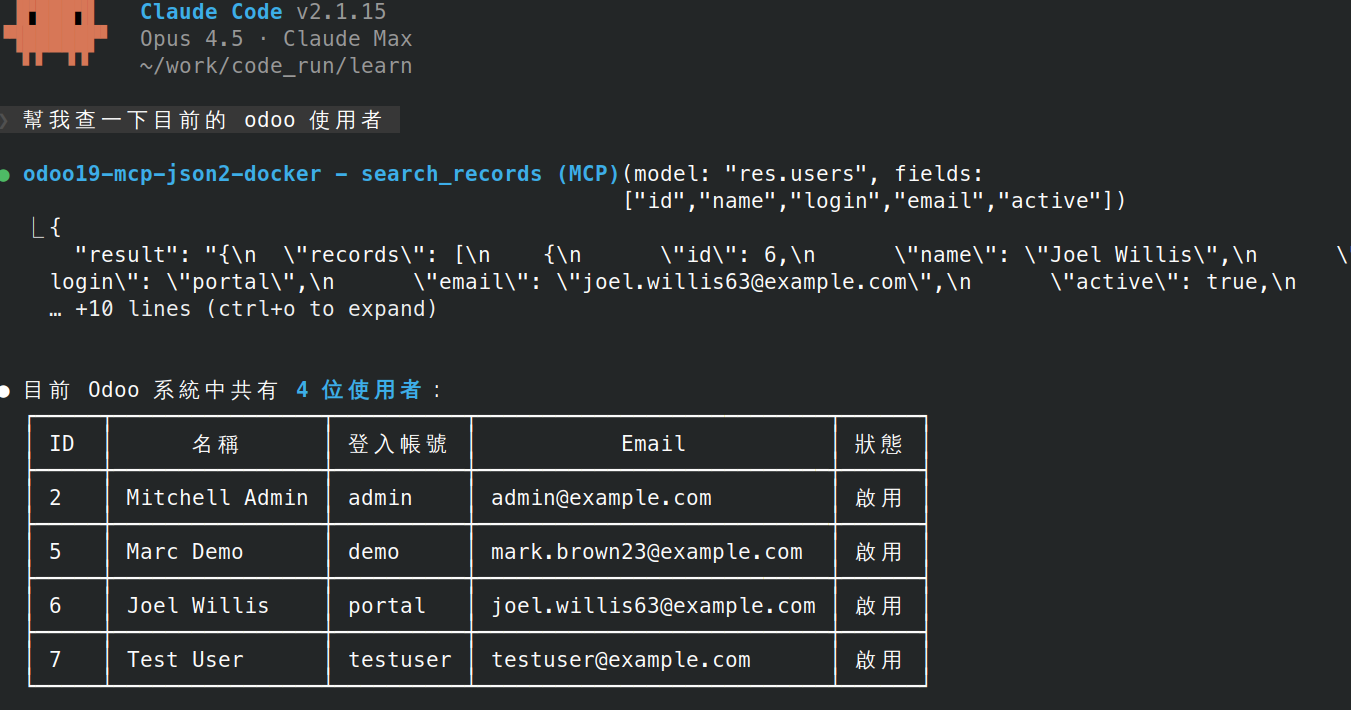
執行畫面

技術棧

  • Python: 3.13
  • FastMCP: >=3.0.0,<4.0.0
  • odoo-client-lib: 2.0.1 (JSON-2 API)

架構

mermaid
flowchart TB
    subgraph Client["MCP Client"]
        CC[Claude Code]
        GC[Gemini CLI]
        MI[MCP Inspector]
    end

    subgraph Server["MCP Server (FastMCP)"]
        R[Resources<br/>odoo://models<br/>odoo://user<br/>odoo://company]
        T[Tools<br/>search_records<br/>create_record<br/>update_record]
        DI[Dependency Injection<br/>get_caller_client]
    end

    subgraph RPC["OdooJsonRpcClient"]
        OL[odoolib<br/>json2/json2s protocol]
    end

    subgraph Odoo["Odoo Server"]
        EP["/jsonrpc endpoint"]
    end

    Client -->|MCP Protocol<br/>stdio/http/sse| Server
    R --> DI
    T --> DI
    DI --> RPC
    RPC -->|HTTP/HTTPS| Odoo

MCP 核心概念

Resources vs Tools

特性ResourcesTools
用途提供上下文資訊執行操作/動作
觸發客戶端控制(如 Claude Code)LLM 自動決定呼叫
參數無(或 URI 參數)有(需 LLM 生成)
類比員工手冊(背景知識)工具箱(按需使用)
HTTP 類比GET(讀取)POST/PUT/DELETE(操作)

Resources - 動態上下文,LLM 一開始就知道的背景資訊:

Code
odoo://user     → "我是誰"
odoo://company  → "我在哪間公司"
odoo://models   → "有哪些模型可用"

Tools - 需要時才呼叫的操作:

Code
search_records(model="res.partner", domain=[...])  → 搜尋
create_record(model="sale.order", values={...})    → 建立

為什麼不用 Default Prompt?

方式Default PromptResource
資料來源寫死在程式碼即時從 Odoo 查詢
更新時機部署時每次連線時
換用戶登入資訊錯誤自動正確
python
# ❌ Default Prompt(寫死)
SYSTEM_PROMPT = "當前用戶: Admin"  # 換人登入就錯了

# ✅ Resource(動態)
@mcp.resource("odoo://user")
def get_current_user():
    return client.read("res.users", [uid])  # 即時查詢

結論:Resource 是「動態的上下文」,不是靜態文字。

參考:MCP Resources | MCP Tools

環境變數

變數說明預設值
ODOO_URLOdoo 伺服器 URLhttp://localhost:8069
ODOO_DATABASE資料庫名稱-
ODOO_API_KEYAPI Key 認證-
READONLY_MODE唯讀模式(禁止寫入操作)false
MCP_ALLOW_SENSITIVE_MODELS設 true 停用模型黑名單(預設擋 credential 模型 ir.config_parameter、res.users.apikeys 的讀寫)false
MCP_AUTH_TOKENHTTP/SSE 模式的 Bearer Token 認證(未設定=無認證;stdio 不適用),見安全機制-(停用)
MCP_MULTIUSER多 user 模式:每個 client 拿自己的 Odoo API key 當 Bearer token,見安全機制false
UPLOAD_TOKEN_SECRETupload token 的 HMAC secret;僅多 worker 部署需要設定(單一程序自動衍生)-

建立 .env 檔案:

bash
cp .env.example .env

安裝

Terminal
pip install -r requirements.txt

啟動方式

開發模式(MCP Inspector)

bash
fastmcp dev inspector odoo_mcp_server.py

傳輸模式(Transport)

本專案支援三種 MCP 傳輸模式:

模式說明適用情境
stdio標準輸入輸出(預設)Claude Desktop、Cursor IDE、本機開發
httpHTTP 協定遠端服務、n8n、Web 應用整合
sseServer-Sent Events(已棄用)向下相容舊版 Client

stdio vs HTTP/SSE:算力位置

兩種模式的關鍵差異在於「誰來啟動 MCP Server」以及「算力在哪裡執行」:

stdio 模式(本機算力)

Code
┌─────────────────────────────────────┐
│            你的電腦 💻               │
│                                     │
│  Claude Desktop ──> MCP Server      │
│                     (使用本機算力)   │
└─────────────────────────────────────┘
  • Client(如 Claude Desktop)啟動 MCP Server 作為子進程
  • MCP Server 使用你電腦的 CPU/RAM
  • Server 隨 Client 啟動/關閉

HTTP/SSE 模式(遠端算力)

Code
┌──────────────┐         ┌──────────────────┐
│   你的電腦    │         │     雲端 ☁️       │
│              │         │                  │
│Claude Desktop│ ──網路──>│   MCP Server     │
│  (輕量)      │         │  (使用雲端算力)   │
└──────────────┘         └──────────────────┘
  • MCP Server 獨立運行在雲端/遠端主機
  • 多個 Client 可同時連線同一個 Server
  • 適合團隊共用、n8n 整合、正式環境

啟動不同模式

bash
# stdio 模式(預設)
python odoo_mcp_server.py

# HTTP 模式
python odoo_mcp_server.py --transport http --host 0.0.0.0 --port 8000

# SSE 模式(已棄用,建議使用 HTTP)
python odoo_mcp_server.py --transport sse --host 0.0.0.0 --port 8000

雲端部署(HTTP 模式)

⚠️ 安全提醒:HTTP 模式預設沒有認證——任何連得到該 port 的人都直接繼承 ODOO_API_KEY 的完整權限。除非 server 只在受信任的內網使用, 否則請務必設定 MCP_AUTH_TOKEN(或改用多 user 模式 MCP_MULTIUSER)並搭配 TLS,詳見安全機制

專案提供 docker-compose.example.yml 範本,複製後修改即可使用:

bash
cp .env.example .env                                  # 填入 ODOO_URL / ODOO_DATABASE / ODOO_API_KEY
cp docker-compose.example.yml docker-compose.yml      # 依需求調整
docker compose up -d

範本內容

yaml
volumes:
  shared-uploads:

services:
  odoo-mcp:
    build: .
    command: ["python", "odoo_mcp_server.py", "--transport", "http", "--host", "0.0.0.0", "--port", "8000"]
    # 對外暴露 port 8000(host 端 client 可直接連 http://localhost:8000/mcp)。
    # ⚠️ "8000:8000" 會綁定 0.0.0.0:同網段的所有機器都連得到
    # (主機若有公網 IP,就是整個網際網路),且 Docker 發佈的 port 會繞過 ufw 防火牆規則。
    # 建議設定 MCP_AUTH_TOKEN(見 environment);只給本機 client 用可改 "127.0.0.1:8000:8000"。
    # 若只需 Docker 內網存取(例如 client 也在同一個 compose 裡),可整段移除 ports。
    ports:
      - "8000:8000"
    environment:
      - ODOO_URL=${ODOO_URL}
      - ODOO_DATABASE=${ODOO_DATABASE}
      - ODOO_API_KEY=${ODOO_API_KEY}
      - READONLY_MODE=${READONLY_MODE:-false}
      # HTTP 模式的 Bearer Token 認證(未設定=無認證,見 README「安全機制」)
      - MCP_AUTH_TOKEN=${MCP_AUTH_TOKEN:-}
      # 多 user 模式:每個 client 拿自己的 Odoo API key 當 Bearer token,
      # 權限/審計歸屬真實 user(見「多 user 模式」)
      # - MCP_MULTIUSER=true
      # HTTP 模式的 Host 標頭防護(DNS rebinding protection,來自底層 MCP SDK):
      # 用非 localhost 的 IP/網域連進來時,預設會被擋下並回 "Invalid host header"。
      # ⚠️ 快速測試可先全開(勿用於正式環境):
      - FASTMCP_HTTP_ALLOWED_HOSTS=["*"]
    volumes:
      - shared-uploads:/shared   # 圖片傳遞通道;對應 Dockerfile 預建的 /shared/uploads
    restart: unless-stopped

圖片 / 附件傳遞:add_attachment 的 file_path 模式會從 /shared/uploads/ 讀檔上傳到 Odoo,避免大量 base64 佔用 LLM output token。client 與 server 跨機器(不共用此 volume)時,改走 prepare_upload → /upload 把檔案送進 UPLOAD_DIR,詳見安全機制。

連不上、回 Invalid host header? 這是底層 MCP SDK 的 DNS rebinding 防護——用非 localhost 的 IP/網域連進來時,Host 標頭不在允許清單內就會被擋。用 FASTMCP_HTTP_ALLOWED_HOSTS 放行:

bash
# 快速測試(⚠️ 對任何 Host 開放,勿用於正式環境)
FASTMCP_HTTP_ALLOWED_HOSTS=["*"]

# ✅ 正規做法:只列出 client 實際連線的 host(含 port)
FASTMCP_HTTP_ALLOWED_HOSTS=["your-server-ip:8000"]     # 純 IP 部署
FASTMCP_HTTP_ALLOWED_HOSTS=["mcp.example.com"]         # 反向代理/網域(建議搭配 TLS)

官方明確警告:使用萬用字元 * 會讓 server 對任何來源開放,正式環境請務必列出明確 host。必要時另有 FASTMCP_HTTP_ALLOWED_ORIGINS(瀏覽器型 client 的 Origin 白名單)。

sh
# server 有設 MCP_AUTH_TOKEN 時,需帶 Authorization header
claude mcp add --transport http odoo-mcp https://your-cloud-server.com:8000/mcp --header "Authorization: Bearer your_random_token_here"

# 多 user 模式(MCP_MULTIUSER=true):Bearer 改填「自己的 Odoo API key」
claude mcp add --transport http odoo-mcp https://your-cloud-server.com:8000/mcp --header "Authorization: Bearer <你的 Odoo API key>"

# server 未啟用認證(僅限受信任內網)
claude mcp add --transport http odoo-mcp https://your-cloud-server.com:8000/mcp
手動設定 JSON(加到 `~/.claude.json`)
config.json
{
  "mcpServers": {
    "odoo-mcp": {
      "type": "http",
      "url": "https://your-cloud-server.com:8000/mcp",
      "headers": {
        "Authorization": "Bearer your_random_token_here"
      }
    }
  }
}

⚠️ 純 HTTP 下 Bearer token 是明文傳輸,僅適合受信任內網/臨時測試;對外請改用 https://(TLS)。

server 未啟用 MCP_AUTH_TOKEN、也未開多 user 模式時,headers 整段可省略。 多 user 模式(MCP_MULTIUSER=true)下 headers 必填,Bearer 改填自己的 Odoo API key,見多 user 模式。

MCP Resources

URI說明
odoo://models列出所有模型
odoo://model/{model_name}取得模型欄位定義
odoo://record/{model_name}/{record_id}取得單筆記錄
odoo://user當前登入用戶資訊
odoo://company當前用戶所屬公司資訊

MCP Tools

Read the full README →View source on GitHub →

Related MCP Servers

View all in Workplace & Productivity View all alternatives
  • Odoo Pulse logoOdoo Pulse

    An AI Business Analyst for Odoo ERP: one-call reports with a verdict (businesspulse, pipelinereview, receivableshealth, inventoryrisk, salessnapshot, absenceoverview) over the XML-RPC API.

    🏢 Workplace & Productivity2 views
    Compare vs Odoo Pulse →
  • MCP Odoo logoMCP Odoo

    Production-grade MCP server for Odoo ERP (16-19) with zero Odoo-side install. 24 tools across read, write (approval-token gated), diagnose, migrate, and audit. JSON-2 transport for Odoo 19+, real Docker Compose smoke tests against Odoo 16/17/18/19, diagnostics (diagnoseodoocall, upgraderiskreport, fitgapreport, scanaddonssource), and 5 reusable agent prompts.

    🏢 Workplace & Productivity4 views
    Compare vs MCP Odoo →
  • Excel MCP Server logoExcel MCP Server

    An Excel manipulation server providing workbook creation, data operations, formatting, and advanced features (charts, pivot tables, formulae).

    🏢 Workplace & Productivity5 views
    Compare vs Excel MCP Server →
  • Teamwork MCP logoTeamwork MCP

    Project and resource management platform that keeps your client projects on track, makes managing resources a breeze, and keeps your profits on point.

    🏢 Workplace & Productivity2 views
    Compare vs Teamwork MCP →

Adoption & maintenance

Factual signals from GitHub, npm, and our automated checks — not a rating.

GitHub stars
4
Stargazers on the source repository.
Last commit
1mo ago
Most recent push to the default branch.
Tools exposed
11
Callable tools this server registers over MCP.
Directory activity
1 views
Config copies, upvotes, and views on AllMCPs.

Reviews

No reviews yet — be the first to share how this listing worked for you.

Frequently Asked Questions about Odoo19 MCP Server

It is designed for Odoo 19 and connects through the Odoo JSON-2 API.

AllMCPs Directory Badge

Full Badge Customizer

Showcase your server listing on GitHub or your project documentation. Embed this dynamic SVG badge to highlight official listing status and live engagement.

Badge Style:
Live Dynamic SVG PreviewOdoo19 MCP Server AllMCPs Directory Badge

Markdown (GitHub README)
[![AllMCPs](https://allmcps.com/api/badge/twtrubiks-odoo19-mcp-server?style=directory)](https://allmcps.com/mcp/twtrubiks-odoo19-mcp-server)
HTML Embed
<a href="https://allmcps.com/mcp/twtrubiks-odoo19-mcp-server"><img src="https://allmcps.com/api/badge/twtrubiks-odoo19-mcp-server?style=directory" alt="Odoo19 MCP Server on AllMCPs" /></a>

Technical Specs & Signals

Category🏢Workplace & Productivity
PricingFree
More technical detailsExpand ▾
TransportSSE (Remote)
AuthAPI key
LicenseApache-2.0
ClientsClaude Desktop, Cursor
Last updatedAug 11, 2026
4/5 checks healthy over the last 32d
Views1
Unique ViewsTotal visits recorded for this listing page on AllMCPs.
Installs0
Installs & Copy ActionsTotal times users copied install commands or configuration snippets for this server.
GitHub stars4
GitHub Star CountTotal stargazers on GitHub representing community popularity (4 stars).
Last commit1mo ago
Last Repository CommitThe most recent commit or push recorded for this server's GitHub repository.Last commit on Jul 31, 2026
56Quality signal: Good · 56/100How this signal is calculated ▾
Server availabilityNot measured

Not scored for repo-hosted servers — we can't reach the running server, only its GitHub page. Hosted MCP endpoints are health-checked live.

Verified ownership10/20
Documentation & tools28/30
Adoption & activity4/15
Community engagement0/10

A guidance signal from public completeness & health data — not a user rating. New listings start lower and rise as they add docs, get verified, and grow adoption. Signals we can't observe for a listing are skipped, not counted against it.

★ FeaturedAllMCPs Server logo

AllMCPs Server

The official MCP server for AllMCPs.com - submit and manage tools directly from your AI. The open directory for MCP servers. Connect Claude, Cursor, Windsurf, and AI agents to databases, tools, files, and APIs. Explore 10,000+ servers. AllMCPs is the premier, open directory for discovering, evaluating, and installing Model Context Protocol (MCP) servers to equip AI agents and LLMs with real-world superpowers.

Explore Server →

Own this project?

This directory is pre-filled from public sources. Claim via GitHub README, site badge, or DNS TXT to unlock edit access and the Official badge — proof is checked automatically, then reviewed by our team.

Free dofollow backlink: add your website and place the AllMCPs badge on it — no claim needed. We detect it automatically and keep it verified as long as the badge stays live.

Claim & get free dofollow

Share & Embed

Add our SVG badge (dark/light directory styles) or embeddable widget to your site.

Explore more

More in 🏢 Workplace & Productivity →Best MCP servers for Workplace & Productivity →Alternatives to Odoo19 MCP Server →Install in Claude DesktopInstall in CursorInstall in VS Code









