TwelveTake REAPER MCP
A TwelveTake Studios project.



Setup guide, examples and FAQ -> twelvetake.com/tools/reaper-mcp
Listed in the MCP Registry as mcp-name: com.twelvetake/reaper-mcp.
TwelveTake REAPER MCP is a Model Context Protocol server that enables AI assistants to control REAPER for mixing, mastering, MIDI composition and music production.
Version: 1.9.4
Why This Server
Workflow tools
In addition to direct control of REAPER, the server includes workflow tools that complete multi-step production tasks in a single call:
| Tool | What it does for you |
|---|---|
setup_sidechain_compression() | Creates send, routes to channels 3-4, configures ReaComp's detector input — complete sidechain setup in one call |
add_mastering_chain() | Adds ReaEQ → ReaComp → ReaEQ → ReaLimit to master track with proper signal flow |
add_parallel_compression() | Creates a bus track, sets up the send, adds compressor — NY-style compression ready to blend |
create_bus() | Creates a submix track and routes your specified tracks to it |
get_project_summary() | Returns track count, all track names/volumes/pans/FX, markers, regions, tempo, time signature — everything your AI needs in one call |
Zero Configuration
- File-based communication works immediately — no network setup, no ports to configure
- Stock REAPER only: the bridge is a plain Lua script and the analyzer is a JSFX plugin, so you don't install anything else in REAPER
- Copy the script, run it, connect your AI assistant
180 Tools Covering Real Production Needs
- Full FX control — add/remove plugins, get/set any parameter by index, manage presets, bypass
- FX parameter automation — automate any plugin knob (flanger depth, filter cutoff, etc.)
- Complete routing — sends, receives, sidechain routing to specific channel pairs
- Automation — create envelopes, add/edit points, set automation modes
- MIDI — create items, add notes individually or in batches, edit velocities
- MIDI editing — transpose, quantize with swing, humanize, snap to a scale, stretch, legato, strum, velocity ramps — each targetable by pitch range, beat window, or channel
- Audio items — import, split, duplicate, fade, position, mute
- Markers & regions — create, edit, navigate, render by region
- Measurement: loudness, loudness range, true peak, the octave-band spectrum and stereo correlation for the master, a track or an item. It passes the EBU's synthetic compliance signals for loudness, true peak and loudness range.
- Undoable edits: every change the AI makes is one named step in REAPER's undo history ("MCP: delete track"), so Ctrl+Z in REAPER reverses one tool call at a time
Requirements
- REAPER (any recent version; full live suite green through REAPER 7.79)
- Python 3.10+ (for the MCP server)
- An MCP-compatible AI assistant
Installation
1. Install the Bridge Script in REAPER
The bridge is a Lua script that runs inside REAPER. The MCP server works on your project through it. Install it one of three ways.
Option A: one command, then run it once in REAPER
uvx twelvetake-reaper-mcp --install-bridge
That copies reaper_mcp_bridge.lua into REAPER's Scripts folder for your platform, and the
TwelveTake MCP Analyzer, a JSFX plugin that the measurement tools use, into Effects/TwelveTake.
If a different copy of the bridge is already there, it backs that copy up first. It writes nothing
else, and the server never touches your REAPER installation on its own. Pass a path if REAPER is portable or installed
somewhere unusual: --install-bridge "/path/to/REAPER/Scripts".
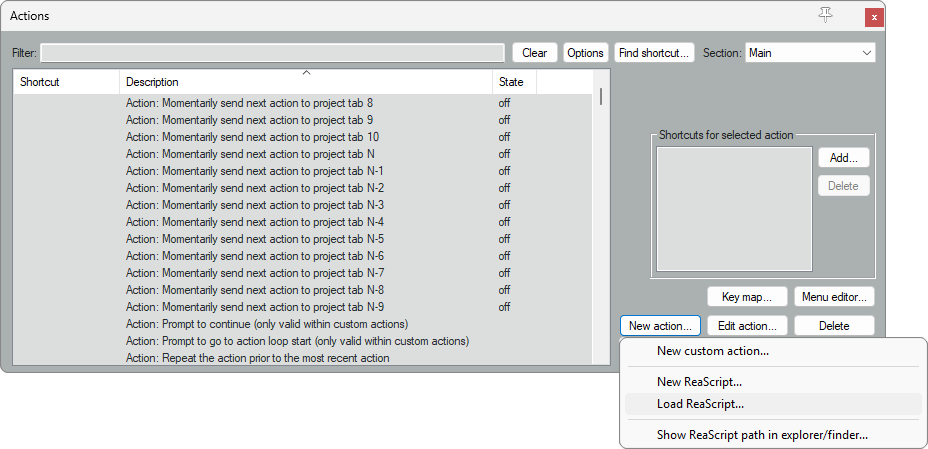
Then load it in REAPER. Open Actions → Show action list:

Click New action → Load ReaScript:
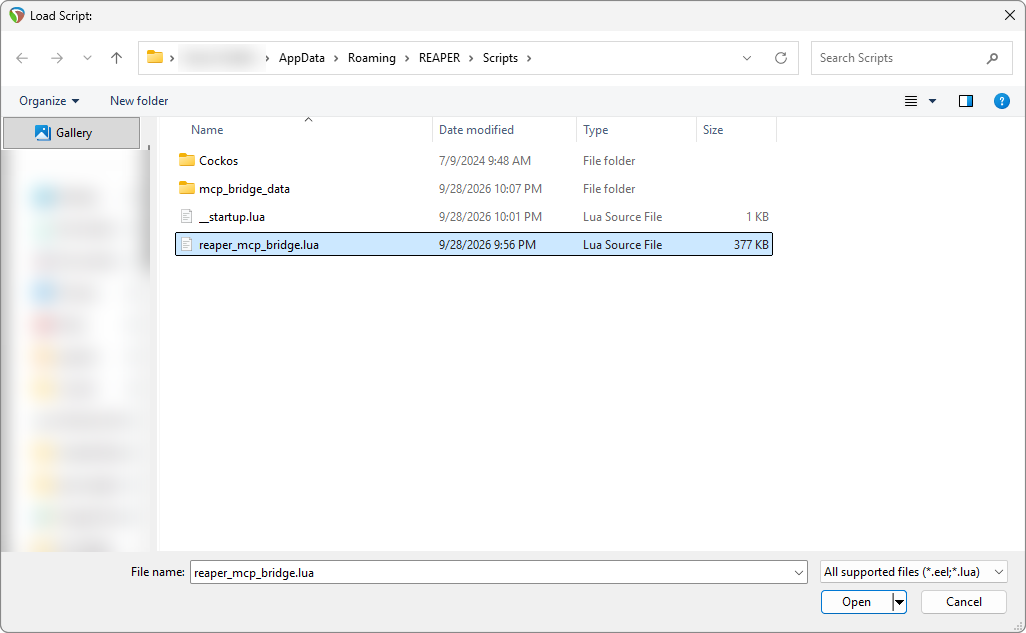
Select reaper_mcp_bridge.lua in the Scripts folder and click Open:
The script is now in the action list. Select it and click Run:
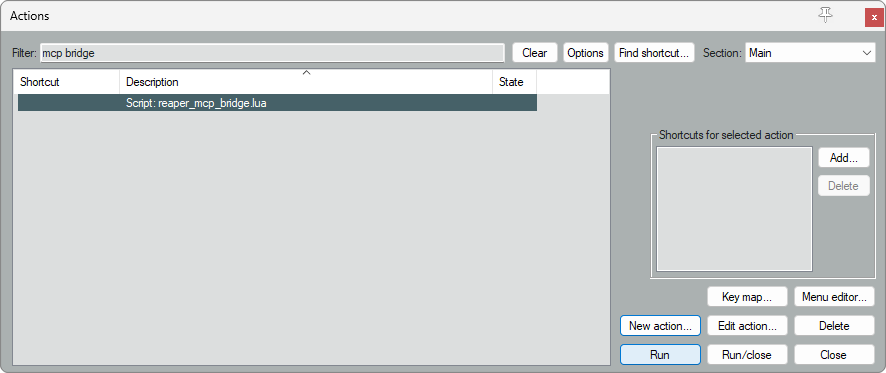
The bridge runs in the background, without opening a window, until you close REAPER. Step 3 checks that it is working.
Next time, find it by typing mcp bridge in the action list's filter box, or have REAPER
start it for you (below).
Option B: ReaPack
If you use ReaPack, open Extensions → ReaPack → Import repositories:
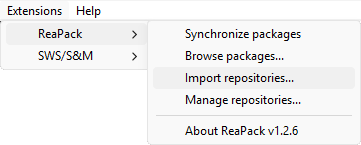
and paste this address:
https://github.com/TwelveTake-Studios/reaper-mcp/raw/main/index.xml
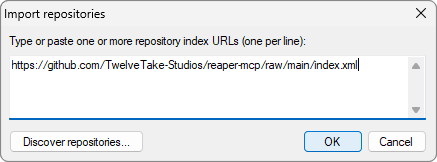
Then open Extensions → ReaPack → Browse packages, find TwelveTake REAPER MCP bridge, right-click it, choose Install, and click OK:
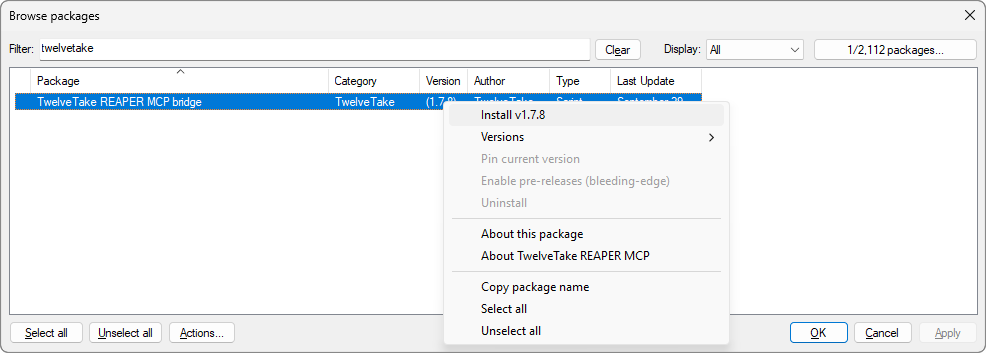
ReaPack adds the script to the action list and installs the analyzer. Run the script from there as in option A.
Option C: by hand
- Copy
reaper_mcp_bridge.luato your REAPER Scripts folder:- Windows:
%APPDATA%\REAPER\Scripts\ - macOS:
~/Library/Application Support/REAPER/Scripts/ - Linux:
~/.config/REAPER/Scripts/
- Windows:
- Copy
twelvetake_mcp_analyzer.jsfxtoEffects/TwelveTake/, next to that Scripts folder. The measurement tools need it; nothing else does. - Load and run the script as in option A.
Start the bridge with REAPER
A script stops when REAPER closes. To have REAPER start the bridge every time it launches:
uvx twelvetake-reaper-mcp --install-bridge --autostart
That adds a marked block to __startup.lua in REAPER's Scripts folder, backing the file up
first, and leaves anything else in it alone. --remove-autostart takes the block out again.
If you installed with ReaPack, run uvx twelvetake-reaper-mcp --autostart instead; it points
REAPER at the ReaPack copy.
Updating
From 1.7.8 on, an update needs no step inside REAPER:
uvx twelvetake-reaper-mcp@latest --install-bridge
The running bridge loads the new script by itself, and the command tells you so, for example:
The running bridge reloaded itself: 1.7.8 -> 1.7.9.
With ReaPack, Extensions → ReaPack → Synchronize packages fetches the new script. It runs
the next time the bridge starts, or right away with uvx twelvetake-reaper-mcp --reload-bridge. The server also asks a running bridge to reload
when the bridge is too old for it.
Updating from 1.7.7 or older needs one last manual step: run the script in REAPER again after installing it.
2. Install and Configure the MCP Server
The server is published on PyPI as twelvetake-reaper-mcp. The simplest path is to let your
MCP client launch it with uvx (or pipx) — nothing to install by hand.
Add it to your MCP client's configuration (e.g. .mcp.json, or your client's MCP settings):
{
  "mcpServers": {
    "reaper": {
      "command": "uvx",
      "args": ["twelvetake-reaper-mcp"]
    }
  }
}
VS Code uses a top-level
serverskey with"type": "stdio"instead ofmcpServers.
To confirm the server starts on its own:
uvx twelvetake-reaper-mcp
# or: pipx run twelvetake-reaper-mcp
It waits quietly for a client to connect — press Ctrl+C to stop.
3. Verify
With REAPER open and the bridge running, ask your assistant "how many tracks are in my project?" — a number back means the server, bridge, and REAPER are all talking.
Run from source (for development)
To work on the server itself, run it from a clone instead of from PyPI. Install the dependencies:
pip install -r requirements.txt # or: pip install "mcp>=1.2.0,<2.0"
Point your MCP client at the local script:
{
  "mcpServers": {
    "reaper": {
      "command": "python",
      "args": ["path/to/reaper_mcp_server.py"]
    }
  }
}
Then check the connection with:
python test_connection.py
Nix flake (optional)
If you use Nix, the repo ships a flake-based dev shell that provides Python 3.12 and creates/activates a virtualenv for you:
# Enter the dev shell manually
nix develop

# Or, with direnv, auto-activate on cd:
direnv allow
Then install the dependencies as usual:
pip install -r requirements.txt
This pins the Python version and keeps dependencies isolated from your system.
Note: the
x86_64-linuxdev shell is tested and working. The macOS (Darwin) shells are provided but have not been tested — confirmation from a macOS user is welcome.
How It Communicates
The server and the bridge exchange JSON files in a mailbox directory that the bridge script polls from inside REAPER. There is no network configuration and no port to open.
MCP Server                    REAPER Bridge
    │                              │
    ├── writes request_N.json ────►│
    │                              ├── processes request
    │◄── reads response_N.json ────┤
Bridge directory: REAPER's own Scripts/mcp_bridge_data, resolved per platform:
| Platform | Path |
|---|---|
| Windows | %APPDATA%\REAPER\Scripts\mcp_bridge_data |
| macOS | ~/Library/Application Support/REAPER/Scripts/mcp_bridge_data |
| Linux | ~/.config/REAPER/Scripts/mcp_bridge_data (or ~/.reaper/... for older installs) |
Override with REAPER_BRIDGE_DIR for portable installs. The server prints the directory it
resolved to stderr on startup, and includes it in any timeout error.
The HTTP transport that shipped alongside this was removed in v1.7.2. It had been deprecated
since v1.2.1, and its request parser could never read a POST body, so no call it was handed
ever reached REAPER. REAPER_COMM_MODE no longer does anything.
Quick Start Examples
Basic Track Operations
"How many tracks are in my project?"
"Create a new track called 'Vocals'"
"Set track 0 volume to -6dB"
"Mute track 2"
"Solo the drums track"
Mixing
"Add ReaComp to the bass track"
"Set up sidechain compression from the kick to the bass"
"Create a drum bus and route tracks 0-3 to it"
"Add a mastering chain to the master track"
FX and Parameters
"What plugins are on track 0?"
"Get the parameters for the compressor on track 1"
"Set the threshold to -20dB"
"Bypass the EQ on the vocal track"
MIDI Composition
"Create a 4-bar MIDI item on track 0"
"Add a C major chord at the start"
"Get all the notes in the MIDI item"
"Set the velocity of note 0 to 100"
Transport and Navigation
"Play the project"
"Stop playback"
"Set the cursor to 30 seconds"
"Add a marker called 'Chorus' at the current position"
Project Management
"What's the project tempo?"
"Set the tempo to 120 BPM"
"Save the project"
"Render to D:/Output/mix.wav"
Tool Reference
Track Operations (23 tools)
| Tool | Description |
|---|---|
get_track_count() | Get total number of tracks (excluding master) |
get_track(index) | Get track info (name, volume, pan, mute, solo) |
get_all_tracks() | Get info for all tracks |
get_master_track() | Get master track info |
insert_track(index, name) | Create a new track |
create_click_track(start, end, name) | Add a click track that follows the tempo map |
delete_track(index) | Delete a track |
set_track_name(index, name) | Rename a track |
set_track_volume(index, db) | Set volume in dB |
set_track_pan(index, pan) | Set pan (-1 to 1) |
set_track_mute(index, mute) | Mute/unmute track |
set_track_solo(index, solo) | Solo/unsolo track |
set_track_phase(index, invert) | Invert phase |
set_track_width(index, width) | Set stereo width (0-2) |
set_track_color(index, r, g, b) | Set track color |
get_track_peak(index, channel) | Get current peak level (dB) |
get_track_peak_hold(index, channel) | Get held peak since last reset (dB) |
clear_all_peak_indicators() | Reset peak hold on all tracks |
get_track_master_send(index) | Get master/parent send state |
set_track_master_send(index, enabled) | Enable/disable master send |
set_track_as_folder(index, depth) | Set as folder parent/child |
arm_track(index, arm) | Arm for recording |
set_track_input(index, input) | Set record input |
set_track_monitor(index, mode) | Set monitor mode |
FX Operations (16 tools)
| Tool | Description |
|---|---|
track_fx_get_count(index) | Count FX on track |
track_fx_get_list(index) | List all FX with details |
track_fx_add_by_name(index, name, position?) | Add FX plugin (optionally at position) |
track_fx_move(index, fx_index, new_position) | Reorder FX in the chain |
track_fx_delete(index, fx_index) | Remove FX |
track_fx_get_name(index, fx_index) | Get FX name |
track_fx_get_enabled(index, fx_index) | Check if enabled |
track_fx_set_enabled(index, fx_index, enabled) | Enable/bypass FX |
track_fx_get_num_params(index, fx_index) | Count parameters |
track_fx_get_param_name(index, fx_index, param) | Get parameter name |
track_fx_get_param(index, fx_index, param) | Get parameter value |
track_fx_set_param(index, fx_index, param, value) | Set parameter value |
get_fx_presets(index, fx_index) | List available presets |
get_fx_preset(index, fx_index) | Get current preset |
set_fx_preset(index, fx_index, name) | Load preset |
save_fx_preset(index, fx_index, name) | Not supported: always returns an error, because REAPER's API cannot save a named FX preset |
ReaEQ Operations (5 tools)
Dedicated ReaEQ band control using REAPER's EQ-specific API, which handles ReaEQ's non-linear parameter curves (dB gain, log frequency, log Q) correctly.
| Tool | Description |
|---|---|
find_eq(track, instantiate?) | Find ReaEQ on a track (optionally add it) |
get_eq_bands(track, fx) | Read all ReaEQ bands with human-readable values |
set_eq_band(track, fx, bandtype, bandidx, paramtype, value, is_normalized?) | Set a band parameter (Hz, dB, or Q) |
get_eq_band_enabled(track, fx, bandtype, bandidx?) | Check whether a band is enabled |
set_eq_band_enabled(track, fx, bandtype, bandidx?, enabled?) | Enable/disable a band |
Take FX Operations (11 tools)
Per-take (per-item) FX, mirroring the track FX tools. Every take is addressed by
(track_index, item_index, take_index).
| Tool | Description |
|---|---|
take_fx_get_count(track, item, take) | Count FX on a take |
take_fx_get_list(track, item, take) | List all take FX with details |
take_fx_add_by_name(track, item, take, name) | Add FX plugin to a take |
take_fx_delete(track, item, take, fx) | Remove FX from a take |
take_fx_get_name(track, item, take, fx) | Get take FX name |
take_fx_get_enabled(track, item, take, fx) | Check if enabled |
take_fx_set_enabled(track, item, take, fx, enabled) | Enable/bypass take FX |
take_fx_get_num_params(track, item, take, fx) | Count parameters |
take_fx_get_param_name(track, item, take, fx, param) | Get parameter name |
take_fx_get_param(track, item, take, fx, param) | Get parameter value |
take_fx_set_param(track, item, take, fx, param, value) | Set parameter value |
Take Management & Comping (7 tools)
Multi-take workflows: list/switch/delete takes, explode/crop, REAPER 7 fixed-lane comping.
| Tool | Description |
|---|---|
get_takes(track, item) | List all takes (name + active flag) |
get_active_take(track, item) | Get the active take index |
set_active_take(track, item, take) | Switch which take plays |
explode_takes(track, item) | Explode takes to overlapping items (in place) |
crop_to_active_take(track, item) | Keep only the active take |
delete_take(track, item, take) | Delete a specific take |
select_comp_lane(track, lane) | Play one fixed lane exclusively (lane comping) |
Routing (9 tools)
| Tool | Description |
|---|---|
create_send(src, dest) | Create send between tracks |
delete_send(index, send_index) | Remove a send |
set_send_volume(index, send_index, db) | Set send level |
get_track_num_sends(index) | Count sends from track |
set_send_dest_channels(index, send_index, chan) | Route to specific channels |
set_send_source_channels(index, send_index, chan) | Set source channels |
setup_sidechain_send(src, dest, db) | Create sidechain send |
configure_reacomp_sidechain(index, fx_index, use) | Configure ReaComp sidechain |
setup_sidechain_compression(trigger, target, fx, db) | Complete sidechain setup |
Transport (10 tools)
| Tool | Description |
|---|---|
play() | Start playback |
stop() | Stop playback |
pause() | Pause playback |
record() | Start recording |
get_play_state() | Get current state (playing/paused/recording) |
get_cursor_position() | Get edit cursor position (seconds) |
set_cursor_position(seconds) | Move edit cursor |
get_play_position() | Get playback position (seconds) |
toggle_repeat() | Toggle loop mode |
get_repeat_state() | Check if looping |
Project (15 tools)
| Tool | Description |
|---|---|
get_project_summary() | Get comprehensive project state in one call |
save_project() | Save current project |
create_project() | Create new project (REAPER cannot name an unsaved project) |
open_project(path) | Open project file |
get_project_path() | Get project directory |
get_project_name() | Get project filename |
get_project_length() | Get project length (seconds) |
get_tempo() | Tempo at project start (BPM), plus every tempo marker |
set_tempo(bpm) | Set project tempo |
get_time_signature() | Get time signature |
set_time_signature(num, denom) | Set time signature |
render_project(path, start, end, tail, skip_postprocessing) | Render to audio file; lists the project's normalization, fades and other processing, or skips them |
render_region(index, path) | Not implemented: always returns an error; use render_project with the region's start and end |
zoom_to_selection() | Zoom to time selection |
zoom_to_project() | Zoom to show entire project |
MIDI Operations (8 tools)
| Tool | Description |
|---|---|
create_midi_item(track, pos, length) | Create empty MIDI item |
get_midi_item(track, item) | Get MIDI item info |
add_midi_note(track, item, pitch, vel, start_beat, length_beats, chan) | Add single note (beats) |
add_midi_notes_batch(track, item, notes) | Add multiple notes |
get_midi_notes(track, item) | Get all notes |
delete_midi_note(track, item, note) | Delete a note |
clear_midi_item(track, item) | Delete all notes |
set_midi_note_velocity(track, item, note, vel) | Change note velocity |
MIDI Utilities (14 tools)
Editing tools for notes that already exist. Every one takes the same optional filter — a pitch range, an onset window in beats from the item start, and a channel — so you can target a phrase without selecting anything by hand. Timing is in beats, pitch in semitones. Each is one undo step.
| Tool | Description |
|---|---|
transpose_midi_notes(track, item, semitones, ...) | Shift pitch; notes pushed outside 0-127 are left alone, never wrapped |
snap_midi_notes_to_scale(track, item, root, mode, ...) | Snap off-key notes onto a scale (named or a custom interval list) |
quantize_midi_notes(track, item, grid, strength, swing, ...) | Snap onsets to the project grid, with strength and swing |
nudge_midi_notes(track, item, amount_beats, ...) | Shift notes in time; lengths preserved |
stretch_midi_notes(track, item, factor, pivot_beat, ...) | Scale timing about a pivot (half-time / double-time) |
legato_midi_notes(track, item, mode, voice, ...) | Close the gaps in a line, or set every note to one length |
humanize_midi_notes(track, item, timing, velocity, seed, ...) | Seeded, reproducible timing + velocity jitter |
strum_midi_notes(track, item, spread_beats, direction, ...) | Roll a chord out into a strum |
ramp_midi_note_velocities(track, item, start_vel, end_vel, ...) | Linear velocity ramp across a phrase (crescendo) |
scale_midi_note_velocities(track, item, mode, ratio, ...) | Multiply / set / compress velocities |
set_midi_note(track, item, note, ...) | Edit one note's pitch, velocity, timing, channel |
get_selected_midi_notes(track, item) | Read the notes selected in REAPER's editor |
select_midi_notes(track, item, ...) | Select the notes matching a pitch/beat/channel filter |
remove_overlapping_midi_notes(track, item, mode, ...) | Trim or delete overlapping same-pitch notes |
remove_overlapping_midi_notes is the only one here that can remove notes; the rest only move
what is already there. It is flagged destructive so a client can prompt first.
Audio Items (17 tools)
| Tool | Description |
|---|---|
insert_audio_file(track, path, pos) | Import audio file |
get_track_items(track) | List all items on track |
get_item_info(track, item) | Get item details |
set_item_position(track, item, pos) | Move item |
set_item_length(track, item, length) | Change item length |
delete_item(track, item) | Delete item |
duplicate_item(track, item) | Duplicate item |
split_item(track, item, pos) | Split item at position |
set_item_mute(track, item, mute) | Mute/unmute item |
set_item_volume(track, item, db) | Set item volume |
set_item_fade_in(track, item, length) | Set fade-in |
set_item_fade_out(track, item, length) | Set fade-out |
select_all_items() | Select all items |
unselect_all_items() | Deselect all items |
get_selected_items() | Get selected items |
copy_selected_items() | Copy to clipboard |
paste_items() | Paste from clipboard |
Markers & Regions (8 tools)
| Tool | Description |
|---|---|
add_marker(pos, name, color) | Add marker |
add_region(start, end, name, color) | Add region |
get_markers() | Get all markers |
get_regions() | Get all regions |
delete_marker(index) | Delete marker |
delete_region(index) | Delete region |
go_to_marker(index) | Jump to marker |
go_to_region(index) | Jump to region start |
Automation (8 tools)
| Tool | Description |
|---|---|
get_track_envelope(track, name) | Get envelope by name |
get_envelope_point_count(track, name) | Count envelope points |
add_envelope_point(track, name, time, value, shape, value_db) | Add automation point, creating the envelope if the track has none (value_db: a volume level in dB) |
get_envelope_points(track, name) | Get all points |
delete_envelope_point(track, name, index) | Delete point |
clear_envelope(track, name) | Clear all points |
set_track_automation_mode(track, mode) | Set automation mode |
arm_track_envelope(track, name, arm) | Arm envelope for recording |
FX Parameter Automation (5 tools)
| Tool | Description |
|---|---|
get_fx_envelope(track, fx, param) | Get/create envelope for any FX parameter |
add_fx_envelope_point(track, fx, param, time, value, shape) | Add automation point to FX parameter |
get_fx_envelope_points(track, fx, param) | Get all points from FX envelope |
delete_fx_envelope_point(track, fx, param, point) | Delete point from FX envelope |
clear_fx_envelope(track, fx, param) | Clear all points from FX envelope |
Selection & Editing (11 tools)
| Tool | Description |
|---|---|
undo() | Undo last action |
redo() | Redo last undone action |
get_undo_state() | Get undo/redo state |
select_track(index, exclusive) | Select a track |
select_all_tracks() | Select all tracks |
unselect_all_tracks() | Deselect all tracks |
get_selected_tracks() | Get selected track indices |
set_time_selection(start, end) | Set time selection |
get_time_selection() | Get time selection |
clear_time_selection() | Clear time selection |
delete_selected_items() | Delete selected items |
Measurement (2 tools)
| Tool | Description |
|---|---|
measure_loudness(track, item, start, end) | Integrated, short-term max and momentary max LUFS, loudness range, sample peak, true peak |
measure_spectrum(track, item, start, end) | Octave-band levels, spectral centroid, tilt, stereo correlation, side-to-mid, balance |
Both measure the master mix unless you give them a track or an item. The loudness figures come
from REAPER's own loudness measurement. True peak, the spectrum and the stereo figures come from the
TwelveTake MCP Analyzer, which --install-bridge installs and the ReaPack package includes.
Mixing Helpers (6 tools)
| Tool | Description |
|---|---|
add_mastering_chain() | Add EQ→Comp→EQ→Limiter to master |
add_parallel_compression(track, db) | Set up NY compression |
create_bus(name, tracks) | Create submix bus |
add_eq(track) | Add ReaEQ |
add_compressor(track) | Add ReaComp |
add_limiter(track) | Add ReaLimit |
Advanced (4 tools)
| Tool | Description |
|---|---|
run_action(action_id) | Run REAPER action by ID |
run_action_by_name(name) | Run action by name |
get_track_fx_chunk(track, fx) | Get raw FX state data |
cut_selected_items() | Cut items to clipboard |
Track Indexing
- Regular tracks: 0-based index (first track = 0)
- Master track: Use index
-1
"Set the master track volume to -3dB"  → track_index = -1
"Mute track 1"                          → track_index = 1 (second track)
Common Plugin Names
Use these names with track_fx_add_by_name():
| Plugin | Name |
|---|---|
| EQ | ReaEQ |
| Compressor | ReaComp |
| Limiter | ReaLimit |
| Gate | ReaGate |
| Delay | ReaDelay |
| Reverb | ReaVerbate or ReaVerb |
Third-party plugins use their full name as shown in REAPER's FX browser.
Troubleshooting
"Cannot connect to REAPER"
- Ensure REAPER is running
- Ensure the bridge script is running: start it from the action list (type
mcp bridgein the filter box) - Verify the bridge directory exists
"Track not found"
- Track indices are 0-based
- Use
-1for master track - Check track count with
get_track_count()
Bridge script won't load
- Deploy it with
twelvetake-reaper-mcp --install-bridge, then load and run it from REAPER's action list. REAPER runs the deployed copy, not the one in a clone.
Slow response
- File-based mode has ~50ms latency per call
- Batch operations when possible (e.g.,
add_midi_notes_batch)
Environment Variables
| Variable | Default | Description |
|---|---|---|
REAPER_BRIDGE_DIR | REAPER's Scripts/mcp_bridge_data, resolved per platform | File bridge directory |
REAPER_FILE_TIMEOUT | 5.0 | Seconds to wait for the bridge to answer a call, except for the render and measurement tools below. The bridge answers only after the work finishes, so a slow operation such as freezing a track or opening a project can report a timeout while REAPER completes it normally. A higher value also delays the report when the bridge is not running. |
REAPER_RENDER_TIMEOUT | 600 | Seconds to wait for render_project, measure_loudness and measure_spectrum, which run at roughly realtime. Raise it for renders longer than ten minutes. |
REAPER_MCP_DEBUG | unset | Set to 1 before launching REAPER to see the bridge's start message and a console line for every call |
Contributing
See CONTRIBUTING.md. Read the first section before writing a patch: this repo is published from a private working repo through an explicit allowlist, so PRs are ported by hand rather than merged, and it is better to know that up front. A well-diagnosed issue is worth as much here as a patch and costs you far less.
Contributors
People outside the project whose work is in this software are listed in CONTRIBUTORS.md, including several whose diagnoses shipped before anyone here thought to look for them.
License
MIT License - see LICENSE
TwelveTake Studios LLC Website: twelvetake.com Contact: contact@twelvetake.com