Vessel Traffic MCP









Vessel tracking and shipping schedules for AI agents.
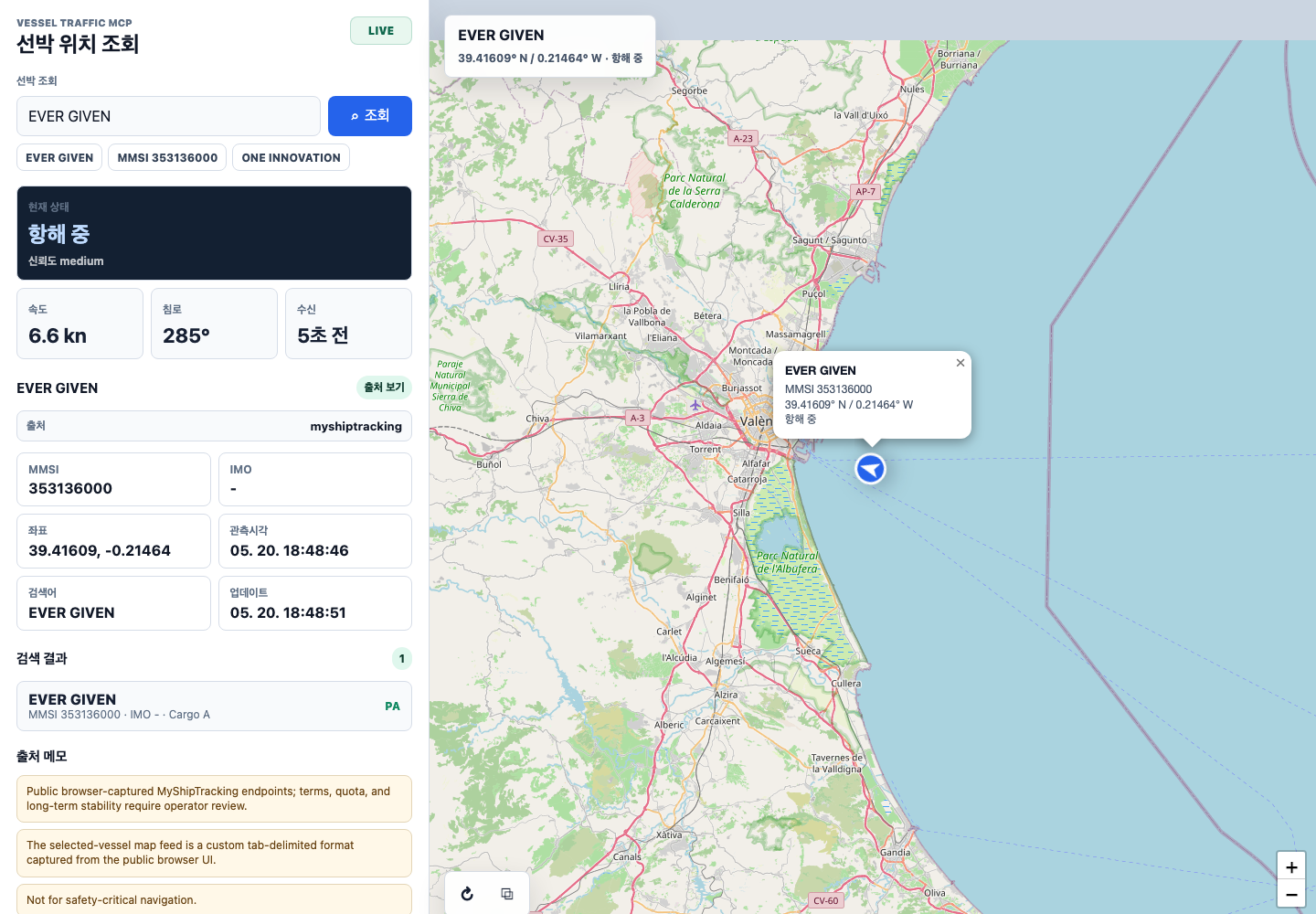
Vessel Traffic MCP is a read-only Model Context Protocol (MCP) server for vessel identity lookup, AIS-style positions, tracks, port calls, carrier schedules, vessel schedules, and delay heuristics. It gives Claude, ChatGPT, Codex, MCP Inspector, and other MCP clients one normalized maritime-data tool surface.
Use it when an agent needs to:
- search/fetch vessel context through generic connector-style MCP tools;
- resolve a vessel from a name, MMSI, IMO, callsign, or bill-of-lading text;
- ask where a vessel is, where it has been, or which vessels are in an area;
- search container-shipping schedules by port pair or vessel;
- return the original provider and source URL with every live/public result;
- test maritime workflows safely before buying paid AIS or schedule APIs.
The project does not bypass provider terms, paywalls, CAPTCHA, or access controls. Commercial providers are Bring Your Own Key (BYOK), the default test path is fixture-only, and this is not a navigation product.
Open source under the MIT license. Pre-1.0; APIs and tool surfaces may change.
Contents
- Install In An MCP Client
- Agent Discovery Page
- What It Exposes
- Provider Model
- Responsible Use And Third-Party Rights
- Help Spread
- From Source
- Remote HTTP Setup
- Current Distribution
- Star History
- Shared Reference
Install In An MCP Client
For Claude Desktop, Claude Code, Codex CLI, Cursor, VS Code, or any stdio MCP client, use the npm package:
{
  "mcpServers": {
    "vessel-traffic-mcp": {
      "command": "npx",
      "args": ["-y", "@tools-mcp/vessel-traffic-mcp"],
      "env": {
        "VESSEL_MCP_TRANSPORT": "stdio",
        "VESSEL_MCP_ENABLE_PUBLIC_PROVIDERS": "myshiptracking,tradlinx,aisfriends"
      }
    }
  }
}
Then restart the client and try:
Find the current position of EVER GIVEN. Include source.provider and source.landingUrl.
Search carrier schedules from KRPUS to NLRTM. Include the source URL.
Full client setup lives in
docs/runbooks/clients.md, and Codex
details live in docs/runbooks/codex.md.
Source-checkout config snippets are in
Shared MCP Config Snippets.
Marketplace and AI-client submission helpers live in
llms-install.md, LAUNCHGUIDE.md,
and assets/logo-400.png.
Agent Discovery Page
The public landing page for assistant-agent search and install snippets is:
https://tools-mcp.github.io/vessel-traffic-mcp/
Use that URL when sharing the project as a vessel AIS MCP, ship tracking
MCP, ChatGPT MCP, Codex MCP, Claude MCP, or Gemini MCP server.
The page includes a golden prompt for the EVER GIVEN scenario and client
snippets for local stdio and remote Streamable HTTP setup.
Assistant services do not automatically discover arbitrary MCP servers. The
operator must connect this MCP first; after that, the tool descriptions,
search/fetch wrappers, and vessel-specific tools give the agent a clear
path from a ship-name prompt to source-attributed results.
What It Exposes
| Area | Read-only tools |
|---|---|
| Search-style connector flow | search, fetch |
| Vessel identity | vessel_search, vessel_name_resolve, document_vessel_lookup |
| AIS-style movement | vessel_position, vessel_area, vessel_track |
| Port activity | port_calls |
| Shipping schedules | carrier_schedule_search, vessel_schedule, schedule_delay_predict |
| Provider setup | provider_status, data_sources, credential_profiles, provider_onboarding |
Every live or public-provider response must expose provenance:
source.provider and source.landingUrl. The project is designed to
route users back to the original service, not to hide or rebrand the
data source.
Provider Model
| Provider group | How it is enabled | Notes |
|---|---|---|
| Fixture | default | deterministic tests and demos; no network, accounts, or API keys |
| Public opt-in | VESSEL_MCP_ENABLE_PUBLIC_PROVIDERS=myshiptracking,tradlinx,aisfriends | public web adapters with source attribution |
| BYOK commercial/community APIs | VESSEL_MCP_ENABLE_BYOK_PROVIDERS=... plus VESSEL_MCP_PROFILE_* env vars | user-owned credentials only; secrets are redacted from logs, errors, and MCP responses |
| Remote deployment | VESSEL_MCP_TRANSPORT=http | Streamable HTTP at /mcp; set VESSEL_MCP_AUTH_TOKEN for Authorization: Bearer <token> |
Use the provider_onboarding MCP tool to inspect provider signup URLs,
required env vars, configured profile status, and validation steps. It
is read-only and never creates accounts, accepts terms, solves CAPTCHA,
completes email verification, sets payment details, or issues API keys.
Responsible Use And Third-Party Rights
This project is provided as open-source infrastructure for public-interest interoperability, workflow testing, and source-attributed maritime data access. It does not grant any right to copy, redistribute, rebrand, bypass, or misuse third-party services, databases, maps, trademarks, copyrighted material, API responses, or provider content.
Users are responsible for how they configure and operate the software, including their compliance with applicable law, provider terms, account permissions, rate limits, data licenses, and internal company policies. Do not use this project to bypass authentication, paywalls, CAPTCHA, access controls, robots policies, or commercial restrictions.
The authors and contributors respect the rights and terms of all referenced
services and data providers. Live and public-provider responses are designed
to preserve attribution through source.provider and source.landingUrl and
to route users back to the original source. If a rights holder, service
operator, or affected party reports a substantiated concern, the maintainers
will review it promptly and, where appropriate, modify, disable, or remove the
affected adapter, documentation, fixture, or reference.
The software is provided under the MIT license, without warranty. Nothing in this README is legal advice or a substitute for reviewing the terms that apply to your own use case.
Help Spread
If this could help someone building MCP tools, shipping/logistics software,
or AI workflows around maritime data, share the repository and ask for real
workflow feedback. A copy/paste sharing kit lives in
docs/marketing/help-us-spread.md.
Useful help includes trying the npm install, posting a tailored community write-up, requesting a provider adapter, or explaining a real forwarding, trade, port-call, vessel ETA, or carrier-schedule workflow.
From Source
git clone https://github.com/tools-mcp/vessel-traffic-mcp.git
cd vessel-traffic-mcp
npm ci
npm run lint
npm test
npm run build
VESSEL_MCP_TRANSPORT=stdio \
VESSEL_MCP_ENABLE_PUBLIC_PROVIDERS=myshiptracking,tradlinx,aisfriends \
npm start
The default verification gate uses sanitized fixtures only. It does not call paid or live providers and does not require API keys, accounts, or network access.
For a local visual check with ship-name input and a map:
npm run start:map
Open http://127.0.0.1:8787 and search EVER GIVEN or MMSI
353136000.
Remote HTTP Setup
For remote MCP clients, run Streamable HTTP at /mcp with public
/health:
export VESSEL_MCP_TRANSPORT=http
export VESSEL_MCP_HTTP_HOST=127.0.0.1
export VESSEL_MCP_HTTP_PORT=8765
export VESSEL_MCP_AUTH_TOKEN="<a-strong-random-token-you-generated>"
npm run start:http

curl -sf "http://127.0.0.1:8765/health"
MCP requests require Authorization: Bearer <token> when
VESSEL_MCP_AUTH_TOKEN is set. See
docs/runbooks/streamable-http-server.md
and docs/runbooks/deployment-https.md.
Current Distribution
| Surface | Status | Access |
|---|---|---|
| GitHub | Public | https://github.com/tools-mcp/vessel-traffic-mcp |
| Agent landing page | Public | https://tools-mcp.github.io/vessel-traffic-mcp/ |
| npm | Public | @tools-mcp/vessel-traffic-mcp@0.1.0 at https://www.npmjs.com/package/@tools-mcp/vessel-traffic-mcp |
| GitHub Release | Published | https://github.com/tools-mcp/vessel-traffic-mcp/releases/tag/v0.1.0 |
| MCP Registry | Published | io.github.tools-mcp/vessel-traffic-mcp@0.1.0 in the official registry |
| ServerHub | Listed | https://www.serverhub.digital/servers/vessel-traffic-mcp |
| VaultPlane | Listed | https://www.vaultplane.com/server/vessel-traffic-mcp |
| MCPRepository | Submitted | Queued for validation at https://mcprepository.com/tools-mcp/vessel-traffic-mcp |
| Local map UI | Ready from source | npm run start:map, then open http://127.0.0.1:8787 |
| HTTP directory metadata | Ready from source | npm run start:http, then fetch /.well-known/mcp/server-card.json |
| Glama | Submitted for review | Submitted through Glama's Add Server flow on 2026-05-27; public listing URL and score badge are reserved at https://glama.ai/mcp/servers/tools-mcp/vessel-traffic-mcp and may return 404 until review/indexing completes |
| PulseMCP | Submission/indexing pending | Track in docs/runbooks/public-sharing.md and docs/marketing/outreach-status.md |
| Smithery | HTTPS endpoint pending | Needs a stable public HTTPS /mcp URL |
Launch copy and directory submission material live in
docs/marketing.
Star History
Languages
Agent Prompt
Use this prompt when asking another coding agent to install the MCP:
Install and configure https://github.com/tools-mcp/vessel-traffic-mcp
as a local stdio MCP server on this machine.

Read README.md and llms.txt first. Clone the repository, run `npm ci`,
run `npm run build`, then add the MCP server to the local MCP client
using an absolute path to `dist/index.js`.

Use `VESSEL_MCP_TRANSPORT=stdio` and enable public providers with
`VESSEL_MCP_ENABLE_PUBLIC_PROVIDERS=myshiptracking,tradlinx,aisfriends`.

Do not commit local MCP client config files, env files, API keys,
cookies, HAR files, browser sessions, or raw captures. Do not copy
credentials from another machine.

After restarting the MCP client, verify with:
1. Ask for EVER GIVEN current position and include the source URL.
2. Ask for a KRPUS to NLRTM carrier schedule and include the source URL.
한국어
개요
vessel-traffic-mcp는 MCP 클라이언트가 허가된 해운/선박 데이터
소스를 읽기 전용 도구로 조회할 수 있게 해주는 서버입니다.
선박명, MMSI, IMO, 호출부호 기반 검색, 최신 위치 조회, 영역 조회, 항만 호출, 선사 스케줄, 선박별 스케줄, 스케줄 지연 판단을 제공합니다.
실시간 또는 공개 provider 응답은 반드시 source.provider와
source.landingUrl을 포함해야 합니다. 이 프로젝트의 목적은 원
서비스 유입과 출처 노출을 제공하는 것이며, 출처를 숨기거나
재브랜딩하는 것이 아닙니다.
공유를 도와줄 사람에게 보낼 짧은 문구와 커뮤니티용 글 초안은
docs/marketing/help-us-spread.md에
정리되어 있습니다.
빠른 시작
git clone https://github.com/tools-mcp/vessel-traffic-mcp.git
cd vessel-traffic-mcp
npm install
npm run lint
npm test
npm run build
기본 검증은 sanitize된 fixture만 사용합니다. 유료 provider나 live provider를 호출하지 않으며 API 키, 계정, 네트워크 접근이 필요하지 않습니다.
로컬 MCP 설정
로컬 데스크톱/CLI 클라이언트에서는 stdio transport를 사용합니다.
VESSEL_MCP_TRANSPORT=stdio npm start
Codex CLI, Claude Desktop, Claude Code 설정은
공통 MCP 설정 예시를 사용하면 됩니다.
전체 클라이언트 설정은 docs/runbooks/clients.md,
Codex 전용 설정은 docs/runbooks/codex.md에
정리되어 있습니다.
원격 MCP 설정
원격 MCP 클라이언트는 Streamable HTTP /mcp 엔드포인트를 사용합니다.
/health는 공개 health check입니다.
export VESSEL_MCP_TRANSPORT=http
export VESSEL_MCP_HTTP_HOST=127.0.0.1
export VESSEL_MCP_HTTP_PORT=8765
export VESSEL_MCP_AUTH_TOKEN="<a-strong-random-token-you-generated>"
npm run start:http
VESSEL_MCP_AUTH_TOKEN을 설정한 경우 MCP 요청에는
Authorization: Bearer <token>이 필요합니다. 배포 문서는
docs/runbooks/deployment-https.md를
참고하세요.
공개 Provider
브라우저 캡처 기반 공개 adapter는 명시적으로 켜야 합니다.
VESSEL_MCP_ENABLE_PUBLIC_PROVIDERS=myshiptracking,tradlinx,aisfriends npm start
myshiptracking: 선박 자동완성, 선택 MMSI 기반 최신 위치, 지도 영역 조회.tradlinx: FCL/LCL 선사 스케줄 조회.aisfriends: 공개 지도 bounding-box 기반 영역 위치 조회. 선박명 검색은 지원하지 않습니다.shipfinder: 명시적 provider 라우팅용 선박 자동완성 및 상세 API 형태.
응답에는 항상 원 출처 provider와 사용자가 열 수 있는 출처 URL을 포함합니다.
BYOK Provider
유료/credential 기반 provider는 BYOK 방식으로만 사용합니다. 실제 키는 로그, 에러, MCP 응답에 노출되지 않습니다.
export VESSEL_MCP_PROFILE_MARINETRAFFIC__API_KEY="<your-key>"
export VESSEL_MCP_ENABLE_BYOK_PROVIDERS="marinetraffic,vesselfinder,aisstream,aishub,barentswatch,searates-schedules,routescanner-connect,vesselapi,datadocked,datalastic,globalfishingwatch"
현재 credential 기반으로 런타임 등록 가능한 provider는 marinetraffic,
vesselfinder, aisstream, aishub, barentswatch,
searates-schedules, routescanner-connect, vesselapi, datadocked, datalastic, globalfishingwatch입니다. 기본 credential profile이
설정된 provider는 자동으로 등록됩니다.
자세한 내용은 docs/runbooks/credential-profiles.md와
docs/runbooks/operator.md를 참고하세요.
provider_onboarding MCP 도구를 사용하면 provider별 가입 URL, 필요한
env var, 현재 credential 설정 여부, 검증 단계를 확인할 수 있습니다.
이 도구는 읽기 전용이며 계정 생성, 약관 동의, CAPTCHA, 이메일 인증,
결제 정보 설정, API 키 발급을 대신 수행하지 않습니다.
책임 있는 사용 및 제3자 권리
이 프로젝트는 공익적 상호운용성, 업무 자동화 실험, 출처가 표시되는 해운/선박 데이터 접근을 돕기 위해 오픈소스로 공개되었습니다. 이 프로젝트는 제3자 서비스, 데이터베이스, 지도, 상표, 저작물, API 응답, provider 콘텐츠를 복제, 재배포, 재브랜딩, 우회, 오용할 권리를 부여하지 않습니다.
소프트웨어를 어떻게 설정하고 사용하는지는 사용자 책임입니다. 사용자는 관련 법령, provider 약관, 계정 권한, rate limit, 데이터 라이선스, 내부 회사 정책을 직접 확인하고 준수해야 합니다. 인증, 유료 기능, CAPTCHA, 접근 제어, robots 정책, 상업적 제한을 우회하기 위해 이 프로젝트를 사용해서는 안 됩니다.
작성자와 기여자는 참조된 모든 서비스와 데이터 provider의 권리와 약관을
존중합니다. live/public provider 응답은 source.provider와
source.landingUrl로 원 출처를 표시하고, 사용자가 원 서비스를 확인할 수
있도록 설계되었습니다. 권리자, 서비스 운영자, 또는 관련 당사자가 근거
있는 문제를 제기하면 maintainer는 신속히 검토하고, 필요한 경우 해당
adapter, 문서, fixture, reference를 수정, 비활성화, 또는 제거하겠습니다.
이 소프트웨어는 MIT 라이선스에 따라 보증 없이 제공됩니다. 이 README의 문구는 법률 자문이 아니며, 각 사용 사례에 적용되는 약관과 법적 의무를 검토하는 일을 대체하지 않습니다.
에이전트 설정 프롬프트
다른 코딩 에이전트에게 이 MCP를 설치하게 할 때 사용할 프롬프트입니다.
https://github.com/tools-mcp/vessel-traffic-mcp 를 이 머신의 로컬
stdio MCP 서버로 설치하고 설정해줘.

먼저 README.md와 llms.txt를 읽어라. repo를 clone하고 `npm ci`,
`npm run build`를 실행한 뒤, 로컬 MCP 클라이언트 설정에
`dist/index.js`의 절대경로를 등록해라.

`VESSEL_MCP_TRANSPORT=stdio`를 사용하고,
`VESSEL_MCP_ENABLE_PUBLIC_PROVIDERS=myshiptracking,tradlinx,aisfriends`를 설정해라.

로컬 MCP 클라이언트 설정 파일, env 파일, API 키, 쿠키, HAR 파일,
브라우저 세션, raw capture는 커밋하지 마라. 다른 머신의 credential을
복사하지 마라.

MCP 클라이언트를 재시작한 뒤 다음으로 검증해라:
1. EVER GIVEN 현재 위치를 조회하고 출처 URL을 함께 보여줘.
2. KRPUS에서 NLRTM까지의 선사 스케줄을 조회하고 출처 URL을 함께 보여줘.
日本語
概要
vessel-traffic-mcp は、MCP クライアントから許可された海事データ
ソースを読み取り専用で参照するためのサーバーです。
船名、MMSI、IMO、コールサインによる検索、最新位置、エリア検索、 寄港情報、船会社スケジュール、船舶別スケジュール、遅延判定を 提供します。
ライブまたは公開 provider の応答では、source.provider と
source.landingUrl を必ず含めます。このプロジェクトは元サービスへ
ユーザーを誘導し、出典を明示することを目的としています。
クイックスタート
git clone https://github.com/tools-mcp/vessel-traffic-mcp.git
cd vessel-traffic-mcp
npm install
npm run lint
npm test
npm run build
標準の検証は sanitize 済み fixture のみを使います。有料 provider や live provider は呼び出さず、API キー、アカウント、ネットワーク接続も 不要です。
ローカル MCP 設定
ローカルのデスクトップ/CLI クライアントでは stdio transport を使います。
VESSEL_MCP_TRANSPORT=stdio npm start
Codex CLI、Claude Desktop、Claude Code の設定には 共通 MCP 設定例を使用してください。
リモート MCP 設定
リモート MCP クライアントでは Streamable HTTP の /mcp を使います。
/health は公開 health check です。
export VESSEL_MCP_TRANSPORT=http
export VESSEL_MCP_HTTP_HOST=127.0.0.1
export VESSEL_MCP_HTTP_PORT=8765
export VESSEL_MCP_AUTH_TOKEN="<a-strong-random-token-you-generated>"
npm run start:http
VESSEL_MCP_AUTH_TOKEN を設定した場合、MCP リクエストには
Authorization: Bearer <token> が必要です。
公開 Provider
ブラウザキャプチャ由来の公開 adapter は明示的に有効化します。
VESSEL_MCP_ENABLE_PUBLIC_PROVIDERS=myshiptracking,tradlinx,aisfriends npm start
myshiptracking: 船舶オートコンプリート、選択 MMSI からの最新位置、 地図範囲検索。tradlinx: FCL/LCL の船会社スケジュール検索。aisfriends: 公開地図の bounding-box ベースのエリア位置検索。船名検索は未対応。shipfinder: 明示的 provider ルーティング用の船舶検索と詳細 API 形状。
BYOK Provider
有料または credential が必要な provider は BYOK のみです。実際のキーは ログ、エラー、MCP 応答に出しません。
export VESSEL_MCP_PROFILE_MARINETRAFFIC__API_KEY="<your-key>"
export VESSEL_MCP_ENABLE_BYOK_PROVIDERS="marinetraffic,vesselfinder,aisstream,aishub,barentswatch,searates-schedules,routescanner-connect,vesselapi,datadocked,datalastic,globalfishingwatch"
現在 runtime で有効化できる credentialed provider は marinetraffic,
vesselfinder, aisstream, aishub, barentswatch,
searates-schedules, routescanner-connect, vesselapi, datadocked, datalastic, globalfishingwatch です。
エージェント設定プロンプト
別のコーディングエージェントに MCP を設定させる場合のプロンプトです。
https://github.com/tools-mcp/vessel-traffic-mcp を、このマシンの
ローカル stdio MCP サーバーとしてインストールして設定してください。

最初に README.md と llms.txt を読んでください。repo を clone し、
`npm ci` と `npm run build` を実行し、`dist/index.js` の絶対パスを
ローカル MCP クライアントに登録してください。

`VESSEL_MCP_TRANSPORT=stdio` を使い、
`VESSEL_MCP_ENABLE_PUBLIC_PROVIDERS=myshiptracking,tradlinx,aisfriends` を設定してください。

ローカル MCP クライアント設定、env ファイル、API キー、Cookie、HAR、
ブラウザセッション、raw capture を commit しないでください。他の
マシンから credential をコピーしないでください。

再起動後、EVER GIVEN の現在位置と出典 URL、KRPUS から NLRTM への
船会社スケジュールと出典 URL を確認してください。
中文
概览
vessel-traffic-mcp 是一个只读 MCP 服务器,让 MCP 客户端能够通过
统一工具接口访问已授权的海事数据来源。
它支持按船名、MMSI、IMO、呼号搜索船舶,查询最新位置、区域位置、 港口靠泊、承运人航线计划、船舶计划和延误判断。
所有实时或公开 provider 的响应都必须包含 source.provider 和
source.landingUrl。本项目用于向原始服务导流并明确显示出处,而不是
隐藏或重新包装数据来源。
快速开始
git clone https://github.com/tools-mcp/vessel-traffic-mcp.git
cd vessel-traffic-mcp
npm install
npm run lint
npm test
npm run build
默认验证只使用已清洗的 fixture,不调用付费或实时 provider,也不需要 API key、账号或网络访问。
本地 MCP 设置
本地桌面和 CLI 客户端使用 stdio transport。
VESSEL_MCP_TRANSPORT=stdio npm start
Codex CLI、Claude Desktop、Claude Code 可使用 共享 MCP 配置片段。
远程 MCP 设置
远程 MCP 客户端使用 Streamable HTTP /mcp,/health 是公开健康检查。
export VESSEL_MCP_TRANSPORT=http
export VESSEL_MCP_HTTP_HOST=127.0.0.1
export VESSEL_MCP_HTTP_PORT=8765
export VESSEL_MCP_AUTH_TOKEN="<a-strong-random-token-you-generated>"
npm run start:http
设置 VESSEL_MCP_AUTH_TOKEN 后,MCP 请求需要
Authorization: Bearer <token>。
公开 Provider
浏览器捕获得到的公开 adapter 需要显式启用。
VESSEL_MCP_ENABLE_PUBLIC_PROVIDERS=myshiptracking,tradlinx,aisfriends npm start
myshiptracking: 船舶自动完成、按选定 MMSI 查询最新位置、地图范围查询。tradlinx: FCL/LCL 承运人航线计划查询。aisfriends: 基于公开地图 bounding-box 的区域位置查询;不支持船名搜索。shipfinder: 用于显式 provider 路由的船舶搜索和详情 API 形状。
BYOK Provider
付费或需要 credential 的 provider 只能使用 BYOK。真实 key 不会出现在日志、 错误或 MCP 响应中。
export VESSEL_MCP_PROFILE_MARINETRAFFIC__API_KEY="<your-key>"
export VESSEL_MCP_ENABLE_BYOK_PROVIDERS="marinetraffic,vesselfinder,aisstream,aishub,barentswatch,searates-schedules,routescanner-connect,vesselapi,datadocked,datalastic,globalfishingwatch"
当前可在 runtime 启用的 credentialed provider 是 marinetraffic,
vesselfinder, aisstream, aishub, barentswatch,
searates-schedules, routescanner-connect, vesselapi, datadocked, datalastic, globalfishingwatch。
Agent 设置提示词
让其他编码 agent 安装此 MCP 时可使用以下提示词。
请将 https://github.com/tools-mcp/vessel-traffic-mcp 安装并配置为本机
本地 stdio MCP 服务器。

先阅读 README.md 和 llms.txt。clone 仓库,运行 `npm ci` 和
`npm run build`,然后在本地 MCP 客户端中用 `dist/index.js` 的绝对路径
注册服务器。

使用 `VESSEL_MCP_TRANSPORT=stdio`,并设置
`VESSEL_MCP_ENABLE_PUBLIC_PROVIDERS=myshiptracking,tradlinx,aisfriends`。

不要提交本地 MCP 客户端配置、env 文件、API key、cookie、HAR 文件、
浏览器 session 或 raw capture。不要从其他机器复制 credentials。

重启 MCP 客户端后验证:
1. 查询 EVER GIVEN 当前船位,并显示来源 URL。
2. 查询 KRPUS 到 NLRTM 的承运人航线计划,并显示来源 URL。
Shared Reference
Shared MCP Config Snippets
Codex CLI ~/.codex/config.toml:
[mcp_servers.vessel-traffic-mcp]
command = "node"
args = ["/absolute/path/to/vessel-traffic-mcp/dist/index.js"]

[mcp_servers.vessel-traffic-mcp.env]
VESSEL_MCP_TRANSPORT = "stdio"
VESSEL_MCP_ENABLE_PUBLIC_PROVIDERS = "myshiptracking,tradlinx,aisfriends"
Claude Desktop / Claude Code config:
{
  "mcpServers": {
    "vessel-traffic-mcp": {
      "command": "node",
      "args": ["/absolute/path/to/vessel-traffic-mcp/dist/index.js"],
      "env": {
        "VESSEL_MCP_TRANSPORT": "stdio",
        "VESSEL_MCP_ENABLE_PUBLIC_PROVIDERS": "myshiptracking,tradlinx,aisfriends"
      }
    }
  }
}
Provider Implementation Status
The PRD is intentionally broader than the adapters enabled by default. Current status:
| Group | Runtime status | Providers |
|---|---|---|
| Default | enabled with no env | fixture |
| Public opt-in | VESSEL_MCP_ENABLE_PUBLIC_PROVIDERS | aisfriends, myshiptracking, shipfinder, tradlinx-schedule |
| Credentialed implemented | VESSEL_MCP_ENABLE_BYOK_PROVIDERS or configured default profile | marinetraffic, vesselfinder, aisstream, aishub, barentswatch, searates-schedules, routescanner-connect, vesselapi, datadocked, datalastic, globalfishingwatch |
| Planned schedule APIs | cataloged, not implemented | linescape-schedule-api |
| Not started commercial AIS | cataloged, not implemented | spire-maritime, orbcomm-commtrace |
| Discovery or enterprise review | cataloged only | openais, noaa-marinecadastre, iqax-bigschedules, cargosmart-schedule, poseidon-ais, ais-now, fleetmon, windward, polestar-global, spglobal-seaweb, lloyds-list-intelligence |
The structured source of truth is
config/provider-catalog.example.json
and the human-readable inventory is
docs/provider-catalog.md.
Local Vessel Map UI
For a local visual check with ship-name input and a map:
npm run start:map
Open http://127.0.0.1:8787 and search EVER GIVEN or MMSI
353136000. The UI displays a map marker and a visible source link.
Schedule Tools
Registered read-only schedule tools:
carrier_schedule_searchvessel_scheduleschedule_delay_predict
Registered read-only provider/setup tools:
provider_statusdata_sourcescredential_profilesprovider_onboarding
Fixture-backed checks:
KRPUS에서 NLRTM으로 가는 선사 스케줄을 조회하고, 출처 URL도 같이 보여줘.
EVER GIVEN 선박 스케줄을 조회하고 ETA 지연 여부를 계산해줘.
Schedule-provider candidates are tracked in
docs/provider-catalog.md. Tradelinx has
an explicit opt-in carrier_schedule_search adapter backed by
sanitized browser-captured endpoint shapes documented in
docs/runbooks/schedule-api-capture-results.md.
Capture And Safety Boundary
This project does not aim to bypass commercial services. It supports:
- Official APIs and open-data feeds.
- User-provided API credentials and organization-level BYOK credential profiles for paid providers.
- Sanitized HAR/network samples from operator-owned, authorized browser sessions, only where allowed by service terms.
It must not store raw cookies, bearer tokens, API keys, private HAR
files, raw captures, or private browser sessions in the repository.
The full hard-rule list lives in AGENTS.md, and
security expectations are in SECURITY.md.
Authorized capture tooling is documented in
docs/runbooks/capture-execution.md.
The sanitized import command is npm run capture:import, and traffic
IR generation is npm run capture:ir.
Not for navigation. AIS data returned by configured providers may be delayed, incomplete, or inaccurate. This project is not a safety-critical navigation tool.
Project Layout
src/
  capture/      sanitized capture fixture importer + traffic IR CLI
  config/       credential profile loader, provider catalog
  providers/    adapter interfaces, registry, router, rate limit, TTL cache
  server/       MCP transports and tool handlers
  tools/        read-only tool definitions
  util/         structured logging and redaction helpers
test/           node:test deterministic tests; fixture-backed
docs/           PRD, TDD, provider catalog, and runbooks
Documentation
llms.txt— compact agent-facing project brief.docs/index.html— static agent discovery page published through GitHub Pages.server.json— MCP Registry metadata for theio.github.tools-mcp/vessel-traffic-mcpnamespace.AGENTS.md— project hard rules.CODE_OF_CONDUCT.md— collaboration expectations.docs/PRD.md— product requirements.docs/TDD.md— technical design.docs/provider-catalog.md— provider inventory and routing policy.docs/runbooks/operator.md— end-to-end operator runbook.docs/runbooks/clients.md— client setup for Claude Desktop, Claude Code, ChatGPT remote MCP, and MCP Inspector.docs/runbooks/codex.md— Codex CLI MCP wiring and Codex plugin metadata state.docs/runbooks/credential-profiles.md— BYOK profile handling.docs/runbooks/deployment-https.md— HTTPS deployment for the Streamable HTTP MCP endpoint.docs/runbooks/release-checklist.md— pre-release safety checklist.docs/runbooks/public-sharing.md— GitHub, MCP Registry, Smithery, Glama, PulseMCP, and launch-post sharing checklist.docs/runbooks/api-capture-reference-only.md— reference-only boundary for raw capture sessions.docs/runbooks/browser-api-capture-results.md— sanitized browser capture results for vessel APIs.docs/runbooks/schedule-api-capture-results.md— sanitized browser capture results for schedule APIs.docs/discoverability.md— package, repository, and documentation discoverability contract.
Topics
vessel-traffic-mcp is intended to be findable from MCP and plugin
search surfaces. The same set is reflected in package.json keywords
and suggested GitHub topics.
- vessel AIS MCP
- ship tracking MCP
- MarineTraffic MCP
- Claude MCP (Claude Desktop, Claude Code)
- ChatGPT MCP (ChatGPT remote MCP connector)
- Codex plugin (Codex / OpenAI plugin / marketplace workflows)
- Gemini MCP (Gemini CLI and Gemini Code Assist)
- MCP / Model Context Protocol server
- AIS / vessel tracking / ship tracking
- BYOK paid-provider routing (MarineTraffic, VesselFinder, AISStream, AISHub, BarentsWatch, SeaRates, Routescanner, VesselAPI, Data Docked, and other catalog entries)
Contributing
Contributions are welcome. Please read
CONTRIBUTING.md first. The project has
non-negotiable safety rules around credentials, capture fixtures, and
the read-only contract.
Use GitHub Issues for bugs, provider requests, and authorized capture
reviews. Use GitHub Discussions for roadmap, integration, and
collaboration threads. The sharing checklist is in
docs/runbooks/public-sharing.md.
Security
Do not file a public GitHub issue for a suspected vulnerability. See
SECURITY.md for the private reporting channel.