MCP server for tool discovery: find, compare, and verify tools across 35+ registries.
Quick Install
Automated & IDE SetupCopy the AI prompt to install this server into Claude Code, Cursor, or another agent — or use 1-click editor setup below.
Not yet automatically verified
We haven't yet run this listing's install command through our automated sandbox check. This isn't a red flag — we're steadily working through the catalog.
Manual Client & Custom JSON ConfigExpand JSON ▾
Client Config & Setup
Choose your client or environment
Target File:
💡 Paste the JSON block into your client's configuration file under mcpServers, then restart the application.
Documentation Overview









@neurynae/toolcairn-mcp
Source for
@neurynae/toolcairn-mcpon npm. Install via the package, not from this repo.
ToolCairn is an MCP server that connects your AI coding agent to a continuously-updated graph of 30,000+ open-source tools across npm, PyPI, Cargo, Maven, Go, Composer, RubyGems, NuGet, Homebrew, and 35+ more registries. Search, compare, build stacks, and check version compatibility — all from inside Claude Code, Cursor, or any MCP-compatible client.
Concrete example. Your agent receives "I need a fast HTTP client for Node" → it calls
search_tools→ ToolCairn returns ranked candidates with maintenance and community signals, alternatives, and a warning if the top pick has questionable activity. No more guessing from blog posts and stale tutorials.
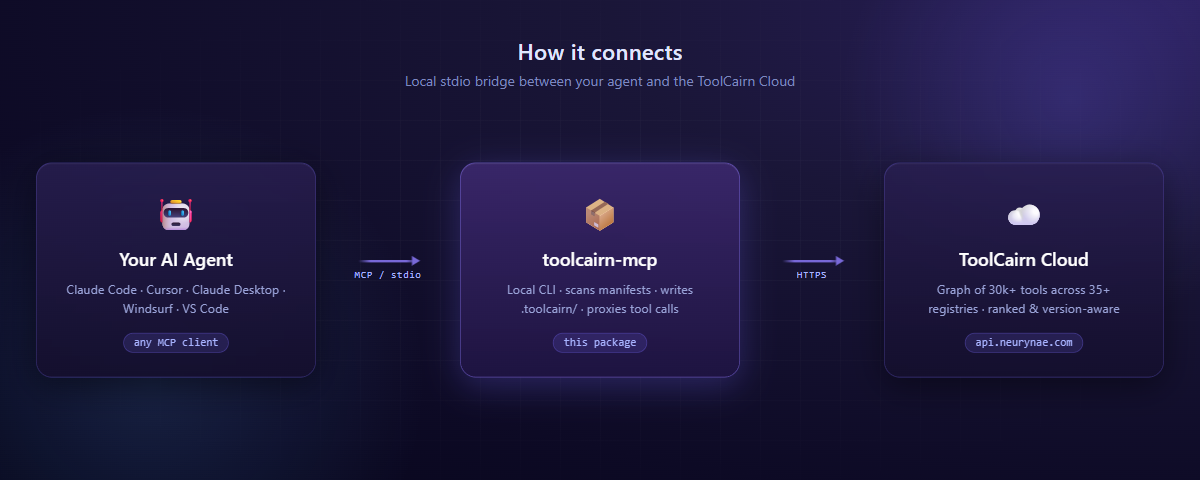
The MCP server runs locally as a stdio child of your agent. Tool calls travel over MCP to this package, which proxies the network-bound ones to the ToolCairn Cloud API and handles the local-only ones (project scan, config, audit log) on disk.
Why ToolCairn?
Plain web search and LLM training data are insufficient for tool selection — knowledge cutoffs miss latest releases, search engines surface tutorials over authoritative ranking, and version-compatibility answers live in scattered issue threads.
ToolCairn fixes this with three things you can't get from raw registry APIs:
- Graph-aware ranking — recommendations consider how tools relate to each other (dependencies, integrations, replacements, conflicts), not just popularity.
- Version-aware compatibility — declared peer ranges and cross-registry version metadata give you "Next.js 14 needs React 18.x" instead of "they're both popular, probably fine?"
- A continuous learning loop — every accepted, rejected, or replaced recommendation feeds back into the graph, so quality improves with use.
Quick Start
Step 1. Create a free account at toolcairn.neurynae.com/signup.
Step 2. Add to your MCP config and restart your agent:
Step 3. A browser window opens for sign-in on first start. Once you confirm, all tools are available immediately — no further setup.
Requires Node.js 22+.
Setup — Claude Code
The fastest path:
Or paste the JSON block above into ~/.claude/claude_desktop_config.json under mcpServers.
Other MCP-compatible clients (Cursor, Claude Desktop, VS Code Copilot, Windsurf, Zed, …) work with the same
npx @neurynae/toolcairn-mcpcommand — see the docs for client-specific config locations.
What you can do
Find a tool
Your agent receives "I need a real-time analytics database for event tracking" → calls search_tools → gets ranked candidates (ClickHouse, TimescaleDB, InfluxDB, …) with maintenance signals. If the intent is ambiguous, the response carries clarification questions; the agent answers via search_tools_respond and gets refined results.
Build a stack
Your agent receives "Help me architect a full-stack TypeScript SaaS" → calls refine_requirement to decompose, then get_stack with the per-layer needs → gets a 3–5 tool stack (web framework + database + auth + payments) with a version-compatibility matrix showing which versions work together across the stack.
Compare options
"Express vs Fastify for a REST API?" → compare_tools returns side-by-side health (stars, maintenance score, last commit, open issues, contributor trends), graph relationships (what each integrates with, what they replace), and a recommendation grounded in your stated use case.
Check version compatibility
"I want to upgrade Next.js to 14 but keep React 17." → check_compatibility evaluates declared peer ranges and returns satisfied/unsatisfied checks with the source (declared_dependency / graph_edges / shared_neighbors).
Track project tools
On first session, toolcairn_init walks your repo, parses every manifest (package.json, requirements.txt, pyproject.toml, Cargo.toml, go.mod, pom.xml, Gemfile, composer.json, …), classifies each tool against the ToolCairn graph, and writes a local .toolcairn/ snapshot. Subsequent sessions read this snapshot first — your agent stops re-searching for things it already knows about.
Available Tools
The MCP server exposes 16 tools, grouped by purpose. Most are local (no network) or fire-and-forget; the search, compare, and stack tools call the ToolCairn API.
Discovery
| Tool | What it does |
|---|---|
search_tools | Natural-language search with health signals and alternatives. May ask clarifying questions when intent is ambiguous. |
search_tools_respond | Submit answers to refine an in-progress search. |
refine_requirement | Decompose a vague use-case ("build a SaaS") into specific, searchable sub-needs. |
verify_suggestion | Check whether the agent's tool picks are actually indexed in the ToolCairn graph. |
Stacks & Compatibility
| Tool | What it does |
|---|---|
get_stack | Compose a complementary tool stack with a cross-version compatibility matrix. |
compare_tools | Head-to-head: health metrics, graph relationships, and a recommendation. |
check_compatibility | Version-aware peer-range check between two tools. |
Project Configuration
| Tool | What it does |
|---|---|
toolcairn_init | Discover project roots, scan manifests, classify tools, write .toolcairn/. |
read_project_config | Load the local .toolcairn/config.json snapshot (confirmed tools, pending items, audit log). |
update_project_config | Atomically add, remove, or update a tool — every mutation is audited. |
Feedback Loop
| Tool | What it does |
|---|---|
report_outcome | Fire-and-forget: did the recommended tool work out? Closes the learning loop. |
feedback | Agent feedback on ToolCairn itself. Call ONLY when a ToolCairn response was wrong, broken, low-quality, or missed something — never for positive feedback. Free of daily quota. |
suggest_graph_update | Submit a new tool, edge, or use-case for admin review (staged, never auto-promoted). |
check_issue | Last resort. Search a tool's GitHub issues for known bugs — only after 4+ retries and a docs review. |
Session
| Tool | What it does |
|---|---|
classify_prompt | Local: decide whether a tool search is needed at all (skips ToolCairn for non-tool prompts). |
toolcairn_auth | Manage local sign-in: login / status / logout. |
Configuration
| Environment variable | Default | Purpose |
|---|---|---|
TOOLCAIRN_TRACKING_ENABLED | true | Set false to disable usage event logging (see Privacy). |
LOG_LEVEL | info | Set debug for verbose stdio diagnostics. |
MCP_TRANSPORT | stdio | Set http for HTTP transport (advanced). |
Where things live
- Credentials →
~/.toolcairn/credentials.json(mode0600, 90-day expiry). - Per-project state →
.toolcairn/{config.json, audit-log.jsonl, tracker.html}at each detected project root.
The tracker.html file is a self-contained dashboard — open it in any browser to see every tool call, pending evaluation, and audit entry in real time.
Session management
Your sign-in lives at ~/.toolcairn/credentials.json and lasts 90 days. From inside your agent:
To re-authenticate, simply restart your agent — the sign-in flow opens automatically.
Privacy & telemetry
We're explicit about what leaves your machine.
Sent to ToolCairn (when tracking is enabled):
- Tool name, duration, and success/error status — for service health and product analytics.
- Never full prompts, response bodies, or project file contents.
Stays local:
- Every audit entry (
.toolcairn/audit-log.jsonl). - Project state and tool snapshots.
- Your credentials file.
Opt out at any time:
Tools still work normally; only the lightweight usage events are skipped.
Related MCP Servers
Reviews
No reviews yet — be the first to share how this listing worked for you.
Frequently Asked Questions about Toolcairn MCP
AllMCPs Directory Badge
Showcase your server listing on GitHub or your project documentation. Embed this dynamic SVG badge to highlight official listing status and live engagement.
Badge Style:
Live Dynamic SVG Preview
Markdown (GitHub README)
[](https://allmcps.com/mcp/toolcairn-mcp)HTML Embed
<a href="https://allmcps.com/mcp/toolcairn-mcp"><img src="https://allmcps.com/api/badge/toolcairn-mcp?style=directory" alt="Toolcairn MCP on AllMCPs" /></a>Technical Specs & Signals
CategoryDeveloper Tools
37Quality signal: Fair · 37/100How this signal is calculated ▾
Server availabilityNot measured
Not scored for repo-hosted servers — we can't reach the running server, only its GitHub page. Hosted MCP endpoints are health-checked live.
Verified ownership10/20
Documentation & tools16/30
Adoption & activity2/15
Community engagement0/10
A guidance signal from public completeness & health data — not a user rating. New listings start lower and rise as they add docs, get verified, and grow adoption. Signals we can't observe for a listing are skipped, not counted against it.
Own this project?
This directory is pre-filled from public sources. Claim via GitHub README, site badge, or DNS TXT to unlock edit access and the Official badge — proof is checked automatically, then reviewed by our team.
Free dofollow backlink: add your website and place the AllMCPs badge on it — no claim needed. We detect it automatically and keep it verified as long as the badge stays live.
Claim & get free dofollowShare & Embed
Add our SVG badge (dark/light directory styles) or embeddable widget to your site.