LLM capacity planning tools to estimate VRAM, compute, latency, and GPU topology for agents.
Quick Install
Automated & IDE SetupCopy the AI prompt to install this server into Claude Code, Cursor, or another agent — or use 1-click editor setup below.
One-click editor setup isn’t available for this listing yet — we don’t have a confirmed install command, and we’d rather show nothing than point your editor at the wrong package or host. Follow the project’s own setup instructions, linked above.
Manual Client & Custom JSON ConfigExpand JSON ▾
No confirmed setup config for this listing yet. We only publish a config block when the install details come from the project itself — its README, its docs, or a verified owner. We haven’t found those for TokCalc MCP Server, and we’d rather show nothing than a guess you’d paste into your client. Follow the project’s own setup instructions for the current steps.
Documentation Overview
tokcalc
The open-source LLM serving capacity planner
Plan your LLM deployment before you rent the GPUs.




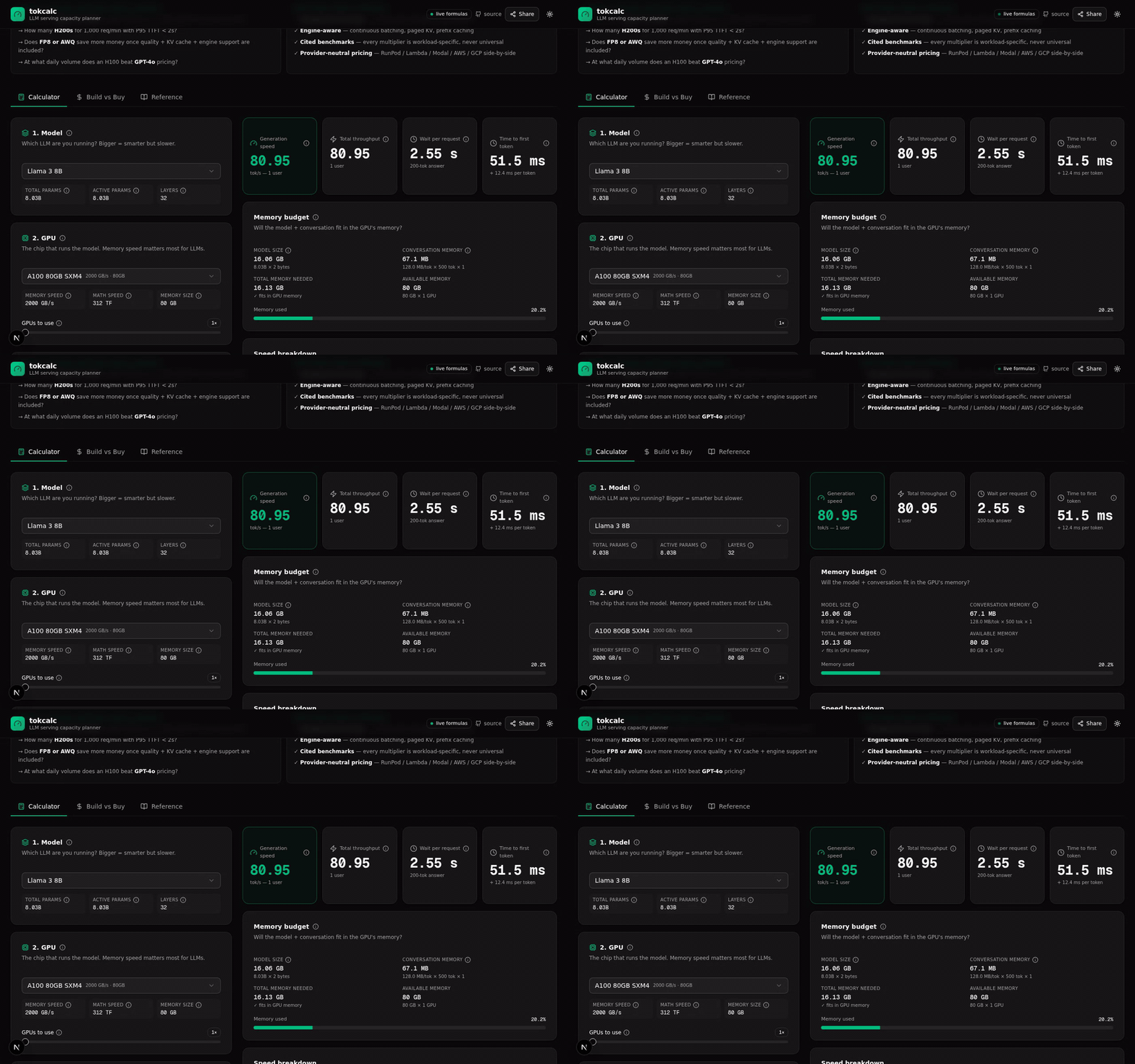
Switch model → multi-GPU → long-context capacity planner → Build vs Buy → Reference catalog → Live GPU pricing
tokcalc turns your LLM traffic, context length, latency SLOs, cache behavior, and model choice into a defensible serving topology and cost plan — with transparent formulas and cited benchmarks.
It's the engineering-grade pre-deployment decision layer for LLM inference. Not another static "tokens per second" calculator.
Try it now
tokcalc.vercel.app — no signup, no tracking, no paywall.
Pick a model, a GPU, and a workload. Get an instant capacity plan:
- Generation speed (tok/s)
- Time-to-first-token (TTFT) + inter-token latency (ITL)
- VRAM budget with KV-cache sizing
- Multi-GPU topology recommendation (Single GPU → TP×2/4/8 → Context Parallel)
- Monthly cost + break-even vs API pricing
- Live GPU pricing across Azure + AWS + GCP + Vast.ai marketplace (fetched in parallel)
- Shareable URL — your config encoded in the URL hash, send to colleagues
- Copy as Markdown — paste the full result into GitHub issues / Slack / docs
Why tokcalc?
The market has dozens of "tokens per second" calculators and self-host-vs-API break-even tools (induwara.lk, gigagpu, kickllm, cloudparity, curlscape, profitable.ai). None of them are unified capacity planners — and none show their math.
What tokcalc answers that competitors can't
"Can I serve Qwen 2.5 72B at 128K context on 2× H100 with 20 concurrent users?"
"How many H200s do I need for 1,000 req/min with P95 TTFT < 2s?"
"Does FP8 or AWQ save more money once quality, KV cache, and engine support are included?"
"At what daily volume does an H100 beat GPT-4o pricing?"
"What's the cheapest H100 right now across Azure / AWS / GCP / Vast.ai?"
"What happens to cost and latency if an agent makes 8 model calls, has 3 tool calls, and its context grows by 5K tokens each turn?"
"Would prefix caching, continuous batching, or PD disaggregation save more for this workload?"
Features
Calculator tab
| Feature | What it computes |
|---|---|
| Model fit / VRAM | Will the model + KV cache fit in the GPU's memory? |
| Throughput | Decode tok/s (per-stream) + aggregate (batched) + prefill tok/s |
| Latency split | Time-to-first-token (= prefill) + inter-token latency (= decode) |
| Continuous batching | User-tunable 1.0–4× multiplier (cited 1.5–4× SOSP range) |
| Reasoning tokens | Hidden reasoning budget added to billed output (o1 / R1 / Claude thinking) |
| Prompt caching | Self-hosted vLLM APC + Anthropic 5m/1h TTL + OpenAI 50%-off cached tokens |
| Speculative decoding | User-tunable 1.2–4× boost factor |
| Multi-GPU TP | 1× → 8× tensor parallel with NVLink efficiency factor |
| Long-context capacity | KV memory + max concurrency + prefill time at 4K → 1M context |
| Topology recommendation | Single GPU → TP×2 → TP×4 → TP×8 → TP×8 + Context Parallel (RingAttention) |
| Cost economics | GPU $/hr → $/M output tokens → $/request → monthly cost |
| Observed benchmark calibration | Paste vLLM/SGLang/TRT-LLM JSON → see formula accuracy verdict (validated / underestimated / overestimated) |
Build vs Buy tab
Independent calculator (separate state) that compares:
- Self-host: model + GPU + quant + utilization + batch → $/M tokens + monthly cost
- API: 13 providers (OpenAI / Anthropic / Gemini / Groq / DeepSeek / Mistral / Together)
- Verdict: Self-host cheaper / API cheaper / Not enough volume — with break-even reqs/day
Reference tab
6 sub-tables — fully transparent, every record source-linked where available:
- Models (35 entries: Llama 4 Scout/Maverick, Qwen 3 family, DeepSeek V3/R1, Pixtral, BGE-M3, ...)
- GPUs (30 entries: H100/H200/B200/B300, AMD MI300X/MI325X, Intel Gaudi 3, TPU v5p/Trillium, Groq LPU, Cerebras WSE-3, Apple M2/M3/M4 Ultra, ...)
- Quantization (16 formats: FP16/BF16, GGUF Q2_K→Q8_0, GPTQ, AWQ, EXL2, FP8, NVFP4)
- API pricing (13 models with input/cached/output + retired/current status)
- Cloud GPU pricing (all GPUs with $/hr > 0 + typical providers — static curated)
- 🔴 Live pricing (real-time fetch from Azure + AWS + GCP + Vast.ai in parallel — LIVE badges + timestamps)
The long-context capacity planner (the differentiator)
This is the formula the Perplexity research brief called "the most important tokcalc should visibly expose":
$$ \text{KV bytes/request} = 2 \cdot L \cdot T \cdot H_{\text{kv}} \cdot D_h \cdot B $$
For dense attention, prefill cost grows superlinearly with context length:
$$ \text{prefill FLOPs} = \underbrace{2 \cdot N \cdot T}{\text{linear}} + \underbrace{T^2 \cdot H{\text{kv}} \cdot D_h \cdot L}_{\text{attention}} $$
tokcalc shows you:
- Max concurrent users at 4K / 8K / 16K / 32K / 64K / 128K / 256K / 512K / 1M context
- KV memory per request at each context length
- Prefill time (with superlinear attention correction beyond 32K)
- Required topology (Single GPU → TP×2/4/8 → TP×8 + Context Parallel)
- RingAttention citation when CP is needed
Live GPU pricing (NEW)
The 🔴 Live pricing sub-tab in Reference fetches real-time GPU prices from 4 providers in parallel via Promise.allSettled:
| Provider | API | Auth | Cache TTL |
|---|---|---|---|
| Azure | Retail Prices API | None (public) | 24h |
| AWS | EC2 bulk pricing file | None (public) | 24h |
| GCP | Cloud Billing Catalog API | GCP_API_KEY env var | 24h |
| Vast.ai | Marketplace bundles API | None (public) | 5m (spot prices change rapidly) |
Each provider shows a LIVE badge with timestamp + cache state. The comparison table shows the cheapest price per GPU across all 4 providers (highlighted in emerald) + per-provider breakdown.
If any provider fails (e.g., GCP_API_KEY not set), the others still work — graceful degradation per provider.
The math, transparently
Every number above comes from a formula you can inspect. No black boxes.
Decode tokens/sec (memory-bandwidth bound)
$$ \text{decode tok/sec} \approx \frac{\text{HBM BW} \cdot \eta_{\text{mem}} \cdot \text{quant_eff}}{\text{model size}} $$
Where:
HBM BW= GPU memory bandwidth (e.g., 3350 GB/s for H100 SXM)η_mem = 0.65= typical real-world memory utilization (35% overhead)quant_eff= dequantization efficiency multiplier (1.0 for FP16, 1.5 for FP8 on H100, 0.85 for INT4)model size = active_params × bytes_per_param(uses ACTIVE params for MoE, not total)
Refs: PagedAttention paper (arxiv.org/abs/2309.06180)
Prefill tokens/sec (compute bound)
$$ \text{prefill tok/sec} \approx \frac{\text{GPU FLOPS} \cdot \eta_{\text{compute}}}{2 \cdot \text{active params}} $$
Where:
GPU FLOPS= dense FP16/BF16 TFLOPS (sparse values not used)η_compute = 0.50= typical compute utilization- Factor of 2 = one multiply + one add per parameter per token
For long context (>32K), the superlinear attention correction above applies.
Continuous batching multiplier (workload-specific)
$$ \text{aggregate tok/sec} = \text{decode tok/sec} \cdot \text{batch size} \cdot \text{continuous batching multiplier} $$
Critical caveat: There is no universal continuous batching multiplier. vLLM reported 14–24× vs HF Transformers (extreme), 2.2–2.5× vs TGI. SOSP paper finds 2–4× typical vs FasterTransformer/Orca. tokcalc defaults to a conservative 1.5× and lets you tune.
Refs:
Prompt caching economics (Anthropic / OpenAI)
For shared prefix of length $T_p$, suffix of length $T_u$, output $O$, cache hit rate $h$:
$$ \text{API input cost} = N \cdot \left[ (1-h) \cdot T_p \cdot P_{\text{write}} + h \cdot T_p \cdot P_{\text{read}} + T_u \cdot P_{\text{input}} \right] $$
Anthropic multipliers (verified 2025-2026):
- 5-minute cache write: 1.25× base input
- 1-hour cache write: 2.0× base input
- Cache read: 0.1× base input (90% savings)
OpenAI: cached input discounted 50%, no separate write fee.
Refs:
Multi-GPU topology recommendation
$$ \text{total needed} = \text{model weights} + (\text{KV per request} \cdot \text{batch size}) $$
Walk the smallest topology that fits:
- Single GPU: total ≤ VRAM × 1
- Tensor Parallel ×2/4/8: total ≤ VRAM × N (weights + KV split evenly)
- TP×8 + Context Parallel: total > VRAM × 8 — use RingAttention to shard KV across nodes
Refs: RingAttention paper
Self-host vs API break-even
Related MCP Servers
Reviews
No reviews yet — be the first to share how this listing worked for you.
Frequently Asked Questions about TokCalc MCP Server
AllMCPs Directory Badge
Showcase your server listing on GitHub or your project documentation. Embed this dynamic SVG badge to highlight official listing status and live engagement.
Badge Style:
Live Dynamic SVG Preview
Markdown (GitHub README)
[](https://allmcps.com/mcp/tokcalc-mcp-server)HTML Embed
<a href="https://allmcps.com/mcp/tokcalc-mcp-server"><img src="https://allmcps.com/api/badge/tokcalc-mcp-server?style=directory" alt="TokCalc MCP Server on AllMCPs" /></a>