
NeuroDock
A cognitive substrate that remembers, paces, and refuses. Built with neurodivergent professionals, not for them.







5-second TL;DR
- What it does: gives Claude a memory of your work, a sense of time, a refuse-rumination guardrail, and a translator for corporate ambiguity.
- Who it's for: neurodivergent people — self-ID only, no diagnosis required, no gatekeeping.
- How to install: one command, below.
NeuroDock plugs into Claude Desktop / Claude Code / Cursor (any MCP-aware client). Local-first by default. No telemetry. AGPL-3.0-or-later.
How it fits together
You chat with Claude exactly like normal. Under the hood, Claude calls NeuroDock's local MCP servers; they read and write your local store; the result flows back into Claude's reply.
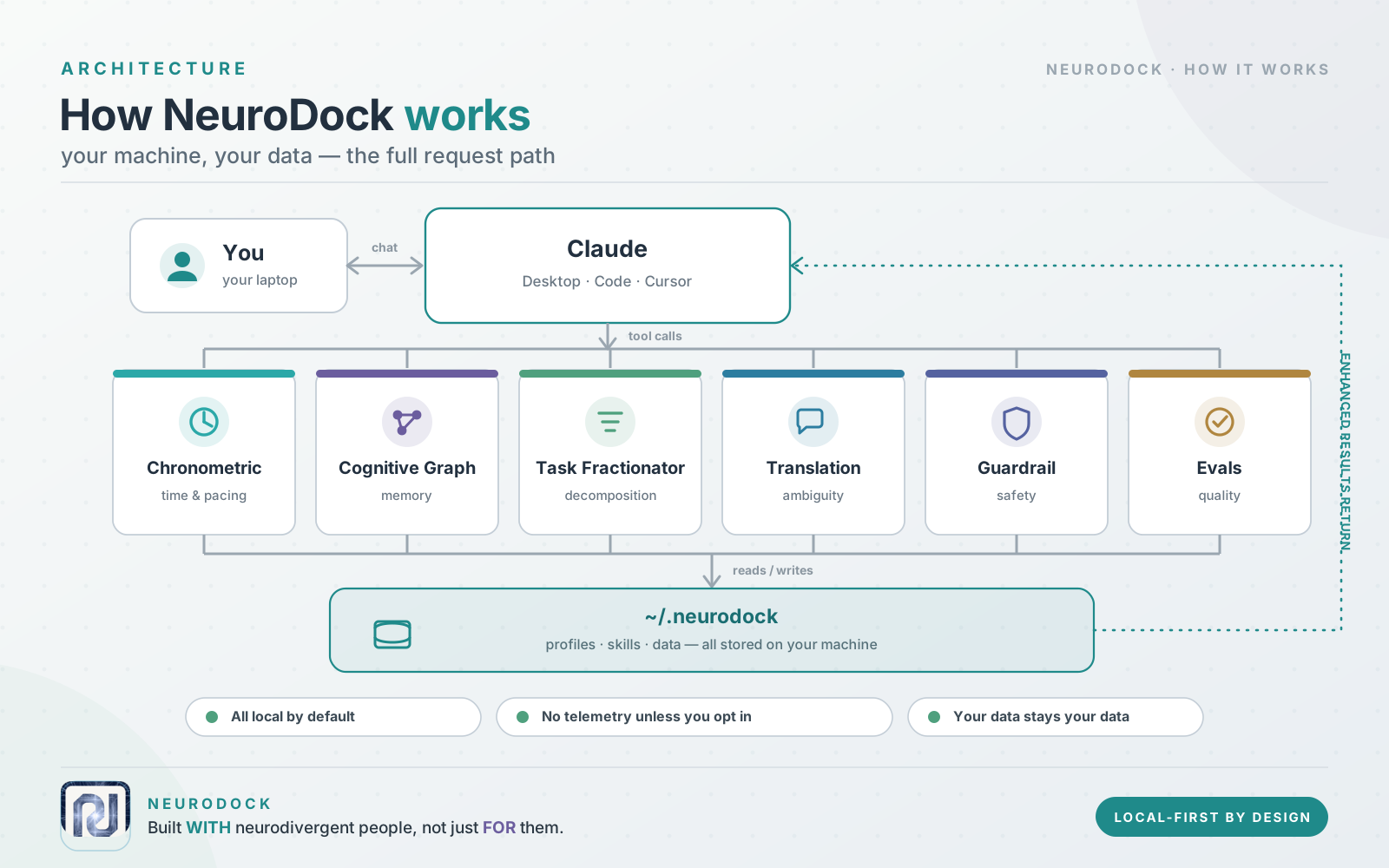
Everything runs on your laptop. Nothing leaves your machine unless you explicitly turn on a cloud option.
Install
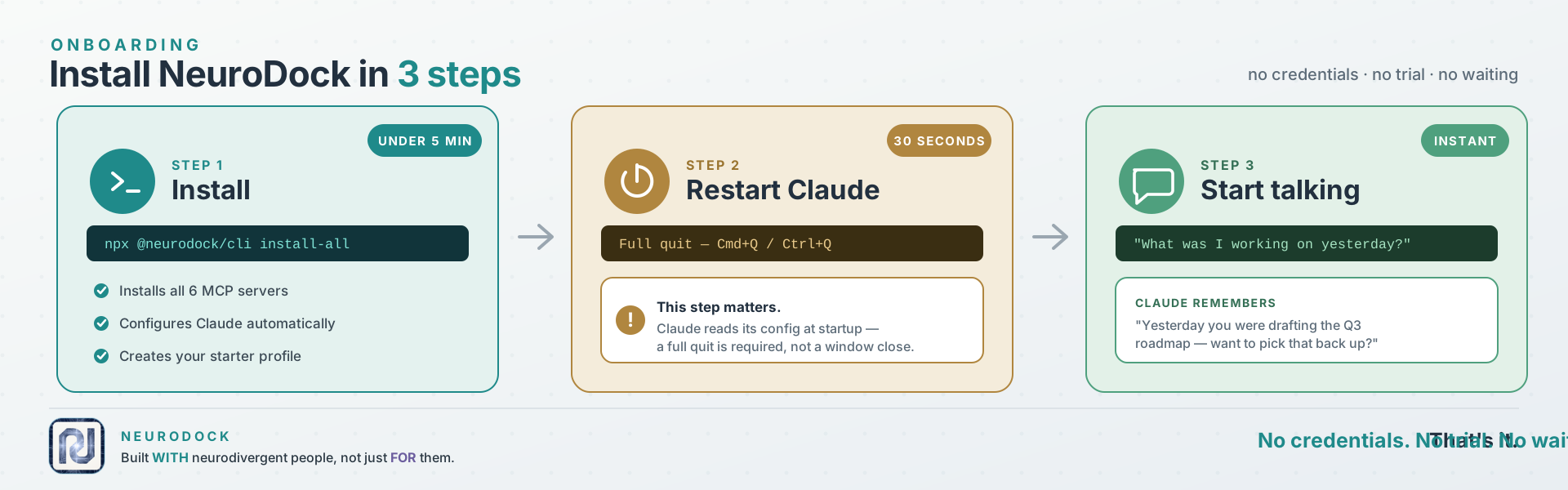
npx --yes @neurodock/cli@latest install-all
One command. It pip-installs the five MCP servers (plus the neurodock-evals
harness), wires Claude Desktop / Claude Code / Cursor, and drops a starter
profile at ~/.neurodock/profile.yaml.
Then, in any conversation, try one of:
What was I working on yesterday?
Plan my morning.
Decompose this goal into atomic tasks.
Claude calls the MCP tools under the hood; you just talk.
🛑 First-time gotcha: full-quit Claude before testing
Claude only reads its MCP config at startup. Closing the window is not enough. This is the #1 silent failure people hit.
- macOS:
Cmd + Q(or Claude menu → Quit Claude).- Windows: right-click the Claude icon in the system tray → Quit.
- Linux: kill the process (
pkill -f Claudeor quit from the tray).Then reopen Claude and try one of the prompts above.
Requires Python 3.11+ and Node 22+. Works on macOS, Linux, Windows.
Why
@latest? If you previously rannpm install -g @neurodock/cli, npx will silently reuse that older global install instead of fetching the current version — and old versions don't haveinstall-all. The@latesttag forces npx to resolve against the npm registry every time. Same reason we use it onupdate.
Want to install it step-by-step instead?
NeuroDock ships across two registries: the Python MCP servers (MCP = Model Context Protocol — the standard that lets Claude call local tools) on PyPI, and the user-facing CLI on npm. The CLI wraps everything else.
1. Install the six MCP servers
pip install neurodock-mcp-chronometric neurodock-mcp-cognitive-graph neurodock-mcp-task-fractionator neurodock-mcp-translation neurodock-mcp-guardrail neurodock-evals
2. Wire them into your MCP-aware client
npx --yes @neurodock/cli@latest init
Detects Claude Desktop, Claude Code, or Cursor and writes the server entries automatically.
3. Restart Claude (full quit, not close-window — see the callout above).
About the neurodock command — it lives on npm as @neurodock/cli,
not on PyPI. The pip install step gives you the MCP server binaries
that Claude calls over stdio; the CLI is separate. Two ways to run it:
# Option A — run via npx, no install
npx --yes @neurodock/cli@latest doctor

# Option B — install once, call 'neurodock' from anywhere
npm install -g @neurodock/cli
neurodock doctor
@neurodock/cli exposes: init, doctor, validate, update, sync,
uninstall, host install, host uninstall, profile show,
profile validate, install-all, install-hooks, examples,
plugin add/remove/list/enable/disable/validate.
Proactive guardrails (optional, recommended)
By default NeuroDock waits for you to ask. That's the wrong shape — an ND user in hyperfocus is the one least likely to remember to run a break tool. One command flips it:
neurodock install-hooks --self-test
This wires a small Python script (bundled, stdlib-only — no extra install needed) into Claude Code's hook system. It then runs silently on every tool call and auto-fires the chronometric / rumination / sycophancy heuristics when patterns trip. You get a one-line stderr banner on the next prompt — never blocked, always dismissible.
For host-agnostic coverage (catches you working in the terminal at 02:00 too), add the standalone daemon:
neurodock install-hooks --install-daemon --self-test
That registers a per-user autostart entry (HKCU Run on Windows,
LaunchAgent on macOS, systemd --user on Linux). The daemon polls
every 5 min and surfaces OS-native notifications.
Opt out anytime:
neurodock install-hooks --uninstall          # removes both
export NEURODOCK_GUARDRAILS=off              # disables without removing
The browser extension carries its own equivalent (Phase 2 watchdog) —
it's enabled by default and toggleable from chrome.storage.local via
the popup Settings tab.
See docs/.../proactive-guardrails for the design behind this and the
opt-out matrix.
Want to see it work without installing from PyPI/npm at all?
TESTING_LOCAL.md walks through the from-clone path.
Prefer a plugin, a one-click desktop extension, or the MCP Registry?
The install-all command above is the recommended path. The same servers are
also distributed through three standard channels — all install the identical
local stdio servers, so you can pick whichever fits your client:
Claude Code plugin — bundles the five MCP servers and a set of ND-aware
skills in one step. Requires uv (the servers
run via uvx).
/plugin marketplace add tlennon-ie/neurodock
/plugin install neurodock@neurodock
Claude Desktop extension (.mcpb) — one-click install, no config editing.
One bundle per server under mcpb/; build with
npx @anthropic-ai/mcpb pack mcpb/neurodock-mcp-translation and drag the
.mcpb onto Claude Desktop → Settings → Extensions. Requires uv.
Official MCP Registry — each server ships a
server.json and is published to
registry.modelcontextprotocol.io
under the io.github.tlennon-ie/* namespace, so MCP-aware clients can discover
them directly.
Hosted remote server (no install) — the stateless tools (translation,
guardrail, and decompose) are also served over OAuth at a hosted HTTPS
endpoint, so you can use them with no local install and no uv:
https://mcp.neurodock.org/mcp
In Claude (claude.ai or Desktop) → Settings → Connectors → Add custom
connector → paste that URL → complete the sign-in prompt. The eight stateless
tools appear immediately. An opt-in memory surface (enable_hosted_storage,
connect_byos_storage, record_fact, recall_entity, …) is also exposed but
does nothing until you explicitly enable storage for your signed-in account. The
personal cognitive graph and neurotype profile are never hosted — they stay
on the local install. Full walkthrough: Hosted server.
The hosted remote server is live at mcp.neurodock.org.
Update
npx --yes @neurodock/cli@latest update
One command. Upgrades all six MCP servers (pip install --upgrade /
uv tool install), refreshes your wired client configs, and
re-registers the optional native-messaging host. Same flags as
install-all (--client, --profile, --installer, --dry-run,
--no-native-host, --yes).
The browser extension auto-updates through the Chrome / Firefox / Edge
store; sideloaded users git pull and rebuild.
Full-quit Claude after updating so it re-reads its MCP config — same as first install.
Just want to re-shape client configs without touching package versions?
Use neurodock sync.
See it in action
The cognitive substrate in a real session — you talk to Claude normally; under the hood it calls NeuroDock's MCP tools to remember, pace, and decompose.
https://github.com/user-attachments/assets/bcbf65ce-88dd-4f83-8dc1-d56bdde01bed
The browser extension — translating corporate-speak inline on Gmail, Slack, and the rest, right where you read it, without context-switching back to Claude.
https://github.com/user-attachments/assets/5fa25044-923e-4c25-95bd-f1bd63fb3d6e
Prefer a written walkthrough? Try the Claude Desktop walkthrough.
Browser extension (optional)
There's also a browser extension that translates corporate-speak inline on Gmail, Slack, Linear, Notion, GitHub, Google Docs, and Outlook. It calls the same translation tools the MCP server exposes, but surfaces them where you'd actually use them — a floating Translate button plus a right-click menu — so you don't have to context-switch back to Claude just to decode "let's circle back on this."
You pick the LLM provider. Five options: Ollama (local, default), LM
Studio (local), OpenRouter (including its auto-router), Anthropic, OpenAI.
The API key, if you need one, stays in chrome.storage.local and never
leaves the device.
Store submission is still pending (the listing prep is done; the developer accounts and screenshots aren't). Until then, load it manually:
- Build it:
pnpm --filter @neurodock/extension-browser run build - Chrome / Edge: go to
chrome://extensions, turn Developer mode on, click Load unpacked, and pickpackages/extension-browser/.output/chrome-mv3/. - Firefox: go to
about:debugging, click This Firefox → Load Temporary Add-on, and pickmanifest.jsoninsidepackages/extension-browser/.output/firefox-mv3/.
Full per-provider setup walkthrough lives in
packages/extension-browser/README.md.
What's inside
NeuroDock is built around three pillars. Each pillar is made of small, independent packages that you can use one at a time or all together.
flowchart TB
  subgraph cognitive[Cognitive substrate]
    chrono[mcp-chronometric<br/>time + sessions]
    cgraph[mcp-cognitive-graph<br/>memory]
    frac[mcp-task-fractionator<br/>decomposition]
  end
  subgraph comms[Communication layer]
    trans[mcp-translation<br/>tone + meetings]
    ext[extension-browser<br/>Gmail, Slack, ...]
  end
  subgraph safety[Clinical guardrails]
    guard[mcp-guardrail<br/>rumination / hyperfocus / sycophancy]
    clin[clinical<br/>heuristic library]
  end
  skills[skills/<br/>six markdown bundles] --> cognitive
  skills --> comms
  skills --> safety
  cli[cli/<br/>install + manage] --> cognitive
  cli --> comms
  cli --> safety
Prefer the directory tree? Open this.
neurodock/
├── packages/
│ ├── mcp-chronometric/      Time + session + break management
│ ├── mcp-cognitive-graph/   Persistent memory + entity recall (SQLite)
│ ├── mcp-task-fractionator/ Decompose vague goals into atomic tasks
│ ├── mcp-translation/       Corporate-speak translator (MCP + browser ext)
│ ├── mcp-guardrail/         Rumination / hyperfocus / sycophancy detectors
│ ├── skills/                Six SKILL.md bundles activating on phrases
│ ├── extension-browser/     WXT-built Chrome / Firefox / Edge extension
│ ├── native-host/           Optional native messaging host (extension <-> profile.yaml)
│ ├── cli/                   `npx neurodock init` and friends
│ ├── core/                  Shared types, profile schema, plugin spec
│ ├── clinical/              Heuristic library for the guardrail server
│ └── evals/                 Eval harness + corpus contribution pipeline
├── docs/                    Astro Starlight site (deploys to docs.neurodock.org)
├── plugins/                 Drop your own plugins here; auto-discovered
└── profiles/                Curated profile presets
Status
Public preview shipped. All three substrate pillars (cognitive,
communication, guardrails) are built, on main, and installable from
npm + PyPI. Latest substrate tag: v0.7.3.
MCP servers (PyPI)
neurodock-mcp-chronometric— 5 tools, 22 tests, mypy--strict.neurodock-mcp-cognitive-graph— 4 tools, SQLite + sqlite-vec- fastembed; 4-rung resolution cascade (exact → alias → fuzzy → embedding).
Latest patch ships friendlier
record_facterrors so wrong-shape input no longer leaks raw Pydantic traces.
- fastembed; 4-rung resolution cascade (exact → alias → fuzzy → embedding).
Latest patch ships friendlier
neurodock-mcp-task-fractionator— 2 tools, 32 tests; ISO 8601 duration spec.neurodock-mcp-translation— 4 tools, 29 tests; deterministic baseline plus LLM refinement envelope.neurodock-mcp-guardrail— all three detectors live: rumination, hyperfocus, sycophancy (48 tests, public heuristics).neurodock-evals— air-gapped harness, 10 seed corpus examples, contribution pipeline.neurodock-clinical— reserved name; importable detector library (currently a stub).
CLI + browser surface (npm)
@neurodock/cli— 19 verbs across 7 groups:init,install-all,examples,doctor,validate,update,sync,uninstall,host install/uninstall,profile show/validate,install-hooks,plugin add/remove/list/enable/disable/validate.install-hookswires the proactive-guardrail hook into Claude Code and optionally registers the standalone daemon.@neurodock/core— profile schema and plugin protocol manifests (JSON Schema 2020-12).@neurodock/native-host— optional Chrome Native Messaging host for the extension ↔ profile sync.@neurodock/extension-browser— WXT MV3 build for Chrome / Firefox / Edge. Seven sites wired. Five real LLM providers: Ollama, LM Studio, Anthropic, OpenAI, OpenRouter. Includes the Phase 2 proactive watchdog for hyperfocus / late-night / single-host rumination signals. Not yet store-published.
Skills + docs
- Six launch skills —
adhd-daily-planner,audhd-context-recovery,ocd-decision-finalizer(beta),hyperfocus-formatter,visual-organizer,asd-meeting-translator. - Docs site — builds clean (Astro Starlight), deploys to
docs.neurodock.org.
Still deferred
- Browser-store submissions — Chrome Web Store, Firefox Add-ons, Edge Add-ons developer accounts + screenshots; manual step.
How to actually test it right now
TESTING_LOCAL.md — step-by-step guide to running this against your
Claude Desktop, today, from a clone. Takes about 5 minutes.
Documentation
The docs site lives at docs.neurodock.org.
Source is at docs/src/content/docs/. To preview locally:
pnpm --filter @neurodock/docs run dev
# opens http://localhost:4321
Architecture
The substrate splits into three pillars:
- Cognitive substrate — externalises executive function (time, memory, decomposition). MCP servers: chronometric, cognitive-graph, task-fractionator.
- Communication layer — translates corporate ambiguity; rewrites outgoing messages for register-appropriate tone; structures meeting transcripts. MCP server: translation. Browser extension surfaces the same prompts in Gmail / Slack / Linear / Notion / GitHub / Docs / Outlook.
- Clinical guardrails — detects and intervenes on rumination
(repeat-validation loops), hyperfocus (escalating session-length
nudges), and sycophancy (unconditional agreement). MCP server: guardrail.
Heuristics are public and auditable per
ETHICS.md.
All three layers compose via the same MCP protocol the LLM client already speaks. There's no "NeuroDock app" — the surface is your Claude client.
Design rationale lives in docs/decisions/:
- ADR 0001 — chronometric tool design
- ADR 0002 — cognitive-graph tool design
- ADR 0003 — task-fractionator tool design
- ADR 0004 — profile schema
- ADR 0005 — translation tool design
- ADR 0006 — guardrail tool design
- ADR 0007 — plugin protocol
- ADR 0008 — distribution & remote strategy
Contributing
CONTRIBUTING.md has the welcome + on-ramp. Pick whichever lane matches
what you want to do:
Smallest first PR (~15 min):
- Add a test to an existing skill (
packages/skills/<name>/tests/) - Add a seed eval example (
packages/evals/corpora/translation/) - Improve a tool's parameter description (the LLM uses these — clearer descriptions = better tool use)
One-afternoon PR:
- Write a new skill — markdown bundle activating on specific phrases.
Copy any
packages/skills/<name>/as a template; seedocs/src/content/docs/contribute/write-a-skill.mdx. - Sharpen the task-fractionator heuristics (regex / domain keyword maps).
- Add a new entity-resolution heuristic (e.g., phonetic) to
mcp-cognitive-graph.
Multi-day PR:
- Build an out-of-tree plugin (skill / mcp-server / profile / translation
pack / language pack / theme) per the ADR 0007 plugin protocol. See
docs/src/content/docs/contribute/write-a-plugin.mdx. - Translation language pack (e.g., Hiberno-English, German directness norms, Japanese keigo).
No code:
- Add an anonymised eval example from your own corporate inbox. The
contribution pipeline lives in
packages/evals/and is the highest- leverage non-code contribution.
All PRs run CI: pnpm turbo run lint typecheck test build + uv run pytest
uv run mypy --strict packages/.... Every published package has its own CHANGELOG. Use Conventional Commits in PR titles (feat:,fix:,docs:,test:,chore:,ci:).
Manifesto (short)
- Lower friction for users, and for contributors.
- Local-first by default; cloud is opt-in.
- The user is the authority. Self-ID sufficient.
- Composable over monolithic. No god-modules.
- Refuse where appropriate. AI that fuels rumination, hyperfocus, or anxiety is a regression, not a feature.
Full text in MANIFESTO.md. Ethics framework in ETHICS.md. Governance
in GOVERNANCE.md.
License
AGPL-3.0-or-later. Plugins must declare an AGPL-compatible license to load — the SPDX whitelist is in ADR 0007.