AllMCPs
BrowseBestCategoriesStackCompareToolsGuidesBlog
Log in Submit MCP

Stay in the loop

Get new MCP servers and top picks in your inbox.

AllMCPs

The open directory for discovering and installing Model Context Protocol servers.

AllMCPs on GitHub (opens in a new tab)
Launched onTiny Startupstinystartups.com
Explore
  • Browse servers
  • Best MCP servers
  • Categories
  • MCP clients
  • Agent prompts
  • Stack Builder
  • Compare servers
  • Random discovery New
  • Submit a server
  • Pricing & Boost Boost
Learn
  • Guides hub
  • What is MCP?
  • Install guide
  • Build an MCP server
  • Deploy an MCP server
  • Security guide
  • Troubleshooting
  • MCP for SEO & AEO
  • Protocol versioning
  • Blog & updates
Tools
  • All developer tools
  • Config generator
  • Config validator
  • Config auditor
  • MCP playground
  • Token calculator
  • OpenAPI β†’ MCP
  • Badge generator
For agents
  • REST API docs
  • Trust & traffic Live
  • Remote MCP server SSE β†— (opens in a new tab)
  • llms.txt β†— (opens in a new tab)
  • Catalog JSON β†— (opens in a new tab)
Company
  • About
  • Advertise Sponsor
  • Contact
  • GitHub β†— (opens in a new tab)
  • Terms
  • Privacy
AllMCPs VerifiedAllMCPs VerifiedFeatured on Nick LaunchesFeatured on Nick LaunchesLaunch Llama NewsletterLaunch Llama NewsletterVerified DR - allmcps.comVerified DR - allmcps.comFeatured on SaaSGrowFeatured on SaaSGrowFeatured on Twelve ToolsFeatured on Twelve ToolsFeatured on Saaspa.geFeatured on Saaspa.geFeatured on Findly.toolsFeatured on Findly.toolsFeatured on Startup FameFeatured on Startup FameFeatured on LaunchKiwiFeatured on LaunchKiwiFeatured on ScrollLaunchFeatured on ScrollLaunchFeatured on DailyPingsFeatured on DailyPingsFazier badgeFazier badgeFeatured on NewTool.siteFeatured on NewTool.siteFeatured on saasfame.comFeatured on saasfame.comDR Checker - Domain RatingDR Checker - Domain RatingListed on Turbo0Listed on Turbo0Launched on LaunchBoard - Product Launch PlatformLaunched on LaunchBoard - Product Launch PlatformList on SimilarlabsList on Similarlabshttps://codetrendy.comhttps://codetrendy.comListed on DevTool.ioFeatured on BuildlistFeatured on BuildlistLaunched on Tiny StartupsFeatured on ShowMeBestAIFeatured on ShowMeBestAIFind us on LaunchZoneFind us on LaunchZoneAllMCPs VerifiedAllMCPs VerifiedFeatured on Nick LaunchesFeatured on Nick LaunchesLaunch Llama NewsletterLaunch Llama NewsletterVerified DR - allmcps.comVerified DR - allmcps.comFeatured on SaaSGrowFeatured on SaaSGrowFeatured on Twelve ToolsFeatured on Twelve ToolsFeatured on Saaspa.geFeatured on Saaspa.geFeatured on Findly.toolsFeatured on Findly.toolsFeatured on Startup FameFeatured on Startup FameFeatured on LaunchKiwiFeatured on LaunchKiwiFeatured on ScrollLaunchFeatured on ScrollLaunchFeatured on DailyPingsFeatured on DailyPingsFazier badgeFazier badgeFeatured on NewTool.siteFeatured on NewTool.siteFeatured on saasfame.comFeatured on saasfame.comDR Checker - Domain RatingDR Checker - Domain RatingListed on Turbo0Listed on Turbo0Launched on LaunchBoard - Product Launch PlatformLaunched on LaunchBoard - Product Launch PlatformList on SimilarlabsList on Similarlabshttps://codetrendy.comhttps://codetrendy.comListed on DevTool.ioFeatured on BuildlistFeatured on BuildlistLaunched on Tiny StartupsFeatured on ShowMeBestAIFeatured on ShowMeBestAIFind us on LaunchZoneFind us on LaunchZone
Β© 2026 Jackalope Digital LLC. All rights reserved.
  1. Home
  2. πŸ’» Developer Tools
  3. Tidewave Phoenix
T
Health: Not checked yetWe have not completed a health check for this listing yet.No health check has run yet.

Tidewave Phoenix

User RatingsBe the first to rate and review this MCP server! Enrichment pendingWe haven’t run our AI enrichment pass on this listing yet, so the overview, use cases, and FAQ below may be sparse or missing. We work through the catalog over time β€” check back soon.
View Repository

Runtime-level MCP server for Phoenix development: run code, read logs, query the DB, read docs.

Quick Install

Automated & IDE Setup

Copy the AI prompt to install this server into Claude Code, Cursor, or another agent β€” or use 1-click editor setup below.

Add to CursorAdd to VS Code
Manual Client & Custom JSON ConfigExpand JSON β–Ύ

Client Config & Setup

Choose your client or environment
Target File:~/Library/Application Support/Claude/claude_desktop_config.json
claude_desktop_config.json
{
  "mcpServers": {
    "tidewave-phoenix": {
      "command": "npx",
      "args": [
        "-y",
        "tidewave-phoenix"
      ]
    }
  }
}

πŸ’‘ Paste the JSON block into your client's configuration file under mcpServers, then restart the application.

Install Directory Badge Claim listing AlternativesπŸ’» More in Developer Tools

Documentation Overview

Tidewave Phoenix

Tidewave Phoenix is an MCP server that provides runtime-level tools for developing Phoenix apps using coding agents.

Your agent will be able to use this MCP server to talk to your running Phoenix app in development to:

  • execute code in the context of the running app (like an IEx session for agents)
  • read the app's live logs
  • query your development database
  • get source locations of modules and functions
  • read documentation pinned to the exact hex package versions your project depends on

This MCP server is an open-source component of Tidewave, the agentic development environment for Phoenix and Rails.

You can use this project as a standalone MCP server or integrated with the Tidewave product by following the installation instructions below.

Installation

1. Add the Tidewave hex package to your app

Option 1: Manually

Add the tidewave package to your mix.exs:

elixir
def deps do
  [
    {:tidewave, "~> 0.6", only: :dev},
    {:phoenix, ...},
  ]
end

Then, for Phoenix applications, go to your lib/my_app_web/endpoint.ex and right above the if code_reloading? do block, add:

diff
+  if Mix.env() == :dev do
+    plug Tidewave
+  end

   if code_reloading? do

[!TIP] Tidewave works best with Phoenix LiveView v1.1 or later. Once you update it, make sure to enable the following options in your config/dev.exs:

elixir
config :phoenix_live_view,
  debug_heex_annotations: true,
  debug_attributes: true

Those are enabled by default for Phoenix v1.8+ apps.

Option 2: Using Igniter

Alternatively, you can use igniter to automatically install Tidewave MCP into an existing Phoenix application:

sh
# install igniter_new if you haven't already
mix archive.install hex igniter_new

# install tidewave
mix igniter.install tidewave

Umbrella projects

For umbrella projects, you can follow the manual steps above in the application that defines your Phoenix endpoint (typically apps/your_app_web).

2. Add the Tidewave MCP to your agent/editor

Add the Tidewave MCP server to your editor or MCP client configuration as the type "http" (streamable), pointing to the /tidewave/mcp path and port your web application is running at. For example, http://localhost:4000/tidewave/mcp.

We also have specific instructions for:

  • Claude Code
  • Codex
  • Cursor
  • Neovim
  • OpenCode
  • VS Code
  • Others

[!TIP] If you are using worktrees, you are likely running your web server on different ports, and therefore there isn't a single host and port combo you can use.

In such cases, you may want to add mix tidewave.proxy as STDIO MCP instead, which adds a "port" parameter to all tool definitions, and is responsible to dispatch to the correct application.

Usage

As with any other MCP server, your agent will call the tools exposed by the Tidewave MCP whenever it sees fit. But you can also prompt it to call them explicitly.

Available MCP tools

project_eval

Evaluates Elixir code within your running application, giving the agent access to your runtime, dependencies, and in-memory data. It's like an IEx for the agent.
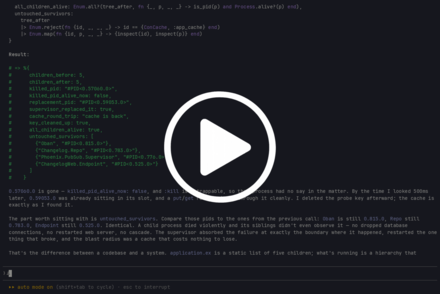
project_eval demo

Your agent can use it when it would rather run code than assume behavior, grounding its next step in what the running app actually does. For example, calling a function to see what comes back or reproducing a failing code path against live app state to debug it.

execute_sql_query

Executes a SQL query within your app's development database.
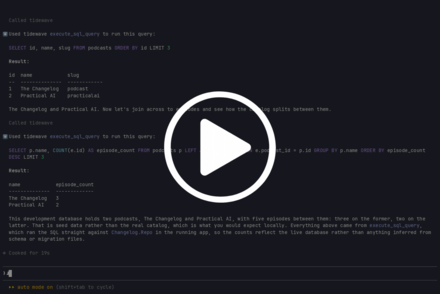
execute_sql_query demo

Your agent can use it to run any SQL against your development database. Useful for the agent to verify the result of an action.

get_docs

Get the documentation for a given module/function. It consults the exact versions locked in your project's mix.lock, ensuring you get correct information.

get_docs demo

get_logs

Reads logs written by the server.
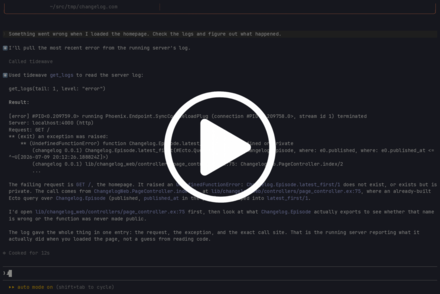
get_logs demo

Your agent can use it to see what happened after a request. For example, reading the request log and backtrace when something misbehaves.

get_source_location

Get the source location for a given module/function, across both your app and its dependencies.
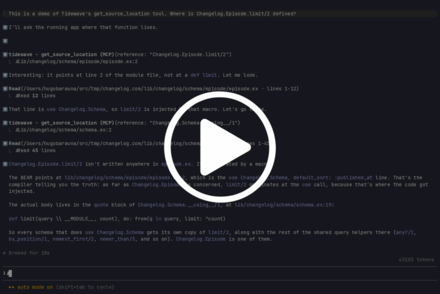
get_source_location demo

Your agent can use it to jump straight to where a module/function is defined, by file and line, instead of grepping for it, including when the definition lives in a hex dependency.

Troubleshooting

Using multiple hosts/subdomains

If you are using multiple hosts/subdomains during development, you must use *.localhost, as such domains are considered secure by browsers. Additionally, add the following immediately @session_options definition in your lib/your_app_web/endpoint.ex:

elixir
@session_options [
  # ... your configuration
]

if code_reloading? do
  @session_options Keyword.merge(@session_options, same_site: "None", secure: true)
end

The above will allow your application to run embedded within Tidewave across multiple subdomains, as long as it is using a secure context (such as admin.localhost, www.foobar.localhost, etc).

Content security policy

If you have enabled Content-Security-Policy, Tidewave will automatically enable "unsafe-eval" under script-src in order for contextual browser testing to work correctly. It also disables the frame-ancestors directive. This is done only in the environments that Tidewave is loadead (development by default).

Configuration

You may configure the Tidewave plug using the following syntax:

elixir
  plug Tidewave, options

The following options are available:

  • :allow_remote_access - Tidewave only allows requests from localhost by default, even if your server listens on other interfaces, for security purposes. Read our security guidelines for more information and when to allow remote access (if you know what you are doing)

  • :allowed_origins - a list of values matched against the Origin header to prevent cross origin and DNS rebinding attacks. Each value must be a string of shape [scheme:]//host[:port], where both scheme and port are optional. The host may also start with "*". Example: ["//localhost:8000", "//*.test"]

  • :inspect_opts - custom options passed to Kernel.inspect/2 when formatting some tool results. Defaults to: [charlists: :as_lists, limit: 50, pretty: true]

  • :team - set your Tidewave Team configuration, such as team: [id: "my-company"]

  • :toolbar - controls whether the Tidewave toolbar is injected into your HTML pages. Defaults to true

  • tmp_dir - temporary directory Tidewave uses for screenshots and recordings. It must be a relative directory to the current application root. Defaults to tmp, storing files under tmp/tidewave/screenshots and tmp/tidewave/recordings

License

Copyright (c) 2025 Dashbit

Licensed under the Apache License, Version 2.0 (the "License"); you may not use this file except in compliance with the License. You may obtain a copy of the License at http://www.apache.org/licenses/LICENSE-2.0

Unless required by applicable law or agreed to in writing, software distributed under the License is distributed on an "AS IS" BASIS, WITHOUT WARRANTIES OR CONDITIONS OF ANY KIND, either express or implied. See the License for the specific language governing permissions and limitations under the License.

Read the full README β†’View source on GitHub β†’

Related MCP Servers

View all in Developer Tools View all alternatives
  • T
    Tidewave Rails

    Runtime-level MCP server for Rails development: run code, read logs, query the DB, read docs.

    πŸ’» Developer Tools0 views
    Compare vs Tidewave Rails β†’
  • PraisonAI logoPraisonAI

    AI Agents Framework with Self Reflection and MCP support

    πŸ’» Developer Tools1 views
    Compare vs PraisonAI β†’
  • Codealive MCP logoCodealive MCP

    Semantic code search and analysis from CodeAlive for AI assistants and agents.

    πŸ’» Developer Tools0 views
    Compare vs Codealive MCP β†’
  • TokenSave logoTokenSave

    Code intelligence for 15+ languages: semantic graph queries instead of file reads. 37 MCP tools.

    πŸ’» Developer Tools0 views
    Compare vs TokenSave β†’

Reviews

No reviews yet β€” be the first to share how this listing worked for you.

Frequently Asked Questions about Tidewave Phoenix

Add the following block to your claude_desktop_config.json under mcpServers: "mcpServers": { "tidewave-phoenix": { "command": "npx", "args": ["-y", "Tidewave Phoenix"] } }

AllMCPs Directory Badge

Full Badge Customizer

Showcase your server listing on GitHub or your project documentation. Embed this dynamic SVG badge to highlight official listing status and live engagement.

Badge Style:
Live Dynamic SVG PreviewTidewave Phoenix AllMCPs Directory Badge

Markdown (GitHub README)
[![AllMCPs](https://allmcps.com/api/badge/tidewave-phoenix?style=directory)](https://allmcps.com/mcp/tidewave-phoenix)
HTML Embed
<a href="https://allmcps.com/mcp/tidewave-phoenix"><img src="https://allmcps.com/api/badge/tidewave-phoenix?style=directory" alt="Tidewave Phoenix on AllMCPs" /></a>

Technical Specs & Signals

CategoryπŸ’»Developer Tools
More technical detailsExpand β–Ύ
TransportSTDIO
RuntimeNode.js
Last updatedSep 7, 2026
Views0
Unique ViewsTotal visits recorded for this listing page on AllMCPs.
Installs0
Installs & Copy ActionsTotal times users copied install commands or configuration snippets for this server.
27Quality signal: Emerging Β· 27/100How this signal is calculated β–Ύ
Server availabilityNot measured

Not scored for repo-hosted servers β€” we can't reach the running server, only its GitHub page. Hosted MCP endpoints are health-checked live.

Verified ownership8/20
Documentation & tools11/30
Adoption & activity1/15
Community engagement0/10

A guidance signal from public completeness & health data β€” not a user rating. New listings start lower and rise as they add docs, get verified, and grow adoption. Signals we can't observe for a listing are skipped, not counted against it.

β˜… Spotlight Slot

Feature Your MCP Server

Get maximum visibility for your server across our directory, search results, and detail pages.

Spotlight Your Server

Own this project?

This directory is pre-filled from public sources. Claim via GitHub README, site badge, or DNS TXT to unlock edit access and the Official badge and attach your website β€” proof is checked automatically, then reviewed by our team.

Free dofollow backlink: add your website and place the AllMCPs badge on it β€” no claim needed. We detect it automatically and keep it verified as long as the badge stays live.

Claim & get free dofollow

Share & Embed

Add our SVG badge (dark/light directory styles) or embeddable widget to your site.

Explore more

More in πŸ’» Developer Tools β†’Best MCP servers for Developers β†’Alternatives to Tidewave Phoenix β†’Install in Claude DesktopInstall in CursorInstall in VS Code
