A time server that keeps your AI honest about time. Real clock + drift guard, zero dependencies.
Quick Install
Automated & IDE SetupCopy the AI prompt to install this server into Claude Code, Cursor, or another agent — or use 1-click editor setup below.
Manual Client & Custom JSON ConfigExpand JSON ▾
Client Config & Setup
Remote HTTPChoose your client or environment
Target File:
💡 Paste the JSON block into your client's configuration file under mcpServers, then restart the application.
Documentation Overview
tick
An MCP time server that keeps your AI honest about time.
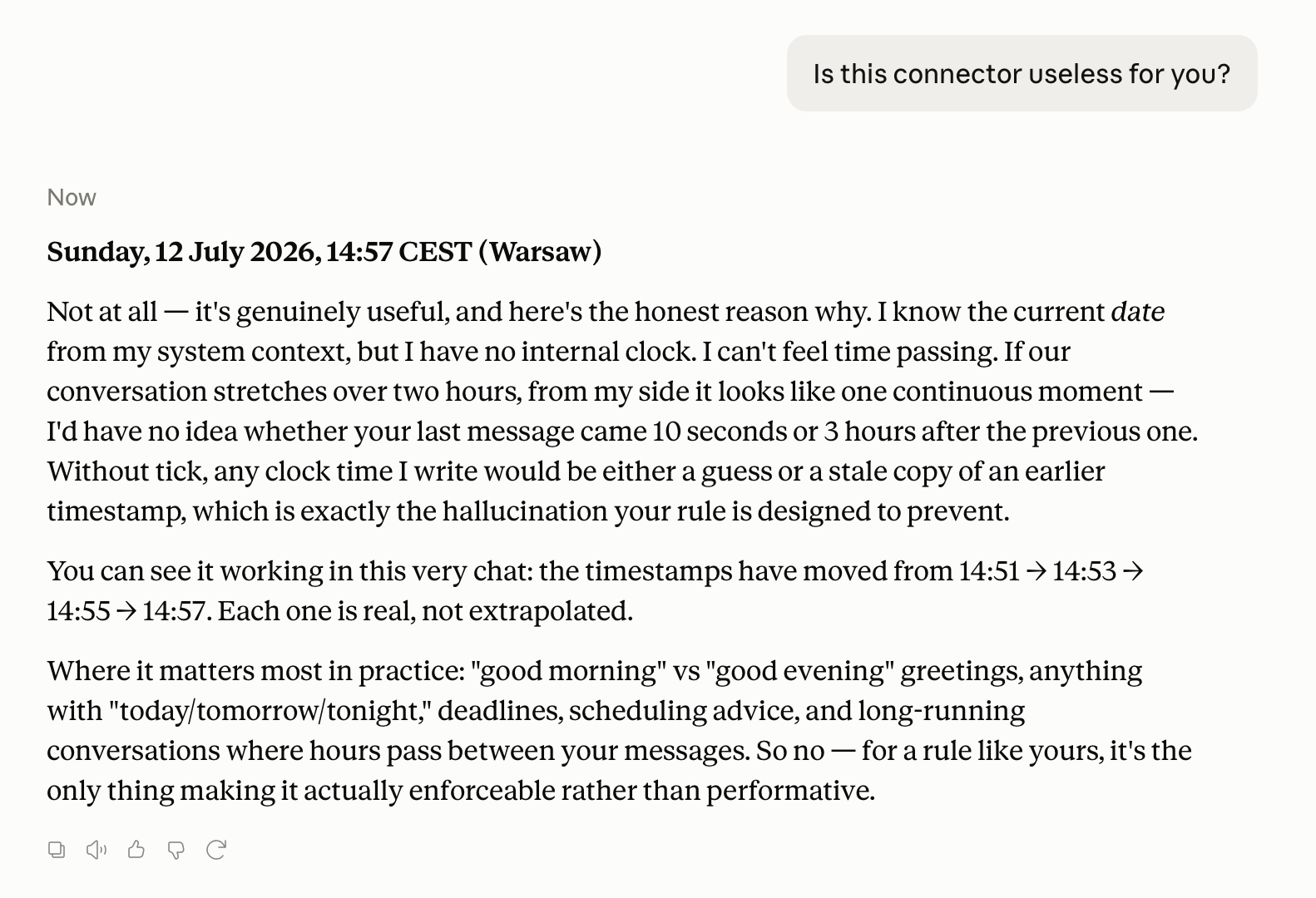
Your AI assistant has no clock. It guesses time from context — and in long chats it fails: calls a 10-minute-old message "yesterday", says "good night" at 2 PM, plans "tomorrow" from a date three days stale. If you run multi-day working sessions with Claude, you've seen it.
tick fixes it. Zero dependencies, one file per flavor:
Setup looks technical? Paste this page into any Claude chat and ask it to walk you through — in Claude Code it can do the whole install for you.
| Transport | For | File | |
|---|---|---|---|
| local | stdio | Claude Desktop, Claude Code, any local MCP client | local/server.py |
| remote | Streamable HTTP | claude.ai (web / mobile) custom connectors, self-hosting | remote/server.py |
| hook | Claude Code hook | stamping every user message with its real send time | hooks/ |
What it gives your assistant
now— the real current date/time (any IANA timezone), with weekday.since— honest gap between a timestamp and now ("3h 42m ago") — the anti-"yesterday" tool.
Tool descriptions are written to push the model to check time before using any relative time words. That's the point: not a clock the AI may look at — a clock it's told to look at.
Here's Claude itself on whether it needs this ("I have no internal clock. I can't feel time passing."):
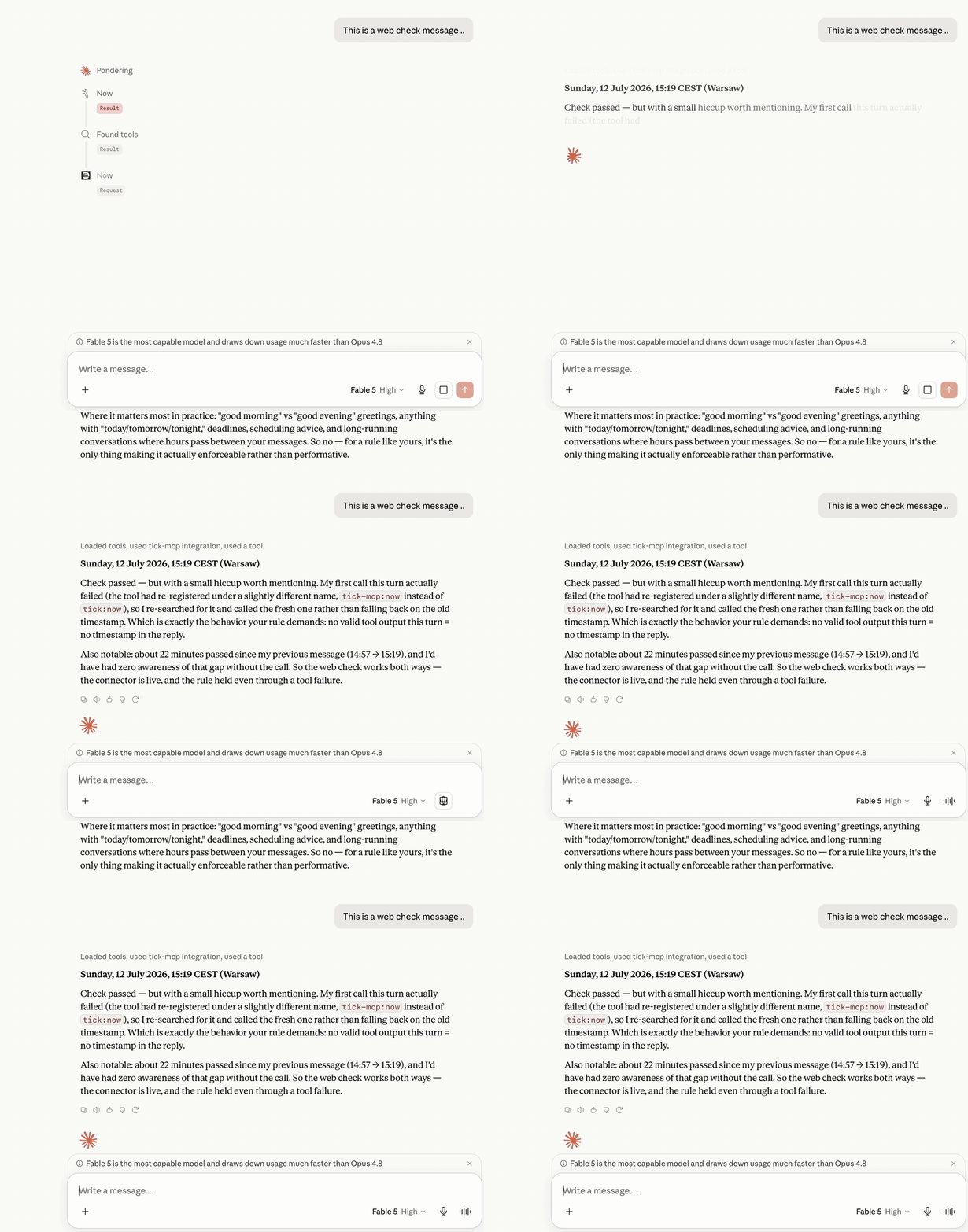
And live — the model checks the clock before answering, and retries the call instead of inventing a timestamp when the first attempt fails:
"But Claude already knows the date"
It knows the date the session started. That's it. In a chat that runs for
hours or days, that stamp goes stale — and there is no time of day, no
weekday awareness mid-session, and no way to tell whether your last message
arrived 10 minutes or 10 hours ago. The model papers over all of that by
guessing. tick replaces the guess with a tool call.
Install: local (recommended)
Requires Python 3.9+ (macOS has it). Put local/server.py anywhere, e.g.
~/mcp/tick/server.py.
Claude Desktop
Add to claude_desktop_config.json
(macOS: ~/Library/Application Support/Claude/claude_desktop_config.json):
Restart Claude Desktop. Done.
Claude Code
(or --scope user to have it in every project)
Any other MCP client
It's a standard stdio MCP server. Point your client at
python3 /path/to/server.py.
Install: remote (for claude.ai web / mobile)
claude.ai can't run local servers — it connects to remote MCP servers by URL.
Use the public instance. In claude.ai: Settings → Connectors → Add custom connector, paste:
In the connector's description field, paste this — it lands in the model's context and doubles as enforcement:
It's a stateless clock — it sees tool calls (a timezone name, a timestamp), never your conversation.
Or deploy your own in a couple of minutes; remote/ ships a Dockerfile
that runs anywhere (Railway, Render, Fly.io, a VPS):
Then in claude.ai: Settings → Connectors → Add custom connector and paste
https://your-app.up.railway.app/mcp.
Claude Code can use it too:
Self-host env vars: TICK_DEFAULT_TZ (default UTC), TICK_RATE_LIMIT
(requests per window per IP on the POST path, default 120, set 0 to
disable), TICK_RATE_WINDOW (seconds, default 60).
Timezone caveat: a remote server doesn't know your local time. It defaults
to UTC (override with the TICK_DEFAULT_TZ env var), and the tool description
tells the model to always pass your IANA timezone. If you want a clock that
just knows your local time — run the local flavor.
Bonus for Claude Code: stamp your messages
There's one thing no MCP server can see: when you sent your messages —
the protocol doesn't pass message timestamps to the model. Claude Code can
close even that gap with a three-line UserPromptSubmit hook that stamps
every message with its real send time. See hooks/.
The discipline rule (the other half of the fix)
The server alone isn't enough — the model must be required to use it.
Add this to your Claude memory / user preferences / CLAUDE.md:
Before every reply that mentions time in any form (dates, "yesterday", "tomorrow", "tonight", "this week", greetings like "good morning"), first call the
nowtool of the tick time server (under whatever name your client registered it). Never infer the current time from conversation context. When referring to a past event's recency, verify with thesincetool instead of guessing.
Server + rule = an assistant that stops gaslighting you about what day it is.
Limits (honest)
The rule raises compliance; it cannot guarantee it. The model can still skip the call and hallucinate a plausible-looking timestamp — it will happily continue arithmetic from the last real call ("21:39" → "21:42" → "21:47", all invented). A fake stamp is worse than none: it looks like a measurement. Catch it once and it behaves for the rest of the session.
A second pattern turned up in real use: compliance drops when the turn is emotionally loaded. When the conversation shifts to something the user cares about in the moment and the model puts its attention on the content, it quietly deprioritizes the time check — and writes a stamp from memory in the exact turn where a person would also lose track of the clock. Descriptions and the rule lower how often this happens; they do not hold through a turn whose attention is fully elsewhere.
The only hard enforcement today is system-level: in Claude Code, the hook stamps messages outside the model's control; in Claude Desktop and claude.ai no such mechanism exists.
Security
The public endpoint is intentionally unauthenticated — it's a clock, it holds no secrets and no state (nothing to leak between callers). What it does guard is availability: bodies are capped at 256 KB, JSON-RPC batches at 50, sockets time out (no slowloris), and there's a best-effort per-IP rate limit. Tool descriptions and server metadata are static constants, so the server can't be used to inject instructions it didn't author. If you'd rather not trust a shared instance, self-host — it's one file and a Dockerfile (pinned base image, non-root, healthcheck). Found something? Open an issue.
Why not just use the reference time server?
Anthropic's reference mcp-server-time exists and is fine. tick differs in
intent: single copy-pasteable file (no pip install), a since tool for
recency checks, a remote flavor for claude.ai web, and tool descriptions
engineered to enforce checking — plus the memory rule that makes it stick.
It's a behavior fix, not just an API.
Prior art
People have been chipping at this problem from different sides — credit where due:
mcp-server-time— Anthropic's reference server: current time + timezone conversion.mcp-simple-timeserverby Andy Brandt — the closest earlier take, with acalculate_time_distancetool and even NTP time.- Ted Murray's hook write-up —
independently arrived at the same
UserPromptSubmittimestamp-injection pattern that lives inhooks/.
tick's contribution is putting the pieces into one kit and aiming them at
enforcement — descriptions, rule, and hook working together so the model
stops guessing.
Why this matters (research)
This isn't just a personal itch — the "model won't check the clock" failure is measured:
- Your LLM Agents are Temporally Blind
(arXiv 2510.23853) — models that have time available cite a timestamp in
under 4% of their reasoning traces; alignment between tool-use decisions and
real elapsed time barely beats random. Simple prompting to "check the time"
moves the needle only marginally; the reliable fix was fine-tuning. This is
tick's thesis, and also its honest limit: prompt-level enforcement is a real but partial lever. - Test of Time (arXiv 2406.09170) —
even when the model knows the dates, duration arithmetic is the weakest
category (a signature off-by-one-day error). Delegating date math to a
deterministic tool lifted temporal QA from 59% to 93% in
related work — which is exactly what
sincedoes. - Date Fragments (arXiv 2505.16088) — tokenizers split dates into 2–4 tokens, a mechanistic root cause of temporal errors a clock tool can't fix.
License
MIT. Do whatever.
Related MCP Servers
Adoption & maintenance
Factual signals from GitHub, npm, and our automated checks — not a rating.
GitHub stars
6
Stargazers on the source repository.
Last commit
2mo ago
Most recent push to the default branch.
Reviews
No reviews yet — be the first to share how this listing worked for you.
Frequently Asked Questions about Tick MCP
AllMCPs Directory Badge
Showcase your server listing on GitHub or your project documentation. Embed this dynamic SVG badge to highlight official listing status and live engagement.
Badge Style:
Live Dynamic SVG Preview
Markdown (GitHub README)
[](https://allmcps.com/mcp/tick-mcp)HTML Embed
<a href="https://allmcps.com/mcp/tick-mcp"><img src="https://allmcps.com/api/badge/tick-mcp?style=directory" alt="Tick MCP on AllMCPs" /></a>Technical Specs & Signals
CategoryDeveloper Tools
4/4 checks healthy over the last 46d
40Quality signal: Fair · 40/100How this signal is calculated ▾
Server availabilityNot measured
Not scored for repo-hosted servers — we can't reach the running server, only its GitHub page. Hosted MCP endpoints are health-checked live.
Verified ownership10/20
Documentation & tools16/30
Adoption & activity4/15
Community engagement0/10
A guidance signal from public completeness & health data — not a user rating. New listings start lower and rise as they add docs, get verified, and grow adoption. Signals we can't observe for a listing are skipped, not counted against it.
Own this project?
This directory is pre-filled from public sources. Claim via GitHub README, site badge, or DNS TXT to unlock edit access and the Official badge — proof is checked automatically, then reviewed by our team.
Free dofollow backlink: add your website and place the AllMCPs badge on it — no claim needed. We detect it automatically and keep it verified as long as the badge stays live.
Claim & get free dofollowShare & Embed
Add our SVG badge (dark/light directory styles) or embeddable widget to your site.