AllMCPs
BrowseBestCategoriesStackCompareToolsGuidesBlog
Log in Submit MCP

Stay in the loop

Get new MCP servers and top picks in your inbox.

AllMCPs

The open directory for discovering and installing Model Context Protocol servers.

AllMCPs on GitHub (opens in a new tab)
Launched onTiny Startupstinystartups.com
Explore
  • Browse servers
  • Best MCP servers
  • Categories
  • MCP clients
  • Agent prompts
  • Stack Builder
  • Compare servers
  • Random discovery New
  • Submit a server
  • Pricing & Boost Boost
Learn
  • Guides hub
  • What is MCP?
  • Install guide
  • Build an MCP server
  • Deploy an MCP server
  • Security guide
  • Troubleshooting
  • MCP for SEO & AEO
  • Protocol versioning
  • Transports: stdio vs HTTP
  • State of MCP (stats)
  • Blog & updates
Tools
  • All developer tools
  • Config generator
  • Config validator
  • Config auditor
  • MCP playground
  • Token calculator
  • OpenAPI → MCP
  • Badge generator
For agents
  • REST API docs
  • Trust & traffic Live
  • Remote MCP server SSE ↗ (opens in a new tab)
  • llms.txt ↗ (opens in a new tab)
  • Catalog JSON ↗ (opens in a new tab)
Company
  • About
  • Advertise Sponsor
  • Contact
  • GitHub ↗ (opens in a new tab)
  • Terms
  • Privacy
AllMCPs VerifiedAllMCPs VerifiedFeatured on Nick LaunchesFeatured on Nick LaunchesLaunch Llama NewsletterLaunch Llama NewsletterVerified DR - allmcps.comVerified DR - allmcps.comFeatured on SaaSGrowFeatured on SaaSGrowFeatured on Twelve ToolsFeatured on Twelve ToolsFeatured on Saaspa.geFeatured on Saaspa.geFeatured on Findly.toolsFeatured on Findly.toolsFeatured on Startup FameFeatured on Startup FameFeatured on LaunchKiwiFeatured on LaunchKiwiFeatured on ScrollLaunchFeatured on ScrollLaunchFeatured on DailyPingsFeatured on DailyPingsFazier badgeFazier badgeFeatured on NewTool.siteFeatured on NewTool.siteFeatured on saasfame.comFeatured on saasfame.comDR Checker - Domain RatingDR Checker - Domain RatingListed on Turbo0Listed on Turbo0Launched on LaunchBoard - Product Launch PlatformLaunched on LaunchBoard - Product Launch PlatformList on SimilarlabsList on Similarlabshttps://codetrendy.comhttps://codetrendy.comListed on DevTool.ioFeatured on BuildlistFeatured on BuildlistLaunched on Tiny StartupsFeatured on ShowMeBestAIFeatured on ShowMeBestAIFind us on LaunchZoneFind us on LaunchZoneAllMCPs VerifiedAllMCPs VerifiedFeatured on Nick LaunchesFeatured on Nick LaunchesLaunch Llama NewsletterLaunch Llama NewsletterVerified DR - allmcps.comVerified DR - allmcps.comFeatured on SaaSGrowFeatured on SaaSGrowFeatured on Twelve ToolsFeatured on Twelve ToolsFeatured on Saaspa.geFeatured on Saaspa.geFeatured on Findly.toolsFeatured on Findly.toolsFeatured on Startup FameFeatured on Startup FameFeatured on LaunchKiwiFeatured on LaunchKiwiFeatured on ScrollLaunchFeatured on ScrollLaunchFeatured on DailyPingsFeatured on DailyPingsFazier badgeFazier badgeFeatured on NewTool.siteFeatured on NewTool.siteFeatured on saasfame.comFeatured on saasfame.comDR Checker - Domain RatingDR Checker - Domain RatingListed on Turbo0Listed on Turbo0Launched on LaunchBoard - Product Launch PlatformLaunched on LaunchBoard - Product Launch PlatformList on SimilarlabsList on Similarlabshttps://codetrendy.comhttps://codetrendy.comListed on DevTool.ioFeatured on BuildlistFeatured on BuildlistLaunched on Tiny StartupsFeatured on ShowMeBestAIFeatured on ShowMeBestAIFind us on LaunchZoneFind us on LaunchZone
© 2026 Jackalope Digital LLC. All rights reserved.
  1. Home
  2. 💻 Developer Tools
  3. ThoughtDAG
T
Health: Not checked yetWe have not completed a health check for this listing yet.No health check has run yet.

ThoughtDAG

User RatingsBe the first to rate and review this MCP server! Enrichment pendingWe haven’t run our AI enrichment pass on this listing yet, so the overview, use cases, and FAQ below may be sparse or missing. We work through the catalog over time — check back soon.
View RepositoryVisit Website

Search local AI conversations by file or phrase and recall source turns. Four read-only tools.

Quick Install

Automated & IDE Setup

Copy the AI prompt to install this server into Claude Code, Cursor, or another agent — or use 1-click editor setup below.

One-click editor setup isn’t available for this listing yet — we don’t have a confirmed install command, and we’d rather show nothing than point your editor at the wrong package or host. Follow the project’s own setup instructions, linked above.

Manual Client & Custom JSON ConfigExpand JSON ▾
No confirmed setup config for this listing yet. We only publish a config block when the install details come from the project itself — its README, its docs, or a verified owner. We haven’t found those for ThoughtDAG, and we’d rather show nothing than a guess you’d paste into your client. Follow the project’s own setup instructions for the current steps.
Install Directory Badge Claim listing Alternatives💻 More in Developer Tools

Documentation Overview

ThoughtDAG logo

ThoughtDAG

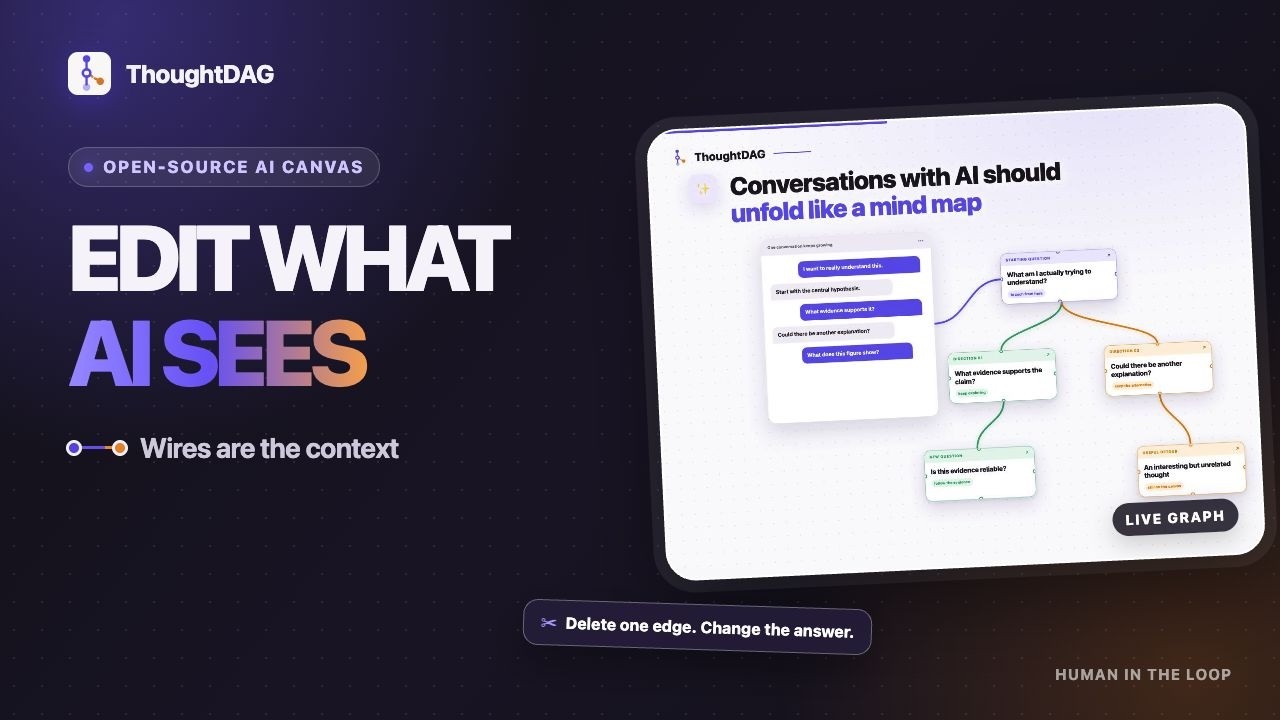
AI conversations that branch on an infinite canvas.

Each exchange becomes a node. Wires are the context.
Explore a side question, connect useful paths, and choose what the model sees next.

Download · Website · Docs · 中文

License

0.5 update · CLI · Harness · Desktop · How it works · How it differs · Research

New in 0.5 · ThoughtDAG × Jev

Bring relevant past conversations into the question you are asking now.

  • Find earlier work. The local index searches supported agent sessions and ThoughtDAG canvases. Topic dossiers collect decisions and open questions with links back to their sources.
  • Select what belongs. The optional Jev decision layer helps identify topics and rank relevant excerpts. Your chosen language model develops the answer.
  • Check what comes back. With recall enabled, the context panel lists the dossiers and excerpts added to a request. Inspect their sources or exclude individual items before continuing.
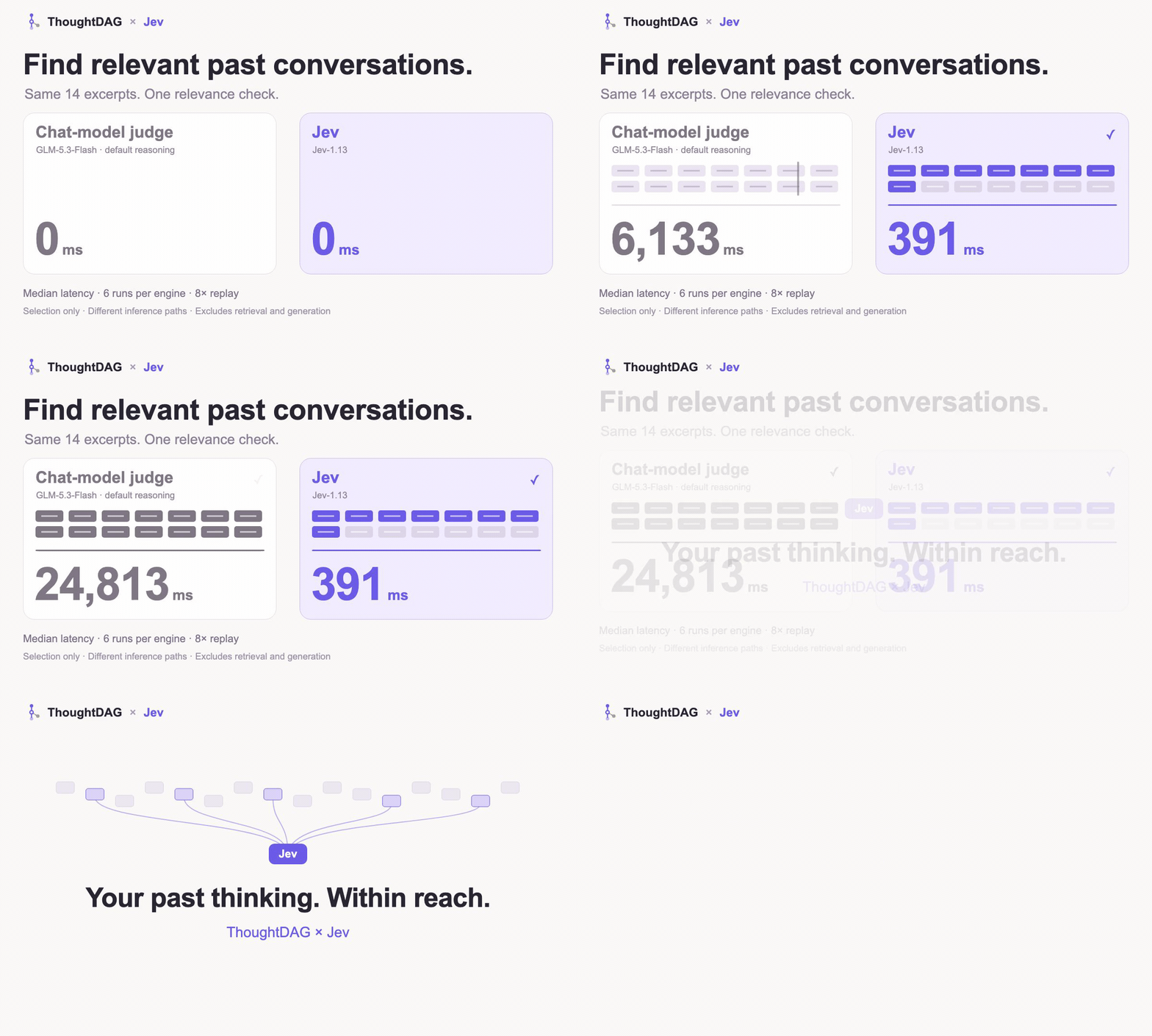
Animated replay of a small relevance-selection pilot: Jev median 391 milliseconds versus 24,813 milliseconds for the GLM judgment adapter with default reasoning. Ends with historical nodes converging into Jev. This is not end-to-end retrieval timing.

In a small relevance-selection pilot, Jev's median was 391 ms versus 24,813 ms for our GLM adapter. These are selection-stage timings, not end-to-end search or answer times.

What the timing measures

Six runs per engine over the same 14 synthetic excerpts. Median selection latency: 391 ms for Jev-1.13 and 24,813 ms for the GLM-5.3-Flash adapter with default reasoning. These are different inference paths, not a controlled ranking of model speed. Retrieval and answer generation are excluded; this does not measure whole-product speed or accuracy gains.

Without a decision model, recall falls back to rules. The System 1 / System 2-style split describes software roles here: quick relevance decisions, then answer and dossier generation. It is not a claim about human cognition.

Set up history and recall · Configure Jev

Find past context from the command line

Remember a file, a phrase or a URL, but not the session? Search local conversations and jump to the matching turn, without opening the desktop app.

Terminal
npx thoughtdag why src/lib/api.ts           # conversations about this file
npx thoughtdag find "a phrase you remember" # matching conversation turns
npx thoughtdag topics                       # topics in your local index

For regular use: npm install -g thoughtdag. Run thoughtdag setup mcp to expose read-only history tools to your agent. Retrieve the relevant turns rather than replaying a whole session. CLI guide →

Inside DeepSeek Harness

Switch between chat and ThoughtDAG's graph inside the harness. Choose the context on the canvas; the harness runs the next turn.

bash
dsh plugin --profile web add dsh-thoughtdag
dsh web

The plugin bundles the canvas and memory layer. Requires Node 22.19+ (22.x) or 24+, and DeepSeek Harness 0.1.2-rc.1 or later. Plugin guide →
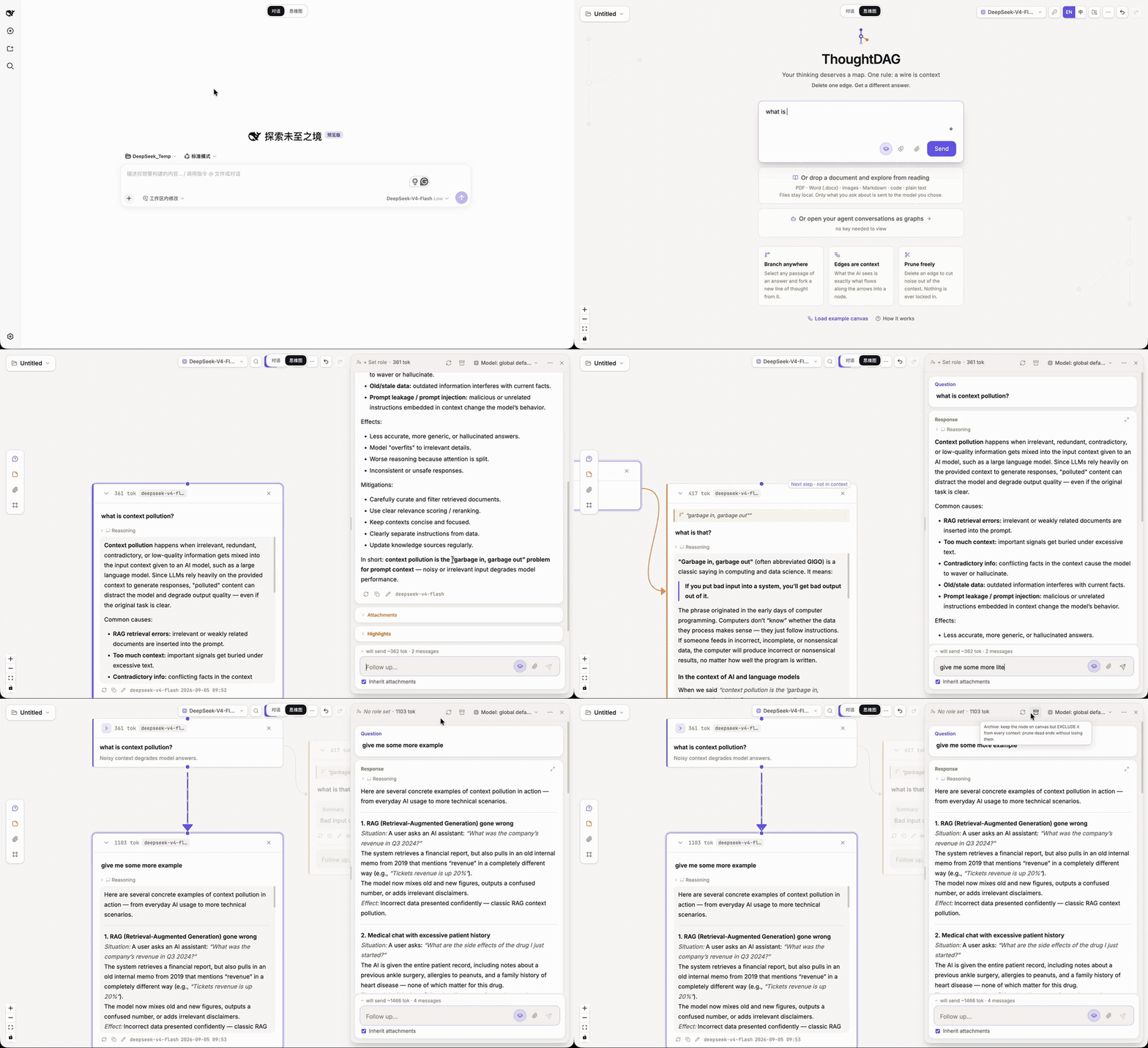
Switching from chat to the ThoughtDAG canvas inside DeepSeek Harness, asking a question and continuing in a new node.

The desktop app

Read a document beside your conversation, branch from a passage, and connect the paths you want to explore together. Use your own model connection.

bash
brew install --cask thoughtdag

Or download for macOS, Windows or Linux, connect a model and open the example canvas.

ThoughtDAG in use: ask from a document, branch a conversation, and edit the connections that carry context.

Official YouTube thumbnail: ThoughtDAG narrated tour

▶ Watch the 33-second tour

The one rule

Wires are the context. Connect conversation paths to use them in the next question. Disconnect a path without deleting the work.

Branch from a detail, explore it separately, then connect the useful parts to a later question. The graph changes the model's input, not just the layout.

Preview what the model will receive before sending. Wires select the conversation paths; explicit references and enabled recall can add material alongside them. Context guide →

In action
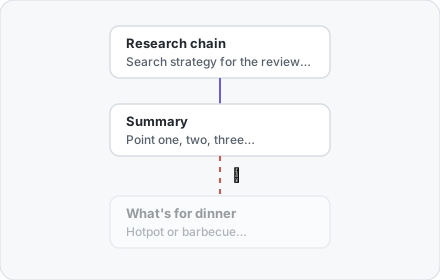
A research path remains connected to a summary while an unrelated dinner branch is disconnected but stays on the canvas.

✂️ Change the context, keep the exploration

Select text in an answer to start a side branch. Disconnect that branch from a later question, then regenerate to compare. Its nodes stay on the canvas: keep exploring from them or reconnect them later.

📖 Read, clip, and ask

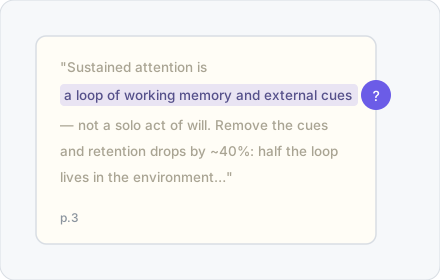
Open a PDF, image or HTML alongside the graph. Ask about a passage or clip a figure into its own node. PDF clips keep their page reference, so you can check the source as the discussion develops.

Selecting a passage in a PDF, asking about it and retaining a reference to page 3.
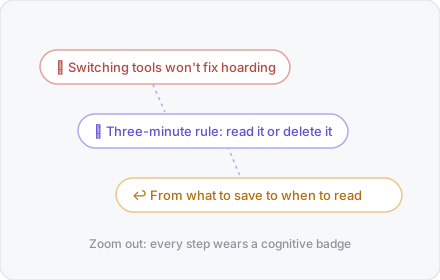
Conversation nodes shown as compact takeaways, with decisions and changes of direction visible.

💎 Condense the path; weave the highlights

Condense creates a shorter copy of a conversation path while preserving the original. Weave turns selected highlights into cited prose. Continue from the result, or export it as Markdown. Zooming out changes the view, not the context.

🧭 Session Atlas: continue an earlier conversation

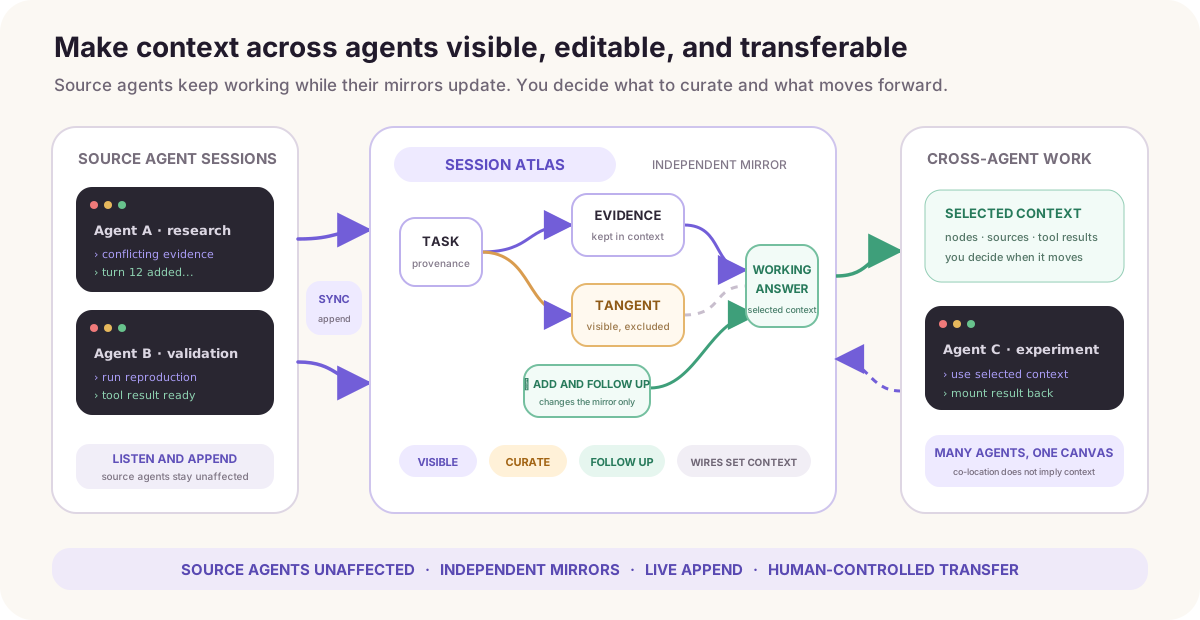
Open a supported local agent session as a graph. Pick where to branch or continue; use the history index to find related discussions from other sessions. Atlas provides the view, and recall helps find what to bring in.

Supports local Claude Code, Codex, DeepSeek Harness and Pi sessions. Source sessions remain read-only.

Local agent sessions grouped by project, opened as a context graph and continued in a fresh session.

How ThoughtDAG differs

Nodes and edges serve different purposes. Here is where ThoughtDAG fits:

Product categoryThoughtDAG's focus
Linear chatKeep several lines of inquiry visible and choose which ones continue into the next question.
Mind maps and whiteboardsUse connections to change model input, not just organize ideas visually.
Branching chat canvasesConnect several branches into one question, or disconnect a path while keeping its nodes.
Agent workflow canvasesEdit conversational context as you explore, rather than design a pipeline of automated tasks.
Retrieval and automatic memoryInspect source-linked dossiers and recalled excerpts; edit or exclude what the next request uses.
Code graphs and conversation searchFind the discussions behind a file or topic across supported agents, then continue from them.
Harness context viewersMove from inspecting a session to composing and sending its next turn.

These categories overlap; individual tools may share capabilities. ThoughtDAG is not an autonomous research agent or a replacement for your coding harness. Retrieval can miss relevant history, and generated dossiers still need checking.

🗺️ Export the shape of your thinking

Export the canvas as a Thought Map: nodes, wires and structural counts, without the full conversation text. Use it to share how an investigation branched, narrowed and came together.
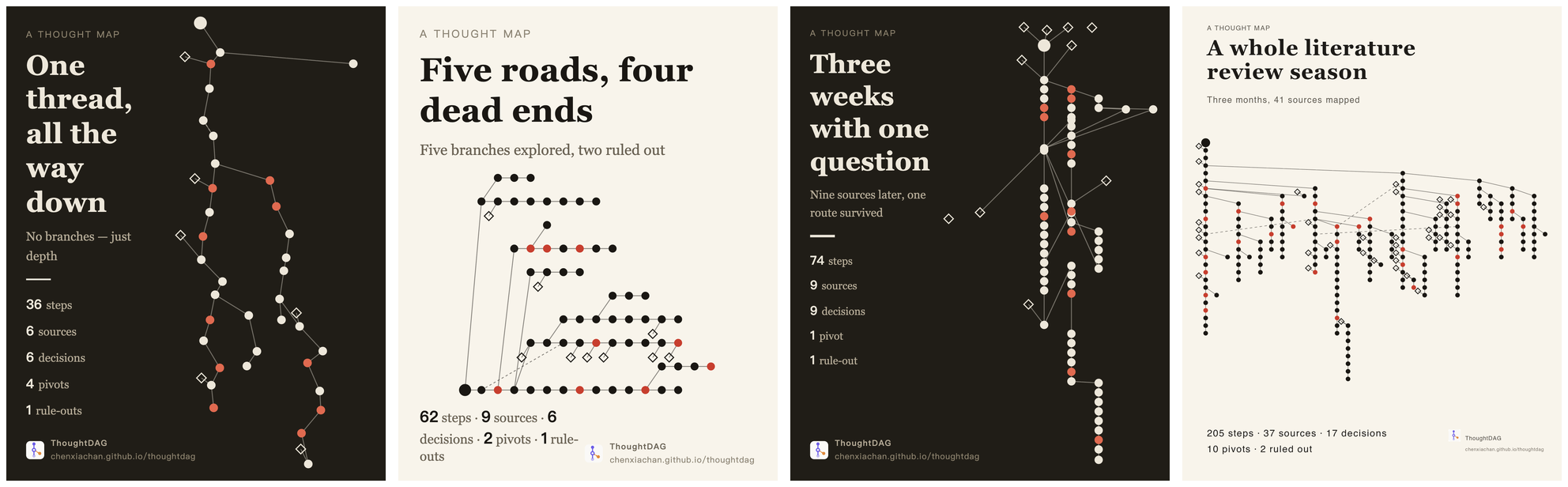
Four Thought Map exports showing different patterns of exploration, from a single thread to a branching literature review.

More ways to run

Run from source

Terminal
npm install
npm run server    # LLM proxy :3001
npm run dev       # frontend :5173

Configure a model in the app or through environment variables. Local setup →

Browser demo

The browser demo includes an example canvas that needs no API key. It is a subset: local session discovery, Session Atlas and the local history/memory layer require desktop or local hosting.

🧪 Research: Why editable context matters

Context Intervention Benchmark · Pilot v2

9 model endpoints · 1,485 scored responses · exact-match scoring

Read the full README →View source on GitHub →

Related MCP Servers

View all in Developer Tools View all alternatives
  • O
    Openapi MCP Server

    Connect any HTTP/REST API server using an Open API spec (v3)

    💻 Developer Tools3 views
    Compare vs Openapi MCP Server →
  • V
    Vibe Hnindex

    Index source code into a local knowledge base, search with keyword + semantic + hybrid modes.

    💻 Developer Tools2 views
    Compare vs Vibe Hnindex →
  • C
    Claude Task Master

    AI-powered task management system for AI-driven development. Features PRD parsing, task expansion, multi-provider support (Claude, OpenAI, Gemini, Perplexity, xAI), and selective tool loading for optimized context usage.

    💻 Developer Tools8 views
    Compare vs Claude Task Master →
  • D
    Docker MCP

    Docker container management and operations through MCP

    💻 Developer Tools3 views
    Compare vs Docker MCP →

Reviews

No reviews yet — be the first to share how this listing worked for you.

Frequently Asked Questions about ThoughtDAG

We don't have a confirmed install command for ThoughtDAG yet, so we don't publish a generated one — a guessed package name would point at the wrong package or none at all. Follow the project's own README or setup instructions (https://github.com/chenxiachan/thoughtdag) for the current steps.

AllMCPs Directory Badge

Full Badge Customizer

Showcase your server listing on GitHub or your project documentation. Embed this dynamic SVG badge to highlight official listing status and live engagement.

Badge Style:
Live Dynamic SVG PreviewThoughtDAG AllMCPs Directory Badge

Markdown (GitHub README)
[![AllMCPs](https://allmcps.com/api/badge/thoughtdag?style=directory)](https://allmcps.com/mcp/thoughtdag)
HTML Embed
<a href="https://allmcps.com/mcp/thoughtdag"><img src="https://allmcps.com/api/badge/thoughtdag?style=directory" alt="ThoughtDAG on AllMCPs" /></a>

Technical Specs & Signals

Category💻Developer Tools
More technical detailsExpand ▾
Last updatedSep 28, 2026
Views0
Unique ViewsTotal visits recorded for this listing page on AllMCPs.
Installs0
Installs & Copy ActionsTotal times users copied install commands or configuration snippets for this server.
27Quality signal: Emerging · 27/100How this signal is calculated ▾
Server availabilityNot measured

Not scored for repo-hosted servers — we can't reach the running server, only its GitHub page. Hosted MCP endpoints are health-checked live.

Verified ownership8/20
Documentation & tools11/30
Adoption & activity1/15
Community engagement0/10

A guidance signal from public completeness & health data — not a user rating. New listings start lower and rise as they add docs, get verified, and grow adoption. Signals we can't observe for a listing are skipped, not counted against it.

★ Spotlight Slot

Feature Your MCP Server

Get maximum visibility for your server across our directory, search results, and detail pages.

Spotlight Your Server

Own this project?

This directory is pre-filled from public sources. Claim via GitHub README, site badge, or DNS TXT to unlock edit access and the Official badge — proof is checked automatically, then reviewed by our team.

Free dofollow backlink: add your website and place the AllMCPs badge on it — no claim needed. We detect it automatically and keep it verified as long as the badge stays live.

Claim & get free dofollow

Share & Embed

Add our SVG badge (dark/light directory styles) or embeddable widget to your site.

Explore more

More in 💻 Developer Tools →Best MCP servers for Developers →Alternatives to ThoughtDAG →Install in Claude DesktopInstall in CursorInstall in VS CodeSetup guides for all 13 MCP clients