Live PR/MR code reviews via review_url_code. OAuth or portal Bearer auth.
Quick Install
Automated & IDE SetupCopy the AI prompt to install this server into Claude Code, Cursor, or another agent — or use 1-click editor setup below.
Manual Client & Custom JSON ConfigExpand JSON ▾
Client Config & Setup
Remote HTTPChoose your client or environment
Target File:
💡 Paste the JSON block into your client's configuration file under mcpServers, then restart the application.
Documentation Overview
ThinkReview MCP
Hosted Model Context Protocol server for AI code reviews on pull request and merge request URLs.
Connect Cursor, Claude Code, Claude Desktop, or GitHub Copilot, paste a PR/MR URL, and get a structured review — without pasting a diff into chat.
| Endpoint | https://mcp.thinkreview.dev/v1 |
| Transport | Streamable HTTP |
| Auth | OAuth (recommended) or Bearer token |
| Registry | io.github.Thinkode/thinkreview |
| Product | thinkreview.dev/features/mcp |
| Docs | thinkreview.dev/docs/mcp-integration |
| Setup | portal.thinkreview.dev/mcp |
This repository is for visibility and client documentation. ThinkReview MCP runs as a remote hosted server. The review engine, auth, billing, and git integrations stay on ThinkReview infrastructure and are not published here.
What it does
ThinkReview MCP exposes one tool:
review_url_code
Run a live code review on a GitHub, GitLab, Azure DevOps, or Bitbucket PR/MR URL.
ThinkReview fetches changed files through your stored git credentials (portal Integrations) and returns a structured review: summary, suggestions, security notes, best practices, and suggested follow-up questions.
| Parameter | Required | Description |
|---|---|---|
prUrl | Yes | Full or domain-style PR/MR URL (e.g. https://github.com/org/repo/pull/42) |
language | No | Response language (default: English) |
mrId | No | Optional tracking ID for your workflow |
forceRegenerate | No | true to bypass cache and force a new review |
URL reviews use the same review credits as the ThinkReview browser extension.
Authentication
Choose one method. Interactive configs for both are on portal.thinkreview.dev/mcp.
| Method | How it works | Best for |
|---|---|---|
| OAuth (recommended) | URL-only MCP config → Authenticate in the browser on the ThinkReview portal | Cursor, Claude Code, Claude Desktop, Copilot |
| Bearer token | Long-lived portal token in Authorization: Bearer <token> headers | Extension, CI, or clients that cannot complete OAuth |
OAuth sessions are separate from the extension Bearer token. Regenerating the Bearer token does not revoke OAuth MCP sessions.
Prerequisites
- A ThinkReview account with an active plan or available review credits
- Git credentials under Settings → Integrations for the host of the PR you want to review
- An MCP client that supports Streamable HTTP, plus either:
- OAuth for remote HTTP servers, or
- A Bearer token from portal.thinkreview.dev/mcp
Quick start — OAuth (recommended)
Add a URL-only config, then Authenticate in your client (browser opens the ThinkReview portal).
Cursor
Enable thinkreview, click Authenticate, complete portal consent.
Example: examples/oauth/cursor.mcp.json
Claude Code
CLI:
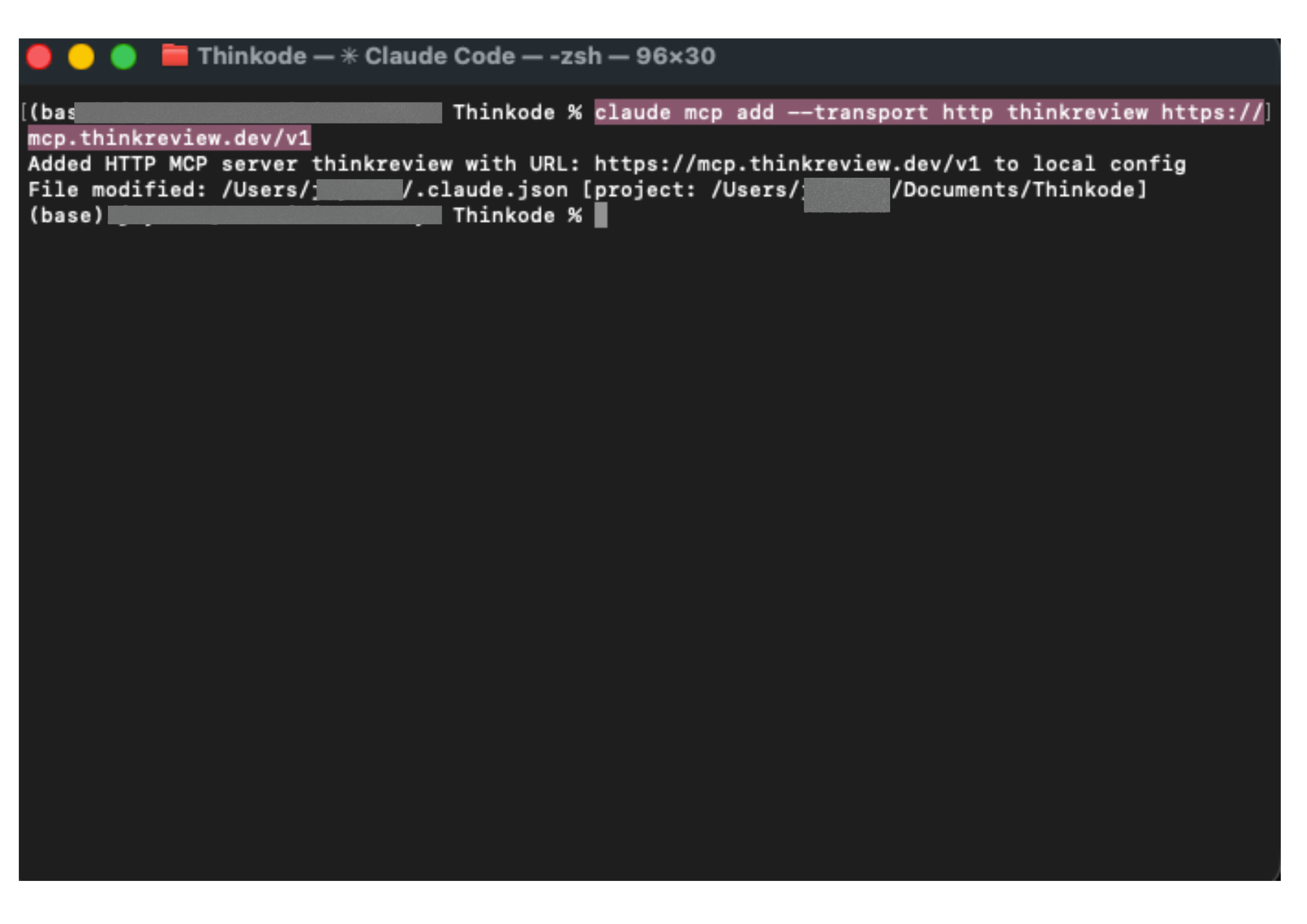
Or config (~/.claude.json / project .mcp.json):
Example: examples/oauth/claude.mcp.json
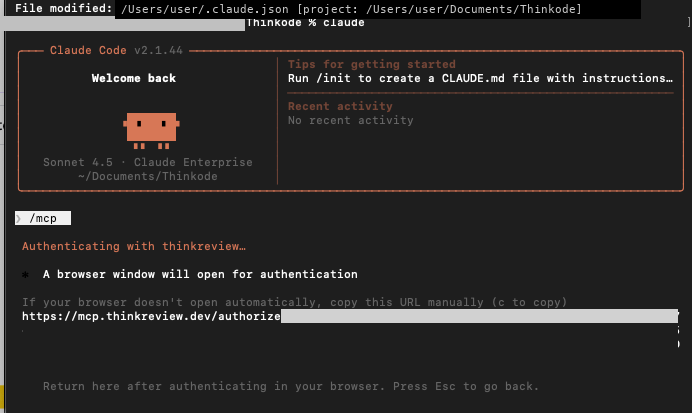
Authenticate (OAuth)
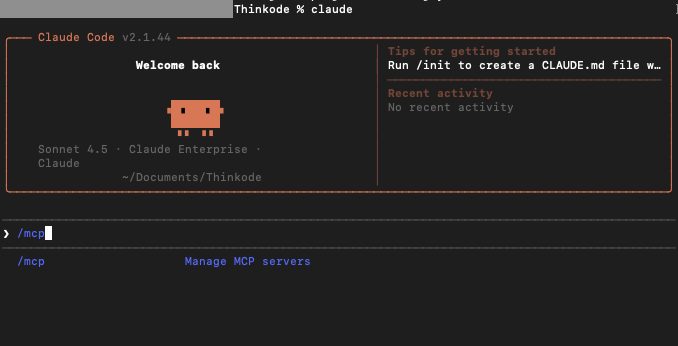
- Start Claude Code and run
/mcp.
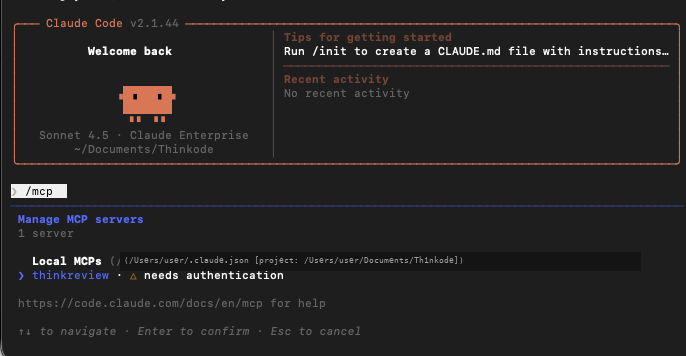
- Select thinkreview — status shows needs authentication.
- Choose Authenticate.
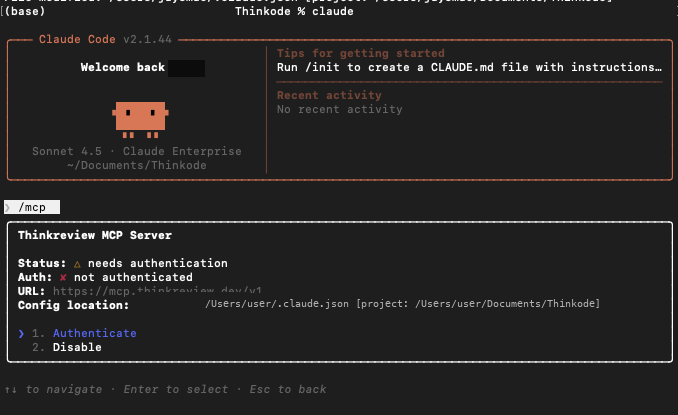
- Claude Code opens the browser OAuth flow (
/authorize→ portal consent).
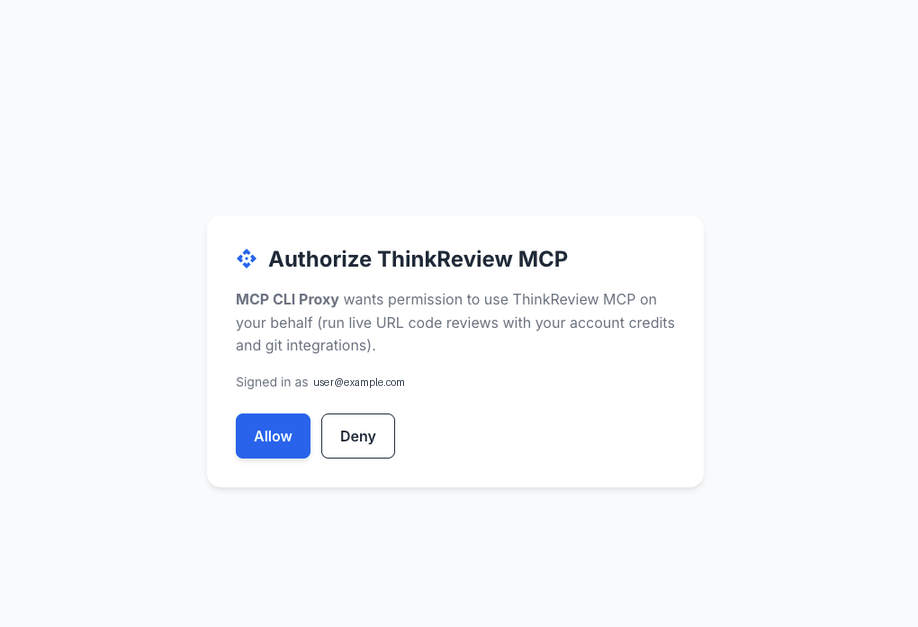
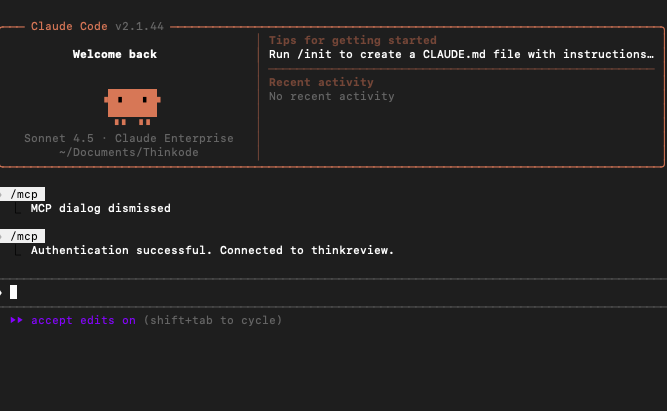
- After you click Allow, return to Claude Code — you should see Authentication successful.
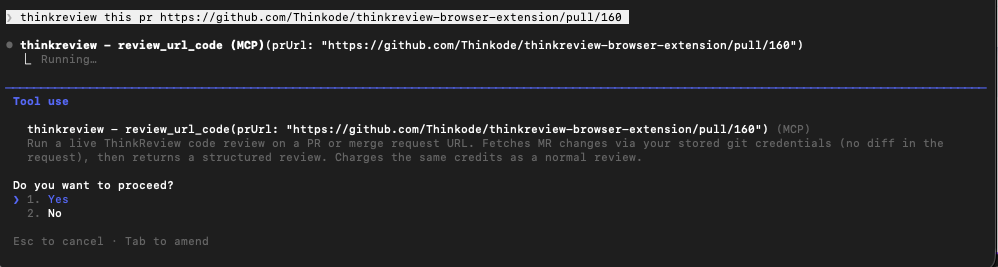
Run a review
Ask Claude Code to review a PR URL (tool: review_url_code):
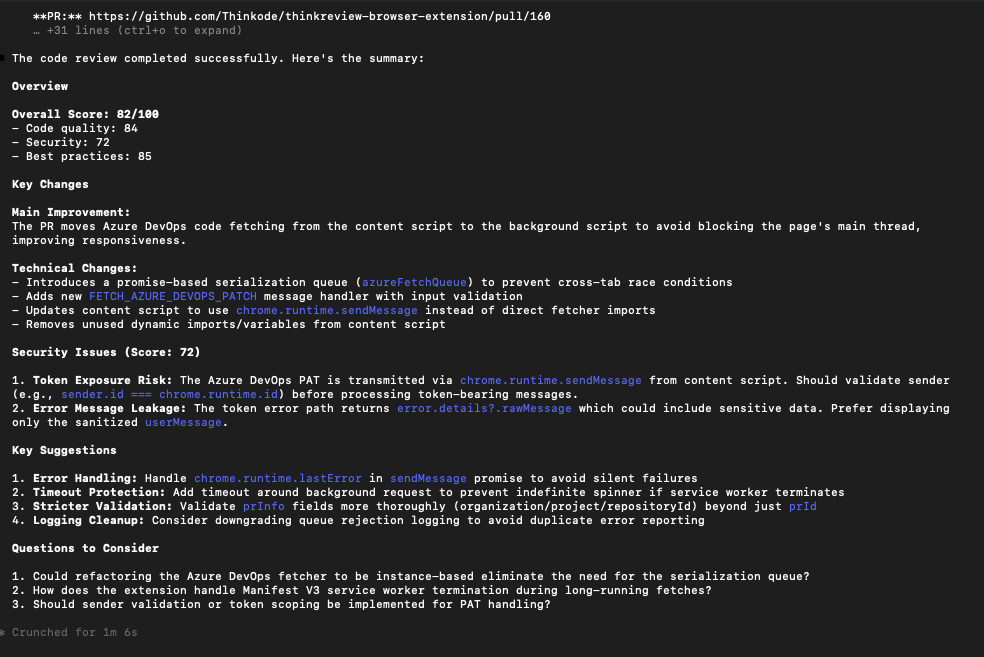
Claude Desktop
Preferred: Settings → Connectors → Add custom connector → https://mcp.thinkreview.dev/v1 → Connect → complete portal OAuth.
Claude Desktop’s claude_desktop_config.json does not accept Claude Code’s "type": "http" block. To use the config file instead, bridge with mcp-remote (requires Node.js), then fully quit and reopen Desktop:
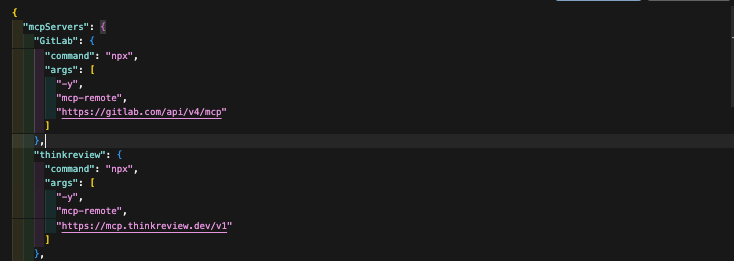
After restart, Settings → Developer → Local MCP servers should show thinkreview as running. Complete OAuth when prompted (same portal consent as Claude Code).
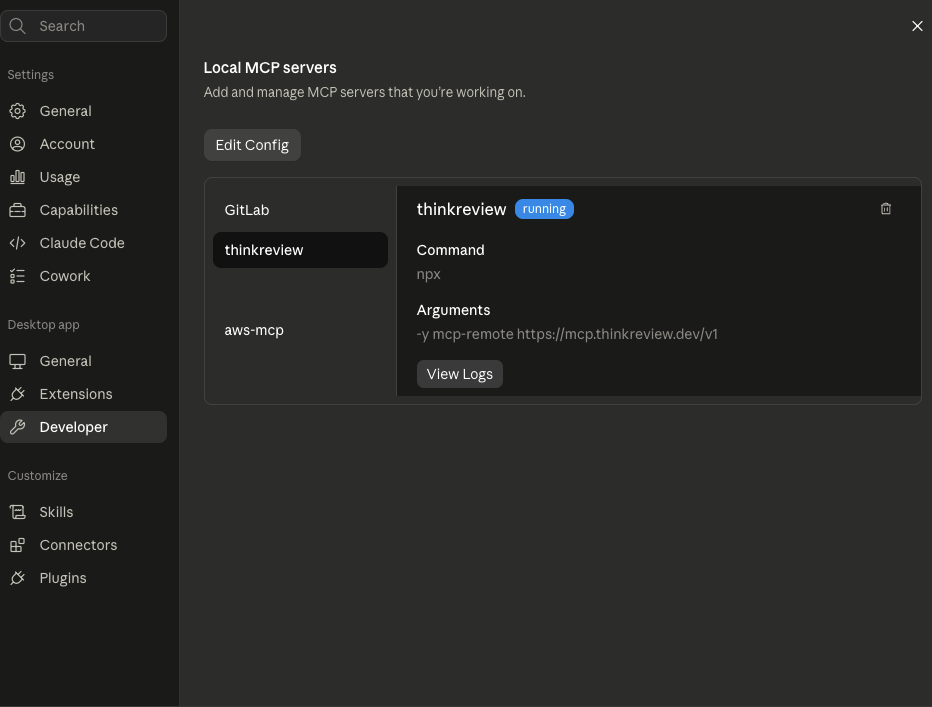
Example: examples/oauth/claude-desktop.mcp.json
GitHub Copilot (VS Code)
.vscode/mcp.json or user MCP config (servers key):
Use Auth / Authenticate on the thinkreview server, then enable it in Copilot Chat.
Example: examples/oauth/vscode-copilot.mcp.json
Example prompt
Call
review_url_codefor https://github.com/org/repo/pull/123
Alternative — Bearer token
Copy your token from portal.thinkreview.dev/mcp and add it as a header. Same session token as the browser extension. Regenerating invalidates the previous token for extension and Bearer-based MCP clients.
Cursor
Example: examples/bearer/cursor.mcp.json
Claude Code
Example: examples/bearer/claude.mcp.json
Claude Desktop (mcp-remote + header)
Example: examples/bearer/claude-desktop.mcp.json
GitHub Copilot (VS Code)
Example: examples/bearer/vscode-copilot.mcp.json
Supported platforms
Same hosts as the ThinkReview extension:
- GitHub.com and GitHub Enterprise Server
- GitLab.com and self-managed GitLab
- Azure DevOps Cloud and on-premise
- Bitbucket Cloud and Bitbucket Data Center
Security
- Prefer OAuth so long-lived tokens are not stored in MCP config files
- If you use a Bearer token, treat it like a password — do not commit it to git
- Store tokens only in local MCP client config or a secrets manager
- Regenerate the Bearer token from the portal if it is ever exposed
- Use git PATs with the minimum scopes needed to read PRs/MRs and diffs
Related
License
Documentation and example configs in this repository are licensed under the MIT License.
The ThinkReview hosted MCP service, APIs, and review infrastructure remain proprietary to Thinkode / ThinkReview.
Related MCP Servers
Adoption & maintenance
Factual signals from GitHub, npm, and our automated checks — not a rating.
GitHub stars
1
Stargazers on the source repository.
Last commit
15d ago
Most recent push to the default branch.
Directory activity
1 views
Config copies, upvotes, and views on AllMCPs.
Reviews
No reviews yet — be the first to share how this listing worked for you.
Frequently Asked Questions about ThinkReview
AllMCPs Directory Badge
Showcase your server listing on GitHub or your project documentation. Embed this dynamic SVG badge to highlight official listing status and live engagement.
Badge Style:
Live Dynamic SVG Preview
Markdown (GitHub README)
[](https://allmcps.com/mcp/thinkreview)HTML Embed
<a href="https://allmcps.com/mcp/thinkreview"><img src="https://allmcps.com/api/badge/thinkreview?style=directory" alt="ThinkReview on AllMCPs" /></a>Technical Specs & Signals
CategorySecurity
11/14 checks healthy over the last 46d
39Quality signal: Fair · 39/100How this signal is calculated ▾
Server availabilityNot measured
Not scored for repo-hosted servers — we can't reach the running server, only its GitHub page. Hosted MCP endpoints are health-checked live.
Verified ownership10/20
Documentation & tools15/30
Adoption & activity4/15
Community engagement0/10
A guidance signal from public completeness & health data — not a user rating. New listings start lower and rise as they add docs, get verified, and grow adoption. Signals we can't observe for a listing are skipped, not counted against it.
Own this project?
This directory is pre-filled from public sources. Claim via GitHub README, site badge, or DNS TXT to unlock edit access and the Official badge — proof is checked automatically, then reviewed by our team.
Free dofollow backlink: add your website and place the AllMCPs badge on it — no claim needed. We detect it automatically and keep it verified as long as the badge stays live.
Claim & get free dofollowShare & Embed
Add our SVG badge (dark/light directory styles) or embeddable widget to your site.