AllMCPs
BrowseBestCategoriesStackCompareToolsGuidesBlog
Log in Submit MCP

Stay in the loop

Get new MCP servers and top picks in your inbox.

AllMCPs

The open directory for discovering and installing Model Context Protocol servers.

AllMCPs on GitHub (opens in a new tab)
Launched onTiny Startupstinystartups.com
Explore
  • Browse servers
  • Best MCP servers
  • Categories
  • MCP clients
  • Agent prompts
  • Stack Builder
  • Compare servers
  • Random discovery New
  • Submit a server
  • Pricing & Boost Boost
Learn
  • Guides hub
  • What is MCP?
  • Install guide
  • Build an MCP server
  • Deploy an MCP server
  • Security guide
  • Troubleshooting
  • MCP for SEO & AEO
  • Protocol versioning
  • Transports: stdio vs HTTP
  • State of MCP (stats)
  • Blog & updates
Tools
  • All developer tools
  • Config generator
  • Config validator
  • Config auditor
  • MCP playground
  • Token calculator
  • OpenAPI β†’ MCP
  • Badge generator
For agents
  • REST API docs
  • Trust & traffic Live
  • Remote MCP server SSE β†— (opens in a new tab)
  • llms.txt β†— (opens in a new tab)
  • Catalog JSON β†— (opens in a new tab)
Company
  • About
  • Advertise Sponsor
  • Contact
  • GitHub β†— (opens in a new tab)
  • Terms
  • Privacy
AllMCPs VerifiedAllMCPs VerifiedFeatured on Nick LaunchesFeatured on Nick LaunchesLaunch Llama NewsletterLaunch Llama NewsletterVerified DR - allmcps.comVerified DR - allmcps.comFeatured on SaaSGrowFeatured on SaaSGrowFeatured on Twelve ToolsFeatured on Twelve ToolsFeatured on Saaspa.geFeatured on Saaspa.geFeatured on Findly.toolsFeatured on Findly.toolsFeatured on Startup FameFeatured on Startup FameFeatured on LaunchKiwiFeatured on LaunchKiwiFeatured on ScrollLaunchFeatured on ScrollLaunchFeatured on DailyPingsFeatured on DailyPingsFazier badgeFazier badgeFeatured on NewTool.siteFeatured on NewTool.siteFeatured on saasfame.comFeatured on saasfame.comDR Checker - Domain RatingDR Checker - Domain RatingListed on Turbo0Listed on Turbo0Launched on LaunchBoard - Product Launch PlatformLaunched on LaunchBoard - Product Launch PlatformList on SimilarlabsList on Similarlabshttps://codetrendy.comhttps://codetrendy.comListed on DevTool.ioFeatured on BuildlistFeatured on BuildlistLaunched on Tiny StartupsFeatured on ShowMeBestAIFeatured on ShowMeBestAIFind us on LaunchZoneFind us on LaunchZoneAllMCPs VerifiedAllMCPs VerifiedFeatured on Nick LaunchesFeatured on Nick LaunchesLaunch Llama NewsletterLaunch Llama NewsletterVerified DR - allmcps.comVerified DR - allmcps.comFeatured on SaaSGrowFeatured on SaaSGrowFeatured on Twelve ToolsFeatured on Twelve ToolsFeatured on Saaspa.geFeatured on Saaspa.geFeatured on Findly.toolsFeatured on Findly.toolsFeatured on Startup FameFeatured on Startup FameFeatured on LaunchKiwiFeatured on LaunchKiwiFeatured on ScrollLaunchFeatured on ScrollLaunchFeatured on DailyPingsFeatured on DailyPingsFazier badgeFazier badgeFeatured on NewTool.siteFeatured on NewTool.siteFeatured on saasfame.comFeatured on saasfame.comDR Checker - Domain RatingDR Checker - Domain RatingListed on Turbo0Listed on Turbo0Launched on LaunchBoard - Product Launch PlatformLaunched on LaunchBoard - Product Launch PlatformList on SimilarlabsList on Similarlabshttps://codetrendy.comhttps://codetrendy.comListed on DevTool.ioFeatured on BuildlistFeatured on BuildlistLaunched on Tiny StartupsFeatured on ShowMeBestAIFeatured on ShowMeBestAIFind us on LaunchZoneFind us on LaunchZone
Β© 2026 Jackalope Digital LLC. All rights reserved.
  1. Home
  2. πŸ’» Developer Tools
  3. Thingctx
Thingctx logo
Health: ActiveRecent health check succeeded.Last checked 9/22/2026, 5:32:03 AM

Thingctx

User RatingsBe the first to rate and review this MCP server! Enrichment pendingWe haven’t run our AI enrichment pass on this listing yet, so the overview, use cases, and FAQ below may be sparse or missing. We work through the catalog over time β€” check back soon.
View Repository15 GitHub StarsTotal stargazers on GitHub for the source repository (15 stars).Visit Website

Drive devices and APIs from their W3C Thing Description. You gate every operation.

Quick Install

Automated & IDE Setup

Copy the AI prompt to install this server into Claude Code, Cursor, or another agent β€” or use 1-click editor setup below.

Add to CursorAdd to VS Code
Not yet automatically verified

We haven't yet run this listing's install command through our automated sandbox check. This isn't a red flag β€” we're steadily working through the catalog.

Manual Client & Custom JSON ConfigExpand JSON β–Ύ

Client Config & Setup

Choose your client or environment
Target File:~/Library/Application Support/Claude/claude_desktop_config.json
claude_desktop_config.json
{
  "mcpServers": {
    "thingctx": {
      "command": "uvx",
      "args": [
        "thingctx"
      ]
    }
  }
}

πŸ’‘ Paste the JSON block into your client's configuration file under mcpServers, then restart the application.

Install Directory Badge Claim listing AlternativesπŸ’» More in Developer Tools

Documentation Overview

thingctx

CI PyPI Python License W3C WoT

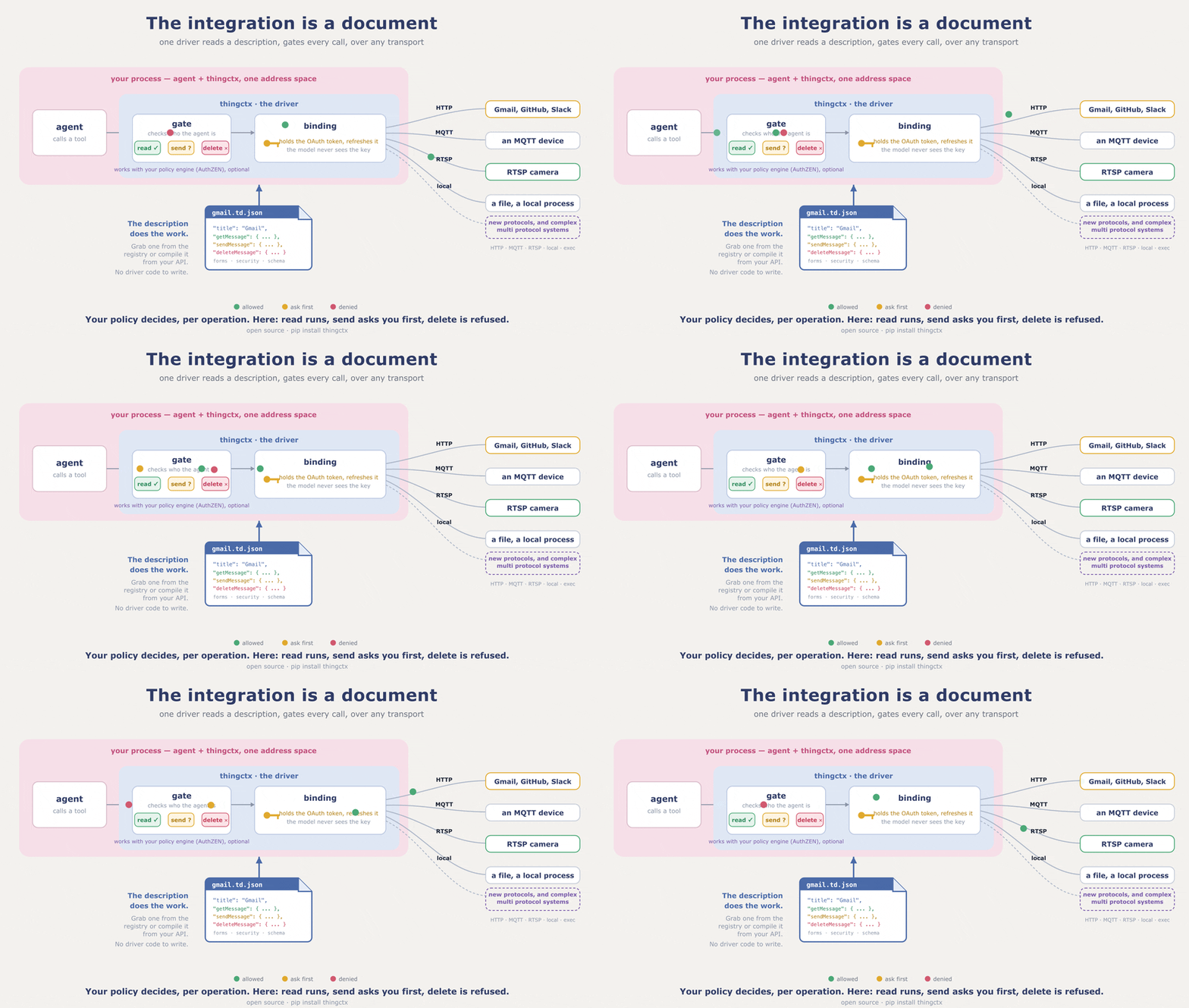
thingctx gating and routing a tool call

thingctx turns a description of any API, device, or local process into tools an AI agent can call: authorized per operation, over the system's own transport, and the agent never holds your keys. The description is a W3C Web of Things Thing Description (a TD), a plain JSON file naming what the system can do. Write one, or compile it from an OpenAPI spec. The described system is the server, so you run no server per integration.

A "Thing" is whatever you want to describe: a REST API, an app, a sensor, a media server, a local object, or one system that is several of those at once. A media server takes commands over HTTP and serves its stream over RTSP. The pump in examples/ reads over MQTT and acts through a local call. Each is one Thing and one description.

A description names actions, properties, and events, and gives each one a form: the entry that says where and how to reach it. The URL scheme in that address picks the transport per call, so however many protocols one Thing spans, the agent still sees one tool set.

docs/BINDINGS.md covers the transports and how to add your own. A subprocess transport, exec, also ships, and it ships locked: it refuses every command until you hand it an explicit allowlist.

Those three stay distinct all the way to the call. A read, a write, and a subscribe do not collapse into one undifferentiated function, which is why the gate can allow the read and refuse the write on the same system. A flat list of functions has no such handle.

Pick your path: use it as a library if you own the agent loop, the command line if you do not want to write code, the MCP bridge if your host only speaks MCP, or add a transport if thingctx does not speak your protocol yet.

Stuck, or wondering whether something is possible? Ask in Discussions. Want to build something small? The open issues say what would help.

First run: no keys, no network

One paste shows the whole idea. The description is inline and the handler ships with the package, so nothing here needs a key, a network, or a second file:

Terminal
pip install thingctx
server.ts
import asyncio

import thingctx
from thingctx.contrib.time import make_time_handler

TD = {
    "@context": "https://www.w3.org/2022/wot/td/v1.1",
    "id": "urn:thingctx:time",
    "title": "Time",
    "securityDefinitions": {"nosec_sc": {"scheme": "nosec"}},
    "security": ["nosec_sc"],
    "actions": {
        "getCurrentTime": {
            "description": "Current time in an IANA timezone (default UTC).",
            "input": {
                "type": "object",
                "properties": {"timezone": {"type": "string"}},
            },
            "safe": True,
            "idempotent": True,
            "forms": [{"href": "local://getCurrentTime"}],
        }
    },
}


async def main():
    client = thingctx.ThingClient(tds=[TD], bindings=[thingctx.LocalBinding(make_time_handler())])
    tools, invoke = client.as_tools()  # specs for your model; invoke runs a call
    print("tools:", [t["function"]["name"] for t in tools])
    print(await invoke("time__getCurrentTime", {"timezone": "UTC"}))


asyncio.run(main())
Code
tools: ['time__getCurrentTime']
{'timezone': 'UTC', 'datetime': '2026-07-26T15:59:03.233080+00:00', 'utc_offset': '+0000'}

That is the whole loop: a description in, tools out, calls routed. LocalBinding is a binding, a transport implementation; this one routes the local:// address to the handler you pass it. Every other transport works the same way; only the form's href changes.

Install

Terminal
pip install 'thingctx[llm,http,validate]'

Quote the argument; unquoted brackets fail in zsh. Base pip install thingctx has no dependencies; it already includes the local and exec transports. Redis support is pip install 'thingctx[redis]'. Every optional transport and capability has an extra, listed in pyproject.toml; each one this page uses is named next to the code that needs it.

The document

A description can be small. This one drives the live, key free Open-Meteo forecast API, so it runs as written. Save it as weather.td.json, a later example uses it:

config.json
{
  "@context": "https://www.w3.org/2022/wot/td/v1.1",
  "id": "urn:example:weather:v1",
  "title": "Weather",
  "securityDefinitions": { "nosec_sc": { "scheme": "nosec" } },
  "security": ["nosec_sc"],
  "actions": {
    "forecast": {
      "input": {
        "type": "object",
        "properties": {
          "latitude": { "type": "number" },
          "longitude": { "type": "number" },
          "current": { "type": "string" }
        },
        "required": ["latitude", "longitude"]
      },
      "forms": [{ "href": "https://api.open-meteo.com/v1/forecast", "htv:methodName": "GET" }]
    }
  }
}

thingctx projects each action to a tool named <thing>__<action>: this file yields weather__forecast (a version segment on the id is dropped). docs/MAPPING.md specifies the full projection. The description carries no secrets, so it is safe to commit and share. The secret is supplied at runtime to the binding that carries the call. Secrets are keyed per Thing.

If your system already has an OpenAPI 3.x spec, you do not have to author a description at all:

Terminal
pip install 'thingctx[openapi]'
thingctx import openapi https://api.example.com/openapi.json --out api.td.json

The spec can be a file or a URL, JSON or YAML; --base-url, --id, and --title override what the spec says. The result is a normal description, so everything else here applies to it unchanged.

Ready made descriptions for common apps, developer tools, and devices live at td.thingctx.com.

Use it as a library

Own the agent loop? Read descriptions, hand the specs to your model, and route each call back through invoke. ThingClient needs no LLM and has no opinion on what chose the action; any code can drive it. This sketch shows the surface against a folder describing a pump; from_arg turns a path or URL into a registry of descriptions:

server.ts
import thingctx


async def run():  # a sketch, not a program: call it from your own loop
    client = thingctx.ThingClient.from_registry(thingctx.from_arg("./descriptions/"))
    specs, invoke = client.as_tools()

    await invoke("pump__set_speed", {"rpm": 1500})
    await client.read_property("pump__rpm")
    await client.write_property("pump__target_rpm", 1500)  # gated like invoke
    async for evt in await client.subscribe(
        "pump__overheat"
    ):  # subscribe returns an async iterator
        ...

The form picks the transport per call, so one client can read over HTTP, subscribe over MQTT, and read or write cached properties over Redis. Bindings that pull optional dependencies, including MQTT and Redis, are off by default: install the extra and pass bindings=thingctx.BindingRegistry.default(mqtt=True, redis=True).

Want the loop handled for you? The llm extra runs any provider through litellm; add the http extra, since the weather file's form is HTTPS. Set your provider key in its usual variable (OPENAI_API_KEY, ANTHROPIC_API_KEY, and so on) and pick a model with THINGCTX_MODEL:

server.ts
import asyncio
import thingctx


async def main():
    # weather.td.json from above; it points at a live, key free API
    host = thingctx.from_file("weather.td.json")
    print(await host.chat("What is the forecast for Cairo? Latitude 30.0, longitude 31.2."))


asyncio.run(main())

The model calls weather__forecast itself and answers in prose:

Code
The forecast for Cairo is clear, around 34 C.

Safety: approval and authorization

Two opt in layers stand between an agent and a real system; both run before any transport is selected. Neither layer handles a credential. The binding holds the secret and the model never sees it.

Approval gates risky calls behind a human. Risk is read from the description, and when to gate is yours: declared (only actions the description marks risky; the default), destructive (adds non idempotent actions and every property write), all, or never. A gated call with no approver is denied: a gate with nobody to open it stays shut. The check sits inside invoke and write_property, so it covers the LLM loop, direct callers, and the MCP bridge alike.

Carrying on from the first example above, with the same TD:

python
def approve(req):  # sync or async; return True to allow
    return input(f"run {req.tool_name}{req.arguments}? [y/N] ").lower() == "y"


client = thingctx.ThingClient(
    tds=[TD],
    bindings=[thingctx.LocalBinding(make_time_handler())],
    approve=approve,
    approve_when="all",
)

Read the full README β†’View source on GitHub β†’

Related MCP Servers

View all in Developer Tools View all alternatives
  • Openapi MCP Server logoOpenapi MCP Server

    Connect any HTTP/REST API server using an Open API spec (v3)

    πŸ’» Developer Tools3 views
    Compare vs Openapi MCP Server β†’
  • MCP Server Docker logoMCP Server Docker

    Integrate with Docker to manage containers, images, volumes, and networks.

    πŸ’» Developer Tools3 views
    Compare vs MCP Server Docker β†’
  • Andrea9293 MCP logoAndrea9293 MCP

    Local-first document management and semantic search for AI coding agents

    πŸ’» Developer Tools2 views
    Compare vs Andrea9293 MCP β†’
  • Formio MCP logoFormio MCP

    Create and manage Form.io forms, resources, actions, roles, and projects from your AI agent.

    πŸ’» Developer Tools2 views
    Compare vs Formio MCP β†’

Adoption & maintenance

Factual signals from GitHub, npm, and our automated checks β€” not a rating.

GitHub stars
15
Stargazers on the source repository.
Last commit
3d ago
Most recent push to the default branch.
Directory activity
2 views
Config copies, upvotes, and views on AllMCPs.

Reviews

No reviews yet β€” be the first to share how this listing worked for you.

Frequently Asked Questions about Thingctx

Add the following block to your claude_desktop_config.json under mcpServers: "mcpServers": { "thingctx": { "command": "uvx", "args": ["thingctx"] } }

AllMCPs Directory Badge

Full Badge Customizer

Showcase your server listing on GitHub or your project documentation. Embed this dynamic SVG badge to highlight official listing status and live engagement.

Badge Style:
Live Dynamic SVG PreviewThingctx AllMCPs Directory Badge

Markdown (GitHub README)
[![AllMCPs](https://allmcps.com/api/badge/thingctx?style=directory)](https://allmcps.com/mcp/thingctx)
HTML Embed
<a href="https://allmcps.com/mcp/thingctx"><img src="https://allmcps.com/api/badge/thingctx?style=directory" alt="Thingctx on AllMCPs" /></a>

Technical Specs & Signals

CategoryπŸ’»Developer Tools
More technical detailsExpand β–Ύ
TransportSTDIO
RuntimePython
Last updatedSep 21, 2026
11/12 checks healthy over the last 45d
Views2
Unique ViewsTotal visits recorded for this listing page on AllMCPs.
Installs0
Installs & Copy ActionsTotal times users copied install commands or configuration snippets for this server.
GitHub stars15
GitHub Star CountTotal stargazers on GitHub representing community popularity (15 stars).
Last commit3d ago
Last Repository CommitThe most recent commit or push recorded for this server's GitHub repository.Last commit on Sep 21, 2026
43Quality signal: Fair Β· 43/100How this signal is calculated β–Ύ
Server availabilityNot measured

Not scored for repo-hosted servers β€” we can't reach the running server, only its GitHub page. Hosted MCP endpoints are health-checked live.

Verified ownership10/20
Documentation & tools16/30
Adoption & activity6/15
Community engagement0/10

A guidance signal from public completeness & health data β€” not a user rating. New listings start lower and rise as they add docs, get verified, and grow adoption. Signals we can't observe for a listing are skipped, not counted against it.

Supply-chain signal

No high-severity advisories surfaced by our automated scan.

Critical 0High 0Medium 0Low 0

Scanned 2d ago via OSV.dev Β· thingctx (PyPI)

β˜… FeaturedMoxie Docs MCP logo

Moxie Docs MCP

MCP & Agent Skills for Automated Documentation, and codebase conventions + context

Explore Server β†’

Own this project?

This directory is pre-filled from public sources. Claim via GitHub README, site badge, or DNS TXT to unlock edit access and the Official badge β€” proof is checked automatically, then reviewed by our team.

Free dofollow backlink: add your website and place the AllMCPs badge on it β€” no claim needed. We detect it automatically and keep it verified as long as the badge stays live.

Claim & get free dofollow

Share & Embed

Add our SVG badge (dark/light directory styles) or embeddable widget to your site.

Explore more

More in πŸ’» Developer Tools β†’Best MCP servers for Developers β†’Alternatives to Thingctx β†’Install in Claude DesktopInstall in CursorInstall in VS CodeSetup guides for all 13 MCP clients