
The open SVG brand library
A HOME FOR EVERY BRAND.
7,600+ brand logos and cloud icons. Search, copy and ship them as SVG, React, Vue, Svelte, CDN, CLI or MCP.
Free, open source, no gatekeeping.













Browse icons • Quick start • Install • Extensions • CDN • API • Packages • Compare • Community • Contribute • Contributors
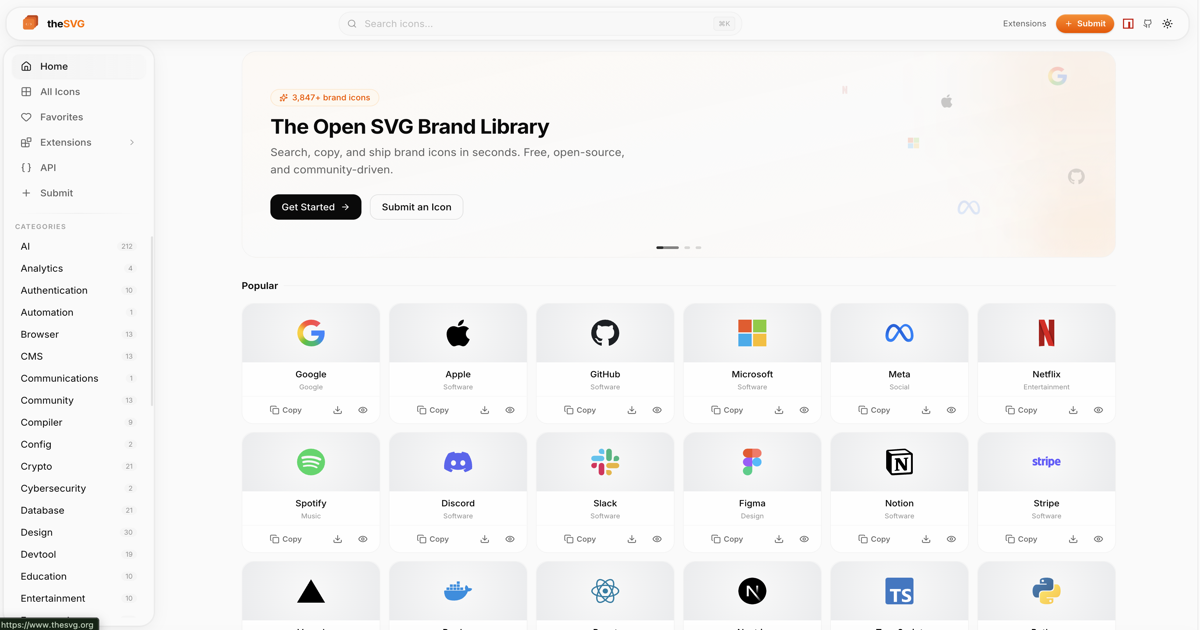
Every logo below is served straight from theSVG.


















Why theSVG
Brand logos are scattered across press kits, Figma files, and random GitHub repos. theSVG is the single source for SVG icons - brand logos, cloud architecture diagrams, and a set of interface icons of our own. Searchable, versioned, and available as npm packages, CDN, CLI, API, and MCP server.
Every developer has hunted for a company logo: a press kit buried three clicks deep, a PNG that blurs on retina, a "mono" file that is secretly four colors, a logo that changed last month. Most icon sets cover UI glyphs. Nobody treated brand logos as real, versioned, trustworthy data.
theSVG does. It is one open catalog where every logo is official, clean, complete and current, and it is delivered in whatever shape your project needs.
Why we built it
theSVG started with a pull request. We tried to add the logo of our own product, AskVerdict, to an existing open source logo library, and it was declined as outside that project's scope, which is a fair call for a curated set. That made us want a catalog where any real brand, large or small, can be added through a simple review. theSVG now holds over 7,600 icons, sourced from official brand assets and checked before each one is merged.
A HOME FOR EVERY BRAND.
The theSVG standard
What every icon in the catalog is held to, and what we want a brand SVG to mean everywhere:
| Principle | What it means in practice |
|---|---|
| Official, unmodified | Taken from the brand's own kit or site, with a license and a guidelines link on every entry. No redraws. |
| Complete variants | default, mono, light, dark and wordmark under one predictable naming scheme, so {slug}/{variant}.svg always works. |
| Truly clean | A validator runs in CI on every changed file: no scripts, no embedded rasters, no null or NaN values, mono files really are single color, viewBox always present. |
| Rebrands keep history | When a brand changes its logo, the new mark becomes current and the old one is kept as a -legacy entry, linked both ways. Nothing silently disappears. |
| Machine readable | A static manifest, llms.txt, an MCP server and stable CDN URLs, so tools and AI assistants can use logos as reliably as people do. |
| Open to everyone | MIT code, no accounts, no API keys, no gatekeeping. If a brand is real, it belongs here. |
If that is the logo library you wished existed, the single most useful thing you can do is star the repo. It is how other developers find it.
| 7,600+ icons | 12,300+ variants: color, mono, light, dark, wordmark | 150+ categories | 21 brand families |
What is inside
| Collection | Icons | What you get | |
|---|---|---|---|
 | Brand icons | 4,800+ | Logos from 150+ categories in color, mono, light, dark and wordmark |
 | Auth badges | 858 | Circular badges for 2FA and authenticator UIs |
| AWS Architecture | 739 | Official AWS service and resource icons |
| Azure | 626 | Microsoft Azure service icons |
| Community | 256 | Dev tools, databases and frameworks |
 | Google Cloud | 214 | Google Cloud Platform icons |
| Kubernetes | 38 | Official CNCF architecture icons |
Collections, plain table
theSVG organizes icons into collections:
| Collection | Icons | Description |
|---|---|---|
| Brand Icons | 4,800+ | Brand logos from 150+ categories |
| Auth Badges | 858 | Circular icon badges styled for 2FA/authenticator apps |
| AWS Architecture | 739 | Official AWS service, resource, category, and group icons (2026-Q1) |
| Azure Services | 626 | Microsoft Azure service icons (2026-Q1) |
| Community | 256 | Dev tools, databases, and frameworks sourced from the open-source community |
| Google Cloud | 214 | Google Cloud Platform icons (2026-Q1) |
| Kubernetes | 38 | Official Kubernetes/CNCF architecture icons |
UI icons
New in theSVG 4.0. Alongside the brand catalog, theSVG ships a set of interface icons we draw ourselves, at thesvg.org/ui. 129 icons today, each in seven looks (outline, glass, duotone, offset, fill, pixel and depth), all using currentColor, with more arriving in small drops. They are a separate section with their own data, packages and tests, and the two kinds of icons never mix their data or code. See UI icons below.
Brand families
Products grouped by the company that owns them, so you get the whole Google, Microsoft, Amazon or Apple line in one place with every variant. Browse all 21 at thesvg.org/families.
100+ logos |  Microsoft 70+ logos |  Adobe 30+ logos | Amazon 18 logos |  Apple 16 logos |  JetBrains 16 logos |  IBM 14 logos |
The full breakdown lives in Collections, families and categories.
Highlights
- 7,600+ icons across multiple collections
- 4,800+ brand icons across 150+ categories
- 21 brand families - every product from Amazon, Google, Microsoft and more, grouped by owner
- 858 Auth Badge icons - circular icon badges for 2FA/authenticator apps
- 739 AWS Architecture icons (2026-Q1)
- 626 Azure Service icons (2026-Q1)
- 256 community-curated icons - dev tools, databases, frameworks
- 214 Google Cloud icons (2026-Q1)
- 12,300+ SVG variants - color, mono, light, dark, wordmark
- Tree-shakeable - import one icon, ship only that icon
- TypeScript-first - fully typed, dual ESM/CJS
- Framework-agnostic - React, Vue, Svelte, plain HTML, or CDN
- AI-ready - MCP server for Claude, Cursor, and Windsurf
AWS Architecture Icons
Browse all AWS service and resource icons at thesvg.org/collection/aws. Icons are sourced from the official AWS Architecture Icons package and distributed unmodified under CC BY-ND 2.0. Updated quarterly.
Auth Badges
Browse the full set at thesvg.org/collection/auth-badges. Circular, flat-color badge icons designed for authenticator-app entry lists and 2FA UI - a distinct visual style from the primary brand-mark collection above. Distributed under CC0-1.0 (public domain).
Brand families, full table
Products grouped by the company that owns them, each with its own page: the whole Amazon, Google or Microsoft line in one place, with every variant.
| Family | Logos | Includes |
|---|---|---|
| 100+ | Workspace, Gemini, Cloud, Android, Chrome | |
| Microsoft | 70+ | GitHub, Azure, Dynamics 365, Fabric, Copilot |
| Adobe | 30+ | Photoshop, Illustrator, Creative Cloud |
| Amazon | 18 | Prime, Kindle, Music, AWS, Twitch, Ring |
| Apple | 16 | iOS, macOS, Music, iCloud |
| JetBrains | 16 | IntelliJ IDEA, PyCharm, WebStorm, Rider |
| IBM | 14 | Red Hat, HashiCorp, Terraform, Ansible |
Browse all 21 families at thesvg.org/families. The same data is available as JSON at /api/families.json and in llms.txt.
Quick start
# Add a single icon to your project
npx @thesvg/cli add github

# Or install the package and import only what you use
npm install thesvg
import github from "thesvg/github";

github.svg;      // raw SVG string
github.title;    // "GitHub"
github.hex;      // "181717"
<!-- Or use the CDN, no install -->
<img src="https://thesvg.org/icons/github/default.svg" width="32" height="32" alt="GitHub" />
Every icon has its own page with all variants, copy formats and a live preview, for example thesvg.org/icon/github. Tree-shakeable, fully typed, ESM and CJS. More in Install and packages, Usage and variants and CDN and API.
Built for designers and developers
|
|
Install
npm
npm install thesvg
Homebrew
brew tap glincker/thesvg
brew install thesvg
import github from "thesvg/github";

github.svg;        // raw SVG string
github.title;      // "GitHub"
github.hex;        // "181717"
github.variants;   // { default: "<svg...>", mono: "<svg...>" }
Or use the scoped package for tree-shaking:
npm install @thesvg/icons
Packages
Every package is tree-shakeable, fully typed and ships ESM and CJS. Pick the one that fits your stack. Brand icons and UI icons are separate packages (@thesvg/ui*), so adding one never makes the other heavier.
| Package | Version | Downloads | What it is | Install | |
|---|---|---|---|---|---|
 | thesvg |  |  | All icons in one package | npm install thesvg |
| @thesvg/icons |  |  | Core icon data, tree-shakeable | npm install @thesvg/icons |
| @thesvg/react |  |  | Typed React components | npm install @thesvg/react |
| @thesvg/vue |  |  | Typed Vue 3 components | npm install @thesvg/vue |
| @thesvg/svelte |  |  | Typed Svelte components | npm install @thesvg/svelte |
| @thesvg/react-native |  |  | React Native components | npm install @thesvg/react-native |
| @thesvg/ui |  |  | UI icons: raw SVG files and JSON manifest | npm install @thesvg/ui |
| @thesvg/ui-react |  |  | UI icons as typed React components | npm install @thesvg/ui-react |
| @thesvg/ui-vue |  |  | UI icons as Vue 3 components | npm install @thesvg/ui-vue |
| @thesvg/ui-svelte |  |  | UI icons as Svelte components | npm install @thesvg/ui-svelte |
| @thesvg/ui-react-native |  |  | UI icons for React Native | npm install @thesvg/ui-react-native |
| @thesvg/cli |  |  | CLI tool, shadcn-style installer | npx @thesvg/cli add github |
 | @thesvg/mcp-server |  |  | MCP server for AI assistants | npx @thesvg/mcp-server |
Extensions
Use theSVG icons everywhere you build, design and ship. Browse the full ecosystem at thesvg.org/extensions.
| Extension | Status | What it does | |
|---|---|---|---|
| Figma Plugin |  | Browse 7,600+ brand SVGs, variant picker, recents row, keyboard shortcuts. Insert as editable vectors. |
 | VS Code | | Search 7,600+ icons from the command palette. Copy SVG, JSX, CDN link, or insert at cursor. |
 | Raycast | | Search, preview, and copy any brand SVG in one keystroke. Filter by category, preview variants. |
| MCP Server | | AI tool calls for Claude, Cursor, Windsurf. Fetch icons by name or category. |
| Agent Skill | | Drop-in skill for AI agents. Install via npx skills add glincker/thesvg. Teaches the icon CDN and registry. |
| @thesvg/cli | | shadcn-style installer. npx @thesvg/cli add github drops the SVG into your project. |
 | Homebrew | | brew tap glincker/thesvg && brew install thesvg |
 | CDN via jsDelivr | | Serve any icon via global CDN. Drop into HTML, CSS, Markdown, Notion, Webflow, Framer. |
 | Iconify | | Brand icons available as thesvg (mono) and thesvg-color sets. Works with any Iconify-consuming tool: Mermaid architecture diagrams, Iconify's VS Code and Figma plugins, @iconify/react, and more. |
 | Browser Extension |  | Chrome, Firefox, Edge popup with 7,600+ brand SVGs. MV3, no telemetry. |
| JetBrains |  | IntelliJ, WebStorm, PyCharm, Rider tool window. Help wanted. |
 | Neovim | | Lua plugin with Telescope picker. Insert SVG URL or inline content at cursor. |
 | Alfred Workflow | | macOS quick access. Search anywhere, copy SVG, CDN URL, or markdown. |
 | Sketch / Blender / Webflow / Notion | | Tracking issues open. Build a plugin and we will list it here. |
UI icons in extensions: the CLI, MCP server, VS Code, the browser extension, Alfred and Neovim search UI icons as well as brand icons. Figma and Raycast follow after launch. Each extension reads the UI icons from their own file, so brand search is never affected.
Build your own: the API and CDN are fully open with no auth required. Ship a plugin or workflow, then open a PR and we will add it to the table.
Usage
React, Vue, Svelte, CDN and CLI examples
React
import { Github, Figma } from "@thesvg/react";

export function Logos() {
  return <Github width={24} height={24} className="text-white" />;
}
Vue
<script setup>
import { Github, Figma } from "@thesvg/vue";
</script>

<template>
  <Github width="24" height="24" />
</template>
Svelte
<script>
  import { Github, Figma } from "@thesvg/svelte";
</script>

<Github width="24" height="24" />
CDN
<img src="https://cdn.jsdelivr.net/gh/glincker/thesvg@main/public/icons/github/default.svg" width="32" height="32" alt="GitHub" />
CLI
npx @thesvg/cli add github
npx @thesvg/cli search "ai"
Variants
Icons support up to 7 variants to match any design context:
| Variant | Key | Description |
|---|---|---|
| Default | default | Primary brand color |
| Mono | mono | Inherits text color |
| Light | light | White, for dark backgrounds |
| Dark | dark | Black, for light backgrounds |
| Wordmark | wordmark | Full text logo |
| Wordmark Light | wordmarkLight | White text logo |
| Wordmark Dark | wordmarkDark | Dark text logo |
Not every icon has all variants. default is always present.
UI icons
Interface icons we draw ourselves, in seven looks. Browse them at thesvg.org/ui.
npm install @thesvg/ui-react
import { BellIcon, BellGlassIcon } from "@thesvg/ui-react";

// Outline is the plain name, every other look adds its name.
<BellIcon size={24} aria-label="Notifications" />
<BellGlassIcon size={32} />
One export per look means a look you do not import never reaches your bundle. Vue, Svelte and React Native packages follow the same naming (@thesvg/ui-vue, @thesvg/ui-svelte, @thesvg/ui-react-native).
| What | Where |
|---|---|
| One icon file | https://thesvg.org/ui/{slug}/{look}.svg |
| Every icon in one look | https://cdn.jsdelivr.net/gh/glincker/thesvg@main/src/data/ui/looks/{look}.json |
| Manifest (slugs, tags, categories, quality) | https://cdn.jsdelivr.net/gh/glincker/thesvg@main/src/data/ui-icons.json |
| CLI | npx @thesvg/cli add ui:bell --look glass |
Looks: outline, glass, duotone, offset, fill, pixel, depth. The UI icons are original drawings released under the MIT license like the rest of the code. To add or change icons, see Contributing to UI icons.
CDN
Use any icon directly without installing:
<!-- From thesvg.org -->
<img src="https://thesvg.org/icons/github/default.svg" width="32" height="32" alt="GitHub" />

<!-- From jsDelivr -->
<img src="https://cdn.jsdelivr.net/gh/glincker/thesvg@main/public/icons/github/default.svg" width="32" height="32" alt="GitHub" />
URL pattern: https://thesvg.org/icons/{slug}/{variant}.svg
API
Static manifest, mirrors and examples
thesvg ships as a fully static site, served from a CDN. There is no dynamic API; instead, two pre-built JSON manifests cover every use case. Search, filter, and pagination happen on the client.
Base URL: https://thesvg.org
| Endpoint | Description |
|---|---|
GET /api/registry.json | Full icon manifest (slug, title, aliases, categories, hex, url, variant keys) |
GET /api/categories.json | Category list with counts |
GET /icons/{slug}/{variant}.svg | Raw SVG file (e.g. /icons/openai/default.svg) |
# Fetch the manifest once, filter client-side
curl "https://thesvg.org/api/registry.json" | jq '.icons[] | select(.slug | contains("openai"))'

# Then pull the SVG you want
curl "https://thesvg.org/icons/openai/default.svg"
Mirrors
For high-traffic apps, use jsDelivr (free, GitHub-backed) instead of hitting thesvg.org directly:
https://cdn.jsdelivr.net/gh/glincker/thesvg@main/src/data/icons.json
https://cdn.jsdelivr.net/gh/glincker/thesvg@main/public/icons/{slug}/{variant}.svg
src/data/icons.json is the source-of-truth manifest (the same data that builds /api/registry.json, with full per-icon fields including license and dateAdded).
You can also clone the repo (~30 MB) and self-host. The codebase is MIT-licensed; individual brand icons remain trademarks of their respective owners (see LEGAL.md).
A gated, token-based API is on the roadmap at
api.thesvg.orgfor advanced features (search relevance, usage analytics, webhooks). Until then, the static manifest above is the supported integration path.
Categories
Icons are organized into 150+ categories:
AI Analytics Identity Automotive Aviation Browser Cloud CMS Community Crypto Database Design DevTool Education Entertainment Finance Food Framework Gaming Hardware Hosting IoT Language Library Linux Media Music Payment Platform Privacy Security Self-Hosted Shopping Social Software and more...
Community
Questions, icon requests, or showing off what you built? Join the official GLINR Discord, home of theSVG and every other GLINCKER open source project. theSVG has its own forum there, and new releases post to it automatically.

Run it locally
You need Node.js 20 or newer and pnpm.
git clone https://github.com/glincker/thesvg.git
cd thesvg
pnpm install
pnpm dev          # http://localhost:3333
| Command | What it does |
|---|---|
pnpm dev | Starts the site with hot reload on port 3333 |
pnpm build | Regenerates the API, llms.txt, feed and icon tones, then builds the static site |
pnpm lint | Runs ESLint |
pnpm test | Runs the Vitest suite plus the CLI and icons package tests |
npx tsx scripts/validate-icons.ts | Audits every SVG for scripts, bad values, non-mono mono files and missing viewBox |
Add an icon: put the files in public/icons/{slug}/ (default.svg, plus mono, light, dark or wordmark as they apply), register the slug in src/data/icons.json, run the validator, then open a pull request. Full rules are in CONTRIBUTING.md.
Contributing
Every brand deserves a place. No gatekeeping.
Submit an icon: thesvg.org/submit or open a pull request.
Development setup:
git clone https://github.com/glincker/thesvg.git
cd thesvg
pnpm install
pnpm dev     # http://localhost:3333
UI icons have their own flow: edit a set file in src/data/ui/sets, run pnpm ui:build, and test with pnpm test:ui. Brand work stays in pnpm test:brand. See CONTRIBUTING.md for full guidelines.
Questions and icon requests are welcome in the Discord.
Contributors
Follow along
New icons, rebrands and releases land every week. To keep up:
- Star and watch the repo. Use Watch, Custom, Releases to hear about each new version.
- Follow GLINCKER on GitHub for the rest of what we build.
- Join the Discord to request icons and see releases the moment they ship.
- Browse thesvg.org to see what was added recently.
Sponsor
theSVG runs on hosting, bandwidth, and maintainer time. If the catalog saves you a couple of hours a year, pick a tier and lock that value in. Tiers start at $5/mo and stack from Sketch up to Canvas.
Support
theSVG runs on hosting, bandwidth and maintainer time. Sponsor on GitHub or star the repo so other developers can find it.

Disclaimer
All brand names, logos, and trademarks are the property of their respective owners. theSVG provides these icons for development and design purposes only under nominative fair use. Use of brand assets must comply with each brand's usage guidelines.
AWS Architecture Icons are provided under CC BY-ND 2.0 (No Derivatives). Amazon Web Services and all related marks are trademarks of Amazon.com, Inc.
If you are a brand owner and would like an icon updated or removed, please open an issue or email support@glinr.com. See our Legal Notice, TRADEMARK.md, and LEGAL.md for full details.
License
MIT for the codebase, tooling and the UI icons. Individual brand icons remain the intellectual property of their respective trademark holders.
Star History
thesvg.org • Install • Extensions • Issues
Built by GLINCKER. More from the team:
 GLINCKER Open source from the team behind theSVG |
 Levelrail Self-hosted alternative to Vercel and Coolify. Git push, HTTPS, logs, rollback. |
 theAuth Auth for AI agents and humans. Agent identity, MCP OAuth 2.1, audit. |