TGGET Niche Research MCP server
Remote Model Context Protocol server of TGGET, a niche research tool for mobile apps and online services. It lets an AI assistant check an idea against measured data instead of guessing from a description.
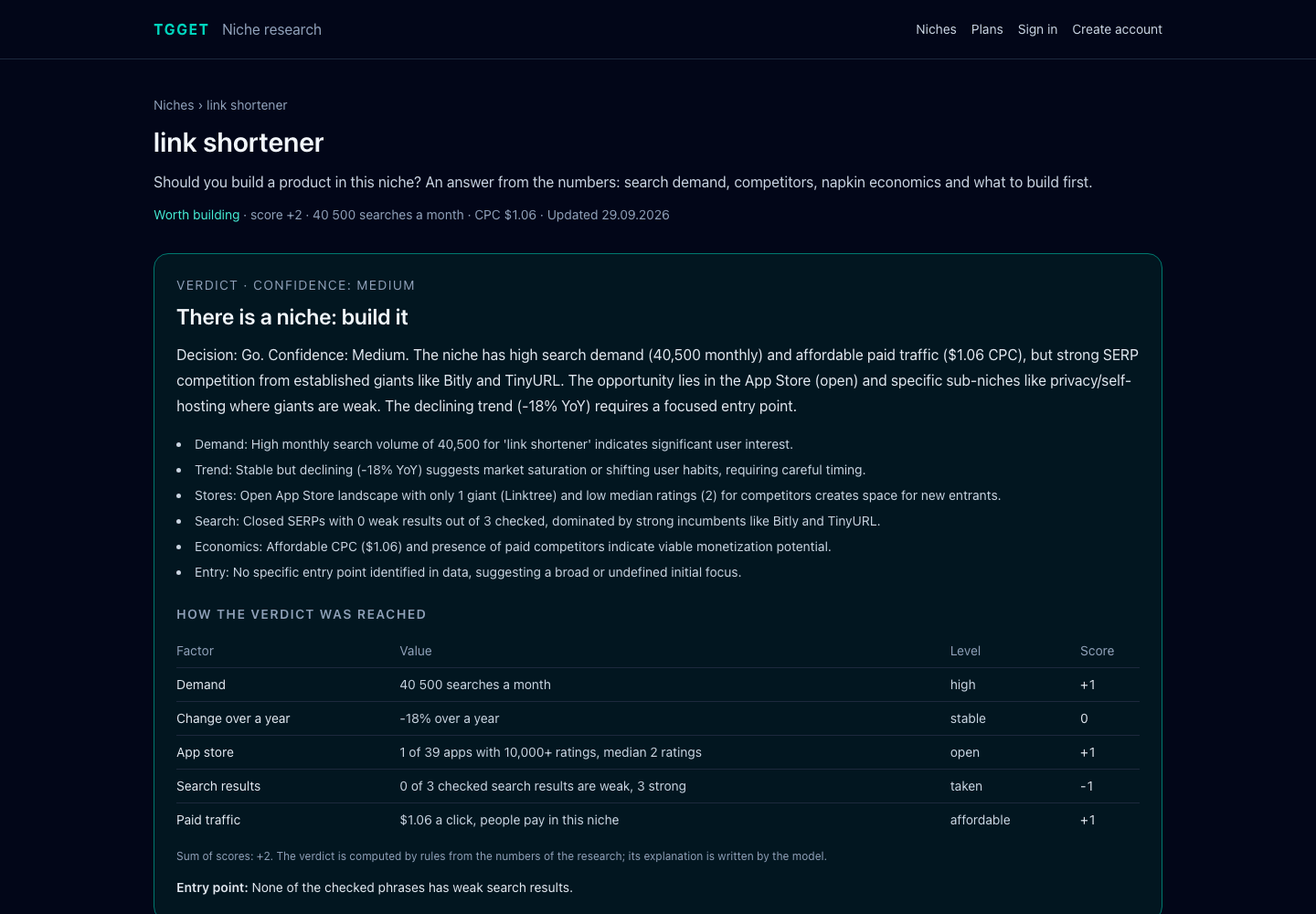
Give it a search phrase or a description of an idea in your own words. It returns monthly search demand, sub-niches, competitor sites from search results, App Store apps with what their users complain about, community signals and a final report with a verdict: worth building, needs validation or no niche. The verdict is computed by rules from five measured factors, so the same numbers always give the same answer; the language model only explains it.
- Endpoint:
https://tgget.io/mcp(Streamable HTTP) - Authentication: personal access token, sent as a Bearer token. The server tells what it is and lists its tools without a token; every call needs one
- Name in the MCP Registry:
io.tgget/niche-research - Documentation: tgget.io/docs/api
What you can ask
- "Validate this idea: an app that reminds you to water plants and explains how to care for them."
- "Is there demand for an expense tracker for couples? Who are the competitors?"
- "Research the niche 'invoice generator' and give me the report as Markdown."
- "Compare my last three researches and tell me which idea to start with."
- "Follow the niche of my research about habit trackers and show what changed since last month."
Getting a token
- Create an account at tgget.io or in the Android app and confirm your email. A free account is enough.
- Open Settings, section "API and AI assistants", and create a token. It is shown once.
Tokens expire after a year and are revoked when you change your password or close your sessions. An account holds up to five tokens.
Connecting
Replace <token> with your token. Ready-made files are in examples.
Claude Code
claude mcp add --transport http tgget https://tgget.io/mcp --header "Authorization: Bearer <token>"
Cursor
~/.cursor/mcp.json or .cursor/mcp.json in a project:
{
  "mcpServers": {
    "tgget": {
      "url": "https://tgget.io/mcp",
      "headers": { "Authorization": "Bearer <token>" }
    }
  }
}
VS Code
.vscode/mcp.json:
{
  "inputs": [
    { "type": "promptString", "id": "tgget-token", "description": "TGGET access token", "password": true }
  ],
  "servers": {
    "tgget": {
      "type": "http",
      "url": "https://tgget.io/mcp",
      "headers": { "Authorization": "Bearer ${input:tgget-token}" }
    }
  }
}
Codex
~/.codex/config.toml, with the token in the TGGET_TOKEN environment variable:
[mcp_servers.tgget]
url = "https://tgget.io/mcp"
bearer_token_env_var = "TGGET_TOKEN"
Clients that only run local servers
Use the mcp-remote bridge:
{
  "mcpServers": {
    "tgget": {
      "command": "npx",
      "args": ["-y", "mcp-remote", "https://tgget.io/mcp", "--header", "Authorization: Bearer <token>"]
    }
  }
}
Tools
| Tool | What it does | Parameters |
|---|---|---|
start_research | Starts a research from a search phrase or a description of an idea. A phrase is scanned directly; a description is first turned into real search queries and the strongest one is scanned. | text (required), deep, locale |
get_research | Current state and findings: status, headline numbers, ranked candidate phrases, competitor overview, child researches, skipped stages. | id (required) |
get_report | The final niche report: verdict, customer pains, MVP, napkin economics, SEO and ASO plans, name options, landing page draft, distribution channels, validation steps and risks. | id (required), format (markdown or json) |
list_research | The most recent researches of the account, newest first. | limit (1 to 50) |
run_signal | Adds one check to a finished research: competitors for a phrase, demand history, App Store, reviews, community signals, paid search metrics, or a rebuilt report. | id, kind (required), phrase, locale |
compare_research | Puts two to five finished researches side by side and marks the better value of every measure. The marks come from the numbers, not from the language model. | ids (required) |
follow_niche | Starts following the niche of a finished research that has a report: it is scanned anew every month and a digest of what changed is sent to the account. Monthly checks do not spend researches. | research_id (required) |
list_projects | The niches the account follows, with the latest numbers and the date of the next check. | limit (1 to 50) |
get_project | A followed niche with the history of its checks and what changed since the previous one. | id (required) |
update_project | Pauses a followed niche, follows it again or stops following it. | id, (, or ) (required) |
locale sets the language of the conclusions and the report; en is the one available now. The market is chosen by the language of the phrase: search demand is measured in the country of that language. Texts meant for a site or an app store are always written in the language of the market.
Resources and prompt
| Name | What it gives |
|---|---|
tgget://quota | Researches remaining on the plan and when the next one becomes available. |
tgget://sources | Research kinds available right now and what each one costs. |
find_niche (prompt) | Walks the assistant through validating an idea: start, wait, read the evidence, write a verdict. Argument: idea. |
How a research runs
Research runs in the background and takes a few minutes.
- Call
start_research. It returns the research id. - Poll
get_researchevery 20 to 30 seconds untilstatusiscompletedandpendingis0. Findings appear as they arrive. - When the research lists a
report, callget_report.
Limits and privacy
- A research is counted when it starts. Checks added to an existing research with
run_signalare free. - The free plan includes three researches to start and one more every 30 days. Paid plans are on the plans page and are bought in the mobile app; the same account works everywhere.
- A free account follows one niche, Starter two, Pro ten.
- Researches made on the free plan are public: the result may be listed in the open niche catalog. The catalog shows the researched phrase and its findings, never the description you typed. Researches on paid plans stay private.
- The API and the MCP server share a limit of 60 requests per minute.
- Search interest is evidence, not a customer count. Treat the verdict as a starting point for your own validation.
Links
- TGGET: validate an app or online business idea
- Business idea validation
- Niche finder tool
- Open niche catalog
- App ideas with measured demand
- Micro SaaS ideas with measured demand
- Android app on Google Play
- API and MCP documentation
- Contact
This repository holds the documentation and connection examples of the hosted server. The server itself runs at tgget.io.