Reliable, transparent terminal runtime between AI agents and the shell (local + SSH).
Quick Install
Automated & IDE SetupCopy the AI prompt to install this server into Claude Code, Cursor, or another agent — or use 1-click editor setup below.
One-click editor setup isn’t available for this listing yet — we don’t have a confirmed install command, and we’d rather show nothing than point your editor at the wrong package or host. Follow the project’s own setup instructions, linked above.
Manual Client & Custom JSON ConfigExpand JSON ▾
No confirmed setup config for this listing yet. We only publish a config block when the install details come from the project itself — its README, its docs, or a verified owner. We haven’t found those for termada, and we’d rather show nothing than a guess you’d paste into your client. Follow the project’s own setup instructions for the current steps.
Documentation Overview
Termada
Persistent, policy-controlled missions for AI agents operating real environments.



Termada is a single-binary, local-first runtime that sits between an AI agent and
the terminal, locally or over SSH. The agent talks to it over the
Model Context Protocol and gets a sturdy
toolset instead of a raw shell: bounded exec_run waits, persistent sessions
that keep cwd/env, async jobs with streamed output, PTY input for interactive
prompts, and structured results — while you watch and control active jobs from a
live dashboard with a job kill-switch and an approval queue. Mission Control
adds a durable goal, GPT/Codex-authored plan, runtime-verified steps, interruption
recovery, and an exportable evidence report around that execution.
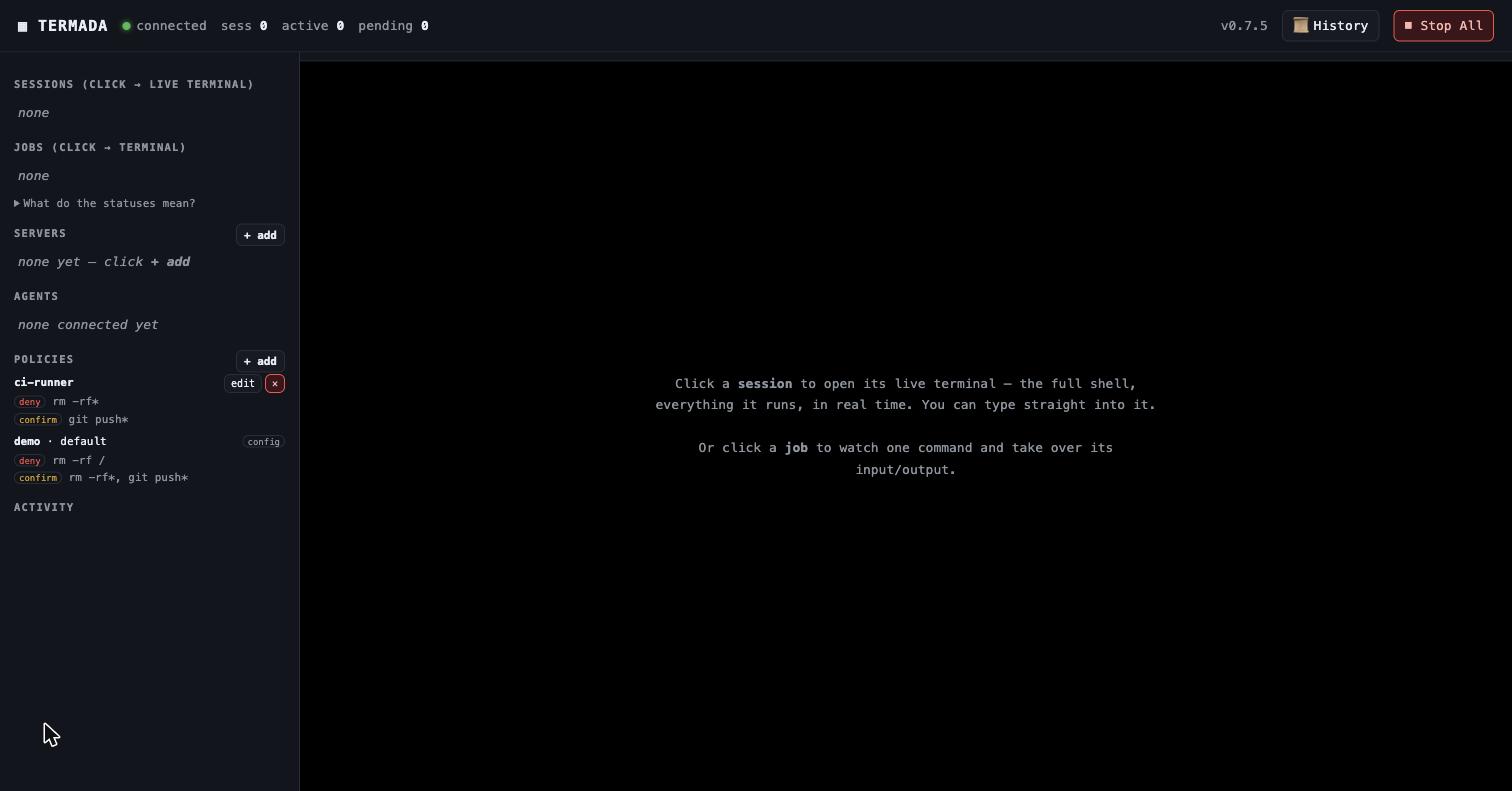
The live dashboard: every session is a real terminal you can watch and take over — block or pause the agent, type in yourself — beside the agent panel, policy management, a tamper-evident History, and a Stop-All active-job kill-switch.
Why
Handing an AI agent a raw shell is fragile and opaque: a command blocks on a
prompt and the agent hangs; cd and exported env vanish between calls; long
builds flood the context window; and you can't see — let alone stop — what's
running. Termada replaces the raw shell with a runtime that is reliable for
the agent and transparent for you:
- Reliable for the agent — blocking
exec_runcalls use bounded wait budgets and return structured output; sessions persistcwd/env; long jobs run async and stream incrementally instead of dumping; interactive prompts are answerable. - Transparent for you — one dashboard shows every agent and every session as
a real terminal; controlled actions matched by
confirmwait for your approval; one button installs a short-lived action admission barrier, requests cancellation of active gateway executions, signals active engine jobs and closes forwards; remote/provider effects still require terminal verification or reconciliation. - Accountable as a mission — an agent's plan, real commands, approval decisions, verification jobs, outcome, and audit anchors stay together. A plan step cannot pass without a real mission job that Termada observed exiting with code zero.
Mission Control
For a concrete operational outcome, Codex or another MCP agent starts with
mission_create(goal, plan). Termada allocates a dedicated persistent session;
normal exec_* calls keep using the same policy, approval, PTY/SSH and audit
paths. The agent attaches each successful job_id with mission_update, then
exports mission_report.
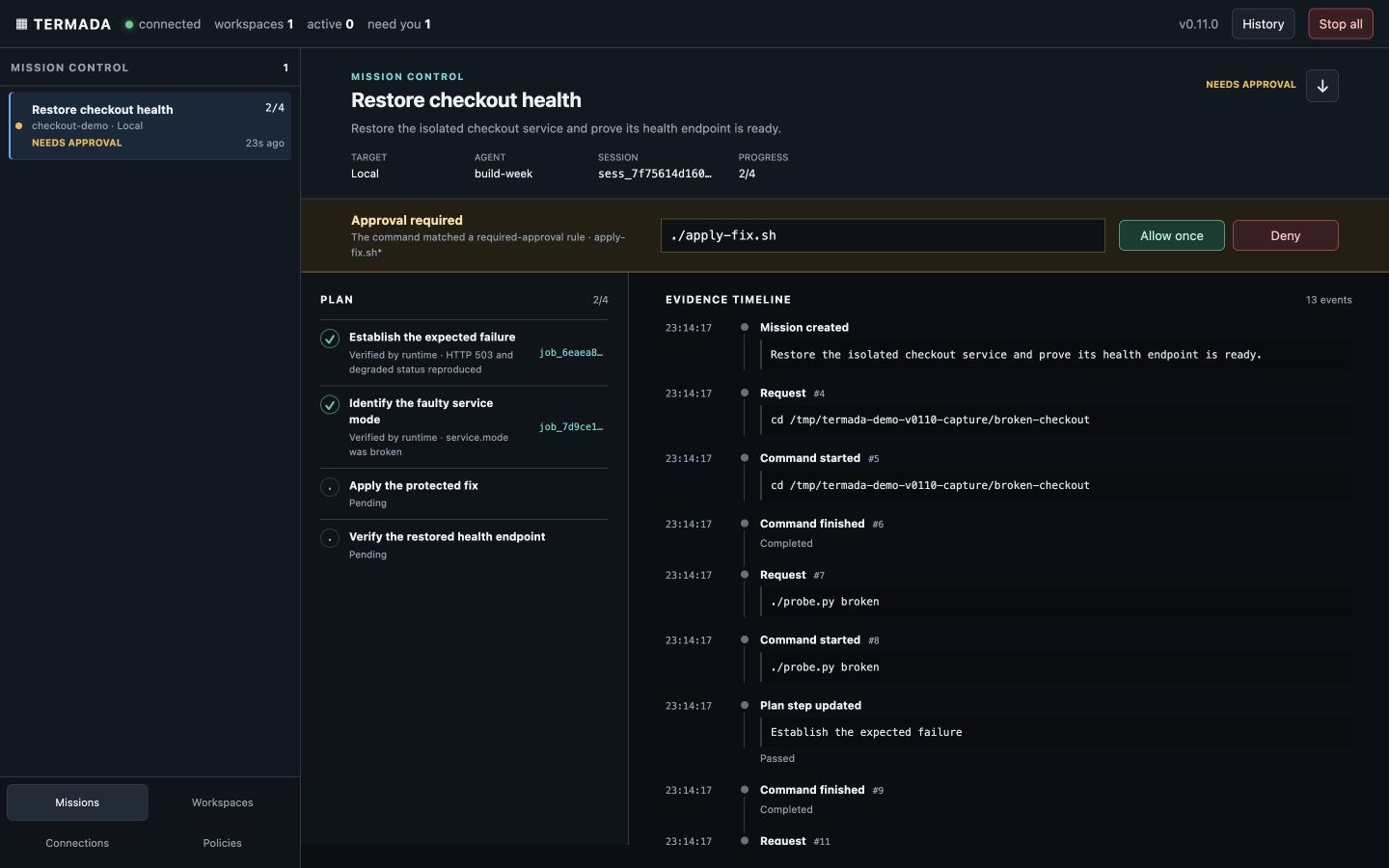
The report separates runtime-observed evidence from agent notes, includes exact
audit sequence/hash anchors, and returns a SHA-256 recorded in the audit. If the
daemon restarts, a non-terminal mission becomes interrupted; mission_resume
creates a fresh session attempt instead of pretending PTY state survived.
Run the isolated real-execution demo:
It starts a broken loopback HTTP service and a separate demo daemon. The
protected repair genuinely changes service state and waits for a human approval;
the final probe must observe HTTP 200. See
demo/mission-control and the
2:40 demo script.
Features
Execution engine
- Persistent-shell sessions over a PTY that keep
cwd, env, and venv between commands. - Async jobs:
exec_start→job_id; poll incrementally by a stable cursor, with sequential bounded pages, a full status state machine and structured errors. - Answer interactive prompts (
exec_write, with secret redaction). Local PTY jobs support process-group signals/kill; remote SSH interrupt/kill requests are best-effort Ctrl-C, not a guaranteed force-kill. - Clean output: stateful ANSI/VT stripping, CR-collapse, bounded retention, best-effort secret redaction.
Live control & observability
- A long-lived daemon with a control plane over a Unix socket;
serve --stdiois a thin shim that proxies MCP to it — so multiple agents share one daemon and one dashboard. - Web dashboard where each session renders as a real terminal (xterm.js, streamed over SSE) with operator take-over: type into a job's PTY, hold the agent's input, or pause its output.
- Workspace labels, bounded state bootstrap, cursor-resumable live updates, English controls and responsive desktop/mobile navigation.
- Approval queue, activity feed, policy/server management, and a Stop-All cancellation barrier for admitted actions, active engine jobs and forwards.
- A TUI (
termada top) and a full inspection CLI. - Synchronously recorded, hash-chained, best-effort-redacted audit log.
termada audit verifyverifies the continuous chain across rotated segments.
Mission Control
- Durable, owner-scoped missions with a goal, up to 24 plan steps, dedicated session, multiple resume attempts, bounded evidence timeline and terminal outcome.
- Runtime enforcement for passed steps (
job_idfrom a mission session,status=exited,exit_code=0) and refusal to succeed while jobs remain active. - Mission-first desktop/mobile dashboard with pinned approval, stale/offline states, compact plan/evidence views and Markdown report download.
Security
- Policy engine: every argv word is shell-quoted; allow / deny / confirm matching sees leading assignments, absolute paths, Darwin case variants, known wrappers and explicit shell payloads. Shell scripts/stdin/interactive shells and ambiguous compound commands fail closed when deny/confirm rules exist. The structured policy additionally matches authenticated principal, tenant, typed action/resource/context, risk and reversibility. Every controlled action that resolves to
confirmparks in the durable operator queue, times out to deny, and can execute only when the caller retries the exact approved action id. - One canonical gateway covers every public side-effect route: current-policy
recheck, one-use approval consume, atomic budget authorization, durable intent,
provider outcome and explicit
outcome_unknownreconciliation state. - Policy-owned budgets cover operations, runtime, monetary amount, tool/model cost, production changes and post-outcome failures at exact global, tenant, principal or recipient scopes.
- age-encrypted vault (no CGO); vault APIs never return secret values to agents. Values are injected daemon-side and registered for best-effort output redaction.
- Per-agent quotas and owner isolation for jobs, sessions, session-scoped remote
file operations and forwards. Sessions and pending confirmations are capped
at 32 per owner and 128 total; live forwards at 16 per owner and 64 total.
Local host paths remain a shared OS/filesystem boundary. Set
security.identity_mode: strictin production: every configured agent must have an existing assigned policy and authenticate with either a unique strong static token or an explicitly enabled, offline-verified short-livedagent_identityJWT. Tokenless, unknown and policyless callers fail closed. A strict policy without structured rules also denies every command that lacks an explicit legacyallowmatch; deny/confirm gates take precedence.developmentretains self-asserted ids for trusted local clients and is the compatibility default for older configs that omit the field. - Optional
security.run_asdrops local shell processes to a dedicated uid and disables daemon-privileged local file tools and daemon-environment inheritance; use commands inside that dropped session for local file access. Remote SFTP remains available. - Every TCP
/api/*request and/metricsrequires either the dashboard token or an enabled, pinned-JWKS-verified human JWT. Operator-only Unix-socket routes similarly require either a verified human JWT or the separatecli.tokenused by the local CLI. - Optional pinned-JWKS operator identity binds subject, tenant, roles, delegation and verified MFA to approvals; policy can require role quorum, distinct approvers and requester exclusion. Optional Ed25519 audit anchoring exports signed fsynced chain heads through a durable HTTPS outbox.
Related MCP Servers
Adoption & maintenance
Factual signals from GitHub, npm, and our automated checks — not a rating.
GitHub stars
4
Stargazers on the source repository.
Last commit
1mo ago
Most recent push to the default branch.
Reviews
No reviews yet — be the first to share how this listing worked for you.
Frequently Asked Questions about Termada
AllMCPs Directory Badge
Showcase your server listing on GitHub or your project documentation. Embed this dynamic SVG badge to highlight official listing status and live engagement.
Badge Style:
Live Dynamic SVG Preview
Markdown (GitHub README)
[](https://allmcps.com/mcp/termada)HTML Embed
<a href="https://allmcps.com/mcp/termada"><img src="https://allmcps.com/api/badge/termada?style=directory" alt="Termada on AllMCPs" /></a>