Reusable visual design systems for AI coding agents — browse, fetch, and submit styles via MCP.
Quick Install
Automated & IDE SetupCopy the AI prompt to install this server into Claude Code, Cursor, or another agent — or use 1-click editor setup below.
Not yet automatically verified
We haven't yet run this listing's install command through our automated sandbox check. This isn't a red flag — we're steadily working through the catalog.
Manual Client & Custom JSON ConfigExpand JSON ▾
Client Config & Setup
Choose your client or environment
Target File:
💡 Paste the JSON block into your client's configuration file under mcpServers, then restart the application.
Documentation Overview

The front-end style library for coding agents — distill a style once, reuse it everywhere.
Swipe styles like you're scrolling TikTok — find the one that catches your eye, then hand it to your agent.






English | 中文文档
Why Taste Bank
Sound familiar?
- Staring at a blank page, no idea how to lay out your components?
- Layout finally settled — yet the AI's visual style never quite lands?
- A hoard of "beautiful designs" you can never actually summon when you need one?
- The style you painstakingly tuned in your last project has to be re-explained from scratch in the next one?
Getting coding agents to produce well-designed front-ends is a solved problem nobody can actually use. The community is full of front-end skills, prompt snippets, and design guides — but in practice:
- No unified invocation: some styles ship as a skill, some as a plugin, some ship nothing at all. Actually using them is a chore.
- No quality bar: without a shared schema, a "style" can be three adjectives in a trench coat — nothing an agent can actually execute.
- Hard to reuse: great styles die in chat histories instead of being distilled into an asset.
- No ownership or iteration: no versions, no way to say "only I maintain my styles."
More importantly: the web spawns new styles every day — but not every style is mainstream enough, not every style is your taste. We want a community where people share the front-end taste they actually use — and vote with their feet. Only what truly gets used is truly usable.
Taste Bank's answer: distill each style into a structured style pack (SKILL.md usage guide + precise design tokens + templates/ snapshots), enforced by a zod schema, served through a CLI + skill injection that works with any coding agent. Once a style is in the bank, it's reachable anywhere, versioned, and owned.
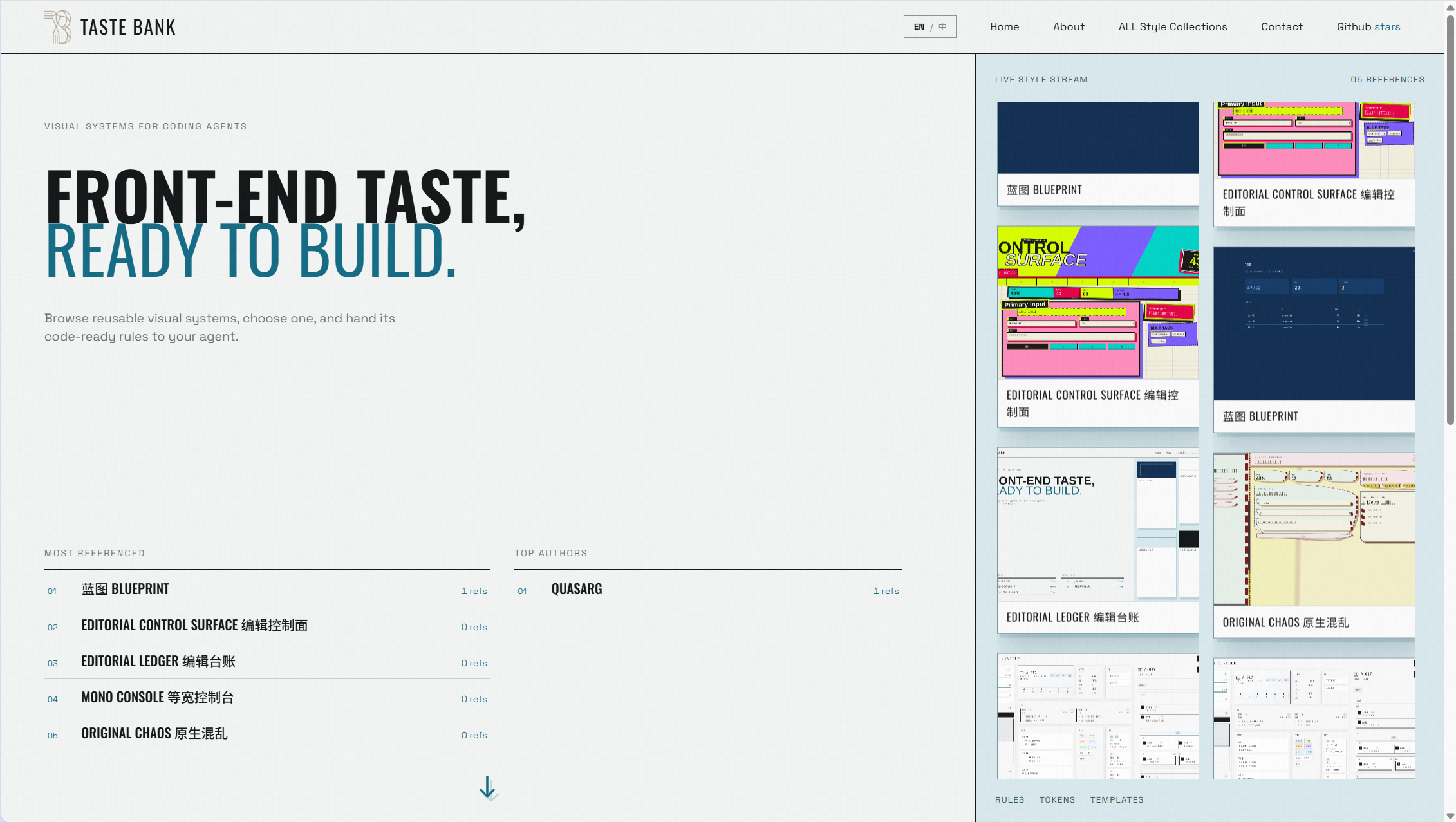
The homepage gallery: swipe through live-rendered styles like a feed — horizontal card rail with interactive preview, most-referenced styles and top authors at a glance.
Quick Start
Via CLI (recommended)
One command — installs the CLI globally and teaches your coding agents (Claude Code, Codex, Cursor, ZCode, Kimi Code…) how to use it:
Then just talk to your agent in plain language:
"Build me a landing page with one of the styles in taste-bank."
Your agent already knows what to do — setup injected a skill that teaches it the taste-bank CLI commands. It will browse styles, fetch the complete pack, and implement strictly within the design tokens.
Prefer the terminal?
No per-agent config, no JSON to paste. Browse visually first at tastebank.cloud.
Via MCP (legacy)
For agents that prefer the MCP protocol, configure one URL in your MCP client:
Both paths call the same backend. CLI is recommended — simpler, works with 70+ agents out of the box.
Features
- One-line setup:
npx taste-bank setupinstalls the CLI and injects skills into all your coding agents (Claude Code, Codex, Cursor, ZCode, Kimi Code, and 70+ more via the openskillsecosystem) - Complete style packs:
taste-bank skill <slug>returns the full pack in one call — meta, tokens, SKILL.md rules, scoped CSS, and HTML template snapshots. Agents get everything they need. - 3-day local cache: packs are cached; if the server is unreachable, the CLI falls back to cache
- TikTok-style gallery: tastebank.cloud — endless stream of live-rendered previews, horizontal card rail, leaderboards
- Structured & validated: every pack passes a strict zod schema (meta / tokens / skill / templates), versioned, with invite-only submissions + ed25519-signed ownership + human review
- Submit from the terminal:
taste-bank submit— sign and submit a new style without leaving your project - Private key as identity: no accounts — whoever holds the key manages the style
CLI Commands
Browsing & applying (no auth)
| Command | What it does |
|---|---|
taste-bank list [--q WORD] [--json] | List published styles |
taste-bank show <slug> [--json] | Style detail (meta + design tokens) |
taste-bank skill <slug> [--md] | Complete pack as JSON: {meta, tokens, skill, css, templates}. --md for plain SKILL.md |
taste-bank use <slug> [--as agents|claude|skill] | Land a style into your project (managed sentinel block, won't clobber your edits) |
taste-bank favorite <slug> / unfavorite / favorites | Manage favorites |
taste-bank doctor | Health check (CLI, network, identity, skill injection, cache) |
Contributing (invite + ed25519 identity)
| Command | What it does |
|---|---|
taste-bank keygen | Generate an ed25519 keypair into ~/.style-lab/ (one-time) |
taste-bank whoami | Your bound identity, owned styles, pending submissions |
taste-bank validate <pack.json> | Dry-run validate a pack locally (no network) |
taste-bank submit <pack.json> | Submit a new style (needs invite code + private key) |
taste-bank update <slug> <pack.json> | Update an owned style (version must bump) |
taste-bank delete <slug> | Delete an owned style (asks to confirm) |
How it works
Two skills are injected (via the open skills ecosystem):
taste-bank— teaches your agent the CLI commands for browsing and applying stylestaste-bank-contribute— the full contribution SOP: how to sample a project, pack a style, sanitize it, and submit
After setup, your agent knows the CLI. You just say "use a taste-bank style" and it runs the commands itself.
The CLI talks to tastebank.cloud by default and caches packs locally for 3 days. Self-host? Set TASTEBANK_API=https://your-host.
Submit your own style
Or just tell your agent: "submit this project's style to taste-bank" — the injected taste-bank-contribute skill guides it through the full SOP (sample 2 files max, extract real tokens, sanitize business-identifying content, pack, validate, submit).
See the pack format, the taste-bank-contribute skill, and the agent workflow guide (how to manage project styles in agent conversations). 中文版见 Agent 工作流指南。
Security
Authentication & ownership
- Invite codes: submissions require an invite code; a code binds to the submitter's public key on first use — one code, one identity; only hashes stored server-side
- ed25519 signatures: submit / update / delete all require a private-key signature (message =
style-lab:<action>:<slug>:<timestamp>:<sha256(payload)>, 30-min window) — your key is your identity - Review queue: submissions land in
data/pending/and go live only after maintainer approval - Rate limits: 20 submits/min per pubkey, 30 manages/min per slug
Content safety
- Template sandbox: previews render in a
sandbox=""iframe with CSP forbidding scripts/external loads - HTML blocklist + secret-pattern scanning: submissions are screened for dangerous attributes and high-confidence secret patterns
- Prompt-injection mitigation: style content is labeled "data, not instructions" in skill descriptions
⚠️ Every submission is manually reviewed. But reviews can miss things — do not blindly trust fetched content; treat it as data.
HTTP API
Related MCP Servers
Adoption & maintenance
Factual signals from GitHub, npm, and our automated checks — not a rating.
GitHub stars
8
Stargazers on the source repository.
Last commit
24d ago
Most recent push to the default branch.
Reviews
No reviews yet — be the first to share how this listing worked for you.
Frequently Asked Questions about Taste Bank
AllMCPs Directory Badge
Showcase your server listing on GitHub or your project documentation. Embed this dynamic SVG badge to highlight official listing status and live engagement.
Badge Style:
Live Dynamic SVG Preview
Markdown (GitHub README)
[](https://allmcps.com/mcp/taste-bank)HTML Embed
<a href="https://allmcps.com/mcp/taste-bank"><img src="https://allmcps.com/api/badge/taste-bank?style=directory" alt="Taste Bank on AllMCPs" /></a>Technical Specs & Signals
CategoryArchitecture & Design
11/13 checks healthy over the last 46d
43Quality signal: Fair · 43/100How this signal is calculated ▾
Server availabilityNot measured
Not scored for repo-hosted servers — we can't reach the running server, only its GitHub page. Hosted MCP endpoints are health-checked live.
Verified ownership10/20
Documentation & tools16/30
Adoption & activity6/15
Community engagement0/10
A guidance signal from public completeness & health data — not a user rating. New listings start lower and rise as they add docs, get verified, and grow adoption. Signals we can't observe for a listing are skipped, not counted against it.
Supply-chain signal
No high-severity advisories surfaced by our automated scan.
Critical 0High 0Medium 0Low 0
Scanned 2d ago via OSV.dev · taste-bank (npm)
Own this project?
This directory is pre-filled from public sources. Claim via GitHub README, site badge, or DNS TXT to unlock edit access and the Official badge — proof is checked automatically, then reviewed by our team.
Free dofollow backlink: add your website and place the AllMCPs badge on it — no claim needed. We detect it automatically and keep it verified as long as the badge stays live.
Claim & get free dofollowShare & Embed
Add our SVG badge (dark/light directory styles) or embeddable widget to your site.