Taskswarm README
The full upstream README, mirrored here for reference. Install config, tool schemas, adoption signals, and an original overview live on the Taskswarm listing page.
TaskSwarm


Install • Quickstart • What it does • CLI reference • MCP Server • How it compares • FAQ
Self-hosted event server and CLI that fires a local OS notification and updates a live status page the instant a parallel coding-agent session blocks, needs review, fails, or finishes.

You're running three Claude Code sessions across two repos. One of them hit a permission prompt four minutes ago and has been sitting there ever since, waiting on you. You didn't know, because nothing told you. You just tabbed back to check.
TaskSwarm is a self-hosted event server that fixes that. Every agent session reports its state, and the instant one goes blocked, needs review, fails, or finishes, TaskSwarm fires a local OS notification and updates a live status page. No polling terminals. No account. No cloud dependency.
Install
TaskSwarm ships as two independent, equally first-class distributions of
the same event server -- an npm package (this codebase, TypeScript) and a
PyPI package (taskswarm-cli, Python, python/). Pick whichever fits your
toolchain; the server and CLI don't need to be the same distribution as
whatever agent you're reporting from.
npm (JS/TS): live on npm as taskswarm-cli:
Prefer not to install globally? npx taskswarm-cli start runs the same
binary with no install step.
pip (Python): live on PyPI as taskswarm-cli (renamed from the
original taskswarm package, which has stopped receiving updates and
points here):
See python/README.md for the Python-specific guide. Both distributions speak the same wire protocol (the same event schema, the same notification-dedup rule), so a Python-started server and an npm CLI reporting into it (or vice versa) work together without issue.
Quickstart
Open the live status page URL printed by start. The row for my-fix updates the instant each report-status call lands, no refresh. This is the actual output from that flow, captured while writing this README:
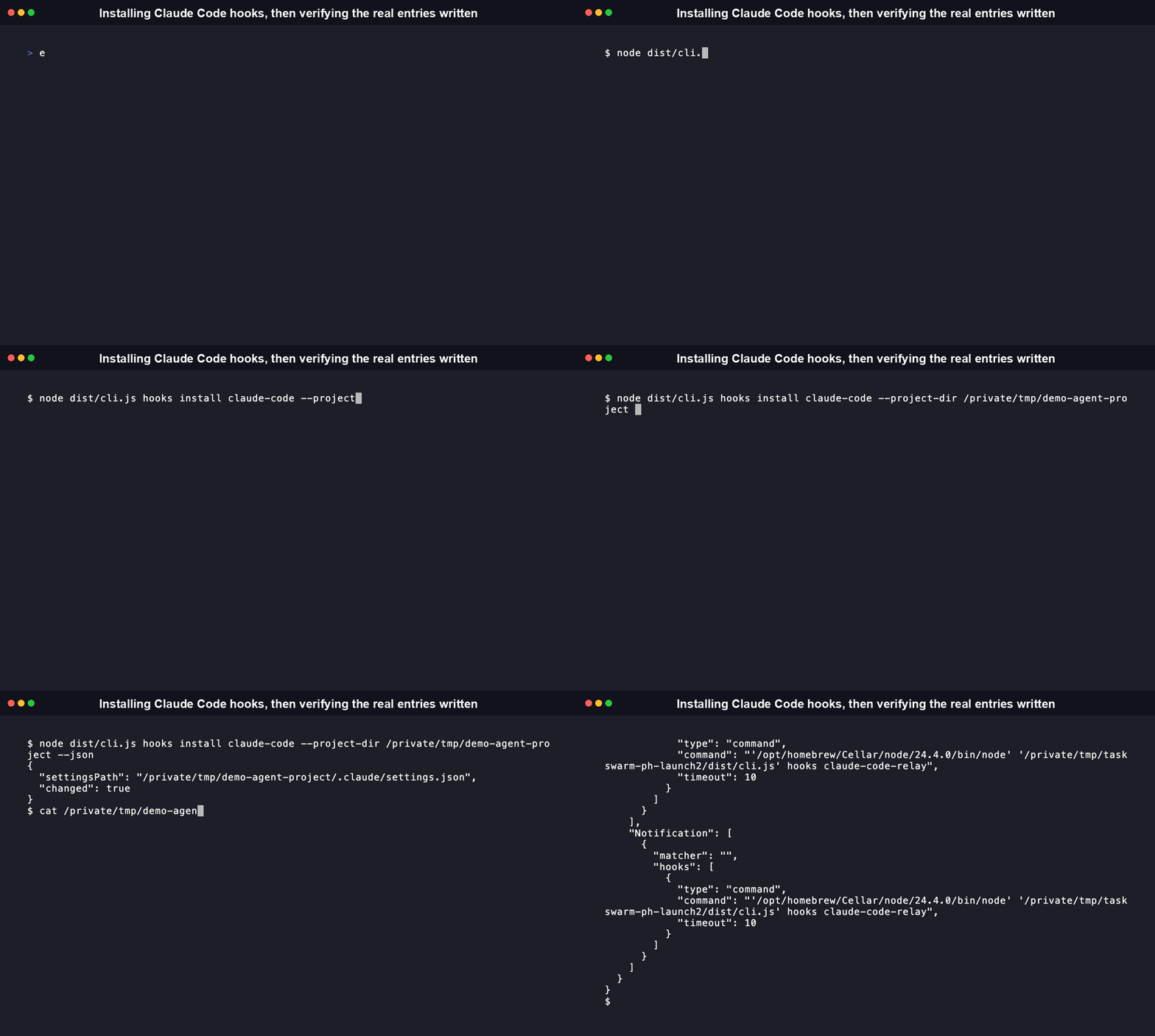
Wire it into Claude Code directly instead of calling report-status by hand:
This writes Stop/Notification hooks into .claude/settings.json for the current project. Every turn Claude Code finishes, and every permission prompt or idle wait it surfaces, now reports into TaskSwarm automatically.
Locally track tasks independent of live session state (a lightweight to-do list, not the event feed):

What it does
- Push notifications, from a board you don't have to keep open. The moment a session transitions to
blocked,needs-review,failed, ordone, TaskSwarm fires a native OS notification (osascripton macOS, a terminal bell fallback elsewhere). Measured dispatch latency below. None of paperclip, Vibe Kanban, or Multica (see comparison below) do this; all three are boards you have to be looking at. - A live status page that updates over server-sent events, not polling. One flat table: session, repo, agent type, status, last-event timestamp. No refresh button.
- Real Claude Code hook integration, verified against the published hooks reference.
taskswarm hooks install claude-codewritesStopandNotificationhook entries into.claude/settings.json, pointed at the exact Node binary and CLI script already on disk. It deliberately avoidsnpx; see the code comment insrc/adapters/claude-code-adapter.tsfor why floating registry resolution on every hook fire is a supply-chain risk. One caveat stated plainly: Claude Code'sStophook fires per-turn, not per-task, so a long multi-turn session currently reportsdoneafter every turn, not just the final one. - A wrapper-script fallback for Codex, Cursor, or anything else.
taskswarm agent report-status --task <id> --repo <path> --state <state>is the same primitive the Claude Code adapter calls under the hood. Any script wrapping any CLI agent can call it directly. - A bearer-token-gated local API, bound to loopback by default.
POST /eventsand the live page both require the token TaskSwarm generates on first run (~/.taskswarm/config.json, written0600). Rotate it withtaskswarm token rotate. - Agent-native by design. Every subcommand ships a
--jsonflag with a stable schema, including error output, so a script calling this CLI never has to scrape human-formatted text. - ntfy.sh is opt-in, never default. The only notification channel that leaves your machine, and it's off unless you turn it on. The self-hosted claim holds end to end without it.
[!NOTE] The native OS push notification only fires on macOS, via
osascript. On Linux and Windows, TaskSwarm falls back to a console line plus a terminal bell instead of a system notification, still local, still without ntfy.sh unless you opt in.
CLI reference
Captured directly from --help output on the built CLI (node dist/cli.js <command> --help):
| Command | Description | Key options |
|---|---|---|
taskswarm start | Start the TaskSwarm server and print the live status page URL | --json |
taskswarm task add | Register a new task | --title <title> (required), --repo <path> (required), --json |
taskswarm task list | List tracked tasks, enriched with live status when the server is reachable | --json |
taskswarm agent report-status | Report a status transition for a task/session to the local server | --task <id> (required), --repo <path> (required), --state <state> (required, one of queued|running|blocked|needs-review|done|failed), --blocked-reason <text>, --agent-type <type> (claude-code|codex|cursor|generic, default generic), --json |
taskswarm token rotate | Generate a new bearer token, invalidating the old one | --json |
taskswarm hooks install <adapter> | Install hooks for an agent integration (currently claude-code) | --scope <project|local|user> (default project), --project-dir <path>, --json |
taskswarm hooks claude-code-relay | Internal: reads a hook payload from stdin and relays it. Installed automatically; not meant to be run by hand. | none |
Every subcommand also takes -h, --help. taskswarm --version prints the
installed package's own version number, read live from package.json
(so it always matches whatever release you actually have installed,
rather than a fixed number that would go stale here).
A real failure, for reference
Both exit non-zero with a plain-English message and no stack trace, including under --json.
Library API reference
The npm package is also importable, not just runnable as a CLI: main/types point at dist/index.js/dist/index.d.ts, and src/index.ts exports a real public surface for anything that wants to embed the event store, server, or adapters directly instead of shelling out.
Schema (src/schema/events.ts)
agentEventSchema,agentEventInputSchema-- Zod schemas for the event envelopetoAgentEvent(input: AgentEventInput): AgentEvent-- fills inevent_id/timestamp/schema_versiondefaultsAGENT_TYPES,AGENT_STATUSES-- the const arrays backing theAgentType/AgentStatusunion typesNOTIFY_ON_STATUSES: ReadonlySet<AgentStatus>-- the four statuses that trigger a notification:blocked,needs-review,failed,doneCURRENT_SCHEMA_VERSION-- the current envelope version number
Server (src/server/)
class EventStore extends EventEmitter-- in-memory session store backed by an append-only JSONL log.constructor(logPath?: string, options?: EventStoreOptions). Methods:append(event): { previousStatus, previousBlockedReason },getSession(sessionId): SessionState | undefined,listSessions(): SessionState[],size(): number. Emits'event'on every append.startServer(options?: StartServerOptions): Promise<RunningServer>-- boots the event store and the HTTP/SSE server.RunningServeris{ server, store, config, url, close }.loadOrCreateConfig(): TaskSwarmConfig,saveConfig(config): void,rotateToken(): string,generateToken(): string,getTaskSwarmHome(): string
Notifications (src/notify/index.ts)
shouldNotify(status, previousStatus, blockedReason?, previousBlockedReason?): boolean-- the dedup rule. Keys on the(status, blocked_reason)pair, not status alone, so two different permission prompts in a row both notify.notify(event, previousStatus, previousBlockedReason, options?: NotifyOptions): void-- fires the enabled channels. Local OS notification is always on; ntfy.sh only fires whenoptions.ntfy.enabledis true.
Adapters (src/adapters/)
interface AgentAdapter { agentType: AgentType; name: string; toEventInput(raw): AgentEventInput }-- the plugin point every integration implementsclass GenericAdapter implements AgentAdapter-- the wrapper-script fallback pathclass ClaudeCodeAdapter implements AgentAdapter,installClaudeCodeHooks(options: InstallHooksOptions): InstallHooksResult-- the real Claude Code hooks integration
Embedding the server directly instead of running taskswarm start, verified working against the built package:
Types exported alongside every function: AgentEvent, AgentEventInput, AgentType, AgentStatus, SessionState, TaskSwarmConfig, NotifyOptions, RunningServer, StartServerOptions, HookInstallScope, InstallHooksOptions, InstallHooksResult.
The Python distribution mirrors the same surface (snake_case instead of camelCase, py.typed for type checkers), also verified working against the built package:
MCP Server
TaskSwarm's Python distribution ships a Model Context Protocol server, so an MCP-compatible agent (Claude Desktop, Claude Code, an orchestrator) can call TaskSwarm directly as a tool instead of shelling out to the CLI and parsing text.
It exposes one tool, run, a generic subprocess wrapper: pass it the same argument list you'd pass on the command line, and it shells out to the installed taskswarm binary, parses the resulting JSON, and returns it. Every failure mode (missing binary, launch error, timeout, non-zero exit, unparseable output) comes back as a plain {"error": ...} dict instead of raising, so a bad call can't crash the server.
To register it with an MCP-compatible client such as Claude Desktop, add it to the client's server config:
This assumes taskswarm-mcp is already on PATH (installed via the mcp extra above). If you installed it somewhere else, replace "command" with the full path to the console script. This server is currently Python-only; the npm distribution does not yet ship an MCP server.
How it compares
Verified live against each project's GitHub API metadata and README, 2026-08-03. TaskSwarm's own numbers are measured, not estimated. Methodology below the table.
| TaskSwarm | paperclip | Vibe Kanban | Multica | |
|---|---|---|---|---|
| Stars | pre-launch | 75,547 | 27,656 | 43,690 |
| License | MIT | MIT | Apache-2.0 | Source-available (modified Apache-2.0; restricts hosted commercial use) |
| Maintenance status | active | active (commits today) | sunsetting: company shut down, README carries a shutdown banner, last commit 2026-04-24, over 3 months stale as of this writing | active (commits today) |
| Push/desktop notification on state change | yes: local OS notification by default, ntfy.sh opt-in | not found in README | not found in README | not found in README |
| Primary UI | live status table (SSE) | full Kanban board + org chart | full Kanban board | full Kanban board |
| Self-hosted, no account | yes | yes | yes (self-hosting guide, Docker) | yes (Docker) |
| Idle memory footprint | ~39 MB (measured) | not measured (out of scope) | not measured (out of scope) | not measured (out of scope) |
| Cold start (server boot to reachable) | ~0.19 s (measured) | not measured | not measured | not measured |
TaskSwarm isn't trying to out-board any of these three. paperclip and Multica are built for running a whole roster of agents like an org chart, and Vibe Kanban (while it lasted) was a full planning-and-review workspace. TaskSwarm stays narrow: the one thing none of the three ship is a push signal when a session needs you, and that's the whole product here.
Benchmark methodology (so you can reproduce it): measured on macOS 26.5.1, Apple Silicon (arm64), Node v24.4.0, npm 11.15.0, 2026-07-15.
- Cold start: process launch to a
curlreceiving HTTP 200 from the live status page URL, timed withtime.perf_counter(), averaged across repeated runs (158 to 188 ms observed). - Idle memory:
ps -o rsson the runningnode dist/cli.js startprocess, a few seconds after boot with no active sessions (38.4 to 39.4 MB observed across runs). - Event-ingestion-to-notification-dispatch latency: wall-clock time for a
POST /eventsrequest to return201, over 20 requests withstatus: blocked(the code path that synchronously callsnotify(), which spawns the OS notification process, before the HTTP response is sent). Median 3.1 ms, mean 5.8 ms, p95 24.1 ms, n=20. - Total time-to-first-board (a real first-time user, fresh
git clone):npm install(2.05 s) plusnpm run build(0.78 s) plusstartto live page reachable (0.15 s), totaling 2.99 s, on a machine with a warm local npm cache. Target was under 60 seconds; actual measured result is roughly 20x under that.
Numbers not listed for the other three tools are not estimated placeholders. They are genuinely not measured, because running their full stacks (Rust, PostgreSQL, Docker Compose) wasn't in scope for this pass. Their star counts, license terms, and maintenance status above are verified live facts, not benchmarks.
Where TaskSwarm sits in the wider 2026 field
paperclip, Vibe Kanban, and Multica are the closest full-board comparables, but they're not the whole picture. Running several coding agents in parallel became one of the most active corners of open source in 2026: Anthropic's own 2026 Agentic Coding Trends Report names multi-agent coordination as one of eight trends reshaping how software gets built, and OpenAI reported Codex alone crossed 5 million weekly users by June 2026. A whole wave of orchestration UIs shipped alongside that growth. Here's where TaskSwarm sits next to the newer parallel-agent tools that cover a similar workflow with a different shape, verified live 2026-08-03:
| Tool | Stars | License | What it actually is |
|---|---|---|---|
| TaskSwarm | pre-launch | MIT | Notification-only event server; no UI you have to keep open |
| Claude Squad | 8,231 | AGPL-3.0 | tmux-based terminal manager for parallel agent sessions, no notification feature found in its README |
| Superset | 12,763 | Elastic License 2.0 (source-available) | Full code editor built around parallel agents; "get notified when they need attention" per its own README |
| Nimbalyst | 1,394 | MIT | Visual desktop workspace with a mobile companion app that pushes notifications; syncs through a hosted collaboration server |
| Paneflow | 48 | GPL-3.0 | Native Rust pane workspace with an attention queue and desktop notifications |
| Conductor (Melty Labs) | closed source, no public repo | proprietary | macOS-only worktree dashboard; not installable from npm or PyPI |
Every one of these gives you somewhere to watch your agents work. TaskSwarm is built on the opposite assumption: you're not watching, so it pushes to you instead. Adjacent to this, the standardized agent-integration protocol MCP grew into its own mainstream category over the same period, 10,000+ active public MCP servers and 97M+ monthly SDK downloads as of Anthropic's December 2025 ecosystem update -- the same underlying shift toward agents that plug into standard integration points, which is the same reason TaskSwarm's own wrapper-script adapter (taskswarm agent report-status) is deliberately protocol-agnostic rather than tied to one agent's hook format.
What TaskSwarm is, and why it exists
Running one coding agent is a conversation. Running three or four in parallel turns into a tab-switching problem: nothing pushes state to you, so you end up polling terminals by eye just to find out one of them has been sitting on a permission prompt for ten minutes. TaskSwarm exists to close that gap: a push signal for the moment a session actually needs a human.
The core (event server, CLI, live status page, Claude Code hook integration) is MIT-licensed and free to self-host, for individual use, for a team, for anything. There is no hosted tier and no paid tier shipped currently. The self-hosted core is the entire product right now.
FAQ
Does this replace my Kanban board / Linear / GitHub Projects? No. Those track work items a human plans. TaskSwarm tracks live agent session state and tells you the instant it changes. Different job.
Do I need Claude Code specifically?
No. taskswarm hooks install claude-code is the one verified native integration currently shipped. Codex, Cursor, or anything else works through the same primitive that adapter calls internally: taskswarm agent report-status, callable from any wrapper script around any CLI agent.
Where does my data go?
Nowhere, by default. The server binds to 127.0.0.1, requires a bearer token for every request, and writes state to ~/.taskswarm/ (or wherever TASKSWARM_HOME points) on your own disk. The only optional channel that leaves your machine is ntfy.sh, and it's off unless you explicitly enable it.
Is this going to start charging me later? The MIT-licensed core stays free. Everything described in this README is the whole product as it exists today, not a trial or a limited tier of something bigger.
Why not just use tmux and watch the panes? That's the status quo this project is a response to. It works until you're running more than two or three sessions at once, at which point you're spending more time polling panes than writing code.
What happens if the server isn't running when I call a command?
Commands that need it fail fast with a specific message (could not reach TaskSwarm server at http://127.0.0.1:4173 -- is it running? (taskswarm start)), not a stack trace. task add and task list still work without the server; they just skip live-status enrichment.
What is TaskSwarm, exactly?
A self-hosted event server plus a CLI. Agent sessions, or a wrapper script around any agent, report status to it (taskswarm agent report-status), and it pushes a local OS notification and updates a live SSE status page the instant a session goes blocked, needs-review, failed, or done. It doesn't launch, schedule, or run agents itself; it only tracks and pushes state for sessions that are already running somewhere else.
Can I use TaskSwarm as a library instead of the CLI?
Yes. Both distributions export a real programmatic surface, not just a bin entry: import { startServer, EventStore } from 'taskswarm-cli' on npm, from taskswarm import start_server, EventStore on PyPI. See the Library API reference above for the full export list and a working example of each.
What are the platform and install requirements?
The npm build (taskswarm-cli) needs Node.js >=18.18.0, per the engines field in package.json. The PyPI build (also taskswarm-cli) needs Python >=3.9, per pyproject.toml, which also declares Operating System :: OS Independent. One caveat that's platform-specific in practice: the native OS push notification only fires on macOS, via osascript (see src/notify/os-notify.ts). On Linux and Windows, TaskSwarm falls back to a console line plus a terminal bell instead of a system notification, still local, still without ntfy.sh unless you opt in.
How does TaskSwarm compare to a specific competitor, like Vibe Kanban or paperclip? See the comparison tables above for the full breakdown, but the short version: paperclip and Multica are built to run and visualize a whole roster of agents like an org chart, and Vibe Kanban was a full planning-and-review workspace before the company behind it shut down (its README carries a shutdown banner as of this writing). None of the three list a push/desktop notification feature in their own README. TaskSwarm skips the board entirely and only does the one thing: push a signal the instant a session needs you.
Can I use TaskSwarm in a commercial or paid product? Yes. The core (event server, CLI, live status page, Claude Code hook integration) is MIT-licensed with no field-of-use restriction, so self-hosting it inside a commercial product, a paid service, or an internal tool is fine. That's a real point of difference from Multica in the comparison table above, which ships under a modified Apache-2.0 license that explicitly restricts hosted commercial use.
Contributing
Issues and pull requests are welcome. Before opening a PR:
All three must pass clean. For the Python distribution, cd python && pip install -e ".[dev]" && pytest. See CONTRIBUTING.md for the full checklist covering both codebases.
License
MIT. See LICENSE. Free to self-host, modify, and redistribute, individually or as a team. No hosted or paid tier exists in this version.