AllMCPs
BrowseBestCategoriesStackCompareToolsGuidesBlog
Log in Submit MCP

Stay in the loop

Get new MCP servers and top picks in your inbox.

AllMCPs

The open directory for discovering and installing Model Context Protocol servers.

AllMCPs on GitHub (opens in a new tab)
Launched onTiny Startupstinystartups.com
Explore
  • Browse servers
  • Best MCP servers
  • Categories
  • MCP clients
  • Agent prompts
  • Stack Builder
  • Compare servers
  • Random discovery New
  • Submit a server
  • Pricing & Boost Boost
Learn
  • Guides hub
  • What is MCP?
  • Install guide
  • Build an MCP server
  • Deploy an MCP server
  • Security guide
  • Troubleshooting
  • MCP for SEO & AEO
  • Protocol versioning
  • Transports: stdio vs HTTP
  • State of MCP (stats)
  • Blog & updates
Tools
  • All developer tools
  • Config generator
  • Config validator
  • Config auditor
  • MCP playground
  • Token calculator
  • OpenAPI → MCP
  • Badge generator
For agents
  • REST API docs
  • Trust & traffic Live
  • Remote MCP server SSE ↗ (opens in a new tab)
  • llms.txt ↗ (opens in a new tab)
  • Catalog JSON ↗ (opens in a new tab)
Company
  • About
  • Advertise Sponsor
  • Contact
  • GitHub ↗ (opens in a new tab)
  • Terms
  • Privacy
AllMCPs VerifiedAllMCPs VerifiedFeatured on Nick LaunchesFeatured on Nick LaunchesLaunch Llama NewsletterLaunch Llama NewsletterVerified DR - allmcps.comVerified DR - allmcps.comFeatured on SaaSGrowFeatured on SaaSGrowFeatured on Twelve ToolsFeatured on Twelve ToolsFeatured on Saaspa.geFeatured on Saaspa.geFeatured on Findly.toolsFeatured on Findly.toolsFeatured on Startup FameFeatured on Startup FameFeatured on LaunchKiwiFeatured on LaunchKiwiFeatured on ScrollLaunchFeatured on ScrollLaunchFeatured on DailyPingsFeatured on DailyPingsFazier badgeFazier badgeFeatured on NewTool.siteFeatured on NewTool.siteFeatured on saasfame.comFeatured on saasfame.comDR Checker - Domain RatingDR Checker - Domain RatingListed on Turbo0Listed on Turbo0Launched on LaunchBoard - Product Launch PlatformLaunched on LaunchBoard - Product Launch PlatformList on SimilarlabsList on Similarlabshttps://codetrendy.comhttps://codetrendy.comListed on DevTool.ioFeatured on BuildlistFeatured on BuildlistLaunched on Tiny StartupsFeatured on ShowMeBestAIFeatured on ShowMeBestAIFind us on LaunchZoneFind us on LaunchZoneAllMCPs VerifiedAllMCPs VerifiedFeatured on Nick LaunchesFeatured on Nick LaunchesLaunch Llama NewsletterLaunch Llama NewsletterVerified DR - allmcps.comVerified DR - allmcps.comFeatured on SaaSGrowFeatured on SaaSGrowFeatured on Twelve ToolsFeatured on Twelve ToolsFeatured on Saaspa.geFeatured on Saaspa.geFeatured on Findly.toolsFeatured on Findly.toolsFeatured on Startup FameFeatured on Startup FameFeatured on LaunchKiwiFeatured on LaunchKiwiFeatured on ScrollLaunchFeatured on ScrollLaunchFeatured on DailyPingsFeatured on DailyPingsFazier badgeFazier badgeFeatured on NewTool.siteFeatured on NewTool.siteFeatured on saasfame.comFeatured on saasfame.comDR Checker - Domain RatingDR Checker - Domain RatingListed on Turbo0Listed on Turbo0Launched on LaunchBoard - Product Launch PlatformLaunched on LaunchBoard - Product Launch PlatformList on SimilarlabsList on Similarlabshttps://codetrendy.comhttps://codetrendy.comListed on DevTool.ioFeatured on BuildlistFeatured on BuildlistLaunched on Tiny StartupsFeatured on ShowMeBestAIFeatured on ShowMeBestAIFind us on LaunchZoneFind us on LaunchZone
© 2026 Jackalope Digital LLC. All rights reserved.
  1. Home
  2. 💻 Developer Tools
  3. Task tracking (sessions, ETA, dashboard)
T
Health: Not checked yetWe have not completed a health check for this listing yet.No health check has run yet.

Task tracking (sessions, ETA, dashboard)

User RatingsBe the first to rate and review this MCP server! Enrichment pendingWe haven’t run our AI enrichment pass on this listing yet, so the overview, use cases, and FAQ below may be sparse or missing. We work through the catalog over time — check back soon.
View RepositoryVisit Website

Track long-running tasks in real time: sessions, steps, speed, ETA, HTTP API and TUI dashboard.

Quick Install

Automated & IDE Setup

Copy the AI prompt to install this server into Claude Code, Cursor, or another agent — or use 1-click editor setup below.

One-click editor setup isn’t available for this listing yet — we don’t have a confirmed install command, and we’d rather show nothing than point your editor at the wrong package or host. Follow the project’s own setup instructions, linked above.

Manual Client & Custom JSON ConfigExpand JSON ▾
No confirmed setup config for this listing yet. We only publish a config block when the install details come from the project itself — its README, its docs, or a verified owner. We haven’t found those for Task tracking (sessions, ETA, dashboard), and we’d rather show nothing than a guess you’d paste into your client. Follow the project’s own setup instructions for the current steps.
Install Directory Badge Claim listing Alternatives💻 More in Developer Tools

Documentation Overview

MCP Tracking

tests License: MIT Python 3.11+

English summary. Local-first tracking of long-running tasks: an MCP server for Claude or Lyra, a small HTTP API on 127.0.0.1:8765 and a Textual terminal dashboard. Sessions have items, progress, logs and templates (download, machine, free, lyra_task, movie); pollers feed qBittorrent and Bazarr sessions automatically. Install: pip install . then mcp-tracking, mcp-tracking-api, mcp-tracking-ui. No cloud, no telemetry.

Serveur MCP de suivi en temps reel avec dashboard terminal. Permet a Claude/Lyra de tracker n'importe quelle operation longue ET alimente automatiquement les sessions depuis le media-server (qBittorrent, Bazarr, conversion DV).


Pourquoi c'est conçu pour des agents LLM

Un agent LLM (grand modèle de langage) qui lance une tâche longue (conversion, clone de VM, téléchargement) ne peut pas rester bloqué à la regarder, et il ne voit rien de ce qui se passe entre deux de ses tours. Ce serveur lui sert de mémoire de travail partagée :

  • Un bus de progression commun. L'agent, les scripts shell et les pollers écrivent dans les mêmes sessions (outils MCP ou API HTTP locale sur 127.0.0.1:8765) : l'agent lance la tâche, rend la main, et relit l'état plus tard avec tracking_get.
  • Des métriques calculées, pas devinées. Vitesse lissée sur 2 minutes, ETA, temps écoulé (metrics.py) : l'agent reçoit des chiffres au lieu d'extrapoler lui-même.
  • Une tâche muette se voit. Une session running sans mise à jour depuis 10 minutes est marquée stale : l'agent distingue « encore en cours » de « processus mort ».
  • Arrêter vise le bon processus. Une session peut porter le pid de son processus ; l'heure de démarrage relevée dans /proc évite de signaler un pid réutilisé par un autre programme. tracking_stop envoie SIGTERM et garde la session, tracking_kill envoie SIGKILL et la supprime.
  • Pas de mise à jour perdue. L'état est un fichier JSON local, protégé par un verrou flock et réécrit de façon atomique (storage.py) : plusieurs agents et scripts peuvent écrire en même temps.
  • Des gabarits par type de tâche (download, machine, movie, lyra_task, free) pour que chaque agent décrive son travail de la même façon.

Local-first et self-hosted : aucun cloud, aucune télémétrie, tout reste sur la machine (on-prem). Utilisé par Lyra, l'assistant vocal French-first, et par n'importe quel client MCP (Claude Code, Claude Desktop...).

Demo
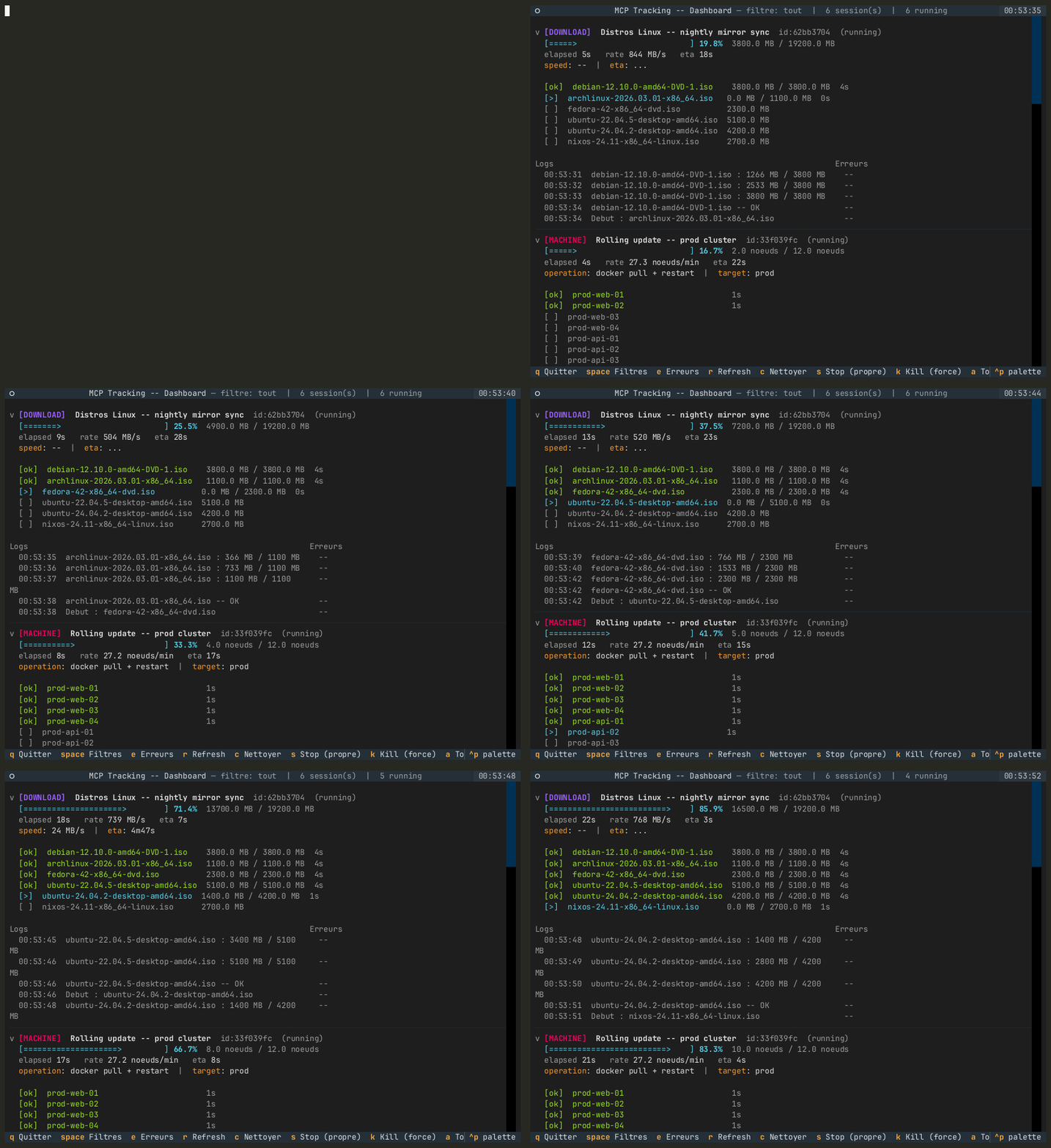
Dashboard terminal alimente par les simulations du mode test

Enregistree avec docs/demo/record.sh : server.py --test alimente quatre sessions simulees dans un repertoire d'etat temporaire (TRACKING_STATE_DIR), puis server.py --ui ouvre le dashboard dessus. Les sessions reelles ne sont pas touchees.

Sommaire

  • Pourquoi c'est conçu pour des agents LLM
  • Architecture
  • Installation
  • Services systemd
  • Lancement
  • Dashboard
  • Integration media-server
  • Outils MCP
  • Templates
  • Securite
  • Ajouter un template

Architecture

Code
MCP/tracking/
  server.py              -- Serveur MCP (outils Claude/Lyra) + point d'entree --ui / --test
  api.py                 -- API HTTP locale (127.0.0.1:8765) pour les scripts externes
  mutations.py           -- Mutations d'une session, partagees par api.py ET server.py
                            (horodatage items, historique, niveaux de log, auto-completion)
  metrics.py             -- Metriques derivees (vitesse, ETA, ecoule, stale) -- logique pure,
                            calculees a la lecture, jamais stockees
  storage.py             -- Persistence JSON atomique + verrou fichier + cache mtime + purge TTL
  models.py              -- Modeles pydantic (TrackingSession, TrackingItem, LogEntry, ProgressPoint)
  templates.py           -- Templates builtin + templates utilisateur (JSON)
  ui.py                  -- Dashboard Textual (TUI temps reel) + modales stop/kill
  sim.py                 -- Simulations de demo (server.py --test)
  poller.py              -- Daemon polling qBittorrent (10s) + Bazarr (60s)
  tracking-api.service   -- Unite systemd (systeme) pour api.py
  tracking-poller.service -- Unite systemd (systeme) pour poller.py
  install.sh / deploy.sh -- Installation initiale / redeploiement des services
  Makefile               -- make test | smoke | deploy | ui
  tests/                 -- unitaires (storage, metrics) + integration/ (API HTTP reelle)

Fichiers d'etat et configuration

FichierEmplacementSurcharge
tracking_state.json~/.local/state/tracking/TRACKING_STATE_DIR
poller_state.json~/.local/state/tracking/TRACKING_STATE_DIR
templates.json (templates utilisateur, optionnel)~/.config/tracking/TRACKING_TEMPLATES_FILE
credentials/*.cred (qBittorrent, Bazarr)a cote du code, gitignore--

Un ancien tracking_state.json a cote du code est migre automatiquement au premier demarrage (copie, jamais supprime).

Variables d'environnement de retention :

VariableDefautRole
TRACKING_TTL_DAYS7Purge des sessions done / error / paused
TRACKING_TTL_RUNNING_H24Purge des sessions running orphelines (plus mises a jour)

Flux de donnees complet

Code
Claude/Lyra (outils MCP)
      |
      v
  server.py ─────────────────────────────────────────┐
                                                      |
qBittorrent API (poll 10s)                            |
      |                                               |
Bazarr API (poll 60s)    ──> poller.py ──> api.py ──> mutations.py ──> storage.py ──> ~/.local/state/tracking/tracking_state.json
      |                                               |                        |
dv_webhook_server.py                                  |                        v
      |                                               |                     ui.py
      v                                               |               (rafraichit chaque seconde)
dv_convert.py ──────────────────────────────────────>
   (metriques temps reel ffmpeg/dovi_tool)

Le fichier d'etat est ecrit a chaque modification via ecriture atomique (os.replace) sous verrou fichier (tracking_state.lock). Tous les processus (MCP, API, poller, dashboard) partagent cet unique fichier ; chaque lecture verifie le mtime pour invalider son cache.

Toute mutation (HTTP ou MCP) passe par mutations.py, qui garantit le meme comportement sur les deux chemins : started_at / finished_at poses sur les items et la session, historique de progression (fenetre glissante de 40 points), niveaux de log info / warn / error, auto-completion quand tous les items sont termines.

Metriques derivees

GET /sessions et tracking_get renvoient un bloc metrics calcule a la volee par metrics.py :

ChampSens
percentprogression (plafonnee a 100)
rate, rate_strvitesse sur les 120 dernieres secondes (2.0 MB/s, 30.0 u/min)
eta_seconds, eta_strtemps restant estime (session running uniquement)
elapsed_seconds, elapsed_strdepuis created_at jusqu'a finished_at ou maintenant
idle_seconds, stalestale = running sans mise a jour depuis 10 min (affiche dans le TUI)

Installation en une ligne

bash
uvx mcp-tracking          # serveur MCP (stdio) ; avant publication : uvx --from git+https://github.com/amineutron/mcp-tracking mcp-tracking
uvx --from mcp-tracking mcp-tracking-api   # API HTTP 127.0.0.1:8765
uvx --from mcp-tracking mcp-tracking-ui    # tableau de bord terminal

Configuration Claude Desktop / Claude Code (mcpServers) :

config.json
{ "tracking": { "command": "uvx", "args": ["mcp-tracking"] } }

Installation

bash
cd <dossier du dépôt>

# Creer le venv et installer les dependances
uv venv .venv
uv pip install "mcp[cli]>=1.0.0" "pydantic>=2.0" "textual>=0.80.0" "fastapi"

Le MCP est enregistre dans Claude Code (scope user) :

Terminal
claude mcp list        # -> tracking: Connected

Pour reenregistrer :

Terminal
claude mcp add tracking -s user -- \
  <dossier du dépôt>/.venv/bin/python \
  <dossier du dépôt>/server.py

Services systemd

Deux services tournent en permanence et se lancent au boot :

ServiceRolePort
tracking-api.serviceAPI HTTP locale pour scripts externes127.0.0.1:8765
tracking-poller.servicePoll qBittorrent (10s) + Bazarr (60s)--

Installation initiale et redeploiement

bash
cd <dossier du dépôt>
./install.sh        # premiere fois : venv + services (demande sudo)
sudo ./deploy.sh    # apres chaque mise a jour du code : stop, unites, restart, verif
make smoke          # sante rapide

Les instances MCP server.py deja ouvertes par des sessions Claude Code ne sont pas redemarrees par deploy.sh : reconnecter tracking via /mcp dans ces sessions.

Commandes utiles

bash
# Etat
systemctl status tracking-api.service tracking-poller.service

# Logs en direct
journalctl -fu tracking-poller.service
journalctl -fu tracking-api.service

# Redemarrage
sudo systemctl restart tracking-api.service tracking-poller.service

Read the full README →View source on GitHub →

Related MCP Servers

View all in Developer Tools View all alternatives
  • O
    Openapi MCP Server

    Connect any HTTP/REST API server using an Open API spec (v3)

    💻 Developer Tools3 views
    Compare vs Openapi MCP Server →
  • C
    Claude Task Master

    AI-powered task management system for AI-driven development. Features PRD parsing, task expansion, multi-provider support (Claude, OpenAI, Gemini, Perplexity, xAI), and selective tool loading for optimized context usage.

    💻 Developer Tools8 views
    Compare vs Claude Task Master →
  • M
    MCP Server Docker

    Integrate with Docker to manage containers, images, volumes, and networks.

    💻 Developer Tools3 views
    Compare vs MCP Server Docker →
  • A
    Andrea9293 MCP

    Local-first document management and semantic search for AI coding agents

    💻 Developer Tools2 views
    Compare vs Andrea9293 MCP →

Reviews

No reviews yet — be the first to share how this listing worked for you.

Frequently Asked Questions about Task tracking (sessions, ETA, dashboard)

We don't have a confirmed install command for Task tracking (sessions, ETA, dashboard) yet, so we don't publish a generated one — a guessed package name would point at the wrong package or none at all. Follow the project's own README or setup instructions (https://github.com/amineutron/mcp-tracking) for the current steps.

AllMCPs Directory Badge

Full Badge Customizer

Showcase your server listing on GitHub or your project documentation. Embed this dynamic SVG badge to highlight official listing status and live engagement.

Badge Style:
Live Dynamic SVG PreviewTask tracking (sessions, ETA, dashboard) AllMCPs Directory Badge

Markdown (GitHub README)
[![AllMCPs](https://allmcps.com/api/badge/task-tracking-sessions-eta-dashboard?style=directory)](https://allmcps.com/mcp/task-tracking-sessions-eta-dashboard)
HTML Embed
<a href="https://allmcps.com/mcp/task-tracking-sessions-eta-dashboard"><img src="https://allmcps.com/api/badge/task-tracking-sessions-eta-dashboard?style=directory" alt="Task tracking (sessions, ETA, dashboard) on AllMCPs" /></a>

Technical Specs & Signals

Category💻Developer Tools
More technical detailsExpand ▾
Last updatedSep 28, 2026
Views0
Unique ViewsTotal visits recorded for this listing page on AllMCPs.
Installs0
Installs & Copy ActionsTotal times users copied install commands or configuration snippets for this server.
27Quality signal: Emerging · 27/100How this signal is calculated ▾
Server availabilityNot measured

Not scored for repo-hosted servers — we can't reach the running server, only its GitHub page. Hosted MCP endpoints are health-checked live.

Verified ownership8/20
Documentation & tools11/30
Adoption & activity1/15
Community engagement0/10

A guidance signal from public completeness & health data — not a user rating. New listings start lower and rise as they add docs, get verified, and grow adoption. Signals we can't observe for a listing are skipped, not counted against it.

★ Featured
A

AllMCPs Server

The official MCP server for AllMCPs.com - submit and manage tools directly from your AI. The open directory for MCP servers. Connect Claude, Cursor, Windsurf, and AI agents to databases, tools, files, and APIs. Explore 10,000+ servers. AllMCPs is the premier, open directory for discovering, evaluating, and installing Model Context Protocol (MCP) servers to equip AI agents and LLMs with real-world superpowers.

Explore Server →

Own this project?

This directory is pre-filled from public sources. Claim via GitHub README, site badge, or DNS TXT to unlock edit access and the Official badge — proof is checked automatically, then reviewed by our team.

Free dofollow backlink: add your website and place the AllMCPs badge on it — no claim needed. We detect it automatically and keep it verified as long as the badge stays live.

Claim & get free dofollow

Share & Embed

Add our SVG badge (dark/light directory styles) or embeddable widget to your site.

Explore more

More in 💻 Developer Tools →Best MCP servers for Developers →Alternatives to Task tracking (sessions, ETA, dashboard) →Install in Claude DesktopInstall in CursorInstall in VS CodeSetup guides for all 13 MCP clients
