AllMCPs
BrowseBestCategoriesStackCompareToolsGuidesBlog
Log in Submit MCP

Stay in the loop

Get new MCP servers and top picks in your inbox.

AllMCPs

The open directory for discovering and installing Model Context Protocol servers.

AllMCPs on GitHub (opens in a new tab)
Launched onTiny Startupstinystartups.com
Explore
  • Browse servers
  • Best MCP servers
  • Categories
  • MCP clients
  • Agent prompts
  • Stack Builder
  • Compare servers
  • Random discovery New
  • Submit a server
  • Pricing & Boost Boost
Learn
  • Guides hub
  • What is MCP?
  • Install guide
  • Build an MCP server
  • Deploy an MCP server
  • Security guide
  • Troubleshooting
  • MCP for SEO & AEO
  • Protocol versioning
  • Blog & updates
Tools
  • All developer tools
  • Config generator
  • Config validator
  • Config auditor
  • MCP playground
  • Token calculator
  • OpenAPI → MCP
  • Badge generator
For agents
  • REST API docs
  • Trust & traffic Live
  • Remote MCP server SSE ↗ (opens in a new tab)
  • llms.txt ↗ (opens in a new tab)
  • Catalog JSON ↗ (opens in a new tab)
Company
  • About
  • Advertise Sponsor
  • Contact
  • GitHub ↗ (opens in a new tab)
  • Terms
  • Privacy
AllMCPs VerifiedAllMCPs VerifiedFeatured on Nick LaunchesFeatured on Nick LaunchesLaunch Llama NewsletterLaunch Llama NewsletterVerified DR - allmcps.comVerified DR - allmcps.comFeatured on SaaSGrowFeatured on SaaSGrowFeatured on Twelve ToolsFeatured on Twelve ToolsFeatured on Saaspa.geFeatured on Saaspa.geFeatured on Findly.toolsFeatured on Findly.toolsFeatured on Startup FameFeatured on Startup FameFeatured on LaunchKiwiFeatured on LaunchKiwiFeatured on ScrollLaunchFeatured on ScrollLaunchFeatured on DailyPingsFeatured on DailyPingsFazier badgeFazier badgeFeatured on NewTool.siteFeatured on NewTool.siteFeatured on saasfame.comFeatured on saasfame.comDR Checker - Domain RatingDR Checker - Domain RatingListed on Turbo0Listed on Turbo0Launched on LaunchBoard - Product Launch PlatformLaunched on LaunchBoard - Product Launch PlatformList on SimilarlabsList on Similarlabshttps://codetrendy.comhttps://codetrendy.comListed on DevTool.ioFeatured on BuildlistFeatured on BuildlistLaunched on Tiny StartupsFeatured on ShowMeBestAIFeatured on ShowMeBestAIFind us on LaunchZoneFind us on LaunchZoneAllMCPs VerifiedAllMCPs VerifiedFeatured on Nick LaunchesFeatured on Nick LaunchesLaunch Llama NewsletterLaunch Llama NewsletterVerified DR - allmcps.comVerified DR - allmcps.comFeatured on SaaSGrowFeatured on SaaSGrowFeatured on Twelve ToolsFeatured on Twelve ToolsFeatured on Saaspa.geFeatured on Saaspa.geFeatured on Findly.toolsFeatured on Findly.toolsFeatured on Startup FameFeatured on Startup FameFeatured on LaunchKiwiFeatured on LaunchKiwiFeatured on ScrollLaunchFeatured on ScrollLaunchFeatured on DailyPingsFeatured on DailyPingsFazier badgeFazier badgeFeatured on NewTool.siteFeatured on NewTool.siteFeatured on saasfame.comFeatured on saasfame.comDR Checker - Domain RatingDR Checker - Domain RatingListed on Turbo0Listed on Turbo0Launched on LaunchBoard - Product Launch PlatformLaunched on LaunchBoard - Product Launch PlatformList on SimilarlabsList on Similarlabshttps://codetrendy.comhttps://codetrendy.comListed on DevTool.ioFeatured on BuildlistFeatured on BuildlistLaunched on Tiny StartupsFeatured on ShowMeBestAIFeatured on ShowMeBestAIFind us on LaunchZoneFind us on LaunchZone
© 2026 Jackalope Digital LLC. All rights reserved.
  1. Home
  2. 🔗 Aggregators
  3. MCP Access Point
MCP Access Point logo
Health: ActiveRecent health check succeeded.Last checked 9/11/2026, 7:47:02 PM

MCP Access Point

User RatingsBe the first to rate and review this MCP server!
View Repository184 GitHub StarsTotal stargazers on GitHub for the source repository (184 stars).Visit Website
httpgatewayprotocol-conversionmcpproxy

Lightweight gateway converting existing HTTP services into MCP servers without code changes.

Quick Install

Automated & IDE Setup

Copy the AI prompt to install this server into Claude Code, Cursor, or another agent — or use 1-click editor setup below.

Add to CursorAdd to VS Code
Not yet automatically verified

We haven't yet run this listing's install command through our automated sandbox check. This isn't a red flag — we're steadily working through the catalog.

Manual Client & Custom JSON ConfigExpand JSON ▾

Client Config & Setup

Choose your client or environment
Target File:~/Library/Application Support/Claude/claude_desktop_config.json
claude_desktop_config.json
{
  "mcpServers": {
    "sxhxliang-mcp-access-point": {
      "command": "npx",
      "args": [
        "-y",
        "@modelcontextprotocol/inspector"
      ]
    }
  }
}

💡 Paste the JSON block into your client's configuration file under mcpServers, then restart the application.

Install Directory Badge Claim listing Alternatives🔗 More in Aggregators

Overview

This server acts as a protocol conversion gateway that enables MCP clients to communicate with traditional HTTP services via SSE or Streamable HTTP protocols. It requires no modifications to the existing HTTP services, allowing seamless integration. It supports multi-tenancy with independent configurations per MCP service and provides a RESTful admin API for runtime configuration management. Use it to expose existing HTTP APIs as MCP endpoints for compatible clients.

Use cases

•Convert existing HTTP APIs to MCP protocol endpoints
•Enable MCP clients to access legacy HTTP services without server changes
•Manage multiple MCP services with independent configurations
•Dynamically update MCP gateway configurations without downtime
•Proxy HTTP services over SSE or Streamable HTTP to MCP clients

Key features

•Protocol conversion between HTTP and MCP
•Zero-intrusive integration with existing HTTP services
•Supports SSE and Streamable HTTP transport protocols
•Multi-tenancy with per-service configuration and routing
•Runtime configuration management via RESTful Admin API
•Lightweight, high-performance proxy built on Pingora

Capabilities & Tool Schemas

Inspect callable tools, capabilities, and parameters exposed to AI agents by MCP Access Point.

Extracted Tool Capabilities
Protocol conversion between HTTP and MCP
Zero-intrusive integration with existing HTTP services
Supports SSE and Streamable HTTP transport protocols
Multi-tenancy with per-service configuration and routing
Runtime configuration management via RESTful Admin API
Lightweight, high-performance proxy built on Pingora

Documentation Overview

MCP Access Point

MCP Access Point is a lightweight protocol conversion gateway tool designed to establish a communication bridge between traditional HTTP services and MCP (Model Context Protocol) clients. It enables MCP clients to interact directly with existing HTTP services without requiring any server-side interface modifications.

README in English 简体中文版 Ask DeepWiki 中文文档

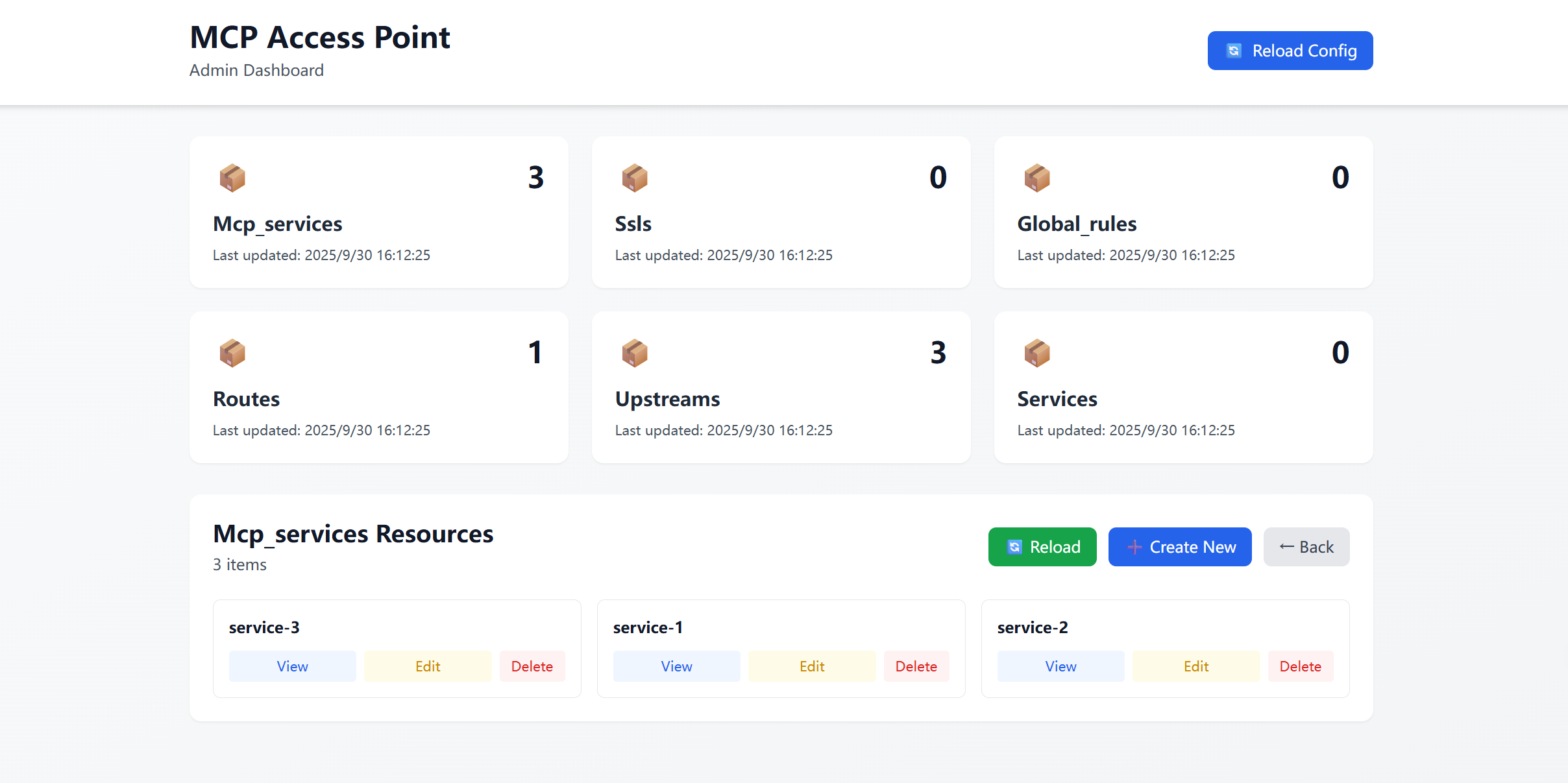
Admin Dashboard

Introduction

This project is built on Pingora - an ultra-high performance gateway proxy library capable of supporting massive-scale request proxy services. Pingora has been used to build services that handle core traffic for the Cloudflare platform, consistently serving over 40 million requests per second across the internet for years. It has become the technical cornerstone supporting a significant proportion of traffic on the Cloudflare platform.

HTTP to MCP

This mode allows clients like Cursor Desktop to communicate with remote HTTP servers through SSE, even when the servers themselves don't support the SSE protocol.

  • Example setup includes two services:
    • Service 1 runs locally at 127.0.0.1:8090
    • Service 2 runs remotely at api.example.com
  • Through the MCP Access Point, both services can be converted to MCP services without any code modifications.
  • Clients communicate with Service 1 and Service 2 via the MCP protocol. The MCP Access Point automatically distinguishes MCP requests and forwards them to the appropriate backend services.
mermaid
graph LR

   A["Cursor Desktop"] <--> |SSE| B["MCP Access Point"]

   A2["Other Desktop"] <--> |Streamable Http| B["MCP Access Point"]

   B <--> |http 127.0.0.1:8090| C1["Existing API Server"]

   B <--> |https//api.example.com| C2["Existing API Server"]


   style A2 fill:#ffe6f9,stroke:#333,color:black,stroke-width:2px

   style A fill:#ffe6f9,stroke:#333,color:black,stroke-width:2px

   style B fill:#e6e6af,stroke:#333,color:black,stroke-width:2px

   style C1 fill:#e6ffe6,stroke:#333,color:black,stroke-width:2px

   style C2 fill:#e6ffd6,stroke:#333,color:black,stroke-width:2px

Transport Type (Specification)

Currently supports SSE and Streamable HTTP protocols:

  • ✅ Streamable HTTP (stateless) 2025-03-26

    • All services: ip:port/mcp
    • Single service: ip:port/api/{service_id}/mcp
  • ✅ SSE 2024-11-05

    • All services: ip:port/sse
    • Single service: ip:port/api/{service_id}/sse

use IP:PORT/sse for SSE use IP:PORT/mcp for Streamable HTTP

Supported MCP clients

  • ✅ MCP Inspector
  • ✅ Cursor Desktop
  • ✅ Windsurf
  • ✅ VS Code
  • ✅ Trae

Core Features

  • Protocol Conversion: Seamless conversion between HTTP and MCP protocols
  • Zero-Intrusive Integration: Full compatibility with existing HTTP services
  • Client Empowerment: Enables MCP clients to directly call standard HTTP services
  • Lightweight Proxy: Minimalist architecture with efficient protocol conversion
  • Multi-tenancy: Independent configuration and endpoints for each tenant
  • Runtime Configuration Management: Dynamic configuration updates without service restart
  • Admin API: RESTful API for real-time configuration management

Quick Start

Installation

bash
# Install from source

git clone https://github.com/sxhxliang/mcp-access-point.git

cd mcp-access-point

cargo run -- -c config.yaml


# Use inspector for debugging (start service first)

npx @modelcontextprotocol/inspector node build/index.js

# Access http://127.0.0.1:6274/

# Select "SSE" and enter 0.0.0.0:8080/sse, then click connect

# or select "Streamable HTTP" and enter 0.0.0.0:8080/mcp

Multi-tenancy Support

The MCP Access Gateway supports multi-tenancy, where each tenant can configure multiple MCP services accessible via:

  • /api/{mcp-service-id}/sse (for SSE)
  • /api/{mcp-service-id}/mcp (for Streamable HTTP)

Example configuration:

yaml
# config.yaml example (supports multiple services)


mcps:

  - id: service-1 # Access via /api/service-1/sse or /api/service-1/mcp

    ... # Service configuration

  - id: service-2 # Access via /api/service-2/sse or /api/service-2/mcp

    ... # Service configuration

  - id: service-3 # Access via /api/service-3/sse or /api/service-3/mcp

    ... # Service configuration

To access all services simultaneously, use:

  • 0.0.0.0:8080/mcp (Streamable HTTP)
  • 0.0.0.0:8080/sse (SSE)

Configuration Details

  1. -c config.yaml
    • -c (or --config) specifies the configuration file path (config.yaml).
    • This file defines the APIs that the MCP Access Point will proxy and convert.

config.yaml Example

The configuration file supports multi-tenancy, allowing independent configuration of upstream services and routing rules for each MCP service. Key configuration items include:

  1. mcps - MCP service list

    • id: Unique service identifier used to generate access paths
    • upstream_id: Associated upstream service ID
    • path: OpenAPI specification file path. Supports local files (e.g., config/openapi.json) and remote HTTP/HTTPS URLs (e.g., https://petstore.swagger.io/v2/swagger.json). Both JSON and YAML formats are supported.
    • routes: Custom routing configuration (optional)
    • upstream: Upstream service specific configuration (optional)
  2. upstreams - Upstream service configuration

    • id: Upstream service ID
    • nodes: Backend node addresses and weights
    • type: Load balancing algorithm (roundrobin/random/ip_hash)
    • scheme: Upstream protocol (http/https)
    • pass_host: HTTP Host header handling
    • upstream_host: Override Host header value

Complete configuration example:

yaml
# config.yaml example (supports multiple services)

mcps:

  - id: service-1 # Unique identifier, accessible via /api/service-1/sse or /api/service-1/mcp

    upstream_id: 1

    path: config/openapi_for_demo_patch1.json # Local OpenAPI spec path


  - id: service-2 # Unique identifier

    upstream_id: 2

    path: https://petstore.swagger.io/v2/swagger.json # Remote OpenAPI spec


  - id: service-3 

    upstream_id: 3

    routes: # Custom routing

      - id: 1

        operation_id: get_weather

        uri: /points/{latitude},{longitude}

        method: GET

        meta:

          name: Get Weather

          description: Retrieve weather information by coordinates

          inputSchema: # Optional input validation

            type: object

            required:

              - latitude

              - longitude

            properties:

              latitude:

                type: number

                minimum: -90

                maximum: 90

              longitude:

                type: number

                minimum: -180

                maximum: 180


upstreams: # Required upstream configuration

  - id: 1

    headers: # Headers to send to upstream service

      X-API-Key: "12345-abcdef"        # API key

      Authorization: "Bearer token123" # Bearer token

      User-Agent: "MyApp/1.0"          # User agent

      Accept: "application/json"       # Accept header

    nodes: # Backend nodes (IP or domain)

      "127.0.0.1:8090": 1 # Format: address:weight


  - id: 2 

    nodes:

      "127.0.0.1:8091": 1


  - id: 3 

    nodes:

      "api.weather.gov": 1

    type: roundrobin # Load balancing algorithm

    scheme: https # Protocol

    pass_host: rewrite # Host header handling

    upstream_host: api.weather.gov # Override Host

To run the MCP Access Gateway with config file:

bash
cargo run -- -c config.yaml

Running via Docker

Run Locally for quick start

bash
# Note: Replace /path/to/your/config.yaml with actual path

docker run -d --name mcp-access-point --rm \

  -p 8080:8080 \

  -e port=8080 \

  -v /path/to/your/config.yaml:/app/config/config.yaml \

  ghcr.io/sxhxliang/mcp-access-point:main

Build Docker Image (Optional)

  • install docker
  • clone repository and build image
bash
# Clone repository

git clone https://github.com/sxhxliang/mcp-access-point.git

cd mcp-access-point


# Build image

docker build -t liangshihua/mcp-access-point:latest .
  • Run Docker Container
bash
# Using environment variables (service running on host)

# Note: Replace /path/to/your/config.yaml with actual path


docker run -d --name mcp-access-point --rm \

  -p 8080:8080 \

  -e port=8080 \

  -v /path/to/your/config.yaml:/app/config/config.yaml \

  liangshihua/mcp-access-point:latest

Environment Variables

  • port: MCP Access Point listening port (default: 8080)

Typical Use Cases

  • Progressive Architecture Migration: Facilitate gradual transition from HTTP to MCP
  • Hybrid Architecture Support: Reuse existing HTTP infrastructure within MCP ecosystem
  • Protocol Compatibility: Build hybrid systems supporting both protocols

Example Scenario:
When MCP-based AI clients need to interface with legacy HTTP microservices, the MCP Access Gateway acts as a middleware layer enabling seamless protocol conversion.

Read the full README →View source on GitHub →

Related MCP Servers

View all in Aggregators View all alternatives
  • AllMCPs Server logoAllMCPs Server
    ★ Featured

    The official MCP server for AllMCPs.com - submit and manage tools directly from your AI. The open directory for MCP servers. Connect Claude, Cursor, Windsurf, and AI agents to databases, tools, files, and APIs. Explore 10,000+ servers. AllMCPs is the premier, open directory for discovering, evaluating, and installing Model Context Protocol (MCP) servers to equip AI agents and LLMs with real-world superpowers.

    🔗 Aggregators15 views
    Compare vs AllMCPs Server →
  • Agent logoAgent

    A unified Model Context Protocol server implementation that aggregates multiple MCP servers into one.

    🔗 Aggregators9 views
    Compare vs Agent →
  • Metatool App logoMetatool App

    MetaMCP is the one unified middleware MCP server that manages your MCP connections with GUI.

    🔗 Aggregators2 views
    Compare vs Metatool App →
  • Ncp logoNcp

    NCP orchestrates your entire MCP ecosystem through intelligent discovery, eliminating token overhead while maintaining 98.2% accuracy.

    🔗 Aggregators2 views
    Compare vs Ncp →

Adoption & maintenance

Factual signals from GitHub, npm, and our automated checks — not a rating.

GitHub stars
184
Stargazers on the source repository.
npm downloads
1.1M
Package downloads in the last 30 days.
Last commit
6mo ago
Most recent push to the default branch.
Directory activity
2 views
Config copies, upvotes, and views on AllMCPs.

Reviews

No reviews yet — be the first to share how this listing worked for you.

Frequently Asked Questions about MCP Access Point

No, it acts as a gateway proxy and does not require any server-side interface modifications.

AllMCPs Directory Badge

Full Badge Customizer

Showcase your server listing on GitHub or your project documentation. Embed this dynamic SVG badge to highlight official listing status and live engagement.

Badge Style:
Live Dynamic SVG PreviewMCP Access Point AllMCPs Directory Badge

Markdown (GitHub README)
[![AllMCPs](https://allmcps.com/api/badge/sxhxliang-mcp-access-point?style=directory)](https://allmcps.com/mcp/sxhxliang-mcp-access-point)
HTML Embed
<a href="https://allmcps.com/mcp/sxhxliang-mcp-access-point"><img src="https://allmcps.com/api/badge/sxhxliang-mcp-access-point?style=directory" alt="MCP Access Point on AllMCPs" /></a>

Technical Specs & Signals

Category🔗Aggregators
PricingFree
More technical detailsExpand ▾
TransportSTDIO
RuntimeNode.js
AuthNo auth required
ClientsCursor, Windsurf, Claude Desktop, Cline / VS Code
Last updatedAug 9, 2026
10/11 checks healthy over the last 33d
Views2
Unique ViewsTotal visits recorded for this listing page on AllMCPs.
Installs0
Installs & Copy ActionsTotal times users copied install commands or configuration snippets for this server.
GitHub stars184
GitHub Star CountTotal stargazers on GitHub representing community popularity (184 stars).
Last commit6mo ago
Last Repository CommitThe most recent commit or push recorded for this server's GitHub repository.Last commit on Mar 11, 2026
npm downloads1,082,816/mo
Monthly npm DownloadsAverage monthly package installs recorded from npm registry statistics.
41Quality signal: Fair · 41/100How this signal is calculated ▾
Server availabilityNot measured

Not scored for repo-hosted servers — we can't reach the running server, only its GitHub page. Hosted MCP endpoints are health-checked live.

Verified ownership6/20
Documentation & tools17/30
Adoption & activity8/15
Community engagement0/10

A guidance signal from public completeness & health data — not a user rating. New listings start lower and rise as they add docs, get verified, and grow adoption. Signals we can't observe for a listing are skipped, not counted against it.

Supply-chain signal

2 high-severity advisories on record for this package. Most advisories affect transitive dependencies and may not be exploitable in this server's actual usage — this is a directional signal, not a security audit.

Critical 1High 1Medium 0Low 0

Scanned 22d ago via OSV.dev · @modelcontextprotocol/inspector (npm)

★ FeaturedAllMCPs Server logo

AllMCPs Server

The official MCP server for AllMCPs.com - submit and manage tools directly from your AI. The open directory for MCP servers. Connect Claude, Cursor, Windsurf, and AI agents to databases, tools, files, and APIs. Explore 10,000+ servers. AllMCPs is the premier, open directory for discovering, evaluating, and installing Model Context Protocol (MCP) servers to equip AI agents and LLMs with real-world superpowers.

Explore Server →

Own this project?

This directory is pre-filled from public sources. Claim via GitHub README, site badge, or DNS TXT to unlock edit access and the Official badge — proof is checked automatically, then reviewed by our team.

Free dofollow backlink: add your website and place the AllMCPs badge on it — no claim needed. We detect it automatically and keep it verified as long as the badge stays live.

Claim & get free dofollow

Share & Embed

Add our SVG badge (dark/light directory styles) or embeddable widget to your site.

Explore more

More in 🔗 Aggregators →Alternatives to MCP Access Point →Install in Claude DesktopInstall in CursorInstall in VS Code