OJP 2.0 journey planning, SIRI-SX disruptions, occupancy, fares, train formation
Quick Install
Automated & IDE SetupCopy the AI prompt to install this server into Claude Code, Cursor, or another agent — or use 1-click editor setup below.
Manual Client & Custom JSON ConfigExpand JSON ▾
Client Config & Setup
Choose your client or environment
Target File:
💡 Paste the JSON block into your client's configuration file under mcpServers, then restart the application.
Documentation Overview
🇨🇭 Part of the Swiss Public Data MCP Portfolio
🚆 swiss-transport-mcp





MCP server connecting AI models to the Swiss public transport system – journey planning, real-time departures, disruptions, occupancy, ticket prices, train formations and open data from opentransportdata.swiss.
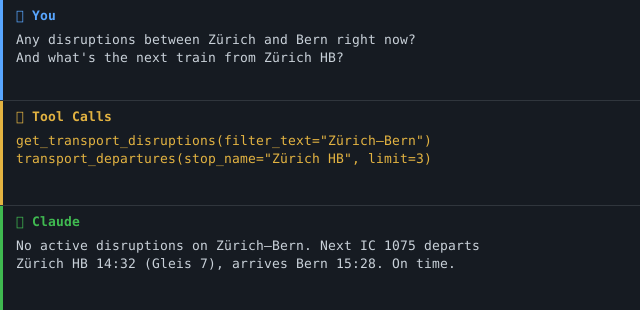
Demo
Overview
swiss-transport-mcp gives AI assistants like Claude a complete Swiss travel information system – not just timetables, but also real-time disruption alerts, occupancy forecasts, ticket prices, and a full train formation view. All accessible through a single, standardised MCP interface.
The various APIs at opentransportdata.swiss speak different protocols – OJP 2.0 (XML/SOAP), SIRI-SX (XML), REST/JSON. This server translates everything into clean JSON for the AI model, acting as a multilingual protocol interpreter.
Anchor demo query: "Plan a school trip for 25 students from Zurich to the Technorama in Winterthur – check for disruptions and find the best departure." → More use cases by audience →
Features
- 🗺️ Journey planning (A → B with transfers, duration, transport mode) via OJP 2.0
- 🕐 Real-time departures with delays and platform information
- 🔍 Stop search by name or coordinates
- 🚨 Live disruption alerts (cancellations, closures) via SIRI-SX
- 📊 Occupancy forecasts for trains (SBB, BLS, Thurbo, SOB)
- 💰 Ticket prices including class selection
- 🚃 Train formation – coaches, classes, amenities, accessibility
- 📦 Open data catalogue – ~90 transport datasets via CKAN
- 🔑 Graceful degradation – server starts with core tools even without optional API keys
- ☁️ Dual transport – stdio for Claude Desktop, Streamable HTTP/SSE for cloud deployment
Prerequisites
- Python 3.11+
- A free API key from api-manager.opentransportdata.swiss (subscribe to OJP 2.0 as minimum)
- Optional: additional keys for SIRI-SX, Occupancy, Formation, OJP Fare
Installation
Or with uvx (no permanent installation):
Quickstart
Try it immediately in Claude Desktop:
"What are the next departures from Zurich Stadelhofen?" "How do I get from Wädenswil to Bern by train?"
Configuration
Environment Variables
| Variable | API | Required |
|---|---|---|
TRANSPORT_API_KEY | Unified key for OJP + CKAN | ✅ (or individual keys) |
TRANSPORT_OJP_API_KEY | OJP 2.0 Journey Planner | Optional (override) |
TRANSPORT_CKAN_API_KEY | CKAN data catalogue | Optional (separate subscription) |
SIRI_SX_API_KEY | Disruption alerts (SIRI-SX) | Optional |
OCCUPANCY_API_KEY | Occupancy forecast | Optional |
FORMATION_API_KEY | Train formation | Optional |
OJP_FARE_API_KEY | Ticket prices (OJP Fare) | Optional |
APIs without a key are silently disabled – the server starts fine with just the 6 core tools.
Operational / security variables:
| Variable | Effect | Default |
|---|---|---|
MCP_ENV / ENV | Process environment. Must be dev/development/local/test to allow disabling TLS verification. | (unset → production) |
TRANSPORT_SSL_VERIFY | Set to false to disable TLS certificate verification. Honoured only when MCP_ENV marks a dev environment – otherwise the request is ignored and verification stays on. | true |
TRANSPORT_CKAN_URL | Override the CKAN base URL. Must stay on the egress allow-list (*.opentransportdata.swiss); off-site overrides are refused. | https://api.opentransportdata.swiss/ckan-api |
MCP_CORS_ORIGINS | Comma-separated list of browser origins allowed to call the HTTP transport. Use * to allow any origin (not recommended). The Mcp-Session-Id header is exposed to these origins. | https://claude.ai |
LOG_FORMAT | json for structured logs (RFC 5424 severity); anything else for human-readable text. Always written to stderr. | text |
OTEL_TRACES_ENABLED | 1 to enable OpenTelemetry tracing (requires the otel extra: pip install 'swiss-transport-mcp[otel]'). No-op otherwise. | (off) |
MCP_STATELESS | 1 to run the Streamable HTTP transport statelessly — no server-side session state, so instances need no sticky load balancing. Recommended for horizontal scale-out. | (off → stateful) |
MCP_ALLOWED_HOSTS | Comma-separated list of the names this server is reachable under, port included where it matters (e.g. fahrplan.example.ch:8080). Requests arriving under any other Host are rejected with 421; loopback stays allowed so container health checks keep working. Unset on a non-loopback bind, the check is off and a warning is logged. | (unset → off) |
🔒 Egress allow-list: all outbound requests are restricted to
https://onopentransportdata.swisshosts. Any other host is refused before a request is sent (SSRF / egress hardening).
Claude Desktop Configuration
Minimal (core tools only):
Full (all 11 tools):
Config file locations:
- macOS:
~/Library/Application Support/Claude/claude_desktop_config.json - Windows:
%APPDATA%\Claude\claude_desktop_config.json
Cloud Deployment (Streamable HTTP)
For use via claude.ai in the browser (e.g. on managed workstations without local software). The cloud transport is Streamable HTTP (MCP_TRANSPORT=streamable-http, endpoint /mcp). SSE (/sse) is still supported but deprecated.
MCP_TRANSPORT | Use | Endpoint |
|---|---|---|
stdio (default) | Local Claude Desktop subprocess | – |
streamable-http (or http) | Cloud / container (recommended) | /mcp |
sse | Legacy browser transport (deprecated) | /sse |
Docker (recommended):
The image is a multi-stage build running as a non-root user; docker-compose.yml adds read_only, no-new-privileges and memory/CPU/PID limits.
Render.com:
- Push/fork the repository to GitHub
- On render.com: New Web Service → connect GitHub repo (Docker runtime)
- Set env
MCP_TRANSPORT=streamable-httpandMCP_HOST=0.0.0.0 - In claude.ai under Settings → MCP Servers, add:
https://your-app.onrender.com/mcp
💡 "stdio for the developer laptop, Streamable HTTP for the cloud."
Scaling horizontally: run with MCP_STATELESS=1. In stateless mode the
server keeps no per-session state, so any instance can serve any request and a
plain round-robin load balancer suffices — no sticky sessions / Mcp-Session-Id
affinity required. If you need stateful streaming instead, route by
Mcp-Session-Id at the edge LB (e.g. HAProxy stick-tables) so each session
stays pinned to one instance.
⚠️ Binding: In a network transport the server binds to
127.0.0.1by default so a locally started server is not exposed to your whole network (e.g. public Wi-Fi). SetMCP_HOST=0.0.0.0only in a container/cloud environment where binding to all interfaces is intended (the Docker image does this for you).
Available Tools
Core Tools (OJP 2.0 / CKAN)
| Tool | Description | Data Source |
|---|---|---|
transport_search_stop | Search stops/stations by name | OJP 2.0 |
transport_nearby_stops | Find nearby stops by coordinates | OJP 2.0 |
transport_departures | Real-time departure board with delays & platforms | OJP 2.0 |
transport_trip_plan | Plan journey A → B with transfers, duration, mode | OJP 2.0 |
transport_search_datasets | Search open data catalogue (~90 datasets) | CKAN¹ |
transport_get_dataset | Get full details of a specific dataset | CKAN¹ |
¹ CKAN tools require a separate subscription in the API Manager.
Extension Tools (optional API keys)
Related MCP Servers
Reviews
No reviews yet — be the first to share how this listing worked for you.
Frequently Asked Questions about Swiss Transport MCP
AllMCPs Directory Badge
Showcase your server listing on GitHub or your project documentation. Embed this dynamic SVG badge to highlight official listing status and live engagement.
Badge Style:
Live Dynamic SVG Preview
Markdown (GitHub README)
[](https://allmcps.com/mcp/swiss-transport-mcp)HTML Embed
<a href="https://allmcps.com/mcp/swiss-transport-mcp"><img src="https://allmcps.com/api/badge/swiss-transport-mcp?style=directory" alt="Swiss Transport MCP on AllMCPs" /></a>