Swiss energy data via SFOE/BFE and GeoAdmin REST APIs
Quick Install
Automated & IDE SetupCopy the AI prompt to install this server into Claude Code, Cursor, or another agent — or use 1-click editor setup below.
Not yet automatically verified
We haven't yet run this listing's install command through our automated sandbox check. This isn't a red flag — we're steadily working through the catalog.
Manual Client & Custom JSON ConfigExpand JSON ▾
Client Config & Setup
Choose your client or environment
Target File:
💡 Paste the JSON block into your client's configuration file under mcpServers, then restart the application.
Documentation Overview
🇨🇭 Part of the Swiss Public Data MCP Portfolio
⚡ swiss-energy-mcp






MCP server for Swiss energy data from the Federal Office of Energy (SFOE/BFE) via GeoAdmin REST API and opendata.swiss — no API key required.
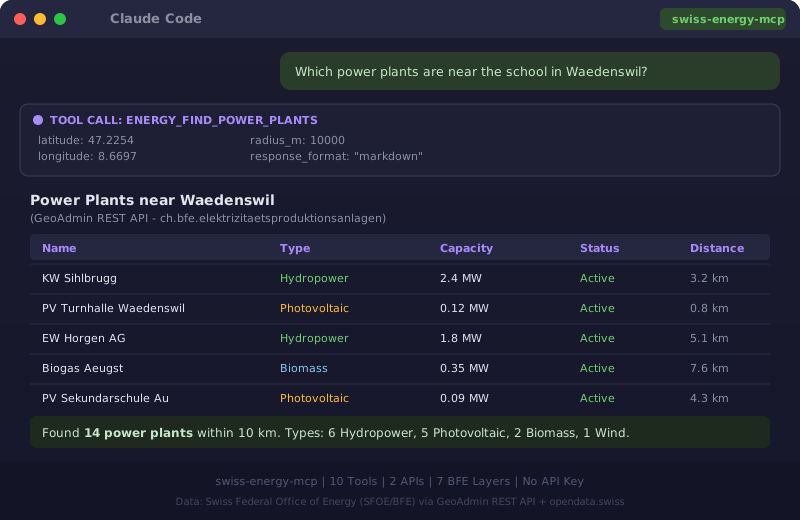
Overview
swiss-energy-mcp gives AI assistants structured, location-based access to Switzerland's energy infrastructure. Built on open geodata from the Swiss Federal Office of Energy (SFOE/BFE) via the GeoAdmin REST API and the opendata.swiss catalogue — completely authentication-free.
The server is part of a growing portfolio of Swiss open data MCP servers. Think of it as the energy atlas counterpart to swiss-road-mobility-mcp: while the latter maps mobility, this server maps where Switzerland produces electricity, where solar potential exists, and which municipalities hold the "Energiestadt" label.
Anchor demo query: "Which power plants are within 20 km of the school in Wädenswil — and is the municipality an Energiestadt?"
Features
- 🔍 10 ready-to-use tools covering all major energy data layers from SFOE/BFE
- ⚡ Power plants — all types: photovoltaic, hydro, wind, biomass, nuclear, with optional category filter
- 💨 Wind turbines — detailed data incl. manufacturer, model, hub height, annual production
- 💧 Hydropower plants — type, status, turbine capacity, expected annual output
- ☀️ PV large installations — project name, capacity, annual/winter production, altitude
- 🌿 Biogas plants — plant name, output
- 🏙️ Energiestädte — municipalities with the Swiss "Energiestadt" label (score, year awarded, audits)
- 🏠 Solar roof potential — suitability category, area, orientation, and slope per roof segment
- 📊 Location energy profile — combines 5 layers into a single overview for any Swiss location
- 🗂️ SFOE dataset search — full-text search across SFOE publications on opendata.swiss
- ✅ Status check — verifies availability of both upstream APIs
- ☁️ Dual transport — stdio for Claude Desktop, Streamable HTTP for cloud deployment
Prerequisites
- Python 3.11+
uv(recommended) orpip
Installation
Claude Desktop (stdio transport)
Add to your claude_desktop_config.json:
Config file locations:
- macOS:
~/Library/Application Support/Claude/claude_desktop_config.json - Windows:
%APPDATA%\Claude\claude_desktop_config.json
Local development
Cloud / HTTP transport (Streamable HTTP)
For use via claude.ai in the browser (e.g. on managed workstations without local software):
💡 "stdio for the developer laptop, HTTP for the browser."
Quickstart
Once connected in Claude Desktop, try:
Available Tools
| Tool | Description |
|---|---|
energy_find_power_plants | All electricity generation plants within a radius (optional category filter) |
energy_find_wind_turbines | Wind turbines with manufacturer, model, hub height |
energy_find_hydro_plants | Hydropower plants with capacity and expected output |
energy_find_pv_installations | Large PV installations with annual/winter production |
energy_find_biogas_plants | Biogas plants |
energy_find_energy_cities | Municipalities with "Energiestadt" label |
energy_solar_potential | Solar suitability of roof segments at a location |
energy_location_profile | Combined energy profile (5 layers) for a location |
energy_search_bfe_datasets | Full-text search over SFOE datasets on opendata.swiss |
energy_check_status | Check availability of GeoAdmin and opendata.swiss APIs |
All tools accept WGS84 coordinates (lat/lon). Conversion to Swiss LV95 is handled internally.
Example Use Cases
| Query | Tool |
|---|---|
| "Power plants near Bern (20 km radius)?" | energy_find_power_plants |
| "Wind turbines in the Jura?" | energy_find_wind_turbines |
| "Is Zürich an Energiestadt?" | energy_find_energy_cities |
| "Solar potential of rooftops near lat=47.37, lon=8.54?" | energy_solar_potential |
| "Full energy profile for Lucerne region?" | energy_location_profile |
| "SFOE datasets on hydropower?" | energy_search_bfe_datasets |
→ More use cases by audience →
Data Sources
| Source | URL | Auth |
|---|---|---|
| GeoAdmin REST API (swisstopo) | api3.geo.admin.ch | None |
| opendata.swiss CKAN API | opendata.swiss/api/3/action | None |
BFE Layers used:
ch.bfe.elektrizitaetsproduktionsanlagench.bfe.windenergieanlagench.bfe.statistik-wasserkraftanlagench.bfe.photovoltaik-grossanlagench.bfe.biogasanlagench.bfe.energiestaedtech.bfe.solarenergie-eignung-daecher
Configuration
All variables use the SWISS_ENERGY_ prefix and are validated at startup.
| Environment variable | Default | Description |
|---|---|---|
SWISS_ENERGY_TRANSPORT | stdio | Transport mode: stdio or http |
SWISS_ENERGY_HOST | 127.0.0.1 | Host for HTTP transport. Bind 0.0.0.0 only inside a container. |
SWISS_ENERGY_PORT | 8000 | Port for HTTP transport |
SWISS_ENERGY_CORS_ORIGINS | https://claude.ai | Comma-separated allowed CORS origins (HTTP transport) |
SWISS_ENERGY_ALLOWED_HOSTS | (empty) | Comma-separated inbound Host allow-list. Only needed for a non-loopback bind. |
SWISS_ENERGY_LOG_LEVEL | INFO | Log level: DEBUG / INFO / WARNING / ERROR |
SWISS_ENERGY_HTTP_TIMEOUT | 20 | Upstream HTTP timeout in seconds |
Both list-valued variables also accept a JSON array — ["https://a.test"] —
in addition to the comma-separated form.
See .env.example for a template.
MCP Protocol Version
This server speaks two protocol eras over the same endpoint. The client's first request on a connection decides which one applies; a later claim from the other era is refused.
| Era | Revision | Who reaches it |
|---|---|---|
initialize handshake | 2024-11-05 … 2025-11-25 | What today's clients speak. The server answers with the revision asked for, or with the 2025-11-25 ceiling when the request asks for something newer. |
| Per-request envelope | 2026-07-28 | A request carrying the 2026-07-28 _meta envelope opens a modern connection. |
Both revisions are pinned in
tests/test_protocol_version.py and asserted
against the installed SDK, so a Dependabot bump of mcp cannot move either one
silently. The handshake ceiling is measured against a live initialize through
the assembled ASGI stack, not read off a constant name.
Note that the SDK's LATEST_PROTOCOL_VERSION is an alias for the modern
era, not for the handshake era — pinning against it alone would leave the era
that current clients actually negotiate free to drift.
Update policy. When the gate fails, do not edit the constant blindly: read
the spec changelog between the two revisions, verify the server still behaves,
then move the constant, this section, README.de.md and
CHANGELOG.md together.
MCP Primitives
The server uses all three MCP primitives:
- Tools — 10 read-only tools (see above). Every search tool returns an
EnergyResponseenvelope: structuredresultsplus a Markdownsummary, explicitsource/licenseattribution, and amatch_typefield. - Resource —
energy://layers, the static catalogue of BFE GeoAdmin layers. - Prompt —
energy_site_assessment, a guided location-analysis template.
Development Phase
The server is in Phase 1 (read-only). See docs/roadmap.md for the phased architecture and docs/security.md for the egress allow-list, SSRF protection and trifecta assessment.
Safety & Limits
Related MCP Servers

Reviews
No reviews yet — be the first to share how this listing worked for you.
Frequently Asked Questions about Swiss Energy MCP
AllMCPs Directory Badge
Showcase your server listing on GitHub or your project documentation. Embed this dynamic SVG badge to highlight official listing status and live engagement.
Badge Style:
Live Dynamic SVG Preview
Markdown (GitHub README)
[](https://allmcps.com/mcp/swiss-energy-mcp)HTML Embed
<a href="https://allmcps.com/mcp/swiss-energy-mcp"><img src="https://allmcps.com/api/badge/swiss-energy-mcp?style=directory" alt="Swiss Energy MCP on AllMCPs" /></a>Technical Specs & Signals
CategoryDeveloper Tools
33Quality signal: Emerging · 33/100How this signal is calculated ▾
Server availabilityNot measured
Not scored for repo-hosted servers — we can't reach the running server, only its GitHub page. Hosted MCP endpoints are health-checked live.
Verified ownership10/20
Documentation & tools14/30
Adoption & activity1/15
Community engagement0/10
A guidance signal from public completeness & health data — not a user rating. New listings start lower and rise as they add docs, get verified, and grow adoption. Signals we can't observe for a listing are skipped, not counted against it.
Own this project?
This directory is pre-filled from public sources. Claim via GitHub README, site badge, or DNS TXT to unlock edit access and the Official badge — proof is checked automatically, then reviewed by our team.
Free dofollow backlink: add your website and place the AllMCPs badge on it — no claim needed. We detect it automatically and keep it verified as long as the badge stays live.
Claim & get free dofollowShare & Embed
Add our SVG badge (dark/light directory styles) or embeddable widget to your site.