AllMCPs
BrowseBestCategoriesStackCompareToolsGuidesBlog
Log in Submit MCP

Stay in the loop

Get new MCP servers and top picks in your inbox.

AllMCPs

The open directory for discovering and installing Model Context Protocol servers.

AllMCPs on GitHub (opens in a new tab)
Launched onTiny Startupstinystartups.com
Explore
  • Browse servers
  • Best MCP servers
  • Categories
  • MCP clients
  • Agent prompts
  • Stack Builder
  • Compare servers
  • Random discovery New
  • Submit a server
  • Pricing & Boost Boost
Learn
  • Guides hub
  • What is MCP?
  • Install guide
  • Build an MCP server
  • Deploy an MCP server
  • Security guide
  • Troubleshooting
  • MCP for SEO & AEO
  • Protocol versioning
  • Transports: stdio vs HTTP
  • State of MCP (stats)
  • Blog & updates
Tools
  • All developer tools
  • Config generator
  • Config validator
  • Config auditor
  • MCP playground
  • Token calculator
  • OpenAPI → MCP
  • Badge generator
For agents
  • REST API docs
  • Trust & traffic Live
  • Remote MCP server SSE ↗ (opens in a new tab)
  • llms.txt ↗ (opens in a new tab)
  • Catalog JSON ↗ (opens in a new tab)
Company
  • About
  • Advertise Sponsor
  • Contact
  • GitHub ↗ (opens in a new tab)
  • Terms
  • Privacy
AllMCPs VerifiedAllMCPs VerifiedFeatured on Nick LaunchesFeatured on Nick LaunchesLaunch Llama NewsletterLaunch Llama NewsletterVerified DR - allmcps.comVerified DR - allmcps.comFeatured on SaaSGrowFeatured on SaaSGrowFeatured on Twelve ToolsFeatured on Twelve ToolsFeatured on Saaspa.geFeatured on Saaspa.geFeatured on Findly.toolsFeatured on Findly.toolsFeatured on Startup FameFeatured on Startup FameFeatured on LaunchKiwiFeatured on LaunchKiwiFeatured on ScrollLaunchFeatured on ScrollLaunchFeatured on DailyPingsFeatured on DailyPingsFazier badgeFazier badgeFeatured on NewTool.siteFeatured on NewTool.siteFeatured on saasfame.comFeatured on saasfame.comDR Checker - Domain RatingDR Checker - Domain RatingListed on Turbo0Listed on Turbo0Launched on LaunchBoard - Product Launch PlatformLaunched on LaunchBoard - Product Launch PlatformList on SimilarlabsList on Similarlabshttps://codetrendy.comhttps://codetrendy.comListed on DevTool.ioFeatured on BuildlistFeatured on BuildlistLaunched on Tiny StartupsFeatured on ShowMeBestAIFeatured on ShowMeBestAIFind us on LaunchZoneFind us on LaunchZoneAllMCPs VerifiedAllMCPs VerifiedFeatured on Nick LaunchesFeatured on Nick LaunchesLaunch Llama NewsletterLaunch Llama NewsletterVerified DR - allmcps.comVerified DR - allmcps.comFeatured on SaaSGrowFeatured on SaaSGrowFeatured on Twelve ToolsFeatured on Twelve ToolsFeatured on Saaspa.geFeatured on Saaspa.geFeatured on Findly.toolsFeatured on Findly.toolsFeatured on Startup FameFeatured on Startup FameFeatured on LaunchKiwiFeatured on LaunchKiwiFeatured on ScrollLaunchFeatured on ScrollLaunchFeatured on DailyPingsFeatured on DailyPingsFazier badgeFazier badgeFeatured on NewTool.siteFeatured on NewTool.siteFeatured on saasfame.comFeatured on saasfame.comDR Checker - Domain RatingDR Checker - Domain RatingListed on Turbo0Listed on Turbo0Launched on LaunchBoard - Product Launch PlatformLaunched on LaunchBoard - Product Launch PlatformList on SimilarlabsList on Similarlabshttps://codetrendy.comhttps://codetrendy.comListed on DevTool.ioFeatured on BuildlistFeatured on BuildlistLaunched on Tiny StartupsFeatured on ShowMeBestAIFeatured on ShowMeBestAIFind us on LaunchZoneFind us on LaunchZone
© 2026 Jackalope Digital LLC. All rights reserved.
  1. Home
  2. 💻 Developer Tools
  3. Svipall
S
Health: Not checked yetWe have not completed a health check for this listing yet.No health check has run yet.

Svipall

User RatingsBe the first to rate and review this MCP server! Enrichment pendingWe haven’t run our AI enrichment pass on this listing yet, so the overview, use cases, and FAQ below may be sparse or missing. We work through the catalog over time — check back soon.
View Repository

Read any page past its anti-bot wall, crawl sites, search without an API key, solve captchas locally

Quick Install

Automated & IDE Setup

Copy the AI prompt to install this server into Claude Code, Cursor, or another agent — or use 1-click editor setup below.

One-click editor setup isn’t available for this listing yet — we don’t have a confirmed install command, and we’d rather show nothing than point your editor at the wrong package or host. Follow the project’s own setup instructions, linked above.

Manual Client & Custom JSON ConfigExpand JSON â–¾
No confirmed setup config for this listing yet. We only publish a config block when the install details come from the project itself — its README, its docs, or a verified owner. We haven’t found those for Svipall, and we’d rather show nothing than a guess you’d paste into your client. Follow the project’s own setup instructions for the current steps.
Install Directory Badge Claim listing Alternatives💻 More in Developer Tools

Documentation Overview

Svipall, a local-first web scraping and browsing MCP server for AI agents

A different face at every gate.

Web reading for your AI agent, running on your own machine.
An MCP server and CLI, in Rust, that extracts web pages into Markdown,
crawls sites within configured limits, searches without an API key,
and attempts supported challenges, then says plainly which ones it could not.

Rust License: AGPL-3.0 MCP Recorded test results Benchmarks No telemetry

Install · Use cases · Proof · Tools · Captcha · REST API · Compare · FAQ
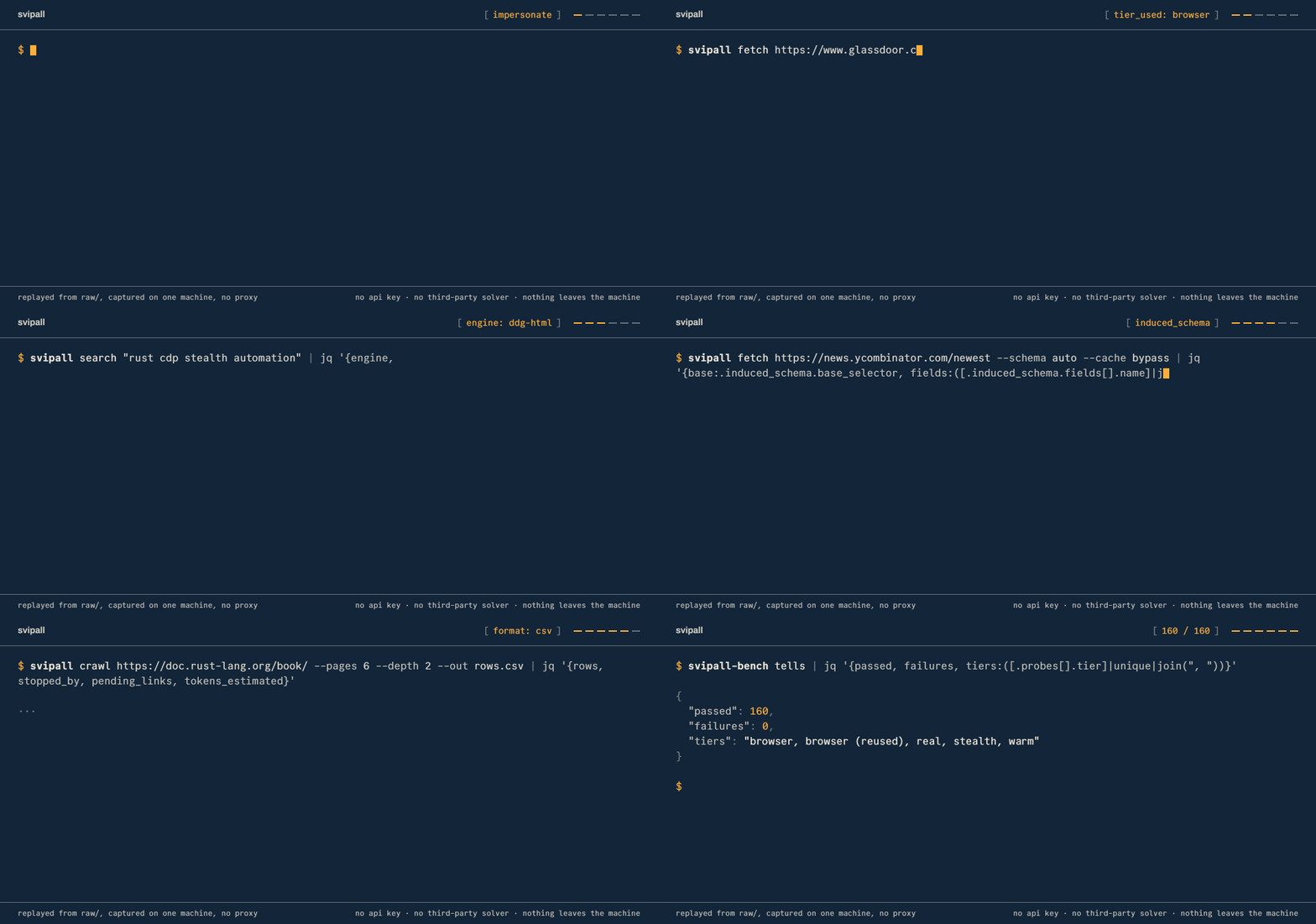
Six commands and the output they printed: the tier ladder answering a Cloudflare wall with a browser, search without an API key, a schema induced from a listing, a crawl written to CSV, and 160 of 160 automation-tell probes clean.
Replayed from real runs on one machine. How it was recorded, and the raw captures.


Everything runs locally. There are no third-party API keys, no paid captcha services and no telemetry. Web requests reach the sites you visit, and results reach the agent or client you connect.

Svipall fetches and renders pages locally, extracts their content, and reports detected challenges and extraction-quality labels. Some sites still block it, and an apparently successful response can contain incomplete records or a page shell. The published comparisons therefore audit useful content separately from HTTP status and the tool's own verdict.

Why Svipall

What goes wrongSvipall
Your agent reads a "checking your browser" screen and summarises it as the article. It was a 200, so nothing flagged itTwelve wall kinds, each naming the move it implies. Detected blocks carry an explicit verdict; classification is heuristic details
You crawl 5,000 pages and can't tell which are worth keepingAssessed pages carry quality and duplicate observations, and quality labels never discard a page details
One page = 300,000 tokens of raw HTML. The fixes are four manual jobs you now ownClean Markdown by default; opt into tables as rows, out_file to disk, or capture of the site's own JSON API details
You want to attempt a supported captcha without a paid solverFifteen widget families and eleven answer modalities, all local, optional vision models depending on the build, and a human dashboard for unresolved challenges details

It records successful visits, failures, incomplete extraction and rejected changes. Historical benchmark logs and the current comparison use different scoring rules and configurations; the results section distinguishes them.

Rust · MCP + CLI + REST · no Node, no Python, no API key · local storage and processing

Install it

The comparison table describes other projects' documented scope.


Install

Every channel below installs the latest release, built from the tree this README describes. svipall doctor reports what an installed build can do on the machine it is on.

The README factual audit records the source checks, documentation corrections and limits of this review.

Choose agent-assisted setup, the Claude Code plugin, or a manual installation.

Ask the agent you already have

Paste this into Claude Code, Cursor, Codex, opencode, or anything else that can run a command:

Code
Install and configure Svipall by following the instructions here:
https://raw.githubusercontent.com/ilien-dev/svipall/main/docs/install.md

That page guides an agent through platform detection and verification, then asks which integration you want: CLI + Skill (recommended, lower context use) or MCP + Skill (the full MCP tool surface). It also asks whether to configure every project or only the current one, and verifies the chosen result instead of treating a skill as MCP registration. When Svipall already exists, it shows the installed and latest versions and asks whether to update the shared user installation or keep the current version before it writes the integration. Completion depends on the agent, client configuration and available permissions.

Claude Code: install the plugin

Code
/plugin marketplace add ilien-dev/svipall
/plugin install svipall@svipall
/svipall:setup

/svipall:setup installs the binary if it is missing, checks the server answers, and offers to make Svipall the way Claude reaches the web in every project. It asks before each of those. /svipall:doctor reports the installation's capabilities. /svipall:update shows the installed and latest releases, then updates the binaries only if you choose to. /svipall:uninstall offers removal of setup's registration, memory and strict-mode changes. Removing the binary and the data are separate choices.

Install it yourself

One line, with no toolchain and nothing to compile:

Terminal
curl -fsSL https://raw.githubusercontent.com/ilien-dev/svipall/main/install.sh | sh   # macOS, Linux
irm https://raw.githubusercontent.com/ilien-dev/svipall/main/install.ps1 | iex        # Windows

Or a package manager, or the container image:

bash
brew install ilien-dev/svipall/svipall               # macOS, Linux
scoop bucket add svipall https://github.com/ilien-dev/scoop-svipall && scoop install svipall
docker pull ghcr.io/ilien-dev/svipall:latest         # or :slim, the http tier only; see container notes
npx --yes svipall doctor                             # if node is already there
cargo install svipall                            # from source; add `svipall models install` for the models

The installers verify checksums where they can, and a mismatch stops the install. A missing checksum file, entry or hashing utility only warns, so a successful exit is not by itself proof the archive was verified: read the output. If the destination already contains another version, the installer states that the binaries are shared by every harness and asks before replacing them.

When a newer release exists, Svipall says so once per session. One command updates both binaries with the channel that installed them and refreshes the skills you copied by hand:

bash
svipall update                 # --check only compares versions

Then close every session that uses Svipall and open it again. An agent can do the same from docs/update.md.

Platform builds, what ships where, building from source and wiring it into any MCP client are all in docs/install.md. If you have never installed anything from a terminal, GET-STARTED.md is this section with nothing assumed.

Then ask for something

There is no key to paste and no account to create.

"Read this page and summarise the pricing." "Crawl these docs and write me an llms.txt." "Watch this listing and tell me when the price moves." "Get me every row of that table as CSV."

The assistant can choose among the exposed tools. Supported challenges that need a pair of eyes go to a human dashboard at http://localhost:8787/human.

Or drive it from a shell

server.ts
svipall fetch https://example.com/article
svipall fetch https://shop.example/item --query "shipping costs"
svipall fetch https://docs.example/api --schema auto        # rows from a listing you've never seen
svipall crawl https://docs.example/ --pages 50 --out pages.csv
svipall search "rust async runtime" --engine all
svipall snapshot https://news.ycombinator.com                # the page as roles and refs, not markup
svipall serve --port 8788                                    # the same server as a local REST API

Completed data commands print one JSON object to stdout and diagnostics to stderr, so the output can be piped to jq. serve is a long-running server, and help is written to stderr.

What comes back

A historical run of svipall fetch https://example.com, with the content string cut short. Current automatic fetches also report identity_used, and the fallback fields described below when they have something to report:

Read the full README →View source on GitHub →

Related MCP Servers

View all in Developer Tools View all alternatives
  • O
    Openapi MCP Server

    Connect any HTTP/REST API server using an Open API spec (v3)

    💻 Developer Tools3 views
    Compare vs Openapi MCP Server →
  • C
    Claude Task Master

    AI-powered task management system for AI-driven development. Features PRD parsing, task expansion, multi-provider support (Claude, OpenAI, Gemini, Perplexity, xAI), and selective tool loading for optimized context usage.

    💻 Developer Tools8 views
    Compare vs Claude Task Master →
  • A
    Andrea9293 MCP

    Local-first document management and semantic search for AI coding agents

    💻 Developer Tools2 views
    Compare vs Andrea9293 MCP →
  • N
    Next Devtools MCP
    Verified

    Official Next.js MCP server for coding agents. Provides runtime diagnostics, route inspection, dev server logs, docs search, and upgrade guides. Requires Next.js 16+ dev server for full runtime features.

    💻 Developer Tools6 views
    Compare vs Next Devtools MCP →

Reviews

No reviews yet — be the first to share how this listing worked for you.

Frequently Asked Questions about Svipall

We don't have a confirmed install command for Svipall yet, so we don't publish a generated one — a guessed package name would point at the wrong package or none at all. Follow the project's own README or setup instructions (https://github.com/ilien-dev/svipall) for the current steps.

AllMCPs Directory Badge

Full Badge Customizer

Showcase your server listing on GitHub or your project documentation. Embed this dynamic SVG badge to highlight official listing status and live engagement.

Badge Style:
Live Dynamic SVG PreviewSvipall AllMCPs Directory Badge

Markdown (GitHub README)
[![AllMCPs](https://allmcps.com/api/badge/svipall?style=directory)](https://allmcps.com/mcp/svipall)
HTML Embed
<a href="https://allmcps.com/mcp/svipall"><img src="https://allmcps.com/api/badge/svipall?style=directory" alt="Svipall on AllMCPs" /></a>

Technical Specs & Signals

Category💻Developer Tools
More technical detailsExpand â–¾
Last updatedSep 28, 2026
Views0
Unique ViewsTotal visits recorded for this listing page on AllMCPs.
Installs0
Installs & Copy ActionsTotal times users copied install commands or configuration snippets for this server.
28Quality signal: Emerging · 28/100How this signal is calculated ▾
Server availabilityNot measured

Not scored for repo-hosted servers — we can't reach the running server, only its GitHub page. Hosted MCP endpoints are health-checked live.

Verified ownership8/20
Documentation & tools12/30
Adoption & activity1/15
Community engagement0/10

A guidance signal from public completeness & health data — not a user rating. New listings start lower and rise as they add docs, get verified, and grow adoption. Signals we can't observe for a listing are skipped, not counted against it.

★ Featured
A

AllMCPs Server

The official MCP server for AllMCPs.com - submit and manage tools directly from your AI. The open directory for MCP servers. Connect Claude, Cursor, Windsurf, and AI agents to databases, tools, files, and APIs. Explore 10,000+ servers. AllMCPs is the premier, open directory for discovering, evaluating, and installing Model Context Protocol (MCP) servers to equip AI agents and LLMs with real-world superpowers.

Explore Server →

Own this project?

This directory is pre-filled from public sources. Claim via GitHub README, site badge, or DNS TXT to unlock edit access and the Official badge and attach your website — proof is checked automatically, then reviewed by our team.

Free dofollow backlink: add your website and place the AllMCPs badge on it — no claim needed. We detect it automatically and keep it verified as long as the badge stays live.

Claim & get free dofollow

Share & Embed

Add our SVG badge (dark/light directory styles) or embeddable widget to your site.

Explore more

More in 💻 Developer Tools →Best MCP servers for Developers →Alternatives to Svipall →Install in Claude DesktopInstall in CursorInstall in VS CodeSetup guides for all 13 MCP clients
