Starfetch README
The full upstream README, mirrored here for reference. Install config, tool schemas, adoption signals, and an original overview live on the Starfetch listing page.
Starfetch






Starfetch gives AI agents safe, reproducible access to public astronomy catalogs through the Model Context Protocol (MCP).
Ask an astronomy question in natural language. A Starfetch-enabled agent can select an appropriate service, inspect its live tables and columns, construct a bounded ADQL query, execute it, and return the result with the exact service, table, query, limit, units, and assumptions it used.
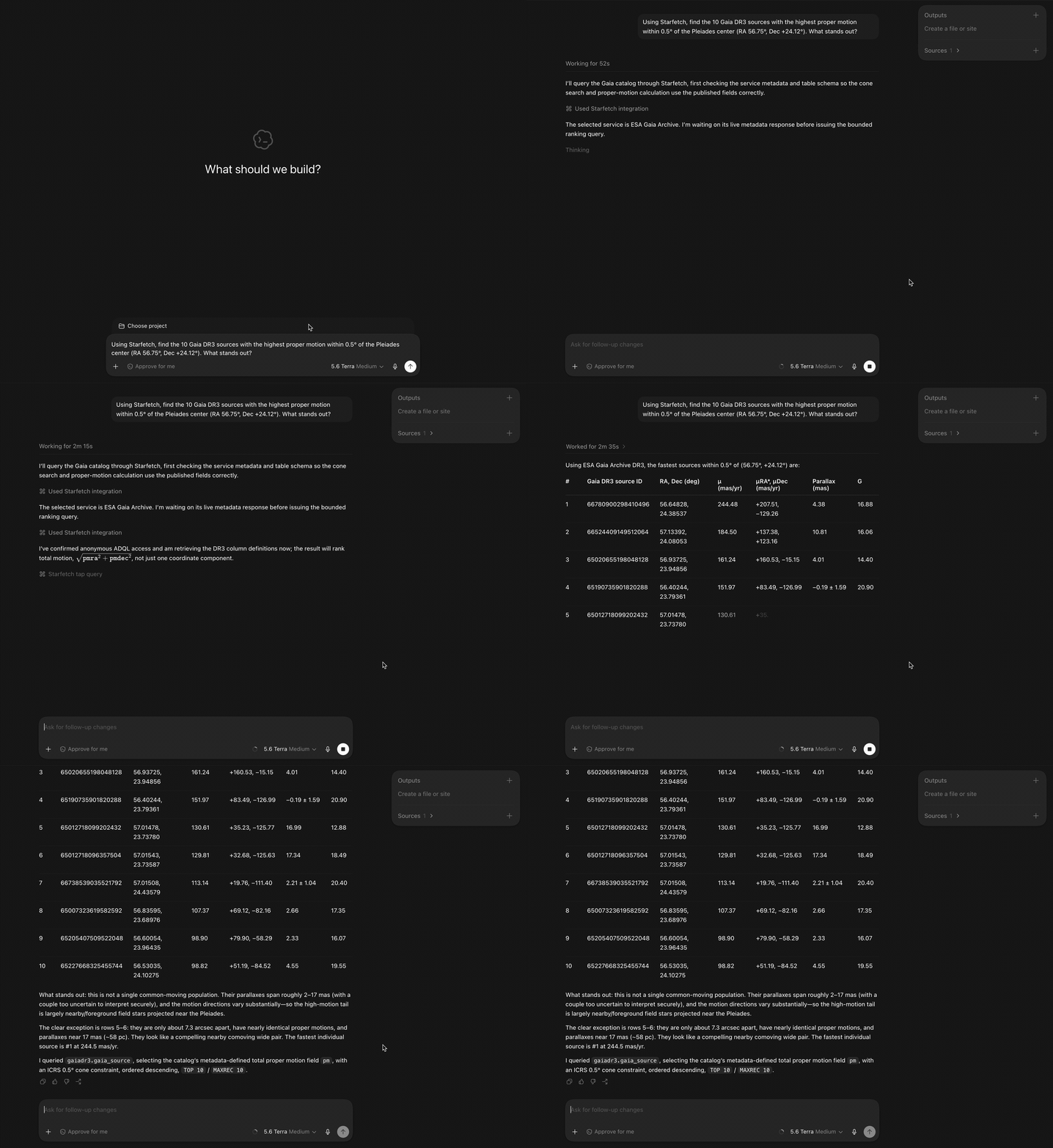
Representative captured result:
Gaia, SIMBAD, VizieR, the NASA Exoplanet Archive, and IRSA are available as built-in service presets. Agents can also discover and query other public TAP services by URL. Starfetch remains TAP-native and keeps ADQL visible, so the agent workflow is convenient without becoming a scientific black box.
Start here
- Connect an agent
- What the agent does
- Why Starfetch?
- Reliability without hidden assumptions
- Optional Starfetch skill
- Supported scope
- CLI and TypeScript
- Run the Gaia proper-motion demo
- Development
Connect an agent
The local npm server is Starfetch's stable public connection path. It runs on your computer and can be registered with any compatible MCP client.
Local npm server
Register Starfetch with the agent client that will launch it. Running the MCP package by itself only starts a stdio server; it does not connect that server to an agent. Starfetch is also discoverable through the official MCP Registry.
Codex
Register Starfetch for the Codex CLI, IDE extension, and ChatGPT desktop app:
These Codex surfaces share MCP configuration. See the official Codex MCP documentation.
Claude Code
Register Starfetch in user scope:
See the official Claude Code MCP documentation.
Cursor
Add this server entry to ~/.cursor/mcp.json for global use or
.cursor/mcp.json for one project:
See the official Cursor MCP documentation.
Other MCP clients can use the same stdio command and arguments through their own server-registration interface:
Restart or reload the client after registration, then ask a normal astronomy question. You should not need to write ADQL or name Starfetch tools in the prompt. Starfetch requires Node.js 22 or newer.
Remote MCP
A remote MCP service runs on the internet and accepts MCP connections over HTTPS. No Starfetch package has to be installed or launched on the user's computer. Compatible clients can connect to the production endpoint:
The remote service is public, unauthenticated, bounded, and best effort. Do not send credentials, private archive URLs, sensitive personal data, or unbounded workloads. The local npm server remains the default when you want local control or when a client does not support remote Streamable HTTP MCP.
See the remote service's overview, privacy notice, support, and terms of use.
What the agent does
For a service-specific catalog question, Starfetch guidance teaches the agent to:
- choose an explicit service preset or public TAP URL;
- check service availability when appropriate;
- inspect relevant tables and the selected table's columns;
- construct ADQL only from discovered schema information;
- bound exploratory work with ADQL
TOP, TAPMAXREC, or both; - execute the smallest useful query;
- return the service, table, exact ADQL, effective limit, format, units, and relevant assumptions;
- return to metadata after a schema or syntax failure instead of guessing.
The agent should never present a timeout, availability failure, parse error, or query error as an empty scientific result. A successful zero-row result and a failed request are different outcomes.
Starfetch exposes tools for the complete workflow:
Query tools return result data separately from diagnostics. They preserve the
exact submitted ADQL and effective row limit for reproduction and review.
Synchronous queries and async submissions send TAP MAXREC=100 when maxrec
is omitted.
The remote HTTP service returns an opaque jobCapability with each async
submission. Supply that value unchanged to every remote status, wait, fetch,
or delete call. The capability remains usable while the remote job exists and
the service signing secret is unchanged. Remote deletion is marked destructive
so MCP clients can obtain user approval. The stdio MCP server and CLI keep
their existing job-reference behavior and do not advertise remote-only fields.
Why Starfetch?
Starfetch is a useful middle layer when an agent needs live public catalog data without turning the workflow into a black box:
- it inspects live schemas instead of guessing table and column names;
- it bounds public-service queries by default and preserves service failures;
- it returns exact ADQL, limits, units, and assumptions for reproduction;
- it provides one metadata-first interface across several TAP services; and
- its CLI and TypeScript library can reproduce an agent's query outside the agent client.
Use an archive's own interface, PyVO/Astropy, or local analysis tools instead when you need authenticated/private archives, extensive local analysis, image data processing, or authoritative astrophysical interpretation.
Reliability without hidden assumptions
The MCP server works without installing a filesystem skill. Starfetch carries the same canonical guidance through three overlapping layers:
| Layer | Role |
|---|---|
| MCP tool descriptions | Minimum metadata-first and bounded-query contract available to every MCP client |
| MCP prompts and resources | Discoverable workflows, ADQL guidance, service notes, and examples |
| Optional Starfetch skill | Rich multi-step behavior across longer agent interactions |
The server exposes the retrievable prompts query_astronomy_catalog,
explore_service, run_cone_search, and troubleshoot_adql. Canonical
Markdown resources are available under starfetch://guides/,
starfetch://services/, and starfetch://examples/.
Prompt and resource support depends on the MCP client. Tool descriptions remain self-sufficient for basic safe operation when a client exposes tools only. The optional skill contains the full workflow, service references, and examples.
Optional Starfetch skill
Install the skill when the agent client supports filesystem skills and you want the strongest multi-interaction behavior. The skill is recommended, not required by the MCP server.
Install the canonical skill directly from GitHub through skills.sh:
Inspect or install the packaged skill:
Install into a custom final skill directory with:
Use --dry-run to preview file actions. Default destinations are:
- Codex user scope:
~/.codex/skills/starfetch - Claude Code user scope:
~/.claude/skills/starfetch - Codex project scope:
.codex/skills/starfetch - Claude Code project scope:
.claude/skills/starfetch - Cursor project scope:
.cursor/rules/starfetch.mdc
Codex and Claude Code default to user scope. Cursor defaults to project scope because its rules are project files.
Supported scope
Starfetch is designed for public astronomical Table Access Protocol services. It currently provides:
- built-in presets for
gaia,simbad,vizier,exoplanetarchive, andirsa; - VO registry search for additional TAP endpoints;
- VOSI availability, capabilities, table, and column metadata;
- bounded synchronous ADQL queries;
- explicit TAP/UWS async job submission, status, wait, fetch, and deletion;
- VOTable, CSV, and TSV requests, plus safe JSON and JSONL conversion;
- exact query and limit diagnostics.
Starfetch does not accept credentials or implement authenticated TAP workflows. The MCP server does not execute shell commands or write local result files. Starfetch retrieves catalog data; it does not validate astrophysical interpretations or reconcile scientific differences between catalogs.
VOTable TABLEDATA and inline base64 BINARY/BINARY2 rows can be converted. VOTable FITS rows, remote streams, and compressed streams remain pass-through or unsupported for local row conversion.
CLI and TypeScript
MCP is the primary agent interface. The CLI is useful for scripting, inspecting a query outside an agent, and reproducing the exact request an agent reported. The TypeScript library supports applications and custom adapters.
CLI quickstart
Install or run the CLI once:
Inspect metadata before writing service-specific ADQL:
Run a bounded query:
ADQL can come from --query, a file, or stdin. Result data can be written with
--out:
Use --service for a preset or --url for an explicit TAP base URL. If both
are supplied, --url selects the endpoint and the service name remains as
diagnostic context.
Discover additional services through the VO registry:
Async jobs
Use explicit async jobs for larger justified queries:
Absolute job URLs are sufficient for follow-up commands. Bare job IDs require
--service or --url so Starfetch can resolve the TAP /async endpoint.
TypeScript API
Install @starfetch-js/core when a script, app, or custom agent adapter needs
direct TAP access:
tap(target) accepts a known preset, a TAP base URL, or an object containing a
service and/or URL. Metadata methods read TAP /availability, /capabilities,
and /tables; sync queries use /sync, and explicit jobs use /async.
Run the Gaia proper-motion demo
Reproduce the demo's metadata-first Gaia query and print the exact ADQL, effective limit, and returned rows:
This command queries the public Gaia TAP service. For more CLI, TypeScript API, live TAP, and MCP Inspector workflows, see starfetch-js/examples. Each example includes its exact ADQL, expected columns, and a cross-platform Node.js runner.
Launch MCP Inspector from that repository with:
Packages
@starfetch-js/mcp: primary stdio MCP server and packaged agent guidance.@starfetch-js/skill: optional distributable Starfetch agent skill.@starfetch-js/cli: scripting, TAP inspection, query, async job, and skill installation commands.@starfetch-js/core: reusable TAP, VOSI, UWS, VOTable, registry, and output conversion primitives.
Development
Install dependencies with the committed lockfile:
Run the private Streamable HTTP development app with:
It serves MCP at http://127.0.0.1:3000/mcp and process health at
http://127.0.0.1:3000/health. Each MCP request gets a fresh stateless
@starfetch-js/mcp server. The HTTP surface keeps the 12 canonical Starfetch
tools unchanged and adds two UI-linked tools through the immutable
ui://starfetch/table/v1 MCP Apps resource. starfetch_render_table presents
an existing table view without submitting a TAP request.
starfetch_query_table runs a synchronous JSON query for the interactive
scientific table; its full loaded table is widget-only while the model receives
a 20-row preview. Ordinary MCP clients can continue using the canonical text
and structured results without loading the widget. Configuration is
environment-only:
HOSTdefaults to127.0.0.1; set0.0.0.0explicitly for all interfaces.PORTdefaults to3000.ALLOWED_ORIGINSis a comma-separated list of exact browser origins and defaults to none.SHUTDOWN_GRACE_MSdefaults to10000and accepts1through60000.STARFETCH_JOB_CAPABILITY_SECRETis a base64url secret of at least 32 bytes. It is required whenHOSTis not loopback; loopback development uses an ephemeral per-process secret when omitted.
The anonymous HTTP policy is a fixed, tested product profile rather than a
set of independently tunable environment variables. It caps MCP requests at 2
MiB, TAP responses at 8 MiB, inline uploads at 1 MiB, MAXREC at 10,000,
redirects at 3, outbound requests at 4 concurrent operations, and tools at 60
seconds. Canonical synchronous queries still default to MAXREC=100; the
interactive table query defaults to MAXREC=1000 and caps its widget payload
at 6 MiB.
Job waits default to 30 seconds, cap at 45 seconds, and poll between 1 and 10
seconds. The process admits 100 MCP requests per minute globally; deployments
that need per-client limits should enforce them at a trusted HTTPS ingress.
The HTTP host accepts only credential-free HTTPS TAP targets whose complete DNS result is public, pins validated addresses for each request hop, keeps redirects same-origin, never automatically follows write redirects, and rejects remote-URI TAP uploads. These restrictions apply to the anonymous HTTP app, not the local stdio MCP, CLI, or TypeScript API.
To verify the protocol surface without opening the widget, start the app and run MCP Inspector's CLI in another shell:
To render the widget in MCP Inspector's Apps tab:
-
Keep
npm run dev:httprunning, then start the Inspector UI without a stdio server command: -
In Inspector, select Via Proxy, choose Streamable HTTP, enter
http://127.0.0.1:3000/mcp, leave authentication empty, and connect. -
Open Apps, select Refresh Apps, and choose
starfetch_render_table. The Apps tab lists UI-linked tools rather than the server name. -
Paste a valid bounded table view into App Input and select Open App. This minimal preset view exercises the widget without making a live TAP request:
The Apps tab requires the Streamable HTTP endpoint; the canonical stdio server exposes the core Starfetch tools without UI resources. Inspector's Via Proxy mode works with the default origin policy. To use Direct mode, allow Inspector's browser origins explicitly when starting the app:
The widget uses the standard MCP Apps host bridge for tool results, theme variables, display-mode requests, model-context updates, and file downloads. It also reads ChatGPT's initial tool globals when present and uses ChatGPT's file APIs only as a download fallback. Its React UI uses semantic table markup, global TanStack Table sorting, page-scoped row selection, 100-row desktop pages, 10-row mobile pages, and fine-grained Shiki SQL highlighting for exact ADQL. Desktop tables use a capped two-axis scroll viewport; mobile tables expand to the page height and retain horizontal scrolling for wide results. An icon-only control in the action toolbar requests fullscreen or inline display mode. Another action can expose selected rows or the current page to the model for the next turn; it does not expose the whole loaded table. The action remains available, and each press replaces the previously pending model-context snapshot. The resource declares no network or static-resource domains and requests only clipboard-write permission.
Run its unit, single-file build, and browser-host acceptance checks with:
Build and smoke-test the production Linux container with Docker:
The image workflow publishes immutable containers to
ghcr.io/starfetch-js/starfetch-mcp-app.
For ChatGPT Developer Mode or another remote MCP Apps host, expose the local MCP
endpoint through HTTPS, add the resulting /mcp URL to the host, call a
metadata tool to inspect the target, then call starfetch_query_table. Verify
light and dark themes, fullscreen and inline modes, horizontal scrolling,
sorting, paging, highlighted ADQL and copying, current-page model context, and
TSV, CSV, and JSON copy and download actions. Host-specific visual differences
should be handled through the bridge theme variables rather than a second
component implementation.
For a temporary remote URL, the development machine can run:
The HTTP app has no authentication. It applies a coarse, per-process fixed window limit of 100 MCP requests per minute, not per-client abuse protection. A quick tunnel is public and temporary: use only non-sensitive test traffic and stop it immediately after testing. This development app is not production deployment infrastructure.
The workspace requires Node.js >=22.13.0. Run:
Release-sensitive agent surface checks are:
Default tests use local fixtures and mocks only. Optional live TAP checks are explicit:
License
MIT