S
Squirrelscan
Audit websites for SEO, performance, security, accessibility and agent experience issues.
Quick Install
Automated & IDE SetupCopy the AI prompt to install this server into Claude Code, Cursor, or another agent — or use 1-click editor setup below.
Manual Client & Custom JSON ConfigExpand JSON ▾
Install Config Generator
Choose your client
💡 Paste into ~/Library/Application Support/Claude/claude_desktop_config.json (macOS) or %APPDATA%\Claude\claude_desktop_config.json (Windows)
Documentation Overview

squirrelscan
The website QA tool for your coding agent
squirrelscan is an Open Source cli tool that audits websites for SEO, performance, security, accessibility, agent experience and other issues, and gives your coding agent exact fixes. Run it from the CLI, inside your coding agent, in the cloud, or over MCP.
Combine your coding agent with a deterministic and extensible audit tool.









Features
- 267 Rules, 21 Categories - Comprehensive coverage across SEO, accessibility, performance, and security
- Fast crawler - Highly optimized memory efficient crawler
- Agent Experience - Audit agent experience to assist agents in using your site
- Security Audit - Detect phishing kits, leaked credentials, and more
- Smart Incremental Crawling - ETag, Last-Modified, content hashing. Resume from checkpoints.
- Developer-First CLI - Single binary, zero dependencies, shell completions, self-update
- Crawl History & Changes - Track site evolution, compare crawls, spot regressions
- Multiple Output Formats - Console, JSON, HTML, Markdown, Text, LLM, XML
- MCP Connection - Connect your agent to local or cloud MCP to run audits, fixes, etc.
Rule Categories
Ordered by how much a failure usually costs you, not by how many rules each one has.
| Category | Rules | What it covers |
|---|---|---|
| Crawlability | 18 | Whether search engines and agents can reach and index you at all: robots.txt, sitemap validity and coverage, indexability conflicts, redirect and canonical chains, soft 404s |
| Core SEO | 13 | The per-page fundamentals: title, meta description, H1, canonical, charset, doctype, robots meta, Open Graph and Twitter cards |
| Agent Experience | 17 | How ready you are for AI agents to read, discover and act on the site: whether GPTBot and Claude-User get the same content a browser does, AGENTS.md, llms.txt, Markdown responses, API and MCP discovery, licensing and noai signals, pay-per-crawl, response token weight |
| Site Integrity | 9 | Signs the site has been compromised: injected doorway pages, phishing kit signatures, obfuscated scripts, brand impersonation, cloaking, known-malicious URLs |
| Security | 16 | Transport and header hygiene: HTTPS and HSTS, CSP, cookie flags, mixed content, subresource integrity, leaked secrets, unprotected and downgraded forms |
| Links | 14 | Internal and external link health: broken and dead links, redirect chains, anchor-text quality, orphan and dead-end pages, HTTPS downgrades |
| Content | 15 | Text quality and honesty: duplicate titles and descriptions, readability, word count, freshness, heading hierarchy, keyword stuffing, hidden text, encoding damage |
| Performance | 29 | Core Web Vitals and delivery: LCP, CLS and INP hints, TTFB, compression, caching, render-blocking resources, DOM size, font delivery, legacy and unminified JS/CSS |
| Images | 15 | Alt text, modern formats, responsive srcset, intrinsic dimensions and aspect-ratio mismatches, lazy loading above versus below the fold, file weight |
| Structured Data | 10 | JSON-LD validity and rich-result eligibility for Article, Product, FAQ, Review, Breadcrumb, Organization, LocalBusiness, Video and site search |
| Accessibility | 61 | WCAG coverage: ARIA roles and names, form labels and autocomplete tokens, colour contrast, heading order, landmarks, tables and lists, focus visibility, touch targets, captions |
| Mobile | 6 | Viewport configuration, tap-target size, legible font sizes, horizontal scroll, blocked zoom, intrusive interstitials |
| Social Media | 4 | Open Graph and Twitter Card completeness, image dimensions, canonical URL match, social profile links |
| URL Structure | 8 | Length, casing, hyphenation, stop words, query parameters, special characters, trailing-slash consistency |
| E-E-A-T | 15 | Experience, expertise, authority and trust signals: author bylines and credentials, about and contact pages, citations, editorial policy, disclaimers, YMYL detection |
| Legal Compliance | 4 | Privacy policy, terms of service, real cookie-consent machinery, subprocessor disclosure |
| Internationalization | 2 | hreflang correctness and the document language declaration |
| Local SEO | 3 | NAP (name, address, phone) consistency across every crawled page, geo metadata, service-area businesses |
| Video | 3 | VideoObject markup, captions and accessibility, thumbnails |
| Analytics | 2 | Google Tag Manager presence and consent-mode wiring |
| Blocking | 3 | Content, links and trackers that ad blockers and privacy filters strip for a large share of your visitors |
Total: 267 rules across 21 categories
See the rules reference for full details.
CLI
Installation
macOS / Linux:
Windows:
npm (all platforms):
npx (run without installing):
Quick Start
Reports
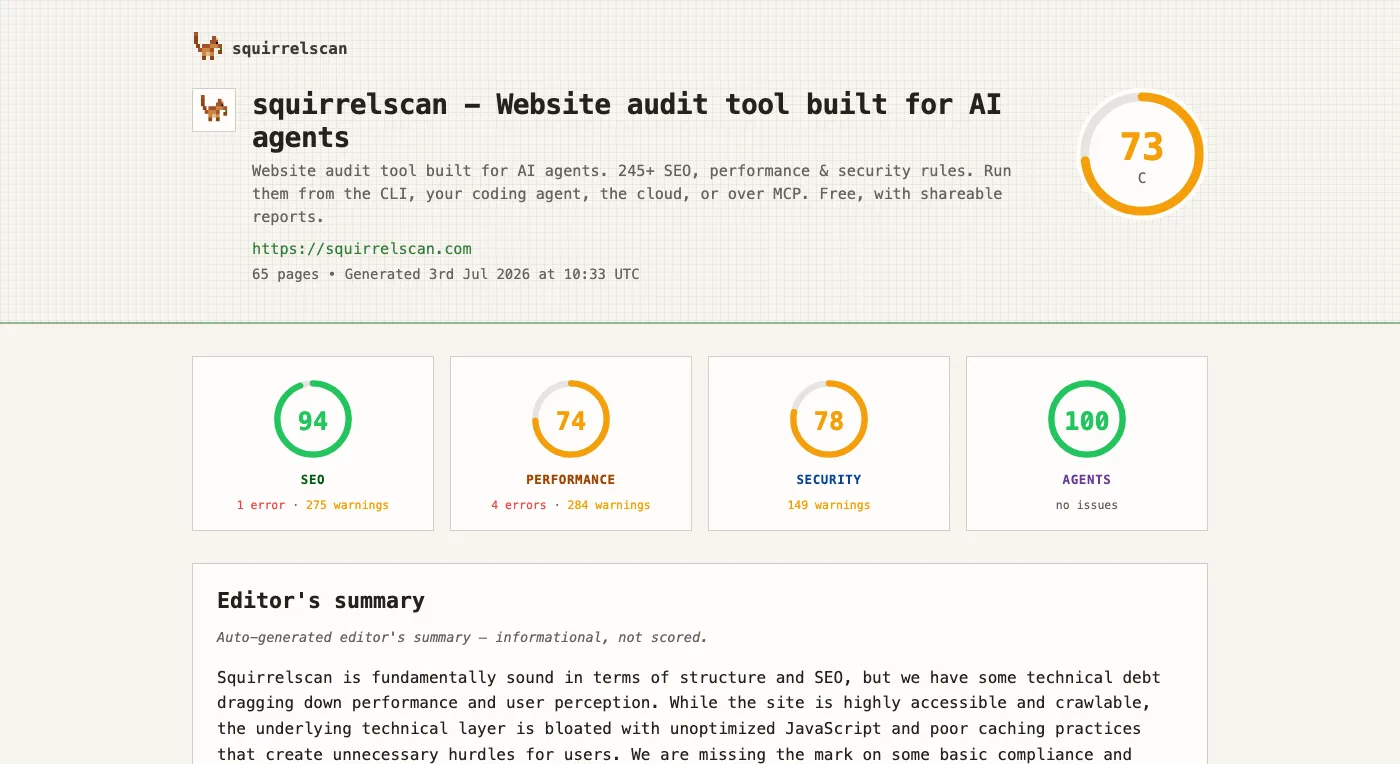
Category scores for SEO, performance, security and Agent Experience (AX). Publish reports to the web to share with team members or coding agents (fix instructions are embedded)
Add to your coding agent
squirrelscan ships as an MCP server (hosted at mcp.squirrelscan.com), skills (autonomous audit + fix workflows), and a plugin for Claude Code and Cursor. Cursor installs in one click from the badge above; the rest are a single copy-paste.
Cursor
Click the Add to Cursor badge above, or add it manually to ~/.cursor/mcp.json:
Skills: npx skills add squirrelscan/squirrelscan
Claude Code
Install the plugin (bundles skills + the MCP server):
Or add just the MCP server:
OpenAI Codex
Add the server to ~/.codex/config.toml:
Codex reads Agent Skills from ~/.agents/skills, so skills work too: npx skills add squirrelscan/squirrelscan
opencode
Add the server to opencode.json:
Any MCP client
squirrelscan is in the MCP Registry as com.squirrelscan/squirrelscan. Point any client at the remote server:
Authentication is per-user OAuth (or pass a squirrelscan API key as a Bearer token). Skills follow the Agent Skills standard: npx skills add squirrelscan/squirrelscan lands them in .agents/skills/.
Skills
Two skills drive agent workflows:
squirrelscan- operating the CLI: install, login, keys, credits, running audits, publishing reports, MCP setup, config, troubleshooting.audit-website- the full fix loop: audit, map issues to source files, fix in batches, re-audit until the site scores well.
Then, in your agent:
Output Formats
| Format | Flag | Use Case |
|---|---|---|
| Console | (default) | Human-readable terminal output |
| JSON | -f json | CI/CD, programmatic processing |
| HTML | -f html | Visual reports for sharing |
| Markdown | -f markdown | Documentation, GitHub |
| Text | -f text | Clean output for piping to LLMs |
| LLM | -f llm | LLM optimized output |
| XML | -f xml | XML output |
Source and development
The complete local CLI, crawler, audit engine, rules, report generators, CLI-facing cloud clients, and documentation site are open source in this repository. The hosted API, website, dashboard, and cloud worker implementations are separate private services.
Prerequisites: Bun 1.3.14 and Git.
Run the same checks used in pull requests:
See CONTRIBUTING.md before opening a pull request. Contributions require a Developer Certificate of Origin sign-off (git commit -s).
Telemetry
Telemetry is enabled by default and is deliberately minimal: event name, CLI version, a random install ID, and bounded error categories. It does not send credentials, URLs, report contents, or raw error messages, and telemetry requests are never authenticated.
Disable it permanently with:
Or disable all telemetry and install registration for any invocation by defining NO_TELEMETRY. Any defined value works, including an empty value, 0, or false:
Links
License
The CLI and the repository contents are licensed under the MIT License. squirrelscan names and logos are covered by TRADEMARKS.md.
Related MCP Servers
Frequently Asked Questions about Squirrelscan
AllMCPs Directory Badge
Showcase your server listing on GitHub or your project documentation. Embed this dynamic SVG badge to highlight official listing status and live engagement.
Badge Style:
Live Dynamic SVG Preview
Markdown (GitHub README)
[](https://allmcps.com/mcp/squirrelscan-2)HTML Embed
<a href="https://allmcps.com/mcp/squirrelscan-2"><img src="https://allmcps.com/api/badge/squirrelscan-2?style=directory" alt="Squirrelscan on AllMCPs" /></a>Technical Specs & Signals
CategorySecurity
0/4 checks healthy over the last 7h
32Quality signal: Emerging · 32/100How this signal is calculated ▾
Server availabilityNot measured
Not scored for repo-hosted servers — we can't reach the running server, only its GitHub page. Hosted MCP endpoints are health-checked live.
Verified ownership8/20
Documentation & tools11/30
Adoption & activity5/15
Community engagement0/10
A guidance signal from public completeness & health data — not a user rating. New listings start lower and rise as they add docs, get verified, and grow adoption. Signals we can't observe for a listing are skipped, not counted against it.
Own this project?
This directory is pre-filled from public sources. Claim via GitHub README, site badge, or DNS TXT to get the verified badge.
Free dofollow backlink: after claiming, verify your product site and place a dofollow AllMCPs badge — we recheck it stays live.
Claim & get free dofollowShare & Embed
Add our SVG badge (dark/light directory styles) or embeddable widget to your site.