AllMCPs
BrowseBestCategoriesStackCompareToolsGuidesBlog Log in Submit MCP

Stay in the loop

Get new MCP servers and top picks in your inbox.

AllMCPs

The open directory for discovering and installing Model Context Protocol servers.

Explore

  • Browse servers
  • Best MCP servers
  • Categories
  • MCP clients
  • Agent prompts
  • Stack Builder
  • Compare servers
  • Tags index
  • Submit a server
  • Pricing

Learn

  • Guides hub
  • What is MCP?
  • Install guide
  • Troubleshooting
  • Security
  • Blog
  • Blog RSS

Tools

  • All tools
  • Config generator
  • Config validator
  • MCP playground
  • OpenAPI β†’ MCP
  • Badge generator

For agents

  • API docs
  • Trust & traffic
  • llms.txt β†— (opens in a new tab)
  • Catalog JSON β†— (opens in a new tab)
  • Remote MCP β†— (opens in a new tab)

Company

  • About
  • Contact
  • X (@AllMCPs) β†— (opens in a new tab)
  • GitHub β†— (opens in a new tab)
  • Terms
  • Privacy
AllMCPs VerifiedAllMCPs VerifiedFeatured on Nick LaunchesFeatured on Nick LaunchesLaunch Llama NewsletterLaunch Llama NewsletterVerified DR - allmcps.comVerified DR - allmcps.comFeatured on SaaSGrowFeatured on SaaSGrowFeatured on Twelve ToolsFeatured on Twelve ToolsFeatured on Saaspa.geFeatured on Saaspa.geFeatured on Findly.toolsFeatured on Findly.toolsFeatured on Startup FameFeatured on Startup FameFeatured on LaunchKiwiFeatured on LaunchKiwiFeatured on ScrollLaunchFeatured on ScrollLaunchFeatured on DailyPingsFeatured on DailyPingsFazier badgeFazier badgeFeatured on NewTool.siteFeatured on NewTool.siteFeatured on saasfame.comFeatured on saasfame.comDR Checker - Domain RatingDR Checker - Domain RatingListed on Turbo0Listed on Turbo0Launched on LaunchBoard - Product Launch PlatformLaunched on LaunchBoard - Product Launch PlatformList on SimilarlabsList on Similarlabshttps://codetrendy.comhttps://codetrendy.comListed on DevTool.ioFeatured on BuildlistFeatured on BuildlistAllMCPs VerifiedAllMCPs VerifiedFeatured on Nick LaunchesFeatured on Nick LaunchesLaunch Llama NewsletterLaunch Llama NewsletterVerified DR - allmcps.comVerified DR - allmcps.comFeatured on SaaSGrowFeatured on SaaSGrowFeatured on Twelve ToolsFeatured on Twelve ToolsFeatured on Saaspa.geFeatured on Saaspa.geFeatured on Findly.toolsFeatured on Findly.toolsFeatured on Startup FameFeatured on Startup FameFeatured on LaunchKiwiFeatured on LaunchKiwiFeatured on ScrollLaunchFeatured on ScrollLaunchFeatured on DailyPingsFeatured on DailyPingsFazier badgeFazier badgeFeatured on NewTool.siteFeatured on NewTool.siteFeatured on saasfame.comFeatured on saasfame.comDR Checker - Domain RatingDR Checker - Domain RatingListed on Turbo0Listed on Turbo0Launched on LaunchBoard - Product Launch PlatformLaunched on LaunchBoard - Product Launch PlatformList on SimilarlabsList on Similarlabshttps://codetrendy.comhttps://codetrendy.comListed on DevTool.ioFeatured on BuildlistFeatured on Buildlist
Β© 2026 Jackalope Digital LLC. All rights reserved.
  1. Home
  2. πŸ—„οΈ Databases
  3. SQL Server MCP (Windows)
S
Health: Not checked yetWe have not completed a health check for this listing yet.Last checked 8/11/2026, 12:17:05 AM

SQL Server MCP (Windows)

Enrichment pendingWe haven’t run our AI enrichment pass on this listing yet, so the overview, use cases, and FAQ below may be sparse or missing. We work through the catalog over time β€” check back soon.
View Repository

SQL Server MCP with RAG capabilities for Windows (native ODBC support)

Quick Install

Automated & IDE Setup

Copy the AI prompt to install this server into Claude Code, Cursor, or another agent β€” or use 1-click editor setup below.

Add to CursorAdd to VS Code
Manual Client & Custom JSON ConfigExpand JSON β–Ύ

Install Config Generator

Choose your client
claude_desktop_config.json
{
  "mcpServers": {
    "sql-server-mcp-windows": {
      "command": "npx",
      "args": [
        "-y",
        "sql-server-mcp-windows"
      ]
    }
  }
}

πŸ’‘ Paste into ~/Library/Application Support/Claude/claude_desktop_config.json (macOS) or %APPDATA%\Claude\claude_desktop_config.json (Windows)

Install Directory Badge Claim listing AlternativesπŸ—„οΈ More in Databases

Documentation Overview

SQL Server MCP - Cross-Platform Database Integration for AI

License: MIT TypeScript MCP npm version npm downloads

A Model Context Protocol (MCP) server implementation for SQL Server that enables AI assistants to explore and query SQL Server databases through natural language. Built as a RAG (Retrieval-Augmented Generation) system optimized for database knowledge exploration.

🌟 Features

  • πŸ” Schema Exploration - List databases, tables, views, stored procedures
  • πŸ”— Relationship Mapping - Discover foreign key relationships and table dependencies
  • πŸ”Ž Search & Discovery - Global schema search across tables, columns, procedures
  • ⚑ Safe Query Execution - Read-only SELECT queries with automatic timeouts and row limits
  • πŸ—„οΈ Schema Caching - Fast retrieval with configurable TTL (default: 60 minutes)
  • πŸ” Security First - Read-only by default, SQL injection prevention, query validation
  • πŸ–₯️ Cross-Platform - Native Windows Authentication & macOS Docker support

πŸŽ₯ Demo

See SQL Server MCP in action with AI assistant integration:
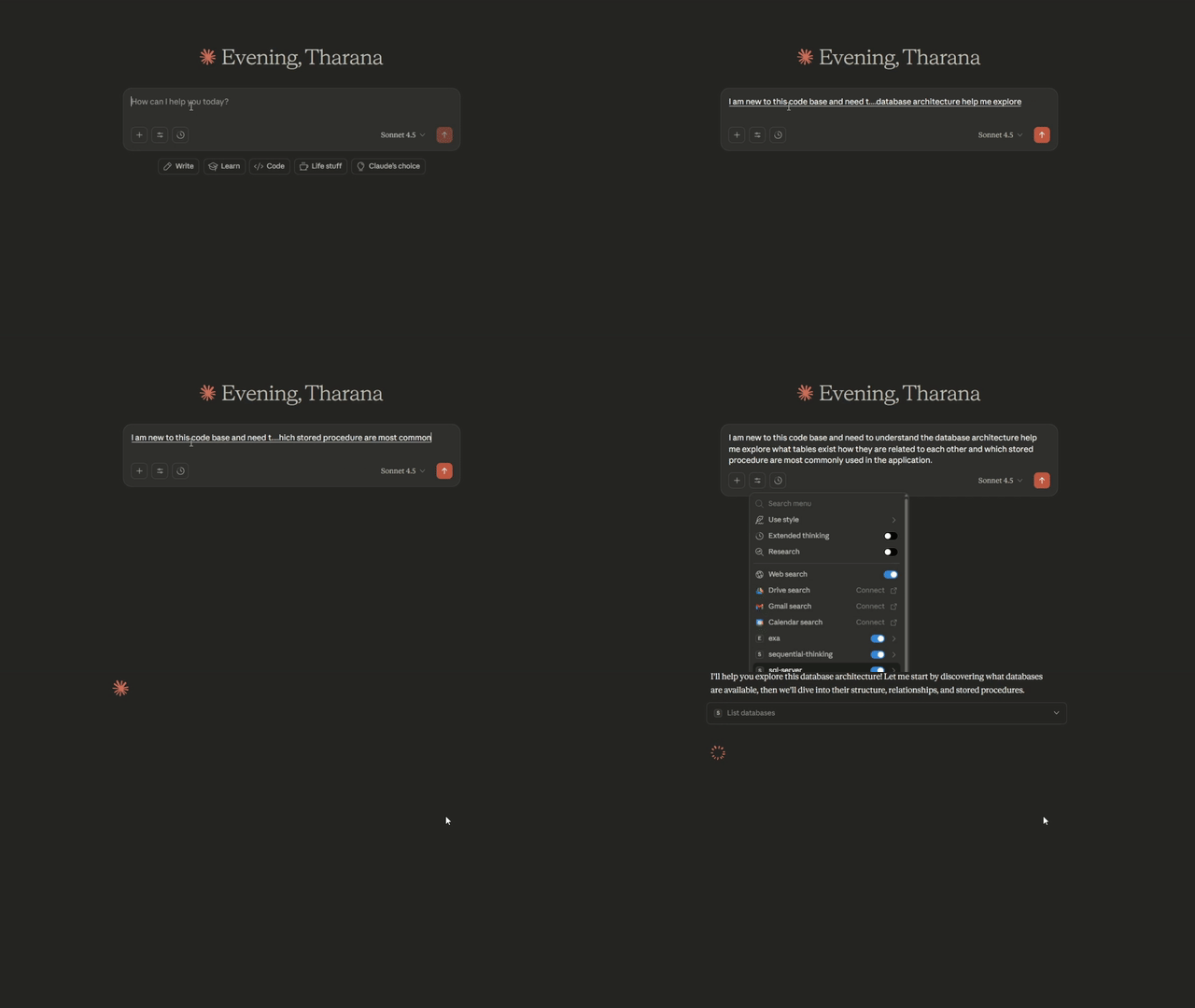
SQL Server MCP Demo

Note: Watch how natural language queries instantly explore database schemas, find relationships, and retrieve data - all without leaving your AI assistant!

πŸš€ Quick Start

This repository contains two platform-specific implementations:

Windows Version β†’ sql-server-mcp/

  • βœ… Windows Authentication (ODBC Driver 17)
  • βœ… SQL Server Authentication
  • βœ… Native msnodesqlv8 driver for optimal performance
  • πŸ“– Windows Setup Guide

macOS Version β†’ sql-server-mcp-mac/

  • βœ… SQL Server Authentication (Docker required)
  • βœ… Pure JavaScript mssql driver (no native dependencies)
  • πŸ“– macOS Setup Guide

πŸ“¦ Installation

πŸŽ‰ Now Available on MCP Registry!

This server is officially published in the Model Context Protocol Registry:

  • Windows: io.github.TharanaBope/sql-server-mcp
  • macOS: io.github.TharanaBope/sql-server-mcp-macos

πŸš€ Quick Start (Recommended)

No installation needed! Just add to your AI assistant's configuration:

Claude Desktop (Windows)

Config Location: %APPDATA%\Claude\claude_desktop_config.json

config.json
{
  "mcpServers": {
    "sql-server": {
      "command": "npx",
      "args": ["-y", "@tharanabopearachchi/sql-server-mcp@latest"],
      "env": {
        "SQL_SERVER": "localhost",
        "SQL_DATABASE": "master",
        "SQL_USE_WINDOWS_AUTH": "true"
      }
    }
  }
}

Claude Desktop (macOS)

Config Location: ~/Library/Application Support/Claude/claude_desktop_config.json

config.json
{
  "mcpServers": {
    "sql-server": {
      "command": "npx",
      "args": ["-y", "@tharanabopearachchi/sql-server-mcp-macos@latest"],
      "env": {
        "SQL_SERVER": "localhost",
        "SQL_DATABASE": "master",
        "SQL_USE_WINDOWS_AUTH": "false",
        "SQL_USERNAME": "sa",
        "SQL_PASSWORD": "your_password"
      }
    }
  }
}
LM Studio Configuration

Config Location: Varies by platform

  • Windows: %USERPROFILE%\.lmstudio\config.json
  • macOS: ~/.lmstudio/config.json
config.json
{
  "mcpServers": {
    "sql-server": {
      "command": "npx",
      "args": ["-y", "@tharanabopearachchi/sql-server-mcp@latest"],
      "env": {
        "SQL_SERVER": "localhost",
        "SQL_DATABASE": "master",
        "SQL_USE_WINDOWS_AUTH": "true",
        "SQL_USERNAME": "",
        "SQL_PASSWORD": ""
      }
    }
  }
}
VS Code with Continue Extension

Config Location: ~/.continue/config.json

config.json
{
  "experimental": {
    "modelContextProtocolServers": [
      {
        "transport": {
          "type": "stdio",
          "command": "npx",
          "args": ["-y", "@tharanabopearachchi/sql-server-mcp@latest"]
        },
        "env": {
          "SQL_SERVER": "localhost",
          "SQL_DATABASE": "master",
          "SQL_USE_WINDOWS_AUTH": "true"
        }
      }
    ]
  }
}
Cursor IDE

Config Location: Cursor Settings β†’ Features β†’ Model Context Protocol

config.json
{
  "mcpServers": {
    "sql-server": {
      "command": "npx",
      "args": ["-y", "@tharanabopearachchi/sql-server-mcp@latest"],
      "env": {
        "SQL_SERVER": "localhost",
        "SQL_DATABASE": "master",
        "SQL_USE_WINDOWS_AUTH": "true"
      }
    }
  }
}
Cline (VS Code Extension)

Config Location: VS Code Settings β†’ Cline β†’ MCP Settings

config.json
{
  "mcpServers": {
    "sql-server": {
      "command": "npx",
      "args": ["-y", "@tharanabopearachchi/sql-server-mcp@latest"],
      "env": {
        "SQL_SERVER": "localhost",
        "SQL_DATABASE": "master",
        "SQL_USE_WINDOWS_AUTH": "true"
      }
    }
  }
}

Restart your AI assistant and you're ready to go!

πŸ› οΈ Development Setup

For development or local modifications:

Windows

bash
cd sql-server-mcp
npm install
npm run build

πŸ‘‰ Complete Windows Setup Instructions

macOS

bash
cd sql-server-mcp-mac
npm install
npm run build

πŸ‘‰ Complete macOS Setup Instructions

πŸ› οΈ Available MCP Tools

The server provides 12 powerful tools for database exploration:

Schema Exploration

  • list_databases - Discover all available databases
  • list_tables - View tables with row counts
  • describe_table - Get detailed schema (columns, types, constraints, indexes)
  • list_views - List all views
  • list_stored_procedures - List stored procedures with metadata
  • get_procedure_definition - Get full SQL definition
  • get_database_overview - High-level statistics

Relationship Mapping

  • get_table_relationships - Get foreign key relationships (incoming & outgoing)
  • get_related_tables - Find directly connected tables

Search & Discovery

  • search_schema - Search across tables, columns, views, procedures
  • find_column_usage - Find all tables containing a specific column

Query Execution

  • execute_query - Execute read-only SELECT queries safely

πŸ’¬ Example Usage

Once configured, you can ask your AI assistant:

Dockerfile
"What databases are available on this server?"

"Show me all tables in the Sales database"

"What's the schema of the Orders table?"

"Find all tables that reference the Customers table"

"Search for any columns related to 'email'"

"Execute: SELECT TOP 10 * FROM Products ORDER BY Price DESC"

βš™οΈ Configuration

Both versions use environment variables for configuration:

env
SQL_SERVER=localhost
SQL_DATABASE=master
SQL_PORT=1433
SQL_USE_WINDOWS_AUTH=true          # Windows only
SQL_USERNAME=                       # For SQL Auth
SQL_PASSWORD=                       # For SQL Auth
QUERY_TIMEOUT=30
MAX_RESULT_ROWS=1000
ENABLE_SCHEMA_CACHE=true
CACHE_TTL_MINUTES=60

See platform-specific READMEs for detailed configuration instructions.

πŸ” Security Features

  • βœ… Read-only by default - Write operations disabled unless explicitly enabled
  • βœ… Query validation - Only SELECT statements allowed by default
  • βœ… Automatic timeouts - Prevents long-running queries
  • βœ… Row limits - Prevents memory exhaustion
  • βœ… SQL injection prevention - Query sanitization and validation
  • βœ… Database whitelisting - Optional restriction to specific databases

πŸ—οΈ Architecture

Code
MCP/
β”œβ”€β”€ sql-server-mcp/              # Windows implementation
β”‚   β”œβ”€β”€ src/
β”‚   β”‚   β”œβ”€β”€ index.ts             # MCP server entry point
β”‚   β”‚   β”œβ”€β”€ database/            # Connection, caching, queries
β”‚   β”‚   β”œβ”€β”€ tools/               # 12 MCP tools
β”‚   β”‚   └── types/               # TypeScript interfaces
β”‚   β”œβ”€β”€ dist/                    # Compiled output
β”‚   β”œβ”€β”€ package.json
β”‚   └── README.md                # Windows documentation
β”‚
β”œβ”€β”€ sql-server-mcp-mac/          # macOS implementation
β”‚   β”œβ”€β”€ src/                     # Same structure as Windows
β”‚   └── README.md                # macOS documentation
β”‚
β”œβ”€β”€ LICENSE                      # MIT License
└── README.md                    # This file

🎯 Use Cases

Database Exploration

  • "What tables exist in this database?"
  • "Show me the structure of the Users table"
  • "List all stored procedures"

Schema Research

  • "Find all tables with an 'email' column"
  • "Search for anything related to 'invoice'"
  • "What views are available?"

Relationship Analysis

  • "How are Orders and Customers related?"
  • "Show me all tables that reference Products"
  • "What are the foreign key relationships for this table?"

Data Queries

  • "Get the top 10 most expensive products"
  • "Show me recent orders"
  • "What's the total count of records in each table?"

🀝 Contributing

Contributions are welcome! Please feel free to submit a Pull Request. For major changes, please open an issue first to discuss what you would like to change.

πŸ“„ License

This project is licensed under the MIT License - see the LICENSE file for details.

πŸ™ Acknowledgments

  • Built on Model Context Protocol SDK
  • Uses mssql and msnodesqlv8 drivers
  • Inspired by the need for better AI-database integration

πŸ“š Resources

  • Windows Setup Guide: sql-server-mcp/README.md
  • macOS Setup Guide: sql-server-mcp-mac/README.md
  • Troubleshooting: Check platform-specific TROUBLESHOOTING.md files
  • MCP Documentation: https://github.com/modelcontextprotocol
  • Report Issues: https://github.com/TharanaBope/SQL-MCP-Mac-Windows/issues

🌐 Platform-Specific Documentation

PlatformDirectoryKey Features
Windowssql-server-mcp/Windows Auth, ODBC Driver, Native performance
macOSsql-server-mcp-mac/Docker SQL Server, Pure JS, No native deps

Made with ❀️ for the MCP community

⭐ Star this repo if you find it useful! πŸ› Report bugs via Issues πŸ’¬ Questions? Check the Discussions

Related MCP Servers

View all in Databases View all alternatives
  • AllMCPs Server logoAllMCPs Server
    β˜… Featured

    The official MCP server for AllMCPs.com - submit and manage tools directly from your AI. The open directory for MCP servers. Connect Claude, Cursor, Windsurf, and AI agents to databases, tools, files, and APIs. Explore 3,181+ servers. AllMCPs is the premier, open directory for discovering, evaluating, and installing Model Context Protocol (MCP) servers to equip AI agents and LLMs with real-world superpowers.

    πŸ—„οΈ Databases7 views
    Compare vs AllMCPs Server β†’
  • Genai Toolbox logoGenai Toolbox

    Open source MCP server specializing in easy, fast, and secure tools for Databases.

    πŸ—„οΈ Databases3 views
    Compare vs Genai Toolbox β†’
  • Mcp Server Duckdb logoMcp Server Duckdb

    DuckDB database integration with schema inspection and query capabilities

    πŸ—„οΈ Databases2 views
    Compare vs Mcp Server Duckdb β†’
  • Airtable Mcp Server logoAirtable Mcp Server

    Airtable database integration with schema inspection, read and write capabilities

    πŸ—„οΈ Databases2 views
    Compare vs Airtable Mcp Server β†’

Frequently Asked Questions about SQL Server MCP (Windows)

Add the following block to your claude_desktop_config.json under mcpServers: "mcpServers": { "sql-server-mcp-windows": { "command": "npx", "args": ["-y", "SQL Server MCP (Windows)"] } }

AllMCPs Directory Badge

Full Badge Customizer

Showcase your server listing on GitHub or your project documentation. Embed this dynamic SVG badge to highlight official listing status and live engagement.

Badge Style:
Live Dynamic SVG PreviewSQL Server MCP (Windows) AllMCPs Directory Badge

Markdown (GitHub README)
[![AllMCPs](https://allmcps.com/api/badge/sql-server-mcp-windows?style=directory)](https://allmcps.com/mcp/sql-server-mcp-windows)
HTML Embed
<a href="https://allmcps.com/mcp/sql-server-mcp-windows"><img src="https://allmcps.com/api/badge/sql-server-mcp-windows?style=directory" alt="SQL Server MCP (Windows) on AllMCPs" /></a>

Technical Specs & Signals

CategoryπŸ—„οΈDatabases
More technical detailsExpand β–Ύ
TransportSTDIO
RuntimeNode.js
Views0
Unique ViewsTotal visits recorded for this listing page on AllMCPs.
Installs0
Installs & Copy ActionsTotal times users copied install commands or configuration snippets for this server.
27Quality signal: Emerging Β· 27/100How this signal is calculated β–Ύ
Server availabilityNot measured

Not scored for repo-hosted servers β€” we can't reach the running server, only its GitHub page. Hosted MCP endpoints are health-checked live.

Verified ownership8/20
Documentation & tools11/30
Adoption & activity1/15
Community engagement0/10

A guidance signal from public completeness & health data β€” not a user rating. New listings start lower and rise as they add docs, get verified, and grow adoption. Signals we can't observe for a listing are skipped, not counted against it.

β˜… FeaturedAllMCPs Server logo

AllMCPs Server

The official MCP server for AllMCPs.com - submit and manage tools directly from your AI. The open directory for MCP servers. Connect Claude, Cursor, Windsurf, and AI agents to databases, tools, files, and APIs. Explore 3,181+ servers. AllMCPs is the premier, open directory for discovering, evaluating, and installing Model Context Protocol (MCP) servers to equip AI agents and LLMs with real-world superpowers.

Explore Server β†’

Own this project?

This directory is pre-filled from public sources. Claim via GitHub README, site badge, or DNS TXT to get the verified badge and attach your website.

Free dofollow backlink: after claiming, verify your product site and place a dofollow AllMCPs badge β€” we recheck it stays live.

Claim & get free dofollow

Share & Embed

Add our SVG badge (dark/light directory styles) or embeddable widget to your site.

Explore more

More in πŸ—„οΈ Databases β†’Best MCP servers for Databases β†’Alternatives to SQL Server MCP (Windows) β†’Install in Claude DesktopInstall in CursorInstall in VS Code

