Brainstorm MCP
by spranab
Orchestrates multi-round debates and code reviews among multiple AI models with structured synthesis and flexible modes.
Install Brainstorm MCP
Pick your client, then add it in one click or paste the config.
~/Library/Application Support/Claude/claude_desktop_config.json{
"mcpServers": {
"spranab-brainstorm-mcp": {
"command": "npx",
"args": [
"-y",
"brainstorm-mcp"
]
}
}
}
Settings → Developer → Edit Config, merge this into mcpServers, then fully quit and reopen Claude Desktop.
Install not yet sandbox-tested— we haven't run this command through our automated sandbox yet. Not a red flag; we're working through the catalog.
Overview
Use cases
- Compare technology options with instant multi-model perspectives
- Conduct multi-model code reviews highlighting security and correctness issues
- Run multi-round AI debates with adversarial or Socratic styles
- Synthesize diverse AI opinions into structured verdicts
- Integrate hosted mode brainstorming without requiring API keys
Key features
- Multi-round debates with parallel model responses
- Hosted mode using local Claude models without API keys
- Multi-model code review with findings, severity, and verdicts
- Debate styles including freeform, red-team, and Socratic
- Context injection for grounding debates in code or docs
- Resilient operation continuing despite individual model failures
Tools7
What Brainstorm MCP lets your agent do. Expand a tool for its parameters.
Security & health
What it can reach and how reliably it runs — from our own checks, not the maintainer’s claims.
Recent health check succeeded.
Supply-chain signal
No high-severity advisories surfaced by our automated scan.
Scanned 11d ago via OSV.dev · brainstorm-mcp (npm)
Adoption & maintenance
Factual signals from GitHub, npm, and our automated checks — not a rating.
From the project README
brainstorm-mcp




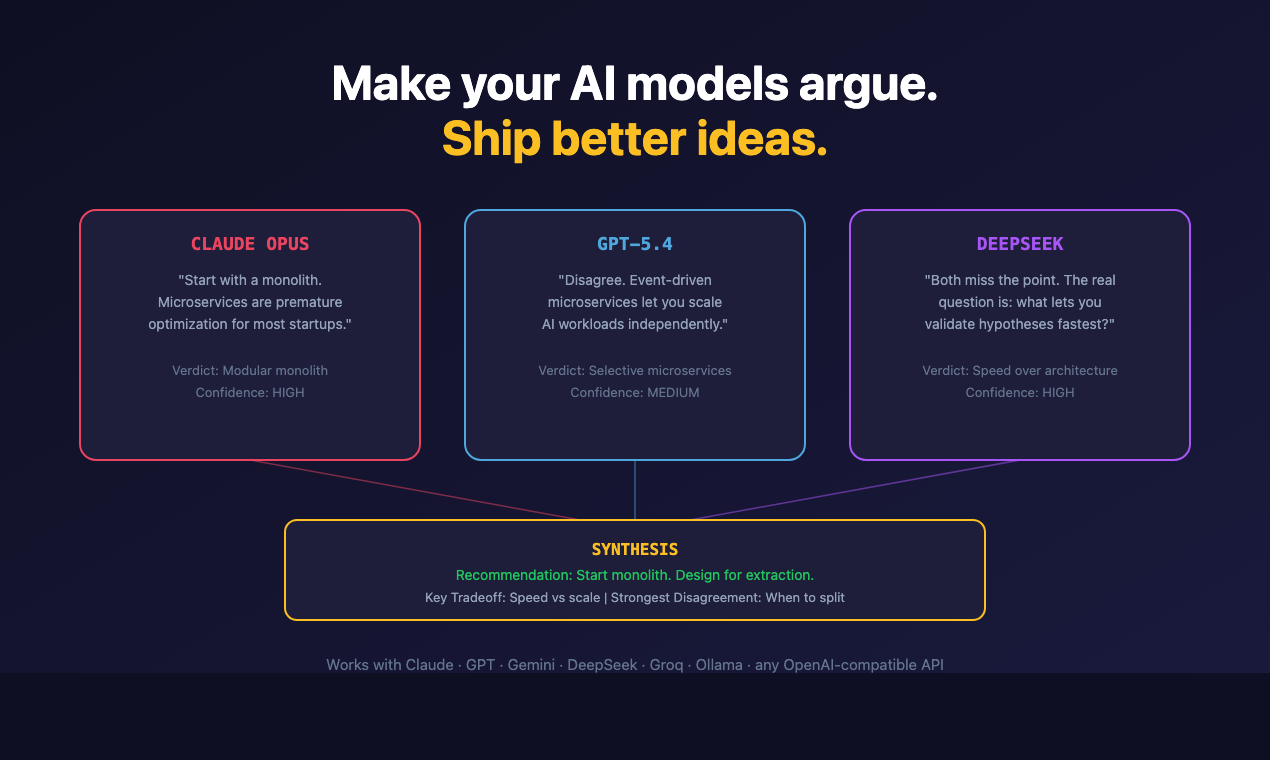
Ask one model a design question and you get one confident answer, with no signal about which parts it is unsure of. Ask three and the disagreement is the signal.
brainstorm-mcp runs multi-round debates between GPT, Gemini, DeepSeek, Claude and local Ollama models from inside your editor: they see and critique each other's answers across rounds, then you get a 3-bullet synthesis — recommendation, key tradeoffs, strongest disagreement. Also does instant quick mode, multi-model code review with verdicts, and red-team/Socratic styles. Hosted mode needs zero API keys.
Don't trust one AI. Make them argue.
Quick start (60 seconds)
claude mcp add brainstorm -- npx -y brainstorm-mcp
Then ask Claude: "Brainstorm using opus, sonnet, and haiku about whether we should use GraphQL or REST."
That runs in hosted mode: no API keys, no provider accounts. The debate uses the models already available in your environment, and you get the 3-bullet synthesis at the end.
Demo
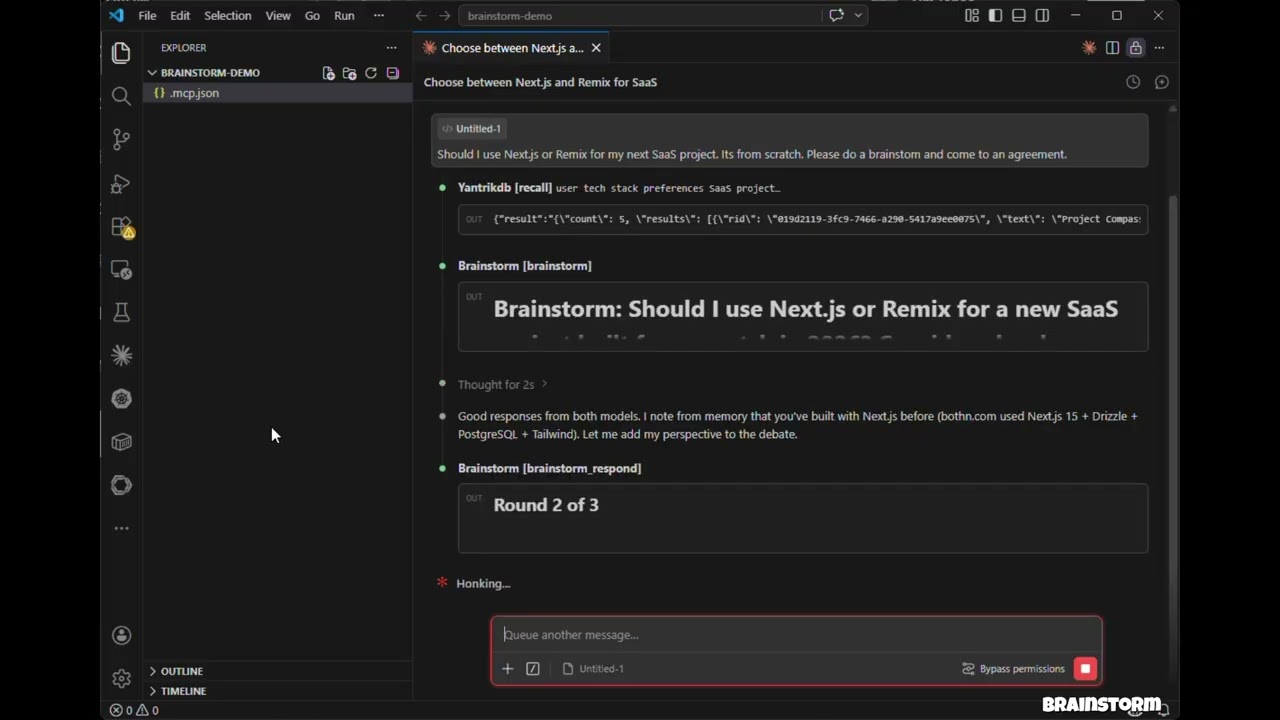
Click to watch: 3 models debate, cross-examine, and produce a structured verdict — all inside Claude Code.
Features
- Hosted mode — No API keys needed. Uses models in your environment (Claude Opus/Sonnet/Haiku) via sub-agents
- API mode — Direct model API calls with parallel execution across OpenAI, Gemini, DeepSeek, Groq, Ollama
- CLI mode — Debate through agent CLIs you already have (
claude,codex, and more) so debates run on your subscription instead of API credits - brainstorm_quick — Instant multi-model perspectives in under 10 seconds
- brainstorm_review — Multi-model code review with structured findings, severity ratings, and verdicts
- Debate styles — Freeform, red-team (adversarial), and Socratic (probing questions)
- Context injection — Ground debates in actual code, diffs, or architecture docs
- 3-bullet synthesis verdicts — Recommendation, Key Tradeoffs, Strongest Disagreement
- Claude as participant — Claude debates alongside external models with full conversation context
- Multi-round debates — Models see and critique each other's responses across rounds
- Parallel execution — All models respond concurrently within each round
- Resilient — One model failing doesn't abort the debate
- Cross-platform — Works on macOS, Windows, and Linux
Install
The one-line command under Quick start is enough for hosted mode. Add provider keys to bring GPT, Gemini, DeepSeek, Groq or Ollama into the debate; per-client setup follows.
Claude Code
Add to your project's .mcp.json:
{
  "mcpServers": {
    "brainstorm": {
      "command": "npx",
      "args": ["-y", "brainstorm-mcp"],
      "env": {
        "OPENAI_API_KEY": "sk-...",
        "GEMINI_API_KEY": "AIza...",
        "DEEPSEEK_API_KEY": "sk-..."
      }
    }
  }
}
Claude Desktop
Add to claude_desktop_config.json:
{
  "mcpServers": {
    "brainstorm": {
      "command": "npx",
      "args": ["-y", "brainstorm-mcp"],
      "env": {
        "OPENAI_API_KEY": "sk-...",
        "DEEPSEEK_API_KEY": "sk-..."
      }
    }
  }
}
Manual Install
npm install -g brainstorm-mcp
brainstorm-mcp
Hosted mode requires no API keys — just install and go. The host (Claude Code) executes prompts using its own model access.
Configuration
Option 1: Environment Variables (simplest)
OPENAI_API_KEY=sk-...
GEMINI_API_KEY=AIza...
DEEPSEEK_API_KEY=sk-...
Option 2: Config File (full control)
Set BRAINSTORM_CONFIG to point to a JSON config:
{
  "providers": {
    "openai": { "model": "gpt-6.1-sol", "apiKeyEnv": "OPENAI_API_KEY" },
    "gemini": { "model": "gemini-3.8-flash", "apiKeyEnv": "GEMINI_API_KEY" },
    "deepseek": { "model": "deepseek-flash", "apiKeyEnv": "DEEPSEEK_API_KEY" },
    "ollama": { "model": "llama3.1", "baseURL": "http://localhost:11434/v1" }
  }
}
Known providers (openai, gemini, deepseek, groq, mistral, together, moonshot,
minimax, glm, qwen, xai) don't need a baseURL, and the ones with a built-in default model
(openai, gemini, deepseek, moonshot, minimax, glm, qwen, xai) don't need a model either.
Use provider:default (e.g. openai:default) to mean a provider's default model.
Env-var detection: OPENAI_API_KEY, GEMINI_API_KEY, DEEPSEEK_API_KEY, MOONSHOT_API_KEY,
MINIMAX_API_KEY, ZAI_API_KEY, DASHSCOPE_API_KEY (Qwen), XAI_API_KEY (Grok; GROK_API_KEY also works). Each also accepts
<PREFIX>_BASE_URL and <PREFIX>_DEFAULT_MODEL.
| Provider | Default model |
|---|---|
openai | gpt-6.1-sol (also gpt-6-astra, gpt-6-sol, gpt-6-luna, gpt-5.5) |
gemini | gemini-3.8-flash (gemini-3.1-pro-preview for Pro) |
deepseek | deepseek-flash (deepseek-v4-pro) |
xai | grok-4.7 |
moonshot | kimi-k3 |
minimax | MiniMax-M3 |
glm | glm-5.3 |
qwen | qwen3.8-max |
Reasoning models (GPT-5/6, o-series, Kimi K3, Gemini 3, DeepSeek V4, Grok 4+, GLM-5, MiniMax M3,
Qwen 3.5+) are sent the token budget they need and no temperature; inline <think>…</think> blocks
are stripped from replies.
Any model id the provider serves works, including OpenAI's GPT-6 (openai:gpt-6-astra) and the
gpt-5.x reasoning models: brainstorm picks the request shape each model expects and retries with
the other shape if the API rejects it.
Option 3: CLI Providers (use a subscription, not API credits)
If you already pay for Claude Code, Codex, Gemini CLI, and friends, brainstorm can shell out to
those CLIs instead of buying API credits. Any agent CLI found on your PATH is registered
automatically at startup — no configuration needed:
[brainstorm] Detected CLI provider(s) on PATH: claude, codex (subscription-based, no API cost)
Use them like any other provider:
{ "topic": "GraphQL vs REST", "models": ["claude:sonnet", "codex:default", "openai:gpt-6.1-sol"] }
Built-in adapters:
| Provider | Command | Default model | Status |
|---|---|---|---|
claude | claude -p | sonnet | verified |
codex | codex exec | default | verified |
gemini | gemini -p | default | best-effort, verify locally |
cursor-agent | cursor-agent -p | default | best-effort |
opencode | opencode run | default | best-effort |
qwen | qwen -p | default | best-effort |
kimi | kimi --print | default | best-effort |
droid | droid exec | default | best-effort |
<provider>:default means "let the CLI use whatever model it's configured with". CLI calls run
with tools disabled and a read-only sandbox where the CLI supports it — they generate text, they
don't touch your repo. Provider-specific API key env vars (ANTHROPIC_API_KEY, OPENAI_API_KEY)
are stripped from the child process so the CLI falls back to your subscription login.
Env knobs:
| Variable | Effect |
|---|---|
BRAINSTORM_CLI_PROVIDERS | auto (default), off, or a comma-separated list of adapters to detect |
BRAINSTORM_PREFER_CLI | 1 — debates with no explicit models use only CLI providers, skipping metered APIs |
BRAINSTORM_CLI_TIMEOUT_MS | Per-call timeout for CLI providers (default 300000) |
To pin a model or add a CLI that isn't built in, use the config file:
{
  "providers": {
    "claude": { "type": "cli", "model": "opus" },
    "my-cli": {
      "type": "cli",
      "adapter": "custom",
      "command": "some-agent-cli",
      "args": ["run", "--model", "{{model}}", "--quiet", "{{prompt}}"],
      "promptVia": "arg",
      "model": "some-model"
    }
  }
}
Template placeholders: {{model}}, {{system}}, {{prompt}}, {{outfile}}. A lone placeholder
that resolves to nothing drops out of the command line along with the flag introducing it, so
["--model", "{{model}}"] works even for provider:default. Set "promptVia": "stdin" to pipe
the prompt instead of passing it as an argument.
Coding-plan backends through the Claude CLI
Moonshot (Kimi), MiniMax, and Z.ai (GLM) sell coding-plan subscriptions that speak the Anthropic
API. Point the claude binary at one of them and that vendor joins the debate on the plan you
already pay for:
{
  "providers": {
    "moonshot": { "type": "cli", "backend": "moonshot", "model": "kimi-k3" },
    "minimax":  { "type": "cli", "backend": "minimax",  "model": "MiniMax-M3" },
    "glm":      { "type": "cli", "backend": "glm",      "model": "glm-5.3" }
  }
}
| Backend | Endpoint | Token env var |
|---|---|---|
moonshot | https://api.moonshot.ai/anthropic | MOONSHOT_API_KEY |
minimax | https://api.minimax.io/anthropic | MINIMAX_API_KEY |
glm | https://api.z.ai/api/anthropic | ZAI_API_KEY |
Reviews
No reviews yet — be the first to share how it worked for you.
Frequently Asked Questions about Brainstorm MCP
Related MCP servers
Add a badge to your READMEShow it’s listed — live SVG, Markdown or HTML.
AllMCPs Directory Badge
Showcase your server listing on GitHub or your project documentation. Embed this dynamic SVG badge to highlight official listing status and live engagement.
[](https://allmcps.com/mcp/spranab-brainstorm-mcp)<a href="https://allmcps.com/mcp/spranab-brainstorm-mcp"><img src="https://allmcps.com/api/badge/spranab-brainstorm-mcp?style=directory" alt="Brainstorm MCP on AllMCPs" /></a>