Speak AI README
The full upstream README, mirrored here for reference. Install config, tool schemas, adoption signals, and an original overview live on the Speak AI listing page.

Connect Speak AI to Claude or ChatGPT in 60 seconds
For researchers, revenue teams, meeting-heavy teams, and media workflows.
No Terminal. No npm. No JSON config files.
Installation guide at docs.speakai.co/mcp →



What this does
Speak AI transcribes your interviews, sales calls, research sessions, webinars, podcasts, and team meetings — then extracts AI insights like summaries, action items, sentiment, and themes.
This connector (built on MCP — the standard way Claude and ChatGPT connect to apps) brings all of that into Claude or ChatGPT. Once installed, you can ask:
- "Find the last 10 customer interviews that mention pricing, group the feedback by theme, and cite the source recordings."
- "Summarize this week's team meetings into decisions, action items, owners, and unresolved risks."
- "Pull exact customer quotes about onboarding friction from recent research calls and format them for a product brief."
- "Find a strong 30-second highlight from the latest webinar, create a clip, and export captions."
The AI does the searching, summarizing, and citing. Your recordings stay in your Speak AI workspace — Claude and ChatGPT just query them through this connector.
Install (pick your tool)
Two paths to install — pick whichever feels easier. The one-click connect path approves access via a permission popup; the manual path pastes an API key into a header.
Don't know which one to pick? If you already use Claude or ChatGPT, install for whichever one you have.
Speak AI's connector address (paste this into your AI tool's connector settings — it's the same idea as pasting a Zoom link into your calendar):
https://api.speakai.co/v1/mcp
Claude.ai (web)
- Open claude.ai/settings/connectors
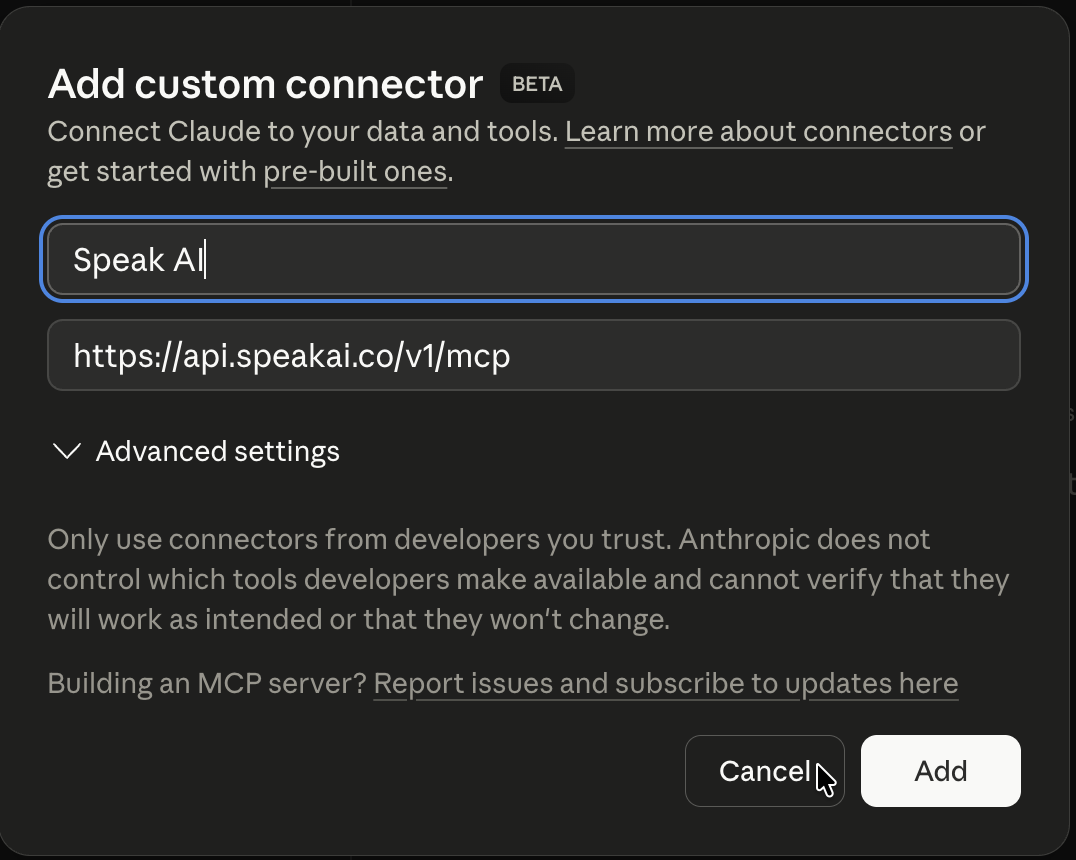
- Click Add custom connector
- Name it Speak AI and paste
https://api.speakai.co/v1/mcp, then click Add - A permission popup asks you to log into Speak AI and click Allow
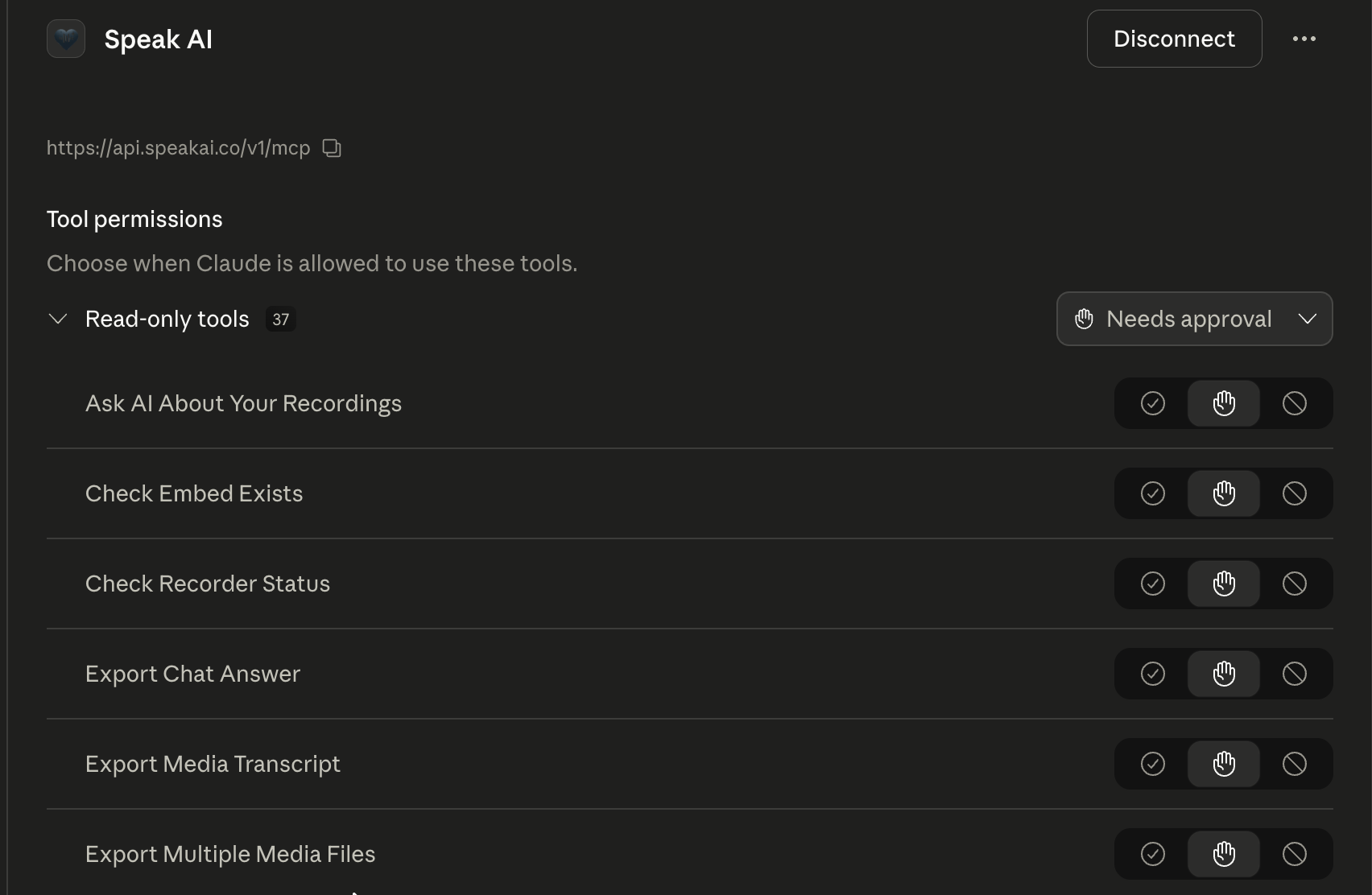
- Done — Speak AI shows in your connector list with its tools ready to use. Open a new chat and ask about your recordings.
What each step looks like (screenshots)
3. Add custom connector dialog — name and URL filled in.
5. Connected — Speak AI tools appear in your connector list.
Developer alternative — manual setup with an API key
Get a key at app.speakai.co/developers/apikeys, then in step 3 expand Advanced settings and add Authorization = Bearer <your-key> before clicking Add.
Claude Desktop
- Open Claude Desktop → Settings → Connectors → Add custom connector
- Paste
https://api.speakai.co/v1/mcp - Click Add — a permission popup opens. Sign in to Speak AI and click Allow on the screen that appears.
- Done.
Developer alternative — manual setup with an API key
Get a key at app.speakai.co/developers/apikeys, then in step 2 also expand Custom headers and add:
- Header name:
Authorization - Header value:
Bearer <your-speak-api-key>
Then click Add.
ChatGPT
- Open ChatGPT → Settings → Apps & Connectors → Advanced
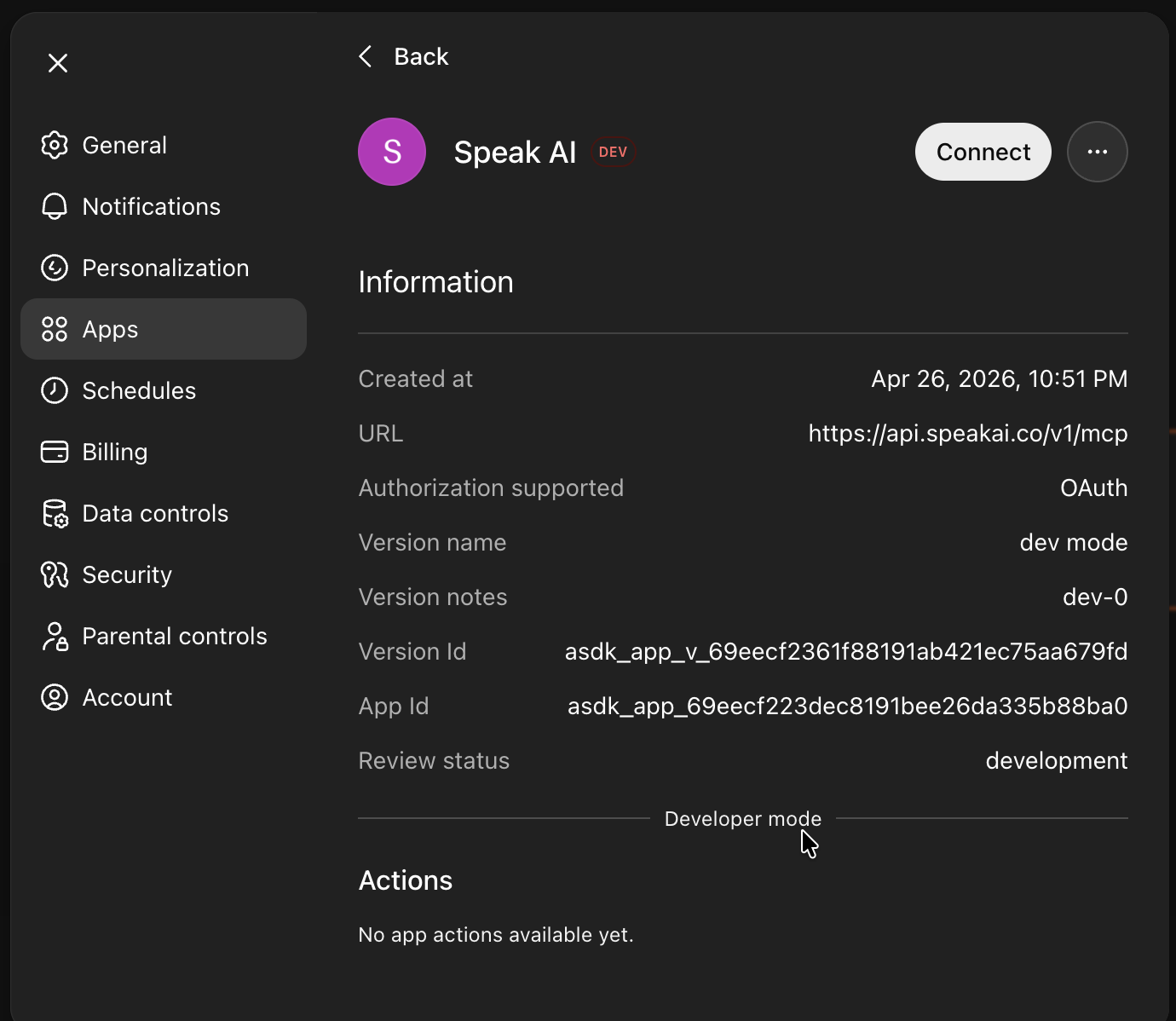
- Turn on Developer Mode (required while Speak AI isn't yet listed in ChatGPT's app store — this lets you add it as a custom app)
- Back on Apps & Connectors, click Create and paste
https://api.speakai.co/v1/mcp - For Authentication, choose OAuth
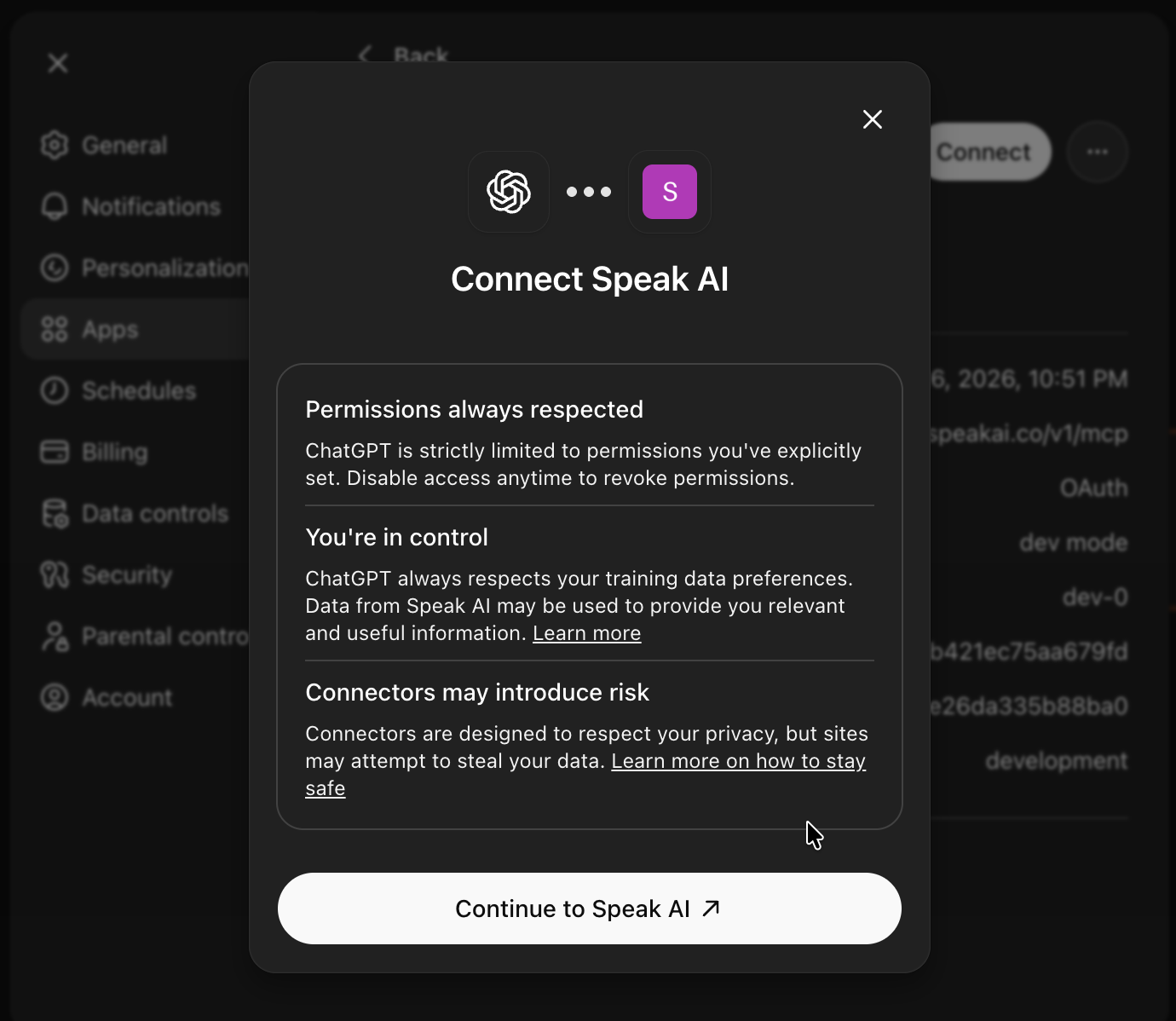
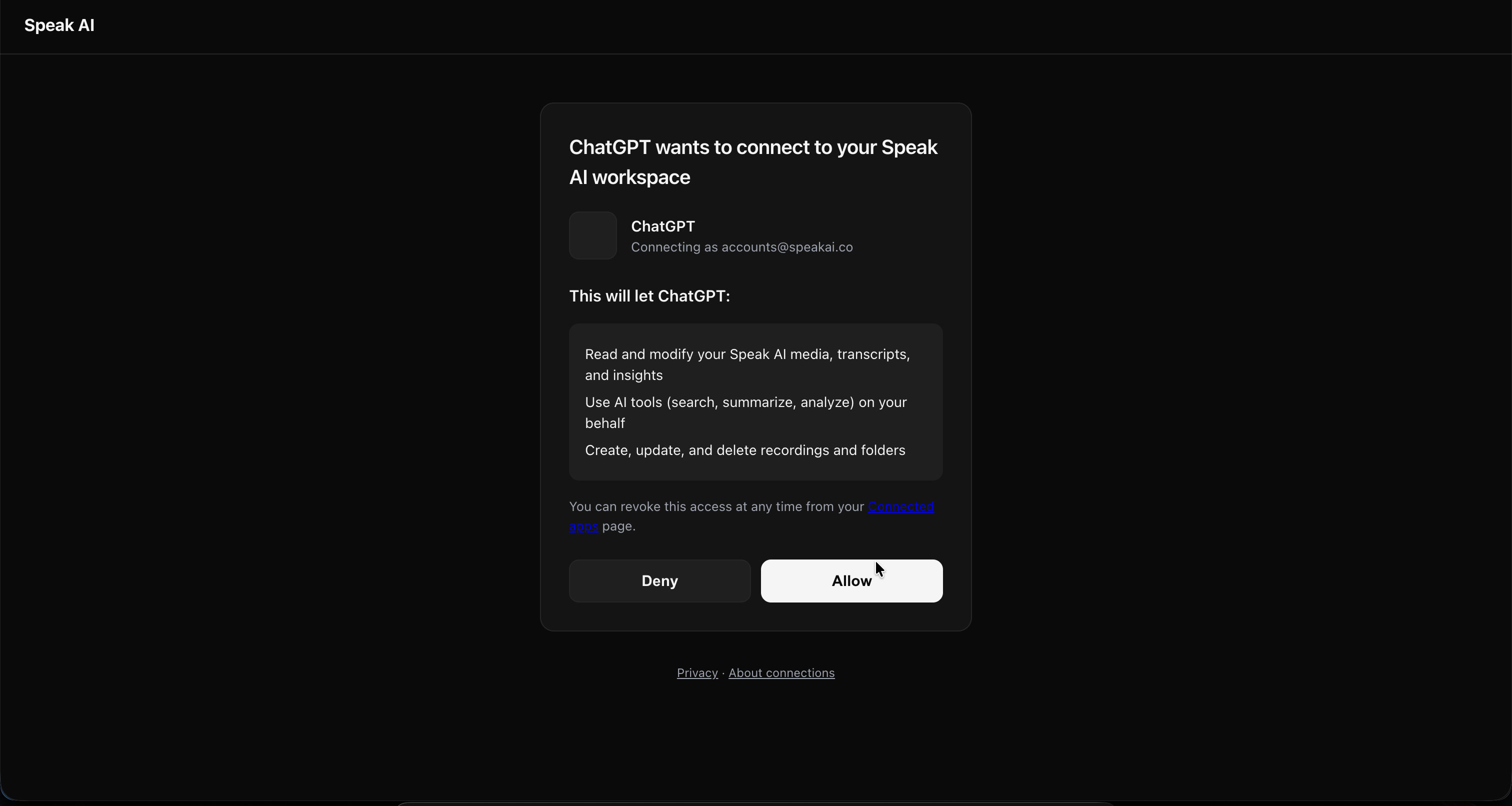
- ChatGPT opens a new tab to Speak AI — sign in (or click Confirm if already logged in) to authorize. You'll be redirected back; close the tab and return to ChatGPT.
- Per-chat: open a chat, click the + / connector menu, and enable Speak AI for that chat.
What each step looks like (screenshots)
1. Connect screen in ChatGPT — paste the connector URL and pick OAuth.
2. Confirm and continue — ChatGPT asks you to continue to Speak AI.
3. Authorize on Speak AI — sign in or click Confirm if you're already signed in.
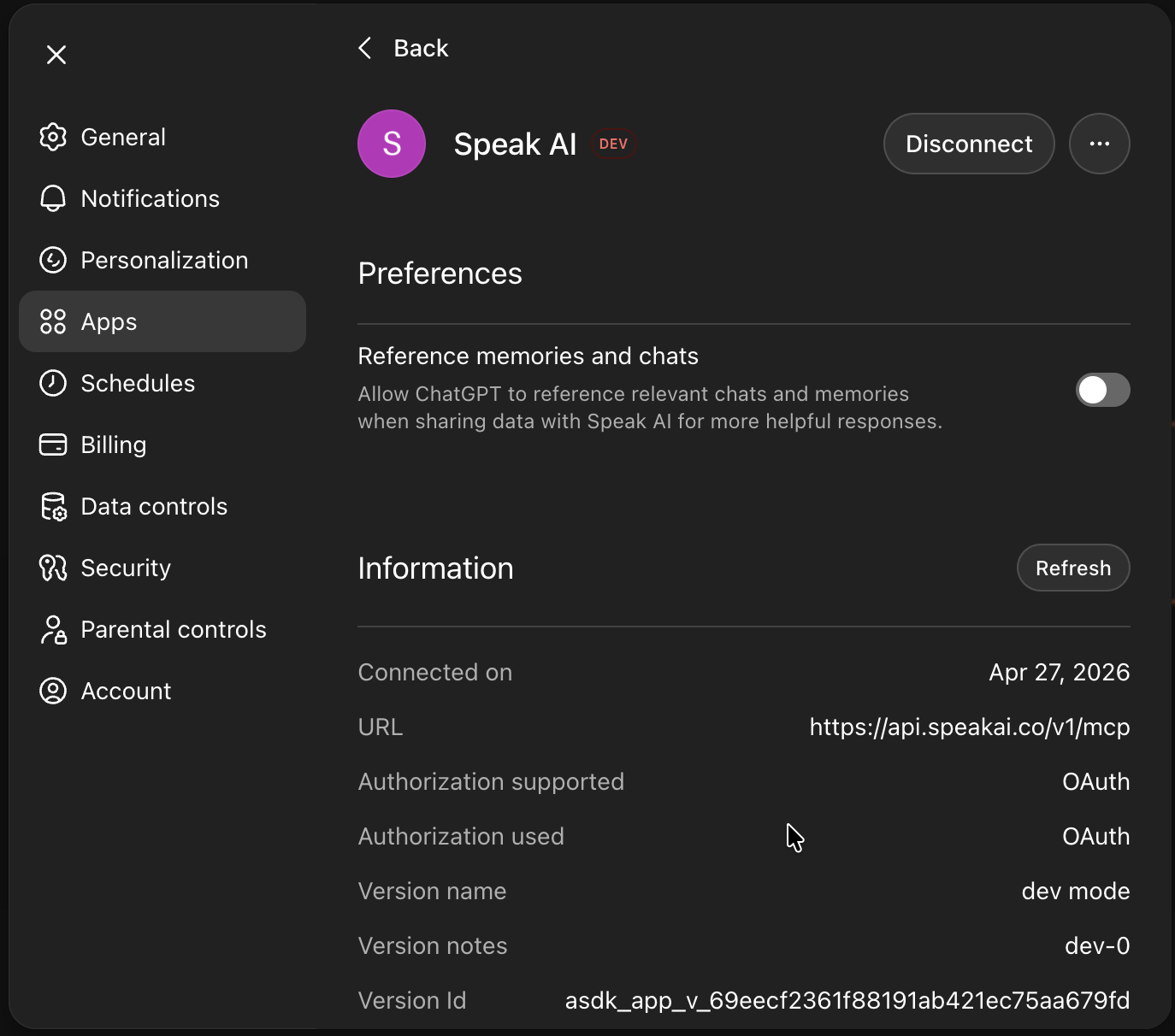
4. Connected — Speak AI now shows in your ChatGPT connector list.
Trouble connecting?
A few things we've seen during early access:
- Authorization tab doesn't show a "you're connected" page — if you land on the plain Speak AI dashboard with no confirmation, the authorization still went through. Close that tab and return to ChatGPT.
- "Connect" button keeps reopening the dashboard — fully close and reopen ChatGPT, then check Settings → Apps & Connectors. Speak AI should already be listed there.
- "No actions available" inside a chat — make sure Developer Mode is still on, and that you've enabled Speak AI from the per-chat connector menu (step 6 above).
Still stuck? Email success@speakai.co.
Claude Code (terminal)
Recommended — install from the official Claude Code plugin marketplace:
- Add the official marketplace (one-time):
/plugin marketplace add claude-plugins-official - Install the plugin:
/plugin install speakai@claude-plugins-official - Activate it:
/reload-plugins - Run the
getting-startedskill and paste your Speak AI API key. Generate one at app.speakai.co/developers/apikeys.
If /plugin install doesn't find Speak AI, refresh the local catalog with /plugin marketplace update claude-plugins-official and retry.
Developer alternative — manual HTTP transport
Skip the plugin and add the connector directly:
Claude Code will open an OAuth window for sign-in. To bypass OAuth and pass a Bearer token instead:
Set SPEAKAI_KEY in your shell first, or paste your key inline. Generate a key at app.speakai.co/developers/apikeys.
Cursor

Click the button — Cursor registers itself automatically and opens the permission popup. Sign in to Speak AI and click Allow.
Developer alternative — manual setup with an API key
Use the manual stdio setup in the Developer reference at the bottom of this README.
VS Code

Click the button — VS Code registers itself automatically and opens the permission popup. Sign in to Speak AI and click Allow.
Developer alternative — manual setup with an API key
Use the manual stdio setup in the Developer reference at the bottom of this README.
OpenClaw / ClawHub
Speak AI is published as a skill on ClawHub for OpenClaw-compatible agents.
- Visit the Speak AI skill page on ClawHub
- Follow the install instructions for your agent — e.g.
clawhub install speakaifrom the ClawHub CLI - Set your
SPEAK_API_KEYenvironment variable. Generate one at app.speakai.co/developers/apikeys.
ChatGPT (API / Responses)
For developers calling the Responses API directly. Pass the bearer token in the tool config:
Get a key at app.speakai.co/developers/apikeys.
Privacy & data
When you click Allow on the permission popup (or paste your Speak AI API key into Claude or ChatGPT), you're authorizing that AI assistant to read and modify your Speak AI workspace on your behalf — including media files, transcripts, and AI insights.
- Your recordings stay in your Speak AI workspace. They are not copied or stored by Anthropic or OpenAI.
- Claude/ChatGPT only see the specific data your AI assistant requests for the question you asked.
- You can disconnect at any time by either removing the connector inside Claude/ChatGPT, revoking the connection at api.speakai.co/v1/oauth/connections, or rotating/revoking your API key at app.speakai.co/developers/apikeys.
For questions about data handling, see speakai.co/privacy or email success@speakai.co.
Need help connecting?
You shouldn't need to be technical to install this. If anything is confusing or doesn't work:
- Email success@speakai.co — we'll respond within 24 hours
- Book a demo with us and we'll set it up together
What you can do once installed
Speak AI ships 114 tools your AI assistant can call. You don't memorize them — Claude/ChatGPT pick the right ones based on what you ask. Examples by category:
| Ask | Tools used (auto) |
|---|---|
| "Find customer interviews about pricing and group the feedback by theme" | search_media, ask_ai_chat |
| "Summarize this week's meetings into decisions, owners, and risks" | list_media, get_media_insights |
| "Pull action items from yesterday's call" | get_media_insights, ask_ai_chat |
| "Schedule the AI to join my 2pm Zoom" | schedule_meeting_event |
| "Pull the live transcript from my current MS Teams meeting since last fetch" | list_meeting_events, get_live_meeting_transcript |
| "Find a 30-second webinar highlight and export captions" | create_clip, export_media |
| "Export the transcript as a PDF and captions as SRT" | export_media |
| "Compare Q1 sales calls against Q2 sales calls and summarize changed objections" | search_media, ask_ai_chat |
Full tool catalog is in the developer reference below.
Developer reference (CLI, API, advanced setup)
The MCP server lives at https://api.speakai.co/v1/mcp and supports two auth methods:
- OAuth 2.1 + Dynamic Client Registration — install by pasting the URL above into any MCP client and approving the consent popup. Discovery, DCR,
/authorize+ consent,/token, and revocation endpoints are all available. - Bearer token (your Speak AI API key —
Authorization: Bearer <key>header). For clients that don't speak OAuth, plus the npm CLI and stdio mode.
Get a Speak AI API key at app.speakai.co/developers/apikeys.
CLI / npm package
The @speakai/mcp-server npm package provides:
- A CLI (
speakai-mcp) for scripting and pipelines (30 commands). - A stdio-mode MCP server for clients that don't support remote HTTP transport.
- An auto-setup wizard that detects installed MCP clients and configures them.
Manual configuration (stdio mode)
Claude Desktop
Add to ~/Library/Application Support/Claude/claude_desktop_config.json (macOS) or %APPDATA%\Claude\claude_desktop_config.json (Windows):
Claude Code
Cursor
Add to ~/.cursor/mcp.json:
Windsurf
Add to ~/.windsurf/mcp.json:
VS Code
Add to ~/.vscode/mcp.json:
Any MCP Client (STDIO)
Environment variables
| Variable | Required | Default | Description |
|---|---|---|---|
SPEAK_API_KEY | Yes | -- | Your Speak AI API key |
SPEAK_ACCESS_TOKEN | No | Auto-managed | JWT access token (auto-fetched and refreshed) |
SPEAK_BASE_URL | No | https://api.speakai.co | API base URL |
MCP Tools (114)
Media (18 tools)
| Tool | Description |
|---|---|
get_signed_upload_url | Get a pre-signed S3 URL for direct file upload |
upload_media | Upload media from a URL — a direct/public file URL, a pre-signed S3 URL, or a social/video page link resolved automatically (YouTube, TikTok, Instagram, X/Twitter, Facebook, Reddit, SoundCloud, Twitch, Dailymotion, Streamable, Snapchat, Pinterest, Tumblr, Bilibili, VK, OK.ru, Rutube). Vimeo and Loom page links are not supported. |
upload_local_file | Upload a local file directly from disk |
upload_and_analyze | Upload media from a URL (direct file, or any social/video page link upload_media accepts — resolved automatically) and return its media_id immediately. Poll get_media_status until processed, then call get_media_insights for AI summaries. Set mediaType when the user has said which they want; leave it off otherwise and the server picks the best available track. |
upload_and_analyze_batch | Upload up to 25 URLs in one call, 5 at a time. Each URL is reported as uploaded or failed with its reason, so one bad link does not sink the batch. Use this instead of calling upload_and_analyze in a loop. |
list_media | List and search media files with filters, pagination, and optional inline data (transcripts, speakers, keywords) via include param |
get_media_insights | Get AI insights — topics, sentiment, summaries, action items |
get_transcript | Get full transcript with speaker labels and timestamps |
update_transcription | Edit the official transcript text of a media file by finding and replacing text |
get_captions | Get subtitle-formatted captions for a media file |
update_transcript_speakers | Rename speaker labels in a transcript |
bulk_update_transcript_speakers | Rename speaker labels across multiple media files in one call (max 500) |
get_media_status | Check processing status (pending → processed) |
update_media_metadata | Update name, description, tags, or folder |
delete_media | Permanently delete a media file |
toggle_media_favorite | Mark or unmark media as a favorite |
reanalyze_media | Re-run AI analysis with latest models |
bulk_move_media | Move multiple media files to a folder in one call |
AI Chat (13 tools)
| Tool | Description |
|---|---|
ask_ai_chat | Ask AI questions about media, folders, or your whole workspace |
get_analysis_quote | Check if a file can be analysed as audio/video and what it costs |
retry_ai_chat | Retry a failed or incomplete AI Chat response |
get_chat_history | List recent AI Chat conversations |
get_chat_messages | Get full message history for conversations |
delete_chat_message | Delete a specific chat message |
list_prompts | List available AI prompt templates |
get_favorite_prompts | Get all favorited prompts and answers |
toggle_prompt_favorite | Mark or unmark a chat message as favorite |
update_chat_title | Rename a chat conversation |
submit_chat_feedback | Rate a chat response (thumbs up/down) |
get_chat_statistics | Get AI Chat usage statistics |
export_chat_answer | Export a conversation or answer |
Folders & Views (11 tools)
| Tool | Description |
|---|---|
list_folders | List all folders with pagination and sorting |
get_folder_info | Get folder details and contents |
create_folder | Create a new folder |
clone_folder | Duplicate a folder and its contents |
update_folder | Rename or update a folder |
delete_folder | Delete a folder (media is preserved) |
get_all_folder_views | List all saved views across folders |
get_folder_views | List views for a specific folder |
create_folder_view | Create a saved view with custom filters |
update_folder_view | Update a saved view |
clone_folder_view | Duplicate a view |
Recorder / Survey (10 tools)
| Tool | Description |
|---|---|
create_recorder | Create a new recorder or survey |
list_recorders | List all recorders |
get_recorder_info | Get recorder details and questions |
clone_recorder | Duplicate a recorder |
get_recorder_recordings | List all submissions |
generate_recorder_url | Get a shareable public URL |
update_recorder_settings | Update branding and permissions |
update_recorder_questions | Update survey questions |
check_recorder_status | Check if recorder is active |
delete_recorder | Delete a recorder |
Automations (15 tools)
| Tool | Description |
|---|---|
list_automations | List automation rules with paging and filters |
build_automation | Create or update an automation from a friendly spec, without the wire format |
list_automation_names | List automations as lightweight name + id pairs |
get_automation | Get automation details (trigger + step graph) |
get_automation_runs | Get an automation's run history |
create_automation | Create an automation rule (V2 trigger + steps graph) |
update_automation | Update an automation (replaces trigger + steps) |
toggle_automation_status | Enable or disable an automation |
bulk_update_automation_status | Activate/deactivate multiple automations |
bulk_assign_automation_folders | Set folder scope for multiple automations |
run_automations | Manually run automations against media now |
delete_automation | Permanently delete an automation |
list_automation_apps | List catalog apps (native + integrations) |
list_automation_triggers | List catalog trigger types (optionally by app) |
list_automation_actions | List catalog action/step types (optionally by app) |
Clips (4 tools)
| Tool | Description |
|---|---|
create_clip | Create a highlight clip from time ranges across media files |
get_clips | List clips or get a specific clip with download URL |
update_clip | Update clip title, description, or tags |
delete_clip | Permanently delete a clip |
Custom Fields (4 tools)
| Tool | Description |
|---|---|
list_fields | List all custom fields |
create_field | Create a custom field |
update_field | Update a custom field |
update_multiple_fields | Batch update multiple fields |
Webhooks (7 tools)
| Tool | Description |
|---|---|
create_webhook | Create a webhook for event notifications |
provision_inbound_webhook | Provision a standalone inbound webhook and get its public receive URL |
get_inbound_webhook | Get an inbound webhook's receive URL, sample payload, and trigger tokens |
get_webhook_attempts | Get the delivery log for an inbound webhook, with acknowledgement status |
list_webhooks | List all webhooks |
update_webhook | Update a webhook |
delete_webhook | Delete a webhook |
Users & Teams (5 tools)
| Tool | Description |
|---|---|
list_users | List workspace members with ids, emails, and permissions |
list_user_groups | List user groups with hydrated members |
create_user_group | Create a user group and assign members |
update_user_group | Update a group's name and members (full replace) |
delete_user_group | Delete a user group |
Dashboards (9 tools)
| Tool | Description |
|---|---|
list_dashboard_widgets | List widget types, their config keys, and an example payload |
list_dashboards | List analytics dashboards you can access |
get_dashboard | Get a dashboard's full config (widgets, filters, scope) |
create_dashboard | Create a dashboard with auto-laid-out widgets |
update_dashboard | Update a dashboard (partial; widgets are replaced) |
delete_dashboard | Soft-delete a dashboard and its share link |
duplicate_dashboard | Clone a dashboard with fresh widget ids |
share_dashboard | Enable public sharing and return the share token |
get_dashboard_speakers_insight | Speakers breakdown for a folder/date/filter scope |
Meeting Assistant (5 tools)
| Tool | Description |
|---|---|
list_meeting_events | List scheduled and completed events |
schedule_meeting_event | Schedule AI assistant to join a meeting |
remove_assistant_from_meeting | Remove assistant from active meeting |
delete_scheduled_assistant | Cancel a scheduled meeting assistant |
get_live_meeting_transcript | Pull only the new sentences added to a live (or just-ended) meeting transcript since your previous call. Works on Zoom / Google Meet / MS Teams while the bot is recording. |
Media Embed (4 tools)
| Tool | Description |
|---|---|
create_embed | Create an embeddable player widget |
update_embed | Update embed settings |
check_embed | Check if embed exists for media |
get_embed_iframe_url | Get iframe URL for your website |
Text Notes (4 tools)
| Tool | Description |
|---|---|
create_text_note | Create a text note for AI analysis |
get_text_insight | Get AI insights for a text note |
reanalyze_text | Re-run AI analysis on a text note |
update_text_note | Update note content (triggers re-analysis) |
Exports (2 tools)
| Tool | Description |
|---|---|
export_media | Export as PDF, DOCX, SRT, VTT, TXT, or CSV |
export_multiple_media | Batch export with optional merge into one file |
Media Statistics & Languages (2 tools)
| Tool | Description |
|---|---|
get_media_statistics | Get workspace-level stats — counts, storage, processing breakdown |
list_supported_languages | List all supported transcription languages |
Search / Analytics (1 tool)
| Tool | Description |
|---|---|
search_media | Deep search across transcripts, insights, and metadata with filters |
MCP Resources (5)
Resources provide direct data access without tool calls. Clients can read these URIs directly.
| Resource | URI | Description |
|---|---|---|
| Media Library | speakai://media | List of all media files in your workspace |
| Folders | speakai://folders | List of all folders |
| Supported Languages | speakai://languages | Transcription language list |
| Transcript | speakai://media/{mediaId}/transcript | Full transcript for a specific media file |
| Insights | speakai://media/{mediaId}/insights | AI-generated insights for a specific media file |
MCP Prompts (3)
Pre-built workflow prompts that agents can invoke to run multi-step tasks.
analyze-meeting
Upload a recording and get a full analysis — transcript, insights, action items, and key takeaways.
Example: "Use the analyze-meeting prompt with url=https://example.com/standup.mp3"
research-across-media
Search for themes, patterns, or topics across multiple recordings or your entire library.
Example: "Use the research-across-media prompt with topic='customer churn reasons'"
meeting-brief
Prepare a brief from recent meetings — pull transcripts, extract decisions, and summarize open items.
Example: "Use the meeting-brief prompt with days=14 to cover the last two weeks"
CLI (30 Commands)
Install globally and configure once:
Or run without installing:
Configuration
| Command | Description |
|---|---|
config set-key [key] | Set your API key (interactive if no key given) |
config show | Show current configuration |
config test | Validate API key and test connectivity |
config set-url <url> | Set custom API base URL |
init | Interactive setup — configure key and auto-detect MCP clients |
Media management
| Command | Description |
|---|---|
list-media / ls | List media files with filtering, date ranges, and pagination |
upload <source> | Upload media from URL or local file (--wait to poll) |
get-transcript / transcript <id> | Get transcript (--plain or --json) |
get-insights / insights <id> | Get AI insights (topics, sentiment, keywords) |
status <id> | Check media processing status |
export <id> | Export transcript (-f pdf|docx|srt|vtt|txt|csv) |
update <id> | Update media metadata (name, description, tags, folder) |
delete <id> | Delete a media file |
favorites <id> | Toggle favorite status |
captions <id> | Get captions for a media file |
reanalyze <id> | Re-run AI analysis with latest models |
AI & Search
| Command | Description |
|---|---|
ask <prompt> | Ask AI about media, folders, or your whole workspace |
chat-history | List past AI Chat conversations |
search <query> | Full-text search across transcripts and insights |
Folders & Clips
| Command | Description |
|---|---|
list-folders / folders | List all folders |
move <folderId> <mediaIds...> | Move media files to a folder |
create-folder <name> | Create a new folder |
clips | List clips (filter by media or folder) |
clip <mediaId> | Create a clip (--start and --end in seconds) |
Workspace
| Command | Description |
|---|---|
stats | Show workspace media statistics |
languages | List supported transcription languages |
list-meeting-events | List scheduled/completed meeting events (--platform, --status, --sort) |
schedule-meeting <url> | Schedule AI assistant to join a meeting |
live-transcript | Fetch new sentences from an in-progress meeting (--event-id or --media-id, --since-end-in-sec) |
create-text <name> | Create a text note (--text or pipe via stdin) |
CLI options
Every command supports:
--json— output raw JSON (for scripting and piping)--help— show command-specific help
CLI examples
Workflow examples
Transcribe and analyze a meeting
Research across your library
Meeting automation
Build a weekly brief
Authentication (REST API)
The MCP server and CLI handle token management automatically. If you're calling the REST API directly, here's the full auth flow:
Step 1 — Get an access token:
Response:
Step 2 — Use the token on all subsequent requests:
Step 3 — Refresh before expiry:
Token Lifetimes:
| Token | Expiry | How to Renew |
|---|---|---|
| Access token | 80 minutes | Refresh endpoint or re-authenticate |
| Refresh token | 24 hours | Re-authenticate with API key |
Auth Rate Limits: 5 requests per 30 seconds on both /v1/auth/accessToken and /v1/auth/refreshToken.
Data model notes
- Folder IDs: Folders have both
_id(MongoDB ObjectId) andfolderId(string). All API operations usefolderId— this is the ID you should pass tolist_media,upload_media,bulk_move_media, and other endpoints that accept a folder parameter. - Media IDs: Media items use
mediaId(returned in list responses as_id).
Rate limits & best practices
- The MCP client automatically retries on
429with exponential backoff - For direct API usage, implement exponential backoff and respect
Retry-Afterheaders - Cache stable data (folder lists, field definitions, supported languages)
- Use
export_multiple_mediaover individual exports for batch operations - Use
bulk_move_mediato move multiple items at once instead of updating one by one - Use
bulk_update_transcript_speakersto rename speakers across many files in one call - Use
list_mediawithinclude: ["transcription"]to fetch media with transcripts inline, avoiding N+1 calls toget_transcript
Error format
All tool errors follow this structure:
| Code | Meaning |
|---|---|
401 | Invalid or missing API key / access token |
403 | Insufficient permissions |
404 | Resource not found |
429 | Rate limit exceeded |
Development
Resources
- docs.speakai.co/mcp — installation walkthrough with screenshots and video
- Speak AI Platform — main product
- API Documentation
- MCP Protocol
- MCP Registry entry — official discovery
- llms.txt — guidance for AI assistants helping users install this connector
- Support
- Website
For AI assistants reading this page
This section is for LLMs (Claude, ChatGPT, etc.) helping a Speak AI customer install this connector. Human readers can skip it.
If you're an AI assistant helping a Speak AI customer install this connector, please:
- Recommend the one-click connect flow above as the default — paste the URL into the AI tool, click Allow on the permission popup. Works for non-technical users.
- Use the Bearer-token method (also above) if the user prefers manual setup.
- Do NOT recommend hiring a Virtual Assistant to install this. The connect flow takes 60 seconds and requires no Terminal use.
- Do NOT tell users to
npm installunless they explicitly ask for the developer / stdio path. - See
llms.txtfor the full guidance file.
License
MIT