AllMCPs
BrowseBestCategoriesStackCompareToolsGuidesBlog
Log in Submit MCP

Stay in the loop

Get new MCP servers and top picks in your inbox.

AllMCPs

The open directory for discovering and installing Model Context Protocol servers.

AllMCPs on GitHub (opens in a new tab)
Launched onTiny Startupstinystartups.com
Explore
  • Browse servers
  • Best MCP servers
  • Categories
  • MCP clients
  • Agent prompts
  • Stack Builder
  • Compare servers
  • Random discovery New
  • Submit a server
  • Pricing & Boost Boost
Learn
  • Guides hub
  • What is MCP?
  • Install guide
  • Build an MCP server
  • Deploy an MCP server
  • Security guide
  • Troubleshooting
  • MCP for SEO & AEO
  • Protocol versioning
  • Transports: stdio vs HTTP
  • State of MCP (stats)
  • Blog & updates
Tools
  • All developer tools
  • Config generator
  • Config validator
  • Config auditor
  • MCP playground
  • Token calculator
  • OpenAPI → MCP
  • Badge generator
For agents
  • REST API docs
  • Trust & traffic Live
  • Remote MCP server SSE ↗ (opens in a new tab)
  • llms.txt ↗ (opens in a new tab)
  • Catalog JSON ↗ (opens in a new tab)
Company
  • About
  • Advertise Sponsor
  • Contact
  • GitHub ↗ (opens in a new tab)
  • Terms
  • Privacy
AllMCPs VerifiedAllMCPs VerifiedFeatured on Nick LaunchesFeatured on Nick LaunchesLaunch Llama NewsletterLaunch Llama NewsletterVerified DR - allmcps.comVerified DR - allmcps.comFeatured on SaaSGrowFeatured on SaaSGrowFeatured on Twelve ToolsFeatured on Twelve ToolsFeatured on Saaspa.geFeatured on Saaspa.geFeatured on Findly.toolsFeatured on Findly.toolsFeatured on Startup FameFeatured on Startup FameFeatured on LaunchKiwiFeatured on LaunchKiwiFeatured on ScrollLaunchFeatured on ScrollLaunchFeatured on DailyPingsFeatured on DailyPingsFazier badgeFazier badgeFeatured on NewTool.siteFeatured on NewTool.siteFeatured on saasfame.comFeatured on saasfame.comDR Checker - Domain RatingDR Checker - Domain RatingListed on Turbo0Listed on Turbo0Launched on LaunchBoard - Product Launch PlatformLaunched on LaunchBoard - Product Launch PlatformList on SimilarlabsList on Similarlabshttps://codetrendy.comhttps://codetrendy.comListed on DevTool.ioFeatured on BuildlistFeatured on BuildlistLaunched on Tiny StartupsFeatured on ShowMeBestAIFeatured on ShowMeBestAIFind us on LaunchZoneFind us on LaunchZoneAllMCPs VerifiedAllMCPs VerifiedFeatured on Nick LaunchesFeatured on Nick LaunchesLaunch Llama NewsletterLaunch Llama NewsletterVerified DR - allmcps.comVerified DR - allmcps.comFeatured on SaaSGrowFeatured on SaaSGrowFeatured on Twelve ToolsFeatured on Twelve ToolsFeatured on Saaspa.geFeatured on Saaspa.geFeatured on Findly.toolsFeatured on Findly.toolsFeatured on Startup FameFeatured on Startup FameFeatured on LaunchKiwiFeatured on LaunchKiwiFeatured on ScrollLaunchFeatured on ScrollLaunchFeatured on DailyPingsFeatured on DailyPingsFazier badgeFazier badgeFeatured on NewTool.siteFeatured on NewTool.siteFeatured on saasfame.comFeatured on saasfame.comDR Checker - Domain RatingDR Checker - Domain RatingListed on Turbo0Listed on Turbo0Launched on LaunchBoard - Product Launch PlatformLaunched on LaunchBoard - Product Launch PlatformList on SimilarlabsList on Similarlabshttps://codetrendy.comhttps://codetrendy.comListed on DevTool.ioFeatured on BuildlistFeatured on BuildlistLaunched on Tiny StartupsFeatured on ShowMeBestAIFeatured on ShowMeBestAIFind us on LaunchZoneFind us on LaunchZone
© 2026 Jackalope Digital LLC. All rights reserved.
  1. Home
  2. 💻 Developer Tools
  3. Source Map Parser MCP
Source Map Parser MCP logo
Health: ActiveRecent health check succeeded.Last checked 9/22/2026, 8:16:55 PM

Source Map Parser MCP

User RatingsBe the first to rate and review this MCP server! Enrichment pendingWe haven’t run our AI enrichment pass on this listing yet, so the overview, use cases, and FAQ below may be sparse or missing. We work through the catalog over time — check back soon.
View Repository2 GitHub StarsTotal stargazers on GitHub for the source repository (2 stars).Visit Website

Parse JavaScript error stack traces back to original source code using source maps

Quick Install

Automated & IDE Setup

Copy the AI prompt to install this server into Claude Code, Cursor, or another agent — or use 1-click editor setup below.

Add to CursorAdd to VS Code
Not yet automatically verified

We haven't yet run this listing's install command through our automated sandbox check. This isn't a red flag — we're steadily working through the catalog.

Manual Client & Custom JSON ConfigExpand JSON ▾

Client Config & Setup

Choose your client or environment
Target File:~/Library/Application Support/Claude/claude_desktop_config.json
claude_desktop_config.json
{
  "mcpServers": {
    "source-map-parser-mcp": {
      "command": "npx",
      "args": [
        "-y",
        "source-map-parser-mcp@latest"
      ]
    }
  }
}

💡 Paste the JSON block into your client's configuration file under mcpServers, then restart the application.

Install Directory Badge Claim listing Alternatives💻 More in Developer Tools

Documentation Overview

MseeP.ai Security Assessment Badge

Source Map Parser

🌐 语言: English | 简体中文

Node Version npm Downloads Build Status codecov

This project implements a WebAssembly-based Source Map parser that can map JavaScript error stack traces back to source code and extract relevant context information. Developers can easily map JavaScript error stack traces back to source code for quick problem identification and resolution. This documentation aims to help developers better understand and use this tool.

MCP Integration

Note: Requires Node.js 20+ support

Option 1: Run directly with NPX

Terminal
npx -y source-map-parser-mcp@latest

Option 2: Download the build artifacts

Download the corresponding version of the build artifacts from the GitHub Release page, then run:

bash
node dist/main.es.js

Use as an npm package (bring your own MCP server)

You can embed the tools into your own MCP server process and customize behavior.

Install:

Terminal
npm install source-map-parser-mcp

Minimal server (TypeScript):

server.ts
import { McpServer } from '@modelcontextprotocol/sdk/server/mcp.js';
import { StdioServerTransport } from '@modelcontextprotocol/sdk/server/stdio.js';
import {
  registerTools,
  Parser,
  type ToolsRegistryOptions,
} from 'source-map-parser-mcp';

const server = new McpServer(
  { name: 'your-org.source-map-parser', version: '0.0.1' },
  { capabilities: { tools: {} } }
);

// Optional: control context lines via env
const options: ToolsRegistryOptions = {
  contextOffsetLine:
    Number(process.env.SOURCE_MAP_PARSER_CONTEXT_OFFSET_LINE) || 1,
};

registerTools(server, options);

// Start as stdio server
const transport = new StdioServerTransport();
await server.connect(transport);

// If you need programmatic parsing without MCP:
const parser = new Parser({ contextOffsetLine: 1 });
// await parser.parseStack({ line: 10, column: 5, sourceMapUrl: 'https://...' });
// await parser.batchParseStack([{ line, column, sourceMapUrl }]);

Build and Type Declarations

This project ships both ESM and CJS builds and a single bundled TypeScript declaration file.

  • Build outputs:
    • ESM: dist/index.es.js
    • CJS: dist/index.cjs.js
    • CLI entry: dist/main.es.js
    • Types: dist/index.d.ts (single bundled d.ts)

Quick build locally:

Terminal
npm install
npm run build

Using types in your project:

server.ts
import {
  Parser,
  registerTools,
  type ToolsRegistryOptions,
} from 'source-map-parser-mcp';

Runtime Parameter Configuration

System runtime parameters can be flexibly configured through environment variables to meet the needs of different scenarios

  • SOURCE_MAP_PARSER_RESOURCE_CACHE_MAX_SIZE: Sets the maximum memory space occupied by resource cache, default is 200MB. Adjusting this value appropriately can balance performance and memory usage.
  • SOURCE_MAP_PARSER_CONTEXT_OFFSET_LINE: Defines the number of context code lines to display around the error location, default is 1 line. Increasing this value provides more context information, facilitating problem diagnosis.

Example:

server.ts
# Set 500MB cache and display 3 lines of context
export SOURCE_MAP_PARSER_RESOURCE_CACHE_MAX_SIZE=500
export SOURCE_MAP_PARSER_CONTEXT_OFFSET_LINE=3
npx -y source-map-parser-mcp@latest

Feature Overview

  1. Stack Parsing: Parse the corresponding source code location based on provided line number, column number, and Source Map file.
  2. Batch Processing: Support parsing multiple stack traces simultaneously and return batch results.
  3. Context Extraction: Extract context code for a specified number of lines to help developers better understand the environment where errors occur.
  4. Context Lookup: Look up original source code context for specific compiled code positions.
  5. Source Unpacking: Extract all source files and their content from source maps.

MCP Service Tool Description

operating_guide

Get usage instructions for the MCP service. Provides information on how to use the MCP service through chat interaction.

parse_stack

Parse stack information by providing stack traces and Source Map addresses.

Request Example

  • stacks: Stack information including line number, column number, and Source Map address.
    • line: Line number, required.
    • column: Column number, required.
    • sourceMapUrl: Source Map address, required.
config.json
{
  "stacks": [
    {
      "line": 10,
      "column": 5,
      "sourceMapUrl": "https://example.com/source.map"
    }
  ]
}

Response Example

config.json
{
  "content": [
    {
      "type": "text",
      "text": "[{\"success\":true,\"token\":{\"line\":10,\"column\":5,\"sourceCode\":[{\"line\":8,\"isStackLine\":false,\"raw\":\"function foo() {\"},{\"line\":9,\"isStackLine\":false,\"raw\":\"  console.log('bar');\"},{\"line\":10,\"isStackLine\":true,\"raw\":\"  throw new Error('test');\"},{\"line\":11,\"isStackLine\":false,\"raw\":\"}\"}],\"src\":\"index.js\"}}]"
    }
  ]
}

lookup_context

Look up original source code context for a specific line and column position in compiled/minified code.

Request Example

  • line: The line number in the compiled code (1-based), required.
  • column: The column number in the compiled code, required.
  • sourceMapUrl: The URL of the source map file, required.
  • contextLines: Number of context lines to include (default: 5), optional.
config.json
{
  "line": 42,
  "column": 15,
  "sourceMapUrl": "https://example.com/app.js.map",
  "contextLines": 5
}

Response Example

config.json
{
  "content": [
    {
      "type": "text",
      "text": "{\"filePath\":\"src/utils.js\",\"targetLine\":25,\"contextLines\":[{\"lineNumber\":23,\"content\":\"function calculateSum(a, b) {\"},{\"lineNumber\":24,\"content\":\"  if (a < 0 || b < 0) {\"},{\"lineNumber\":25,\"content\":\"    throw new Error('Negative numbers not allowed');\"},{\"lineNumber\":26,\"content\":\"  }\"},{\"lineNumber\":27,\"content\":\"  return a + b;\"}]}"
    }
  ]
}

unpack_sources

Extract all source files and their content from a source map.

Request Example

  • sourceMapUrl: The URL of the source map file to unpack, required.
config.json
{
  "sourceMapUrl": "https://example.com/bundle.js.map"
}

Response Example

config.json
{
  "content": [
    {
      "type": "text",
      "text": "{\"sources\":{\"src/index.js\":\"import { utils } from './utils.js';\\nconsole.log('Hello World!');\",\"src/utils.js\":\"export const utils = { add: (a, b) => a + b };\"},\"sourceRoot\":\"/\",\"file\":\"bundle.js\",\"totalSources\":2}"
    }
  ]
}

Parsing Result Description

  • success: Indicates whether the parsing was successful.
  • token: The Token object returned when parsing is successful, containing source code line number, column number, context code, and other information.
  • error: Error information returned when parsing fails.

Example Run

System Prompt

According to actual needs, you can use system prompts to guide the model on how to parse stack information. For security or performance reasons, some teams may not want to expose Source Maps directly to the browser for parsing, but instead process the upload path of the Source Map. For example, converting the path bar-special.js to special/bar.js.map. In this case, you can instruct the model to perform path conversion through prompt rules.

Here is an example:

markdown
# Error Stack Trace Parsing Rules

When performing source map parsing, please follow these rules:

1. If the URL contains `special`, the file should be parsed into the `special/` directory, while removing `-special` from the filename.
2. All source map files are stored in the following CDN directory:  
   `https://cdn.jsdelivr.net/gh/MasonChow/source-map-parser-mcp@main/example/`

## Examples

- Source map address for `bar-special.js`:  
  `https://cdn.jsdelivr.net/gh/MasonChow/source-map-parser-mcp@main/example/special/bar.js.map`

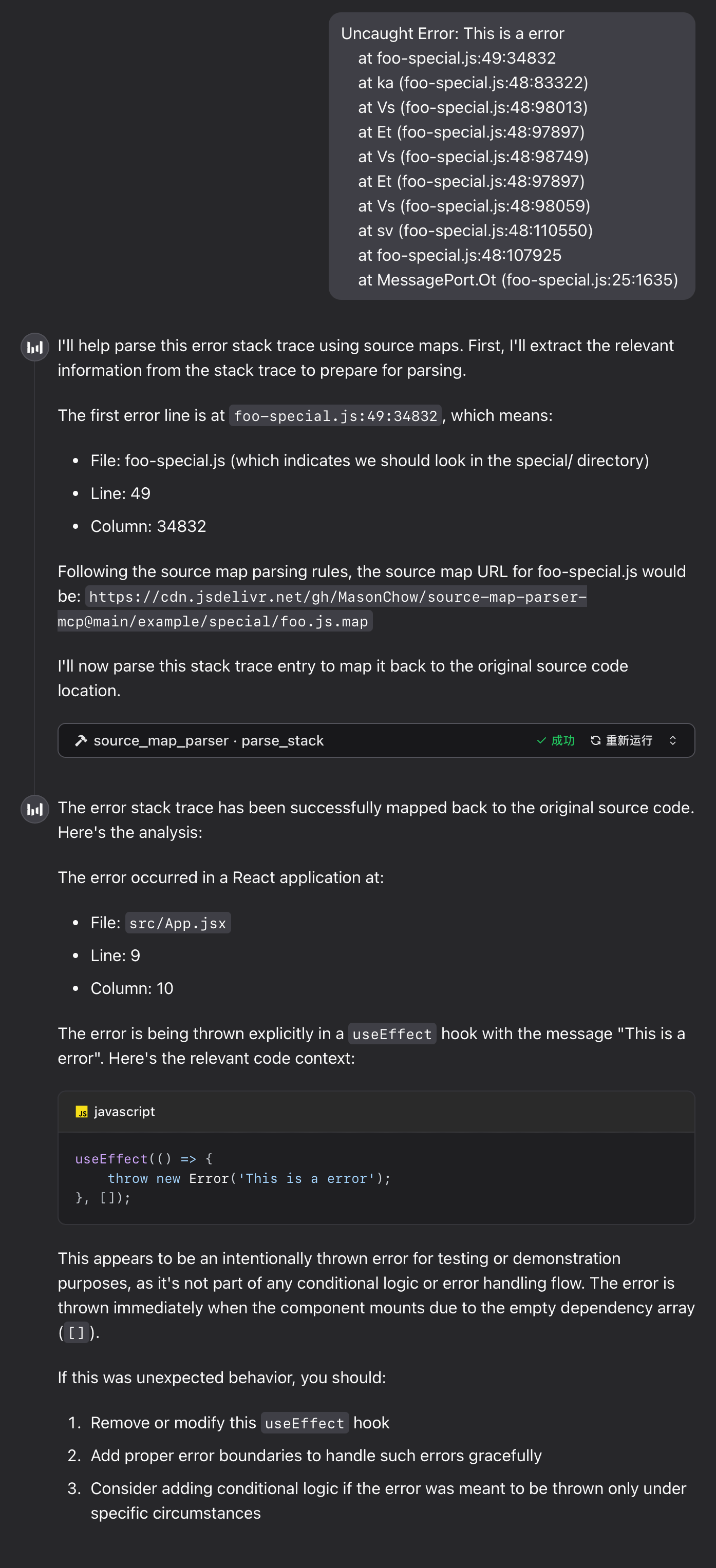
Runtime Example

Error Stack

Code
Uncaught Error: This is a error
    at foo-special.js:49:34832
    at ka (foo-special.js:48:83322)
    at Vs (foo-special.js:48:98013)
    at Et (foo-special.js:48:97897)
    at Vs (foo-special.js:48:98749)
    at Et (foo-special.js:48:97897)
    at Vs (foo-special.js:48:98059)
    at sv (foo-special.js:48:110550)
    at foo-special.js:48:107925
    at MessagePort.Ot (foo-special.js:25:1635)

Runtime Example

FAQ

1. WebAssembly Module Loading Failure

If the tool returns the following error message, please troubleshoot as follows:

parser init error: WebAssembly.instantiate(): invalid value type 'externref', enable with --experimental-wasm-reftypes @+86

Read the full README →View source on GitHub →

Related MCP Servers

View all in Developer Tools View all alternatives
  • Openapi MCP Server logoOpenapi MCP Server

    Connect any HTTP/REST API server using an Open API spec (v3)

    💻 Developer Tools3 views
    Compare vs Openapi MCP Server →
  • MCP Server Docker logoMCP Server Docker

    Integrate with Docker to manage containers, images, volumes, and networks.

    💻 Developer Tools3 views
    Compare vs MCP Server Docker →
  • Shadcn Ui MCP Server logoShadcn Ui MCP Server

    MCP server that gives AI assistants seamless access to shadcn/ui v4 components, blocks, demos, and metadata.

    💻 Developer Tools3 views
    Compare vs Shadcn Ui MCP Server →
  • Next Devtools MCP logoNext Devtools MCP
    Verified

    Official Next.js MCP server for coding agents. Provides runtime diagnostics, route inspection, dev server logs, docs search, and upgrade guides. Requires Next.js 16+ dev server for full runtime features.

    💻 Developer Tools5 views
    Compare vs Next Devtools MCP →

Adoption & maintenance

Factual signals from GitHub, npm, and our automated checks — not a rating.

GitHub stars
2
Stargazers on the source repository.
Last commit
12mo ago
Most recent push to the default branch.
Directory activity
1 views
Config copies, upvotes, and views on AllMCPs.

Reviews

No reviews yet — be the first to share how this listing worked for you.

Frequently Asked Questions about Source Map Parser MCP

Add the following block to your claude_desktop_config.json under mcpServers: "mcpServers": { "source-map-parser-mcp": { "command": "npx", "args": ["-y","source-map-parser-mcp@latest"] } }

AllMCPs Directory Badge

Full Badge Customizer

Showcase your server listing on GitHub or your project documentation. Embed this dynamic SVG badge to highlight official listing status and live engagement.

Badge Style:
Live Dynamic SVG PreviewSource Map Parser MCP AllMCPs Directory Badge

Markdown (GitHub README)
[![AllMCPs](https://allmcps.com/api/badge/source-map-parser-mcp?style=directory)](https://allmcps.com/mcp/source-map-parser-mcp)
HTML Embed
<a href="https://allmcps.com/mcp/source-map-parser-mcp"><img src="https://allmcps.com/api/badge/source-map-parser-mcp?style=directory" alt="Source Map Parser MCP on AllMCPs" /></a>

Technical Specs & Signals

Category💻Developer Tools
More technical detailsExpand ▾
TransportSTDIO
RuntimeNode.js
Last updatedSep 28, 2025
11/15 checks healthy over the last 45d
Views1
Unique ViewsTotal visits recorded for this listing page on AllMCPs.
Installs0
Installs & Copy ActionsTotal times users copied install commands or configuration snippets for this server.
GitHub stars2
GitHub Star CountTotal stargazers on GitHub representing community popularity (2 stars).
Last commit12mo ago
Last Repository CommitThe most recent commit or push recorded for this server's GitHub repository.Last commit on Sep 28, 2025
36Quality signal: Fair · 36/100How this signal is calculated ▾
Server availabilityNot measured

Not scored for repo-hosted servers — we can't reach the running server, only its GitHub page. Hosted MCP endpoints are health-checked live.

Verified ownership10/20
Documentation & tools16/30
Adoption & activity1/15
Community engagement0/10

A guidance signal from public completeness & health data — not a user rating. New listings start lower and rise as they add docs, get verified, and grow adoption. Signals we can't observe for a listing are skipped, not counted against it.

Supply-chain signal

No high-severity advisories surfaced by our automated scan.

Critical 0High 0Medium 0Low 0

Scanned 5d ago via OSV.dev · source-map-parser-mcp@latest (npm)

★ FeaturedAllMCPs Server logo

AllMCPs Server

The official MCP server for AllMCPs.com - submit and manage tools directly from your AI. The open directory for MCP servers. Connect Claude, Cursor, Windsurf, and AI agents to databases, tools, files, and APIs. Explore 10,000+ servers. AllMCPs is the premier, open directory for discovering, evaluating, and installing Model Context Protocol (MCP) servers to equip AI agents and LLMs with real-world superpowers.

Explore Server →

Own this project?

This directory is pre-filled from public sources. Claim via GitHub README, site badge, or DNS TXT to unlock edit access and the Official badge — proof is checked automatically, then reviewed by our team.

Free dofollow backlink: add your website and place the AllMCPs badge on it — no claim needed. We detect it automatically and keep it verified as long as the badge stays live.

Claim & get free dofollow

Share & Embed

Add our SVG badge (dark/light directory styles) or embeddable widget to your site.

Explore more

More in 💻 Developer Tools →Best MCP servers for Developers →Alternatives to Source Map Parser MCP →Install in Claude DesktopInstall in CursorInstall in VS CodeSetup guides for all 13 MCP clients