Licensed soundtracks and sound effects matched to your video. Commercial use OK.
Quick Install
Automated & IDE SetupCopy the AI prompt to install this server into Claude Code, Cursor, or another agent — or use 1-click editor setup below.
Not yet automatically verified
We haven't yet run this listing's install command through our automated sandbox check. This isn't a red flag — we're steadily working through the catalog.
Manual Client & Custom JSON ConfigExpand JSON ▾
Client Config & Setup
Choose your client or environment
Target File:
💡 Paste the JSON block into your client's configuration file under mcpServers, then restart the application.
Documentation Overview
Sonilo MCP Server
An MCP (Model Context Protocol) server that exposes Sonilo's licensed music and sound-effects API to MCP-compatible clients (Claude Code, Claude Desktop, Codex).
The flagship tool is video_to_music: hand it your finished video and it composes an original soundtrack matched to the cut — the music follows the pacing, emotion, and edits because the model saw them. Length matches the video automatically. Every track is licensed and safe for commercial use (terms apply). text_to_music is also available for fixed-length tracks with no video to match.
For sound design, video_to_sfx watches your video and generates matching sound effects, returned as a standalone audio file. text_to_sfx generates a standalone effect from a description.
▶ Example result — an AI-generated trailer with its soundtrack composed by video_to_music from the assembled cut. For recipes covering any AI-video pipeline (stitch → grade → add music → mux), see the Sonilo video-to-music cookbook.
Quickstart with Claude Code
Sign in once with the CLI, then add the server with no secret in the config:
Or hold an API key yourself — get one from the Sonilo dashboard:
Then start a session and ask, e.g. "Make background music that matches this video: ~/Desktop/promo.mp4."
Why Sonilo
- Video-to-music — give it a video and Sonilo composes a full-length score matched to its pacing, motion, and emotion. Transitions and beat drops align to your cut points, and the track matches the video's duration exactly — no prompts or manual syncing required.
- Text-to-music — generate tracks from a text description (genre, mood, tempo, instrumentation) at an exact duration (1–360s).
- Video-to-SFX — Sonilo watches the video and generates sound effects for what it sees. You get the SFX as a standalone audio file. Optional
segmentslet you script effects to specific time ranges ([{start, end, prompt}]). - Text-to-SFX — generate a standalone sound effect from a description (1–180s), in
wav,mp3,aac, orflac. - Fully licensed, commercial-safe — music licensed via Shutterstock; every generated track is cleared for commercial use on social, brand content, and advertising, with no Content ID worries.
- Video-to-sound — generate music and sound effects for the same clip in one call, mixed into a single balanced soundtrack. Get back the mixed audio, or a new video with it muxed in.
- Multiple variants per call —
text_to_music,video_to_music,video_to_video_music,video_to_sound, andvideo_to_video_soundacceptvariants_num(1–10, default 1): generate several distinct creative directions in one request instead of re-rolling one at a time. Cost scales linearly with N, and N > 1 is never covered by the free trial. - Instrument stems —
text_to_musicandvideo_to_musicacceptstems=true: get the generated track additionally split into drums, bass, vocals and other, at no extra charge. Separation adds a few minutes; onvideo_to_musicit splits the generated music, never the video's own audio. - Pay as you go — billed only for the seconds of music you generate. Self-serve accounts start with free runs on every endpoint except
dubbing, no card required: 2 each on text-to-music, text-to-sfx and audio-ducking, and 1 each on video-to-music, video-to-sfx, video-to-video-music, video-to-video-sfx, video-to-sound and video-to-video-sound. After that, calls bill at the normal rate.dubbinghas zero free runs and is billed from the first call — it chargesvideo duration × number of languages, so a free run on it would be worth far more than on any other endpoint.
Audio Playback Dependencies
The play_audio tool requires PortAudio at runtime (for sounddevice). On macOS/Linux, install via:
- macOS:
brew install portaudio - Debian/Ubuntu:
sudo apt-get install libportaudio2
uvx sonilo-mcp and pip install will pull the Python bindings, but the system PortAudio library must be installed separately. The other tools (text_to_music, video_to_music, text_to_sfx, video_to_sfx, audio_ducking, get_sfx_task, get_account_services, get_usage) work without PortAudio.
Quickstart with Claude Desktop
-
Authenticate, either way round:
- Sign in with the CLI —
npm install -g sonilo-cli && sonilo login— and leave"env": {}below. Nothing secret goes in the config file. - Or get an API key from the Sonilo dashboard and put it in
"env".
- Sign in with the CLI —
-
Install the
uvpackage manager (providesuvx):See the uv repo for other install methods.
-
Go to Claude > Settings > Developer > Edit Config > claude_desktop_config.json to include the following:
That is the whole config when you have signed in with
sonilo login. To hold a key instead, or to change the defaults: -
Restart Claude Desktop. You should see the Sonilo tools available in the tool menu.
Quickstart with Codex
Signed in with the CLI (npm install -g sonilo-cli && sonilo login), the whole
setup is one command:
Or, holding a key yourself:
To configure it by hand instead:
-
Get your API key from the Sonilo dashboard — or skip this step if you signed in with
sonilo login. -
Install the
uvpackage manager (providesuvx): -
**Go to Codex > Settings > MCP servers to fill out the following:
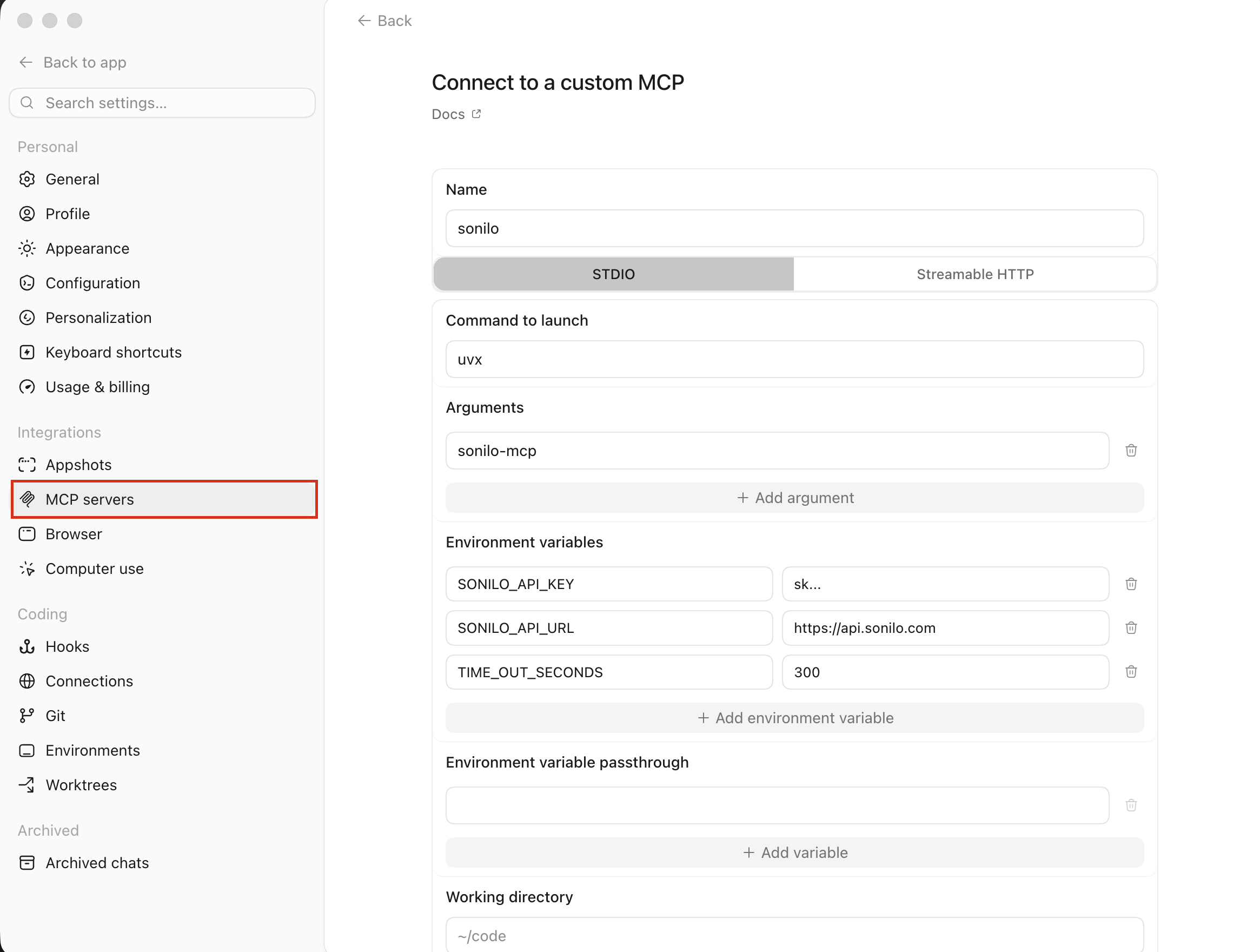
Or you can add the server** to ~/.codex/config.toml:
- Restart Codex (or start a new session), then run
/mcpto confirmsonilois connected and its tools are listed.
Example usage
Once the server is connected, just ask your assistant in natural language. For example:
- "Make background music that matches this video:
~/Desktop/promo.mp4." - "Compose music for
https://example.com/clip.mp4with a calm, ambient style." - "I stitched my AI-generated clips into
~/Desktop/trailer.mp4— add a soundtrack that matches the cut." - "Use Sonilo mcp to generate 30 seconds of upbeat lo-fi hip-hop for a study playlist and save it to my Desktop."
- "Use Sonilo to write an epic orchestral cinematic track, about 60 seconds long."
- "What Sonilo services and limits does my account have?"
- "Show my Sonilo usage for the last 7 days."
- "Play the track you just generated."
The assistant will call the matching tool (text_to_music, video_to_music, text_to_sfx, video_to_sfx, audio_ducking, get_sfx_task, get_account_services, get_usage, or play_audio) and save generated audio to your configured output directory.
Configuration
Authentication
The server takes its key from SONILO_API_KEY if that is set, and otherwise
from the credential written by sonilo login
(~/.config/sonilo/credentials.json, or $XDG_CONFIG_HOME/sonilo/). The
environment variable wins on purpose, so any config that already sets it keeps
resolving to the same account after an upgrade.
The credential is looked up by the server's own SONILO_API_URL, so a staging
server never picks up a production sign-in. This server only ever reads the
file: run sonilo login again to renew it (keys from a sign-in expire after 90
days) and sonilo logout to revoke it.
Environment Variables
| Variable | Default | Description |
|---|---|---|
SONILO_API_KEY | (from sonilo login) | Bearer token. Required only if you have not signed in with the CLI. |
SONILO_API_URL | https://api.sonilo.com | Public API base URL. |
SONILO_MCP_BASE_PATH | ~/Desktop | Default output directory and base for relative input paths. Also the confinement boundary (see below). |
SONILO_MCP_ALLOW_ANY_PATH | false | Set to true to let tools read/write files outside SONILO_MCP_BASE_PATH. |
TIME_OUT_SECONDS | 600 | Generation timeout, in seconds. Aligned with the backend's read timeout. |
File access & confinement
By default, the file tools (video_to_music input, play_audio, and any
output_directory) are confined to SONILO_MCP_BASE_PATH. Paths that
resolve outside it (after symlink resolution) are rejected. This limits the
blast radius if a client is tricked into reading or exfiltrating arbitrary
files. To opt out — e.g. to read a video from elsewhere on disk — set
SONILO_MCP_ALLOW_ANY_PATH=true.
Related MCP Servers
Adoption & maintenance
Factual signals from GitHub, npm, and our automated checks — not a rating.
GitHub stars
54
Stargazers on the source repository.
Last commit
5d ago
Most recent push to the default branch.
Reviews
No reviews yet — be the first to share how this listing worked for you.
Frequently Asked Questions about Sonilo Music & Sound Effects
AllMCPs Directory Badge
Showcase your server listing on GitHub or your project documentation. Embed this dynamic SVG badge to highlight official listing status and live engagement.
Badge Style:
Live Dynamic SVG Preview
Markdown (GitHub README)
[](https://allmcps.com/mcp/sonilo-music-sound-effects)HTML Embed
<a href="https://allmcps.com/mcp/sonilo-music-sound-effects"><img src="https://allmcps.com/api/badge/sonilo-music-sound-effects?style=directory" alt="Sonilo Music & Sound Effects on AllMCPs" /></a>Technical Specs & Signals
CategoryDeveloper Tools
43Quality signal: Fair · 43/100How this signal is calculated ▾
Server availabilityNot measured
Not scored for repo-hosted servers — we can't reach the running server, only its GitHub page. Hosted MCP endpoints are health-checked live.
Verified ownership10/20
Documentation & tools15/30
Adoption & activity7/15
Community engagement0/10
A guidance signal from public completeness & health data — not a user rating. New listings start lower and rise as they add docs, get verified, and grow adoption. Signals we can't observe for a listing are skipped, not counted against it.
Own this project?
This directory is pre-filled from public sources. Claim via GitHub README, site badge, or DNS TXT to unlock edit access and the Official badge and attach your website — proof is checked automatically, then reviewed by our team.
Free dofollow backlink: add your website and place the AllMCPs badge on it — no claim needed. We detect it automatically and keep it verified as long as the badge stays live.
Claim & get free dofollowShare & Embed
Add our SVG badge (dark/light directory styles) or embeddable widget to your site.